

Update – Serviio version 2.0 is a new major version, so existing Serviio 1.x licences will not unlock the Pro features without a fresh licence purchase. If you wish to downgrade back to version 1.10.1 you may manually install the older package (merged architectures, or evansport) but your media library will need to be rebuilt.
Running the Serviio DLNA server on a NAS is a very efficient solution. It allows all your media to be constantly available to all your devices, all without the need for a dedicated media PC. Most TV and Bluray players are already capable media renderers – so indexing the library, retrieving metadata, and streaming the content are where Serviio fits in. Device support is continually improved by a community of contributors, and this crowd-sourced aspect was what initially drew me to the project, leading me to create the Sony Bluray device profile back in 2010. Serviio can also connect to online sources of content such as catch-up TV portals and allow fuss free content playback without advertising, even on devices which lack native support. These online plugins are also community maintained.
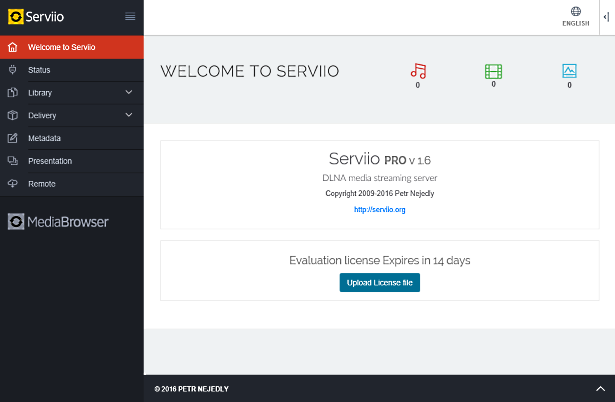
This new version of the Synology package updates Serviio to version 2.0 which fixes some issues and introduces multiple user support (release notes). Version 1.10 improved MediaBrowser, and also 4K media support. Version 1.9 replaced the Flash Player dependency in MediaBrowser with an HTML5 player. Serviio 1.7 brought audio track selection preferences, and automatic subtitle downloading. The most significant enhancement from version 1.6 onwards is the new web management console which removes the need to install the separate Serviio Console application on a computer. The web console uses a modern adaptive design which works well on mobile devices, and it is now integrated with DSM so you will see its icon in the application menu when the package is running:

The package supports hardware transcoding on the DS214play and DS415play with Intel Evansport media processor. This support required substantial personal effort and was made possible by the very kind donation of a new DS214play unit from MrK/Boretom a fellow package maintainer for ASUStor devices.
Limitations
If you use a TV, Bluray or media player bought in the last few years it is likely to have very good format support. In this case even a low specification NAS will be adequate for streaming most video content. There are some limitations however, in particular with video transcoding.
Serviio’s MediaBrowser is a Pro version only feature, and is designed to allow direct playback of media on tablet devices without the need for dedicated apps. Please note that Apple iOS devices require video in H.264 and audio in stereo AAC format when streaming. With the exception of the “play” models already mentioned, most Synology NAS models lack the CPU power to transcode video into H.264 in realtime. Even if the source video is already H.264, ARMv5 family CPUs (which lack an FPU) in the older models lack the power even to transcode AAC audio in realtime without libfdk_aac. Unfortunately I am unable to distribute an FFmpeg binary compiled against this library under the terms of its software license.
Ever since Serviio version 1.2 renderers that do not natively support subtitles via DLNA can have them burned into the video during transcoding, but as already explained a NAS usually lacks the CPU power to do this (more info on subs here). If you absolutely need hard subs for a particular film, you could start playback on your device then stop it and Serviio will continue transcoding. Then you will be able to try again in a few hours since it will play from the transcode cache folder. Newer TVs tend to support inline SRT subs, but for those with older models I can recommend the PlayStation 4 Media Player as a competent DLNA renderer with inline subs support.
I was able to compile FFmpeg for all eight supported architectures (ARMv5, ARMv7, ARMv7 with NEON, ARMv8, Intel i686, Intel x64, Intel Evansport media processor, and PowerPC e500v2) with the additional libraries Serviio requires while using the libs included within DSM as far as possible. I have published my compilation methods to make the process easier for others in future since parts of it were difficult to figure out. Only the Intel CPU or higher end ARM CPUs are likely to be of any practical use transcoding to H.264, since the other CPU types lack vector units (no AltiVec in QorIQ/PowerQUICC, and no NEON in Armada 370/XP).
Synology Package Installation
- In Synology DSM’s Package Center, click Settings and add my package repository:
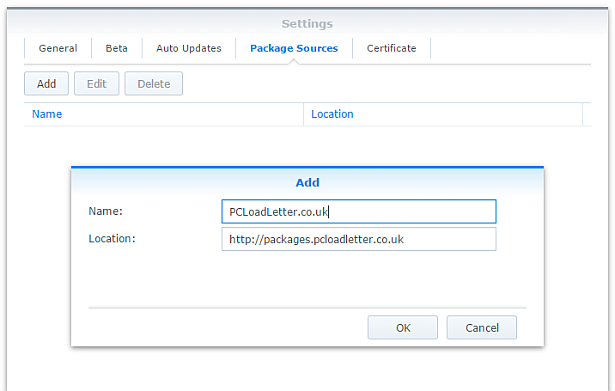
- The repository will push its certificate automatically to the NAS, which is used to validate package integrity. Set the Trust Level to Synology Inc. and trusted publishers:

- Serviio now requires Java 8 for OS-native filesystem watching, so you will need to install my Java SE Embedded package first if you have not already done so. Read the instructions on that page carefully too.
- Now browse the Community section in Package Center to install Serviio:

Community packages are not listed in the All category for some reason. The repository only displays packages which are compatible with your specific model of NAS. If you don’t see Serviio in the list, then either your NAS model or your DSM version are not supported at this time. DSM 6.0 is the minimum supported version for this package. - When Serviio is started for the first time, a plugins folder will be created in the public shared folder (usually /volume1/public/serviio/plugins/). Download any Serviio online content plugins that you require and place the .groovy files in that location.
- If you need subtitle support for glyphs not present in the default DejaVu fonts, add additional fonts to the following folder inside your NAS’s public shared folder (usually /volume1/public/serviio/fonts/).
Notes
- You should reserve an IP address for your NAS (most home broadband routers will let you do this in the DHCP options), or use a static IP address. This will prevent Serviio from appearing multiple times in the menus of your renderer devices as its IP changes.
- In the console disable ‘Generate thumbnails for local videos’ in the Metadata tab. Failure to do this can make adding videos to your library very slow on older NAS systems. With this disabled Serviio will still fetch thumbnail images automatically from the online databases.
- Don’t alter the transcoded files location on the Transcoding tab, it’s already set to a sensible location for Synology systems. This particular folder is deleted each time your NAS restarts, and Serviio cleans up its temp files automatically in any case.
- When adding folders to the media library use the Browse button. This will show the root of the entire NAS Linux filesystem, so you will find your DSM shared folders inside /volume1.
- If you’re upgrading from a previous Serviio version you should check for updates of your online content plugins.
- MediaBrowser (Pro only feature) can be opened using the link in the side bar of the web console (http://IPofYourNAS:23424/mediabrowser). If you want to use the MediaBrowser from a remote location you would need to either port forward 23424 on your router, or use SSH tunnelling. You can also manage Serviio remotely by SSH tunnelling port 23423 which the console uses. Both of these service definitions are added to the DSM Firewall.
- Advanced users who wish to edit device profiles or enable debug logging can find the Serviio files in /var/packages/Serviio/target. You will need to use an SSH session to access this folder – it cannot be navigated to using DSM’s File Station. You will need to restart the Serviio package for profile changes to take effect.
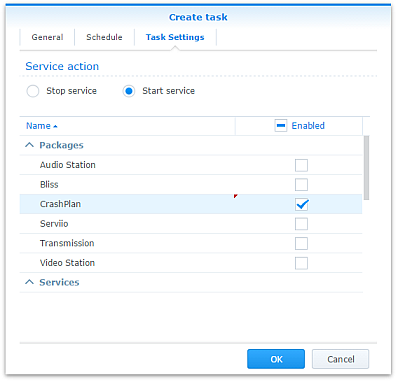
- Some users may wish to restrict running Serviio to specific times of day in order to free up RAM for a scheduled backup window for instance. This can be achieved by creating tasks to start and stop Serviio using the Task Scheduler in DSM Control Panel:
- The package uses an FFmpeg wrapper script to modify the usual transcoding behaviour of Serviio to use the Intel Evansport hardware decoding and encoding available in the DS214play and DS415play models. I have left the FFmpeg wrapper scripts in the package even when not in use (in the Serviio/bin folder), because they are still useful for people trying to test a particular workaround or encoder setting. The wrapper was a tricky script to get working due to variable expansion precedence issues and quote handling. If you need it, just change the ffmpeg.location system property in /var/packages/Serviio/target/bin/serviio.sh to point to your modified wrapper script.
- If additional fonts are not working as expected, some troubleshooting is available. You can re-create the fontconfig cache by connecting to the NAS via an SSH session as admin, and then running:
sudo -i

(enter admin password to become root)

rm -rf ~/.fontconfig.cache

FC_DEBUG=128 /var/packages/Serviio/target/bin/fc-cache --verbose
Hardware transcoding support
- DS214play and DS415play with Intel Evansport SoC are the only models supported for hardware transcoding. Serviio uses the multimedia tool FFmpeg for manipulating media files, and I am only able to build a hardware-assisted FFmpeg for DS214play and DS215play. Subsequent to those products, Synology has marketed a number of other systems with hardware transcoding features but these are not supported by Serviio.
The DS216play with STiH412 Monaco SoC uses a specialised build of Gstreamer for the Synology transcoding solution rather than FFmpeg, so its hardware features cannot be used by Serviio.
It seems likely that Synology is also using Gstreamer for the Intel Braswell or newer generation CPUs with QuikSync, since DSM ships with an older FFmpeg (2.7.1) than the version which introduced QuikSync support (2.8.0). To implement FFmpeg QuikSync hardware transcoding support requires Linux kernel patches for libmfx support which is not currently included in DSM 6.x, so Serviio support for Intel QuikSync on Synology is unlikely unless Synology in future switches to using FFmpeg for its own hardware transcoding solution.
The DS218play with Realtek RTD1296 SoC uses Gstreamer with OpenMAX drivers for the Synology transcoding solution. Although I was able to compile the ARMv8 build of FFmpeg with libomx support, unfortunately the Belaggio OpenMAX IL will not register these Realtek drivers which are distributed in the VideoStation package, therefore the hardware transcoding features of this model cannot be used by Serviio. - For the supported systems FFmpeg will use hardware decoding wherever possible.
- Although multiple hardware assisted decodes can take place simultaneously, only a single hardware encode is available. The package intelligently avoids race conditions for this.
- Any FFmpeg commandline to encode using libx264 will automatically be sent to the hardware encoder when available.
- profiles.xml has been modified so that the preferred transcode format for most devices for non-natively supported videos is H.264.
- In order to add hardware H.264 encoding to a device profile, specify h264 as the desired codec and the FFmpeg wrapper script will make the necessary substitution automatically.
- When the hardware encoder is used, the low quality settings in Serviio’s default libx264 options to favour encoding speed are ignored. The hardware encoder performance is not altered by quality settings.
- If a media stream is being both hardware decoded and hardware encoded, it will use pipelined mode. Based on responses from Synology support during development this means that both jobs occur on the media processor without exposing the intermediate bitstream to FFmpeg. Consequently it is not possible to burn subtitles in pipelined mode. As a result my FFmpeg wrapper script will run the decode part of the job in software in order to do this. The unfortunate result is that the encoder cannot quite achieve real time transcoding during subtitle compositing. For full 1080p HD material it achieves around 20fps, whereas most movies are 24fps. This means that in order to watch a film with hard subs you would need to start it off, pause or stop the renderer and return a bit later to view. An alternative would be to mux the content into an MKV container with the desired subtitles before adding it to the Serviio library, assuming that your device supports SRTs in MKV.
- The hardware encoded H.264 streams are not 100% compliant with the specification and fail validation using the tool DGAVCDec. For most tested renderers this does not affect playback (Bravia, Sony Bluray, iOS). FlowPlayer which had been the embedded player in MediaBrowser did not play these files satisfactorily and dropped many frames resulting in jerky playback. However since Serviio version 1.9 MediaBrowser uses an HTML5 player which is not affected by this issue.
Package scripts
For information, here are the package scripts so you can see what it’s going to do. You can get more information about how packages work by reading the Synology 3rd Party Developer Guide.
installer.sh
#!/bin/sh

#--------SERVIIO installer script
#--------package maintained at pcloadletter.co.uk


DOWNLOAD_PATH="http://download.serviio.org/releases"
DOWNLOAD_FILE="serviio-2.0-linux.tar.gz"
EXTRACTED_FOLDER="serviio-2.0"
DOWNLOAD_URL="${DOWNLOAD_PATH}/${DOWNLOAD_FILE}"
SYNO_CPU_ARCH="`uname -m`"
[ "${SYNO_CPU_ARCH}" == "x86_64" ] && SYNO_CPU_ARCH="x64"
[ "${SYNOPKG_DSM_ARCH}" == "comcerto2k" ] && SYNO_CPU_ARCH="armneon"
[ "${SYNOPKG_DSM_ARCH}" == "armada375" ] && SYNO_CPU_ARCH="armneon"
[ "${SYNOPKG_DSM_ARCH}" == "armada38x" ] && SYNO_CPU_ARCH="armneon"
[ "${SYNOPKG_DSM_ARCH}" == "alpine" ] && SYNO_CPU_ARCH="armneon"
[ "${SYNOPKG_DSM_ARCH}" == "alpine4k" ] && SYNO_CPU_ARCH="armneon"
[ "${SYNOPKG_DSM_ARCH}" == "monaco" ] && SYNO_CPU_ARCH="armneon"
[ "${WIZARD_ENC_HW}" == "true" ] && SYNO_CPU_ARCH="i686evansport"
NATIVE_BINS_URL="http://packages.pcloadletter.co.uk/downloads/serviio-native-${SYNO_CPU_ARCH}.tar.xz"
NATIVE_BINS_FILE="`echo ${NATIVE_BINS_URL} | sed -r "s%^.*/(.*)%\1%"`"
FONTS_URL="http://sourceforge.net/projects/dejavu/files/dejavu/2.37/dejavu-fonts-ttf-2.37.tar.bz2"
FONTS_FILE="`echo ${FONTS_URL} | sed -r "s%^.*/(.*)%\1%"`"
#'ua' prefix means wget user-agent will be customized
INSTALL_FILES="ua${DOWNLOAD_URL} ${NATIVE_BINS_URL} ${FONTS_URL}"
PID_FILE="${SYNOPKG_PKGDEST}/serviio.pid"
COMMENT="# Synology Serviio Package"
TEMP_FOLDER="`find / -maxdepth 2 -path '/volume?/@tmp' | head -n 1`"
PUBLIC_FOLDER="`synoshare --get public | sed -r "/Path/!d;s/^.*\[(.*)\].*$/\1/"`"
PLUGINS_PATH="${PUBLIC_FOLDER}/serviio"
source /etc/profile


pre_checks ()
{
  #These checks are called from preinst and from preupgrade functions to prevent failures resulting in a partially upgraded package
  if [ -z ${JAVA_HOME} ]; then
    echo "Java is not installed or not properly configured. JAVA_HOME is not defined. " >> $SYNOPKG_TEMP_LOGFILE
    echo "Download and install the Java Synology package from http://wp.me/pVshC-z5" >> $SYNOPKG_TEMP_LOGFILE
    exit 1
  fi

  if [ ! -f ${JAVA_HOME}/bin/java ]; then
    echo "Java is not installed or not properly configured. The Java binary could not be located. " >> $SYNOPKG_TEMP_LOGFILE
    echo "Download and install the Java Synology package from http://wp.me/pVshC-z5" >> $SYNOPKG_TEMP_LOGFILE
    exit 1
  fi

  JAVA_VER=`java -version 2>&1 | sed -r "/^.* version/!d;s/^.* version \"[0-9]\.([0-9]).*$/\1/"`
  if [ ${JAVA_VER} -lt 8 ]; then
    echo "This version of Serviio requires Java 8 or newer. Please update your Java package. " >> $SYNOPKG_TEMP_LOGFILE
    exit 1
  fi

  if [ -z ${PUBLIC_FOLDER} ]; then
    echo "A shared folder called 'public' could not be found - note this name is case-sensitive. " >> $SYNOPKG_TEMP_LOGFILE
    echo "Please create this using the Shared Folder DSM Control Panel and try again." >> $SYNOPKG_TEMP_LOGFILE
    exit 1
  fi
}


preinst ()
{
  pre_checks
  cd ${TEMP_FOLDER}
  for WGET_URL in ${INSTALL_FILES}
  do
    WGET_FILENAME="`echo ${WGET_URL} | sed -r "s%^.*/(.*)%\1%"`"
    [ -f ${TEMP_FOLDER}/${WGET_FILENAME} ] && rm ${TEMP_FOLDER}/${WGET_FILENAME}
    #this will allow serviio.org to track the number of downloads from Synology users
    WGET_URL=`echo ${WGET_URL} | sed -e "s/^ua/--user-agent=Synology --referer=http:\/\/pcloadletter.co.uk\/2012\/01\/25\/serviio-syno-package /"`
    wget ${WGET_URL}
    if [ $? != 0 ]; then
      if [ -d ${PUBLIC_FOLDER} ] && [ -f ${PUBLIC_FOLDER}/${WGET_FILENAME} ]; then
        cp ${PUBLIC_FOLDER}/${WGET_FILENAME} ${TEMP_FOLDER}
      else
        echo "There was a problem downloading ${WGET_FILENAME} from the official download link, " >> $SYNOPKG_TEMP_LOGFILE
        echo "which was \"${WGET_URL}\" " >> $SYNOPKG_TEMP_LOGFILE
        echo "Alternatively, you may download this file manually and place it in the 'public' shared folder. " >> $SYNOPKG_TEMP_LOGFILE
        exit 1
      fi
    fi
  done

  exit 0
}


postinst ()
{
  #extract the downloaded Serviio archive
  cd ${TEMP_FOLDER}
  tar xzf ${TEMP_FOLDER}/${DOWNLOAD_FILE}
  rm ${TEMP_FOLDER}/${DOWNLOAD_FILE}
  cp -R ${TEMP_FOLDER}/${EXTRACTED_FOLDER}/* ${SYNOPKG_PKGDEST}
  if [ ! -z "${EXTRACTED_FOLDER}" ]; then
    rm -r ${TEMP_FOLDER}/${EXTRACTED_FOLDER}
  fi
  if [ ! -d "${PLUGINS_PATH}/plugins" ]; then
    mkdir -p ${PLUGINS_PATH}/plugins
  fi
  if [ ! -d "${PLUGINS_PATH}/fonts" ]; then
    mkdir -p ${PLUGINS_PATH}/fonts
  fi

  #extract CPU-specific additional binaries
  cd ${SYNOPKG_PKGDEST}/lib
  tar xJf ${TEMP_FOLDER}/${NATIVE_BINS_FILE} && rm ${TEMP_FOLDER}/${NATIVE_BINS_FILE}
  mv ${SYNOPKG_PKGDEST}/lib/ffmpeg ${SYNOPKG_PKGDEST}/bin
  mv ${SYNOPKG_PKGDEST}/lib/fc-cache ${SYNOPKG_PKGDEST}/bin
  [ -e ${SYNOPKG_PKGDEST}/lib/omxregister-bellagio ] mv ${SYNOPKG_PKGDEST}/lib/omxregister-bellagio ${SYNOPKG_PKGDEST}/bin

  #remove legacy package font versions
  [ -d ${PLUGINS_PATH}/fonts/dejavu-fonts-ttf-2.33/ ] && rm -rf ${PLUGINS_PATH}/fonts/dejavu-fonts-ttf-2.33/
  [ -d ${PLUGINS_PATH}/fonts/dejavu-fonts-ttf-2.34/ ] && rm -rf ${PLUGINS_PATH}/fonts/dejavu-fonts-ttf-2.34/
  [ -d ${PLUGINS_PATH}/fonts/dejavu-fonts-ttf-2.35/ ] && rm -rf ${PLUGINS_PATH}/fonts/dejavu-fonts-ttf-2.35/

  #extract open source font package for subtitle support during transcoding
  cd ${PLUGINS_PATH}/fonts
  tar xvjf ${TEMP_FOLDER}/${FONTS_FILE} && rm ${TEMP_FOLDER}/${FONTS_FILE}
  sed -i "s|WINDOWSFONTDIR|${PLUGINS_PATH}/fonts|" ${SYNOPKG_PKGDEST}/config/fonts/fonts.conf
  sed -i "s|WINDOWSTEMPDIR_FONTCONFIG_CACHE|~/.fontconfig.cache|" ${SYNOPKG_PKGDEST}/config/fonts/fonts.conf

  #wrapper script can be useful for testing different encoder options
  if [ -e "${SYNOPKG_PKGDEST}/bin/ffmpeg-wrapper-${SYNO_CPU_ARCH}.sh" ]; then
    #we need to use the wrapper to make FFmpeg use libshine on ARM systems and to use hardware decode/encode on Intel Evansport systems
    FFMPEG_PATH="\$SERVIIO_HOME/bin/ffmpeg-wrapper-${SYNO_CPU_ARCH}.sh"
  else
    FFMPEG_PATH="\$SERVIIO_HOME/bin/ffmpeg"
  fi

  #modifications to device profiles (evansport hardware transcoding)
  if [ -e "${SYNOPKG_PKGDEST}/config/profiles-${SYNO_CPU_ARCH}.xml" ]; then
    mv "${SYNOPKG_PKGDEST}/config/profiles.xml" "${SYNOPKG_PKGDEST}/config/profiles-orig.xml"
    mv "${SYNOPKG_PKGDEST}/config/profiles-${SYNO_CPU_ARCH}.xml" "${SYNOPKG_PKGDEST}/config/profiles.xml"
  fi

  #modifications to application profiles (evansport hardware transcoding)
  #removed owing to frame drops in FlowPlayer because encoder does not produce 100% valid streams, evansport has sufficient power for flv encoding
  #if [ -e "${SYNOPKG_PKGDEST}/config/application-profiles-${SYNO_CPU_ARCH}.xml" ]; then
  #  mv "${SYNOPKG_PKGDEST}/config/application-profiles-${SYNO_CPU_ARCH}.xml" "${SYNOPKG_PKGDEST}/config/application-profiles.xml"
  #fi

  #make changes to Serviio launcher script so that pid file is created for Java process
  sed -r -i "s%Execute the JVM in the foreground%Execute the JVM in the background%" ${SYNOPKG_PKGDEST}/bin/serviio.sh
  sed -r -i "s%^(exec \"$JAVA.*)$%\1 \&%" ${SYNOPKG_PKGDEST}/bin/serviio.sh
  echo "echo \$! > ${PID_FILE}" >> ${SYNOPKG_PKGDEST}/bin/serviio.sh

  #set some additional Serviio system properties (temp folder, FFmpeg path, plugins folder)
  #http://www.serviio.org/index.php?option=com_content&view=article&id=43
  EXTRA_OPTS="-Dserviio\.defaultTranscodeFolder=${TEMP_FOLDER} -Dffmpeg\.location=${FFMPEG_PATH} -Dplugins\.location=${PLUGINS_PATH}"
  #fix Java prefs checking which was preventing NAS hibernation http://forum.serviio.org/viewtopic.php?f=5&t=6878
  EXTRA_OPTS="${EXTRA_OPTS} -Djava.util.prefs.syncInterval=86400"
  if [ "${SYNO_CPU_ARCH}" == "armv5tel" ]; then
    #use integer math (not floating point) Dolby AC-3 encoder for better performance on ARM CPUs
    #http://ffmpeg.org/ffmpeg.html#ac3-and-ac3_005ffixed
    EXTRA_OPTS="${EXTRA_OPTS} -Dserviio\.fixedPointEncoders"
  fi
  sed -r -i "s% -Dffmpeg\.location=ffmpeg%%; s%^(JAVA_OPTS=.*)\"$%\1 ${EXTRA_OPTS}\"%" ${SYNOPKG_PKGDEST}/bin/serviio.sh

  #create log file to allow package start errors to be captured
  [ -e ${SYNOPKG_PKGDEST}/log ] || mkdir ${SYNOPKG_PKGDEST}/log
  [ -e ${SYNOPKG_PKGDEST}/log/serviio.log ] || touch ${SYNOPKG_PKGDEST}/log/serviio.log

  #add firewall config
  /usr/syno/bin/servicetool --install-configure-file --package /var/packages/${SYNOPKG_PKGNAME}/conf/${SYNOPKG_PKGNAME}.sc > /dev/null

  exit 0
}


preuninst ()
{
  `dirname $0`/stop-start-status stop

  exit 0
}


postuninst ()
{
  #remove fontconfig configuration
  sed -i "/${COMMENT}/d" /root/.profile

  #remove firewall config
  if [ "${SYNOPKG_PKG_STATUS}" == "UNINSTALL" ]; then
    /usr/syno/bin/servicetool --remove-configure-file --package ${SYNOPKG_PKGNAME}.sc > /dev/null
  fi

  #remove legacy daemon user and homedir
  [ -e /var/services/homes/serviio ] && synouser --del serviio
  [ -e /var/services/homes/serviio ] && rm -r /var/services/homes/serviio

  exit 0
}


preupgrade ()
{
  `dirname $0`/stop-start-status stop
  pre_checks
  #if a media database exists we need to preserve it
  if [ -d ${SYNOPKG_PKGDEST}/library/db ]; then
    mkdir ${SYNOPKG_PKGDEST}/../${SYNOPKG_PKGNAME}_db_migration
    mv ${SYNOPKG_PKGDEST}/library/db ${SYNOPKG_PKGDEST}/../${SYNOPKG_PKGNAME}_db_migration
  fi

  exit 0
}


postupgrade ()
{
  #use the backed up media database from the previous version
  if [ -d ${SYNOPKG_PKGDEST}/../${SYNOPKG_PKGNAME}_db_migration/db ]; then
    mv ${SYNOPKG_PKGDEST}/../${SYNOPKG_PKGNAME}_db_migration/db ${SYNOPKG_PKGDEST}/library
    rmdir ${SYNOPKG_PKGDEST}/../${SYNOPKG_PKGNAME}_db_migration
  fi
  chown -R root:root ${SYNOPKG_PKGDEST}

  exit 0
}
start-stop-status.sh
#!/bin/sh

#--------SERVIIO start-stop-status script
#--------package maintained at pcloadletter.co.uk

PKG_FOLDER="/var/packages/Serviio"
ENGINE_CFG="${PKG_FOLDER}/target/bin/serviio.sh"
ENGINE_SCRIPT="${PKG_FOLDER}/target/bin/serviio.sh"
PID_FILE="${PKG_FOLDER}/target/serviio.pid"
DNAME="Serviio"
DLOG="${PKG_FOLDER}/target/log/serviio.log"
COMMENT="# Synology Serviio Package"
TIMESTAMP="`date "+%F %X,000"`"
source /etc/profile
source /root/.profile


EnvCheck ()
#updates to DSM will reset these changes so check them each startup
{
  #/root/.profile should contain 2 lines added by this package tagged with trailing comments
  COUNT=`grep -c "$COMMENT$" /root/.profile`
  if [ $COUNT != 2 ]; then

    #remove any existing mods
    sed -i "/${COMMENT}/d" /root/.profile

    #add required environment variables
    echo "export FONTCONFIG_FILE=fonts.conf ${COMMENT}" >> /root/.profile
    echo "export FONTCONFIG_PATH=${PKG_FOLDER}/target/config/fonts ${COMMENT}" >> /root/.profile
  fi
}

start_daemon ()
{
  EnvCheck
  source /root/.profile

  #create/refresh fontconfig cache - prevents delay the first time that FFmpeg renders hard subs
  #FC_DEBUG=128 fc-cache --verbose
  ${PKG_FOLDER}/target/bin/fc-cache

  #refresh hostname in Serviio instance name - recently DSM has modified the hosts file and broken localhost name resolution
  sed -i -r "s%<FriendlyName>Serviio \((\{computerName\})\)%<FriendlyName>Serviio \(`hostname`\)%" $PKG_FOLDER/target/config/profiles.xml

  #set appropriate Java max heap size
  RAM=$((`free | grep Mem: | sed -e "s/^ *Mem: *\([0-9]*\).*$/\1/"`/1024))
  if [ $RAM -le 128 ]; then
    JAVA_MAX_HEAP=80
  elif [ $RAM -le 256 ]; then
    JAVA_MAX_HEAP=192
  elif [ $RAM -le 512 ]; then
    JAVA_MAX_HEAP=384
  #Serviio's default max heap is 512MB
  elif [ $RAM -gt 512 ]; then
    JAVA_MAX_HEAP=512
  fi
  sed -i -r "s/(^..JAVA.) -Xmx[0-9]+[mM] (.*$)/\1 -Xmx${JAVA_MAX_HEAP}m \2/" "${ENGINE_CFG}"
  echo "${TIMESTAMP} Starting ${DNAME}" >> ${DLOG}
  ${ENGINE_SCRIPT} > /dev/null 2>> ${DLOG}
  if [ -z ${SYNOPKG_PKGDEST} ]; then
    #script was manually invoked, need this to show status change in Package Center
    [ -e ${PKG_FOLDER}/enabled ] || touch ${PKG_FOLDER}/enabled
  fi
}

stop_daemon ()
{
  echo "${TIMESTAMP} Stopping ${DNAME}" >> ${DLOG}
  kill `cat ${PID_FILE}`
  wait_for_status 1 20 || kill -9 `cat ${PID_FILE}`
  rm -f ${PID_FILE}
  if [ -z ${SYNOPKG_PKGDEST} ]; then
    #script was manually invoked, need this to show status change in Package Center
    [ -e ${PKG_FOLDER}/enabled ] && rm ${PKG_FOLDER}/enabled
  fi
}

daemon_status ()
{
  if [ -f ${PID_FILE} ] && kill -0 `cat ${PID_FILE}` > /dev/null 2>&1; then
    return
  fi
  rm -f ${PID_FILE}
  return 1
}

wait_for_status ()
{
  counter=$2
  while [ ${counter} -gt 0 ]; do
    daemon_status
    [ $? -eq $1 ] && return
    let counter=counter-1
    sleep 1
  done
  return 1
}

case $1 in
  start)
    if daemon_status; then
      echo ${DNAME} is already running with PID `cat ${PID_FILE}`
      exit 0
    else
      echo Starting ${DNAME} ...
      start_daemon
      exit $?
    fi
  ;;

  stop)
    if daemon_status; then
      echo Stopping ${DNAME} ...
      stop_daemon
      exit $?
    else
      echo ${DNAME} is not running
      exit 0
    fi
  ;;

  restart)
    stop_daemon
    start_daemon
    exit $?
  ;;

  status)
    if daemon_status; then
      echo ${DNAME} is running with PID `cat ${PID_FILE}`
      exit 0
    else
      echo ${DNAME} is not running
      exit 1
    fi
  ;;

  log)
    echo "${DLOG}"
    exit 0
  ;;

  *)
    echo "Usage: $0 {start|stop|status|restart}" >&2
    exit 1
  ;;

esac
ffmpeg-wrapper-i686evansport.sh
#!/bin/sh

#FFmpeg wrapper script to enable hardware decoding and encoding on Intel Evansport CPUs
#wrapper originally posted here: http://forum.serviio.org/viewtopic.php?f=7&t=6458

FOLDER="`dirname $0`"
PARAMS=""
COMMANDLINE=$@
FFMPEG_BIN="ffmpeg"
INPUT=0
for PARAM in "$@"; do
  if [ ${INPUT} = 1 ]; then
    #the FFmpeg input filename/URL needs quotes adding back on
    #because it may contain spaces, and the shell has removed them
    PARAMS="${PARAMS} \"${PARAM}\""
    INPUT=0
  elif [ ${INPUT} = 2 ]; then
    #the FFmpeg subtitles filename needs quotes adding back on
    #because it may contain spaces, and the shell has removed them
    PARAM=${PARAM/\[*.*\]subtitles=filename=/subtitles=filename=\"}
    PARAM=${PARAM/:original_size/\":original_size}
    PARAMS="${PARAMS} ${PARAM}"
    INPUT=0
  elif [ "${PARAM}" == "-filter_complex" ]; then
    #next parameter will be subtitles filtergraph including subtitle filename
    #which needs special treatment, so set a flag
    INPUT=2
    PARAMS="${PARAMS} ${PARAM}"
  elif [ "${PARAM}" == "-i" ]; then
    #next parameter will be input filename which needs special treatment, so set a flag
    INPUT=1
    #enable hardware decoding by default, but not when Serviio is either:
    # gathering media metadata,
    # remuxing video,
    # generating thumbnails,
    # or rendering subtitles into the video stream (pipeline mode not supported for subs),
    if [ $# -lt 3 ] || \
       [ "${COMMANDLINE}" != "${COMMANDLINE/ -c:v copy /}" ] || \
       [ "${COMMANDLINE}" != "${COMMANDLINE/ pipe:/}" ] || \
       [ "${COMMANDLINE}" != "${COMMANDLINE/ -filter_complex \[*:*\]subtitles=/}" ]; then
      PARAMS="${PARAMS} -i"
    # or gathering online stream metadata
    elif [ $# -eq 4 ] && [ "${COMMANDLINE}" != "${COMMANDLINE/-analyzeduration /}" ]; then
      PARAMS="${PARAMS} -i"
    else
      PARAMS="${PARAMS} -prefer_smd -i"
    fi
  else
    PARAMS="${PARAMS} ${PARAM}"
  fi
done

#older Evansport FFmpeg version 2.7.1 needs "-strict -2" to use experimental aac encoder
if [ "${PARAMS}" != "${PARAMS/ -c:a:* aac /}" ]; then
  PARAMS="${PARAMS/ aac / aac -strict -2 }"
fi

#Is this FFmpeg commandline a candidate for the hardware encoder?
HWENC=0
if [ "${PARAMS}" != "${PARAMS/ -c:v libx264 /}" ]; then
  #check whether H.264 encoder is already busy with another Serviio/VideoStation session
  PID_HWENC=`cat /tmp/VideoStation/enabled 2> /dev/null | sed -r "s/.*\"PID\":([0-9]+),\"hardware_transcode.*$/\1/;s/\[//;s/\]//"`
  #is there an indicated PID?
  if [ -n "${PID_HWENC}" ]; then
    #there is an indicated PID - is it running?
    if ! kill -0 ${PID_HWENC}; then
      #the indicated PID is not in fact running, HW encoder is therefore available
      rm /tmp/VideoStation/enabled
      #make hardware H.264 encoder substitution to replace libx264
      HWENC=1
    fi
  else
    #there is no indicated PID, HW encoder is therefore available
    HWENC=1
  fi
fi

if [ ${HWENC} = 1 ]; then
  #make hardware H.264 encoder substitution to replace libx264
  PARAMS=${PARAMS/ libx264 / h264_smd }

  #by default Serviio's libx264 transcoding is intended for speed over quality, with SMD we can opt for better quality
  PARAMS="`echo ${PARAMS} | sed -r "s/ -crf [0-9]+ / /; s/ -g [0-9]+ / /"`"
  PARAMS=${PARAMS/ -preset:v veryfast / }
  PARAMS=${PARAMS/ -profile:v baseline / -profile:v high }
  PARAMS=${PARAMS/ -level 3 / -level 4.1 }
fi

#invoke FFmpeg
#log commandline, except media probes
#[ $# -gt 2 ] && echo "${FOLDER}/${FFMPEG_BIN} ${PARAMS}" >> ${FOLDER}/../log/ffmpeg-wrapper.log

#need to use eval here otherwise the quotes aren't handled properly
#http://fvue.nl/wiki/Bash:_Why_use_eval_with_variable_expansion%3F
eval ${FOLDER}/${FFMPEG_BIN} ${PARAMS}

#return FFmpeg status
exit $?
Changelog:
- 0037 05/Jun/19 – Updated to Serviio 2.0, clear your web browser cache to fix Serviio Console issues
- 0036 17/Apr/19 – Updated to Serviio 1.10.1, fixed missing Serviio console icon in DSM 6.2 main menu, added support for DS119j
- 0035 14/May/18 – Updated to Serviio 1.9.2
- 0034 01/Mar/18 – Updated to Serviio 1.9.1, added ARMv8 support
- 0033 02/Aug/17 – Updated to Serviio 1.9
- 0032 21/Jan/17 – Fixed Evansport FFmpeg wrapper script to allow transcoding to aac since it’s an older FFmpeg version with slightly different command syntax
- 0031 07/Jan/17 – Updated to Serviio 1.8
Updated FFmpeg to 3.2.2
Updated Intel Evansport hardware transcoding build of FFmpeg from 2.0.2 to 2.7.1 – now detects H.265 codec correctly
Fixed Intel Evansport FFmpeg support for transcoding DTS audio
FFmpeg now uses hard float ABI on systems with Armada 370/XP SoC (DSM 6.0 change)
FFmpeg now uses NEON on systems with Armada 375 SoC (DSM 6.0 change)
Disabled FFmpeg wrapper script to enable libshine for ARMv5 systems now that Serviio handles this automatically
Added Ogg Vorbis audio support to FFmpeg
Updated Deja-Vu fonts to 2.37
DSM 6.0 is now required due to greatly simplify FFmpeg compilation - 0030 21/May/16 – Updated to Serviio 1.6.1
- 0029 28/Jan/16 – Updated to Serviio 1.6, integrated the new built-in web console into DSM, fixed stupid wrapper bug which had broken evansport hardware transcoding on DS214play and DS415play, fixed online content when using evansport build. You must have already upgraded to version 1.5.2-0028 or else Package Center will report a TCP port conflict and will fail to upgrade the package. If you missed the 0028 update, install it manually in Package Center using the .spk file: (DS214play/DS415play), (all other models).
- 0028 08/Jan/16 – Serviio instance uses hostname rather than localhost, more accurate detection of DSM 6.0 on Intel CPUs which need x64 FFmpeg build, added DS216play support, fixed missing libgmp on DS3612xs running DSM 5.0, change to allow easy package upgrade to forthcoming Serviio 1.6
- 0027 12/Nov/15 – Substantial package re-write hence the long delay since the last release
Completely refreshed documentation, please re-read
Updated to Serviio version 1.5.2
Java 8 is now required – this is a Serviio imposed requirement
DSM 5.0 or newer is now required
Updated to FFmpeg 2.7.1 and many libs e.g. x264 at latest versions from late July 2015
Added optional hardware transcoding support for Intel Evansport systems (DS214play, DS415play) built using Synology-modified sources for FFmpeg 2.0.2
FFmpeg is now compiled with https support via GNUTLS library (useful for online streams via plugins)
Switched to using root account which was necessary for Evansport hardware encoding – no more adding account permissions, package upgrades will no longer break this
Added support for Mindspeed Comcerto 2000 CPU (comcerto2k – ARM Cortex-A9 with NEON) in DS414j
Added support for Intel Atom C2538 (avoton) CPU in DS415+
Fontconfig fc-cache utility now included to allow troubleshooting issues with adding new fonts for additional subtitle language support
Fontconfig variables checked on each package startup so DSM upgrades no longer break hard subs support
Updated DejaVu subtitle font to version 2.35
DSM Firewall application definitions added
Tested with DSM Task Scheduler to allow package to start/stop at certain times of day, saving RAM when not needed
Daemon init script now uses a proper PID file instead of the unreliable method of using grep on the output of ps
Daemon init script can be run from the command line
Improved accuracy of temp folder and plugins folder detection
Switched to .tar.xz compression for native binaries to reduce web hosting storage footprint
Package is now signed with repository private key
User Agent customization while downloading Serviio binaries from serviio.org to allow download stats gathering - 0026 25/Mar/14 – Updated to Serviio 1.4.1.2
- 0025 18/Mar/14 – Updated to Serviio 1.4.1.1
- 0024 30/Jan/14 – Updated to Serviio 1.4
- 0023 07/Nov/13 – Updated to FFmpeg 2.1 stable release
- 0022 30/Oct/13 – Added support for Intel Atom Evansport and Armada XP CPUs in new DSx14 products
- 0021 18/Oct/13 – Fixed zlib linking issue in QorIQ and Intel builds of FFmpeg
- 0020 05/Sep/13 – Updated to Serviio 1.3.1
- 0019 25/May/13 – Added support for Armada370 SoC used in DS213j (ARMv7 CPU with FPU)
- 0018 29/Mar/13 – Updated to Serviio 1.2.1, recompiled FFmpeg to use the libRTMP source code from serviio.org for consistency
- 0017 01/Mar/13 – Updated to Serviio 1.2
- 0016 23/Jan/13 – Fixes for DSM 4.2
- 015 30/Dec/13 – Updated to Serviio 1.1, fixed garbled ac3 encoding issue on ARM CPUs by compiling FFmpeg natively, rather than cross compiling. Remember to update your computer’s Serviio Console to 1.1 before connecting to manage.
- 014 28/Oct/12 – Added support for Freescale QorIQ PowerPC CPUs used in some Synology x13 series products, switched to shared library compile of FFmpeg with some minor changes, ARM build now uses libshine encoder which allows realtime audio transcoding to MP3, edited FlowPlayer config to play AAC audio natively to make MediaBrowser more usable with online feed items.
- 013 Fixed a bug in the plugins folder creation, fixed deletion of home directories after user deletion (DSM 4.1)
- 012 Reduced Java prefs checking interval to once every 24 hours to allow the NAS to hibernate (was 30 seconds by default – remember to increase the time between library refreshes if you want hibernation)
- 011 Updated Serviio to 1.0.1, slightly altered how the plugins folder path is determined
- 010 Updated to Serviio 1.0, removed WebUI, FFmpeg wrapper no longer needed on ARM, plugins folder moved to /volume1/public/serviio/plugins to make adding/updating plugins easier
- 009 Installation fails unless User Home service is enabled, unified the installer scripts, merged ARM and Intel packages into one which downloads the FFmpeg binary separately, used integer maths Dolby AC-3 encoder on ARM systems (no floating point)
- 008 Fixed DST timezone support, installer no longer assumes /volume1 is primary storage volume
- 007 Updated Serviio to 0.6.2, kairoh’s WebUI to 0.6.2c, changed package to download Serviio from the official website during installation, temp path is set by default to /volume1/@tmp on first run, and finally some CSS improvements
- 006 Updated to Serviio 0.6.1, switched to kairoh’s Java WebUI, added timezone support, removed DSM icon when Serviio is not running, adjusted Java max heap size for systems with low RAM, specified FFmpeg path directly rather than creating a symlink in /bin so as not to interfere with other packages which may use different versions of FFmpeg
- 005 Added Web Station dependency, EULA dialog, and links for Web UI and user forum in More Info
- 004 Test for package repo to allow update notification
- 0.6.0.1 v3 Hopefully fixed an issue with the Serviio DSM icon in DSM 3.2 on NAS units without Optware installed
- 0.6.0.1 v2 Inclusion of a modified version of the PHP Web UI
- 0.6.0.1 v1 New minor Serviio release 0.6.0.1 with some updated international translations – will upgrade 0.6 preserving the media library
- 0.6 v1 23/Sep/11 – First public release – Serviio 0.6
- 0.6b4 v2 Fixed permissions on transcode temporary folder following upgrade, avoiding the need for a reboot
- 0.6b4 v1 Updated to Serviio 0.6 beta 4, added upgrade scripts to allow media database migration (install future packages over the top of this one – database is preserved)
- 0.6b3c v2 Fixed HOME env var for serviio user (to fix librtmp issues with BBC iPlayer) and removed the need to edit the passwd file to change the shell (safer)
- 0.6b3c v1 Initial spk test release – Serviio 0.6 beta 3
 PC LOAD LETTER
Hi,
I have a ds1511+ system. I successfully installed Java 6 SE Embedded but then when I try to install Serviio in Package Center I get a dialog saying ‘Failed to download’. At the same time in /var/log/messages I get ‘PkgSynoMan.cgi: PkgSynoMan.cpp:374 Failed to download package, httpResponseCode=404’.
From ‘404’ I am concluding that there is no package there.
Regards
Cheers for that. I stupidly put them in the wrong folder in my Dropbox account :)
Should be fine now…
I’m getting a 503:
PkgSynoMan.cpp:503 Failed to verify the package /volume1/@tmp/@synopackage/Serviio/@SYNOPKG_DOWNLOAD_Serviio by MD5 8139d3c64e8702a594919c1cbd3612ab
It finishes downloading
afterwards it says
“Failed to download”
and
“Serviio: Broken”
so I downloaded and installed it manually
but after I chose the path and press apply it says
“invalid file format.”
and I can’t untar the package (“file is broken”)
maybe the source file in your Dropbox is broken?
(I am still using a DS211+)
Strange. I just re-upped it and now it’s ok. I’ll re-upload the Intel one too. Could have got corrupted as I copied it to Dropbox. Then again, the download seems to be really slow so maybe that was the issue.
Hi,
I have a ds711+ system. I successfully updated Java 6 SE Embedded and Serviio 0,6,1 from the Package Center after this I have restarted my nas and all work just fine. Thank for this update.
Updated okay but when I try to access the Serviio admin page it never comes up, just remains a blank window in DSM.
System details please…
DS411+II
Latest DSM 3.2
Your Java 6 package, updated to latest version right before updating Serviio
Did you allow it a few minutes to start up? Anything in the Serviio log?
Figured it out. Serviio console now uses port 8123… had to forward it on my router to get it working. Might want to add something about that in your instructions. Thanks!
True, though not many people will be administering it from a remote location. I did add a link in the More bit in Package Center so you can take down the details and use it directly from a smart phone or iPad or whatever without using DSM. Glad you’re up and running. I have amended the notes section.
The issue will probably happen for anyone using a dynamic DNS service… the shortcuts created in the DSM menu refer to the DDNS address, and so go out to the internet first and need to be port forwarded at the router. Before it was using Web Station on port 80, which is always forwarded automatically.
Those links are relative paths, so they will display whatever hostname you put into your browser to access DSM, but yes you would need to port forward at your router.
Hi,
Will this package work on DSM 3.1-1636 or should I still use the instructions at https://pcloadletter.co.uk/2011/09/23/serviio-synology-package/ for DSM 3.1?
Thanks
It will work, but you’ll need to manually install the package. The repo support in 3.2 makes things so much easier so I’d recommend you upgrade. Here are the package files:
http://dl.dropbox.com/u/1188556/blog/serviio0.6.2-88f6281-007.spk
http://dl.dropbox.com/u/1188556/blog/serviio0.6.2-x86-007.spk
No 3.2 for me yet, I’m still on a a 207+ :(
Maybe it’s time for a 212+ :)
Thanks for the files and the support!
Philip
Hi ,i have an error , that when i try to execute serviio ,always i get a page that can connect to serviio server, with this error
Error 118 (net::ERR_CONNECTION_TIMED_OUT): Se ha agotado el tiempo de la operación.
I tryed to uninstall java, serviio and install again ,but the same error.
I have a 110j nas
How i can fix it?
Thanks a lot
What does it show in the Log tab when you open Serviio in Package Center?
Hi ,how i can access to the log file ,i tryed with winscp with user root and admin pass, to get the file in @appstore/log ,but i get an error 127.
Also y tryed to do ctrl+c but i it’s impossible
thanks again
Also i’m in DSM Beta 4
There’s a tab with the log if you click More on Serviio in Package Center. If that tab is blank then there is no log. Perhaps Java is not installed correctly. Can you connect via SSH and run java -version?
Hi, here the log in tab button
[log snippet, showing typical startup]
Thanks for all your help ,strange that when i connect my ps3, i can see the serviio icon but when i try to enter i can see any files.
I tryed to uninstall and install again ,but always the same
Error 118 (net::ERR_CONNECTION_TIMED_OUT): Se ha agotado el tiempo de la operación.
Thanks…
Well the log you posted looks totally normal so I’m not sure what the issue is. Could be your network. Perhaps try a wired connection if you had been using wifi.
Hi ,i’m wired ,i trayed to uninstall and install a old version, but the same.
It’s possible to do a clean install? ,maybe there is a folder or a file damaged.
Thanks
My DS hibernates again.
I’ve always wondered why it doesn’t fell asleep after the time I’ve set. It did stop the Disks but the System was still running. Now it hibernates like it should. I don’t know why but I’ve changed nothing but updating your package.
Just wanted to let you know.
Thank you again, have a nice weekend.
upgrade from previous version was straight forward for me ! i used upgrade from the package center (DS411+ Java6)
however nothing happens when i click on icon in control panel as the URL is http://localhost:8123/serviio/console , is it possible to update localhost with IP somewhere ?
else , i tried for the first time the plugins , i follwed instructions but there is nothing under folder “Online” on my front end (TV , iDevice , …)
Thanks for the nice job !
It’s not specifically set to localhost. It just appends the port number and the path onto the URL you’re using to access DSM. If it says localhost for you, I’m guessing you’re accessing your syno remotely via an SSH tunnel (which I use when I’m at work for instance). If so, you’ll need to remember to add port 8123 to your tunnel definitions.
Hi patters and thanks again for nice job
gotcha !! actually no , no SSH here but you pointed me to the reason , i connect to the NAS through a virtual apache website (so i use same URL at home and at work , it’s my way to connect to my nas the most convenient)
indeed , as soon as i connect with the local IP then the URL reflect the IP and no longer “localhost”
however , i have to do “open in a new window” otherwise nothing happen , expected ? (it was in the past but not sure for this version)
It should work normally, but it could be related to your proxy thing.
I find SSH tunelling to be the easiest way of connecting remotely:
I’ve said it before and i’ll say it again; you sir are awesome
thx again!
Hi
I am already a happy user of serviio on windows and I wanted to also install it on my NAS.
I have Synology DS411j with firmware DSM 3.2 .1955, but ……
when I try to install Java 6 from Package Sources I get messagge ‘Failed to dowload’
when I try to install Java 7 I get message
“Java binary bundle not found. I was expecting the file /volume1/public/eire-7u2-fcs-b13-linux-arm-sflt-headless-22_nov_2011.tar.gz ………………”
Before I have created the the ‘public’ shared folder under volume1
What’s wrong?
Thanks for the great job !
I just double-checked the download for Java 6 and it is fine, so you experienced a temporary problem with Dropbox (where it’s hosted). Anyway, there’s more info regarding the Java package here:
Is not a temporary problem, since yesterday I feel.
I solved by downloading the files by hand
ejre-7u2-fcs-b13-linux-arm-sFlt-headless-22_nov_2011.tar.gz (torrent)
gcc421_glibc25_88f628x.tgz (sourgeforge)
and copied in to directory volume1\public
I launched the installation of java7 and the Serviio program
from Package Sources successfully completed
‘ll continue tomorrow with the settings ……
Though I love you are creating packages like this (srsly love it!), I dont really see the real purpose of this yet, mainly because 9 out of 10 NASes cant transcode on the fly (1080p and stuff) unfortunately :( I used to run Serviio on my Synology DS1511+ before but it just couldnt handle the transcoding of MKV (x264) videofiles to my bravia tv without hickups.
Since i put the Serviio stuff on my Windows 2008 Server (Quad core Xeon CPU) it is finally able to auto transcode to any device i have in my home :) Though ofcourse, i wished the synology could do all this so i didnt have to use another server for this.
Also Im wondering what the purpose of the built in Mediaserver is made by Synology. If you dont need real transcoding that one might be efficient enough right, or not?
Did anyone else test the 0.6.1 yet on their NAS and can it auto transcode fine / better than the previous versions for 1080p movies? would love to hear everyones thoughts on this
When you have a decent renderer (e.g. Sony Bluray or Samsung TV) you don’t need to transcode much, apart from the audio sometimes – in which case a NAS runs this perfectly well. Serviio has better renderer and format support than the built-in option, plus it fetches decent metadata for all titles.
The new online streaming features really take it to the next level. Most TVs’ own YouTube implementations are typically limited to SD so being able to browse YouTube API queries or channels at 1080p quality is a huge leap forward. In the UK for instance, we can now watch the huge amount of online content from Channel Four on our TVs without all the irritating interstitial advertising. You can watch BBC iPlayer content, even if your TV lacks such a feature in its native software.
So you are telling me a Bravia 2011 model can play MKV files (X264) without transcoding?
If that’s the case I might aswell move serviio back to my synology nas :)
I just tested it, a 1080p MKV (X264) file (movie Abduction) ran perfectly fine when playing from the DS1511+ > Bravia HX820 :) no stutter (well the first 5 seconds) and no strange things :) Very happy about this! So it IS possible now to put it on the NAS!
@michiel yup, works perfectly. Update DSM to increase the performance of the NAS even more greatly!
avi > mpeg2 doesnt work that great on my DS111, but thats nothing short of excepted
Oh and when anyone comes up with saying PS3 Mediaserver is better, it actually isnt :( I tried it multiple times but it always fails towards my Bravia 2011 (HX820) TV. Serviio does always work without problems! And soon Serviio is adding Subtitle support (including .srt) so that is gonna be epic!
Oh that’s great! That’s the main thing I miss vs. my standalone O!Play box… the subtitle support. Is there an ETA for that feature to be added?
Serviio will already present srt subs to the renderer in the DLNA standard way, where they exist. I think the enhancement that’s coming will be for it to extract and present srt subs that are inside mkvs for instance, which the renderer may not support natively. I’m fairly certain no Sony products support srt so I’m not really sure what Michiel means. Serviio can’t currently burn subs into transcoded streams because FFmpeg doesn’t do that yet. PS3MS can do it because it uses mencoder.
I just read somewhere that the existing subtitle support was broken in 0.6.1 due to a bug, so it should be fixed in 0.6.2. I’m waiting on a WebUI fix before I can release though. It’s frustrating, I may just remove the WebUI entirely. Then at least I can release the syno package in step with the actual main releases.
Hi! U have Synology DS211j. I had been trying to run Serviio 0.6.0 with no significant success (it worked for sometime, but then started saying that serviio server did not seem to be running), so I hoped to get my problems fixed with this update.
I noticed that Java 7 for Embedded 7 may have been updated too, removed it and installed it again. The same has been done for Serviio. Now Serviio does not even show that it works. It apparently starts when I click Run, but after a minute or so it is stopped again. Java for Embedded 7 seems always stopped, and I do not see a link to run it. Any advice?
Hi, thanks a lot for the update. It worked like a charm.
Do you know if the package will run on DSM 4.0? I would like to try it and because the downgrade is not possible, I don’t want to lose the working serviio package.
Yes it’s fine on 4.0 beta. That’s what I’m using.
Great man, thanks for feedback.
The update is first thing I do when I’m at home ;)
Any plans to update to the 0.6.2 bug fix?
Naturally. Give me a chance though :)
go go go
this fix lets me use online streams :)
Unfortunately I just found an issue with kairoh’s new version of the WebUI which will need fixing before I can release 0.6.2.
Hmmm after a few days running 0.6.2 I don’t seem to have much success on the iPlayer plugin so either somethings not right with my setup (it ran ok from a laptop version with the plugin on serviio 6.01) or there is an issue with 0.6.1 in that area…
Just wanted to say thank you for taking the time to do this for all of us. I’ve been able to use my Sony BDP-570 now.
I’m having a lot of problem’s with ip’s and chossing profiles.
I’ve already tried with fixed and DHCP, and both have issues.
Thanks for nice work and instructions. I have a couple of questions before I’ll try the package.
1. Is 128Mb ram on DS110J sufficient to run Serviio?
2. I hope there is no corresponding indexing service needed for Serviio. It uses inotify technique?
3. (A stupid one) Do I need to stop the multimedia server by synology when I run Serviio? Or the two dlna servers can be used from the same host?
Hi,
1) yep, should be fine 2) not sure – you could ask on the Serviio forum 3) Again not sure – I’ve never used the built-in one.
I have both on at the moment and both seem happy to play. Not tried them at the same time but connecting to one or the other seems fine.
Thanks for a quick answer.
2. Serviio does not support inotify – http://forum.serviio.org/viewtopic.php?f=5&t=2225
BTW minidlna and mediatomb do support inotify.
3. I have tried to run both minidlna and mediatomb on my mipsel router simultaneously. My Samsung D6530 found both upnp servers on the same host and was able to play videos from both servers.
Yes, I don’t think the DLNA standard mandates a particular port so it should be ok to run both. Not really sure why you would want to though.
It was just a simple check whether two upnp/dlna servers can coexist on the same host.
For example serviio and the multimidia server by synology.
The problem with synology server – it needs a long manual reindexing if one uses ssh/console to copy/move files or third party download/torrent clients.
Serviio is a little forward of the built-in solution. But it lacks inotify support.
Probably I’ll try serviio later or I’ll crosscompile the latest minidlna or mediatomb (with sumsung path). I have tried mediatomb with this patch – http://sourceforge.net/tracker/?func=detail&aid=3014026&group_id=129766&atid=715782 and was able to use external subtitles.
I think Serviio 0.6.1 had broken subtitle support due to a bug. Try the new package I just released – 0.6.2.
Hi ,
Thanks for the new update ,but i can’t install it ,i recive an error from 8123 port that i have to disable it for install the new update ,so how i can fix it??
Thanks again
I had this error too. Could be a bug in DSM 4.0 beta perhaps. I added some text about this in the notes section of this page.
What worked for me was to open Package Center, stop Serviio, wait 20 secs, close Package Center, re-open Package Center, then it should be ok to update.
thanks ,now it’s working…
I’m on DSM 3.2-1955 w/ Serviio 0.6.1-006. I already stopped the Serviio server 1st from serviio console then from package center. Still get the “Port 8123 configured for this package is either used…” error even after waiting 20 secs, closing package center, re-opening package center then updating. Any advise?
Since I couldn’t shutdown Serviio successfully via Package Center so that I could upgrade it, I decided to reboot my Syno. I did what patters recommended again and it updated okay :D
I installed everything on my ds211j and in PackageCenter status is running, but when I open console this are errors i get:
Cannot connect to Serviio server, it does not seem to be running. Exiting…
Rest error to “cpu-cores” : (0)
Rest error to “metadataLanguages” : (0)
Rest error to “browsingCategoriesLanguages” : (0)
Rest error to “descriptiveMetadataExtractors” : (0)
Rest error to “categoryVisibilityTypes” : (0)
Rest error to “profiles” : (0)
Rest error to “onlineRepositoryTypes” : (0)
Rest error to “onlineContentQualities” : (0)
Rest error to “status” : (0)
Please help
1. Are you sure Java is correctly installed. Use PuTTY to connect to your nas and type “java -version”. If it gives you information about the version number then it is fine.
2. If Java is correctly installed, then there is some other issue. Does Serviio’s Log tab in Package Center show that Serviio has started? Errors will be reported in the log.
1. java -version gives:
java -version
java version “1.7.0_02”
Java(TM) SE Runtime Environment for Embedded (build 1.7.0_02-b13, headless)
Java HotSpot(TM) Client VM (build 22.0-b10, mixed mode)
2. log: no ERRORS in log, only INFO. To me everything looks ok.
I just updated to DSM 4.0 BETA, but problem remains. Fuuny thing is that java now is marked as stopped, but serviio is marked running. Only console is not working, still.
Java is ok, it doesn’t need to start.
Can you try using the Serviio Remote Console from another computer – instructions in the FAQ section of the Serviio website.
The problem was in Firewall settings on NAS. Now serviio works ok.
Thanks!!
Thanks for pointing that out Nenad, i had the same problem. I was fiddling around with my DDNS settings on my NAS and it enabled the Firewall, was doing my head in!
Also @patters, thanks for this awesome app :) Been using it over the default media server for a couple of months now, so much better!
Thank you!!!!!!!!!
Patters, i had a question for you. Would it be possible for you to make a Filezilla (http://filezilla-project.org/download.php?type=client) Package for Synology NAS? The reason Im asking this is because when i use FTP now i either have to go to a pc everytime and drag/drop files from the FTP server to my pc and than copy all to the NAS. It would be very handy to be able to use a FTP client right in the Synology NAS interface where i can just get into an FTP server and download or upload files and unpack things on the NAS directly instead of having to use another pc to do all that.
Is there a possibility?
To run inside DSM, you’d need a client WebUI for FileZilla. Just had a look and there isn’t one, only a WebUI to manage FileZilla server. for your scenario you’re better off connecting your Windows PC to the Synology via a drive letter then saving directly to that from the PC version of FileZilla. On Windows 7, open My Computer, then one of the buttons across the top of the window is “Map Network Drive”. Use that.
Hi,
A question, i see that there is a content online plugin, i have installed “All Plugins Pack For Serviio 0.6.2 ” ,but when i browse to serviio and go to online i can see anything. So how i can acces to all plugins?
Thanks a lot…
You need to add feeds to the Online Sources list from here:
http://forum.serviio.org/viewforum.php?f=19
Thanks ,but for all the plugins like youtube, vimeo,trailersaddic, that it’s included in this pakage how i can acces it?
Thanks
Extract the archive into the public folder on your nas. Then from an SSH session:
cp /volume1/public/*.groovy /volume1/@appstore/Serviio/pluginsStop and restart Serviio in Package Center. After a couple of minutes check the log in Package Center and you should see it reported that the plugins have been loaded. Now add some feeds via the WebUI.
Thanks for all this excellent work. I have a question though. I thought to have read that lame was installed with this package, but it does not appear to do so with me. Is there any easy way to install lame encoder on ARMv5 (Synology 212+)? Thanks in advance, I’m quite confused by now.
No, it’s not installed. FFmpeg is built with libmp3lame included, but the lame executable is not installed. I think it may be bundled in the Subsonic package which is on my repo. I’m not entirely sure because I don’t maintain that one.
Hi,
first congratulations this is a great suite of work ….
I’m having some difficulty installing the Serviio package. Firstly the Java6 install says “Java SE for embedded 6 damaged” so I successfully installed Java7.02, and then the serviio package and ran it up. However my problem is the serviio console window remains blank, if I telnet onto the DS212j and ‘top’ I can see Serviio running and can use the WebUI interface to connect to it, any suggestions as to why the console window is blank?
Any help much appreciated
Thanks
Miles
I’ve got the same problem here, any resolutions yet?
Can you post the link to the spk again for Serviio? I cannot download from above dropbox url… Need direct link as the other sources tab is not working for me…
Update your DSM to the latest – apparently there were Package Center issues with the first build of DSM 4.0. I have updated the spk download links in these comments.
I’m running DSM on a DS212+ and in the package center always got a ‘connection failed’ error message and I can’t see your packages. Also trying to download the old version 06.1 on dropbox I got a 404 error. Please help
Could have been a problem with the repo hosting. Does it work now?
When adding the package repository location on a DS1411J with DSM 3.2 — http://pcloadletter.comlu.com gives an “invalid location” message.
Has the url changed?
It’s hosted on a free hosting platform (http://www.000webhost.com) which may have the odd bit of downtime. It’s better than me taking the risk of hosting it on my own syno :)
Aloha and thanks for this great package!
I have a stange issue, whenever i change any options in the Serviio interface, they just revert. I also cannot add directories. Ive given the user account access to the folders.
Any ideas?
Hi, sorry for the delay to get back to you – I was on holiday away from the Internet last week. It could be an IE issue with the Web UI, which Kairoh may fix later. Have you tried a different browser? Firefox/Chrome/Safari should all be ok.
Download links don’t work for anything here (http://dl.dropbox.com/u/1188556/blog/serviio0.6.2-88f6281-007.spk, http://dl.dropbox.com/u/1188556/blog/serviio0.6.2-x86-007.spk).
“Package Sources” is something non-existing in 3.1 X. Should this be understood as Serviio not compatible with 207+?
How, and which version can I install on my older model?
Most of my packages are Java software requiring a minimum of Java 6. You can only install Oracle’s Java Runtime on a Marvell Kirkwood or Intel CPU equipped Synology NAS. Yours is older:
http://forum.synology.com/wiki/index.php/What_kind_of_CPU_does_my_NAS_have
I have updated those links in your post above (and the earlier comment where you got them from too), so if you did manage to get a working Java you could use them.
Seems that Java 6 SE isn’t available anymore — I keep getting 404 HTTP errors after clicking on the registration email link. Any chance this will work with Java 7 SE? That link works fine.
(Unless someone can Dropbox the Java 6 SE for me)
Yeah it works with either Java version. I’ve not had problems with the download though. Just checked again. You have to agree to the EULA (radio button on the page) before the links work.
Hi,
Just wanted to say thanks for this, been having issues with my TV (Samsung c580) finding the built in media player on my synology ds212. Stumbled on Serviio in a forum post on synology site and have set it up this afternoon. All went well (extras I had to do was to add ports 8123, 8895 and 1900 (udp) to the Synology firewall exclusions to get the console and server to work, and I also initially only gave the Serviio user read only access to my shared folders, which caused an issue that meant I had to add them both again as they only got partially indexed).
The fact I now also have iPlayer / Youtube (sort of!) and 4OD on a TV that doesn’t have them built in is the best part though. Now to find more online content…..
Thanks again for your efforts.
Andy
Hello,
I have a situation, witch I don’t know if is possible to work around!
I have a Synology DS211+ Running Serviio, no problems (just minor bugs), and I have another old SMC Nas just for data.
Is it possible to serviio in synology, add a path to videos folder in the other NAS, with the “add path” button?
Or another solution, for me will be fantastic!
Regards
Hi!
Thank you for the packages. I’ve successfully installed serviio 0.6.2 on my DS212+ box. I’ve added my shared folders via the “add path” button (they are /volume1/music, /volume1/video and /volume1/photo). Serviio user has been granted with read access to these shared folders.
Despite all this, my PC Windows Media Player can’t find any media through the Serviio DLNA access that shows up in library.
Any clue?
Regards
Ok I figured it out: simply WMP is not DLNA compliant and it doesn’t like Serviio.
Another Hurray for MS!!
they are not allowed to because it would be an unfair market advantage for them.
Hi :)
I Want to instal serviio 0.6.2 package for Synology NAS but !
When I add your package repository URL I don’t see in my Package Center “serviio” or “java” :(
I just see “Minecraft” “Ope,remote” “crafbukkit”.
I don’t understand !
Thank, and sorry for my English !
Your CPU is probably an unsupported type. It’s Intel and ARM only I’m afraid. Take a look here:
http://forum.synology.com/wiki/index.php/What_kind_of_CPU_does_my_NAS_have
Okay :(
I have a ds410. Freescale mpc8533E PPC Processor…….
So I can’t use your serviio ?
:(
Hi, I just upgraded my DS1511+ to DSM 4
and while I was doing that, I also upgraded Servioo to the latest build available from the package center… anyway, now Servioo can’t show in the DLNA menu any folder that got accents like é à è and so on…
I saw that Java 6 which is installed got an upgrade also available, I don’t know if I must do it, or leave it this way, last time I tested Java 7 on the DS 1511+ Servioo wouldn’t work anymore.
thanks for your help
That’s expected behaviour for a DSM upgrade – stop all your Java packages in Package Center and remove and re-install Java. That will fix locale (and therefore accent) support.
will the java update offered in the package panel fix this issue ?
thanks
Yes, it should do.
What about this error?
“Failed to install the package.”
Help please.
… and i got this messages in /var/log/messages
Mar 21 08:23:31 PkgMan.cgi: pkgtool.cpp:2007 Failed to run postinst script
Mar 21 08:24:36 PkgMan.cgi: pkgtool.cpp:2366 Package target path broken
Mar 21 08:25:45 PkgMan.cgi: pkgtool.cpp:1947 Failed to run preinst script
Mar 21 08:27:00 PkgMan.cgi: pkgtool.cpp:1947 Failed to run preinst script
Mar 21 08:36:27 PkgMan.cgi: pkgtool.cpp:2007 Failed to run postinst script
Mar 21 09:43:10 PkgMan.cgi: pkgtool.cpp:2366 Package target path broken
Thanks
I have installed ipkg.. just in case…
Tried to reinstall… got only this error:
Mar 21 10:38:04 PkgMan.cgi: pkgtool.cpp:2007 Failed to run postinst script
At a guess I’d say it’s because there are partially unpacked files in /tmp from previous failed attempts. I would recommend rebooting which will clear those out, then try again.
Unfortunately i get the same error… checked and double checked DS411slim’s processor. I don’t know where i’m mistaking.
Hi!
Thanks for the package!
But here is my problem :)
Serviio cannot find all my picture folders (it finds only few of hundreds). Their names are all ASCII.
I was so happy to install Serviio because Synolgy Media Server does not support pictures larger then 4k.
Because Serviio does not see all folders it’s useless now :(
Please help.
My system: DS 110j, Serviio 0.6.2, DSM 3.2, Java 1.7u2
I would recommend you ask on the Serviio forum because I do not think this is a Synology-specific issue. Most of the focus of Serviio’s development and user testing has untik now been on video and audio. I had a similar experience to yours when I tried to get Serviio to crawl my iPhoto library on my Macbook (so nothing to do with my syno).
I just upgraded to 0.6.2. I have a small problem though.
I can’t chose any profiles for my devices. The boxes only shows question marks. The log in the package center says the profiles have been added.
I tired rebooting everything, but nothing happened.
I’m using a DS211j with DSM 3.2 and I have the Java SE for Embedded 7 v 1.7.0_02-006.
Do I need to upgrade to DSM 4.0 or is there anything else I can change to make it work?
Thanks!
You sometimes get the question marks when Serviio is still starting up and you’ve tried the WebUI too early. Other than that I don’t know about your issue. Not had that myself.
I solved it by just removing all devices and then adding them again. Then everything worked fine. No more question marks.
Thanks for the reply though!
Hi, thanks for this great tool.
I have a new Synology 1511+ with DSM 4.0 and I am having a hard time following your instructions because it seems that the Java packages have been updated on Oracle’s site. Can I install any Java package for Intel? I recall you mentioning that it depends on a specific package. Is there any way I can do this now?
I just signed up with Oracle again to get the downloads and I can confirm they definitely have not been updated. The one you want is the Java for Embedded 6 for x86 Linux Small Footprint (on the righthand side):
http://www.oracle.com/technetwork/java/embedded/downloads/javase/index.html
Then install my Java 6 package.
So this installed great on my DS110j, thanks! I really like how Serviio adds genres, actors, etc. And it runs well, even transcoding mkv files to my PS3.
Although I’m having a small issue where Serviio won’t recognize my TV Shows and place them in the Series folder. Yet it knows that they are not Movies and keeps them out of that folder (http://forum.serviio.org/viewtopic.php?f=5&t=5746). I don’t see any errors in the log, so I’m stumped. Any idea what the culprit is? I’m running DSM 3.2. Would upgrading make a difference?
For series you need to name them according to the typical notations e.g. S01E03. There is some info on the Serviio site.
Thanks, I’ve done that for all my TV Show files — The Wire S01E03, etc. — but it still won’t recognize them. I even used filebot to rename them using thetvdb.com (which is what Serviio scans). Still won’t work.
Does the serviio user have read permission on the shared folder that you have stored them in?
Yes, sure does. I granted it read access to the entire video folder, where the TV Show folder and show subfolders are located. Does Serviio need write access as well?
I don’t think so. My media is all in the public share though, for simplicity.
Hmmm… I can’t seem to get this to work. Would deleting the serviio profile file do anything?
On another note, I added plugins per you direction (the groovy files) to the public folder during the install. But they do not show up — either in the online folder via my ps3 or in the Serviio menu on the DSM. Yet if I look at the log it says that it has added them.
Not sure about your missing files. For plugins, as long as they show in the log then Serviio has compiled and loaded them. They won’t show in the Web UI. You will need to define content feeds in the Library > Online Sources tab to get them to work.