

Update – Serviio version 2.0 is a new major version, so existing Serviio 1.x licences will not unlock the Pro features without a fresh licence purchase. If you wish to downgrade back to version 1.10.1 you may manually install the older package (merged architectures, or evansport) but your media library will need to be rebuilt.
Running the Serviio DLNA server on a NAS is a very efficient solution. It allows all your media to be constantly available to all your devices, all without the need for a dedicated media PC. Most TV and Bluray players are already capable media renderers – so indexing the library, retrieving metadata, and streaming the content are where Serviio fits in. Device support is continually improved by a community of contributors, and this crowd-sourced aspect was what initially drew me to the project, leading me to create the Sony Bluray device profile back in 2010. Serviio can also connect to online sources of content such as catch-up TV portals and allow fuss free content playback without advertising, even on devices which lack native support. These online plugins are also community maintained.
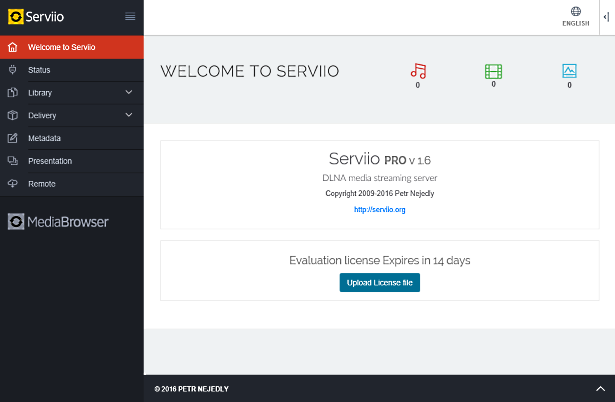
This new version of the Synology package updates Serviio to version 2.0 which fixes some issues and introduces multiple user support (release notes). Version 1.10 improved MediaBrowser, and also 4K media support. Version 1.9 replaced the Flash Player dependency in MediaBrowser with an HTML5 player. Serviio 1.7 brought audio track selection preferences, and automatic subtitle downloading. The most significant enhancement from version 1.6 onwards is the new web management console which removes the need to install the separate Serviio Console application on a computer. The web console uses a modern adaptive design which works well on mobile devices, and it is now integrated with DSM so you will see its icon in the application menu when the package is running:

The package supports hardware transcoding on the DS214play and DS415play with Intel Evansport media processor. This support required substantial personal effort and was made possible by the very kind donation of a new DS214play unit from MrK/Boretom a fellow package maintainer for ASUStor devices.
Limitations
If you use a TV, Bluray or media player bought in the last few years it is likely to have very good format support. In this case even a low specification NAS will be adequate for streaming most video content. There are some limitations however, in particular with video transcoding.
Serviio’s MediaBrowser is a Pro version only feature, and is designed to allow direct playback of media on tablet devices without the need for dedicated apps. Please note that Apple iOS devices require video in H.264 and audio in stereo AAC format when streaming. With the exception of the “play” models already mentioned, most Synology NAS models lack the CPU power to transcode video into H.264 in realtime. Even if the source video is already H.264, ARMv5 family CPUs (which lack an FPU) in the older models lack the power even to transcode AAC audio in realtime without libfdk_aac. Unfortunately I am unable to distribute an FFmpeg binary compiled against this library under the terms of its software license.
Ever since Serviio version 1.2 renderers that do not natively support subtitles via DLNA can have them burned into the video during transcoding, but as already explained a NAS usually lacks the CPU power to do this (more info on subs here). If you absolutely need hard subs for a particular film, you could start playback on your device then stop it and Serviio will continue transcoding. Then you will be able to try again in a few hours since it will play from the transcode cache folder. Newer TVs tend to support inline SRT subs, but for those with older models I can recommend the PlayStation 4 Media Player as a competent DLNA renderer with inline subs support.
I was able to compile FFmpeg for all eight supported architectures (ARMv5, ARMv7, ARMv7 with NEON, ARMv8, Intel i686, Intel x64, Intel Evansport media processor, and PowerPC e500v2) with the additional libraries Serviio requires while using the libs included within DSM as far as possible. I have published my compilation methods to make the process easier for others in future since parts of it were difficult to figure out. Only the Intel CPU or higher end ARM CPUs are likely to be of any practical use transcoding to H.264, since the other CPU types lack vector units (no AltiVec in QorIQ/PowerQUICC, and no NEON in Armada 370/XP).
Synology Package Installation
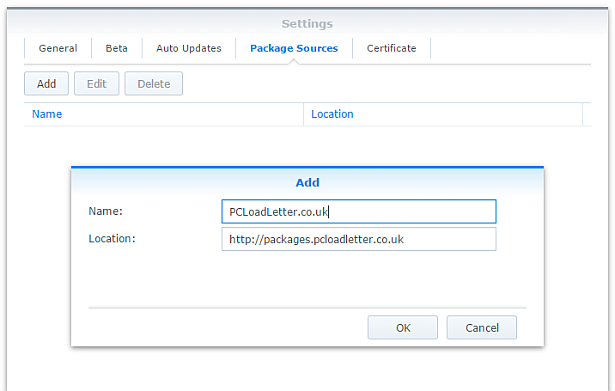
- In Synology DSM’s Package Center, click Settings and add my package repository:
- The repository will push its certificate automatically to the NAS, which is used to validate package integrity. Set the Trust Level to Synology Inc. and trusted publishers:

- Serviio now requires Java 8 for OS-native filesystem watching, so you will need to install my Java SE Embedded package first if you have not already done so. Read the instructions on that page carefully too.
- Now browse the Community section in Package Center to install Serviio:

Community packages are not listed in the All category for some reason. The repository only displays packages which are compatible with your specific model of NAS. If you don’t see Serviio in the list, then either your NAS model or your DSM version are not supported at this time. DSM 6.0 is the minimum supported version for this package. - When Serviio is started for the first time, a plugins folder will be created in the public shared folder (usually /volume1/public/serviio/plugins/). Download any Serviio online content plugins that you require and place the .groovy files in that location.
- If you need subtitle support for glyphs not present in the default DejaVu fonts, add additional fonts to the following folder inside your NAS’s public shared folder (usually /volume1/public/serviio/fonts/).
Notes
- You should reserve an IP address for your NAS (most home broadband routers will let you do this in the DHCP options), or use a static IP address. This will prevent Serviio from appearing multiple times in the menus of your renderer devices as its IP changes.
- In the console disable ‘Generate thumbnails for local videos’ in the Metadata tab. Failure to do this can make adding videos to your library very slow on older NAS systems. With this disabled Serviio will still fetch thumbnail images automatically from the online databases.
- Don’t alter the transcoded files location on the Transcoding tab, it’s already set to a sensible location for Synology systems. This particular folder is deleted each time your NAS restarts, and Serviio cleans up its temp files automatically in any case.
- When adding folders to the media library use the Browse button. This will show the root of the entire NAS Linux filesystem, so you will find your DSM shared folders inside /volume1.
- If you’re upgrading from a previous Serviio version you should check for updates of your online content plugins.
- MediaBrowser (Pro only feature) can be opened using the link in the side bar of the web console (http://IPofYourNAS:23424/mediabrowser). If you want to use the MediaBrowser from a remote location you would need to either port forward 23424 on your router, or use SSH tunnelling. You can also manage Serviio remotely by SSH tunnelling port 23423 which the console uses. Both of these service definitions are added to the DSM Firewall.
- Advanced users who wish to edit device profiles or enable debug logging can find the Serviio files in /var/packages/Serviio/target. You will need to use an SSH session to access this folder – it cannot be navigated to using DSM’s File Station. You will need to restart the Serviio package for profile changes to take effect.
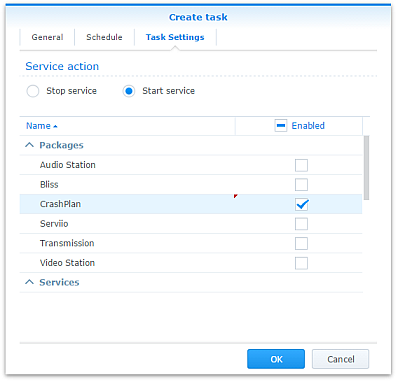
- Some users may wish to restrict running Serviio to specific times of day in order to free up RAM for a scheduled backup window for instance. This can be achieved by creating tasks to start and stop Serviio using the Task Scheduler in DSM Control Panel:
- The package uses an FFmpeg wrapper script to modify the usual transcoding behaviour of Serviio to use the Intel Evansport hardware decoding and encoding available in the DS214play and DS415play models. I have left the FFmpeg wrapper scripts in the package even when not in use (in the Serviio/bin folder), because they are still useful for people trying to test a particular workaround or encoder setting. The wrapper was a tricky script to get working due to variable expansion precedence issues and quote handling. If you need it, just change the ffmpeg.location system property in /var/packages/Serviio/target/bin/serviio.sh to point to your modified wrapper script.
- If additional fonts are not working as expected, some troubleshooting is available. You can re-create the fontconfig cache by connecting to the NAS via an SSH session as admin, and then running:
sudo -i

(enter admin password to become root)

rm -rf ~/.fontconfig.cache

FC_DEBUG=128 /var/packages/Serviio/target/bin/fc-cache --verbose
Hardware transcoding support
- DS214play and DS415play with Intel Evansport SoC are the only models supported for hardware transcoding. Serviio uses the multimedia tool FFmpeg for manipulating media files, and I am only able to build a hardware-assisted FFmpeg for DS214play and DS215play. Subsequent to those products, Synology has marketed a number of other systems with hardware transcoding features but these are not supported by Serviio.
The DS216play with STiH412 Monaco SoC uses a specialised build of Gstreamer for the Synology transcoding solution rather than FFmpeg, so its hardware features cannot be used by Serviio.
It seems likely that Synology is also using Gstreamer for the Intel Braswell or newer generation CPUs with QuikSync, since DSM ships with an older FFmpeg (2.7.1) than the version which introduced QuikSync support (2.8.0). To implement FFmpeg QuikSync hardware transcoding support requires Linux kernel patches for libmfx support which is not currently included in DSM 6.x, so Serviio support for Intel QuikSync on Synology is unlikely unless Synology in future switches to using FFmpeg for its own hardware transcoding solution.
The DS218play with Realtek RTD1296 SoC uses Gstreamer with OpenMAX drivers for the Synology transcoding solution. Although I was able to compile the ARMv8 build of FFmpeg with libomx support, unfortunately the Belaggio OpenMAX IL will not register these Realtek drivers which are distributed in the VideoStation package, therefore the hardware transcoding features of this model cannot be used by Serviio. - For the supported systems FFmpeg will use hardware decoding wherever possible.
- Although multiple hardware assisted decodes can take place simultaneously, only a single hardware encode is available. The package intelligently avoids race conditions for this.
- Any FFmpeg commandline to encode using libx264 will automatically be sent to the hardware encoder when available.
- profiles.xml has been modified so that the preferred transcode format for most devices for non-natively supported videos is H.264.
- In order to add hardware H.264 encoding to a device profile, specify h264 as the desired codec and the FFmpeg wrapper script will make the necessary substitution automatically.
- When the hardware encoder is used, the low quality settings in Serviio’s default libx264 options to favour encoding speed are ignored. The hardware encoder performance is not altered by quality settings.
- If a media stream is being both hardware decoded and hardware encoded, it will use pipelined mode. Based on responses from Synology support during development this means that both jobs occur on the media processor without exposing the intermediate bitstream to FFmpeg. Consequently it is not possible to burn subtitles in pipelined mode. As a result my FFmpeg wrapper script will run the decode part of the job in software in order to do this. The unfortunate result is that the encoder cannot quite achieve real time transcoding during subtitle compositing. For full 1080p HD material it achieves around 20fps, whereas most movies are 24fps. This means that in order to watch a film with hard subs you would need to start it off, pause or stop the renderer and return a bit later to view. An alternative would be to mux the content into an MKV container with the desired subtitles before adding it to the Serviio library, assuming that your device supports SRTs in MKV.
- The hardware encoded H.264 streams are not 100% compliant with the specification and fail validation using the tool DGAVCDec. For most tested renderers this does not affect playback (Bravia, Sony Bluray, iOS). FlowPlayer which had been the embedded player in MediaBrowser did not play these files satisfactorily and dropped many frames resulting in jerky playback. However since Serviio version 1.9 MediaBrowser uses an HTML5 player which is not affected by this issue.
Package scripts
For information, here are the package scripts so you can see what it’s going to do. You can get more information about how packages work by reading the Synology 3rd Party Developer Guide.
installer.sh
#!/bin/sh

#--------SERVIIO installer script
#--------package maintained at pcloadletter.co.uk


DOWNLOAD_PATH="http://download.serviio.org/releases"
DOWNLOAD_FILE="serviio-2.0-linux.tar.gz"
EXTRACTED_FOLDER="serviio-2.0"
DOWNLOAD_URL="${DOWNLOAD_PATH}/${DOWNLOAD_FILE}"
SYNO_CPU_ARCH="`uname -m`"
[ "${SYNO_CPU_ARCH}" == "x86_64" ] && SYNO_CPU_ARCH="x64"
[ "${SYNOPKG_DSM_ARCH}" == "comcerto2k" ] && SYNO_CPU_ARCH="armneon"
[ "${SYNOPKG_DSM_ARCH}" == "armada375" ] && SYNO_CPU_ARCH="armneon"
[ "${SYNOPKG_DSM_ARCH}" == "armada38x" ] && SYNO_CPU_ARCH="armneon"
[ "${SYNOPKG_DSM_ARCH}" == "alpine" ] && SYNO_CPU_ARCH="armneon"
[ "${SYNOPKG_DSM_ARCH}" == "alpine4k" ] && SYNO_CPU_ARCH="armneon"
[ "${SYNOPKG_DSM_ARCH}" == "monaco" ] && SYNO_CPU_ARCH="armneon"
[ "${WIZARD_ENC_HW}" == "true" ] && SYNO_CPU_ARCH="i686evansport"
NATIVE_BINS_URL="http://packages.pcloadletter.co.uk/downloads/serviio-native-${SYNO_CPU_ARCH}.tar.xz"
NATIVE_BINS_FILE="`echo ${NATIVE_BINS_URL} | sed -r "s%^.*/(.*)%\1%"`"
FONTS_URL="http://sourceforge.net/projects/dejavu/files/dejavu/2.37/dejavu-fonts-ttf-2.37.tar.bz2"
FONTS_FILE="`echo ${FONTS_URL} | sed -r "s%^.*/(.*)%\1%"`"
#'ua' prefix means wget user-agent will be customized
INSTALL_FILES="ua${DOWNLOAD_URL} ${NATIVE_BINS_URL} ${FONTS_URL}"
PID_FILE="${SYNOPKG_PKGDEST}/serviio.pid"
COMMENT="# Synology Serviio Package"
TEMP_FOLDER="`find / -maxdepth 2 -path '/volume?/@tmp' | head -n 1`"
PUBLIC_FOLDER="`synoshare --get public | sed -r "/Path/!d;s/^.*\[(.*)\].*$/\1/"`"
PLUGINS_PATH="${PUBLIC_FOLDER}/serviio"
source /etc/profile


pre_checks ()
{
  #These checks are called from preinst and from preupgrade functions to prevent failures resulting in a partially upgraded package
  if [ -z ${JAVA_HOME} ]; then
    echo "Java is not installed or not properly configured. JAVA_HOME is not defined. " >> $SYNOPKG_TEMP_LOGFILE
    echo "Download and install the Java Synology package from http://wp.me/pVshC-z5" >> $SYNOPKG_TEMP_LOGFILE
    exit 1
  fi

  if [ ! -f ${JAVA_HOME}/bin/java ]; then
    echo "Java is not installed or not properly configured. The Java binary could not be located. " >> $SYNOPKG_TEMP_LOGFILE
    echo "Download and install the Java Synology package from http://wp.me/pVshC-z5" >> $SYNOPKG_TEMP_LOGFILE
    exit 1
  fi

  JAVA_VER=`java -version 2>&1 | sed -r "/^.* version/!d;s/^.* version \"[0-9]\.([0-9]).*$/\1/"`
  if [ ${JAVA_VER} -lt 8 ]; then
    echo "This version of Serviio requires Java 8 or newer. Please update your Java package. " >> $SYNOPKG_TEMP_LOGFILE
    exit 1
  fi

  if [ -z ${PUBLIC_FOLDER} ]; then
    echo "A shared folder called 'public' could not be found - note this name is case-sensitive. " >> $SYNOPKG_TEMP_LOGFILE
    echo "Please create this using the Shared Folder DSM Control Panel and try again." >> $SYNOPKG_TEMP_LOGFILE
    exit 1
  fi
}


preinst ()
{
  pre_checks
  cd ${TEMP_FOLDER}
  for WGET_URL in ${INSTALL_FILES}
  do
    WGET_FILENAME="`echo ${WGET_URL} | sed -r "s%^.*/(.*)%\1%"`"
    [ -f ${TEMP_FOLDER}/${WGET_FILENAME} ] && rm ${TEMP_FOLDER}/${WGET_FILENAME}
    #this will allow serviio.org to track the number of downloads from Synology users
    WGET_URL=`echo ${WGET_URL} | sed -e "s/^ua/--user-agent=Synology --referer=http:\/\/pcloadletter.co.uk\/2012\/01\/25\/serviio-syno-package /"`
    wget ${WGET_URL}
    if [ $? != 0 ]; then
      if [ -d ${PUBLIC_FOLDER} ] && [ -f ${PUBLIC_FOLDER}/${WGET_FILENAME} ]; then
        cp ${PUBLIC_FOLDER}/${WGET_FILENAME} ${TEMP_FOLDER}
      else
        echo "There was a problem downloading ${WGET_FILENAME} from the official download link, " >> $SYNOPKG_TEMP_LOGFILE
        echo "which was \"${WGET_URL}\" " >> $SYNOPKG_TEMP_LOGFILE
        echo "Alternatively, you may download this file manually and place it in the 'public' shared folder. " >> $SYNOPKG_TEMP_LOGFILE
        exit 1
      fi
    fi
  done

  exit 0
}


postinst ()
{
  #extract the downloaded Serviio archive
  cd ${TEMP_FOLDER}
  tar xzf ${TEMP_FOLDER}/${DOWNLOAD_FILE}
  rm ${TEMP_FOLDER}/${DOWNLOAD_FILE}
  cp -R ${TEMP_FOLDER}/${EXTRACTED_FOLDER}/* ${SYNOPKG_PKGDEST}
  if [ ! -z "${EXTRACTED_FOLDER}" ]; then
    rm -r ${TEMP_FOLDER}/${EXTRACTED_FOLDER}
  fi
  if [ ! -d "${PLUGINS_PATH}/plugins" ]; then
    mkdir -p ${PLUGINS_PATH}/plugins
  fi
  if [ ! -d "${PLUGINS_PATH}/fonts" ]; then
    mkdir -p ${PLUGINS_PATH}/fonts
  fi

  #extract CPU-specific additional binaries
  cd ${SYNOPKG_PKGDEST}/lib
  tar xJf ${TEMP_FOLDER}/${NATIVE_BINS_FILE} && rm ${TEMP_FOLDER}/${NATIVE_BINS_FILE}
  mv ${SYNOPKG_PKGDEST}/lib/ffmpeg ${SYNOPKG_PKGDEST}/bin
  mv ${SYNOPKG_PKGDEST}/lib/fc-cache ${SYNOPKG_PKGDEST}/bin
  [ -e ${SYNOPKG_PKGDEST}/lib/omxregister-bellagio ] mv ${SYNOPKG_PKGDEST}/lib/omxregister-bellagio ${SYNOPKG_PKGDEST}/bin

  #remove legacy package font versions
  [ -d ${PLUGINS_PATH}/fonts/dejavu-fonts-ttf-2.33/ ] && rm -rf ${PLUGINS_PATH}/fonts/dejavu-fonts-ttf-2.33/
  [ -d ${PLUGINS_PATH}/fonts/dejavu-fonts-ttf-2.34/ ] && rm -rf ${PLUGINS_PATH}/fonts/dejavu-fonts-ttf-2.34/
  [ -d ${PLUGINS_PATH}/fonts/dejavu-fonts-ttf-2.35/ ] && rm -rf ${PLUGINS_PATH}/fonts/dejavu-fonts-ttf-2.35/

  #extract open source font package for subtitle support during transcoding
  cd ${PLUGINS_PATH}/fonts
  tar xvjf ${TEMP_FOLDER}/${FONTS_FILE} && rm ${TEMP_FOLDER}/${FONTS_FILE}
  sed -i "s|WINDOWSFONTDIR|${PLUGINS_PATH}/fonts|" ${SYNOPKG_PKGDEST}/config/fonts/fonts.conf
  sed -i "s|WINDOWSTEMPDIR_FONTCONFIG_CACHE|~/.fontconfig.cache|" ${SYNOPKG_PKGDEST}/config/fonts/fonts.conf

  #wrapper script can be useful for testing different encoder options
  if [ -e "${SYNOPKG_PKGDEST}/bin/ffmpeg-wrapper-${SYNO_CPU_ARCH}.sh" ]; then
    #we need to use the wrapper to make FFmpeg use libshine on ARM systems and to use hardware decode/encode on Intel Evansport systems
    FFMPEG_PATH="\$SERVIIO_HOME/bin/ffmpeg-wrapper-${SYNO_CPU_ARCH}.sh"
  else
    FFMPEG_PATH="\$SERVIIO_HOME/bin/ffmpeg"
  fi

  #modifications to device profiles (evansport hardware transcoding)
  if [ -e "${SYNOPKG_PKGDEST}/config/profiles-${SYNO_CPU_ARCH}.xml" ]; then
    mv "${SYNOPKG_PKGDEST}/config/profiles.xml" "${SYNOPKG_PKGDEST}/config/profiles-orig.xml"
    mv "${SYNOPKG_PKGDEST}/config/profiles-${SYNO_CPU_ARCH}.xml" "${SYNOPKG_PKGDEST}/config/profiles.xml"
  fi

  #modifications to application profiles (evansport hardware transcoding)
  #removed owing to frame drops in FlowPlayer because encoder does not produce 100% valid streams, evansport has sufficient power for flv encoding
  #if [ -e "${SYNOPKG_PKGDEST}/config/application-profiles-${SYNO_CPU_ARCH}.xml" ]; then
  #  mv "${SYNOPKG_PKGDEST}/config/application-profiles-${SYNO_CPU_ARCH}.xml" "${SYNOPKG_PKGDEST}/config/application-profiles.xml"
  #fi

  #make changes to Serviio launcher script so that pid file is created for Java process
  sed -r -i "s%Execute the JVM in the foreground%Execute the JVM in the background%" ${SYNOPKG_PKGDEST}/bin/serviio.sh
  sed -r -i "s%^(exec \"$JAVA.*)$%\1 \&%" ${SYNOPKG_PKGDEST}/bin/serviio.sh
  echo "echo \$! > ${PID_FILE}" >> ${SYNOPKG_PKGDEST}/bin/serviio.sh

  #set some additional Serviio system properties (temp folder, FFmpeg path, plugins folder)
  #http://www.serviio.org/index.php?option=com_content&view=article&id=43
  EXTRA_OPTS="-Dserviio\.defaultTranscodeFolder=${TEMP_FOLDER} -Dffmpeg\.location=${FFMPEG_PATH} -Dplugins\.location=${PLUGINS_PATH}"
  #fix Java prefs checking which was preventing NAS hibernation http://forum.serviio.org/viewtopic.php?f=5&t=6878
  EXTRA_OPTS="${EXTRA_OPTS} -Djava.util.prefs.syncInterval=86400"
  if [ "${SYNO_CPU_ARCH}" == "armv5tel" ]; then
    #use integer math (not floating point) Dolby AC-3 encoder for better performance on ARM CPUs
    #http://ffmpeg.org/ffmpeg.html#ac3-and-ac3_005ffixed
    EXTRA_OPTS="${EXTRA_OPTS} -Dserviio\.fixedPointEncoders"
  fi
  sed -r -i "s% -Dffmpeg\.location=ffmpeg%%; s%^(JAVA_OPTS=.*)\"$%\1 ${EXTRA_OPTS}\"%" ${SYNOPKG_PKGDEST}/bin/serviio.sh

  #create log file to allow package start errors to be captured
  [ -e ${SYNOPKG_PKGDEST}/log ] || mkdir ${SYNOPKG_PKGDEST}/log
  [ -e ${SYNOPKG_PKGDEST}/log/serviio.log ] || touch ${SYNOPKG_PKGDEST}/log/serviio.log

  #add firewall config
  /usr/syno/bin/servicetool --install-configure-file --package /var/packages/${SYNOPKG_PKGNAME}/conf/${SYNOPKG_PKGNAME}.sc > /dev/null

  exit 0
}


preuninst ()
{
  `dirname $0`/stop-start-status stop

  exit 0
}


postuninst ()
{
  #remove fontconfig configuration
  sed -i "/${COMMENT}/d" /root/.profile

  #remove firewall config
  if [ "${SYNOPKG_PKG_STATUS}" == "UNINSTALL" ]; then
    /usr/syno/bin/servicetool --remove-configure-file --package ${SYNOPKG_PKGNAME}.sc > /dev/null
  fi

  #remove legacy daemon user and homedir
  [ -e /var/services/homes/serviio ] && synouser --del serviio
  [ -e /var/services/homes/serviio ] && rm -r /var/services/homes/serviio

  exit 0
}


preupgrade ()
{
  `dirname $0`/stop-start-status stop
  pre_checks
  #if a media database exists we need to preserve it
  if [ -d ${SYNOPKG_PKGDEST}/library/db ]; then
    mkdir ${SYNOPKG_PKGDEST}/../${SYNOPKG_PKGNAME}_db_migration
    mv ${SYNOPKG_PKGDEST}/library/db ${SYNOPKG_PKGDEST}/../${SYNOPKG_PKGNAME}_db_migration
  fi

  exit 0
}


postupgrade ()
{
  #use the backed up media database from the previous version
  if [ -d ${SYNOPKG_PKGDEST}/../${SYNOPKG_PKGNAME}_db_migration/db ]; then
    mv ${SYNOPKG_PKGDEST}/../${SYNOPKG_PKGNAME}_db_migration/db ${SYNOPKG_PKGDEST}/library
    rmdir ${SYNOPKG_PKGDEST}/../${SYNOPKG_PKGNAME}_db_migration
  fi
  chown -R root:root ${SYNOPKG_PKGDEST}

  exit 0
}
start-stop-status.sh
#!/bin/sh

#--------SERVIIO start-stop-status script
#--------package maintained at pcloadletter.co.uk

PKG_FOLDER="/var/packages/Serviio"
ENGINE_CFG="${PKG_FOLDER}/target/bin/serviio.sh"
ENGINE_SCRIPT="${PKG_FOLDER}/target/bin/serviio.sh"
PID_FILE="${PKG_FOLDER}/target/serviio.pid"
DNAME="Serviio"
DLOG="${PKG_FOLDER}/target/log/serviio.log"
COMMENT="# Synology Serviio Package"
TIMESTAMP="`date "+%F %X,000"`"
source /etc/profile
source /root/.profile


EnvCheck ()
#updates to DSM will reset these changes so check them each startup
{
  #/root/.profile should contain 2 lines added by this package tagged with trailing comments
  COUNT=`grep -c "$COMMENT$" /root/.profile`
  if [ $COUNT != 2 ]; then

    #remove any existing mods
    sed -i "/${COMMENT}/d" /root/.profile

    #add required environment variables
    echo "export FONTCONFIG_FILE=fonts.conf ${COMMENT}" >> /root/.profile
    echo "export FONTCONFIG_PATH=${PKG_FOLDER}/target/config/fonts ${COMMENT}" >> /root/.profile
  fi
}

start_daemon ()
{
  EnvCheck
  source /root/.profile

  #create/refresh fontconfig cache - prevents delay the first time that FFmpeg renders hard subs
  #FC_DEBUG=128 fc-cache --verbose
  ${PKG_FOLDER}/target/bin/fc-cache

  #refresh hostname in Serviio instance name - recently DSM has modified the hosts file and broken localhost name resolution
  sed -i -r "s%<FriendlyName>Serviio \((\{computerName\})\)%<FriendlyName>Serviio \(`hostname`\)%" $PKG_FOLDER/target/config/profiles.xml

  #set appropriate Java max heap size
  RAM=$((`free | grep Mem: | sed -e "s/^ *Mem: *\([0-9]*\).*$/\1/"`/1024))
  if [ $RAM -le 128 ]; then
    JAVA_MAX_HEAP=80
  elif [ $RAM -le 256 ]; then
    JAVA_MAX_HEAP=192
  elif [ $RAM -le 512 ]; then
    JAVA_MAX_HEAP=384
  #Serviio's default max heap is 512MB
  elif [ $RAM -gt 512 ]; then
    JAVA_MAX_HEAP=512
  fi
  sed -i -r "s/(^..JAVA.) -Xmx[0-9]+[mM] (.*$)/\1 -Xmx${JAVA_MAX_HEAP}m \2/" "${ENGINE_CFG}"
  echo "${TIMESTAMP} Starting ${DNAME}" >> ${DLOG}
  ${ENGINE_SCRIPT} > /dev/null 2>> ${DLOG}
  if [ -z ${SYNOPKG_PKGDEST} ]; then
    #script was manually invoked, need this to show status change in Package Center
    [ -e ${PKG_FOLDER}/enabled ] || touch ${PKG_FOLDER}/enabled
  fi
}

stop_daemon ()
{
  echo "${TIMESTAMP} Stopping ${DNAME}" >> ${DLOG}
  kill `cat ${PID_FILE}`
  wait_for_status 1 20 || kill -9 `cat ${PID_FILE}`
  rm -f ${PID_FILE}
  if [ -z ${SYNOPKG_PKGDEST} ]; then
    #script was manually invoked, need this to show status change in Package Center
    [ -e ${PKG_FOLDER}/enabled ] && rm ${PKG_FOLDER}/enabled
  fi
}

daemon_status ()
{
  if [ -f ${PID_FILE} ] && kill -0 `cat ${PID_FILE}` > /dev/null 2>&1; then
    return
  fi
  rm -f ${PID_FILE}
  return 1
}

wait_for_status ()
{
  counter=$2
  while [ ${counter} -gt 0 ]; do
    daemon_status
    [ $? -eq $1 ] && return
    let counter=counter-1
    sleep 1
  done
  return 1
}

case $1 in
  start)
    if daemon_status; then
      echo ${DNAME} is already running with PID `cat ${PID_FILE}`
      exit 0
    else
      echo Starting ${DNAME} ...
      start_daemon
      exit $?
    fi
  ;;

  stop)
    if daemon_status; then
      echo Stopping ${DNAME} ...
      stop_daemon
      exit $?
    else
      echo ${DNAME} is not running
      exit 0
    fi
  ;;

  restart)
    stop_daemon
    start_daemon
    exit $?
  ;;

  status)
    if daemon_status; then
      echo ${DNAME} is running with PID `cat ${PID_FILE}`
      exit 0
    else
      echo ${DNAME} is not running
      exit 1
    fi
  ;;

  log)
    echo "${DLOG}"
    exit 0
  ;;

  *)
    echo "Usage: $0 {start|stop|status|restart}" >&2
    exit 1
  ;;

esac
ffmpeg-wrapper-i686evansport.sh
#!/bin/sh

#FFmpeg wrapper script to enable hardware decoding and encoding on Intel Evansport CPUs
#wrapper originally posted here: http://forum.serviio.org/viewtopic.php?f=7&t=6458

FOLDER="`dirname $0`"
PARAMS=""
COMMANDLINE=$@
FFMPEG_BIN="ffmpeg"
INPUT=0
for PARAM in "$@"; do
  if [ ${INPUT} = 1 ]; then
    #the FFmpeg input filename/URL needs quotes adding back on
    #because it may contain spaces, and the shell has removed them
    PARAMS="${PARAMS} \"${PARAM}\""
    INPUT=0
  elif [ ${INPUT} = 2 ]; then
    #the FFmpeg subtitles filename needs quotes adding back on
    #because it may contain spaces, and the shell has removed them
    PARAM=${PARAM/\[*.*\]subtitles=filename=/subtitles=filename=\"}
    PARAM=${PARAM/:original_size/\":original_size}
    PARAMS="${PARAMS} ${PARAM}"
    INPUT=0
  elif [ "${PARAM}" == "-filter_complex" ]; then
    #next parameter will be subtitles filtergraph including subtitle filename
    #which needs special treatment, so set a flag
    INPUT=2
    PARAMS="${PARAMS} ${PARAM}"
  elif [ "${PARAM}" == "-i" ]; then
    #next parameter will be input filename which needs special treatment, so set a flag
    INPUT=1
    #enable hardware decoding by default, but not when Serviio is either:
    # gathering media metadata,
    # remuxing video,
    # generating thumbnails,
    # or rendering subtitles into the video stream (pipeline mode not supported for subs),
    if [ $# -lt 3 ] || \
       [ "${COMMANDLINE}" != "${COMMANDLINE/ -c:v copy /}" ] || \
       [ "${COMMANDLINE}" != "${COMMANDLINE/ pipe:/}" ] || \
       [ "${COMMANDLINE}" != "${COMMANDLINE/ -filter_complex \[*:*\]subtitles=/}" ]; then
      PARAMS="${PARAMS} -i"
    # or gathering online stream metadata
    elif [ $# -eq 4 ] && [ "${COMMANDLINE}" != "${COMMANDLINE/-analyzeduration /}" ]; then
      PARAMS="${PARAMS} -i"
    else
      PARAMS="${PARAMS} -prefer_smd -i"
    fi
  else
    PARAMS="${PARAMS} ${PARAM}"
  fi
done

#older Evansport FFmpeg version 2.7.1 needs "-strict -2" to use experimental aac encoder
if [ "${PARAMS}" != "${PARAMS/ -c:a:* aac /}" ]; then
  PARAMS="${PARAMS/ aac / aac -strict -2 }"
fi

#Is this FFmpeg commandline a candidate for the hardware encoder?
HWENC=0
if [ "${PARAMS}" != "${PARAMS/ -c:v libx264 /}" ]; then
  #check whether H.264 encoder is already busy with another Serviio/VideoStation session
  PID_HWENC=`cat /tmp/VideoStation/enabled 2> /dev/null | sed -r "s/.*\"PID\":([0-9]+),\"hardware_transcode.*$/\1/;s/\[//;s/\]//"`
  #is there an indicated PID?
  if [ -n "${PID_HWENC}" ]; then
    #there is an indicated PID - is it running?
    if ! kill -0 ${PID_HWENC}; then
      #the indicated PID is not in fact running, HW encoder is therefore available
      rm /tmp/VideoStation/enabled
      #make hardware H.264 encoder substitution to replace libx264
      HWENC=1
    fi
  else
    #there is no indicated PID, HW encoder is therefore available
    HWENC=1
  fi
fi

if [ ${HWENC} = 1 ]; then
  #make hardware H.264 encoder substitution to replace libx264
  PARAMS=${PARAMS/ libx264 / h264_smd }

  #by default Serviio's libx264 transcoding is intended for speed over quality, with SMD we can opt for better quality
  PARAMS="`echo ${PARAMS} | sed -r "s/ -crf [0-9]+ / /; s/ -g [0-9]+ / /"`"
  PARAMS=${PARAMS/ -preset:v veryfast / }
  PARAMS=${PARAMS/ -profile:v baseline / -profile:v high }
  PARAMS=${PARAMS/ -level 3 / -level 4.1 }
fi

#invoke FFmpeg
#log commandline, except media probes
#[ $# -gt 2 ] && echo "${FOLDER}/${FFMPEG_BIN} ${PARAMS}" >> ${FOLDER}/../log/ffmpeg-wrapper.log

#need to use eval here otherwise the quotes aren't handled properly
#http://fvue.nl/wiki/Bash:_Why_use_eval_with_variable_expansion%3F
eval ${FOLDER}/${FFMPEG_BIN} ${PARAMS}

#return FFmpeg status
exit $?
Changelog:
- 0037 05/Jun/19 – Updated to Serviio 2.0, clear your web browser cache to fix Serviio Console issues
- 0036 17/Apr/19 – Updated to Serviio 1.10.1, fixed missing Serviio console icon in DSM 6.2 main menu, added support for DS119j
- 0035 14/May/18 – Updated to Serviio 1.9.2
- 0034 01/Mar/18 – Updated to Serviio 1.9.1, added ARMv8 support
- 0033 02/Aug/17 – Updated to Serviio 1.9
- 0032 21/Jan/17 – Fixed Evansport FFmpeg wrapper script to allow transcoding to aac since it’s an older FFmpeg version with slightly different command syntax
- 0031 07/Jan/17 – Updated to Serviio 1.8
Updated FFmpeg to 3.2.2
Updated Intel Evansport hardware transcoding build of FFmpeg from 2.0.2 to 2.7.1 – now detects H.265 codec correctly
Fixed Intel Evansport FFmpeg support for transcoding DTS audio
FFmpeg now uses hard float ABI on systems with Armada 370/XP SoC (DSM 6.0 change)
FFmpeg now uses NEON on systems with Armada 375 SoC (DSM 6.0 change)
Disabled FFmpeg wrapper script to enable libshine for ARMv5 systems now that Serviio handles this automatically
Added Ogg Vorbis audio support to FFmpeg
Updated Deja-Vu fonts to 2.37
DSM 6.0 is now required due to greatly simplify FFmpeg compilation - 0030 21/May/16 – Updated to Serviio 1.6.1
- 0029 28/Jan/16 – Updated to Serviio 1.6, integrated the new built-in web console into DSM, fixed stupid wrapper bug which had broken evansport hardware transcoding on DS214play and DS415play, fixed online content when using evansport build. You must have already upgraded to version 1.5.2-0028 or else Package Center will report a TCP port conflict and will fail to upgrade the package. If you missed the 0028 update, install it manually in Package Center using the .spk file: (DS214play/DS415play), (all other models).
- 0028 08/Jan/16 – Serviio instance uses hostname rather than localhost, more accurate detection of DSM 6.0 on Intel CPUs which need x64 FFmpeg build, added DS216play support, fixed missing libgmp on DS3612xs running DSM 5.0, change to allow easy package upgrade to forthcoming Serviio 1.6
- 0027 12/Nov/15 – Substantial package re-write hence the long delay since the last release
Completely refreshed documentation, please re-read
Updated to Serviio version 1.5.2
Java 8 is now required – this is a Serviio imposed requirement
DSM 5.0 or newer is now required
Updated to FFmpeg 2.7.1 and many libs e.g. x264 at latest versions from late July 2015
Added optional hardware transcoding support for Intel Evansport systems (DS214play, DS415play) built using Synology-modified sources for FFmpeg 2.0.2
FFmpeg is now compiled with https support via GNUTLS library (useful for online streams via plugins)
Switched to using root account which was necessary for Evansport hardware encoding – no more adding account permissions, package upgrades will no longer break this
Added support for Mindspeed Comcerto 2000 CPU (comcerto2k – ARM Cortex-A9 with NEON) in DS414j
Added support for Intel Atom C2538 (avoton) CPU in DS415+
Fontconfig fc-cache utility now included to allow troubleshooting issues with adding new fonts for additional subtitle language support
Fontconfig variables checked on each package startup so DSM upgrades no longer break hard subs support
Updated DejaVu subtitle font to version 2.35
DSM Firewall application definitions added
Tested with DSM Task Scheduler to allow package to start/stop at certain times of day, saving RAM when not needed
Daemon init script now uses a proper PID file instead of the unreliable method of using grep on the output of ps
Daemon init script can be run from the command line
Improved accuracy of temp folder and plugins folder detection
Switched to .tar.xz compression for native binaries to reduce web hosting storage footprint
Package is now signed with repository private key
User Agent customization while downloading Serviio binaries from serviio.org to allow download stats gathering - 0026 25/Mar/14 – Updated to Serviio 1.4.1.2
- 0025 18/Mar/14 – Updated to Serviio 1.4.1.1
- 0024 30/Jan/14 – Updated to Serviio 1.4
- 0023 07/Nov/13 – Updated to FFmpeg 2.1 stable release
- 0022 30/Oct/13 – Added support for Intel Atom Evansport and Armada XP CPUs in new DSx14 products
- 0021 18/Oct/13 – Fixed zlib linking issue in QorIQ and Intel builds of FFmpeg
- 0020 05/Sep/13 – Updated to Serviio 1.3.1
- 0019 25/May/13 – Added support for Armada370 SoC used in DS213j (ARMv7 CPU with FPU)
- 0018 29/Mar/13 – Updated to Serviio 1.2.1, recompiled FFmpeg to use the libRTMP source code from serviio.org for consistency
- 0017 01/Mar/13 – Updated to Serviio 1.2
- 0016 23/Jan/13 – Fixes for DSM 4.2
- 015 30/Dec/13 – Updated to Serviio 1.1, fixed garbled ac3 encoding issue on ARM CPUs by compiling FFmpeg natively, rather than cross compiling. Remember to update your computer’s Serviio Console to 1.1 before connecting to manage.
- 014 28/Oct/12 – Added support for Freescale QorIQ PowerPC CPUs used in some Synology x13 series products, switched to shared library compile of FFmpeg with some minor changes, ARM build now uses libshine encoder which allows realtime audio transcoding to MP3, edited FlowPlayer config to play AAC audio natively to make MediaBrowser more usable with online feed items.
- 013 Fixed a bug in the plugins folder creation, fixed deletion of home directories after user deletion (DSM 4.1)
- 012 Reduced Java prefs checking interval to once every 24 hours to allow the NAS to hibernate (was 30 seconds by default – remember to increase the time between library refreshes if you want hibernation)
- 011 Updated Serviio to 1.0.1, slightly altered how the plugins folder path is determined
- 010 Updated to Serviio 1.0, removed WebUI, FFmpeg wrapper no longer needed on ARM, plugins folder moved to /volume1/public/serviio/plugins to make adding/updating plugins easier
- 009 Installation fails unless User Home service is enabled, unified the installer scripts, merged ARM and Intel packages into one which downloads the FFmpeg binary separately, used integer maths Dolby AC-3 encoder on ARM systems (no floating point)
- 008 Fixed DST timezone support, installer no longer assumes /volume1 is primary storage volume
- 007 Updated Serviio to 0.6.2, kairoh’s WebUI to 0.6.2c, changed package to download Serviio from the official website during installation, temp path is set by default to /volume1/@tmp on first run, and finally some CSS improvements
- 006 Updated to Serviio 0.6.1, switched to kairoh’s Java WebUI, added timezone support, removed DSM icon when Serviio is not running, adjusted Java max heap size for systems with low RAM, specified FFmpeg path directly rather than creating a symlink in /bin so as not to interfere with other packages which may use different versions of FFmpeg
- 005 Added Web Station dependency, EULA dialog, and links for Web UI and user forum in More Info
- 004 Test for package repo to allow update notification
- 0.6.0.1 v3 Hopefully fixed an issue with the Serviio DSM icon in DSM 3.2 on NAS units without Optware installed
- 0.6.0.1 v2 Inclusion of a modified version of the PHP Web UI
- 0.6.0.1 v1 New minor Serviio release 0.6.0.1 with some updated international translations – will upgrade 0.6 preserving the media library
- 0.6 v1 23/Sep/11 – First public release – Serviio 0.6
- 0.6b4 v2 Fixed permissions on transcode temporary folder following upgrade, avoiding the need for a reboot
- 0.6b4 v1 Updated to Serviio 0.6 beta 4, added upgrade scripts to allow media database migration (install future packages over the top of this one – database is preserved)
- 0.6b3c v2 Fixed HOME env var for serviio user (to fix librtmp issues with BBC iPlayer) and removed the need to edit the passwd file to change the shell (safer)
- 0.6b3c v1 Initial spk test release – Serviio 0.6 beta 3
 PC LOAD LETTER
I have DS2411+ and since DSM 4.1-2668, nothing happens when I try to run the Serviio package. What can I do? All Versions before this one, Serviio works properly.
Java running? Mine stopped because of outdated veriosn of Java
Hi,
yes Java is running and Serviio was stopped bevor Java Update.
Same to me on DS211j and DSM4.2Beta, but after spending few hours I figured out what is causing the problem. On Serviio installation, a serviio daemon user must be created, and the password is generated by a perl script. The preinstall script is not verifying that the perl is installed. So, uninstall Serviio install Perl package and reinstall Serviio. Enjoy
Thanks for posting that – you saved me a load of investigative work. The new version uses openssl to generate random passwords. I can’t see them stripping that out in future…
First of all, thansk for the great work… I use your CrashPlan package and its awesome…
I installed this and followed all instructions, but cannot seen to get the Console app to run on my windows box…
Is there a trick I may be missing? I installed it and added a line to the file… There were no lines in the file. So I added that line on the first and only line.
Any help is appreciated, thank you…
I’ve got the same issue trying to connect my windows console to an atom based diskstation (412+), serviio just crashes with a nullpointer exception
2012-12-24 03:51:17,896 INFO [ServiioConsole] Starting Serviio Console
2012-12-24 03:51:17,958 INFO [ServiioConsole] Connecting to Serviio REST on 10.11.12.20:23423
2012-12-24 03:51:18,348 INFO [Messages] Loaded console message bundle for locale: en
2012-12-24 03:51:20,782 ERROR [ServiioConsole] Unexpected exception occured: null
java.lang.NullPointerException
at org.serviio.ui.view.swing.PresentationView.initComponents(PresentationView.java:92)
at org.serviio.ui.view.swing.PresentationView.(PresentationView.java:81)
at org.serviio.ui.view.swing.ServiioFrameView.(ServiioFrameView.java:79)
at org.serviio.console.ServiioConsole.main(ServiioConsole.java:106)
at sun.reflect.NativeMethodAccessorImpl.invoke0(Native Method)
at sun.reflect.NativeMethodAccessorImpl.invoke(Unknown Source)
at sun.reflect.DelegatingMethodAccessorImpl.invoke(Unknown Source)
at java.lang.reflect.Method.invoke(Unknown Source)
at com.exe4j.runtime.LauncherEngine.launch(Unknown Source)
at com.exe4j.runtime.WinLauncher.main(Unknown Source)
2012-12-24 03:51:20,797 INFO [ServiioConsole] Leaving Serviio Console
such a tease, I can see the dnas server, and i can see the webui in mozilla, but it doesn’t accept any password.
it looks like its running in the synology ui:
http://tinyurl.com/bulqmky
and in an rsh :
godzilla> ps | grep serviio
4684 root 2540 S grep serviio
27796 serviio 2536 S /bin/sh /volume1/@appstore/Serviio/bin/serviio.sh
27801 serviio 642m S /volume1/@appstore/java6/jre/bin/java -Xmx512m -Xms20M -XX:+UseParNewGC -XX:MinHeapFreeRatio=10 -XX:MaxHeapFreeRatio=20
~~~~~
28270 serviio 642m S /volume1/@appstore/java6/jre/bin/java -Xmx512m -Xms20M -XX:+UseParNewGC -XX:MinHeapFreeRatio=10 -XX:MaxHeapFreeRatio=20 -Djava.net.preferIPv4Stack=true -Djava.awt.headless=true -Dderby.system.home=/vol
and its log looks healthy :
2012-12-24 03:46:44,212 INFO [MediaServer] ————————————————————————
2012-12-24 03:46:44,214 INFO [MediaServer] Serviio DLNA media streaming server v 1.0.1 (rev. 6dbf7c6e334f+)
2012-12-24 03:46:44,214 INFO [MediaServer] Petr Nejedly 2009-2012
2012-12-24 03:46:44,214 INFO [MediaServer] http://www.serviio.org
2012-12-24 03:46:44,214 INFO [MediaServer]
2012-12-24 03:46:44,214 INFO [MediaServer] Java 1.6.0_38-Sun Microsystems Inc.
2012-12-24 03:46:44,215 INFO [MediaServer] OS Linux i386 3.2.11
2012-12-24 03:46:44,215 INFO [MediaServer] File encoding: UTF-8
2012-12-24 03:46:44,216 INFO [MediaServer] Headless mode enabled: true
2012-12-24 03:46:44,216 INFO [MediaServer] User home dir: /var/services/homes/serviio
2012-12-24 03:46:44,216 INFO [MediaServer] Temp dir: /tmp
2012-12-24 03:46:44,217 INFO [MediaServer] ————————————————————————
2012-12-24 03:46:44,520 INFO [WebServer] Socket buffer set to 65535 bytes
2012-12-24 03:46:44,524 INFO [RestletServer] Starting Restlet server (/rest) exposed on port 23423
2012-12-24 03:46:44,608 INFO [RestletServer] Starting Restlet server (/cds) exposed on port 23424
2012-12-24 03:46:44,609 INFO [RestletServer] Starting Restlet server (/mediabrowser) exposed on port 23424
2012-12-24 03:46:44,638 INFO [DBSchemaUpdateExecutor] Checking if DB schema needs to be updated
2012-12-24 03:46:47,979 INFO [MediaServer] ————————————————————————
2012-12-24 03:46:47,979 INFO [MediaServer] License: PRO (EVALUATION, id: 11111111-1111-1111-1111-111111111113)
2012-12-24 03:46:47,979 INFO [MediaServer] ————————————————————————
2012-12-24 03:46:48,383 INFO [ProfilesDefinitionParser] Parsing Profiles definition
2012-12-24 03:46:49,694 INFO [ProfilesDefinitionParser] Added profile ‘Generic DLNA profile’ (id=1)
2012-12-24 03:46:50,793 INFO [ProfilesDefinitionParser] Added profile ‘Samsung TV (B-series)’ (id=2)
2012-12-24 03:46:51,298 INFO [ProfilesDefinitionParser] Added profile ‘Xbox 360’ (id=3)
2012-12-24 03:46:52,230 INFO [ProfilesDefinitionParser] Added profile ‘Playstation 3’ (id=4)
2012-12-24 03:46:52,858 INFO [ProfilesDefinitionParser] Added profile ‘Samsung TV (A-series)’ (id=5)
2012-12-24 03:46:53,225 INFO [ProfilesDefinitionParser] Added profile ‘DirecTV HD-DVR’ (id=6)
2012-12-24 03:46:54,474 INFO [ProfilesDefinitionParser] Added profile ‘Samsung TV / player (C/D/E-series)’ (id=7)
2012-12-24 03:46:54,554 INFO [ProfilesDefinitionParser] Added profile ‘LG TV / player’ (id=8)
2012-12-24 03:46:56,345 INFO [ProfilesDefinitionParser] Added profile ‘Sony Bravia TV (2012)’ (id=sony2012)
2012-12-24 03:46:58,489 INFO [ProfilesDefinitionParser] Added profile ‘Sony BD Player / SMP’ (id=10)
2012-12-24 03:46:59,358 INFO [ProfilesDefinitionParser] Added profile ‘Toshiba REGZA’ (id=13)
2012-12-24 03:46:59,848 INFO [ProfilesDefinitionParser] Added profile ‘WDTV Live’ (id=14)
2012-12-24 03:46:59,944 INFO [ProfilesDefinitionParser] Added profile ‘LaCie LaCinema Media Player’ (id=15)
2012-12-24 03:47:00,342 INFO [ProfilesDefinitionParser] Added profile ‘Manta WIFI Centre’ (id=16)
2012-12-24 03:47:00,512 INFO [ProfilesDefinitionParser] Added profile ‘Pure Flow’ (id=17)
2012-12-24 03:47:01,286 INFO [ProfilesDefinitionParser] Added profile ‘Sharp Aquos’ (id=18)
2012-12-24 03:47:01,438 INFO [ProfilesDefinitionParser] Added profile ‘Sony Bravia TV (2011)’ (id=sony2011)
2012-12-24 03:47:02,413 INFO [ProfilesDefinitionParser] Added profile ‘Sony Bravia TV (2010)’ (id=sony2010)
2012-12-24 03:47:03,290 INFO [ProfilesDefinitionParser] Added profile ‘Philips’ (id=20)
2012-12-24 03:47:03,655 INFO [ProfilesDefinitionParser] Added profile ‘Sony Bravia TV (2009)’ (id=sony2009)
2012-12-24 03:47:03,835 INFO [ProfilesDefinitionParser] Added profile ‘Denon AVR’ (id=22)
2012-12-24 03:47:05,505 INFO [ProfilesDefinitionParser] Added profile ‘Panasonic Viera G/GT/DT/UT/VT (2011/2012)’ (id=viera2011a)
2012-12-24 03:47:05,757 INFO [ProfilesDefinitionParser] Added profile ‘Panasonic Viera E/S/ST/VT (2011)’ (id=viera2011)
2012-12-24 03:47:05,989 INFO [ProfilesDefinitionParser] Added profile ‘Panasonic Viera (2010)’ (id=viera2010)
2012-12-24 03:47:06,322 INFO [ProfilesDefinitionParser] Added profile ‘Sony Bravia TV (2012) – US’ (id=sony2012us)
2012-12-24 03:47:06,655 INFO [ProfilesDefinitionParser] Added profile ‘Sony Bravia TV (2011) – US’ (id=sony2011us)
2012-12-24 03:47:06,698 INFO [ProfilesDefinitionParser] Parsing Profiles definition
2012-12-24 03:47:07,330 INFO [ProfilesDefinitionParser] Added profile ‘Flash player’ (id=flv_player)
2012-12-24 03:47:07,761 INFO [ProfilesDefinitionParser] Added profile ‘ServiiGo’ (id=serviigo)
2012-12-24 03:47:08,022 INFO [Device] Created UPnP Device with UUID: 9d59d10b-8b6e-39c8-816c-f7c97445fea7, bound address: 10.11.12.18
2012-12-24 03:47:08,081 INFO [PluginCompilerThread] Looking for plugins at /volume1/public/serviio/plugins
2012-12-24 03:47:08,081 INFO [PluginCompilerThread] Started looking for plugins
2012-12-24 03:47:08,084 INFO [UpdateChecker] Checking if a new version is available
2012-12-24 03:47:08,442 INFO [AbstractTranscodingDeliveryEngine] Cleaning transcode engine and its data
2012-12-24 03:47:08,489 INFO [WebServer] WebServer starting on port 8895
2012-12-24 03:47:08,500 INFO [EventSubscriptionExpirationChecker] Starting EventSubscriptionExpirationChecker
2012-12-24 03:47:08,500 INFO [EventDispatcher] Starting EventDispatcher
2012-12-24 03:47:08,502 INFO [DiscoveryAdvertisementNotifier] Starting DiscoveryAdvertisementNotifier
2012-12-24 03:47:08,505 INFO [DiscoverySSDPMessageListener] Starting DiscoverySSDPMessageListener using interface eth0 (eth0) and address 10.11.12.18, timeout = 0
2012-12-24 03:47:08,513 INFO [RendererSearchSender] Searching for Renderer devices
2012-12-24 03:47:08,513 INFO [RendererExpirationChecker] Starting RendererExpirationChecker
2012-12-24 03:47:11,285 INFO [ContentDirectoryDefinitionParser] Parsing ContentDirectory definition
2012-12-24 03:47:12,527 INFO [BrowsingCategoriesMessages] Loaded browsing categories message bundle for locale: en
2012-12-24 03:47:34,573 INFO [FeedUpdaterThread] Started looking for information about online resources
2012-12-24 03:47:34,580 INFO [LibraryAdditionsCheckerThread] Started looking for newly added files
2012-12-24 03:47:34,582 INFO [LibraryUpdatesCheckerThread] Started looking for updates to currently shared files
2012-12-24 03:47:34,583 INFO [PlaylistMaintainerThread] Started looking playlist changes
I’ve spent enough time trying to get it to work for now. Get in touch with me if you want to test on my atom based setup
This could be a version mismatch between the version of the server and the console. I haven’t yet updated the Synology package to v1.1, so you will need to install v1.0.1 of the console.
thanks for the tip. I’ll give it a go (now I know why ppl are asking for a 1.1 ;)
still, is an unhandled exception
I had a look for the 1.0.1 installer for windows but didn’t find it on the official site, old links all lead to 1.1 builds (except for the synology build). I might have another dig later.
Cheers, and merry xmas
Serviio 1.0.1 http://downloads.pcauthority.com.au/article/27941-serviio or
http://www.videohelp.com/tools/Serviio/old-versions
Merry Christmas :)
Hi patters.
Any chance for Serviio 1.1 package any time soon?
Regards
Hi again patters
I have seen recently many tired with serviio people have moved to Universal Media Server:
http://www.universalmediaserver.com/
I have checked the linux installation package and main program comes as jar file. Server comes with many profiles for different devices, this is Serviio lacks the most and allows to use plugins which supposed to come as jar files too. It comes with my Realtek Media Player as well :D
Maybe that would be not to hard to give it a try and create a package for Synology keeping in mind that many our synology boxes come with your java installation already?
Have A Merry Christmass. :)
I have latest Serviio and latest DSM 4.1-2668 and Serviio seems to ignore all directories and files with non us ascii characters in the name, for instance czech characters. I don’t know, if it started to happen from some time (or DSM update) or from the first installation 6 months ago, but I noticed this yesterday. I renamed everything to standard ascii and everything is OK. But something is wrong probably…
Stop Serviio and reinstall the Java package. DSM updates break the UTF-8 character set support.
Works. Thank you for your answer and software and merry christmass to you and your family.
I have a DS213+ with the latest Serviio and the latest DSM 4.1-2668. All media files are already indexed, but the NAS didnt go in the hibernation mode. The hibernation mode is entered after ten minutes if i stop Servio. Anyway had an explanation for this behavior? Pls help :-(
I have the same problem with my DS413.
In the forum exists a thread which describes exactly this problem but the solution does not change the behavior on my platform. Here is the link if you’re interested.
http://forum.serviio.org/viewtopic.php?f=5&t=6878&sid=121d8cd87d9cb716bf1a19d19536cd8f
That fix is already incorporated into the package I’m afraid. Have you tried lowering the time interval for the library refresh in the Serviio Console? It’s 5 mins by default remember, so the disk will be polled every 5 mins unless you change that.
Hi Patters,
thx for your fast answer. Yes, the fix with the syncInterval is in the package already. The value is 86400 that is approx. 24h. The checkbox of the serviio console to update the library is unchecked. I use the Serviio Web UI interface to set the serviio configuration. All other checkboxes are also unchecked on tab pages Library, Metadata, Transcoding and Console settings. I start Serviio with the properties (-Djava.util.prefs.syncInterval=86400) directly from the command line. The behavior is the same. I have the feeling that the property -Djava.util.prefs.syncInterval has no effect, even though the value is 86400. Have you an idea? and sorry for my bad english. I hope you understand me.
Have another look at that forum thread for info on how to enable debugging of hibernation issues. You should be able to see precisely what on the filesystem is being polled, which should give further clues as to how to fix.
Ok, i have a debug log with runnig serviio recorded. Here is the relevant section from the /var/log/messages.
Dec 26 14:25:11 kernel: [18476.251251] drivers/scsi/sd.c[461]:syno_hibernation_timer_update(), sdb: cmd 0x0 spin up by pid=3405, comm=khelper
Dec 26 14:25:11 kernel: [18476.261662] drivers/scsi/sd.c[461]:syno_hibernation_timer_update(), sda: cmd 0x0 spin up by pid=24815, comm=events/1
Dec 26 14:25:39 kernel: [18491.667187] Freezing user space processes … (elapsed 0.00 seconds) done.
Dec 26 14:25:39 kernel: [18491.674703] Freezing remaining freezable tasks … (elapsed 0.00 seconds) done.
Dec 26 14:25:39 kernel: [18491.682095] Suspending console(s) (use no_console_suspend to debug)
Dec 26 14:25:39 kernel: [18491.689260] ata4: send port disabled event
Dec 26 14:25:39 kernel: [18491.689292] ata3: send port disabled event
Dec 26 14:25:39 kernel: [18491.890578] ata1: send port disabled event
Dec 26 14:25:39 kernel: [18491.890611] ata2: send port disabled event
Dec 26 14:25:39 kernel: [18491.906771] Disabling non-boot CPUs …
Dec 26 14:25:39 kernel: [18492.352572] Enabling non-boot CPUs …
Dec 26 14:25:39 kernel: [18492.352600] setting frequency for cpu 0 to 1066666 kHz, PLL ratio is 4/2
Dec 26 14:25:39 kernel: [18492.352608] PMJCR request 04043c00 at CPU 0
Dec 26 14:25:39 kernel: [18492.352615] PORPLLSR core freq 1066MHz at CPU 0
Dec 26 14:25:39 kernel: [18492.353072] Processor 1 found.
Dec 26 14:25:39 kernel: [18492.438589] 0: 533333kHz
Dec 26 14:25:39 kernel: [18492.438593] 1: 799999kHz
Dec 26 14:25:39 kernel: [18492.438597] 2: 1066666kHz
Dec 26 14:25:39 kernel: [18492.438600] 3: 1333332kHz
Dec 26 14:25:39 kernel: [18492.438604] 4: 1599999kHz
Dec 26 14:25:39 kernel: [18492.438608] 5: 1866665kHz
Dec 26 14:25:39 kernel: [18492.438611] 6: 2133332kHz
Dec 26 14:25:39 kernel: [18492.438656] setting frequency for cpu 1 to 1066666 kHz, PLL ratio is 4/2
Dec 26 14:25:39 kernel: [18492.438662] PMJCR request 04043c00 at CPU 1
Dec 26 14:25:39 kernel: [18492.438667] PORPLLSR core freq 1066MHz at CPU 1
Dec 26 14:25:39 kernel: [18492.438702] setting frequency for cpu 1 to 1066666 kHz, PLL ratio is 4/2
Dec 26 14:25:39 kernel: [18492.438707] PMJCR request 04043c00 at CPU 1
Dec 26 14:25:39 kernel: [18492.438712] PORPLLSR core freq 1066MHz at CPU 1
Dec 26 14:25:39 kernel: [18492.438717] CPU1 is up
Dec 26 14:25:39 kernel: [18492.950448] ata4: No Device OR PHYRDY change,Hstatus = 0xa0000000
Dec 26 14:25:39 kernel: [18492.950479] ata3: No Device OR PHYRDY change,Hstatus = 0xa0000000
Dec 26 14:25:39 kernel: [18502.445883] ata2: softreset failed (timeout)
Dec 26 14:25:39 kernel: [18502.445888] ata2: softreset failed, set srst fail flag
Dec 26 14:25:39 kernel: [18502.445910] ata1: softreset failed (timeout)
Dec 26 14:25:39 kernel: [18502.445914] ata1: softreset failed, set srst fail flag
Dec 26 14:25:39 kernel: [18504.645783] ata2: link reset sucessfully clear error flags
Dec 26 14:25:39 kernel: [18504.645838] ata1: link reset sucessfully clear error flags
Dec 26 14:25:39 kernel: [18504.876694] Restarting tasks … [/etc/localtime] opened by pid 3024 [u:(/sbin/klogd), comm:(klogd)]
Dec 26 14:25:39 kernel: [18504.885971] [/volume2/public/serviio/plugins] opened by pid 27148 [u:(/volume1/@appstore/java7/jre/bi), comm:(java)]
Dec 26 14:25:39 kernel: [18504.888302] done.
Dec 26 14:25:40 kernel: [18505.126603] usb usb2: No SuperSpeed endpoint companion for config 1 interface 0 altsetting 0 ep 129: using minimum values
Dec 26 14:25:40 scemd: SCEMD: disk 2 wake up from hibernation
Is the access to the serviio plugins the problem? I dont have installed plugins.
No idea? Nobody can help me? :(
I have similar problem. DS112, Serviio 1.1 , DSM 4.1-2668. No automatic updated library, no online sources, no plugins.
NAS hibernates fine after 10 minutes.
If serviio is running, NAS hibernates after 10 minutes too, but wake up periodically each hour (exactly after 60 minutes).
messages
………
Jan 4 17:03:02 kernel: [453838.610000] ata1: wake up from deepsleep, reset link now
Jan 4 17:03:02 kernel: [453838.690000] ata1: device plugged sstatus 0x123
Jan 4 17:03:02 kernel: [453841.610000] ata1: exception Emask 0x10 SAct 0x0 SErr 0x4010000 action 0xe frozen
Jan 4 17:03:02 kernel: [453841.620000] ata1: edma_err_cause=00000010 pp_flags=00000000, dev connect
Jan 4 17:03:02 kernel: [453841.630000] ata1: SError: { PHYRdyChg DevExch }
Jan 4 17:03:08 kernel: [453847.600000] ata1: link is slow to respond, please be patient (ready=0)
Jan 4 18:03:02 kernel: [457438.640000] ata1: wake up from deepsleep, reset link now
Jan 4 18:03:02 kernel: [457438.720000] ata1: device plugged sstatus 0x123
Jan 4 18:03:02 kernel: [457441.640000] ata1: exception Emask 0x10 SAct 0x0 SErr 0x4010000 action 0xe frozen
Jan 4 18:03:02 kernel: [457441.650000] ata1: edma_err_cause=00000010 pp_flags=00000000, dev connect
Jan 4 18:03:02 kernel: [457441.660000] ata1: SError: { PHYRdyChg DevExch }
Jan 4 18:03:08 kernel: [457447.630000] ata1: link is slow to respond, please be patient (ready=0)
………..
any record in serviio.log (INFO mode, when DEBUG mode is set, NAS never hibernates)
hello patters !
Since i upgrade my synology serviio version from 1.0 to 1.0-14, i’ve no sound on all my MP4 videos files (video AVC + AAC sound).. i’ve looked on profile, compare profile from 1.0, 1.0-14 and 1.1 version but there’s no changes which can explain this problem.
i’ve just download servio 1.1 (not on my NAS but on my Windows PC) and the same mp4 are working good now (with sound).
i suspect maybe a problem on ffmpeg on version 1.0-14 in your package.
have you changed your ffmpeg on last 1.0-14 version ? do you planned to build an 1.1 package for synology soon ?
Hi, thanks for the feedback. I presume your NAS has an ARM CPU. Unfortunately, patching in unofficial support for libshine does actually break other encoders which I hadn’t noticed when I released the package. I’ll have to remove that when I build the package for Serviio 1.1 which hopefully I’ll take a look at later today…
You’re right, I’ve got a DS 212+ synology (ARM cpu).
I’ve noticed also a very bad transcoding performance (when it works) since 1.0 version. Before 1.0, i used to watch my mkv 1080p video transcoded on the fly, It is not possible at all since 1.0. Maybe this problem is related to libshine too ?
i’m waiting you package as soon as possible. Thanks for your work !
I spent a long time looking at this yesterday. I cross compiled a new shared library FFmpeg binary without libshine and it still exhibited the same crackly AC3 encoding. I then cross compiled a static binary like I had done with previous package versions and even that had the same issue. Finally, I natively compiled a static binary on the NAS itself and that encodes AC3 fine:
https://ffmpeg.org/trac/ffmpeg/ticket/1457#comment:24
I’ve been having some difficulty compiling a shared lib version. Not quite there yet. Once that’s done I’ll be able to release Serviio 1.1.
Ok, I finally have a compile I’m happy with – i.e. AC3 and shine encoders both work, that has shared libs, and is linked to DSM’s existing libz, libpthread, libcrypto, and libssl.
And I have documented the whole thing so I can at least do it again when Serviio requires a newer FFmpeg: https://pcloadletter.co.uk/2012/10/12/ffmpeg-shared-libs-for-synology/
cool! if you want a beta tester for the synology ARM version, i’m yours ;-)
Hello!
First of all thank you for your work!
I have brand new a Synology DS212-j and a Sony Bravia 40NX700
Following your instructions I installed Serviio 1.0 on it, using java embedded 7.
I wuold ask you 2 questions:
– my cpu level is always on 99% (biggest quota is used by java). IS THIS OK? If not, how can I limit cpu usage of java?
– I experience very low transcoding performance to my TV, both via wifi and cable. The flow stops after a minute….any hint??
Thank you again for your interest.
Paolo
here is my two cents :
if your not watching a DLNA video on your TV, Your java process should not used all you CPU.
– Maybe serviio is still indexing your library (which used a lot of CPU and can take a lot of time (60 hours for my 19 000 jpeg photos for example!)).
– Maybe serviio continuously update your library for nothing : you should check your library option in serviio console. default value for automatically refresh is 5 minutes. you should increase this value (or disabled it and do a manual force refresh when you add new media).
concerning your poor performance in transcoding, I’ve the same problem with this version of synology servvio package (see my message above). hope it’ll be better in the next 1.1 package. Unfortunately, you’ve choosen a synology with a poor cpu performance, which could not help to have best transcoding performance (212j < 212 < 212+).
Hi, thank you for your kind reply!
I thing you got it….now cpu usage is 10%
I would ask you a suggestion: What can I do in order to watch my avi movies from my tv?
Maybe working on transcoding parameters?
Cabled network? Already tested, better, but not enough
Thank you again
you can try to install serviio 1.1 on you computer and test if your avi video are well transcoded on your tv. if it’s ok, your network is fast enough to stream the movie and your transcoding problems come from the poor performance of synology CPU (1) or the transcoding poor performance bug with the last synology serviio package on ARM cpu (2).
if it’s the problem 1, you can do nothing except buy a new more powerful synology NAS or convert your avi video into a new codec which is supported by your TV without transcoding.
if it’s problem 2, we all hope that the next Patters synology serviio package (version 1.1) will correct this transcoding problem. so wait’n see ;-)
if your cable networked tests seems to work better than WIFI, WIFI can be a part of the problem (depending on distance between your router and TV, and the WIFI type (B / G or N)).
Dear all,
Happy new yeat!!
thank you for your effort!
I installed Serviio package 1.1 since few days…but my problem is the same.
At the first test I watched on Bravia NX 3-4 minutes of streamed movie…Fancy that?!?!
….Then it played jerkily again.
No good : (
I tried to install Serviio on a laptop, but i encountered some problems.
Anyway this further test could only eclude a problem on my network.
I will work it out..
Any other idea / suggestion?
If it’s problem 1: I don’t want to replace my brand new nas (this would cost too much, at least+ 100€), neither convert all my collection to avchd (!?!?!?).
What if I add a media extender to my TV – e.g. Apple TV?
I don’t like at all this solution, I admit, but this costs 100 € (and needs to be jailbroken, of course…)
Thank you for your appreciated feedback.
Auguri! What format is the file you are trying to stream? Is it AVI, or H.264?
Pingback: NAS Synology DS212+ – Ein Erfahrungsbericht | Robins Blog - Technik und Multimedia
With Debian Bootstrap and Java packages from Chreggy, I succeeded to run Serviio on my DS509+ in the chroot environment.
Do you think it’s possible to have a nice package like yours to install, configure and run Serviio in this chrooted environment?
Hi, it’s not something I can create since I can’t test it. Compiling FFmpeg would be difficult too. Chreggy could do it I guess, if he has an interest in Serviio.
I’ve updated my servioo synology package to 1.1 yesterday and all seem to work perfectly. Sound is back on my MP4 videos :-)
Thanks you patters for this good work !
Glad it’s working well for you :) Thanks for the feedback.
First patters, let me say thanks for putting the packages together and maintaining it. It is much appreciated.
I upgraded to the 1.1 package and it deleted my serviio user and failed to add it back; This left it unusable. I decided instead of debugging things or fixing things manually by creating the user that I’d just remove the package and re-install. I did backup my library directory but in the end I decided to just rebuild everything using path locations rather than the local locations I already had.
If anyone has a problem with the upgrade, and the service not starting after the upgrade, take a look to make sure that the user gets created correctly.
Not sure what would have happened there. None of that logic has changed in my scripts for a long time. It didn’t do that to me when I upgraded mine.
Hey patters,
First off. thank you for all your hard work.
One quick question: I am using your serviio package (1.1) to stream files from my DS713+ to a Philips 40PFL5007K/12. The necessity to use Serviio arose from the fact that Philips does not support DTS.
Serviio does a great job of transcoding the audio into something my TV understands, but the stream stutters every couple of seconds. My NAS’s CPU usage also goes up to about 95%. While I realize that NAS’s are not CPU powerhouses, I thought an Intel 2.13Ghz Dual-core should be able to handle it.
What is your take? Do you think this has something to do with the bug you mentioned above, or is it still simply an issue of the CPU being not powerful enough?
Best
I am using your serviio package (1.1) to stream files from my DS213 to a Philips TV. Also with the same high CPU load. If I take a closer look FFMPEG is using 95% of the CPU when then server is in idle state. When I restart the serviio server the load is normal until i start to stream again. Hope this helps to come to a solution.
Update 11-01-2012 : I did several things, so I’m not sure which of them solved the problem. Maybe someone with a clean install can confirm the right order.
I installed first Java7 with serviio this caused the high CPU load
then I deinstalled Java7 and installed 6 with Serviio server. This did not solve the problem. Then I restarted the NAS this after streaming a video resulted in the expected behavour.
So if only a restart was enough or the installation of Java6 I can not tell for sure.
The result now is that I’m a :-) person using also the web gui 1.2a from eg-blog.de
This is what i wanted to share with people who want to stream directly to a tv set.
Hey Arjan,
Thanks for your feedback. Unfortunately this is not the root cause of my problem. I have Java 6 installed, and have rebooted my Synology many many times.
I am glad it worked for you, though!
Hello, Happy New Years !
Thx for ur job.
I have a 110J synology with the 4.1 DM.
All seem to be working fine… but i have some Pb…
I can’t see the Serviio Icon on my dsm menu to manage it ? java 7 is installed on my nas synology.
Thx for ur reponse.
Chey.
There is no webui for Serviio in the package itself. You can install additional package Serviio GUI from eg-blog.de or install serviio console on the client computer and follow the description by patters carefully.
Last I looked the eg-blog.de Web UI package was still at Serviio v1.0.1 rather than 1.1 so using it is probably not a good idea until it’s up to date.
Hello Patters!
I have a 411 Slim and since I’ve done the update to 1.1 Serviio dos not play mkv files. The player is showing me just a black screen… and no sound. Anything I am doing wrong?
Regards,
Paul
Hi everyone! I updated to v.1.1 and afterwards I made a force update to check new files. Now, all the thumbnails of video files have disappeared. Does anyone have the same issue? I would appreciate it if someone could help me. Thanks in advance.
I’ve already solved this issue! I was making some tests in my Synology and for some reason I deleted the ‘Default Gateway’ in the Setup Config. Once I wrote the correct one, I forced a new scan for videos and now all thumbnails were succesfully restored. Regards!
Similar behaviour… Updated to v1.1 and all configured Chanells and settings are gone. Additionally, “Presentation” tab is empty (shows no categories) in the Serviio console. Who knows what to do with that? How could that be fixed?
I have released a new version which fixes the missing daemon user account issue on DSM 4.2
when I add “http://packages.pcloadletter.co.uk” nothing happens at all – I cannot see to get past this first bit.
I have the lastest DSM package installed. Its like the NAS cannot see the outside world….
Gus
Can you ping packages.pcloadletter.co.uk from the command line when you’re logged into the NAS via SSH? Maybe its DNS isn’t set up properly. I assume you clicked Refresh at the top of Package Center?
Hi,
I installed the Serviio package after installing Java. I saw that the install created user accounts as well. When i go back to the packages area, and click ‘more’ under the Serviio package, i see the link to Serviio web UI. As soon as i click on it, it asks me for a password on the page. Can someone tell me what password is that i need? I saw that no where under any documentation.
Any help is appreciated!
Thanks,
JS
That’s not a Web UI, it’s the Media Browser. You need to install the Serviio Console on a computer to configure Serviio. This is all explained on the blog post.
Hello, I have a synology DS212j on DSM 4.2
I am trying to install/upgrade the new package but the system tells me that port 23424 is already used by another package (I don’t think so) or reserved for system usage…
I’m new at this NAS so sorry if the answer to that question is obvious but I don’t know it
thanks for any help!
alright, this morning I as able to upgrade
what I did was to stop cloud station and video station
(maybe that did it, maybe not)
anyway… cool
Hello, I´m running a DS1511+ with DSM 4.2 beta version installed. I´ve added the package repository URL to the package source, but Serviio doesn´t show up in the package center.
A ping is not possible but nslookup on my NAS shows the following entr for the Serviio URL:
Name: packages.pcloadletter.co.uk
Address 1: 82.147.22.211 host19.qnop.net
What´s wrong ? Thanks for any help !
Same
I’ve recently started getting a steady stream of warnings in the logs that I never got before. Here’s a sample:
2013-02-03 16:56:02,774 WARN [OutputTextReader] Error reading output of an external command:Stream closed
2013-02-03 17:07:43,268 WARN [OutputTextReader] Error reading output of an external command:Stream closed
2013-02-03 17:13:32,691 WARN [OutputTextReader] Error reading output of an external command:Bad file descriptor
2013-02-03 17:25:11,486 WARN [OutputTextReader] Error reading output of an external command:Stream closed
2013-02-03 17:31:05,629 WARN [OutputTextReader] Error reading output of an external command:Stream closed
2013-02-03 17:42:42,108 WARN [OutputTextReader] Error reading output of an external command:Stream closed
2013-02-03 17:54:20,284 WARN [OutputTextReader] Error reading output of an external command:Stream closed
2013-02-03 18:06:08,538 WARN [OutputTextReader] Error reading output of an external command:Stream closed
2013-02-03 18:17:45,471 WARN [OutputTextReader] Error reading output of an external command:Stream closed
2013-02-03 18:52:43,529 WARN [OutputTextReader] Error reading output of an external command:Stream closed
2013-02-03 19:16:15,607 WARN [OutputTextReader] Error reading output of an external command:Stream closed
2013-02-03 19:22:06,167 WARN [OutputTextReader] Error reading output of an external command:Stream closed
2013-02-03 19:59:02,590 WARN [OutputTextReader] Error reading output of an external command:Stream closed
2013-02-03 20:04:52,798 WARN [OutputTextReader] Error reading output of an external command:Stream closed
Any idea how to resolve this?
Still getting hundreds of these WARN messages in the log… It may be related to DSM 4.1 as I don’t remember seeing these errors before upgrading from 4.0.
2013-03-02 23:51:38,617 WARN [OutputBytesReader] Error reading bytes stream from external process: Stream closed
2013-03-02 23:57:25,612 WARN [OutputBytesReader] Error reading bytes stream from external process: Stream closed
2013-03-03 00:03:28,565 WARN [OutputBytesReader] Error reading bytes stream from external process: Stream closed
2013-03-03 00:27:16,811 WARN [OutputBytesReader] Error reading bytes stream from external process: Stream closed
2013-03-03 00:33:13,878 WARN [OutputBytesReader] Error reading bytes stream from external process: Stream closed
2013-03-03 00:39:18,169 WARN [OutputBytesReader] Error reading bytes stream from external process: Stream closed
2013-03-03 00:39:18,169 WARN [OutputTextReader] Error reading output of an external command:Stream closed
2013-03-03 00:51:05,019 WARN [OutputBytesReader] Error reading bytes stream from external process: Stream closed
2013-03-03 00:57:05,046 WARN [OutputBytesReader] Error reading bytes stream from external process: Stream closed
2013-03-03 01:21:02,599 WARN [OutputBytesReader] Error reading bytes stream from external process: Stream closed
2013-03-03 01:27:00,000 WARN [OutputBytesReader] Error reading bytes stream from external process: Stream closed
2013-03-03 01:32:59,309 WARN [OutputBytesReader] Error reading bytes stream from external process: Stream closed
2013-03-03 01:44:57,974 WARN [OutputTextReader] Error reading output of an external command:Stream closed
Hello!
I am having some troubles with both my Serviio app and the Serviio Console.
Basic info: I have a Synology DS211j with DSM 4.1-2668 and a MacBook with Mac OS X 10.7.5 and Serviio Console 1.0.1.
At first I can’t seem to update my Serviio app from 1.0-012 to the latest one. It doesn’t show anything in the Package Center. How do I do that?
Secondly I can’t access the server through Serviio Console on my Mac. I’m starting the program on my Mac and it shows in the Dock, but no window is appearing. I have checked the settings in the Contents/info.plist file and it looks like this:
Properties
serviio.home
$JAVAROOT
java.net.preferIPv4Stack
true
serviio.remoteHost
192.168.1.100
Can anyone help in any way, please?
/Erik
Hello!
I just successfully reinstalled both the Serviio app and the Serviio Console. But now I don’t see any of my devices in the Render Profile list. When I hit the Refresh button nothing happens. I’ve tried both with my TV, my PS3 and my Xbox 360 and no one is shown.
If I remember correctly you could manually add devices by adding an IP-address before, but in the latest Console it seems that function is gone.
I have a DS211j with DSM 4.1-2668, Serviio 1.1.0-0016 and the Serviio Console 1.1 on my Mac OS X 10.7.5.
Any ideas?
Hi All ,
i upgraded serviio on my Synology 212 to 1.1 version and i have problem with MKV and subitles (MKV = “format is not supported” subtitles = are not show..) on Samsung C series…
Has someone same problem ?
Or know someone, how to solve it ?
THX
Nothing seems to be working for me with the last update. Can I download an older version somewhere?
Which DSM version are you on? Can you post the output from running /volume1/@appstore/Serviio/bin/ffmpeg
I can’t seem to get the lastest update to work. It claims the install went fine, but does nothing when I try and start the service.
If I look at the Serviio directory in @appstore it doesn’t seem to have much there:
DiskStation> ls -lR Serviio/
Serviio/:
drwxrwxrwx 2 serviio users 4096 Feb 15 21:36 bin
-rw-rw-rw- 1 serviio root 8890 Dec 30 13:57 config
Serviio/bin:
-rwxrwxrwx 1 serviio users 1306 Jan 2 01:51 ffmpeg-wrapper.sh
Is there any way I can debug the install process or do the install on the command line?
Thanks.
Looks like it somehow didn’t download the ffmpeg native binaries, nor the Serviio for Linux bundle, both of which it downloads using wget. Can your syno resolve DNS ok? Is wget working ok?
Ah. Now you mention it, I was having trouble accessing the Serviio site because of a dns change on their end. I think they claimed it should resolve itself in the next few days. That sounds like a likely culprit.
Ah yes. The Serviio site is moving hosting companies and it’s had issues.
Hi Guys,
i’m try to add the serviio package to my Synology DS109+ but the package doesn’t appears in the available list… It’s available for my DS213+ within the same repository, do you guys have know why?
Thanks in advance,
That model’s CPU type is different, and unsupported by the package.
Hi Patters, I love what you’ve done to allow me to use my Synology DS413 NAS to host serviio.
Today I updated to v1.2 and was really excited at the prospect of subtitle support on my PS3 finally.
Unfortunately the 2 files I tried with subtitles (MP4 format) were unable to stream due to stuttering really badly. It looks like the CPU is not up to the task of transcoding at all. Boo.
Thanks for the feedback. That’s a shame, those CPUs are dual core but I think perhaps the mpeg2video encoder is not multithreaded, so it certainly is capable of more. Did you try unchecking the “Use best video quality” option in the Transcoding settings? Also I had to patch the FFmpeg source to get a working binary (on Synology’s advice). I believe that the patch may fundamentally worsen the performance since it looks like it disables the use of the additional CPU register that the e500v2 has over the e500.
If you need the subtitles feature for a foreign film then I guess you could set it going, stop the playback, and Serviio would carry on transcoding. In a few hours you could re-try and it would play the completed file from the transcode cache.
Hello patters,
first let me thank you for your great work, effort and willingness to support!
I’m using serviio for quite a while now. Recently I installed it on a new Synology NAS.
My problem is: I cannot connect to Serviio using the console – the protocol says: “AuthenticationException occured: Returning error code 401 to the REST layer. Message: Cannot log in with an empty password”
I did set up a password in the serviio console though.
Also, my Samsung TV does recognize Serviio on my NAS, but all folders are empty..
Any idea what could be wrong?
Best Regards,
Gero
Hello patters,
I used serviio 1.2 and DSM 4.1. When I upgraded to DSM 4.2, serviio removed all files and directories having the “czech” characters (č,ž,ý,…) in their name from library.. ..
Can you help me?
Best Regards,
Petr
It’s mentioned in the notes – after a DSM upgrade you will need to remove and re-add the Java package because DSM wipes out the UTF-8 support.
You’re right, thank you.
Petr
Hi, They needed would advise using Serviio 1.2 installed on the Synology DS212j NAS and connected TV is Samsung UE55ES6570, Serviio takes too long to start up and load the files before, several times previously disconnected when they finally manage to start the movie, then it works without problems. Do you have any advice on how to remove this? Thank you.
Video preview: http://youtu.be/yaH83qsBkpo
Hi, I’m trying to get Serviio running on my Synology 413 with DSM 4.2. Serviio package 1.2 is running fine on the NAS (I can see it with UPNP clients) – I followed the tutorial above, so thanks! However, I cannot get Serviio Console 1.2 to talk to the server on my Win7 machine. This: “-Dserviio.remoteHost=192.168.1.104” is the only text in the ServiioConsole.exe.vmoptions file. And the 104 address is hardcoded to my NAS. Every time I attempt to start the console, I get an error message that the Server cannot be found. I checked the log, and it keeps looking for localhost:23423 – i.e. it’s not reading the remotehost info. I get this in the log:
2013-03-23 18:00:46,042 INFO [ServiioConsole] Leaving Serviio Console
2013-03-23 18:04:51,148 INFO [ServiioConsole] Starting Serviio Console
2013-03-23 18:04:51,289 INFO [ServiioConsole] Connecting to Serviio REST on localhost:23423
2013-03-23 18:05:01,657 WARN [ServiioConsole] Cannot connect to the server to get DB initialization info
2013-03-23 18:05:11,693 WARN [ServiioConsole] Cannot connect to server: Connection Error (1000) – Connection refused: connect
2013-03-23 18:05:11,716 INFO [Messages] Loaded console message bundle for locale: en
Can anyone help? Oh, I installed the server locally on the Win7 machine and the console starts up just fine.
Hi patters,
Thanks for this great work to bring Serviio to NAS solutions.
Have you looked into including fdk-aac (fixed-point AAC) in your ffmpeg build so that we can have another important codec available in addition to libshine, when -Dserviio.fixedPointEncoders is set?
FWIW, some info here: http://bernaerts.dyndns.org/dns325/249-dns325-ffp7-ffmpeg-sox-x264-lame-shineenc-fdkaac-twolame-opus
I did look at that, but to enable that encoder you need to use –enable-non-free at compile time which means you can’t distribute the binary under the terms of the FFmpeg software licence. So that’s why I have left it out.
Thanks for the info.
It’s quite unfortunate, although http://ffmpeg.org/trac/ffmpeg/wiki/AACEncodingGuide says it can be resolved, but it’s unclear how…
On another note, do you think your ffmpeg binary would be suitable for QNAP ARM-based NAS such as TS219p+ (Marvell Kirkwood 88F6281)?
Thanks!
Hi,
two friends and me have been enjoying your serviio package for our Synologys DS213+ a lot. Thank you very much for it – it’s awesome! I had been using it since early February and it was a lot of fun.
Everything has been going just great, until the last software update to the DS 213+ was released. I updated – no problem. I saw, that there was a release on your channel for the serviio package as well. I tried doing the update, and unfortunately it failed (nothing happened after a while). After half an hour I rebooted the nas.
Now it seems that serviio is gone.
root@nas:/volume1$ ps | grep serviio
10158 root 3044 S grep serviio
The pity is that I don’t seem to be able to reinstall the package again. The package manager doesn’t display it any longer. Please note that your channel http://packages.pcloadletter.co.uk is still added as a manual update source. Do you have any idea, what should I do?
I’m desperate and sincerely need the package, it’s the greatest thing with the nas.
One of my friends also updated, and is struggling at the same point like me. The other one still uses the old serviio package, together with the latest software update of Synology. This combination seems to work fine, still.
Thanks a lot for any input on this!
Hi guys, a short supplement to this:
The reason why one of my friends and I tried to update serviio in the first place was that we both had problems with Umlauts with our installation. I thought, you should know.
All media files with Umlauts in the filename were just discarded and not displayed (in my case on my Samsung UE40d6500 TV).
I first wanted to check if the latest release might have solved these issues. Unfortunately, not successful so far.
It’d be great to get some input.
Best!
Stop stop stop. Rollback.
No help needed. I think I could solve it. I did what was advised for the czech installation, and first uninstalled Java and reinstalled it. Then I removed the pcloadletter repository and added it again.
Then I was able to find the serviio package under community. I then went through all the installation steps again.
Unfortunately I also needed to reconfigure the settings for serviio any time I reinstall. Do you know any way how to save the configuration so that this doesn’t need to be done any time again?
Hi – thank you very much for the guides and packs – I have now installed the java packs and and the serviio server pack on my DS213+ and according to the information in the pack center both are running. Then i installed the Serviio console on my windows pc, and I have added the script line in the Serviio console exe – but I still can’t get the console to start – all I get is an error line stating “cannot conect to serviio server – it does not seem to be running” what am I doing wrong ? am am not strong in these things and i am running out of options.
If you view Serviio in the ‘Installed’ section of Package Center while it’s running, can you click on the URL for Media Browser? Does it get to the point where it asks you for a password? If so, Serviio is indeed running which means that you have some kind of issue with configuring the PC client.
In order to upgrade java, do I need to uninstall and reinstall? Is that the only way?
Yes you need to uninstall and reinstall Java, but not Serviio – just make sure you stop Serviio before doing that in Package Center.
hi, can’t seem to login to the server.
– http://localhost:23424/mediabrowser/ (password required, adjusted the HKEY line in the registry but doesn’t seem to be working)
– starting the server gives the error: cannot connect to serviio server, it doesn;t seem to be running. exiting….
what is wrong with my settings?
i’m not a computer expert so in simple english please :)
Leon
please reply this one, since i didn’t select the notification on my previous post :)
It is possible to run serviio on DS213j? Do you plan this in next time?
Thanks for the heads-up. I hadn’t been aware of that model being released. It should be a good choice for a media server since it has a true FPU, which should really help transcoding performance. It is becoming much more complicated to support these packages that have compiled binaries, now that Synology have 4 different CPU architectures in their product line-up. I don’t have time right now, but I ought to be able to build something for you to test soon. Do you own a DS213j yet or are you just considering it?
Thx for answer. I am a owner of the new DS213j. For test I need java package too. I am ready for testing ;-) I need serviio for my Samsung TV, the Synology Mediaplayer dont support resume.
Your good job for DS212j is the reason why i have bought the new DS213j. But I dont know before that the CPU’s are different.
Big thx
Can you post the result of running this from an SSH session?
cat /proc/cpuinfoIts a Armada armV7
http://www.synology-forum.de/attachment.html?attachmentid=12542&d=1368597608
I don’t have a login to see that forum. I know it’s an Armada 370 SoC but from reading various datasheets it’s not clear which specific features it has, beyond being an ARMv7 with FPU. Apparently Marvell customise these SoCs for the customer. The output of
cat /proc/cpuinfowill tell me for sure what I need to enable when compiling FFmpeg.Sry, i hope thats better:

Great, thanks. It’s that features line that’s most important (tells me precisely which FPU and so on).
Hi,
I’m install serviio on my synology DS1513+.
It’s work but the srt has error.
Sony TV show the subtitle is □.
How can I fix ti?
What language is the subtitle file? Complex script languages like Arabic don’t currently work due to an extra load of dependencies needing to be compiled (which I had issues with). Also, you may need to load the file into a decent text editor (e.g. PSPad) and make sure to save it as UTF-8, not some other character encoding.
This is a zh-tw language srt. I was save it as UTF-8 and it change form garbled to □.
When I am trying to install Servio to my DS213+ DSM 4.2-3211 it gives the following error:
Java is not installed or not properly configured. Java binary could not be located. …
Meanwhile Java 1.7.0_21-0015 is installed and running. Reboot doesn’t help.
Please advise
Sorry, Java was not properly installed, now it works
I’m having troubles with DS212j since it has never got in hibernation. My Synology wakes up every half an hour aprox, and I don’t have enabled auto refresh in Serviio. If I stop or uninstall Serviio, then it runs properly again. I’m using Java 7. I’d appreciate it if someone helps me or gives me and example of configuration. Thanks in advance.
Can someone with a DS213j (Armada 370 CPU) download and extract this FFmpeg binary. Does it run?
https://dl.dropboxusercontent.com/u/1188556/ffmpeg-armv7l.tgz
Copy it to a temporary folder and use
tar xvzf ffmpeg-armv7l.tgzto extract it (libs will be extracted too. You can run ffmpeg without moving the libs).If it does, can you try to encode an MP3 with it. So something like:
ffmpeg -i track1.wav -f mp3 track1.mp3
How long does it take to encode a typical 4-5 minute track?
DiskStation> ffmpeg -i track1.wav -f mp3 track1.mp3
ffmpeg version UNKNOWN, Copyright (c) 2000-2011 the FFmpeg developers
built on Mar 11 2013 20:16:30 with gcc 4.6.4 20120731 (prerelease)
configuration: –arch=arm –target-os=linux –cross-prefix=/usr/local/arm-marv ell-linux-gnueabi/bin/arm-marvell-linux-gnueabi- –enable-cross-compile –enable -optimizations –disable-yasm –disable-altivec –enable-pic –enable-shared –d isable-static –disable-swscale-alpha –disable-ffserver –disable-ffplay –enab le-libmp3lame –enable-libfaac –enable-nonfree –enable-version3 –enable-libop encore-amrnb –enable-libopencore-amrwb –disable-decoder=amrnb –cc=/usr/local/ arm-marvell-linux-gnueabi/bin/arm-marvell-linux-gnueabi-ccache-gcc
libavutil 50. 40. 1 / 50. 40. 1
libavcodec 52.120. 0 / 52.120. 0
libavformat 52.108. 0 / 52.108. 0
libavdevice 52. 4. 0 / 52. 4. 0
libavfilter 1. 77. 0 / 1. 77. 0
libswscale 0. 14. 0 / 0. 14. 0
track1.wav: No such file or directory
sry the wrong way, now 3min wav track encode under 1min:
DiskStation> ffmpeg -i track1.wav -f mp3 track1.mp3
ffmpeg version UNKNOWN, Copyright (c) 2000-2011 the FFmpeg developers
built on Mar 11 2013 20:16:30 with gcc 4.6.4 20120731 (prerelease)
configuration: –arch=arm –target-os=linux –cross-prefix=/usr/local/arm-marvell-linux-gnueabi/bin/arm-marvell-linux-gnueabi- –enable-cross-compile –enable-optimizations –disable-yasm –disable-altivec –enable-pic –enable-shared –disable-static –disable-swscale-alpha –disable-ffserver –disable-ffplay –enable-libmp3lame –enable-libfaac –enable-nonfree –enable-version3 –enable-libopencore-amrnb –enable-libopencore-amrwb –disable-decoder=amrnb –cc=/usr/local/arm-marvell-linux-gnueabi/bin/arm-marvell-linux-gnueabi-ccache-gcc
libavutil 50. 40. 1 / 50. 40. 1
libavcodec 52.120. 0 / 52.120. 0
libavformat 52.108. 0 / 52.108. 0
libavdevice 52. 4. 0 / 52. 4. 0
libavfilter 1. 77. 0 / 1. 77. 0
libswscale 0. 14. 0 / 0. 14. 0
[wav @ 0x40fc0] max_analyze_duration reached
Input #0, wav, from ‘track1.wav’:
Duration: 00:03:00.27, bitrate: 1411 kb/s
Stream #0.0: Audio: pcm_s16le, 44100 Hz, 2 channels, s16, 1411 kb/s
Output #0, mp3, to ‘track1.mp3’:
Metadata:
TSSE : Lavf52.108.0
Stream #0.0: Audio: libmp3lame, 44100 Hz, 2 channels, s16, 64 kb/s
Stream mapping:
Stream #0.0 -> #0.0
Press [q] to stop encoding
size= 1409kB time=180.32 bitrate= 64.0kbits/s
video:0kB audio:1409kB global headers:0kB muxing overhead 0.002357%
3min *.wav in 55sec to *.mp3
5,21 min. *.wav in 100 sec
Thanks, but I forgot to specify that you need to launch the binary using:
./ffmpeg
because otherwise it will use the copy from /bin (which happened in your examples). Sorry, can you run another test?
HI! Thank you very very much!
Original FFmpeg:
3,0 min wav in 55 sec
5,21 min wav in 100 sec
Yours:
3.0 min wav in 60 sec
2,21 min wav in 105
The results are ok? You have a email from me with all data
You mean so:
[quote]DiskStation> ./ffmpeg -i track1.wav -f mp3 track1.mp3[/quote]
nothing happens…
And you’re in the same folder as my ffmpeg executable? No error at all? Does it hang, or does it drop back to the prompt?
back to prompt
DiskStation> cd /root

DiskStation> dir

drwxr-xr-x    3 root     root          4096 May 22 12:13 .

drwxr-xr-x   23 root     root          4096 May 23 12:46 ..

-rw-------    1 root     root            16 May 15 18:51 .esd_auth

-rw-r--r--    1 root     root           364 Mar  4 14:41 .profile

drwx------    2 root     root          4096 May 23 12:47 .pulse

-rw-------    1 root     root           256 May 15 18:51 .pulse-cookie

-rwxrwxrwx    1 root     root             0 May 22 11:40 ffmpeg

-rwxrwxrwx    1 root     root       5206108 May 21 21:48 libavcodec.so.54

-rwxrwxrwx    1 root     root         19540 May 21 21:48 libavdevice.so.54

-rwxrwxrwx    1 root     root        266008 May 21 21:48 libavfilter.so.3

-rwxrwxrwx    1 root     root        926312 May 21 21:48 libavformat.so.54

-rwxrwxrwx    1 root     root        125616 May 21 21:48 libavutil.so.52

-rwxrwxrwx    1 root     root         50352 May 21 21:48 libswresample.so.0

-rwxrwxrwx    1 root     root        151248 May 21 21:48 libswscale.so.2

-rwxrwxrwx    1 root     root      31801216 May 22 12:00 track1.wav

-rwxrwxrwx    1 root     root      56675358 May 22 12:10 track2.wav

DiskStation> ./ffmpeg -i track1.wav -f mp3 track1.mp3

DiskStation>
sry Linux nnob on work ;-) ffmpeg has 0kb, new copy, now:
DiskStation> ./ffmpeg -i track1.wav -f mp3 track1.mp3ffmpeg version 1.1.1-compiled_by_patters_for_Serviio Copyright (c) 2000-2013 the FFmpeg developers
built on May 21 2013 20:39:46 with gcc 4.6.4 (Linaro GCC branch-4.6.4. Marvell GCC 201303-1655.6f19debc) 20120731 (prerelease)
configuration: --arch=arm --enable-cross-compile --cross-prefix=/usr/local/arm -marvell-linux-gnueabi/bin/arm-marvell-linux-gnueabi- --target-os=linux --prefix =/usr/local/arm-marvell-linux-gnueabi --enable-shared --disable-static --enable- pic --disable-ffplay --disable-ffserver --disable-neon --enable-thumb --disable- debug --enable-pthreads --pkg-config=pkg-config --extra-version=compiled_by_patt ers_for_Serviio
libavutil 52. 13.100 / 52. 13.100
libavcodec 54. 86.100 / 54. 86.100
libavformat 54. 59.106 / 54. 59.106
libavdevice 54. 3.102 / 54. 3.102
libavfilter 3. 32.100 / 3. 32.100
libswscale 2. 1.103 / 2. 1.103
libswresample 0. 17.102 / 0. 17.102
[wav @ 0x58f60] max_analyze_duration 5000000 reached at 5015510
Guessed Channel Layout for Input Stream #0.0 : stereo
Input #0, wav, from 'track1.wav':
Metadata:
artist : Cascada
date : 2013
genre : Pop
title : Ready Or Not
album : Hitbombe International Folge 109 CD 1
track : 1
encoder : Lavf54.59.107
Duration: 00:03:00.27, bitrate: 1411 kb/s
Stream #0:0: Audio: pcm_s16le ([1][0][0][0] / 0x0001), 44100 Hz, stereo, s16 , 1411 kb/s
Output #0, mp3, to 'track1.mp3':
Metadata:
artist : Cascada
date : 2013
genre : Pop
title : Ready Or Not
album : Hitbombe International Folge 109 CD 1
track : 1
encoder : Lavf54.59.107
Stream #0:0: Audio: none, 0 channels, 128 kb/s
Stream mapping:
Stream #0:0 -> #0:0 (pcm_s16le -> ?)
Encoder (codec none) not found for output stream #0:0
It launches so my binary seems to be ok, but it’s not auto-selecting the LAME encoder. Try this command line:
./ffmpeg -i track1.wav -acodec libmp3lame track1.mp3
Unknown encoder 'libmp3lame'Oops, I forgot to enable libmp3lame when I compiled the binary. I’ll build the full thing tonight (with libass, librtmp and all the other dependencies). Then hopefully I should be all set for releasing Serviio.
i think you did not compile lame in ffmpeg?
synology original:
DiskStation> ffmpeg -versionffmpeg version UNKNOWN, Copyright (c) 2000-2011 the FFmpeg developers
built on Mar 11 2013 20:16:30 with gcc 4.6.4 20120731 (prerelease)
configuration: --arch=arm --target-os=linux --cross-prefix=/usr/local/arm-marvell-linux-gnueabi/bin/arm -marvell-linux-gnueabi- --enable-cross-compile --enable-optimizations --disable-yasm --disable-altivec -- enable-pic --enable-shared --disable-static --disable-swscale-alpha --disable-ffserver --disable-ffplay - -enable-libmp3lame --enable-libfaac --enable-nonfree --enable-version3 --enable-libopencore-amrnb --enabl e-libopencore-amrwb --disable-decoder=amrnb --cc=/usr/local/arm-marvell-linux-gnueabi/bin/arm-marvell-lin ux-gnueabi-ccache-gcc
Yours:
DiskStation> ./ffmpeg -versionffmpeg version 1.1.1-compiled_by_patters_for_Serviio
built on May 21 2013 20:39:46 with gcc 4.6.4 (Linaro GCC branch-4.6.4. Marvell GCC 201303-1655.6f19debc) 20120731 (prerelease)
configuration: --arch=arm --enable-cross-compile --cross-prefix=/usr/local/arm-marvell-linux-gnueabi/bin/ arm-marvell-linux-gnueabi- --target-os=linux --prefix=/usr/local/arm-marvell-linux-gnueabi --enable-share d --disable-static --enable-pic --disable-ffplay --disable-ffserver --disable-neon --enable-thumb --disab le-debug --enable-pthreads --pkg-config=pkg-config --extra-version=compiled_by_patters_for_Serviio
Big THX!
i´m waiting for this.
As you can probably guess, it wasn’t easy to compile! I think I’ve done it. Can you try this build:
https://dl.dropboxusercontent.com/u/1188556/ffmpeg-armv7l-thumb.tgz
Try encoding an MP3 as before and check the performance is similar to the DSM version you already tested. If that runs ok without missing library errors I’ll release Serviio for Armada370.
HI! Thank you very very much!
Original FFmpeg:
3,0 min wav in 55 sec
5,21 min wav in 100 sec
Yours:
3.0 min wav in 60 sec
2,21 min wav in 105
The results are ok? You have a email from me with all data
Thanks to Delta 1 for the help testing. Serviio is now available for the DS213j! Its new CPU is a much more powerful ARMv7 with an FPU, so hopefully this unit will be able to transcode video to MPEG2 in realtime.
Hello patters,
Since the last update, I’m unable to add a “Shared Folders” using the “Add Local…” button.
A selection windows is appearing but I’m unable to edit anything.
An error message is showed :
Warning: file_exists(): open_basedir restriction in effect. File(/) is not within the allowed path(s): (/etc.defaults:/usr/bin/php:/usr/syno/synoman:/etc:/var/run:/tmp:/var/spool/php:/volume1/@tmp/php:/var/services/web:/var/services/photo:/var/services/blog:/var/services/homes) in /volume1/web/serviioweb/tree/jquery_folder_tree/jquery.foldertree.php on line 18
Is there a way to add a folder manually on a config file ?
Or is this a bug ?
I’m using a DS1511+ Synology NAS.
Thanks you!
Hello,
i have exactly same problem.. i am new to serviio, everything went good, but i cannot share any folder.. I totally missing button add path.. look here:

here are my versions:
Java SE for Embedded 7 v 1.7.0_21-0017
Serviio v 1.2.1-0019
Serviio Console v 1.4beta-002
I am using Synology DS413j DSM 4.2-3211
What is wrong? Please help, I really appreciate solving answer, product is so fantastic !!
I would not recommend using a WebUI – they lag behind Serviio’s development and introduce their own problems. Try to use the proper Serviio Console from a computer in the method I describe. From the notes above:
When adding folders to the media library use the Add Path button (not Add Local). You will need to specify the folder path in the NAS’s Linux notation, for example /volume1/public/videos
Note: Using a Windows console bypass the issue…
Q for patters. Synology DS412+. Installed Java SE for Embedded 6 (1.6.0_38-0016) and this is running OK. Installed Serviio via Package Center but it will not run, permanently ‘Stopped’. Installed on Desktop and edited Console doc. Still no change.
Any ideas how to fix?
Obviously Not. Binned!