
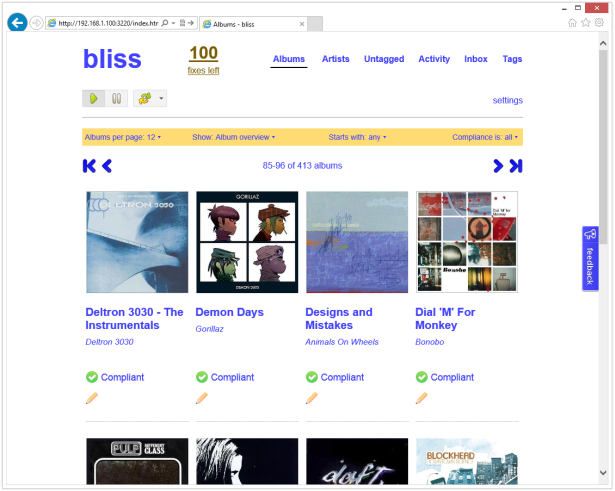
Bliss is a Java application written by Dan Gravell which can manage file names, tags and album art for your music collection and which can also enforce their consistency. It is designed to be left running once installed so that albums you add later will have these same policies applied to them automatically. It supports a wide range of music formats, and effortlessly deals with very large collections – apparently even ones containing quite obscure recordings. My own collection didn’t really put this to the test, since it doesn’t contain bootlegs, live sets or rarities plus I had also already obtained cover art for it (from back when CoverFlow first graced the screen of my iPhone 2G).
I could see from referrals to this blog that people were asking Dan for a Synology package which he didn’t have the time to investigate, and so I thought that it would make an interesting little project, especially since a NAS is the ideal device to run Bliss on. Although there was already a Howto post on the Synology forums, that guide only really covered getting the basic functionality of Bliss up and running – it was missing the best bits: the filesystem watching and audio fingerprinting features. These depend on natively compiled binaries, which Bliss doesn’t include for ARM or PowerPC CPUs. Getting these working provided precisely the sort of challenge I like. Not only were they difficult to compile, but getting them integrated into the various OSGi ‘bundles’ that make up Bliss was quite involved too.
Bliss uses an open source library called Chromaprint, itself part of the wider Acoustid project. The aim is to scan an audio file, to produce a fingerprint of the sound, and then to compare this against an open online database such as MusicBrainz.org to identify music regardless of compression codec used. Its author Lukáš Lalinský explains how it works.
Synology Package Installation
- In Synology DSM’s Package Center, click Settings and add my package repository:
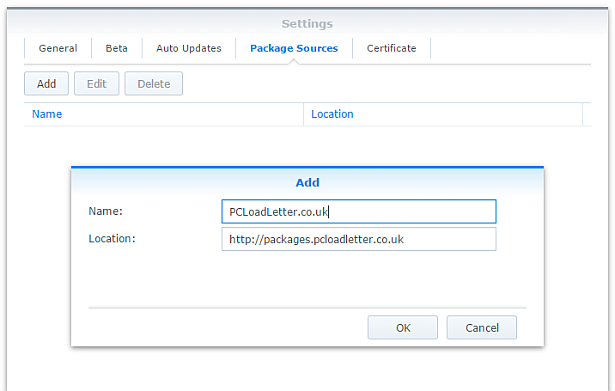
- The repository will push its certificate automatically to the NAS, which is used to validate package integrity. Set the Trust Level to Synology Inc. and trusted publishers:

- Since Bliss is a Java application, you will need to install one of my Java SE Embedded packages first (Java 7 or 8) if you have not already done so. Read the instructions on that page carefully too.
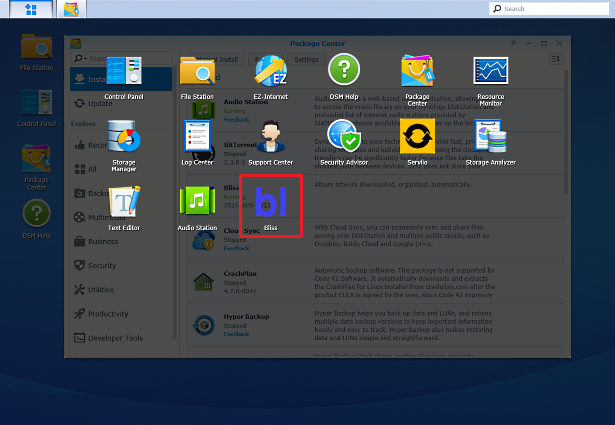
- Now browse the Community section in Package Center to install Bliss:

The repository only displays packages which are compatible with your specific model of NAS. If you don’t see Bliss in the list, then either your NAS model or your DSM version are not supported at this time. DSM 5.0 is the minimum supported version for this package, though you will need DSM 6.0 or later for audio fingerprinting support. - When the Bliss package is running you can manage it using the icon in the main DSM application menu using the button in the top left corner:
Package scripts
For information, here are the package scripts so you can see what it’s going to do. You can get more information about how packages work by reading the Synology 3rd Party Developer Guide.
installer.sh
#!/bin/sh

#--------BLISS installer script
#--------package maintained at pcloadletter.co.uk


DOWNLOAD_URL="`wget -qO- http://www.blisshq.com/app/latest-linux-version`"
DOWNLOAD_FILE="`echo ${DOWNLOAD_URL} | sed -r "s%^.*/(.*)%\1%"`"
SYNO_CPU_ARCH="`uname -m`"
[ "${SYNO_CPU_ARCH}" == "x86_64" ] && [ ${SYNOPKG_DSM_VERSION_MAJOR} -ge 6 ] && SYNO_CPU_ARCH="x64"
[ "${SYNO_CPU_ARCH}" == "x86_64" ] && SYNO_CPU_ARCH="i686"
[ "${SYNOPKG_DSM_ARCH}" == "armada375" ] && SYNO_CPU_ARCH="armv7l"
[ "${SYNOPKG_DSM_ARCH}" == "armada38x" ] && SYNO_CPU_ARCH="armhfneon"
[ "${SYNOPKG_DSM_ARCH}" == "comcerto2k" ] && SYNO_CPU_ARCH="armhfneon"
[ "${SYNOPKG_DSM_ARCH}" == "alpine" ] && SYNO_CPU_ARCH="armhfneon"
[ "${SYNOPKG_DSM_ARCH}" == "alpine4k" ] && SYNO_CPU_ARCH="armhfneon"
[ "${SYNOPKG_DSM_ARCH}" == "monaco" ] && SYNO_CPU_ARCH="armhfneon"
[ ${SYNOPKG_DSM_VERSION_MAJOR} -ge 6 ] && NATIVE_BINS_URL="http://packages.pcloadletter.co.uk/downloads/bliss-native-${SYNO_CPU_ARCH}.tar.xz"
NATIVE_BINS_FILE="`echo ${NATIVE_BINS_URL} | sed -r "s%^.*/(.*)%\1%"`"
#'ua' prefix means wget user-agent will be customized
INSTALL_FILES="ua${DOWNLOAD_URL} ${NATIVE_BINS_URL}"
PID_FILE="${SYNOPKG_PKGDEST}/bliss.pid"
TEMP_FOLDER="`find / -maxdepth 2 -path '/volume?/@tmp' | head -n 1`"
APP_TEMP="${TEMP_FOLDER}/${SYNOPKG_PKGNAME}"
source /etc/profile


pre_checks ()
{
  if [ -z ${JAVA_HOME} ]; then
    echo "Java is not installed or not properly configured. JAVA_HOME is not defined. " >> $SYNOPKG_TEMP_LOGFILE
    echo "Download and install the Java Synology package from http://wp.me/pVshC-z5" >> $SYNOPKG_TEMP_LOGFILE
    exit 1
  fi

  if [ ! -f ${JAVA_HOME}/bin/java ]; then
    echo "Java is not installed or not properly configured. The Java binary could not be located. " >> $SYNOPKG_TEMP_LOGFILE
    echo "Download and install the Java Synology package from http://wp.me/pVshC-z5" >> $SYNOPKG_TEMP_LOGFILE
    exit 1
  fi

  JAVA_VER=`java -version 2>&1 | sed -r "/^.* version/!d;s/^.* version \"[0-9]\.([0-9]).*$/\1/"`
  if [ ${JAVA_VER} -lt 7 ]; then
    echo "This version of Bliss requires Java 7 or newer. Please update your Java package. " >> $SYNOPKG_TEMP_LOGFILE
    exit 1
  fi

  if [ ${SYNOPKG_DSM_VERSION_MAJOR} -lt 6 ]; then
    echo "Please note that native binary support for song identification via audio fingerprinting requires DSM 6.0" >> $SYNOPKG_TEMP_LOGFILE
  fi
}


preinst ()
{
  pre_checks
  cd ${TEMP_FOLDER}
  for WGET_URL in ${INSTALL_FILES}
  do
    WGET_FILENAME="`echo ${WGET_URL} | sed -r "s%^.*/(.*)%\1%"`"
    [ -f ${TEMP_FOLDER}/${WGET_FILENAME} ] && rm ${TEMP_FOLDER}/${WGET_FILENAME}
    #this will allow blisshq.com to track the number of downloads from Synology users
    WGET_URL=`echo ${WGET_URL} | sed -e "s/^ua/--user-agent=Synology --referer=http:\/\/pcloadletter.co.uk\/2012\/09\/17\/bliss-package-for-synology /"`
    wget ${WGET_URL}
    if [[ $? != 0 ]]; then
      if [ -d ${PUBLIC_FOLDER} ] && [ -f ${PUBLIC_FOLDER}/${WGET_FILENAME} ]; then
        cp ${PUBLIC_FOLDER}/${WGET_FILENAME} ${TEMP_FOLDER}
      else
        echo "There was a problem downloading ${WGET_FILENAME} from the official download link, " >> $SYNOPKG_TEMP_LOGFILE
        echo "which was \"${WGET_URL}\" " >> $SYNOPKG_TEMP_LOGFILE
        echo "Alternatively, you may download this file manually and place it in the 'public' shared folder. " >> $SYNOPKG_TEMP_LOGFILE
        exit 1
      fi
    fi
  done

  exit 0
}


postinst ()
{
  #run the installer
  cd ${TEMP_FOLDER}
  echo "INSTALL_PATH=${SYNOPKG_PKGDEST}" > ${TEMP_FOLDER}/bliss-synology.properties
  java -jar ${TEMP_FOLDER}/${DOWNLOAD_FILE} -options ${TEMP_FOLDER}/bliss-synology.properties > /dev/null && rm ${TEMP_FOLDER}/${DOWNLOAD_FILE}
  rm ${TEMP_FOLDER}/bliss-synology.properties
  sed -i "s%^#!/bin/bash%#!/bin/sh%" ${SYNOPKG_PKGDEST}/bin/bliss.sh

  #stow jar files containing Synology versions of native code
  if [ -f ${TEMP_FOLDER}/${NATIVE_BINS_FILE} ]; then
    mkdir ${SYNOPKG_PKGDEST}/syno-native
    cd ${SYNOPKG_PKGDEST}/syno-native
    tar xJf ${TEMP_FOLDER}/${NATIVE_BINS_FILE}
  fi
  #record the CPU architecture
  echo "${SYNO_CPU_ARCH}" > syno_cpu_arch.txt

  #make changes to Bliss launcher script so that pid file is created for Java process
  sed -r -i "s%^(exec .*)$%\1 > ${SYNOPKG_PKGDEST}/bliss.out 2>\&1 \&%" ${SYNOPKG_PKGDEST}/bin/bliss.sh
  echo "echo \$! > ${PID_FILE}" >> ${SYNOPKG_PKGDEST}/bin/bliss.sh

  #set some additional system properties (temp folder, prefs sync interval)
  EXTRA_OPTS="-Djava.io.tmpdir=${TEMP_FOLDER} -Djava.util.prefs.syncInterval=86400 -Djava.net.preferIPv4Stack=true"
  sed -r -i "s%-splash:bliss-splash.png%${EXTRA_OPTS}%" ${SYNOPKG_PKGDEST}/bin/bliss.sh
  sed -r -i "s%-XX:HeapDumpPath=/tmp%-XX:HeapDumpPath=${TEMP_FOLDER}%" ${SYNOPKG_PKGDEST}/bin/bliss.sh

  #create log file to allow package start errors to be captured
  [ -e ${SYNOPKG_PKGDEST}/bliss.out ] || touch ${SYNOPKG_PKGDEST}/bliss.out

  #add firewall config
  /usr/syno/bin/servicetool --install-configure-file --package /var/packages/${SYNOPKG_PKGNAME}/scripts/${SYNOPKG_PKGNAME}.sc > /dev/null

  exit 0
}


preuninst ()
{
  `dirname $0`/stop-start-status stop

  exit 0
}


postuninst ()
{
  #clean up temp
  [ -d ${TEMP_FOLDER}/Bliss ] && rm -rf ${TEMP_FOLDER}/Bliss

  #remove firewall config
  if [ "${SYNOPKG_PKG_STATUS}" == "UNINSTALL" ]; then
    /usr/syno/bin/servicetool --remove-configure-file --package ${SYNOPKG_PKGNAME}.sc > /dev/null
  fi

  exit 0
}


preupgrade ()
{
  `dirname $0`/stop-start-status stop
  pre_checks

  exit 0
}


postupgrade ()
{
  exit 0
}
start-stop-status.sh
#!/bin/sh

#--------BLISS start-stop-status script
#--------package maintained at pcloadletter.co.uk


PKG_FOLDER="`dirname $0 | cut -f1-4 -d'/'`"
ENGINE_SCRIPT="${PKG_FOLDER}/target/bin/bliss.sh"
DNAME="`dirname $0 | cut -f4 -d'/'`"
PID_FILE="${PKG_FOLDER}/target/bliss.pid"
DLOG="${PKG_FOLDER}/target/bliss.out"
SYNO_CPU_ARCH="`cat ${PKG_FOLDER}/target/syno-native/syno_cpu_arch.txt`"
source /etc/profile
source /root/.profile


start_daemon ()
{
  #update the package version number in case of an in-app update
  BLISS_BUNDLE_DIR="`grep -r --include='*.info' com.elsten.bliss.bundle ${PKG_FOLDER}/target/felix-cache/ | cut -f1 -d':'`"
  BLISS_BUNDLE_DIR="`dirname ${BLISS_BUNDLE_DIR}`"
  BLISS_VERSION=`grep "version" ${PKG_FOLDER}/INFO | sed -r "s/^.*([0-9]{8}).*$/\1/"`
  if [ -d ${BLISS_BUNDLE_DIR} ]; then
    find ${BLISS_BUNDLE_DIR} -name *.jar > /tmp/bliss-v-check.txt
    while IFS="" read -r FILE_TO_PARSE; do
      if [ -e ${FILE_TO_PARSE} ]; then
        #no unzip command in DSM 6.0
        if [ -e /usr/bin/7z ]; then
          DETECTED_VERSION=`7z e -so ${FILE_TO_PARSE} META-INF/MANIFEST.MF 2> /dev/null | grep Bundle-Version | cut -f4 -d'.' |  cut -c1-8`
        else
          DETECTED_VERSION=`unzip -p ${FILE_TO_PARSE} META-INF/MANIFEST.MF | grep Bundle-Version | cut -f4 -d'.' |  cut -c1-8`
        fi
      fi
      if [ ${DETECTED_VERSION} -gt ${BLISS_VERSION} ]; then
        BLISS_VERSION=${DETECTED_VERSION}
      fi
    done < /tmp/bliss-v-check.txt
  fi
  rm /tmp/bliss-v-check.txt
  sed -r -i "s/^version=\"[0-9]{8}/version=\"${BLISS_VERSION}/" /var/packages/Bliss/INFO

  #update the CPU-specific repository customizations (in case of an in-app update)
  #catch both armv5te and armv7l
  if [ "${SYNO_CPU_ARCH}" != "${SYNO_CPU_ARCH/arm/}" ]; then
    sed -i "s/policy\.tag\.auto\.linux\.x86/policy\.tag\.auto\.linux\.ARM_le/g" ${PKG_FOLDER}/target/bliss-bundle/repository.xml
  fi
  if [ "${SYNO_CPU_ARCH}" == "ppc" ]; then
    sed -i "s/policy\.tag\.auto\.linux\.x86/policy\.tag\.auto\.linux\.PowerPC/g" ${PKG_FOLDER}/target/bliss-bundle/repository.xml
  fi

  #overwrite native lib bundles with syno versions (in case of an in-app update)
  if [ -e ${PKG_FOLDER}/target/syno-native/ ]; then
    cp ${PKG_FOLDER}/target/syno-native/* ${PKG_FOLDER}/target/bliss-bundle
  fi

  cd ${PKG_FOLDER}
  ${ENGINE_SCRIPT} > /dev/null 2>> ${DLOG}
  if [ -z ${SYNOPKG_PKGDEST} ]; then
    #script was manually invoked, need this to show status change in Package Center
    [ -e ${PKG_FOLDER}/enabled ] || touch ${PKG_FOLDER}/enabled
  fi
}


stop_daemon ()
{
  echo "Stopping ${DNAME}" >> ${DLOG}
  kill `cat ${PID_FILE}`
  wait_for_status 1 20 || kill -9 `cat ${PID_FILE}`
  rm -f ${PID_FILE}
  if [ -z ${SYNOPKG_PKGDEST} ]; then
    #script was manually invoked, need this to show status change in Package Center
    [ -e ${PKG_FOLDER}/enabled ] && rm ${PKG_FOLDER}/enabled
  fi
}


daemon_status ()
{
  if [ -f ${PID_FILE} ] && kill -0 `cat ${PID_FILE}` > /dev/null 2>&1; then
    return
  fi
  rm -f ${PID_FILE}
  return 1
}


wait_for_status ()
{
  counter=$2
  while [ ${counter} -gt 0 ]; do
    daemon_status
    [ $? -eq $1 ] && return
    let counter=counter-1
    sleep 1
  done
  return 1
}


case $1 in
  start)
    if daemon_status; then
      echo ${DNAME} is already running with PID `cat ${PID_FILE}`
      exit 0
    else
      echo Starting ${DNAME} ...
      start_daemon
      exit $?
    fi
  ;;

  stop)
    if daemon_status; then
      echo Stopping ${DNAME} ...
      stop_daemon
      exit $?
    else
      echo ${DNAME} is not running
      exit 0
    fi
  ;;

  restart)
    stop_daemon
    start_daemon
    exit $?
  ;;

  status)
    if daemon_status; then
      echo ${DNAME} is running with PID `cat ${PID_FILE}`
      exit 0
    else
      echo ${DNAME} is not running
      exit 1
    fi
  ;;

  log)
    echo "${DLOG}"
    exit 0
  ;;

  *)
    echo "Usage: $0 {start|stop|status|restart}" >&2
    exit 1
  ;;

esac
Changelog:
- 20160606-0011 Substantial overhaul for DSM 6.0, incorporating many enhancements developed for other packages, updated to Bliss version 20160606, DSM 6.0 newer is now required for audio track fingerprinting (fpcalc is compiled to depend on ffmpeg 2.7.1), added support for several newer Synology products, improved accuracy of temp folder detection, in-app updating should also be fixed
- 20150522-0010 Substantial re-write (hence the long delay):
Updated to Bliss version 20150522
DSM 5.0 newer is now required (fpcalc is compiled to depend on FFmpeg 2.0.2)
Now that Intel systems running DSM 5.0+ use a newer glibc, replacement Intel binaries are no longer needed
Added support for Mindspeed Comcerto 2000 CPU in DS414j
Added support for Intel Atom C2538 (avoton) CPU in various models
Added support for ppc853x CPU in older PowerPC models
Added support for Marvell Armada 375 CPU in DS215j
Added support for Intel Evansport CPU in DS214Play and DS415Play
Switched to using root account – no more adding account permissions, package upgrades will no longer break this
DSM Firewall application definition added
Tested with DSM Task Scheduler to allow package to start/stop at certain times of day, saving RAM when not needed
Daemon init script now uses a proper PID file instead of the unreliable method of using grep on the output of ps
Daemon init script can be run from the command line
Switched to .tar.xz compression for native binaries to reduce web hosting storage footprint
Improved accuracy of temp folder detection
Package is now signed with repository private key
User Agent customization while downloading Bliss package from blisshq.com to allow download stats gathering - 20130213-0009 Updated to Bliss 20130213, and will correctly report version in Package Center after an in-app update
- 20130131-0008 Updated to Bliss 20130131
- 20121112-0007 Fixes for DSM 4.2
- 20121112-006 Updated to Bliss 20121112
- 20121019-005 Updated to Bliss 20121019
- 20121002-004 Updated to Bliss 20121002
- 20120830-003 Added support for Freescale QorIQ PowerPC CPUs used in some Synology x13 series products, PowerPC processors in previous Synology generations with older glibc versions are not supported
- 20120830-002 Hopefully fixed Java prefs polling issue that prevented NAS hibernation
- 20120830-001 initial public release
Build Notes
Chromaprint uses some complex maths functions that FFmpeg can provide (specifically Fourier Transform), and FFmpeg’s shared libraries are already included with Synology DSM. Building Chromaprint linked to those existing libraries results in a minuscule 78KB build of fpcalc, rather than the statically compiled ones for various OS and CPU architectures included with Bliss, which weigh in at several megabytes each. I think I’m finally ‘getting’ what open source is all about, which is nice since that was my objective in experimenting with my NAS. To prevent fpcalc building and linking to its dynamic library libchromaprint.so and to get it to detect FFmpeg properly I had to carefully inspect the Makefiles to find the correct build syntax:
FFMPEG_DIR=${TOOLCHAIN} cmake -DCMAKE_BUILD_TYPE=Release -DBUILD_EXAMPLES=ON -DBUILD_SHARED_LIBS=NO .
FFMPEG_DIR is the base folder from which CMake will look for lib/libavcodec.so and include/libavcodec/avfft.h.
Once I had got past the obstacle of compiling the native code, I needed to liaise back and forth with Dan to understand how Bliss was dealing with its libraries and how I could replace the built-in versions. Originally this was quite a kludge but Dan has since abstracted out the native binaries into their own OSGI bundle fragments which makes things a lot easier, and allows Bliss to survive in-app updates until those native components are superseded. The Synology package provides the following architecture-specific jar files (with corresponding edits to their manifest) which contain the fpcalc binary from Chromaprint. Thank you to Dan for all the quick answers!
- com.elsten.bliss.policy.tag.auto.linux.x86-1.0.1.jar
- com.elsten.bliss.policy.tag.auto.linux.amd64-1.0.1.jar
- com.elsten.bliss.policy.tag.auto.linux.ARM_le-1.0.1.jar (various versions)
- com.elsten.bliss.policy.tag.auto.linux.PowerPC-1.0.1.jar
 PC LOAD LETTER
Thanks for the package. I already have another Java package installed (the one from http://missilehugger.com/556/java-package/). Is there any possibility that the Bliss Package uses this Java installation (it’s located in /usr/local/java/bin/java)?
Depends whether that package sets up the environment variables properly (PATH, JAVA_HOME), and whether it includes locale and UTF-8 support. If it doesn’t then you’ll have issues.
Wow!
Grazie mille!
You deserve a donation =)
While scanning albums I get lots of “Error while executing oleranceAutomaticFixerPolicyCommand” . (The error is visible if I click under compliance results of each Album “unknown” )
I think you’ll probably have to ask Dan Gravell about that over at blisshq.com
Thanks Nicola… please follow the procedure at http://www.blisshq.com/support/reporting-problems.html
I have a DS 410 and even after I refresh the repository I don’t see the package. Any idea why?
Your CPU is a PowerPC which, as mentioned in the instructions, is unfortunately not supported.
while installing I get an error: port 3220 is used by an other service. What can I do (i have no idea what service uses 3220)
If you had a previous version on there, or have uninstalled and then are trying to reinstall, Package Center sometimes does this. Usually it’s fine after waiting a minute or two, or failing that you could try rebooting your syno.
really interesting post, shows a lot more patience for trawling through arcane compiler errors and stack overflow answers than I could ever have!
everything was running fine, then today package center reported an update to the package and I tried installing it: first time it failed and I got stuck (couldn’t reinstall), so I rebooted, reinstalled again and this time worked, even though I lost all settings. After starting bliss, package center reported an update again, but version is always the same. What’s going on?
BTW: putting file http://www.blisshq.com/downloads/bliss-install-20121002.jar in “public” share doesn’t work, the installer script always downloads with wget from blisshq.com.
Looks like Dan has published an in-app update. This is the first time it’s happened since I released the package, and although I liaised with him on how to handle this – it obviously needs work. I’ll investigate…
I tried updating in-app but it says I have the latest version, doesn’t seem that Dan published an update. I debugged a little bit and noticed that your script calls an url on dan’s site to discover the latest jar and then downloads it to install it. After the first installation, when the update notification appears and I run it, the same jar gets downloaded. That’s when I noticed that the update notification was a “false positive”. :)
BTW: I tried putting the jar downloaded in the public share (same procedure as Java SE runtime installation), but the installer doesn’t care, it always redownloads the same jar again.
I have released a new version, but it looks like the in-app update stuff didn’t work. I guess I’ll have to freshen the package each time Dan updates for the time being.
I just rechecked in-app update:
“The current version of bliss is 20121002. You are using the latest version.”
This is always the case, since I installed bliss using your package. Don’t think dan released any update ’til now.
What is the trigger of the update icon in DSM for this package? What gets checked in order to tell users to update?
Currently the check for the latest version only works each time you restart! So this is likely to be wrong when running “forever” on a Synology NAS.
i have got a problem with fingerprinting on my synology (Linux foxbox 2.6.32.12 #2647 Wed Sep 26 03:18:29 CST 2012 armv5tel GNU/Linux synology_88f6282_212+).
I have written an email to dan already and he told me to post in your forum (Dan: “The guy that created the Synology version had to build a new version of the fingerprinter.”)
i also sent him a part of the logfile which i attached. can you help me with this problem or is there already a solution i can apply?
2012-11-06 15:39:36,949 (thread BlockingLowPriorityBufferStorageNotificationBus-notification worker) DEBUG Received updated untagged: /volume1/neueMusik/_unsorted/Tocotronic - Kapitulation(1).mp3,/volume1/neueMusik/_unsorted/Anton Karas - Harry Lime (Third Man's Theme).mp3,/volume1/neueMusik/_unsorted/Van Morrisson - Brown Eyed Girl.mp3,/volume1/neueMusik/_unsorted/Jimi Hendrix - The Wind Cries Mary.mp3,/volume1/neueMusik/_unsorted/Aretha Franklin - Respect.mp3 (UntaggedSuggestionStorageNotificationListener.java:70) 2012-11-06 15:39:42,859 (thread UntaggedSuggestionStorageNotificationListener) ERROR Exception while fingerprinting /volume1/neueMusik/_unsorted/Tocotronic - Kapitulation(1).mp3 (AudioFingerprint.scala:94) java.lang.RuntimeException: Nonzero exit value: 2 at scala.sys.package$.error(package.scala:27) at scala.Predef$.error(Predef.scala:66) at process.AbstractProcessBuilder.getString(ProcessImpl.scala:140) at process.AbstractProcessBuilder.$bang$bang(ProcessImpl.scala:142) at com.elsten.bliss.policy.tag.auto.FpCalc$class.exec(AudioFingerprint.scala:88) at com.elsten.bliss.policy.tag.auto.FpCalcLinux$.exec(AudioFingerprint.scala:107) at com.elsten.bliss.policy.tag.auto.AudioFingerprintFromFile.calc(AudioFingerprint.scala:133) at com.elsten.bliss.policy.tag.auto.AudioFingerprint.result(AudioFingerprint.scala:120) at com.elsten.bliss.policy.tag.auto.AcoustidLookup$$anonfun$5.apply(AcoustidLookup.scala:104) at com.elsten.bliss.policy.tag.auto.AcoustidLookup$$anonfun$5.apply(AcoustidLookup.scala:104) at scala.collection.TraversableLike$$anonfun$filter$1.apply(TraversableLike.scala:213) at scala.collection.mutable.ResizableArray$class.foreach(ResizableArray.scala:60) at scala.collection.mutable.ArrayBuffer.foreach(ArrayBuffer.scala:44) at scala.collection.TraversableLike$class.filter(TraversableLike.scala:212) at scala.collection.mutable.ArrayBuffer.filter(ArrayBuffer.scala:44) at com.elsten.bliss.policy.tag.auto.AcoustidLookup$.forItems(AcoustidLookup.scala:104) at com.elsten.bliss.policy.tag.auto.AcoustidLookup$.forFiles(AcoustidLookup.scala:37) at com.elsten.bliss.policy.tag.auto.AcoustidLookup.forFiles(AcoustidLookup.scala) at com.elsten.bliss.untagged2.AcoustidUntaggedRecognitionStrategy.lookupFileResults(AcoustidUntaggedRecognitionStrategy.java:312) at com.elsten.bliss.untagged2.AcoustidUntaggedRecognitionStrategy.doSuggest(AcoustidUntaggedRecognitionStrategy.java:150) at com.elsten.bliss.untagged2.AcoustidUntaggedRecognitionStrategy.suggest(AcoustidUntaggedRecognitionStrategy.java:131) at com.elsten.bliss.untagged.UntaggedSuggestionStorageNotificationListener$Consumer.run(UntaggedSuggestionStorageNotificationListener.java:43) at java.util.concurrent.Executors$RunnableAdapter.call(Executors.java:471) at java.util.concurrent.FutureTask$Sync.innerRun(FutureTask.java:334) at java.util.concurrent.FutureTask.run(FutureTask.java:166) at java.util.concurrent.ThreadPoolExecutor.runWorker(ThreadPoolExecutor.java:1110) at java.util.concurrent.ThreadPoolExecutor$Worker.run(ThreadPoolExecutor.java:603) at java.lang.Thread.run(Thread.java:722) 2012-11-06 15:39:43,011 (thread UntaggedSuggestionStorageNotificationListener) ERROR Exception while fingerprinting /volume1/neueMusik/_unsorted/Anton Karas - Harry Lime (Third Man's Theme).mp3 (AudioFingerprint.scala:94) java.lang.RuntimeException: Nonzero exit value: 2 at scala.sys.package$.error(package.scala:27) at scala.Predef$.error(Predef.scala:66) at process.AbstractProcessBuilder.getString(ProcessImpl.scala:140) at process.AbstractProcessBuilder.$bang$bang(ProcessImpl.scala:142) at com.elsten.bliss.policy.tag.auto.FpCalc$class.exec(AudioFingerprint.scala:88) at com.elsten.bliss.policy.tag.auto.FpCalcLinux$.exec(AudioFingerprint.scala:107) at com.elsten.bliss.policy.tag.auto.AudioFingerprintFromFile.calc(AudioFingerprint.scala:133) at com.elsten.bliss.policy.tag.auto.AudioFingerprint.result(AudioFingerprint.scala:120) at com.elsten.bliss.policy.tag.auto.AcoustidLookup$$anonfun$5.apply(AcoustidLookup.scala:104) at com.elsten.bliss.policy.tag.auto.AcoustidLookup$$anonfun$5.apply(AcoustidLookup.scala:104) at scala.collection.TraversableLike$$anonfun$filter$1.apply(TraversableLike.scala:213) at scala.collection.mutable.ResizableArray$class.foreach(ResizableArray.scala:60) at scala.collection.mutable.ArrayBuffer.foreach(ArrayBuffer.scala:44) at scala.collection.TraversableLike$class.filter(TraversableLike.scala:212) at scala.collection.mutable.ArrayBuffer.filter(ArrayBuffer.scala:44) at com.elsten.bliss.policy.tag.auto.AcoustidLookup$.forItems(AcoustidLookup.scala:104) at com.elsten.bliss.policy.tag.auto.AcoustidLookup$.forFiles(AcoustidLookup.scala:37) at com.elsten.bliss.policy.tag.auto.AcoustidLookup.forFiles(AcoustidLookup.scala) at com.elsten.bliss.untagged2.AcoustidUntaggedRecognitionStrategy.lookupFileResults(AcoustidUntaggedRecognitionStrategy.java:312) at com.elsten.bliss.untagged2.AcoustidUntaggedRecognitionStrategy.doSuggest(AcoustidUntaggedRecognitionStrategy.java:150) at com.elsten.bliss.untagged2.AcoustidUntaggedRecognitionStrategy.suggest(AcoustidUntaggedRecognitionStrategy.java:131) at com.elsten.bliss.untagged.UntaggedSuggestionStorageNotificationListener$Consumer.run(UntaggedSuggestionStorageNotificationListener.java:43) at java.util.concurrent.Executors$RunnableAdapter.call(Executors.java:471) at java.util.concurrent.FutureTask$Sync.innerRun(FutureTask.java:334) at java.util.concurrent.FutureTask.run(FutureTask.java:166) at java.util.concurrent.ThreadPoolExecutor.runWorker(ThreadPoolExecutor.java:1110) at java.util.concurrent.ThreadPoolExecutor$Worker.run(ThreadPoolExecutor.java:603) at java.lang.Thread.run(Thread.java:722) 2012-11-06 15:39:43,100 (thread UntaggedSuggestionStorageNotificationListener) ERROR Exception while fingerprinting /volume1/neueMusik/_unsorted/Van Morrisson - Brown Eyed Girl.mp3 (AudioFingerprint.scala:94) java.lang.RuntimeException: Nonzero exit value: 2 at scala.sys.package$.error(package.scala:27) at scala.Predef$.error(Predef.scala:66) at process.AbstractProcessBuilder.getString(ProcessImpl.scala:140) at process.AbstractProcessBuilder.$bang$bang(ProcessImpl.scala:142) at com.elsten.bliss.policy.tag.auto.FpCalc$class.exec(AudioFingerprint.scala:88) at com.elsten.bliss.policy.tag.auto.FpCalcLinux$.exec(AudioFingerprint.scala:107) at com.elsten.bliss.policy.tag.auto.AudioFingerprintFromFile.calc(AudioFingerprint.scala:133) at com.elsten.bliss.policy.tag.auto.AudioFingerprint.result(AudioFingerprint.scala:120) at com.elsten.bliss.policy.tag.auto.AcoustidLookup$$anonfun$5.apply(AcoustidLookup.scala:104) at com.elsten.bliss.policy.tag.auto.AcoustidLookup$$anonfun$5.apply(AcoustidLookup.scala:104) at scala.collection.TraversableLike$$anonfun$filter$1.apply(TraversableLike.scala:213) at scala.collection.mutable.ResizableArray$class.foreach(ResizableArray.scala:60) at scala.collection.mutable.ArrayBuffer.foreach(ArrayBuffer.scala:44) at scala.collection.TraversableLike$class.filter(TraversableLike.scala:212) at scala.collection.mutable.ArrayBuffer.filter(ArrayBuffer.scala:44) at com.elsten.bliss.policy.tag.auto.AcoustidLookup$.forItems(AcoustidLookup.scala:104) at com.elsten.bliss.policy.tag.auto.AcoustidLookup$.forFiles(AcoustidLookup.scala:37) at com.elsten.bliss.policy.tag.auto.AcoustidLookup.forFiles(AcoustidLookup.scala) at com.elsten.bliss.untagged2.AcoustidUntaggedRecognitionStrategy.lookupFileResults(AcoustidUntaggedRecognitionStrategy.java:312) at com.elsten.bliss.untagged2.AcoustidUntaggedRecognitionStrategy.doSuggest(AcoustidUntaggedRecognitionStrategy.java:150) at com.elsten.bliss.untagged2.AcoustidUntaggedRecognitionStrategy.suggest(AcoustidUntaggedRecognitionStrategy.java:131) at com.elsten.bliss.untagged.UntaggedSuggestionStorageNotificationListener$Consumer.run(UntaggedSuggestionStorageNotificationListener.java:43) at java.util.concurrent.Executors$RunnableAdapter.call(Executors.java:471) at java.util.concurrent.FutureTask$Sync.innerRun(FutureTask.java:334) at java.util.concurrent.FutureTask.run(FutureTask.java:166) at java.util.concurrent.ThreadPoolExecutor.runWorker(ThreadPoolExecutor.java:1110) at java.util.concurrent.ThreadPoolExecutor$Worker.run(ThreadPoolExecutor.java:603) at java.lang.Thread.run(Thread.java:722)Which version of DSM are you running? It was compiled against DSM 4.1’s FFmpeg libraries if I recall. I may have a workaround (something I did for Serviio) but I still need to update the Synology Bliss package to Dan’s latest release – something I haven’t yet found time to do.
thank you for the quick reply. My version of dsm is 4.1-2647. Maybe you have got time to update the bliss package sometime. Let me know if you need further information. I would be happy to keep bliss running on my box.
Maybe a stupid question, but why can’t i see my music?
You have to point bliss at your music. Click ‘settings’ then ‘Browse’ to find your music (of if you already know the location type it in). Can you find your music that way?
After doing that, configure some rules. E.g. see http://www.blisshq.com/support/tutorials/first-steps.html
Thanks :-)
I’m very interested on your Chromaprint and fpcalc libaries/binaries for Synology.
I need fpcalc for fingerprinting with beet (a python mp3 tagger).
Where can I find the files/libaries?
Hi, sorry about the delay – I forgot to reply to your comment. Install the package, then let it scan some music, preferably a track with an ambiguous name and it will extract fpcalc to /volume1/@tmp/Bliss/fpcalc_linux. If you use it in another project please can you credit me and link back to this page. Thanks.
Apologies, this package has been broken since Dan’s update to Bliss on the 19th October, and unfortunately I hadn’t found time to test and fix, until now. Enjoy!
i’m afraid fingerprinting still does not work. after updating i get the same error in the log. Is there anything else to do but updating the sysno-package? (error: 2012-11-13 08:28:31,617 (thread UntaggedSuggestionStorageNotificationListener) ERROR Exception while fingerprinting /volume1/neueMusik/testfiles/Marvin Gaye – Whats Going On.mp3 (AudioFingerprint.scala:94)
java.lang.RuntimeException: Nonzero exit value: 2)
What’s your CPU and DSM version please?
I’m seeing this a few times too. I’m in the process of gathering info about the Synology models affected. The latest I’ve heard it occurring with is the DS713+
Also, another occurrence with the DS412+ running DSM 4.2-3202
My version of dsm is 4.1-2647
Linux foxbox 2.6.32.12 #2647 Wed Sep 26 03:18:29 CST 2012 armv5tel GNU/Linux synology_88f6282_212+
What happens when you run /volume1/@tmp/Bliss/fpcalc_linux
Try manually fingerprinting a test file. If that works then there’s nothing wrong with the package but perhaps the audio file is corrupt in some way. I have that same DSM version, and with armv5tel CPU.
/volume1/@tmp/Bliss/fpcalc_linux: line 1: syntax error: unexpected “)”
Can you reboot your syno? The copy of fpcalc in your @tmp folder is the one from before I fixed the package. Let Bliss run for a bit and it will extract it again, then it should work. I’ll need to fix the uninstaller to clean that up.
After the reboot it seems to work now. but fingerprinting still does not recognize any songs. i wrote an email to dan now. i will keep you informed if i get any news.
I’m watching this thread :) Maybe some extra validation I’ve added to avoid false positives. Once you’ve uploaded the files to the folder I invited you to, Harald, I’ll take a look.
Ok i have a DS212+ and i was running the last version just fine, it worked great and i bought the unlimited license, now that i upgraded to the latest package it is no longer running, when i look at the log file through the package center there is a big long list of Java errors starting with “Failed to start shutdown monitor because could’nt open the server socket (ShutdownMonitor.java:36, thread FelixStartLevel) java.net.bindException: Address already in use
it states that the address already in use sevral times in the log
I am using your Java package embedded 7 1.7.0_06-010
not sure what other information might might need to steer me in the right direction.
Not sure about this. Have you tried rebooting the NAS perhaps?
I have rebooted a couple of times as well as uninstall and reinstall, how do I copy the log file out, also what command do I use to delete a folde that is not empty using telnet and logged in as root, I am trying the fixes that Dan suggested
So i sent Synology support the kernal log file from my system and they said the the Bliss package is running amuck, and that i needed to remove it to get it back to normal, here is what was in the log file i am hoping it means more to you than it does to me.
The log was flooded with these messages just before you restarted the unit. It looks like these processes were building up in the system and when you restarted, the system attempted to kill them all:
Nov 19 09:43:29 killps: Kill the process “/volume1/@appstore/java7/jre/bin/java” with /volume1/@appstore/Bliss/felix-cache/bundle13/version0.0/bundle.jar.
Nov 19 09:43:29 killps: Kill the process “/volume1/@appstore/java7/jre/bin/java” with /volume1/@appstore/Bliss/felix-cache/bundle14/version0.0/bundle.jar.
Nov 19 09:43:29 killps: Kill the process “/volume1/@appstore/java7/jre/bin/java” with /volume1/@appstore/Bliss/felix-cache/bundle15/version0.0/bundle.jar.
Nov 19 09:43:29 killps: Kill the process “/volume1/@appstore/java7/jre/bin/java” with /volume1/@appstore/Bliss/felix-cache/bundle16/version0.0/bundle.jar.
Nov 19 09:43:29 killps: Kill the process “/volume1/@appstore/java7/jre/bin/java” with /volume1/@appstore/Bliss/felix-cache/bundle17/version0.0/bundle.jar.
Nov 19 09:43:29 killps: Kill the process “/volume1/@appstore/java7/jre/bin/java” with /volume1/@appstore/Bliss/felix-cache/bundle18/version0.0/bundle.jar.
Nov 19 09:43:29 killps: Kill the process “/volume1/@appstore/java7/jre/bin/java” with /volume1/@appstore/Bliss/felix-cache/bundle19/version0.0/bundle.jar.
Nov 19 09:43:29 killps: Kill the process “/volume1/@appstore/java7/jre/bin/java” with /volume1/@appstore/Bliss/felix-cache/bundle20/version0.0/bundle.jar.
Nov 19 09:43:29 killps: Kill the process “/volume1/@appstore/java7/jre/bin/java” with /volume1/@appstore/java7/jre/lib/rt.jar.
Did they provide any more detail other than “running amuck”? That could mean anything.
BTW, bliss is not fully tested against Java 1.7. It should work, but there are possibilities things could go wrong. Do you have a /tmp/bliss.log file you can send me?
A few other thoughts on the logs Jim has provided…
The multitude of processes… could these be processes, or could they be threads-as-processes, i.e. the threads started by bliss? bliss will, for instance, assess five albums at the same time, and runs five threads for this.
Jim also provided a screenshot by email. The pertinent error message, which I have mangled slightly for this comment, was:
Error accessing file:/volume1/@appstore/Bliss/bliss-bundle/com.elsten.bliss.policy.coverart.lookup.discogs-2.0.1.jar (No such file or directory)
This file is no longer hosted on blisshq.com – the latest version of the discogs bundle is 2.0.3 and that’s all that is deployed.
Since this has not been fully tested on Java 7 i am swapping it out for JAVA 6, i am currently resyncing my crash plan and then will reboot and try ou Bliss again and let you know how it goes.
Using java 6 did not make any difference, I’m just about ready to reset the is on my system to see if it works after that, I’m running out of ideas
so interesting happenstance, on a while i tried connecting to Bliss and it was actually running even though package center states that the app is not running.
The actual Java errors would be helpful to see, but try the following in order:
http://www.blisshq.com/support/faq/install-first-use/fixing-update.html
http://www.blisshq.com/support/faq/general/how-clear-corrupted-database.html
Let me know how you get on…
So far I can get into where the files that need to be removed are but it won’t let me delete a folder that is not empty and I am trying to figure out how to copy the error message out I may end up taking a screen shot and emailing you
Cool, email me bliss @ blisshq.com
Hi (again)
Some IP-addresses have just tried to bruteforce into my DiskStation :-( Could they in any way use the bliss user to access it? I do also have a plex user and Jomla do you maybe know about them? What is actually the password for the bliss user? And can i see which login (and passwords) they have tried in some kind of log file, couse i’m really interested to know that :-)
Sorry for the (maybe) off-topic question, but I didn’t knew any other places to ask :-)
Hi,
I have just installed bliss on my Synology DS213air. bliss is reported to be running but I can’t connect either by hostname (diskstation) or directly by IP address. I am able to access the admin interface on port 5000 and there are no rules in the firewall. By way of a bit of diagnostics I ssh’d in to the NAS and note the following:
ps | grep bliss
returns with
8640 bliss 241m S /volume1/@appstore/java7/jre/bin/java -Djava.io.tmpdir=/volume1/@tmp/Bliss -Djava.util.prefs.syncInterval=86400 -Xmx1
so it looks like it is running.
A quick netstat | grep 3220
Returns nothing!
Quick sanity check netstat | grep 5000
tcp 0 0 ::ffff:192.168.4.220%18:5000 ::ffff:192.168.4.200%3202210100:53258 ESTABLISHED
cd /volume1/@appstore/Bliss/bin to run bliss.sh manually returns this:
ERROR: Error creating bundle cache. (java.lang.Exception: Unable to create bundle cache lock file: java.io.FileNotFoundException: ././../felix-cache/cache.lock (Permission denied))
java.lang.Exception: Unable to create bundle cache lock file: java.io.FileNotFoundException: ././../felix-cache/cache.lock (Permission denied)
at org.apache.felix.framework.cache.BundleCache.(BundleCache.java:168)
at org.apache.felix.framework.Felix.init(Felix.java:629)
at org.apache.felix.main.Main.main(Main.java:289)
Could not create framework: org.osgi.framework.BundleException: Error creating bundle cache.
org.osgi.framework.BundleException: Error creating bundle cache.
at org.apache.felix.framework.Felix.init(Felix.java:634)
at org.apache.felix.main.Main.main(Main.java:289)
Caused by: java.lang.Exception: Unable to create bundle cache lock file: java.io.FileNotFoundException: ././../felix-cache/cache.lock (Permission denied)
at org.apache.felix.framework.cache.BundleCache.(BundleCache.java:168)
at org.apache.felix.framework.Felix.init(Felix.java:629)
… 1 more
Permissions check
drwxr-xr-x 9 bliss users 4096 Nov 23 20:21 felix-cache
which explains why I can’t run bliss as I’m not logged in as a bliss user and I don’t expect that bliss has a shell account so I’m a bit stumped now.
Any suggestions on how to proceed now please?
Don’t launch it as root ,it will mess up the file and folder permissions for when the daemon user tries to launch. Remove the package, reboot, then re-install, and try again. The log that you can see in Package Center will report all output.
When you say don’t launch it as “root”, do you mean don’t launch it as “admin”? admin is the only account I have set up on the box. Should I create a “normal” user account and run it from that?
You can log in on SSH using the user name ‘root’ which has the same password that you set for the admin account. Running any of the packages manually as a user that’s not the daemon account they normally use will tend to mess things up though by changing the permissions on log and config files such that the daemon user is subsequently unable to access them.
Hi,
Please ignore my last reply. I reinstalled and rebooted and everything is good. Thanks.
Andy
Good stuff
How do you remove the package to reinstall it again? I’m having the same issue as Andrew.
Find the package in Package Center, click More, then Uninstall.
Hi all, I just updated the Bliss package to work with Dan’s latest release.
Hi,
I’ve got an error when launching the package after the update. bliss is working if i connect to the bliss 3320 port, but launching package cause an error while repairing. no icon is created in the DSM. and since the package is not “launched” i cannot stop it from the DSM.
i always have this problem. i’ve uninstalled package, reboot the syno, then reinstall. but no way to lauch the package. I’ve got a bliss “licence” and i also use crashplan package
Removed, reboot, re-installed, still doesn’t work. Does it matter if you are on the LAN when you install it or can I be remote using my external DDNS address? I’m doing this from the Office rather than at home on my LAN
If you haven’t forwarded the specific port for Bliss, then you cannot get acces from WAN.
I realise that but the fact is it doesn’t work at home on the LAN either, also the Syno is in a DMZ.
Dan what does this error mean?
Error while executing ToleranceAutomaticFixerPolicyCommand
java.lang.RuntimeException: Exception occured executing MoveAlbumAndInformPlatformCallable
at com.elsten.bliss.music.conceptual.model.ChangeOnlyAlbumMapper.submit(ChangeOnlyAlbumMapper.java:177)
at com.elsten.bliss.music.conceptual.model.ChangeOnlyAlbumMapper.moveAlbum(ChangeOnlyAlbumMapper.java:235)
at com.elsten.bliss.music.policy.fileorg.AggregatedFilePathResponse.execute(AggregatedFilePathResponse.java:89)
at com.elsten.bliss.music.policy.ToleranceAutomaticFixerPolicyCommand.execute(ToleranceAutomaticFixerPolicyCommand.java:54)
at com.elsten.bliss.music.conceptual.model.AggregatedPolicyCommand.executeChildPolicy(AggregatedPolicyCommand.java:62)
at com.elsten.bliss.music.conceptual.model.AggregatedPolicyCommand.execute(AggregatedPolicyCommand.java:45)
at com.elsten.bliss.music.conceptual.model.AlbumComplianceUpdate.execute(AlbumComplianceUpdate.java:53)
at com.elsten.bliss.music.conceptual.model.ExclusiveAlbumMusicModelListener$ExclusiveComplianceUpdate.execute(ExclusiveAlbumMusicModelListener.java:127)
at com.elsten.bliss.music.policy2.PerFixLicensedPolicyCommandExecutor.executeCommand(PerFixLicensedPolicyCommandExecutor.java:101)
at com.elsten.bliss.music.policy2.InMemoryMusicPolicyDistributor.albumUpdated(InMemoryMusicPolicyDistributor.java:61)
at com.elsten.bliss.music.policy2.PersistedActivationMusicPolicyDistributor.albumUpdated(PersistedActivationMusicPolicyDistributor.java:105)
at com.elsten.bliss.music.conceptual.model.ThreadedMusicModelListener$2.run(ThreadedMusicModelListener.java:97)
at java.util.concurrent.Executors$RunnableAdapter.call(Executors.java:441)
at java.util.concurrent.FutureTask$Sync.innerRun(FutureTask.java:303)
at java.util.concurrent.FutureTask.run(FutureTask.java:138)
at java.util.concurrent.ThreadPoolExecutor$Worker.runTask(ThreadPoolExecutor.java:886)
at java.util.concurrent.ThreadPoolExecutor$Worker.run(ThreadPoolExecutor.java:908)
at java.lang.Thread.run(Thread.java:662)
Caused by: java.lang.NullPointerException: Null tagKey is not allowed
at com.elsten.bliss.platform.tagindex.JdbmTagIndex$TaggedRecordIndexKeys.(JdbmTagIndex.java:315)
at com.elsten.bliss.platform.tagindex.JdbmTagIndex.lookupIndexKeys(JdbmTagIndex.java:354)
at com.elsten.bliss.platform.tagindex.JdbmTagIndex.lookupIndexKeys(JdbmTagIndex.java:348)
at com.elsten.bliss.platform.tagindex.JdbmTagIndex.removeFromStorageNodeToTaggedRecords(JdbmTagIndex.java:458)
at com.elsten.bliss.platform.tagindex.JdbmTagIndex.access$4(JdbmTagIndex.java:456)
at com.elsten.bliss.platform.tagindex.JdbmTagIndex$JdbmTagStoreDataImpl.removeUniDirectional(JdbmTagIndex.java:577)
at com.elsten.bliss.platform.tagindex.model.UniDirectionalTaggedCommand.remove(UniDirectionalTaggedCommand.java:27)
at com.elsten.bliss.platform.tagindex.model.TabledTagIndex.deleteQuietly(TabledTagIndex.java:84)
at com.elsten.bliss.music.conceptual.model.PlatformAlbumMapperImpl.updateTagIndexAndMusicModelFromStorageNodes(PlatformAlbumMapperImpl.java:94)
at com.elsten.bliss.music.conceptual.model.PlatformAlbumMapperImpl.access$0(PlatformAlbumMapperImpl.java:84)
at com.elsten.bliss.music.conceptual.model.PlatformAlbumMapperImpl$MoveAlbumAndInformPlatformCallable.call(PlatformAlbumMapperImpl.java:239)
at com.elsten.bliss.music.conceptual.model.ChangeOnlyAlbumMapper$MoveAlbumCallable.call(ChangeOnlyAlbumMapper.java:1)
at com.elsten.bliss.music.conceptual.model.ChangeOnlyAlbumMapper.submit(ChangeOnlyAlbumMapper.java:174)
… 17 more
It means bliss broke :( Most likely caused by stale data. If you leave bliss to run through, then perform a clear and rescan (http://www.blisshq.com/music-library-management-blog/2012/01/03/new-release-20111221-clear-rescan/) that should clear things up.
Could you send me a debug archive by email (Help then Download debug archive)?
sent
I tried updating Bliss using internal update feature and it didn’t restart.
I uninstalled now, but before installing again and reconfiguring everything I’d like to know if I’m the only one with this issue and if it is safe to update in-app or I should wait for the package release.
Thanks.
I’ve just reinstalled, latest version installed automagically, database was empty but my previous settings were retained. Great. Now it’s rescanning everything…let’s cross fingers…:)
I get a “failed to run package service” when I try and run bliss on my DS211j
nevermind, I went to the web address anyway and i can access the gui, so I’m assuming all is good to go
I’m getting this error, but I can’t access from the web server address, so i know it’s not running.
tried reinstalling.
now on dsm4.2 beta 3161 on a 712+
still won’t run.
lots of java errors in log, but i followed java 6re instructions?
On DSM 4.2 beta you will need the Perl package installed (Perl was always included in DSM until now).
I have Perl package installed and I am getting the “failed to run package service”
Are there some logs that will give more info on why the package service will not run?
I’ll check the installation on my Syno later tonight.
Perl is no longer required. Does your syno have a bliss user since installing the package?
Yes, I have a bliss user that was part of the users group. I tried to give it as much privileges as I could but was still not able to get the package service to start.
I have am using dsm4.2 beta 3161 on a 413j
Hi, somehow I can’t add your package repository URL to sourcesettings. Any thoughts?
Hi Patters,
Bliss is live with Release 20130213 – do you know when the updated Bliss Synology package will be available?
Thanks, Jason
Hi Jason, the in-app update from inside the Bliss web pages should just work. Does it not?
Hi Patters,
No it does not work unfortunately. If I click on update from within the Bliss web page, it states: The current version of bliss is 20130131. You are using the latest version.
I usually update via Synology Package Center when it indicates there is an update available. Jason
Jason – I forgot to say you need to restart bliss for it to see the new version.
Thanks for that Dan.
Question – if I update directly from Bliss, would this create a disconnect from the version that Synology thinks it is running within the ‘Synology Package Center’
As mentioned before, to date, I have always done upgrades via ‘Synology Package Center’
Erm, not sure! Patters?
No, it will be fine. Package Center will only offer an upgrade if the repo-hosted version number is greater. If your local version is greater it will be fine. I made the Bliss daemon startup script check the Bliss jar file’s manifest to determine the version, and made it update the Synology package metadata to match every time it starts up. So the version that you see reported in Package Center should change once you run an in-app update (you would need to restart the package to see that). I just tested the in-app update myself and it seems fine apart from that version number update in Package Center – I’ll investigate that…
Dan – does Bliss only check for updates as it starts then? Would you consider a check once every 24 hours as well?
Dan – following the in-app update the manifest in bliss-bundle/com.elsten.bliss.bundle-0.0.0.jar is still showing the older version number. Is that because the newer version of Bliss is unpacked elsewhere, or did you forget to update the manifest in the new version?
It should be 0.0.0.201302131248 . I’m wondering if you are receiving a cached version from CloudFront (the CDN)?
Thanks for that Patters – I ran the in-app update and Bliss updated and shows me latest version. I then stopped and restarted Package but still see the old version number (as you described above too)
Hi everybody,
It seems Bliss doesn’t scan for new music after the initial scan. I have to manually “clear and rescan” the database each time.
I’ve tried moving the files around; changing permissions… To no avail.
I’ve sent logs to Dan but he doesn’t seem to find anything wrong with them at first glance.
Any ideas?
Forgot some useful info… I’m running on a DS712+ (Intel Atom D425)
Well, after rebooting/restarting everything, it seems to be working now… Not sure what was happening. Maybe a service hadn’t been started properly or something.
Anyways, I already thanked Dan for his piece of software but I got to thank patters for the port :)
Updated to latest version, plus fixed version reporting after in-app updates.
Patters is there a way to permanently remove this from from my system? Right now it will not display that it is running in the package centers even though it is, I have even gone as far as to push the reset button 2 times and re-install DSM for scratch then installed everything again but it appears that the Bilss database was still there because it did not need to re scan and i did not have to enter my unlimited fix code either.
The bliss database is, by default, in ~/.bliss/data . I can’t remember if the Synology version puts that somewhere other than the home folder. You can remove that manually.
The bliss user home directory is at /var/services/homes/bliss
you’ll have to forgive me i am not so fluent with Linux commands, what command would i use to remove that directory and its contents, and is that the only place to look for remnants of the install?
You should be able to do:
ls /var/services/homes/bliss
That should list the data folder, a file called settings, activePolicies etc.
If that is the case do:
cd /var/services/homes/bliss
rm -rf data
interesting the bliss folder in homes went away after doing an uninstall, but something somewhere is still persisting that has settings and everything else about bliss in it.
It shouldn’t do on DSM 4.1 and later (the synouser –del command no longer cleans up the home directory).
never mind i guess after resetting my DSM and re installing i needed to install Bliss then uninstall it and then re install it to get everything back to normal again
I’d really love to get this working on my DS212j, and very nearly did but seem to have stopped now. I followed the installation instructions to the letter and all seemed to install until Bliss tried to run which threw up the “failed to run package service” error. Checked the log and things seemed to be happening but the service was still stopped. When trying to start I get the “failed to run package service” error.
When going to the web address I was oddly able to load up, configure and start scanning so it seemed to be working even though the app was stopping in the Package Centre.
I was on the verge of getting the unlimited licence too as Bliss seemed just what I needed.
Any suggestions on how to get this working please?
I had a lot of problems with this as well, I ended up resetting my ds and reinstalling it from scratch, though afterwords I found this not nessisarry. In install bliss the you will have to ssh or telnet into your ds and remove and home directorys associated wil bliss. If you look at blisshq.com there are som faqs that list the files your looking for and if you read through this thread there is more information
Thanks Jim. So are you saying that you have managed to get Bliss working fully now?
Yup it works now, starting and stopping from dsm as well as when I uninstall and reinstall all settings go to default
Thanks for creating this package on Synology.
After an upgrade of the Bliss package (through the package manager of Synology) a new user is created (with a new uid). This brings many permission error messages when moving files with Bliss. Can you please adjust the package, so that when doing an upgrade no longer is the Bliss user deleted?
Thanks!
Same issue for me on my Synology. I hope this can be fixed soon… With these permission error, I prefer to not update Bliss unless this isn’t fixed
Hi,
First off, appreciate the effort you put into making Bliss work on the Synology NAS! :)
It seems like a great app, just what I need to move on from a desktop version of Media Monkey which I used to automate music library indexing.
However, is anyone else experiencing a really slow NAS after installing? Not only is the bliss user interface very sluggish, bordering on useless to be honest, but also the actual web admin for the NAS is sluggish. Any ideas?
This affects the manual updating of for example file structures, takes ages from clicking the fix button to it actually being done.
Also tried the in-app update button the other day, which completely broke the Bliss package and returned a 404 error in the admin. Maybe this isn’t supposed to be used?
Accessing the Bliss user interface from a remote location using Synologys DynDNS doesn’t seem to be working, opened up the port 3220 and the Synology Web admin and services is working using the same DynDNS, suggestions?
Do I need to change any read/write settings for the Bliss user that is being created? Right now it doesn’t have access to any of the folders.
Hope you got some tips, otherwise I guess I’ll remove it waiting for a future update. Got the unlimited pack though so might try some desktop version of it.
My specs:
Synology DS211
DSM 4.2-3202
Bliss 2003-02-13-0009
Hi @erikr . About the in-app update… this can happen sometimes, it’s still not a seamless process. Deleting then re-installing I think should fix this but maybe patters should confirm that there isn’t any other side effect.
I know patters is also working on some stuff around the user and permissions on install/uninstall.
Hi,
I just thought I would provide a little feedback on a few issues I encountered when installing the Bliss package on my Synology DS1511+/DX510 system.
First a couple of minor issues with the installation (at least on my setup). The problem I experienced was due to my system setup where I have 2 volumes, volume1 on the DS1511+ and volume2 on the DX510 (used for backups). When I installed Bliss I requested that it be installed on volume1, which was honoured. However due to assumptions in the installer.sh and start-stop-status.sh scripts I ended up with an installation with Bliss’s temporary directory setup to be in volume2 (/volume2/@tmp/Bliss) which is not what I wanted and also prevented Bliss from starting. The following are the patches I made to installer.sh:
>>> cut here <<nul`”
+DAEMON_PASS=”`openssl rand 12 -base64 2>/dev/null`”
DAEMON_ID=”${SYNOPKG_PKGNAME} daemon user”
ENGINE_SCRIPT=”bliss.sh”
MIGRATION_FOLDER=”${DAEMON_USER}_data_mig”
@@ -17,7 +17,7 @@
INSTALL_FILES=”${DOWNLOAD_URL}”
source /etc/profile
-TEMP_FOLDER=”`find / -maxdepth 2 -name ‘@tmp’ | head -n 1`”
+TEMP_FOLDER=”${SYNOPKG_PKGDEST}/../../@tmp”
APP_TEMP=”${TEMP_FOLDER}/${SYNOPKG_PKGNAME}”
DAEMON_HOME=”`cat /etc/passwd | grep “${DAEMON_ID}” | cut -f6 -d’:’`”
PRIMARY_VOLUME=”/`echo $TEMP_FOLDER | cut -f2 -d’/’`”
@@ -142,7 +142,7 @@
synouser –del ${DAEMON_USER}
#clean up temp
– [ -d ${TEMP_FOLDER}/Bliss ] && rm -r ${TEMP_FOLDER}/Bliss
+ [ -d ${APP_TEMP} ] && rm -r ${APP_TEMP}
exit 0
}
>>> cut here <<>> cut here <<>> cut here <<<
to rectify these issues. These changes solved the installation issues I was seeing.
The final problem I had was with the special build of fpcalc_linux contained in syno-native/com.elsten.bliss.policy.tag.auto.linux.x86-1.0.0.jar (used to override the version supplied in the Bliss installer). I do not know if the problem is also present in the Bliss package from your web site but after I upgraded to the latest Bliss package from blisshq.com I discovered that since the DS1511+ is a 64-bit architecture Bliss was actually using fpcalc_linux64 from com.elsten.bliss.policy.tag.auto.linux.amd64-1.0.0.jar, supplied with the Bliss package. Since this will not run on the Synology due to GLIBC compatibly issues I saw thousands of errors in Bliss's log file. As a simple fix I copied fpcalc_linux from syno-native/com.elsten.bliss.policy.tag.auto.linux.x86-1.0.0.jar to /volume1/@tmp/Bliss and gave it the name fpcalc_linux64.
Interestingly the lack of a 64-bit version of syno-packages/net.contentobjects.jnotify.linux.x86-0.94.0.jar (i.e. net.contentobjects.jnotify.linux.amd64-0.94.0.jar) does not seem to be causing any issues (but I have not being using Bliss very long).
[FYI I upgraded Bliss because I saw other errors in the log file unrelated to the above issue with fpcalc_linux and the disappearance of some music files for an unknown reason. On restoring from backup and then upgrading (manually) and restarting Bliss with the above fixes my problems disappeared; no errors in Bliss's log file (apart from what I assume is expected moans about @eaDir) and no disappearing music tracks.]
Cheers,
Antony.
Hmm, my patches seem to have been corrupted, let me try a different approach. In installer.sh the following lines are changed:
10:DAEMON_PASS=”`openssl rand 12 -base64 2>/dev/null`”
20:TEMP_FOLDER=”${SYNOPKG_PKGDEST}/../../@tmp”
145: [ -d ${APP_TEMP} ] && rm -r ${APP_TEMP}
(and as I tried to say the key change is line 20, the others are some other corrections I made) and in start-stop-status.sh the following line is changed:
14: ps -w | grep “^ *[0-9]* ${DAEMON_USER} .*java.*-Djava\.io\.tmpdir=.*/@tmp/Bliss” | grep -v “grep” | awk ‘{ print $1 }’
Interesting – thanks for the feedback. I haven’t had any time to keep these packages updated recently. I had been wondering for a while why on earth Synology make the 64bit toolchain available (even for the very first Intel models) because most of the DSM binaries are i686 on the models I used to have access to for testing. I presume it’s only some of the Intel products that are actually using the x64 binaries. I’ll try and sort that out soon.
Hello Everybody ,
One question from my side , i would like to install bliss on my synology 213 , i can install java and bliss without problems , but program not would like to start. I checked procesor , it’s Kirkwood 2 GHZ. I am really surprise becouse the same program working good on my old 110j model.
Thanks for advice , Regards
Henryk
hi – any chance of you updating the bliss package to the latest version?
I encounter some problem since the last in-app update (Bliss was so slow…) so I have uninstall Bliss and try to reinstall it. But now, He don’t want to start :-( I tried te reinstall it many times, but without luck :-/
Anyone else encounter this problems?
Installed on my DS213 and Bliss failed to start with a Null Pointer Exception in the start-up code (meaning I could not get to the UI on port 3220). This turned out (thanks Dan!) to be because the temp directory (changed to /volume1/@tmp/Bliss in the install script) did not exist. I created it and set ownership to the bliss user and it worked fine.
Note that the uninstall deletes the directory, so uninstalling will give this error again (e.g. thesalan/Henry?).
Dan is currently testing a fix…
This is a great piece of work (I’ve studied the scripts!), thanks!
Any chance of hosting on github or Google Code??
Thanks again.
It would be great if this could be hosted on GitHub – I’m sure patters is a busy guy so if others can contribute updates that might be helpful. I suppose the build into a releasable artifact may still need to be hosted somewhere.
If this could be hosted on Github (or other platform) it would be great!
I understand that you can be busy, I’m developer too, and it’s not so easy to conciliate development and family… So, this could be a good solution to maintain this script.
DJ> Thanks for your help, I will test this when I will be at home.
i have just brought a Synology DS412+ I have managed to get minimServer up and running and would love to get Bliss to work sorry very new at this
I downloaded the packages for MinimServer to my computer running synology Assistant to set it up how do i download your packages Did say I was new to all this !!
Thanks Neale
HI I have followed your instruction for bliss got java etc put in public folder installed bliss but after install it wont run says stopped every time I try to run it just stops the error in the log mentioned something about dependancies I have a synology ds213+
see Below any ideas what could be wrong please, great article by the way.
Starting
INFO : org.apache.felix.scr (33): Version = 1.6.0
INFO : com.elsten.bliss.platform (19): [com.elsten.bliss.main.PlatformImpl] Dependency not satisfied: coverArtLookupStrategy
INFO : com.elsten.bliss.platform (19): [com.elsten.bliss.main.PlatformImpl] Dependency not satisfied: untaggedRecognitionStrategy
INFO : com.elsten.bliss.platform (19): [com.elsten.bliss.main.PlatformImpl] Not all dependencies satisified, cannot activate
INFO : com.elsten.bliss.ui.systemtray (23): [com.elsten.bliss.ui.systemtray.SystemTray] Dependency not satisfied: contextHandler
INFO : com.elsten.bliss.ui.systemtray (23): [com.elsten.bliss.ui.systemtray.SystemTray] Dependency not satisfied: platform
INFO : com.elsten.bliss.ui.systemtray (23): [com.elsten.bliss.ui.systemtray.SystemTray] Not all dependencies satisified, cannot activate
INFO : com.elsten.bliss.platform (19): [com.elsten.bliss.main.PlatformImpl] Dependency Manager: Service untaggedRecognitionStrategy registered, activate component
INFO : com.elsten.bliss.platform (19): [com.elsten.bliss.main.PlatformImpl] Dependency not satisfied: coverArtLookupStrategy
INFO : com.elsten.bliss.platform (19): [com.elsten.bliss.main.PlatformImpl] Not all dependencies satisified, cannot activate
I get the same error. Were you able to find a solution?
Interestingly, Bliss seems to run nevertheless (if I go directly to the website)
Sorry for the misunderstanding, but those INFO messages are temporary and are just bits of bliss being started and waiting to “glue” together. Maybe the terminal does not show all of the output? If you read through all the messages at startup you should eventually receive a message showing bliss has started. Is bliss accessible still?
Hi,
I have a DS412+ and first off, I want to say thanks! This package helped me out immensely. Install went perfectly smooth, indexing was chugging along smoothly for the first few hours that I watched it until I went to bed. (I must admit I stayed up later than I should have enjoying watching bliss do it’s thing).
After I woke up, I found the bliss UI I had left open on my comp’s browser was unresponsive. I closed my browser tab and went back in, and found it wouldn’t load (hit the port ok but the page just spun loading). Checking on the NAS side of things, I found it was using up 40% of my 1GB of ram, and had spawned 20+ java procs. I ended up sshing in as root and killing all the java procs.
Any thoughts? Is ~400MB of RAM usage expected? More importantly, has anyone else experienced bliss UI not coming up but the service running in the background still? I suspect the service was still running fine, as the db files were updated after I noticed the issue and before I killed it.
Once again, thanks for all your work on this. If it even indexes my music just once and needs an occasional manual run to update new files, it’s worth it!
400MB is high. bliss is configured to use 128MB internally, although the overhead of the JVM adds on to that. I would expect about 170-180MB. What reading was giving 400MB?
I suspect the slowness was down to the memory use. Which rules did you have enabled? The most taxing is probably the file organisation rule because of the amount of I/O that has to be done and the subsequent file event notifications which must be handled. Second is the cover art rule which is taxing on the CPU when images are inspected (for resolution etc).
Hi I have 20130617 installed on a DS413. I have tried to invoke in app update for 20131028 and the version before. It just says “Starting download and install. Go and brew a coffee!”. I have stopped all non essential services and have plenty of RAM free. Nothing happens. How can I troubleshoot Bliss on a synology or even better is there an idea how to get the update on the synology?!
Regards Twilek
Hi, I have exactly the same issue when trying to update with release 20131108. I’ve almost ran out of coffee, please advise…
I have just tried to autoupdate to 20131126… It still does not work… Is there any manual way to update on a synology?
Finally found the log… This is what Bliss has to say:
2013-12-03 19:03:39,344 (thread Thread-1444) WARN Initial render threw an exception (LogUtils.scala:8)
java.lang.NoSuchMethodError: com.elsten.bliss.platform.model.Updater$UpdateListener.installBundleStart()V
at com.elsten.bliss.updater.OnlineUpdater.updateTo(OnlineUpdater.java:83)
at com.elsten.bliss.ui.model.Updater$.update(Updater.scala:17)
at com.elsten.bliss.ui.comet.Update$$anonfun$lowPriority$1$$anonfun$apply$1.apply$mcV$sp(Update.scala:76)
at com.elsten.bliss.ui.comet.Update$$anonfun$lowPriority$1$$anonfun$apply$2.apply$mcV$sp(Update.scala:73)
at com.elsten.bliss.ui.comet.Update$$anonfun$lowPriority$1$$anonfun$apply$2.apply(Update.scala:73)
at com.elsten.bliss.ui.comet.Update$$anonfun$lowPriority$1$$anonfun$apply$2.apply(Update.scala:73)
at scala.concurrent.ThreadRunner$$anon$1$$anonfun$run$1.apply(ThreadRunner.scala:37)
at scala.concurrent.ThreadRunner.scala$concurrent$ThreadRunner$$tryCatch(ThreadRunner.scala:31)
at scala.concurrent.ThreadRunner$$anon$1.run(ThreadRunner.scala:37)
at java.lang.Thread.run(Thread.java:744)
Well I “solved” the problem by reinstalling the Bliss package.
Just re-installed Bliss again after leaving it be for a while, waiting for some updates. :) And at first, before starting to scan I was happily surprised that the user interface was much faster than earlier version, plus the in-app update was very seamless (didn’t even notice). But then the issues start, and maybe it is just due to my Synology not being to handle it (quite a big music library) but after leaving Bliss on during night, I no longer can access the web interface.
I tried stopping and starting, and even though it goes further and displays a “bliss is starting” screen instead of a white blank screen I still get no luck.
I am running this on a DS211 and dying to use my unlimited fixes. ;)
Some Synology devices do struggle to run bliss – specifically the 128MB devices. How much memory does your device have?
256MB, 1.6GHz. (Spec sheet: http://59.124.61.242/download/ds/DS211/DataSheet/Synology_DS211_Data_Sheet_enu.pdf) In relation to the above issue with it not starting I can report it actually started after I posted the comment. I let it run in the background. But it took about 15 minutes, don’t know if it’s doing some initial scan that takes all processing power. It probably has around 160GB to go through…
@Erik 256MB is a little light. On the very first startup it takes a little longer to initialise some sections of code.
With the latest package (20131108-0009) I am getting this error, after clearing the database and reloaded the page:
Exception occured while processing /
Message: java.lang.OutOfMemoryError: Java heap space
What could it mean?
It means the bliss process ran out of memory. On Synology it is constrained to 128MB internal “heap” memory. Running out can happen when a particular music file is opened which causes a lot of memory to be used. Can you send a debug archive? Restart bliss, then click “Help” then “Download debug archive”. Send me an email support@blisshq.com and I’ll send you somewhere to upload it to… it can be large (~100MB).
How can I up the ‘heap’ memory? I have 3Gb RAM in my Synology, and bliss is one of my most used apps. Like to give it the most resources possible, how can I do that?
How are you with the command line? Take a look at http://www.blisshq.com/support/faq/general/assign-more-memory.html …
Hello,
Thank you both Dan and Patters for your good work, although I haven’t been able yet to manage to have Bliss installed on my brand new Synology DS214play. It is not appearing in the community packages (while the other packages from pcloadletter like Serviio are). And I can’t find the spk file.
Is it because Bliss is not supporting the Evansport architecture? If not, is it forecasted in the near future? If yes, what am I doing wrong?
Regards,
Sébastien
Hi :)
First off thanks for doing all the hard work of getting bliss to work on synology!
I’m trying to get an different media app to work (beet), which requires the same fpcalc library for audio fingerprinting. I downloaded your package but I can’t find fpcalc in it, could you point me in the right direction?
Cheers,
Arthur
Hello,
I’ve installed Java without problem but I don’t see bliss in the DSM’s Package Center.
I just see
– CrashPlan
– Minecraft
– Serviio etc … but not Bliss.
What is wrong with me ?
Tanks for your help
Regards
Anthony
PS : Sorry for my english
precision : it’s a DS 213j
Hi, I’m afraid I haven’t been able to update the Bliss package for that CPU type yet. I had trouble compiling the jnotify library (only with that particular toolchain) and the Synology support team were unable to help.
;-(((
What a pity
Tanks for you answer
Regards
Is this package (or will it be) compatible with DSM 5 (or with the just released Beta)?
Hello
I understood that i can’t manage bliss with my DS 213j.
But i have a raspberry B, too !
How can I manage Bliss with it ?
Any idea ?
Regards
Not sure about that, but anything with a web browser should be fine.
Start with the Linux version of bliss. You’ll need to install Java.