
If you install the latest build of vSphere CLI 4.1 on Windows 7 x64 some of the commands will fail, with perl.exe throwing the following error:
The ordinal 3212 could not be located in the dynamic link library LIBEAY32.dll
There isn’t much to go on when you look up the error – just a lot of people saying you should delete all older copies of LIBEAY32.dll from your system.
Fortunately there is a neater solution, and I’m surprised VMware haven’t fixed this problem yet (4.0 also had the same issue).
- Open your CLI command prompt as Administrator. Type ppm and hit enter (Perl Package Manager).
- Now look for a module called Crypt-SSLeay. You’ll see that CLI’s bundled ActivePerl distribution includes version 0.53, but there is a newer version 0.57 available:
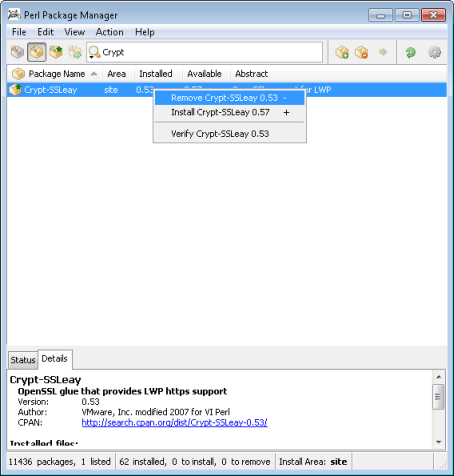
- Remove this as shown, then go to File -> Run Marked Actions
- Click on the grey box icon on the left of the toolbar. These are available packages which are not currently installed. Search for Crypt-SSLeay once again, install, and Run Marked Actions. Exit.
Problem solved!
 PC LOAD LETTER