
If you install the latest build of vSphere CLI 4.1 on Windows 7 x64 some of the commands will fail, with perl.exe throwing the following error:
The ordinal 3212 could not be located in the dynamic link library LIBEAY32.dll
There isn’t much to go on when you look up the error – just a lot of people saying you should delete all older copies of LIBEAY32.dll from your system.
Fortunately there is a neater solution, and I’m surprised VMware haven’t fixed this problem yet (4.0 also had the same issue).
- Open your CLI command prompt as Administrator. Type ppm and hit enter (Perl Package Manager).
- Now look for a module called Crypt-SSLeay. You’ll see that CLI’s bundled ActivePerl distribution includes version 0.53, but there is a newer version 0.57 available:
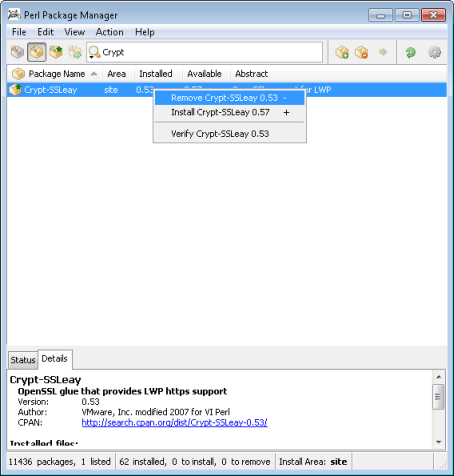
- Remove this as shown, then go to File -> Run Marked Actions
- Click on the grey box icon on the left of the toolbar. These are available packages which are not currently installed. Search for Crypt-SSLeay once again, install, and Run Marked Actions. Exit.
Problem solved!
 PC LOAD LETTER
Thanks for this post. It worked for me.
Great write up and perfect fix!
Great. Worked like a charm for me. Thanks Patters
simply awesome. Thank you.
This is great. It worked. Thank you
Yup, worked for me too – thanks.
Great. Thanks a lot.
had the problem on a Windows 7 32bit machine. but I only had to right click and select “Install Crypt-SSLeay 0.57” – not remove.
Had the problem on a Windows 2003 32bit machine. but I only had to right click and select “Install Crypt-SSLeay 0.57″ not remove first.
Great. Thanks a lot. Worked for me too on Windows XP 32bit.
Thank you Thank you Thank you, I was looking all over to correct this DLL issue and nothing worked until I came across your post. I appreciate your help.
Saved my day :-) My win 7 allways crashed with appcrash perl.exe when i try to use vihostupdate.pl with esxi 4.1 -> with 5.0 i haven’t that probs (ok it is a little bit other command)
great job thank you
Yes, that did the trick, thank you.
Pingback: VMware Vsphere CLI – libeay32.dll error on 64bit Windows 7 | Phy2Vir