
There is a lot of good Java software, but it’s difficult to get Java running on a NAS. I decided to do something about that, mainly to pave the way for a Serviio package that didn’t require a huge guide to install. In compliance with the Oracle EULA the Java binaries cannot be redistributed, so this package looks for the downloaded .tar.gz archive in the public shared folder on the NAS. The end user is required to register with Oracle to get the file, as you can see from the description below. I also added locale support to the underlying Linux since Java requires this for UTF-8 support when reading from the filesystem (DSM 4.3 later included this). Timezone support is also configured.
This package installs Java SE Embedded which is purposefully designed to run on low specification headless hardware. It should be noted that Synology Java Manager (only available on Intel products) is the full Java Runtime Environment, and consequently uses more RAM. By default you should use Java 8, unless the application you want to run specifically requires Java 7.
Please note that Oracle ceased maintaining Java 6 in 2012, so it should be considered a serious security vulnerability. The Java 6 package has been withdrawn from the package repository for this reason. If you need it to run a particular piece of software you may download it here for manual installation. Please also note that Oracle retired support for PowerPC CPUs following Java 8 Update 6, so the PowerPC package remains at that version.

Instructions
- In Synology DSM’s Package Center, click Settings and add my package repository:
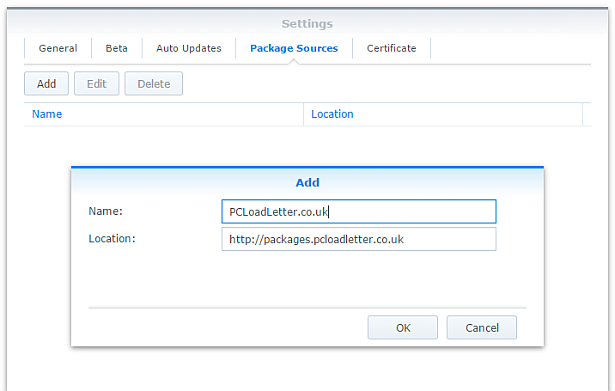
- The repository will push its certificate automatically to the NAS, which is used to validate package integrity. Set the Trust Level to Synology Inc. and trusted publishers:

- Now browse the Community section in Package Center to install a Java SE Embedded package:

The repository only displays packages which are compatible with your specific model of NAS. If you don’t see Java Embedded in the list, then either your NAS model or your DSM version are not supported at this time. - If you have a multi-bay NAS, use the Shared Folder control panel to create a shared folder called public (it must be all lower case). On single bay models this is created by default. Assign it with Read/Write privileges for everyone.
- Register with Oracle and download the appropriate version of Java SE Embedded for your CPU architecture and save in the public shared folder on your NAS. Note that to get any version of Java older than the current one you will need to follow the Oracle Java SE Embedded Downloads Archive link on that page. If in doubt, attempt to install the package first, and the error message will tell you which specific download version is required.
- If you have trouble getting the Java archive recognised, try downloading it with a different web browser. Some browsers try to help by uncompressing the file, or renaming it without warning. I have tried to code around most of these behaviours. Use Firefox if all else fails.
Package scripts
For information, here are the package scripts so you can see what it’s going to do. You can get more information about how packages work by reading the Synology 3rd Party Developer Guide.
installer.sh
#!/bin/sh

#--------JAVA installer script
#--------package maintained at pcloadletter.co.uk

COMMENT="# Synology Java Package"
SYNO_CPU_ARCH="`uname -m`"
[ "`echo ${SYNO_CPU_ARCH} | cut -c1-7`" == "armv5te" ] && SYNO_CPU_ARCH="armv5tel"
#--------Synology switched Armada 370 systems from SoftFP to HardFP EABI for DSM 6.0
[ "${SYNOPKG_DSM_ARCH}" == "armada370" ] && [ ${SYNOPKG_DSM_VERSION_MAJOR} -gt 5 ] && SYNO_CPU_ARCH="armv7l-hflt"
[ "${SYNOPKG_DSM_ARCH}" == "armada375" ] && SYNO_CPU_ARCH="armv7l-hflt"
[ "${SYNOPKG_DSM_ARCH}" == "armada38x" ] && SYNO_CPU_ARCH="armv7l-hflt"
[ "${SYNOPKG_DSM_ARCH}" == "comcerto2k" ] && SYNO_CPU_ARCH="armv7l-hflt"
[ "${SYNOPKG_DSM_ARCH}" == "alpine" ] && SYNO_CPU_ARCH="armv7l-hflt"
[ "${SYNOPKG_DSM_ARCH}" == "alpine4k" ] && SYNO_CPU_ARCH="armv7l-hflt"
[ "${SYNOPKG_DSM_ARCH}" == "monaco" ] && SYNO_CPU_ARCH="armv7l-hflt"
[ "${SYNOPKG_DSM_ARCH}" == "x86_64" ] && [ "${WIZARD_JRE_EE}" == "true" ] && SYNO_CPU_ARCH="i686"
[ "${SYNOPKG_DSM_ARCH}" == "x86_64" ] && [ ${SYNOPKG_DSM_VERSION_MAJOR} -lt 6 ] && SYNO_CPU_ARCH="i686"

if [ "${SYNOPKG_PKGNAME}" == "java6" ]; then
  DOWNLOAD_URL="http://tinyurl.com/javaembedarchive"
  EXTRACTED_FOLDER="ejre1.6.0_38"
  JCE_BINARY="jce_policy-6.zip"
  JCE_URL="http://tinyurl.com/java-jce6"
  JCE_FOLDER="jce"
  if [ "`echo ${SYNO_CPU_ARCH} | cut -c1-7`" == "armv5te" ]; then
    JAVA_BINARY="ejre-1_6_0_38-fcs-b05-linux-arm-sflt-eabi-headless-13_nov_2012.tar.gz"
    JAVA_BUILD="ARMv5 Linux - Headless EABI"
  elif [ "${SYNO_CPU_ARCH}" == "armv7l" ]; then
    JAVA_BINARY="ejre-1_6_0_38-fcs-b05-linux-arm-vfp-eabi-headless-13_nov_2012.tar.gz"
    JAVA_BUILD="ARMv6/7 Linux - Headless EABI, VFP, SoftFP ABI, Little Endian"
  elif [ "${SYNO_CPU_ARCH}" == "i686" ]; then
    JAVA_BINARY="ejre-1_6_0_38-fcs-b05-linux-i586-headless-13_nov_2012.tar.gz"
    JAVA_BUILD="x86 Linux Small Footprint - Headless"
  elif [ "${SYNO_CPU_ARCH}" == "x86_64" ]; then
    JAVA_BINARY="ejre-1_6_0_38-fcs-b05-linux-i586-headless-13_nov_2012.tar.gz"
    JAVA_BUILD="x86 Linux Small Footprint - Headless"
  elif [ "${SYNO_CPU_ARCH}" == "ppc" ]; then
    JAVA_BINARY="ejre-1_6_0_38-fcs-b05-linux-ppc-e500v2-headless-13_nov_2012.tar.gz"
    JAVA_BUILD="Power Architecture Linux - Headless - e500v2 core"
  fi

elif [ "${SYNOPKG_PKGNAME}" == "java7" ]; then
  DOWNLOAD_URL="http://tinyurl.com/javaembed"
  EXTRACTED_FOLDER="ejre1.7.0_75"
  JCE_BINARY="UnlimitedJCEPolicyJDK7.zip"
  JCE_URL="http://tinyurl.com/java-jce7"
  JCE_FOLDER="UnlimitedJCEPolicy"
  if [ "${SYNO_CPU_ARCH}" == "armv5tel" ]; then
    JAVA_BINARY="ejre-7u75-fcs-b13-linux-arm-sflt-headless-18_dec_2014.tar.gz"
    JAVA_BUILD="ARMv5 Linux - Headless EABI, SoftFP ABI, Little Endian"
  elif [ "${SYNO_CPU_ARCH}" == "armv7l" ]; then
    JAVA_BINARY="ejre-7u75-fcs-b13-linux-arm-vfp-sflt-client_headless-18_dec_2014.tar.gz"
    JAVA_BUILD="ARMv6/7 Linux - Headless - Client Compiler EABI, VFP, SoftFP ABI, Little Endian"
  elif [ "${SYNO_CPU_ARCH}" == "armv7l-hflt" ]; then
    JAVA_BINARY="ejre-7u75-fcs-b13-linux-arm-vfp-hflt-client_headless-18_dec_2014.tar.gz"
    JAVA_BUILD="ARMv6/7 Linux - Headless - Client Compiler EABI, VFP, HardFP ABI, Little Endian"
  elif [ "${SYNO_CPU_ARCH}" == "i686" ]; then
    JAVA_BINARY="ejre-7u75-fcs-b13-linux-i586-headless-18_dec_2014.tar.gz"
    JAVA_BUILD="x86 Linux Small Footprint - Headless"
  elif [ "${SYNO_CPU_ARCH}" == "x86_64" ]; then
    JAVA_BINARY="ejre-7u75-fcs-b13-linux-i586-headless-18_dec_2014.tar.gz"
    JAVA_BUILD="x86 Linux Small Footprint - Headless"
  elif [ "${SYNO_CPU_ARCH}" == "ppc" ]; then
    JAVA_BINARY="ejre-7u75-fcs-b13-linux-ppc-e500v2-headless-18_dec_2014.tar.gz"
    JAVA_BUILD="Power Architecture Linux - Headless - e500v2 with double-precision SPE Floating Point Unit"
  fi

elif [ "${SYNOPKG_PKGNAME}" == "java8" ]; then
  DOWNLOAD_URL="http://tinyurl.com/javaembed"
  EXTRACTED_FOLDER="ejdk1.8.0_211"
  JCE_BINARY="jce_policy-8.zip"
  JCE_URL="http://tinyurl.com/java-jce8"
  JCE_FOLDER="UnlimitedJCEPolicyJDK8"
  if [ "${SYNO_CPU_ARCH}" == "armv5tel" ]; then
    JAVA_BINARY="ejdk-8u211-linux-arm-sflt.tar.gz"
    JAVA_BUILD="ARMv5/ARMv6/ARMv7 Linux - SoftFP ABI, Little Endian 2"
  elif [ "${SYNO_CPU_ARCH}" == "armv7l" ]; then
    JAVA_BINARY="ejdk-8u211-linux-arm-sflt.tar.gz"
    JAVA_BUILD="ARMv5/ARMv6/ARMv7 Linux - SoftFP ABI, Little Endian 2"
  elif [ "${SYNO_CPU_ARCH}" == "armv7l-hflt" ]; then
    JAVA_BINARY="ejdk-8u211-linux-armv6-vfp-hflt.tar.gz"
    JAVA_BUILD="ARMv6/ARMv7 Linux - VFP, HardFP ABI, Little Endian 1"
  elif [ "${SYNO_CPU_ARCH}" == "aarch64" ]; then
    JAVA_BINARY="jdk-8u211-linux-arm64-vfp-hflt.tar.gz"
    JAVA_BUILD="Linux ARM 64 Hard Float ABI"
    DOWNLOAD_URL="http://tinyurl.com/java8arm64"
    EXTRACTED_FOLDER="jdk1.8.0_211"
  elif [ "${SYNO_CPU_ARCH}" == "i686" ]; then
    JAVA_BINARY="ejdk-8u211-linux-i586.tar.gz"
    JAVA_BUILD="x86 Linux Small Footprint - Headless"
  elif [ "${SYNO_CPU_ARCH}" == "x86_64" ]; then
    JAVA_BINARY="jre-8u211-linux-x64.tar.gz"
    JAVA_BUILD="Linux x64"
    EXTRACTED_FOLDER="jre1.8.0_211"
    DOWNLOAD_URL="http://tinyurl.com/java8x64"
  elif [ "${SYNO_CPU_ARCH}" == "ppc" ]; then
    #Oracle have discontinued Java 8 for PowerPC after update 6
    JAVA_BINARY="ejdk-8u6-fcs-b23-linux-ppc-e500v2-12_jun_2014.tar.gz"
    JAVA_BUILD="Power Architecture Linux - Headless - e500v2 with double-precision SPE Floating Point Unit"
    EXTRACTED_FOLDER="ejdk1.8.0_06"
  fi
fi

JAVA_BINARY=`echo ${JAVA_BINARY} | cut -f1 -d'.'`
PUBLIC_FOLDER="`synoshare --get public | sed -r "/Path/!d;s/^.*\[(.*)\].*$/\1/"`"
TEMP_FOLDER="`find / -maxdepth 2 -path '/volume?/@tmp' | head -n 1`"
NATIVE_BINS_URL="http://packages.pcloadletter.co.uk/downloads/java-native-${SYNO_CPU_ARCH}.tar.xz"
NATIVE_BINS_FILE="`echo ${NATIVE_BINS_URL} | sed -r "s%^.*/(.*)%\1%"`"
#DSM versions older than 4.3 need locale support adding, don't download unless needed
[ ! -e /usr/bin/locale ] && INSTALL_FILES="${NATIVE_BINS_URL}"
source /etc/profile


preinst ()
{
  synoshare -get public > /dev/null || (
    echo "A shared folder called 'public' could not be found - note this name is case-sensitive. " >> $SYNOPKG_TEMP_LOGFILE
    echo "Please create this using the Shared Folder DSM Control Panel and try again." >> $SYNOPKG_TEMP_LOGFILE
    exit 1
  )

  JAVA_BINARY_FOUND=

  if [ -n "${JAVA_HOME}" ]; then
    echo "It seems from /etc/profile that a Java Runtime is already installed at ${JAVA_HOME}. Uninstall it and try again." >> $SYNOPKG_TEMP_LOGFILE
    exit 1
  fi

  [ -f ${PUBLIC_FOLDER}/${JAVA_BINARY}.tar.gz ] && JAVA_BINARY_FOUND=true
  [ -f ${PUBLIC_FOLDER}/${JAVA_BINARY}.tar ] && JAVA_BINARY_FOUND=true
  [ -f ${PUBLIC_FOLDER}/${JAVA_BINARY}.tar.tar ] && JAVA_BINARY_FOUND=true
  [ -f ${PUBLIC_FOLDER}/${JAVA_BINARY}.gz ] && JAVA_BINARY_FOUND=true

  if [ -z ${JAVA_BINARY_FOUND} ]; then
    echo "Java binary bundle not found. " >> $SYNOPKG_TEMP_LOGFILE
    echo "I was expecting the file ${PUBLIC_FOLDER}/${JAVA_BINARY}.tar.gz. " >> $SYNOPKG_TEMP_LOGFILE
    echo "Please agree to the Oracle licence at ${DOWNLOAD_URL}, then download the '${JAVA_BUILD}' package" >> $SYNOPKG_TEMP_LOGFILE
    echo "and place it in the 'public' shared folder on your NAS. This download cannot be automated even if " >> $SYNOPKG_TEMP_LOGFILE
    echo "displaying a package EULA could potentially cover the legal aspect, because files hosted on Oracle's " >> $SYNOPKG_TEMP_LOGFILE
    echo "server are protected by a session cookie requiring a JavaScript enabled browser." >> $SYNOPKG_TEMP_LOGFILE
    exit 1
  fi

  if [ "${WIZARD_JCE_UL}" == "true" ]; then
    if [ ! -f ${PUBLIC_FOLDER}/${JCE_BINARY} ]; then
      echo "JCE Unlimited Strength binary bundle not found. " >> $SYNOPKG_TEMP_LOGFILE
      echo "I was expecting the file ${PUBLIC_FOLDER}/${JCE_BINARY} " >> $SYNOPKG_TEMP_LOGFILE
      echo "Please agree to the Oracle licence at ${JCE_URL}, then download the Unlimited Strength Jurisdiction Policy Files zip file " >> $SYNOPKG_TEMP_LOGFILE
      echo "and place it in the 'public' shared folder on your NAS. " >> $SYNOPKG_TEMP_LOGFILE
      exit 1
    fi
  fi

  cd ${TEMP_FOLDER}
  for WGET_URL in ${INSTALL_FILES}
  do
    WGET_FILENAME="`echo ${WGET_URL} | sed -r "s%^.*/(.*)%\1%"`"
    [ -f ${TEMP_FOLDER}/${WGET_FILENAME} ] && rm ${TEMP_FOLDER}/${WGET_FILENAME}
    wget ${WGET_URL}
    if [[ $? != 0 ]]; then
      if [ -d ${PUBLIC_FOLDER} ] && [ -f ${PUBLIC_FOLDER}/${WGET_FILENAME} ]; then
        cp ${PUBLIC_FOLDER}/${WGET_FILENAME} ${TEMP_FOLDER}
      else
        echo "There was a problem downloading ${WGET_FILENAME} from the official download link, " >> $SYNOPKG_TEMP_LOGFILE
        echo "which was \"${WGET_URL}\" " >> $SYNOPKG_TEMP_LOGFILE
        echo "Alternatively, you may download this file manually and place it in the 'public' shared folder. " >> $SYNOPKG_TEMP_LOGFILE
        exit 1
      fi
    fi
  done

  exit 0
}


postinst ()
{
  WORKING_DIR=`pwd`

  #ldd tool is very useful but not included in DSM
  if [ ! -e /usr/local/bin/ldd ]; then
    mkdir -p /usr/local/bin
    cp ${SYNOPKG_PKGDEST}/tools/ldd-${SYNO_CPU_ARCH} /usr/local/bin/ldd
  fi

  #extract native binaries if needed
  if [ -e ${TEMP_FOLDER}/${NATIVE_BINS_FILE} ]; then
    cd ${SYNOPKG_PKGDEST}
    #older DSM tar uses different command line switch for xz archives
    tar xJf ${TEMP_FOLDER}/${NATIVE_BINS_FILE} || tar xaf ${TEMP_FOLDER}/${NATIVE_BINS_FILE}
    rm ${TEMP_FOLDER}/${NATIVE_BINS_FILE}
  fi

  #extract Java (Web browsers love to interfere with .tar.gz files)
  cd ${PUBLIC_FOLDER}
  if [ -f ${JAVA_BINARY}.tar.gz ]; then
    #Firefox seems to be the only browser that leaves it alone
    tar xzf ${JAVA_BINARY}.tar.gz
  elif [ -f ${JAVA_BINARY}.gz ]; then
    #Chrome
    tar xzf ${JAVA_BINARY}.gz
  elif [ -f ${JAVA_BINARY}.tar ]; then
    #Safari
    tar xf ${JAVA_BINARY}.tar
  elif [ -f ${JAVA_BINARY}.tar.tar ]; then
    #Internet Explorer
    tar xzf ${JAVA_BINARY}.tar.tar
  fi

  #install Java
  if [ "${EXTRACTED_FOLDER}" != "${EXTRACTED_FOLDER/jdk/}" ]; then
    mv ${EXTRACTED_FOLDER} ${SYNOPKG_PKGDEST}
    JRE_PATH="`find ${SYNOPKG_PKGDEST}/${EXTRACTED_FOLDER} -name jre`"
  else
    mv ${EXTRACTED_FOLDER} ${SYNOPKG_PKGDEST}/jre
    JRE_PATH="${SYNOPKG_PKGDEST}/jre"
  fi

  #install unlimited crypto policy files if requested
  if [ "${WIZARD_JCE_UL}" == "true" ]; then
    if [ -e /usr/bin/7z ]; then
      7z x ${JCE_BINARY} > /dev/null 2>&1
    else
      unzip ${JCE_BINARY}
    fi
    mv ${JCE_FOLDER}/* ${JRE_PATH}/lib/security
    rmdir ${JCE_FOLDER}
  fi

  #change owner of folder tree
  chown -R root:root ${SYNOPKG_PKGDEST}

  echo "NOTE - This package does *not* start and stop like other packages. " >> $SYNOPKG_TEMP_LOGFILE
  echo "Java is correctly installed if you can see the runtime and HotSpot version numbers, " >> $SYNOPKG_TEMP_LOGFILE
  echo "and locale information in the package Log tab." >> $SYNOPKG_TEMP_LOGFILE

  exit 0
}


preuninst ()
{
  exit 0
}


postuninst ()
{
  #clean up profile mods
  sed -i "/${COMMENT}/d" /etc/profile
  sed -i "/${COMMENT}/d" /root/.profile

  #leave locale support in place on older DSM versions - too risky to delete system binaries

  exit 0
}
start-stop-status.sh
#!/bin/sh

JRE_PATH="`find /var/packages/${SYNOPKG_PKGNAME}/target/ -name jre`"
COMMENT="# Synology Java Package"
#set the current timezone for Java so that log timestamps are accurate, modern timezone names so DST works
SYNO_TZ=`cat /etc/synoinfo.conf | grep timezone | cut -f2 -d'"'`
#fix for DST time in DSM 5.2 thanks to MinimServer Syno package author
[ -e /usr/share/zoneinfo/Timezone/synotztable.json ] \
 && SYNO_TZ=`jq ".${SYNO_TZ} | .nameInTZDB" /usr/share/zoneinfo/Timezone/synotztable.json | sed -e "s/\"//g"` \
 || SYNO_TZ=`grep "^${SYNO_TZ}" /usr/share/zoneinfo/Timezone/tzname | sed -e "s/^.*= //"`

EnvCheck ()
#updates to DSM will reset these changes so check them each startup
{
  #/etc/profile should contain 5 lines added by this package tagged with trailing comments
  COUNT=`grep -c "$COMMENT$" /etc/profile`
  if [ $COUNT != 5 ]; then

    #remove any existing mods
    sed -i "/${COMMENT}/d" /etc/profile

    #add required environment variables
    echo "PATH=\$PATH:${JRE_PATH}/bin ${COMMENT}" >> /etc/profile
    echo "JAVA_HOME=${JRE_PATH} ${COMMENT}" >> /etc/profile
    echo "CLASSPATH=.:${JRE_PATH}/lib ${COMMENT}" >> /etc/profile
    echo "LANG=en_US.utf8 ${COMMENT}" >> /etc/profile
    echo "export CLASSPATH JAVA_HOME LANG PATH ${COMMENT}" >> /etc/profile
  fi

  #/root/.profile should contain 3 lines added by this package tagged with trailing comments
  COUNT=`grep -c "$COMMENT$" /root/.profile`
  if [ $COUNT != 3 ]; then

    #remove any existing mods
    sed -i "/${COMMENT}/d" /root/.profile

    #add required environment variables
    echo "PATH=\$PATH:${JRE_PATH}/bin ${COMMENT}" >> /root/.profile
    echo "TZ='${SYNO_TZ}' ${COMMENT}" >> /root/.profile
    echo "export PATH TZ ${COMMENT}" >> /root/.profile
  fi

  #timezone needs setting each startup in case system value has changed
  sed -i "s%^TZ=.* ${COMMENT}%TZ='${SYNO_TZ}' ${COMMENT}%" /root/.profile

  #DSM versions older than 4.3 need locale support adding
  if [ ! -e /usr/bin/locale ]; then

    #build missing locale with UTF-8 support (don't think it matters which language)
    cp ${SYNOPKG_PKGDEST}/bin/* /usr/bin
    cp -R ${SYNOPKG_PKGDEST}/share/i18n /usr/share
    if [ ! -d /usr/lib/locale ]; then
      mkdir /usr/lib/locale
    fi
    localedef -c -f UTF-8 -i en_US en_US.utf8
  fi

  #DSM versions up to 5.1 are missing the zoneinfo timezone definitions which causes inaccurate log timestamps
  #thanks to CoolRaoul here: http://forum.synology.com/enu/viewtopic.php?f=19&t=69232#p310553
  #to revert, just remove everything apart from 'Timezone' 'zone.tab' from /usr/share/zoneinfo
  if [ ! -e /usr/share/zoneinfo/Europe/London ]; then
    cp -R ${SYNOPKG_PKGDEST}/zoneinfo/* /usr/share/zoneinfo/
  fi

}

case $1 in
  start)
    EnvCheck
    source /etc/profile
    source /root/.profile

    #evidence of whether Java can start successfully is written to the package log
    java -version > ${SYNOPKG_PKGDEST}/output.log 2>&1
    echo >> ${SYNOPKG_PKGDEST}/output.log
    echo System installed locales: >> ${SYNOPKG_PKGDEST}/output.log
    locale -a >> ${SYNOPKG_PKGDEST}/output.log
    echo >> ${SYNOPKG_PKGDEST}/output.log
    echo JAVA_HOME=$JAVA_HOME >> ${SYNOPKG_PKGDEST}/output.log
    echo TZ=$TZ >> ${SYNOPKG_PKGDEST}/output.log

    exit 0
  ;;

  stop)
    exit 0
  ;;

  status)
    source /etc/profile
    source /root/.profile
    if [ -e "${JAVA_HOME}/bin/java" ]; then
      exit 0
    else
      exit 1
    fi
  ;;

  log)
    echo "${SYNOPKG_PKGDEST}/output.log"
    exit 0
  ;;

esac
install_uifile
[
  {
    "step_title": "Java Runtime Environment Selection",
    "items": [
      {
        "type": "singleselect",
        "desc": "Please select the Java version to install:",
        "subitems": [
          {
            "key": "WIZARD_JRE_EE",
            "desc": "Java SE Embedded 8 (smaller memory footprint, 32bit)",
            "defaultValue": true
          },
          {
            "key": "WIZARD_JRE_SE",
            "desc": "Java SE 8 (64bit)",
            "defaultValue": false
          }
        ]
      }
    ]
  },
  {
    "step_title": "Java Cryptography Strength Selection",
    "items": [
      {
        "type": "singleselect",
        "desc": "Please select Java Cryptographic Extension policy:",
        "subitems": [
          {
            "key": "WIZARD_JCE_STD",
            "desc": "Default Strong JCE policy - limited to AES-128 encryption",
            "defaultValue": true
          },
          {
            "key": "WIZARD_JCE_UL",
            "desc": "Unlimited Strength JCE policy - not permitted in some jurisdictions, see Oracle documentation",
            "defaultValue": false
          }
        ]
      }
    ]
  }
]
Changelog:
- 0050 17/Apr/19 – Updated to Java 8u211, added support for DS119j
- 0049 11/Apr/19 – Updated to Java 8u201, fixed issue where x86_64 CPUs would ignore user selection and always install 64bit Java SE
- 0048 22/Aug/18 – Updated to Java 8u181, added option to select 64bit full Java SE for x86_64 CPUs
- 0047 14/May/18 – Updated to Java 8u171
- 0046 20/Feb/18 – Updated to Java 8u161, experimental aarch64 support
- 0045 30/Oct/17 – Updated to Java 8u151, added support for new CPUs in x17 and x18 models
- 0044 02/Aug/17 – Updated to Java 8u144
- 0043 21/Jan/17 – Updated to Java 8u121
- 0042 07/Jan/17 – Updated to Java 8u111, fixed Armada 370/XP systems running DSM 6.0 which had switched from soft to hard float ABI
- 0041 25/Jul/16 – Added support for unlimited strength cryptography (default is strong)
- 0040 20/Jul/16 – Updated to Java 8u101
- 0039 26/Apr/16 – Updated to Java 8u91
- 0038 24/Mar/16 – Updated to Java 8u77
- 0037 07/Feb/16 – Updated to Java 8u73
- 0036 26/Jan/16 – Updated to Java 8u71
- 0035 14/Dec/15 – Updated to Java 8u65, added support for models DS716+ and DS216play
- 0034 19/Aug/15 – Fixed timezone DST issue with DSM 5.2, added support for DS215+
- 0033 07/Aug/15 – Updated to Java 8u51, PowerPC build remains at 8u6
- 0032 13/Jul/15 – Fixed timezone issue with DSM 5.2, updated main blog post documentation
- 0031 25/Jan/15 – Fixed issue with version 0030 for systems with more than one volume
- 0030 21/Jan/15 – Improved temp folder detection, updated to Java 7u75 and Java 8u33 (Oracle did not publish a version for PowerPC)
- 0029 25/Dec/14 – DSM timezone zone.tab file is no longer overwritten, which had been prompting a malware alert in DSM 5.1 Security Advisor
- 0028 20/Oct/14 – Updated to Java 7u71, added missing zoneinfo timezone definitions to fix inaccurate timestamps for non-GMT timezones (checked every startup), switched native binary archives from .tgz to .tar.xz format to reduce size
- 0027 18/Oct/14 – Updated Java 8 to 8u6, added support for Mindspeed Comcerto 2000 CPU in DS414j for Java 7 and Java 8
- 0026 24/Jun/14 – DSM updates will no longer break Java
- 0025 31/May/14 – Updated to Java 7u60
- 0024 31/May/14 – Updated to Java 7u55
- 0023 27/May/14 – Added Java 8 support
- 0022 30/Jan/14 – Updated to Java 7u51
- 0021 15/Nov/13 – Locale support is no longer downloaded and added to DSM 4.3 or newer since it’s already present
- 0020 30/Oct/13 – Added support for Intel Atom Evansport and Armada XP CPUs in new DSx14 products, removed Early Access JDK 8 support since it did not run on the Armada SoCs
- 0019 17/Oct/13 – Updated to Java 7u45
- 0018 11/Oct/13 – Updated to Java 7u40, and JDK8 Early Access b106
- 0017 05/Jun/13 – For Armada370 CPU changed from ARMv7 Server JVM to Client JVM since the Server one turned out to be unstable. Added support for Early Access JDK 8 for Armada 370.
- 0016 21/May/13 – Added Armada370 CPU support (DS213j)
- 0015 18/Apr/13 – Updated to Java 7u21, Java 6 Embedded seems to be no longer maintained by Oracle
- 0014 13/Feb/13 – Fixed metadata for DSM 4.2 Package Center
- 013 13/Dec/12 – Updated to Java 6u38 and Java 7u10
- 012 10/Dec/12 – Installer script fetches native binaries separately to reduce bandwidth on repo hosting
- 011 Added support for Freescale QorIQ PowerPC CPUs used in some Synology x13 series products, PowerQUICC PowerPC processors in previous Synology generations with older glibc versions are not supported
- 010 updated to Java 6u34 and Java 7u6
- 009 corrected timezone bug for Atlantic and Pacific timezones which may have caused error messages when in fact the package had installed correctly
- 008 unified the build scripts
- 007 included the locale binaries to simplify installation, fixed environment variables for root user (inc. timezone with DST support), displayed Java version information and env vars in Log tab, incremented Java to latest versions 6u32 and 7u4, fixed detection of renamed .tar.gz archives downloaded by Google Chrome
- 006 fixed path issue for root user on non-bootstrapped systems, updated info link to refer back to this page, and improved description text
- 005 incremented JRE versions to match new releases from Oracle
- 004 forced check for existence of ‘public’ shared folder
- 003 fixed a stupid typo that stopped 002 from working :)
- 002 rewrote scripts to be easier to maintain, and to allow for web browsers that untar or rename the Java and toolchain binary bundles as they’re saved
- 001 23/Aug/11 – fixed package repo support, defined as a non-runnable service, prevented more than one JRE being installed, saved files into actual package folder rather than @appstore/java now that package names can be separate from Package Center display names
- v3 initial spk release (I think!)
 PC LOAD LETTER
Hi there Patters
I have run the above and now have Java on my box… does this mean that I can install Serviio as a package now, and actaully have a really decent DNLA server running on my synology box?
Cheers
Tod
Hi Tod, yes that’s the idea. I’ve built a package for Serviio 0.6 but I need to wait for it to come out of beta before I can release it into the wild. It shouldn’t be long now though…
This is fantastic!!!!! Superb :)
( I am a Java nerd )
Just installed it on my DS211+ with success. Quickly followed by running Tomcat 7.
It works :)
/moelholm
Fantastico!!! Many thanks for this Synology Package!
I think it should become a part of the default package of the DSM, because Java could be so useful for so many different tasks and apps.
Excellent! Thank you soo much, this made my day as I was trying to figure out how to install Java on my DS211j to run a MineCraft server. Now it’s a breeze :-D
Just been having a look at Minecraft. Looks intriguing. Did you manage to get a server running on your syno? Apparently it needs 1GB of RAM…
Very Nice!!!
Thank you so much!!!!
Do you have some snapshot of serviio 0.6 with you? I can`t download it on a serviio forum, it`s freeze for release. = ]
Thanks. Serviio 0.6 is hopefully only few days from release. The moment it’s out I will release a Synology package…
Hello
I get this error, do anyone know why?
Home> java
Error: dl failure on line 875
Error: failed /volume1/@appstore/java/lib/i386/client/libjvm.so, because /volume1/@appstore/java/lib/i386/client/libjvm.so: cannot handle TLS data
Home>
i get exactly same error (ds 411+) , i removed the package and installing manually
I searched and it seems to be reported elsewhere:
http://forum.synology.com/enu/viewtopic.php?f=27&t=40450
Exté, did you get Java 7 working?
The guy in the post I linked to above mentioned that Java 6 was fine.
keep getting a failed to install package.
trying to install on a DS1511+ DSM 3.2
created a public folder gave full read write access.
downloaded your java package for intel into it.
:java1.7.0_x86_v3.spk
downloaded java se embeded for intel into it
:ejre-7-fcs-b147-linux-i586-headless-27_jun_2011.tar”
download synology dsm 3.1 toolchain into it
:gcc420_glibc236_pineview
error:
I was expecting the file ${JAVA_PICKUP}/ejre-7-fcs-b147-linux-i586-headless-27_jun_2011.tar.gz. ”
any idea thanks.
Sorry for the huge delay responding – your comment got buried and I only properly reviewed it just now. Looks like your browser is automatically ungzipping the file as it downloads. Since this is a common problem I have improved the script to accept either tar, or tar.gz, or even .tar.tar (which Internet Explorer produces).
same problème on DS710 , java won’t start ! the pb seems to be with intel Atom CPUs..
Jeff
Looks like I’ll have to make a Java 6 package as a workaround. Should be quick – I’m on my way home so it should be ready in an hour or so.
It seems likely that Oracle have compiled Java 7 to depend on a newer glibc than the one present in the syno’s Linux distro. This is the same type of error:
http://stackoverflow.com/questions/3465291/libstdc-so-6-cannot-handle-tls-data
Hi,
I’ve been pondering for ages wether to install serviio on my DS211+ and was so happy when serviio 0.6 came out a few days ago to simplify the process as I’m not that technical.
However, it looks as if I’m failing on the first step. Unsure of the exact sequence but when I try to install the ‘java.7.0_88f6281_v3.spk’ package from the DSM Package Update/Install, which is all acknowledged ok but returns the following error message when I apply this update :-
“java binary bundle not found – I was expecting the file /ejre-7-fcs–b147-linux-arm-sflt-headless-27_jun_2011.tar.gz. Please register and download from Oracle etc.”
I do this but the dowloaded file above (which ends in .tar & not tar.gz) is zipped up and when I try to install this I get an “Invalid File Format” error message! I’ve tried unzipping but there are many files and this is as far as I can get.
Hopefully you will be able to help – if the answer is not too technical?
Thanks,
Mike
You’re probably using Safari to download, which automatically gunzips the files. Try this in a Terminal window:
cd ~/Downloads
gzip ejre-7-fcs–b147-linux-arm-sflt-headless-27_jun_2011.tar
Then try installing the spk package again.
Hi,
Thanks for your help, I noticed I had winRAR installed on my PC which was zipping it, so I have uninstalled this and downloaded again from the ‘registered’ link on the oracle web site and saved it directly to the public network drive on NAS using IE8 (On a Vista SP2 Platform) and it now saves it as a unrecongised file (maybe the original file) with the following name;
ejre-7-fcs-b147-linux-arm-sflt-headless-27_jun_2011.tar.tar
Unsure why double tar at the end, but unfortunatley it returns an invalid file format error message!
I have tried it with only one .tar and wondered if it’s just a matter of changing the file extension name! (Tried .spk but didn’t work) I have also tried the Java 6 Embedded version too but with same error results!
I have also downloaded the file using a Windows 7 PC (Using IE9) and have the exactly the same file name/extension.
My DS211+ is on DSM Version 3.2-1922.
Your serviio (0.6) & java (7.0) packages seem to be acknowkedged ok and it’s just getting the embedded java on that is my problem – I think!
I did try the terminal window (by the run then cmd – if this is correct as I’m not technical) but it returned an error message!
Sorry to be a pain but hope you can help?
Thanks,
Mike
Get the file ending in .tar.tar and just rename it to end with .tar.gz. Don’t do anything else to it. Leave it in the public shared folder. Then install my Java spk package file in Package Center in DSM. Should work then.
Hi,
Many thanks, both java and serviio packages are up and running now after I changed the file names.
Kind regards,
Mike
The Oracle version 6 for x86 is later than the one the package installer expects. Where do you get your version (14 april) ?
Well spotted – I had used an older Oracle download link from my email without checking. Sorry – the Java 6 packages are both updated now.
It was a test – you passed :) Can you let me know whether it works ok on Intel? Thanks.
Thanks for the update. Both packages installed and serviio package info now says it’s running. Next job is to get a win7 serviio console to connect (first time using serviio).
I have successfully installed 0.6 on my DS 211+ (Marvell Kirkwood mv6282 1.6Ghz) with Java 7 using the above packages.
The only problem that I have is that Java uses more than 95% of the CPU. This problem is already going on for a few days.
Has anyone seen this issue before?
How can I solve this issue?
Have a look at the Serviio log. Is it still adding things to the library? Head over to the Serviio forums to find out how you can increase the log detail level. You’ll find the config file location in my blog post about the Serviio package (you’ll need to stop Serviio, make an edit to the logging config, then restart it).
Dear Patters,
I have enabled detailed logging. And indeed Serviio is adding pictures to the library. This explains the high CPU and mem usage.
Apologies for this basic question, I should have come up with this explanation myself.
But I just couldn’t explain that Java is actually using the CPU and mem that much
Do you know how to install Java on a DS3611xs (Intel Core i3 CPU)? I tried with the x86 version but without any luck.
Sorry, I don’t. Did you try installing the full Java SE from Oracle, rather than the Embedded version (since that system is pretty well equipped)?
Massive thanks for this guide and installer package….crashplan installation here I come!
http://kennethlarsendk.blogspot.com/2011/03/how-to-using-crashplan-with-synology.html
I’m obviously doing something wrong. I understand that I need to install the Java package first, but I can’t get the installer to load the package. Can you detail the steps I need to follow again.
I’m running DS207+ w/ OS ver 3.1
thanks, jim
Hi, your processor is a Marvell Orion (mv5281), not a Marvell Kirkwood:
http://forum.synology.com/wiki/index.php/What_kind_of_CPU_does_my_NAS_have
Package Center detects this and fails to install my package, since it’s intended for mv6281/mv6282. Though yours is an ARMv5 variant, the Linux that Synology supplies for it is not EABI so from what I can gather, Oracle’s Java will not work.
So, I guess there’s no way to get Serviio to work on my Synology machine… right?
Nope, afraid not. Not unless you can find another Java Runtime Environment that works.
The link for JAVA 7 for Marvell doesn’t seem to be working.
Sorry, that’s fixed. Underscore/hyphen confusion.
Hello,
Can you make source for your SPK, for automatic update in DSM (other sources list)
Hi, yes I’d like to get a repository working since I now maintain several packages, but it needs me to code a small web service. I have done some packet captures so I know what I need to do – the trouble is finding time…
Ok, I’ve built a small PHP/MySQL web service for the package repo and found some free hosting, so can you test this repo URL and report back:
http://pcloadletter.comlu.com
Thanks
Hi, I’ve just tried installing the java package as instructed. It appears to install fine, but when I open the “installed” tab, there’s no option to run the package (as instructed by the installer). Not sure if this is required or not. If I look at /volume1/@appstore/java6, it is just empty except for a marker file containing the text “placeholder”. Any ideas why this hasn’t installed successfully?
Java doesn’t need to start. That’s the Synology Package Center putting up a superfluous message. You can test whether Java is installed by running:
java -version
As for the java6 folder being empty, did you install this today? Or yesterday? Until version 002, the package would actually put all the files in @appstore/java, regardless of whether it was java6 or java7. I changed that yesterday and now the files are installed in a jre subfolder inside the package’s proper folder (java6 in your case).
I would recommend that you install via the package repo though, that way you’ll get notified when new versions are available.
Thanks for the quick reply. I installed this today. The version of DSM is 3.2. I did try java -version, but it was not recognised. Tried restarting the synology box too. Checked /etc/profile and presumed the path in there was updated by the package installer. Here’re the additional entries in profile:
PATH=/opt/bin:/opt/sbin:$PATH
PATH=$PATH:/volume1/@appstore/java6/jre/bin
JAVA_HOME=/volume1/@appstore/java6/jre
LANG=en_US.utf8
export JAVA_HOME LANG PATH
and here are the contents of the java6 folder:
DiskStation> pwd
/volume1/@appstore/java6
DiskStation> ls -al
total 12
drwxr-xr-x 2 root root 4096 2011-11-20 18:03 .
drwxr-xr-x 3 root root 4096 2011-11-20 18:03 ..
-rw-r–r– 1 root root 12 2011-08-23 02:02 marker
DiskStation> java -version
-sh: java: not found
Do you mean you recommend downloading your package and manually installing it?
Hi, path is fine – something must have gone wrong extracting the archive containing java. It could be a typo from when I rewrote the scripts yesterday. I tested the ARM packages so I’m guessing you’re on Intel perhaps?
Can you also check the file extension of the java archive you put in /volume1/public – is it .tar or .tar.gz?
My script runs ‘tar xvf’ if it’s .tar and ‘tar xvfz’ if it’s .tar.gz
It could be that your web browser mangled the name to .tar but didn’t actually ungzip it. If so I need to know which browser so I can test…
Hi, there was some weirdness, the downloaded files (and those in the public folder) had the following extensions:
ejre-1_6_0_27-fcs-b07-linux-i586-headless-18_jul_2011.tar
ejre-1_6_0_27-fcs-b07-linux-i586-headless-18_jul_2011.tar.gz.download
gcc420_glibc236_pineview.tar
gcc420_glibc236_pineview.tgz.download
although from what you say above, the .tar versions of these should have been fine?
I removed all of these and extracted the tar.gz from the .download files and ran the installer again. I can confirm that the files were extracted successfully, I can see these in the public folder, but there are still no files installed in the /volume1/@appstore/java6 directory.
I downloaded the files on osx using safari.
I’ll look into it. Btw, .download on Mac OS Safari is usually a partially downloaded file. But yes, Safari does normally gunzip files without asking, which explains the .tar ones. I checked the scripts again for intel – file names all look fine.
Did the toolchain stuff work? Can you run the ‘locale’ command?
Hi, the toolchain folder did get extracted into the public folder, and I could run locale successfully. Cheers.
Working now, thanks!
Hello,
i have just reinstalled my DS211+ from the factory settings and with DSM 3.2.
i installed Java 6 trough your guides and it worked fin!
But, wen java susscessfolly was installed a text says that i can start java from package center. But there is no Start button, just uninstall button?!
Is there any service i need to start first?
No that’s normal. There’s nothing that needs to ‘start’ for Java, it’s not a service/daemon. Even though I’ve defined it as a package that is not startable, that message comes up. Just ignore, it’s Package Center being a little stupid. The real test is if you open a terminal session and run:
java -version
You should see something like this:
java version “1.6.0_27”
Java(TM) 2 Runtime Environment, Standard Edition for Embedded (build 1.6.0_27-b07, headless)
Java HotSpot(TM) Client VM (build 20.2-b06, mixed mode)
Now i have fix it!
i used safari to download the java 6.
but i read her on the press that it could unzip the gz file.
so i tryed to dowload with google chrome and then it worked!
Many Thx!
Hi Patters,
I have tried following the instructions and can see the Serviio, Java embedded 6 & 7 in my Package Centre. However when I try to install the Java Embedded I get an error, telling me it expects to find a file in the public folder, go register with Oracle to download it!! I thought this was what was contained in in the package from you and did not anticipate having to download additional files or register with Oracle. Do I have to download something else prior?? I have DSM 3.2 on a DS110J. Am I missing something here??
Cheers,
Phil
Re-read the blog post :)
The whole reason no one had made a package is that Java cannot be redistributed under the terms of its licence. So you have to sign up with Oracle yourself and get the download, then my package does the rest.
Hi Patters,
Eventually located and downloaded all the additional files flagged by your install error messages and then lauched your packages. All went well and now Serviio is up and running, partially at least, as for some reason I can not get photos or videos to be recognised, but music is streaming to my Sony TV and Bluray. I’ve entered the location of the public files /Volume1/photo etc. and ticked all the right boxes on the Serviio interface, but no joy as yet. Any suggestions before I take another look at the weekend? Guesss I also need to search on the Serviio forum.
Anyway – great job with your packages – thanks.
Thanks. By the way, remember that Linux paths are case sensitive. It’s /volume1 not /Volume1. Could that be your problem perhaps?
Hi
I am trying to make a minecraft server and I have installed java following your instructions, the next part of the instalation requires me to know where the ejrel.6.0_21 folder is, but I can not find it. any suggestions?
here is what i am supposed to run
ejre1.6.0 21/bin/java -Xmx256m -jar minecraft server.jar net.minecraf
t.server.MinecraftServer nogui
You don’t need the full path, you can run java just by typing ‘java’.
If you want to go looking, you’ll find it in /volume1/@appstore/java6/jre/bin
Hi,
Any chance you could make a package for the Freescale PPC Processor ?
Java 6 seems to be available for my Ds410 (ejre-1_6_0_27-fcs-b07-linux-ppc-e500v2-headless-18_jul_2011.tar)
Hi, though the Java build for the PPC e500 CPU exists, it’s compiled against a newer version of glibc than the Synology software so it won’t work unfortunately.
This is still true with the new DSM 4.0? Thanks
It looks like it’s still true yes:
http://sourceforge.net/projects/dsgpl/files/DSM%204.0%20Tool%20Chains/PowerPC%20854x%20Linux%202.6.32/
Hi Patters,
My path to the media folders is in lower case [/volume1/photo..]. HoweverI have another query. When I click on the “library refresh” button, why does the pop-up window show “To Do…” – what does that mean? By the way my photos now seem to be partially displaying on My TV, but still no videos!
Cheers Phil W.
I don’t think photo support is that good really – I once added my iPhoto library and it took hours to index and crashed. If you leave out the photos for now, you should find that the videos are added fine. As for the ‘To do’ that’s a progress feature that wasn’t yet implemented in the Web UI I integrated.
i”ve managed to install the Jave 6 or 7 version, but it mentioned
status “STOPPED”, how do i get this up and running ?
That’s normal. Java is not a service/daemon.
Hi, I am trying to install on Synology DS712+ box. I cannot find the file ejre-1_6_0_27-fcs-b07-linux-i586-headless-18_jul_2011.tar.gz from Oracle anymore. Is it possible you could update your installer to be a bit more loose on the filename? I have build 30 from nov 2011.
I’ve repacked it with the old filename and the old path in the tarball as a workaround, but I want to make sure I can use the package center to update later.
Thanks,
Mike
Unfortunately I can’t really do fuzzy name detection because then the package version numbering wouldn’t be consistent, which has a knock-on effect on update notifications via the repo. They only increment the versions every few months so a manual update is acceptable. I don’t tend to realize until it gets reported here though, so thanks.
Hej Patters,
I’m having some problems installing Java on my DS211 (DSM 3.2) I’ve registered and downloaded the latest Java 7 SE (ejre-7u2-fcs-b13-linux-arm-sflt-headless-22_nov_2011.tar.gz) and put it in the /volume1/public directory, however when I use the package installation manager, it tells me that it’s expecting a different file (ejre-1_6_0_27-fcs-b07-linux-arm-sflt-eabi-headless-18_jul_2011.tar.gz) and won’t continue.
I assume that I’m just being a bit thick about this, but will it work if I just rename the first file name to be the file it’s expecting and go from there ? Or am I somehow downloading the wrong version ?
You’re absolutely right to point this out. I’ve updated the packages on the repository. Oracle release new builds now and again and I have to rebuild the packages.
Hello patters
I have just read last night’s post from Paul, a fellow poster who appeared to be having a similar difficulty to myself. I followed your advice to him and everything is sorted out with both Java 7 and Serviiio.
I must thank you both very much
Hi Max, I hadn’t replied to your inquiry because I was still wondering what the problem could have been (your comment suggested the Java package had installed successfully, but that it was Serviio that was failing). Anyway, glad you got it working!
Hello again Patters, like Paul I had downloaded the latest files and when they would not allow installation, I manually re-named the files (Changed the date) this appeared to permit the installation of Java 7 but would not allow the installation of Serviio. I feel a bit of an idiot now.
Please help, I can’t install the spk, the error message is:
This package is not supported on the platform of diskstation
I have a DS107+.
http://forum.synology.com/wiki/index.php/What_kind_of_CPU_does_my_NAS_have
Your processor is neither a Marvell Kirkwood nor an Intel. The NAS units with older Marvell Orion and the Freescale PowerPC CPUs cannot run the Oracle JRE.
I was affraid of that.. Thanks for your reply!
Bart
Hi, I tried JAVA 7 and JAVA 6. I could install both of them, but could not “start” them. If I click on “more” I see “stopped”.
The “protocol” is empty. What can I do now? I own a DS710+.
As I’ve answered several times here, there is nothing to start for Java. The message that comes up is just the Package Center assuming wrongly. If you launch a terminal connection to your syno and type:
java -version
you should see that it’s installed.
ok, perhaps my last post ;-)
I had a look into the “postinst” and found java ^^
thx
I tried to read all messages, I found nothing about the new toolchain for DSM 3.2. It seems that the file is named gcc421_glibc25_88f6281-GPL. The 3.1 toolchain is gcc421_glibc25_88f628x.tgz
1) I sit important, since I have DSM 3.2, to use the “right” toolchain ?
2) Can I use the new one with your package installation ?
3) VCAn it work if I change the filename ?
Thanks,
For now it still asks for the 3.1 toolchain. You can see that the gcc and glibc versions are unchanged so I don’t think it’s important. It still works if your NAS is on 3.2. I’m not sure how the directories are laid out in the 3.2 toolchain so best not to use that just yet. It may work, it may not. I think I’ll probably change the package to use 3.2 with the next version, however it seems a bit pointless to deliberately exclude systems on DSM 3.1 for no good reason.
Can’t seem to get this installed on a Synology DS109+ with DSM 3.2 The only package I see is OpenRemote.
Any ideas?
http://forum.synology.com/wiki/index.php/What_kind_of_CPU_does_my_NAS_have
Your CPU is not supported, that’s why.
Amazing work, Kenneth. I finally got the Crashplan server working on my Synology 411j thanks to your package.
Installed Java 6 and Serviio and it seems to be working but I’m not getting UTF-8 characters in filenames (specifically Japanese characters). Is there any way to trouble UTF-8 support? I ran the “locale” command in a terminal and got the following:
LANG=en_US.utf8
LC_CTYPE=”en_US.utf8″
LC_NUMERIC=”en_US.utf8″
LC_TIME=”en_US.utf8″
LC_COLLATE=”en_US.utf8″
LC_MONETARY=”en_US.utf8″
LC_MESSAGES=”en_US.utf8″
LC_PAPER=”en_US.utf8″
LC_NAME=”en_US.utf8″
LC_ADDRESS=”en_US.utf8″
LC_TELEPHONE=”en_US.utf8″
LC_MEASUREMENT=”en_US.utf8″
LC_IDENTIFICATION=”en_US.utf8″
LC_ALL=
That looks ok. The actual locale is irrelevant as long as the character set is UTF8. You can use this little Java program to verify whether Java is able to read the filenames properly:
http://forum.serviio.org/viewtopic.php?f=5&t=2972&start=20#p19382
That utility was able to read the names, although they don’t print out correctly in PuTTY (which maybe is expected?) Hope there’s some way to get it working as I have lots of files with UTF8 filenames.
Ah, you need to set your PuTTY session to UTF-8 character set before you connect, then save it. That caught me out for ages.
Also, if you’re viewing the Serviio log on your Syno you’ll need a UTF-8 version of nano (the one from ipkg isn’t):
I managed to get Java installed OK. I want to use it with crashplan however I get the following error
nice: /volume1/@appstore/java7/jre/bin: Permission denied
Anyone know how I fix this permission error?
Not sure if anyone would be able to help me, but I installed Java SE 6 successfully on my DS111. I also was able to successfully install Apache Tomcat 6. However, I am having some problems with tomcat.
When I SSH (using PUTTY) into the synology and start tomcat manually everything works; however, when I log out the tomcat server stops working.
Do I need to create a startup script from tomcat or set a variable within java? (I’m not sure if I can do either without help.) Thanks if anyone is able to help.
I found that confusing too, as I wasn’t used to Linux. When you invoke processes from a shell, and that shell later dies (by logging out), those running processes also die with it. So yes, you’ll need to create a daemon script for Tomcat server. Take a look at my method here from before I had built the Serviio package:
To jump to the right section search for the text “In the DSM User Control Panel create a new user called serviio”
It’s good practice to run daemons as a user account other than root, granting it only privileges that may be necessary (such as chown -R on your Tomcat folder).
Thanks patters,
The script worked great!
The only difference is I needed to put it in the /usr/syno/etc/rc.d folder for it to startup when I restarted my NAS. Other than that it was smooth sailing.
Hi, Can’t see – are my CPU Freescall MPC8533 (DS409+) supported ?
Thanks in advance
I’m afraid not – the PowerPC synos can’t run the Oracle JRE (even though it exists) because their DSM uses an old version of glibc.
Hello,
Thx for your job
I have one question :
My Synonoly is DS411slim with Marvell Kirkwood mv6282 so ARMv6 ! Is it easy to obtain from your site with your kwonledge a spk like this :
Java 6 for Marvell Kirkwood CPU (ARMv 6 ): java1.6.0_30-88f6282-005.spk ??? so for ARMv6 ?
Thx a lot
just one precision : i can install java ARMv5 with Oracle Java for ARMv5 on my 411Slim but when i start it the CPU is at 100%
Despite the 6 in the chip name, the mv6282 is not an ARMv6 core, it’s ARMv5:
Click to access 88f6282-3_pb.pdf
O_o … ah !?! oki thx a lot !!!
(Puisque tu parles français: merci !)
OMG The 6th version works like a charm!! Thank you so mutch, Synology definitely needs to integrate that as a genuine package!
No chances with the 7th though…
I have a DS211j btw…
Pingback: Synology and Java | Tigar
patters,
I got the same “failed to download” with update 6. Maybe the checksum again?
Thanks!
Sorry, I had updated so many packages that I had pasted in the wrong checksum. Should be fixed now. Thanks for reporting it!
Hi.
I got this same problem today with Java 6.
Coud you please see whats up?
Thanx for all you work!
Intel or ARM?
Sorry, with ARM
ejre-1_6_0_30-fcs-b12-linux-arm-sflt-eabi-headless-10_nov_2011.tar.gz
I have just checked again, the package definitely downloads and installs from the repo fine. Are you located in a country that cannot access Dropbox perhaps (dunno, China might block that for instance)?
I don’t understand – are you saying you can’t find ejre-1_6_0_30-fcs-b12-linux-arm-sflt-eabi-headless-10_nov_2011.tar.gz?
I downloaded the file from oracle no problem, and then the DSM 3.1 toolchain. When I click Install on Java 6 it says (next to the install button): “Java SE for embedded 6: broken” and then I get the box with “Failed to download”.
However
I tried downloading the 7 one from oracle and install Java 7 and that one worked.
Hi!
In the optware repos (ipkg) for the Freescale MPC8533 PPC we have avaliable this version of glib:
glib – 2.20.4-1 – The GLib library of C routines.
http://ipkg.nslu2-linux.org/feeds/optware/syno-e500/cross/unstable/glib_2.20.4-1_powerpc.ipk
will installing this make java 6/7 compatible with PPC cpu’s?
I don’t think so unfortunately. Apparently you’d need glibc 2.4.
I made a note of it in my first Serviio guide (someone had tested it and emailed/commented at the time):
How can I install sun-java6-jre sun-java6-plugin sun-java6-fonts screen on the synology?
It is good to use for running bukkit for minecraft servers to start in virtual windows so that I can close putty after starting bukkit server.
Thanks for your help.
I want to download your package “Java 6 for Marvell Kirkwood CPU (ARMv5)” directly because I am on DSM 3.1 but can’t find your Dropbox folder. Is it somewhere else now? Thanks for responding.
Sorry, I removed the download links thinking everyone would be on DSM 3.2 by now. Here you are:
http://dl.dropbox.com/u/1188556/blog/java1.6.0_30-88f6281-006.spk
http://dl.dropbox.com/u/1188556/blog/java1.6.0_30-x86-006.spk
http://dl.dropbox.com/u/1188556/blog/java1.7.0_02-88f6281-006.spk
Thx!
Hi,
you write here, that u think everyone uses dsm 3.2 now. So do i, but what can i do to run java on ds411 with 88FR131 proc?
Sorry, but i didn’t get it. Is it possible to use your scripts for 88f6281 ? Or did your know some other way?
Thx.
A DS411 uses the 88f628x in any case, so yes that should work:
http://forum.synology.com/wiki/index.php/What_kind_of_CPU_does_my_NAS_have
Thx for your fast reply – but thats strange:
i found this site:
http://www.synology-wiki.de/index.php/Welchen_Prozessortyp_besitzt_mein_System%3F
and
cat /proc/cpuinfo
says:
Processor: Feroceron 88FR131 rev 1 (v51)
So the german wiki-site links your english-site but has this particular difference in MY cpu. Any idea?
Well i think i’ll give it a try. As far as i understand i can use your script and i just have to rename the toolchain 3.2 files to the name in your script for toolchain 3.1 ?
Strange. When I run cat /proc/cpuinfo I also get that result with my DS111. Maybe it’s another name for the 88f6282. It does also report this further down the output:
Hardware : Synology 6282 board
And, no – just use the 3.1 toolchain, that’s what the package expects. I don’t think it’s very different from 3.2 (gcc and glibc versions are the same).
Since your CPU is supported, I’d recommend you use the repo.
thx – it worked with all of your described files. My “special” CPU makes no problem.