
There is a lot of good Java software, but it’s difficult to get Java running on a NAS. I decided to do something about that, mainly to pave the way for a Serviio package that didn’t require a huge guide to install. In compliance with the Oracle EULA the Java binaries cannot be redistributed, so this package looks for the downloaded .tar.gz archive in the public shared folder on the NAS. The end user is required to register with Oracle to get the file, as you can see from the description below. I also added locale support to the underlying Linux since Java requires this for UTF-8 support when reading from the filesystem (DSM 4.3 later included this). Timezone support is also configured.
This package installs Java SE Embedded which is purposefully designed to run on low specification headless hardware. It should be noted that Synology Java Manager (only available on Intel products) is the full Java Runtime Environment, and consequently uses more RAM. By default you should use Java 8, unless the application you want to run specifically requires Java 7.
Please note that Oracle ceased maintaining Java 6 in 2012, so it should be considered a serious security vulnerability. The Java 6 package has been withdrawn from the package repository for this reason. If you need it to run a particular piece of software you may download it here for manual installation. Please also note that Oracle retired support for PowerPC CPUs following Java 8 Update 6, so the PowerPC package remains at that version.

Instructions
- In Synology DSM’s Package Center, click Settings and add my package repository:
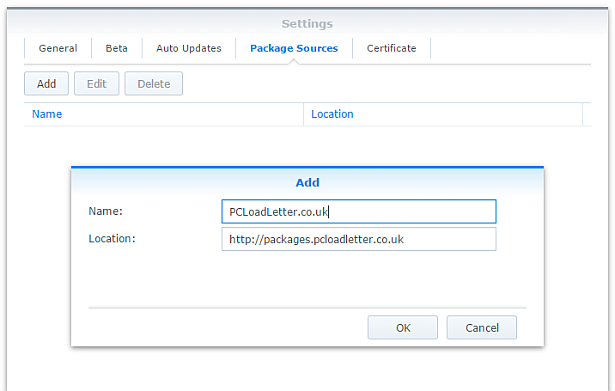
- The repository will push its certificate automatically to the NAS, which is used to validate package integrity. Set the Trust Level to Synology Inc. and trusted publishers:

- Now browse the Community section in Package Center to install a Java SE Embedded package:

The repository only displays packages which are compatible with your specific model of NAS. If you don’t see Java Embedded in the list, then either your NAS model or your DSM version are not supported at this time. - If you have a multi-bay NAS, use the Shared Folder control panel to create a shared folder called public (it must be all lower case). On single bay models this is created by default. Assign it with Read/Write privileges for everyone.
- Register with Oracle and download the appropriate version of Java SE Embedded for your CPU architecture and save in the public shared folder on your NAS. Note that to get any version of Java older than the current one you will need to follow the Oracle Java SE Embedded Downloads Archive link on that page. If in doubt, attempt to install the package first, and the error message will tell you which specific download version is required.
- If you have trouble getting the Java archive recognised, try downloading it with a different web browser. Some browsers try to help by uncompressing the file, or renaming it without warning. I have tried to code around most of these behaviours. Use Firefox if all else fails.
Package scripts
For information, here are the package scripts so you can see what it’s going to do. You can get more information about how packages work by reading the Synology 3rd Party Developer Guide.
installer.sh
#!/bin/sh

#--------JAVA installer script
#--------package maintained at pcloadletter.co.uk

COMMENT="# Synology Java Package"
SYNO_CPU_ARCH="`uname -m`"
[ "`echo ${SYNO_CPU_ARCH} | cut -c1-7`" == "armv5te" ] && SYNO_CPU_ARCH="armv5tel"
#--------Synology switched Armada 370 systems from SoftFP to HardFP EABI for DSM 6.0
[ "${SYNOPKG_DSM_ARCH}" == "armada370" ] && [ ${SYNOPKG_DSM_VERSION_MAJOR} -gt 5 ] && SYNO_CPU_ARCH="armv7l-hflt"
[ "${SYNOPKG_DSM_ARCH}" == "armada375" ] && SYNO_CPU_ARCH="armv7l-hflt"
[ "${SYNOPKG_DSM_ARCH}" == "armada38x" ] && SYNO_CPU_ARCH="armv7l-hflt"
[ "${SYNOPKG_DSM_ARCH}" == "comcerto2k" ] && SYNO_CPU_ARCH="armv7l-hflt"
[ "${SYNOPKG_DSM_ARCH}" == "alpine" ] && SYNO_CPU_ARCH="armv7l-hflt"
[ "${SYNOPKG_DSM_ARCH}" == "alpine4k" ] && SYNO_CPU_ARCH="armv7l-hflt"
[ "${SYNOPKG_DSM_ARCH}" == "monaco" ] && SYNO_CPU_ARCH="armv7l-hflt"
[ "${SYNOPKG_DSM_ARCH}" == "x86_64" ] && [ "${WIZARD_JRE_EE}" == "true" ] && SYNO_CPU_ARCH="i686"
[ "${SYNOPKG_DSM_ARCH}" == "x86_64" ] && [ ${SYNOPKG_DSM_VERSION_MAJOR} -lt 6 ] && SYNO_CPU_ARCH="i686"

if [ "${SYNOPKG_PKGNAME}" == "java6" ]; then
  DOWNLOAD_URL="http://tinyurl.com/javaembedarchive"
  EXTRACTED_FOLDER="ejre1.6.0_38"
  JCE_BINARY="jce_policy-6.zip"
  JCE_URL="http://tinyurl.com/java-jce6"
  JCE_FOLDER="jce"
  if [ "`echo ${SYNO_CPU_ARCH} | cut -c1-7`" == "armv5te" ]; then
    JAVA_BINARY="ejre-1_6_0_38-fcs-b05-linux-arm-sflt-eabi-headless-13_nov_2012.tar.gz"
    JAVA_BUILD="ARMv5 Linux - Headless EABI"
  elif [ "${SYNO_CPU_ARCH}" == "armv7l" ]; then
    JAVA_BINARY="ejre-1_6_0_38-fcs-b05-linux-arm-vfp-eabi-headless-13_nov_2012.tar.gz"
    JAVA_BUILD="ARMv6/7 Linux - Headless EABI, VFP, SoftFP ABI, Little Endian"
  elif [ "${SYNO_CPU_ARCH}" == "i686" ]; then
    JAVA_BINARY="ejre-1_6_0_38-fcs-b05-linux-i586-headless-13_nov_2012.tar.gz"
    JAVA_BUILD="x86 Linux Small Footprint - Headless"
  elif [ "${SYNO_CPU_ARCH}" == "x86_64" ]; then
    JAVA_BINARY="ejre-1_6_0_38-fcs-b05-linux-i586-headless-13_nov_2012.tar.gz"
    JAVA_BUILD="x86 Linux Small Footprint - Headless"
  elif [ "${SYNO_CPU_ARCH}" == "ppc" ]; then
    JAVA_BINARY="ejre-1_6_0_38-fcs-b05-linux-ppc-e500v2-headless-13_nov_2012.tar.gz"
    JAVA_BUILD="Power Architecture Linux - Headless - e500v2 core"
  fi

elif [ "${SYNOPKG_PKGNAME}" == "java7" ]; then
  DOWNLOAD_URL="http://tinyurl.com/javaembed"
  EXTRACTED_FOLDER="ejre1.7.0_75"
  JCE_BINARY="UnlimitedJCEPolicyJDK7.zip"
  JCE_URL="http://tinyurl.com/java-jce7"
  JCE_FOLDER="UnlimitedJCEPolicy"
  if [ "${SYNO_CPU_ARCH}" == "armv5tel" ]; then
    JAVA_BINARY="ejre-7u75-fcs-b13-linux-arm-sflt-headless-18_dec_2014.tar.gz"
    JAVA_BUILD="ARMv5 Linux - Headless EABI, SoftFP ABI, Little Endian"
  elif [ "${SYNO_CPU_ARCH}" == "armv7l" ]; then
    JAVA_BINARY="ejre-7u75-fcs-b13-linux-arm-vfp-sflt-client_headless-18_dec_2014.tar.gz"
    JAVA_BUILD="ARMv6/7 Linux - Headless - Client Compiler EABI, VFP, SoftFP ABI, Little Endian"
  elif [ "${SYNO_CPU_ARCH}" == "armv7l-hflt" ]; then
    JAVA_BINARY="ejre-7u75-fcs-b13-linux-arm-vfp-hflt-client_headless-18_dec_2014.tar.gz"
    JAVA_BUILD="ARMv6/7 Linux - Headless - Client Compiler EABI, VFP, HardFP ABI, Little Endian"
  elif [ "${SYNO_CPU_ARCH}" == "i686" ]; then
    JAVA_BINARY="ejre-7u75-fcs-b13-linux-i586-headless-18_dec_2014.tar.gz"
    JAVA_BUILD="x86 Linux Small Footprint - Headless"
  elif [ "${SYNO_CPU_ARCH}" == "x86_64" ]; then
    JAVA_BINARY="ejre-7u75-fcs-b13-linux-i586-headless-18_dec_2014.tar.gz"
    JAVA_BUILD="x86 Linux Small Footprint - Headless"
  elif [ "${SYNO_CPU_ARCH}" == "ppc" ]; then
    JAVA_BINARY="ejre-7u75-fcs-b13-linux-ppc-e500v2-headless-18_dec_2014.tar.gz"
    JAVA_BUILD="Power Architecture Linux - Headless - e500v2 with double-precision SPE Floating Point Unit"
  fi

elif [ "${SYNOPKG_PKGNAME}" == "java8" ]; then
  DOWNLOAD_URL="http://tinyurl.com/javaembed"
  EXTRACTED_FOLDER="ejdk1.8.0_211"
  JCE_BINARY="jce_policy-8.zip"
  JCE_URL="http://tinyurl.com/java-jce8"
  JCE_FOLDER="UnlimitedJCEPolicyJDK8"
  if [ "${SYNO_CPU_ARCH}" == "armv5tel" ]; then
    JAVA_BINARY="ejdk-8u211-linux-arm-sflt.tar.gz"
    JAVA_BUILD="ARMv5/ARMv6/ARMv7 Linux - SoftFP ABI, Little Endian 2"
  elif [ "${SYNO_CPU_ARCH}" == "armv7l" ]; then
    JAVA_BINARY="ejdk-8u211-linux-arm-sflt.tar.gz"
    JAVA_BUILD="ARMv5/ARMv6/ARMv7 Linux - SoftFP ABI, Little Endian 2"
  elif [ "${SYNO_CPU_ARCH}" == "armv7l-hflt" ]; then
    JAVA_BINARY="ejdk-8u211-linux-armv6-vfp-hflt.tar.gz"
    JAVA_BUILD="ARMv6/ARMv7 Linux - VFP, HardFP ABI, Little Endian 1"
  elif [ "${SYNO_CPU_ARCH}" == "aarch64" ]; then
    JAVA_BINARY="jdk-8u211-linux-arm64-vfp-hflt.tar.gz"
    JAVA_BUILD="Linux ARM 64 Hard Float ABI"
    DOWNLOAD_URL="http://tinyurl.com/java8arm64"
    EXTRACTED_FOLDER="jdk1.8.0_211"
  elif [ "${SYNO_CPU_ARCH}" == "i686" ]; then
    JAVA_BINARY="ejdk-8u211-linux-i586.tar.gz"
    JAVA_BUILD="x86 Linux Small Footprint - Headless"
  elif [ "${SYNO_CPU_ARCH}" == "x86_64" ]; then
    JAVA_BINARY="jre-8u211-linux-x64.tar.gz"
    JAVA_BUILD="Linux x64"
    EXTRACTED_FOLDER="jre1.8.0_211"
    DOWNLOAD_URL="http://tinyurl.com/java8x64"
  elif [ "${SYNO_CPU_ARCH}" == "ppc" ]; then
    #Oracle have discontinued Java 8 for PowerPC after update 6
    JAVA_BINARY="ejdk-8u6-fcs-b23-linux-ppc-e500v2-12_jun_2014.tar.gz"
    JAVA_BUILD="Power Architecture Linux - Headless - e500v2 with double-precision SPE Floating Point Unit"
    EXTRACTED_FOLDER="ejdk1.8.0_06"
  fi
fi

JAVA_BINARY=`echo ${JAVA_BINARY} | cut -f1 -d'.'`
PUBLIC_FOLDER="`synoshare --get public | sed -r "/Path/!d;s/^.*\[(.*)\].*$/\1/"`"
TEMP_FOLDER="`find / -maxdepth 2 -path '/volume?/@tmp' | head -n 1`"
NATIVE_BINS_URL="http://packages.pcloadletter.co.uk/downloads/java-native-${SYNO_CPU_ARCH}.tar.xz"
NATIVE_BINS_FILE="`echo ${NATIVE_BINS_URL} | sed -r "s%^.*/(.*)%\1%"`"
#DSM versions older than 4.3 need locale support adding, don't download unless needed
[ ! -e /usr/bin/locale ] && INSTALL_FILES="${NATIVE_BINS_URL}"
source /etc/profile


preinst ()
{
  synoshare -get public > /dev/null || (
    echo "A shared folder called 'public' could not be found - note this name is case-sensitive. " >> $SYNOPKG_TEMP_LOGFILE
    echo "Please create this using the Shared Folder DSM Control Panel and try again." >> $SYNOPKG_TEMP_LOGFILE
    exit 1
  )

  JAVA_BINARY_FOUND=

  if [ -n "${JAVA_HOME}" ]; then
    echo "It seems from /etc/profile that a Java Runtime is already installed at ${JAVA_HOME}. Uninstall it and try again." >> $SYNOPKG_TEMP_LOGFILE
    exit 1
  fi

  [ -f ${PUBLIC_FOLDER}/${JAVA_BINARY}.tar.gz ] && JAVA_BINARY_FOUND=true
  [ -f ${PUBLIC_FOLDER}/${JAVA_BINARY}.tar ] && JAVA_BINARY_FOUND=true
  [ -f ${PUBLIC_FOLDER}/${JAVA_BINARY}.tar.tar ] && JAVA_BINARY_FOUND=true
  [ -f ${PUBLIC_FOLDER}/${JAVA_BINARY}.gz ] && JAVA_BINARY_FOUND=true

  if [ -z ${JAVA_BINARY_FOUND} ]; then
    echo "Java binary bundle not found. " >> $SYNOPKG_TEMP_LOGFILE
    echo "I was expecting the file ${PUBLIC_FOLDER}/${JAVA_BINARY}.tar.gz. " >> $SYNOPKG_TEMP_LOGFILE
    echo "Please agree to the Oracle licence at ${DOWNLOAD_URL}, then download the '${JAVA_BUILD}' package" >> $SYNOPKG_TEMP_LOGFILE
    echo "and place it in the 'public' shared folder on your NAS. This download cannot be automated even if " >> $SYNOPKG_TEMP_LOGFILE
    echo "displaying a package EULA could potentially cover the legal aspect, because files hosted on Oracle's " >> $SYNOPKG_TEMP_LOGFILE
    echo "server are protected by a session cookie requiring a JavaScript enabled browser." >> $SYNOPKG_TEMP_LOGFILE
    exit 1
  fi

  if [ "${WIZARD_JCE_UL}" == "true" ]; then
    if [ ! -f ${PUBLIC_FOLDER}/${JCE_BINARY} ]; then
      echo "JCE Unlimited Strength binary bundle not found. " >> $SYNOPKG_TEMP_LOGFILE
      echo "I was expecting the file ${PUBLIC_FOLDER}/${JCE_BINARY} " >> $SYNOPKG_TEMP_LOGFILE
      echo "Please agree to the Oracle licence at ${JCE_URL}, then download the Unlimited Strength Jurisdiction Policy Files zip file " >> $SYNOPKG_TEMP_LOGFILE
      echo "and place it in the 'public' shared folder on your NAS. " >> $SYNOPKG_TEMP_LOGFILE
      exit 1
    fi
  fi

  cd ${TEMP_FOLDER}
  for WGET_URL in ${INSTALL_FILES}
  do
    WGET_FILENAME="`echo ${WGET_URL} | sed -r "s%^.*/(.*)%\1%"`"
    [ -f ${TEMP_FOLDER}/${WGET_FILENAME} ] && rm ${TEMP_FOLDER}/${WGET_FILENAME}
    wget ${WGET_URL}
    if [[ $? != 0 ]]; then
      if [ -d ${PUBLIC_FOLDER} ] && [ -f ${PUBLIC_FOLDER}/${WGET_FILENAME} ]; then
        cp ${PUBLIC_FOLDER}/${WGET_FILENAME} ${TEMP_FOLDER}
      else
        echo "There was a problem downloading ${WGET_FILENAME} from the official download link, " >> $SYNOPKG_TEMP_LOGFILE
        echo "which was \"${WGET_URL}\" " >> $SYNOPKG_TEMP_LOGFILE
        echo "Alternatively, you may download this file manually and place it in the 'public' shared folder. " >> $SYNOPKG_TEMP_LOGFILE
        exit 1
      fi
    fi
  done

  exit 0
}


postinst ()
{
  WORKING_DIR=`pwd`

  #ldd tool is very useful but not included in DSM
  if [ ! -e /usr/local/bin/ldd ]; then
    mkdir -p /usr/local/bin
    cp ${SYNOPKG_PKGDEST}/tools/ldd-${SYNO_CPU_ARCH} /usr/local/bin/ldd
  fi

  #extract native binaries if needed
  if [ -e ${TEMP_FOLDER}/${NATIVE_BINS_FILE} ]; then
    cd ${SYNOPKG_PKGDEST}
    #older DSM tar uses different command line switch for xz archives
    tar xJf ${TEMP_FOLDER}/${NATIVE_BINS_FILE} || tar xaf ${TEMP_FOLDER}/${NATIVE_BINS_FILE}
    rm ${TEMP_FOLDER}/${NATIVE_BINS_FILE}
  fi

  #extract Java (Web browsers love to interfere with .tar.gz files)
  cd ${PUBLIC_FOLDER}
  if [ -f ${JAVA_BINARY}.tar.gz ]; then
    #Firefox seems to be the only browser that leaves it alone
    tar xzf ${JAVA_BINARY}.tar.gz
  elif [ -f ${JAVA_BINARY}.gz ]; then
    #Chrome
    tar xzf ${JAVA_BINARY}.gz
  elif [ -f ${JAVA_BINARY}.tar ]; then
    #Safari
    tar xf ${JAVA_BINARY}.tar
  elif [ -f ${JAVA_BINARY}.tar.tar ]; then
    #Internet Explorer
    tar xzf ${JAVA_BINARY}.tar.tar
  fi

  #install Java
  if [ "${EXTRACTED_FOLDER}" != "${EXTRACTED_FOLDER/jdk/}" ]; then
    mv ${EXTRACTED_FOLDER} ${SYNOPKG_PKGDEST}
    JRE_PATH="`find ${SYNOPKG_PKGDEST}/${EXTRACTED_FOLDER} -name jre`"
  else
    mv ${EXTRACTED_FOLDER} ${SYNOPKG_PKGDEST}/jre
    JRE_PATH="${SYNOPKG_PKGDEST}/jre"
  fi

  #install unlimited crypto policy files if requested
  if [ "${WIZARD_JCE_UL}" == "true" ]; then
    if [ -e /usr/bin/7z ]; then
      7z x ${JCE_BINARY} > /dev/null 2>&1
    else
      unzip ${JCE_BINARY}
    fi
    mv ${JCE_FOLDER}/* ${JRE_PATH}/lib/security
    rmdir ${JCE_FOLDER}
  fi

  #change owner of folder tree
  chown -R root:root ${SYNOPKG_PKGDEST}

  echo "NOTE - This package does *not* start and stop like other packages. " >> $SYNOPKG_TEMP_LOGFILE
  echo "Java is correctly installed if you can see the runtime and HotSpot version numbers, " >> $SYNOPKG_TEMP_LOGFILE
  echo "and locale information in the package Log tab." >> $SYNOPKG_TEMP_LOGFILE

  exit 0
}


preuninst ()
{
  exit 0
}


postuninst ()
{
  #clean up profile mods
  sed -i "/${COMMENT}/d" /etc/profile
  sed -i "/${COMMENT}/d" /root/.profile

  #leave locale support in place on older DSM versions - too risky to delete system binaries

  exit 0
}
start-stop-status.sh
#!/bin/sh

JRE_PATH="`find /var/packages/${SYNOPKG_PKGNAME}/target/ -name jre`"
COMMENT="# Synology Java Package"
#set the current timezone for Java so that log timestamps are accurate, modern timezone names so DST works
SYNO_TZ=`cat /etc/synoinfo.conf | grep timezone | cut -f2 -d'"'`
#fix for DST time in DSM 5.2 thanks to MinimServer Syno package author
[ -e /usr/share/zoneinfo/Timezone/synotztable.json ] \
 && SYNO_TZ=`jq ".${SYNO_TZ} | .nameInTZDB" /usr/share/zoneinfo/Timezone/synotztable.json | sed -e "s/\"//g"` \
 || SYNO_TZ=`grep "^${SYNO_TZ}" /usr/share/zoneinfo/Timezone/tzname | sed -e "s/^.*= //"`

EnvCheck ()
#updates to DSM will reset these changes so check them each startup
{
  #/etc/profile should contain 5 lines added by this package tagged with trailing comments
  COUNT=`grep -c "$COMMENT$" /etc/profile`
  if [ $COUNT != 5 ]; then

    #remove any existing mods
    sed -i "/${COMMENT}/d" /etc/profile

    #add required environment variables
    echo "PATH=\$PATH:${JRE_PATH}/bin ${COMMENT}" >> /etc/profile
    echo "JAVA_HOME=${JRE_PATH} ${COMMENT}" >> /etc/profile
    echo "CLASSPATH=.:${JRE_PATH}/lib ${COMMENT}" >> /etc/profile
    echo "LANG=en_US.utf8 ${COMMENT}" >> /etc/profile
    echo "export CLASSPATH JAVA_HOME LANG PATH ${COMMENT}" >> /etc/profile
  fi

  #/root/.profile should contain 3 lines added by this package tagged with trailing comments
  COUNT=`grep -c "$COMMENT$" /root/.profile`
  if [ $COUNT != 3 ]; then

    #remove any existing mods
    sed -i "/${COMMENT}/d" /root/.profile

    #add required environment variables
    echo "PATH=\$PATH:${JRE_PATH}/bin ${COMMENT}" >> /root/.profile
    echo "TZ='${SYNO_TZ}' ${COMMENT}" >> /root/.profile
    echo "export PATH TZ ${COMMENT}" >> /root/.profile
  fi

  #timezone needs setting each startup in case system value has changed
  sed -i "s%^TZ=.* ${COMMENT}%TZ='${SYNO_TZ}' ${COMMENT}%" /root/.profile

  #DSM versions older than 4.3 need locale support adding
  if [ ! -e /usr/bin/locale ]; then

    #build missing locale with UTF-8 support (don't think it matters which language)
    cp ${SYNOPKG_PKGDEST}/bin/* /usr/bin
    cp -R ${SYNOPKG_PKGDEST}/share/i18n /usr/share
    if [ ! -d /usr/lib/locale ]; then
      mkdir /usr/lib/locale
    fi
    localedef -c -f UTF-8 -i en_US en_US.utf8
  fi

  #DSM versions up to 5.1 are missing the zoneinfo timezone definitions which causes inaccurate log timestamps
  #thanks to CoolRaoul here: http://forum.synology.com/enu/viewtopic.php?f=19&t=69232#p310553
  #to revert, just remove everything apart from 'Timezone' 'zone.tab' from /usr/share/zoneinfo
  if [ ! -e /usr/share/zoneinfo/Europe/London ]; then
    cp -R ${SYNOPKG_PKGDEST}/zoneinfo/* /usr/share/zoneinfo/
  fi

}

case $1 in
  start)
    EnvCheck
    source /etc/profile
    source /root/.profile

    #evidence of whether Java can start successfully is written to the package log
    java -version > ${SYNOPKG_PKGDEST}/output.log 2>&1
    echo >> ${SYNOPKG_PKGDEST}/output.log
    echo System installed locales: >> ${SYNOPKG_PKGDEST}/output.log
    locale -a >> ${SYNOPKG_PKGDEST}/output.log
    echo >> ${SYNOPKG_PKGDEST}/output.log
    echo JAVA_HOME=$JAVA_HOME >> ${SYNOPKG_PKGDEST}/output.log
    echo TZ=$TZ >> ${SYNOPKG_PKGDEST}/output.log

    exit 0
  ;;

  stop)
    exit 0
  ;;

  status)
    source /etc/profile
    source /root/.profile
    if [ -e "${JAVA_HOME}/bin/java" ]; then
      exit 0
    else
      exit 1
    fi
  ;;

  log)
    echo "${SYNOPKG_PKGDEST}/output.log"
    exit 0
  ;;

esac
install_uifile
[
  {
    "step_title": "Java Runtime Environment Selection",
    "items": [
      {
        "type": "singleselect",
        "desc": "Please select the Java version to install:",
        "subitems": [
          {
            "key": "WIZARD_JRE_EE",
            "desc": "Java SE Embedded 8 (smaller memory footprint, 32bit)",
            "defaultValue": true
          },
          {
            "key": "WIZARD_JRE_SE",
            "desc": "Java SE 8 (64bit)",
            "defaultValue": false
          }
        ]
      }
    ]
  },
  {
    "step_title": "Java Cryptography Strength Selection",
    "items": [
      {
        "type": "singleselect",
        "desc": "Please select Java Cryptographic Extension policy:",
        "subitems": [
          {
            "key": "WIZARD_JCE_STD",
            "desc": "Default Strong JCE policy - limited to AES-128 encryption",
            "defaultValue": true
          },
          {
            "key": "WIZARD_JCE_UL",
            "desc": "Unlimited Strength JCE policy - not permitted in some jurisdictions, see Oracle documentation",
            "defaultValue": false
          }
        ]
      }
    ]
  }
]
Changelog:
- 0050 17/Apr/19 – Updated to Java 8u211, added support for DS119j
- 0049 11/Apr/19 – Updated to Java 8u201, fixed issue where x86_64 CPUs would ignore user selection and always install 64bit Java SE
- 0048 22/Aug/18 – Updated to Java 8u181, added option to select 64bit full Java SE for x86_64 CPUs
- 0047 14/May/18 – Updated to Java 8u171
- 0046 20/Feb/18 – Updated to Java 8u161, experimental aarch64 support
- 0045 30/Oct/17 – Updated to Java 8u151, added support for new CPUs in x17 and x18 models
- 0044 02/Aug/17 – Updated to Java 8u144
- 0043 21/Jan/17 – Updated to Java 8u121
- 0042 07/Jan/17 – Updated to Java 8u111, fixed Armada 370/XP systems running DSM 6.0 which had switched from soft to hard float ABI
- 0041 25/Jul/16 – Added support for unlimited strength cryptography (default is strong)
- 0040 20/Jul/16 – Updated to Java 8u101
- 0039 26/Apr/16 – Updated to Java 8u91
- 0038 24/Mar/16 – Updated to Java 8u77
- 0037 07/Feb/16 – Updated to Java 8u73
- 0036 26/Jan/16 – Updated to Java 8u71
- 0035 14/Dec/15 – Updated to Java 8u65, added support for models DS716+ and DS216play
- 0034 19/Aug/15 – Fixed timezone DST issue with DSM 5.2, added support for DS215+
- 0033 07/Aug/15 – Updated to Java 8u51, PowerPC build remains at 8u6
- 0032 13/Jul/15 – Fixed timezone issue with DSM 5.2, updated main blog post documentation
- 0031 25/Jan/15 – Fixed issue with version 0030 for systems with more than one volume
- 0030 21/Jan/15 – Improved temp folder detection, updated to Java 7u75 and Java 8u33 (Oracle did not publish a version for PowerPC)
- 0029 25/Dec/14 – DSM timezone zone.tab file is no longer overwritten, which had been prompting a malware alert in DSM 5.1 Security Advisor
- 0028 20/Oct/14 – Updated to Java 7u71, added missing zoneinfo timezone definitions to fix inaccurate timestamps for non-GMT timezones (checked every startup), switched native binary archives from .tgz to .tar.xz format to reduce size
- 0027 18/Oct/14 – Updated Java 8 to 8u6, added support for Mindspeed Comcerto 2000 CPU in DS414j for Java 7 and Java 8
- 0026 24/Jun/14 – DSM updates will no longer break Java
- 0025 31/May/14 – Updated to Java 7u60
- 0024 31/May/14 – Updated to Java 7u55
- 0023 27/May/14 – Added Java 8 support
- 0022 30/Jan/14 – Updated to Java 7u51
- 0021 15/Nov/13 – Locale support is no longer downloaded and added to DSM 4.3 or newer since it’s already present
- 0020 30/Oct/13 – Added support for Intel Atom Evansport and Armada XP CPUs in new DSx14 products, removed Early Access JDK 8 support since it did not run on the Armada SoCs
- 0019 17/Oct/13 – Updated to Java 7u45
- 0018 11/Oct/13 – Updated to Java 7u40, and JDK8 Early Access b106
- 0017 05/Jun/13 – For Armada370 CPU changed from ARMv7 Server JVM to Client JVM since the Server one turned out to be unstable. Added support for Early Access JDK 8 for Armada 370.
- 0016 21/May/13 – Added Armada370 CPU support (DS213j)
- 0015 18/Apr/13 – Updated to Java 7u21, Java 6 Embedded seems to be no longer maintained by Oracle
- 0014 13/Feb/13 – Fixed metadata for DSM 4.2 Package Center
- 013 13/Dec/12 – Updated to Java 6u38 and Java 7u10
- 012 10/Dec/12 – Installer script fetches native binaries separately to reduce bandwidth on repo hosting
- 011 Added support for Freescale QorIQ PowerPC CPUs used in some Synology x13 series products, PowerQUICC PowerPC processors in previous Synology generations with older glibc versions are not supported
- 010 updated to Java 6u34 and Java 7u6
- 009 corrected timezone bug for Atlantic and Pacific timezones which may have caused error messages when in fact the package had installed correctly
- 008 unified the build scripts
- 007 included the locale binaries to simplify installation, fixed environment variables for root user (inc. timezone with DST support), displayed Java version information and env vars in Log tab, incremented Java to latest versions 6u32 and 7u4, fixed detection of renamed .tar.gz archives downloaded by Google Chrome
- 006 fixed path issue for root user on non-bootstrapped systems, updated info link to refer back to this page, and improved description text
- 005 incremented JRE versions to match new releases from Oracle
- 004 forced check for existence of ‘public’ shared folder
- 003 fixed a stupid typo that stopped 002 from working :)
- 002 rewrote scripts to be easier to maintain, and to allow for web browsers that untar or rename the Java and toolchain binary bundles as they’re saved
- 001 23/Aug/11 – fixed package repo support, defined as a non-runnable service, prevented more than one JRE being installed, saved files into actual package folder rather than @appstore/java now that package names can be separate from Package Center display names
- v3 initial spk release (I think!)
 PC LOAD LETTER
Thank you patters for sharing your work.
Am I the only one that doesn’t see a java package? I see craftbukkit, minecraft, openremote and subsonic-backup-creator but no java.
DS 410 pretty sure this is NOT intel.
DSM 4.0-2219
pointed to http://pcloadletter.comlu.com
Is there a link to manually download the package?
Any help appreciated.
It’s not Intel, but it’s not a Marvell Kirkwood ARM CPU either:
http://forum.synology.com/wiki/index.php/What_kind_of_CPU_does_my_NAS_have
Thanks for the reply. Bad assumptions on my part. I thought not working on Intel meant working on anything not intel. :-)
I’m curious, does the package have a property indicating what models it runs on when the synology queries the repository?
Thanks again.
Yes, that property is declared in the repo, and it’s also in the package itself. The syno sends its CPU model in the repo query.
Thank you patters for sharing your work.
My Syno is a DS 209+ = MPC8533E = E500 CPU.
running under DSM 4.0-
Ad hoc java Se downloaded from Oracle and placed in “public” directory in Syno shared directory.
Then pointed to http://pcloadletter.comlu.com repository but I dont see the java package? I see craftbukkit, minecraft, openremote etc..but no java.
Have I done something wrong ?
Is there a link to manually download the package?
Thanks for help !
Sorry – that CPU won’t work with my package I’m afraid, not because the CPU is incompatible, but because Synology’s DSM for that model uses an old glibc version. There is a complicated workaround involving a chroot to a minimal Debian system, but it’s a manual process that can’t really be automated by a package:
http://www.hera.cc/2010/11/installer-java-sur-nas-synology-ds210/
You write this in install source, at line 013 – should it not be “x86_64” insteed of “armv5tel”
or maybe I just not understanding the code….
EXTRACTED_FOLDER=”ejre1.6.0_32″
010 if [ “${SYNO_CPU_ARCH}” == “armv5tel” ]; then
011 JAVA_BINARY=”ejre-1_6_0_32-fcs-b05-linux-arm-sflt-eabi-headless-05_apr_2012.tar.gz”
012 JAVA_BUILD=”ARMv5 Linux – Headless”
013 elif [ “${SYNO_CPU_ARCH}” == “armv5tel” ]; then
014 JAVA_BINARY=”ejre-1_6_0_32-fcs-b05-linux-i586-headless-05_apr_2012.tar.gz”
015 JAVA_BUILD=”x86 Linux Small Footprint – Headless”
Sorry I had spotted that shortly after I first released the new package version and I had in fact fixed it within a few hours I think, but I forgot to update the copy of the script on the website.
well, tried to install the package, work but told me that I need to repair the file before activate the Java. When going to installed package, got Java SE for embedded 6 STOPPED and the only thing I could do is uninstall it :(
Hello, can anyone provide the correct java install file for Synology?
For days I have been attempting to download the file from the link after registration but its stuck on loading. I tried different browsers and on different networks.
Any help would be greatly appreciated.
Use the TinyURL link from the package’s error message. Then be sure to click on the Agree to End User Licence radio button. The download links on the Oracle site don’t work until you have done that.
Well, finally it’s work ! I needed to rename the file downloaded from Oracle. I get an file .gz that contain .tar inside. Just renamed the original .gz file in .tar.gz and DONE ! :)
File wont install:
I’ve followed the instructions to the tee, tried to download with another browser, accepted license agreement. The file is their in the public folder exactly as described and yet error says Java binary bundle not found. I was expecting……..(the exact file in the public folder).
HELP!!! Please
same here:
Datentonne> ls -l /volume1/public/ejre-7u4-fcs-b20-linux-arm-sflt-headless-12_apr_2012.tar.gz
-rwxrwxrwx 1 lordfiSh users 33303228 May 29 20:48 /volume1/public/ejre-7u4-fcs-b20-linux-arm-sflt-headless-12_apr_2012.tar.gz
Is the ‘public’ shared folder set to allow read/write privileges to everyone, as per point one of the Instructions?
Ok it worked with the Version 6 but not 7
Hi,
I installed DSM 4.0 and then Java 7 and serviio, but now I have another issue: the processor stays in full load 100% and java is using 99%. Also RAM is consumed a lot by java.
NAS is synology DS211.
thank you,
Hi, I’m experiencing same CPU load.
This is due to serviio thumb’s creation for your photo, also preview generating for your video probably (if you did not unselect this in serviio console for local files).
You can check all the serviio’s activities in /volume1/@appstore/Serviio/log/serviio.log
Currently I’m finding info if thumbs for photos can be disabled in serviio config.
hello, i have also a DS211.
Could you please tell me the steps and the release you follow to install the java machine please.
Thank you
Ps: i would like to upload my photos to flickr automatically .
Pingback: Ingmar Verheij – The dutch IT guy » Backup Synology to CrashPlan Pro (on Dutch server at Pro Backup) » Ingmar Verheij - The dutch IT guy
I have this file ” ejre-7u4-fcs-b20-linux-i586-headless-12_apr_2012.tar.gz” in /volume1/public on my DS1512+ but I cannot install as Java 7. I saw that the installer.sh was referring that filename at one point but this seems not to work.
Java 7 doesn’t work on Intel synos unfortunately. I think there’s some dependency missing. I just left the filename in there for completeness’ sake, from when it was tested. They’re still on glibc 2.3 which is a bit old. Even the ARM synos are on 2.5.
Re: the dependency on Oracle’s JRE – there isn’t one. The script just checks that the environment variable JAVA_HOME is not null, and that the file ${JAVA_HOME}/bin/java exists. So feel free to setup OpenJDK. Be aware though that you’ll need to mess about to get locale support (and therefore UTF-8 which my package integrates).
Out of interest, did Synology send you a test unit, or did you buy it? :)
I just tried JRE7u5 and that seems to run on glibc2.4 but I still get an error:
DiskStation> ./java -version
Error: dl failure on line 864
Error: failed /opt/jre1.7.0_05/lib/amd64/server/libjvm.so, because /lib64/libc.so.6: version `GLIBC_2.4′ not found (required by /opt/jre1.7.0_05/lib/amd64/server/libjvm.so)
But I find that file:
DiskStation> ls /lib64/libc.so.6
/lib64/libc.so.6
Any ideas?
PS: Synology sent me a test unit.
My point is that your system is not built on glibc2.4. No Intel Synology uses 2.4. You have 2.3 – hence that error. There’s nothing you can do about this – Synology would have to rebuild the whole DSM for their Intel products.
Ok, I found an OpenJDK distribution which is based on GPLv2 and can be freely distributed. I will try and create a .spk for that. Can you tell me how a website has to be structured so that the package center can use it as third party source, just like your “http://pcloadletter.comlu.com”? Do I only have to put the .spk file in the root of that website? I did not find any info about that.
Thanks,
–Marcus
No, it’s more complicated than that. You need to build a web service and respond to the syno’s query with JSON formatted data. I had to reverse engineer it from Wireshark traces.
Building a webservice just for serving packages. Wow.
They could just have queried for some kind of packages.xml.
Anyway, I will ask if they can provide me with some info.
The older jre-6u31-linux-x64.bin is working.
I’m not sure what you mean – is this the Oracle JRE, or the OpenJDK?
That is Oracle JRE which is distributable.
I thought the Syno is also on glibc2.4 because the libc.so.6 file exists.
But I guess that glibc2.3 uses the same file?
The full Java SE? My package is the SE Embedded version remember.
For that libc.so.6 – it is the same file, but a different version. You can check just by running it like so:
BusyBox v1.16.1 (2012-05-10 02:27:56 CST) built-in shell (ash)Enter 'help' for a list of built-in commands.
~$ /lib/libc.so.6
GNU C Library stable release version 2.5, by Roland McGrath et al.
Copyright (C) 2006 Free Software Foundation, Inc.
This is free software; see the source for copying conditions.
There is NO warranty; not even for MERCHANTABILITY or FITNESS FOR A
PARTICULAR PURPOSE.
Compiled by GNU CC version 4.2.0 20070413 (prerelease).
Compiled on a Linux >>2.6.17-12-generic<< system on 2007-10-15.
Available extensions:
crypt add-on version 2.1 by Michael Glad and others
GNU Libidn by Simon Josefsson
GNU libio by Per Bothner
NIS(YP)/NIS+ NSS modules 0.19 by Thorsten Kukuk
Native POSIX Threads Library by Ulrich Drepper et al
Support for some architectures added on, not maintained in glibc core.
BIND-8.2.3-T5B
Thread-local storage support included.
For bug reporting instructions, please see:
.
~$
It’s interesting that they sent you a test unit. They seem pretty disinterested in what I have done for them so far.
Looks like there is still a licence chapter that does not allow the distribution. I will also try the OpenJDK now.
I think the best thing would be to make OpenJDK as a separate package rather than part of OpenRemote. Since I don’t have an Intel NAS I can’t reasonably do that myself. However, this antiquated version of glibc is likely to be an issue.
DiskStation> /lib/libc.so.6
GNU C Library stable release version 2.3.6, by Roland McGrath et al.
Copyright (C) 2005 Free Software Foundation, Inc.
This is free software; see the source for copying conditions.
There is NO warranty; not even for MERCHANTABILITY or FITNESS FOR A
PARTICULAR PURPOSE.
Compiled by GNU CC version 3.3.6.
Compiled on a Linux 2.6.12 system on 2009-11-27.
Available extensions:
GNU libio by Per Bothner
crypt add-on version 2.1 by Michael Glad and others
linuxthreads-0.10 by Xavier Leroy
BIND-8.2.3-T5B
libthread_db work sponsored by Alpha Processor Inc
NIS(YP)/NIS+ NSS modules 0.19 by Thorsten Kukuk
For bug reporting instructions, please see:
.
DiskStation>
Some of the problems i am fighting with is the ejre-1_6_0_32-fcs-b05-linux-i586-headless-05_apr_2012.tar.gz had to be at the root of the synology and not the Public share.
After that it says installed successful but have an error in the package log.
/var/packages/java6/scripts/postinst: line 28: java: not found
I have a DS1511 im trying to install it on.
I ran into the same situation on a DS411+ (x86), to fix it i just went to /var/packages/java6/scripts and looked at installer.sh to see what it was doing.
To get it working, log into your syno with ssh as root and check your /etc/profile to make sure that it set up the path and language vars for java (it should, I got the same error as you, and looking at the script it runs through everything to get the syno to give you the installed successfully screen), and if it did you just need to extract the ejre*.tar.gz file into /volume1/@appstore/java6/jre to put the files in place. this assumes you were trying to install to volume1, substitute correct path as necessary.
The script does a bunch of other stuff too, but the only thing it seemed to fall down on was with putting the extracted files in the right place, and i think it may have been because I had to put the file in root for the install to “complete”, but it couldn’t actually get to it there (i didn’t look into it enough to figure it out, i just wanted it working). I think the issue might be related to the fact that i don’t have a “public” folder, but a “Public” folder (i think i changed it to match my drive names on my PC at the time, need caps to match :-))
to check to make sure you’re okay, run “source /etc/profile” to re-read the PATH and run “which java” to have it print out where the java binary is. if something shows up, it should be working, i was able to install and start Subsonic without issue afterwards.
Want to thank patters for putting this stuff together, if I get a chance in the next few days i’ll take a closer look to see what might be causing the issue (if it is not related to the “public” folder not being there, at least).
I get this same error on my 1511+
var/packages/java6/scripts/postinst: line 28: java: not found
Could you be more clear on what needs to be done?
I do have public folder and still I get this error.
I tried createing the /volume1/@appstore/jave6/jre but I can’t. As admin I cannot creat the jre folder.
Thanks for your help
URL of repository seems to be wrong… When i try to add it to the sources, i receive an error message. :sic:
On my 1812, the Java SE for Embedded 7 package isn’t there, only 6. Why?
Hi I recently tried to update to the latest version of Java7, first time I forgot to download the package from Oracle “ejre-7u4-fcs-b20-linux-arm-sflt-headless-12_apr_2012.tar.gz” and so the update failed. This then resulted in both Java and Crash Plan being removed from my installed packages lists. Now after correctly putting the oracle download into the public directory and trying to install it I get the error “This package has already been installed” , but it is not working. java -version reports “java not found”. Can you help
To manually purge a corrupted package install (in this case Java7) you would run:
rm -r /var/packages/java7rm -r /volume1/@appstore/java7
I don’t understand how this could have affected CrashPlan though. Granted it may no longer start without Java, but an issue with Java would not have removed it from the Package Center.
Thanks, these directories were still there and now the installer will run again. However I think that something has gone wrong with the package manager as it now reports ‘Failed to install package’. Is there a way to see a log of the installation to assist with debugging,.
In fact just tried a few other packages, I can uninstall packages but everything that I have tried to install reports “Failed to install package”. How can I debug this? Sounds like a corrupted file or permissions problem ?
Thanks for your support before
I checked /var/log/messages and found that the issue was due to running out of disk-space on the root partition. I corrected this and then manually removed and reinstall the packages as you suggested. All is back running now.
It took a while but I managed to install Java 6. Now my plan was to open a .jar file (JBinUp.jar) (this is a program with GUI) on DS412+, but is opening a program with gui possible? Opening in PuTTY results in a lot of errors (using ‘java JBinUp.jar’).
It’s a headless Java runtime environment install, so no GUI applications will work I’m afraid.
Please give me the link to the spk file. My Provider blocks your http://pcloadletter.comlu.com/
They return a message that under this link some Creditcard and logins could be stolen. Swisscom Switzerland.
http://dl.dropbox.com/u/1188556/blog/java1.6.0_32-merged-009.spk
Looking into moving the repo hosting…
Thanks. Now i try to find the ejre-1_6_0_32-fcs-b05-linux-arm-sflt-eabi-headless-05_apr_2012.tar.gz
Sigh. OK as actually documented, turns out Java 7 does not yet work on x86.
the script doesn t workd at all. I launch it and it ended without doing nothing
Perhaps you should read the instructions. The script is only displayed there for information, it’s not meant to be run like that.
ow okey sorry. it s because i wanted to build the version x86 for java 7 since it seems that oracle has released one for x86
It doesn’t work on the Synology x86 Linux unfortunately, which is why I haven’t made a package for it.
thanks anyway
Can you provide spk link to Java SE for Embedded 7? I’m not able to download from your repo. Thanks!
http://dl.dropbox.com/u/1188556/blog/java1.7.0_04-merged-009.spk
DSM 3.1-1636 on a DS207+ here. Fails to install the package. “Invalid file format.”
Process:
1) cat /proc/cpuinfo –> ARM926EJ-Sid(wb) rev 0 (v5l) -> v5
2) Download: ejre-1_6_0_32-fcs-b05-linux-arm-sflt-eabi-headless-05_apr_2012.tar.gz
2a) Do it again with firefox to prevent chrome from renaming the file
3) Try to install with package manner:
“Invalid file format.” Every time.
Help please!
That model is not supported. It doesn’t have the Kirkwood CPU. As far as I know Oracle’s Java won’t work on that system (EABI Vs OABI).
Thanks for the heads up. I guess I misinterpreted your article.
Minecraft 1.2.3 was working great on DS-712+ using Java 1.6.0.32. I have since upgraded to Minecraft 1.3.1 and I’m now getting the following error:
Description: Exception in server tick loop
java.lang.RuntimeException: Failed to check session lock, aborting
at aea.h(SourceFile:49)
at aea.(SourceFile:35)
at adw.(SourceFile:16)
at adx.a(SourceFile:78)
at net.minecraft.server.MinecraftServer.a(SourceFile:147)
at fs.b(SourceFile:153)
at net.minecraft.server.MinecraftServer.run(SourceFile:291)
at ep.run(SourceFile:539)
Relevant Details:
– Minecraft Version: 1.3.1
– Operating System: Linux (i386) version 2.6.32.12
– Java Version: 1.6.0_32, Sun Microsystems Inc.
– Java VM Version: Java HotSpot(TM) Embedded Client VM (mixed mode), Sun Microsystems Inc.
– Memory: 921341560 bytes (878 MB) / 936181760 bytes (892 MB) up to 936181760 bytes (892 MB)
– JVM Flags: 5 total; -Xmx896M -Xms896M -XX:+UseConcMarkSweepGC -XX:+CMSIncrementalPacing -XX:+AggressiveOpts
– Type: Dedicated Server
– Is Modded: Unknown (can’t tell)
– Profiler Position: N/A (disabled)
– Player Count: 0 / 20; []
Any suggestions on the cause and solution?
Not sure. Are you familiar enough with Linux to restore your world data by hand? If so you could uninstall which would back up your world to /volume1/public/minecraftworld.(date).bak. Then try a clean install (so a new world) and see if you also get that problem. It could be a bug with how it upgraded your existing world perhaps.
I have copied the world to another folder and did an uninstall/install. Same issue. I think the issue could be related to how I’m doing the install. What is the proper way to get the Minecraft 1.3.1 server app installed on a Synology NAS?
I used http://pcloadletter.comlu.com to get version 1.2.3 installed. How would I go about getting the updated 1.3.1 version installed?
I updated the package the other day. If pcloadletter.comlu.com is in the package repo list Package Center will show you that there’s an update. Be sure to enable the User Homes Service in the User DSM Control Panel first.
Thanks for the update. I ran the update without issue. I then copied my world over to the world folder. This is the exception that is logged when I start the Minecraft.
—- Minecraft Crash Report —-
// Why is it breaking :(
Time: 8/10/12 3:17 PM
Description: Exception in server tick loop
java.lang.RuntimeException: Failed to check session lock, aborting
at aea.h(SourceFile:49)
at aea.(SourceFile:35)
at adw.(SourceFile:16)
at adx.a(SourceFile:78)
at net.minecraft.server.MinecraftServer.a(SourceFile:147)
at fs.b(SourceFile:153)
at net.minecraft.server.MinecraftServer.run(SourceFile:291)
at ep.run(SourceFile:539)
Relevant Details:
– Minecraft Version: 1.3.1
– Operating System: Linux (i386) version 2.6.32.12
– Java Version: 1.6.0_32, Sun Microsystems Inc.
– Java VM Version: Java HotSpot(TM) Embedded Client VM (mixed mode), Sun Microsystems Inc.
– Memory: 919470456 bytes (876 MB) / 936181760 bytes (892 MB) up to 936181760 bytes (892 MB)
– JVM Flags: 5 total; -Xmx896M -Xms896M -XX:+UseConcMarkSweepGC -XX:+CMSIncrementalPacing -XX:+AggressiveOpts
– Type: Dedicated Server
– Is Modded: Unknown (can’t tell)
– Profiler Position: N/A (disabled)
– Player Count: 0 / 20; []
Could the issue be related to file security?
When I restore the world the files are owned by root and not minecraf:
I have restored world while world_new is what Minecraft created when the app is first run.
drwxr-xr-x 7 root root 4096 Aug 2 22:39 world
drwxr-xr-x 7 minecraf users 4096 Aug 10 20:47 world_new
If so, then how do I change the permissions?
The ‘chown’ command in my examples recursively resets ownership to the Minecraft daemon uset.
Can’t download the April build anymore from Oracle. The link on the Oracle site say’s April but the actual file is from July now and won’t work with your installer.
I’ve just checked again (went to Oracle.com, signed up, received the email), and both Intel and ARM Java 6 builds were the 5th April ones so I can’t explain your issue. Same filenames as before. http://tinyurl.com/java6u32embed
I saw the same file names you mentioned but after downloading the file the filename shows up as July, it say’s Apr while downloading. Don’t trust what the site says, check your download folder after its finished.
I did.
Correction, it’s happening on the version 7 download page, that version 6 one actually works great, thanks. Any idea why they would mix up the link text for version Java 7?
I’ll take a look…
Checked again and Oracle’s links are fine for me for Java 7. I would suspect something’s wrong with your browser or ISP’s cache or who knows what.
Looks like that was it, Safari kept messing with the filename. I just tried Firefox and it worked just fine. Thanks again for all the help.
I had the same issue, in terms of not being able to find the April release of Java 6.
I ended up getting the April version from:
http://tinyurl.com/java6u32embed
I think perhaps Oracle updated the versions at different times in different territories (so maybe the US got the newer ones first, which would explain why I was getting emails linking to the older ones when I tested signing up again, following reports on here of problems).
Anyway, I have just updated the packages to use the very latest Java versions from Oracle.
Can you make a version of Minecraft for the new DS213+ that has an Power PC e500v2 dual-core which supports glibc 2.5?
Are you sure? It looks like Synology’s toolchain is still Glibc 2.34 though:
http://sourceforge.net/projects/dsgpl/files/DSM%204.0%20Tool%20Chains/PowerPC%20854x%20Linux%202.6.32/
What version is reported if you run /lib/libc.so.6 from an SSH session?
I was wrong. The new power-pc processor in DS213+ supports glibc 2.5 but the built-in software don’t. I hope that Synology will release an update in the near future though.
I have a CS407, and thus I can only update to DSM 3.1…
I do not seem to have any way to add “sources” under package manager, there simply is NO such option (I have looked at images around the web so I knew where to look but its not there).
So I figured I have to install java manually. I used this guide:
http://www.java.com/en/download/help/linux_install.xml
I untar the stuff, and try to run java -version…..
NOTHING…
So can anyone please help me out on how to do this on DSM 3.1
From what I can see none of the 2007 models have supported CPUs I’m afraid.
The Java build number for Version 6 is now 34. Build 32 no longer available from Oracle.. (ejre-1_6_0_34-fcs-b04-linux-i586-headless-19_jul_2012.tar.gz). Does this require an update to the package to install successfully?
Thanks.
I already updated the package to 6u34 pretty much straight after it came out.
I tried to follow the instructions, but as soon as I try to add http://pcloadletter.comlu.com to the package center I get an error Invalid location —- (translated so maybe different in english)…
I also tried to download the spk directly from the dropbox link provided in the comments, but that throw an 404 error…
How do I proceed with this?
Try the mirror on http://packages.pcloadletter.co.uk
Same result… Invalid location .-(
What could cause this?
Some ISPs are blocking the repo because it’s on a free webhost. Try my new mirror on http://packages.pcloadletter.co.uk
I must be missing something.
Where do i configure the application?
Hi, I’m unable to add your repo http://pcloadletter.comlu.com to my package centre. I get an “Incorrect location” error. You mirror http://packages.pcloadletter.co.uk doesn’t work as well. What can I do ?
I’ve just bought some proper webhosting – I’ll get that mirror site working again tomorrow.
Ok, I’ve moved the mirror over to the new hosting and it’s working. Use packages.pcloadletter.co.uk from now on.
I’ll put a dummy package in the old repo with instructions to catch all the people using comlu.com.
In the new location, i also get: invalid location.
same for me
It’s working now. Patters, thank you very much for all the good job you do on those synology packages.
First, let me thank you for taking the time to write this up. I promise that once I have this all working, I will donate to the cause….So, I just need to have my hand held here…..so, I created the public folder and downloaded the Java file with this file name. ejre-7u6-fcs-b24-linux-arm-vfp-client_headless-10_aug_2012.tar.gz I have extracted that to a folder. So, the first question is now what? How do I install it onto my DS411? While I am no where near done yet, but just looking to the future, what Crashplan did you go with to backup your data? What plan does this fall under?
Thanks in advance.
Hi all :)
I yust updated yesterday after my PROe provider updated to 3.3 earlier this week.
I alsa updated my 1511+ to 4.1. So here is my workflow:
1: backup of the NAS
2: Stopped all the program on the NAS
3: Updated DSM
4: Updates all apps.
5: Changed to the new Patters repo
6: Updated Java
7: I had to remove CPPe to be able to update it, the backups that was taken to the NAS from other computer was not deleted :)
8: Connedcted to CPPe on NAS with the SSH/edit config file method : http://support.crashplan.com/doku.php/how_to/configure_a_headless_client#how_it_works_-_using_ssh
9: Adopted the CPPe on the NAS to the old ID.
10: Configured the NAS to backup some files to the cloud, around 10GB only, I mainly use it as an backup destination.
So far it seems to work just like before. Here are some pictures of the performance panel then no backup is done to or from:


And yust so you all know, I heard that sometime next year, CP will be an native app for all platforms its on now, so sometime in the future, no more java.
If CrashPlan is going native, they’ll almost certainly only compile for the most mainstream Linux distros. Synology has some quirks (like an old version of glibc and so on) which mean that a generic Linux native version probably won’t work. Also, given that Code42 currently take many days to even respond to a support ticket, I doubt they have the resources to deal with supporting lots of different builds.
As far as I know they have talked for over a year about native versions. Will be an shame if we cant run CP on our Synos anymore, really. But I alsa heard that both Sunology and Drobo (and maybe Qnap and so on) is very on Code42 to get official versions for the NAS platforms.
I realy hope thats coming, else we have to use the Linux+iSCSI method….. but its no fun on 1-NIC only Synos.
Svein,
On point 6, did you updated to Java 7 or only the latest 6 ?
Java 7 wasn’t compatible with DSM 4.0 and I wonder if it is compatible with DSM 4.1.
If yes, can you tell me the version you choose ?
Thanks.
I struggled with this install for a bit tonight, and then figured out that my folder was named “Public” instead of “public”. FML. Worked well once I got past that point.
Yep, welcome to Linux :)
Just made a donation via PayPal. Thanks for your work on this…
Hi, would you please give short update on the future of Java (and Minecraft) for DS-213+ please? I’m ready to leave small donation to support this initiative.
I saw there is already a new gcc tool published for DSM 4.1…
I’ve just tried to install Java (adding new source and choosing the package) on my 213+, but it reported “unsupported hardware” back. Any way to progress manually?
I think that the proper Java package is on Oracle already, for e500v2 core: am I right?: http://www.oracle.com/technetwork/java/embedded/downloads/javase/index.html
The problem is that from what I can see of the toolchain for those models, the glibc version is still 2.3.4 and Oracle’s Java for e500 PowerPC needs at least glibc 2.4. Unless Synology rebuild their entire PowerPC Linux distro then Java won’t work. Can you run /lib/libc.so.6 in an SSH session and report which version you have. What’s confusing is that at least one of their PowerPC products is using eglibc. I’ve tweeted them to ask for a loan unit, we’ll see if they’re up for that.
Hi
/lib/lic.so.6 is giving the following output:
GNU C Library stable release version 2.8, by Roland McGrath et al.
Copyright (C) 2008 Free Software Foundation, Inc.
…
Compiled by GNU CC version 4.3.2.
Compiled on a Linux >>2.4.18-3<< system on 2009-11-11.
Ok that’s good news, it should hopefully work then. Looks like it was built using this toolchain, which wasn’t published until very recently:
http://sourceforge.net/projects/dsgpl/files/DSM%204.1%20Tool%20Chains/PowerPC%20QorIQ%20Linux%202.6.32/
Can you download the Oracle PowerPC e500v2 Java build from http://tinyurl.com/java6u34embed, extract it then try:
ejre1.6.0_34/bin/java -version
If that works then I’ll cook something up for you to test. Can you also run this and send me the output:
uname -m
Thanks
Hello again,
The “java -version” command gave the following output:
java version “1.6.0_34”
Java SE Embedded Runtime Environment (build 1.6.0_34-b04, headless)
Java HotSpot(TM) Embedded Client VM (build 20.9-b04, mixed mode)
“uname -m” gives “ppc” only
Do I see the light in the tunnel :-)
Rgrds.
T
That’s great. Keep an eye on your email – I’ll send you something to test this evening.
I’m pleased to announce that QorIQ PowerPC CPUs are now supported, so all the latest Synology 2013 models can now run Java applications. Thanks to Tom for testing!
How?
Hello:
I am the owner of a DS410. I have added the repository and follow the steps, i think correctly, to install java but I can’t see the packet launcher to install it. What i am doing wong?
(The repository only contains the “Craftbukkit”, “Minecraft” and “OpenRemote” packets).
Thanx for all.
Your CPU is not supported. From the text above: “Only Marvell Kirkwood, Intel, and Freescale QorIQ PowerPC CPUs are supported, so please check which CPU your NAS has.”
Hi Patters,
I have a Syno DS3611xs (Intel i3 CPU), you already helped me to install Java6 and it runs perfectly.
My question is: can i install java 7 x64 on this NAS ?
Tahnks
Hi, I don’t think so but I can’t test – I’ve just changed jobs so I no longer have access to an Intel Syno.
This might be a stupid question, but can the public account be deleted after the install?
I’m guessing you mean public folder, rather than account. You could delete it, but some of my other packages require it too, and if the Java packages get updated you will need it again so there’s probably no point in removing it.
HHey Mr Patters… I do not see no more my question.
Maybe I don’t see it. Going blind?!
I reformule it : The symptoms seems the same as some already read here but I think my configuration is good.
I have a DS209+ wich have a 500 core. So I put java 6 and tried to reach your repository but.. I don’t Java.
Since my cpu is supposed to be supported, why Don’t I see the java in the Syno?
Can someone tell me the appropriate java version for the 209 + (I think the one I choosen may be wrong?)
Thanks for your support!
I replied further up this page of comments. You have a PowerQUICC CPU, not a QorIQ CPU so it is not supported by my package I’m afraid. The problem is that Synology’s Linux for the older products has an out of date glibc, which prevents Oracle’s Java JRE from working – even though it is intended for all e500 PowerPCs.
http://forum.synology.com/wiki/index.php/What_kind_of_CPU_does_my_NAS_have
It is possible to get it to work, but it’s quite complicated and involves chroot-ing to a minimal Debian install:
http://www.hera.cc/2010/11/installer-java-sur-nas-synology-ds210/
Pingback: Java for new PPC Disk Stations (423 and 213+) | eg-blog
Thanks for this. Looking forward to finally install Subsonic on my brand new DS413 !
I was not sure what package to d/l from oracle for my DS413 between
ejre-7u6-fcs-b24-linux-ppc-headless-10_aug_2012.tar.gz (e600 core)
ejre-7u6-fcs-b24-linux-ppc-e500v2-headless-10_aug_2012.tar.gz (e500v2 core)
I looked at your source code and picked the e500v2, though unsure if best/appropriate for my DS413.
Yes the e500v2 is correct (see the output of cat /proc/cpuinfo).
Just a little note, for some reason Oracle served me
ejre-1_6_0_34-fcs-b04-linux-i586-headless-19_jul_2012.gz
not
ejre-1_6_0_34-fcs-b04-linux-i586-headless-19_jul_2012.tar.gz (note the ‘tar’) that the synology package is looking for.
Oracle’s “mistake” perhaps, the file is actually a gzipped tar…
Also the error message says its looking for /ejre-1_6_0_34-fcs-b04-linux-i586-headless-19_jul_2012.tar.gz even though it actually is looking for /volume1/public/ejre-1_6_0_34-fcs-b04-linux-i586-headless-19_jul_2012.tar.gz (or wherever your public folder is)
I have installed Java Embedded 7 and the Minecraft package on my DS411. The installation was successful. But when I start it, Minecraft Server uses nearly 100% of the cpu even when I stop the other packages.
Have someone an idea? THX
Trying to install your java package. Getting the error:
There was a problem downloading java-native-x86_64.tgz from official download link, which was “http://packages.pcloadletter.co.uk/downloads/java-native-x86_64.tgz”.
I have both these files in public share:
ejre-1_6_0_34-fcs-b04-linux-i586-headless-19_jul_2012.tar
ejre-1_6_0_32-fcs-b05-linux-i586-headless-05_apr_2012.tar
Need to add, that Java and Crashplan ran just fine until I upgraded to DSM 4.1. Then tried to upgrade java = failed with above error…
OK, I need some help, because I simply cannot get the java 1.6 package to install on my DS1812 due to the above error message, and thus cannot get the Crashplan package installed again.
Can you try checking your DNS server settings on your Syno? Maybe try with them statically set to OpenDNS servers for instance:
208.67.222.222
208.67.220.220
During the Java package install it will fetch another tgz file from my repo with CPU-specific binaries in (this is to keep my hosting bandwidth lower). This is stored in the same folder that the package spk file is in, so it’s odd that only that part should be failing for you.
Well, I am actually already using the OpenDNS servers on my system. And I have tried rebooting my DS1812 several times now – but the install error persists… :-(
The java 1.6 package from MisilleHugger.com installs fine, but your CrashPlan package is not compatible with that java package….
The Java JRE bundle file you have is .tar when it should be .tar.gz. Can you fetch it again from Oracle but download it using Firefox (which won’t interfere with the file). It could be a case of one error hiding another.
I was a typo in my first post.
The files are actually named tar.gz:
ejre-1_6_0_34-fcs-b04-linux-i586-headless-19_jul_2012.tar.gz
ejre-1_6_0_32-fcs-b05-linux-i586-headless-05_apr_2012.tar.gz
and both stored in the public share on the DS.
The files where actually used at the first java installation.
The error happens rather quickly after I accept the terms, so I think it has something to do with downloading from the repo. But I can download the java-native-x86_64.tgz file manually by tying in the URL in a browser…
You should be able to manually download that java-native file and put it in the public shared folder. Does that work?
not for my DS213+
I have tried downloading java-native-x86_64.tgz and save it in the public share along the java file, but I still get the error.
Hi.
Did you solve you’re problem? After upgrading to dsm 4.1 both java 6 and 7 will not install right. And because of that crashplan willl not install at all. Java seems to install without any errors, but the log has a line that says: /var/packages/java7/scripts/postins: line 28:java: not found. Can anyone help me with this without to much terminal stuff?
I have updated the Java packages to use Oracle’s latest versions – should be ok now.
Hi Patters.
I still get “/var/packages/java7/scripts/postins: line 28:java:” in the java log and this error when I try to install crashplan: Java is not installer or properly configured. “The Java binary could not be located. Download and install the java sinology package from http://wp.me/pvshc-z5“.
Any idea why this is happening. My crashplan worked perfect until I upgraded to dsm 4.1.
I still have this problem.
Am I really the only one having this problem??
I really need to get CrashPlan reinstalled – and CrashPlan depends on java…
Mr. Patters.
Please help me fix this java-install problem on my DS1812, and I will make you a donation :-)
I really need Crashplan to run again, which requires your java package.
Can I somehow get a log-file, to get a clue about what is going wrong, when this error occurs?
I have installed the java package to run subsonic and everything worked fine. The only problem was that the NAS does not go anymore on sleep mode, any idea why?
That will be caused by Subsonic. The Java package doesn’t launch anything itself, it only makes Java Runtime available.
ok, thanks a lot.
Hi Mr. Patters!
Thanx for this great package!
For those who stummbling to get this working, like the noob I am, I made a hands-on on my site. The only problem, maybe, is that it is in the dutch language… ;)
This site is just an computer-hobby-enthusiastic-site who want to share the knowledge they stummble upon. It not commercial and non profit.
I mentioned your site as source and you as person who must get all the credits.
I hope this is fine by you. If there is something you don’t agree with, let me know.
You can find it at:
http://www.struinersunie.nl/Site/index.php/artikelen/45-hands-on/75-installeer-java-embedded-op-uw-synology-nas
Keep up the good work and thanx again!
Greetings from Holland,
OpperStruiner
Thank you very much for getting this running on Synology. Installation was painless but I have been unable to get any front-end response from Serviio. The server runs fine and is busy adding items to the database but any front end (Web UI, Console, WD box) is too slow to function. I have disabled thumnails and the CPU isn’t a problem.
Running top on the NAS (DS411J) shows the Java process running at 217%MEM usage.
free shows:
total used free shared buffers
Mem: 118484 108864 9620 0 1980
Swap: 2097080 187772 1909308
Total: 2215564 296636 1918928
Does this look right? Is there anything I can do to setup Java differently?
Thanks,
Tom
I just posted this at the bliss, but my prob originally belongs to here, sorry for that.
I gave a DS413 and just tried to install bliss, but it won’t with an error message stating that Java could not be located.
Well Java 7 is installed, and env shows for path:
/volume1/@appstore/java7/jre/bin.
Hm, that does not exist, only ../lib. So the java installation is messed up?
( I just reinstalled java 7 as indicated, no change)
Furthermore the install log shows that java could not be found (not astonishing because the path is wrong). What is the correct env setting?
Thanks
ThK
Try removing and re-installing Java. I have just updated the packages to use the latest versions from Oracle.
The Java scripts are no longer current on Oracles website, nor can the old installers be downloaded from oracles archived areas. Is it possible to have the script updated to accommodate these latest java releases?
Many thanks,
Kieran