
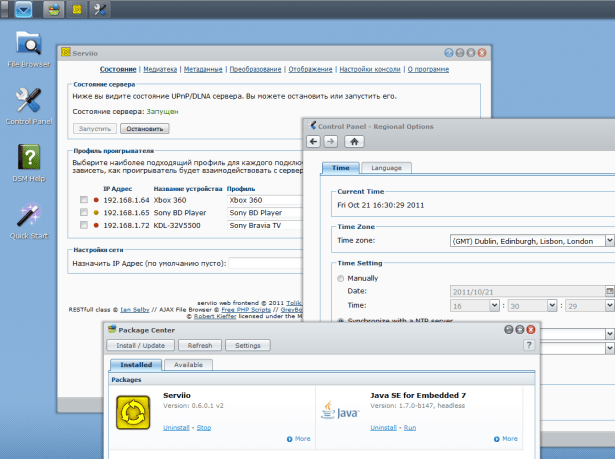
The Serviio Web UI, styled to look like the regular DSM control panel widgets
UPDATE – This is no longer the most recent package. I have released a new version and created a new blog post to keep the comments on topic.
My guide for installing Petr Nejedly’s excellent Serviio 0.5.2 on Synology has been a very popular post, and many people have got it running. However, the process is still complex enough to deter a lot of people and, as I learned more about my Synology NAS, I realised that I could automate the whole thing. The biggest obstacle was creating a package for Java, but adding locale support to the syno Linux also proved difficult.
The PHP Web UI is now included which you can use to manage Serviio once it’s installed. I have tried to fix most of the localization issues with it, and have edited the CSS to give it the look and feel of DSM as much as I could. You could also use Serviio Remote Console from another computer if you prefer. Any online content plugins (ending in .groovy) that are found in your NAS ‘public’ share will also be installed into Serviio’s plugins folder automatically during installation.
The package will allow future upgrades while preserving the media database and the online plugins, as long as Serviio itself is ok with that. You can see Serviio’s log by clicking More in the Package Centre. DSM Package Center installs the application to /volume1/@appstore/Serviio though from what I understand, on multi-volume systems the user is prompted for a destination volume. If you need to edit device profiles, add online content plugins, or look at the log in detail that’s where you’ll find the files. Bear in mind that a NAS, even an Intel Atom powered one, is unlikely to have sufficient CPU power to manage realtime video transcoding (e.g. from DivX to MPEG2), though it will manage remuxing MKV to M2TS and realtime audio transcoding.
Download
If you have DSM 3.2, you can install directly from Package Center. In Settings -> Package Sources add my package repository URL which is http://packages.pcloadletter.co.uk
If you’re still on DSM 3.1, download one of the following packages. Right-click, Save As:
- serviio0.6.0.1-88f6281-005.spk for Marvell Kirkwood CPU (ARMv5)
- serviio0.6.0.1-x86-005.spk for Intel Atom CPU
Serviio uses some open source libraries without which it would not have been possible.
By downloading the software on this page you are agreeing to the terms of the original Serviio End User Licence Agreement.
I accept no liability for any damage that may occur to your data or your cat’s health as a result of using this software :) The scripts are shown in full below, so you are free to assess any risks yourself.
Instructions
This package can be installed on an unmodified NAS – no hacking is required. It has been tested on DSM 3.1 and DSM 3.2. Here’s what you need to do:
- In the DSM User control panel enable the User Home service
- In the DSM Web Services control panel enable Web Station
- Using the DSM Package Center install my Java SE for Embedded Synology package
- Download any online content plugins that you require and leave the .groovy file for each in your NAS’s public shared folder
- Determine your NAS’s CPU type, and install the appropriate Serviio Synology package from the download link above
- Give it some time to start (click More Info in Package Center to see the Log tab – check it has loaded all the renderer profiles), then you can use the Serviio icon in the DSM drop down menu in the top-right to launch the Web UI. This Serviio icon will only be visible to admin users in DSM
- Once the console is up, disable ‘Generate thumbnails for local videos’, and set the ‘Transcoded files location’ to /volume1/@tmp. Don’t forget to use the Users control panel in DSM to grant permission for the Serviio user to read your files (if they’re not in the public share)
- When you add folders to your library you need to use the ‘Add path…’ button (not ‘Add local…’) and give the full Linux path (e.g. /volume1/share-name/Movies). There are issues with the Add Local ajax file browser which mean that it doesn’t work properly even if you give PHP access to the filesystem root
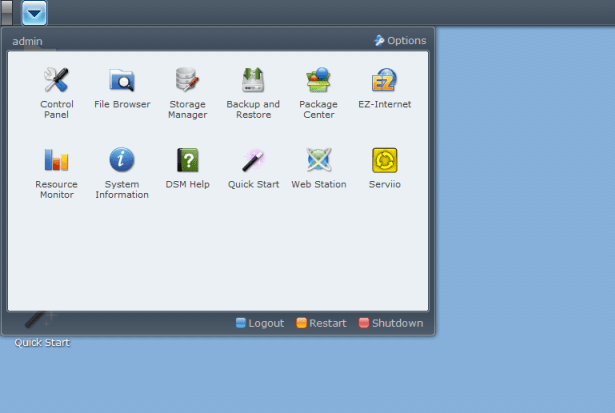
The DSM main drop-down menu, showing the Serviio Web UI icon
Upgrading from 0.5.2
If you want to upgrade from a manually installed 0.5.2, you will need to follow the steps below. I was considering automating it, but it gets complicated trying to remove people’s edits from /etc/profile which may not be entirely consistent.
- Stop the Serviio 0.5.2 daemon by running: /opt/etc/init.d/S99serviio.sh stop
- Copy your media database somewhere safe: cp -R /opt/serviio/library/db /volume1/public
- Follow the uninstallation steps at the bottom of my original guide
- Install my Java Synology package
- Install the Serviio Synology package from the download link above but don’t start it yet
- Copy your saved database into position: cp -R /volume1/public/db /volume1/@appstore/Serviio/library (warning – for people with multiple volumes, the @appstore folder is not always on /volume1 apparently)
- Force ownership on database files: chown -R serviio /volume1/@appstore/Serviio/library
- Force ownership on transcode cache: chown -R serviio /volume1/@tmp/Serviio
- Start Serviio in the DSM Package Center
- Follow the rest of the settings guidelines from above
Package scripts
For info, here are the scripts inside the package. The security-conscious among you can untar the package and take a look at the contents for yourself.
preinst
#!/bin/sh

#--------SERVIIO preinstall script
#--------package maintained at pcloadletter.co.uk

source /etc/profile

if [ -z ${JAVA_HOME} ]; then
        echo "Java is not installed or not properly configured. JAVA_HOME is not defined. " > $SYNOPKG_TEMP_LOGFILE
        echo "Download and install the Java Synology package from http://wp.me/pVshC-z5" >> $SYNOPKG_TEMP_LOGFILE
        exit 1
fi

if [ ! -f ${JAVA_HOME}/bin/java ]; then
        echo "Java is not installed or not properly configured. The Java binary could not be located. " > $SYNOPKG_TEMP_LOGFILE
        echo "Download and install the Java Synology package from http://wp.me/pVshC-z5" >> $SYNOPKG_TEMP_LOGFILE
        exit 1
fi

exit 0
postinst
#!/bin/sh

#--------SERVIIO postinstall script
#--------package maintained at pcloadletter.co.uk

#create serviio daemon user
synouser --add serviio `${SYNOPKG_PKGDEST}/bin/passgen 1 20` "Serviio daemon user" 0 "" ""

#determine the serviio user homedir and save that variable in the user's profile
#this is needed because librtmp needs to write a file called ~/.swfinfo
#and new users seem to inherit a HOME value of /root which they have no permissions for
SERVIIO_HOMEDIR=`cat /etc/passwd | sed -r '/Serviio daemon user/!d;s/^.*:Serviio daemon user:(.*):.*$/\1/'`
su - serviio -s /bin/sh -c "echo export HOME=${SERVIIO_HOMEDIR} >> .profile"

#change owner of Serviio folder tree
chown -R serviio ${SYNOPKG_PKGDEST}

#reset ownership on any pre-existing transcoding temp folder (same volume as appstore)
if [ -d ${SYNOPKG_PKGDEST}/../../@tmp/Serviio ]; then
        chown -R serviio ${SYNOPKG_PKGDEST}/../../@tmp/Serviio
fi
#reset ownership on any pre-existing transcoding temp folder (on volume1 in case app was installed on a different volume)
if [ -d /volume1/@tmp/Serviio ]; then
        chown -R serviio /volume1/@tmp/Serviio
fi

#create symbolic link to Serviio's version of FFmpeg
if [ -f /opt/bin/ffmpeg ]; then
        mv /opt/bin/ffmpeg /opt/bin/ffmpeg.bak.serviio
        ln -s ${SYNOPKG_PKGDEST}/bin/ffmpeg /opt/bin/ffmpeg
else
        ln -s ${SYNOPKG_PKGDEST}/bin/ffmpeg /bin/ffmpeg
fi

#set up symlink for the DSM GUI
if [ -d /usr/syno/synoman/webman/3rdparty ]; then
        ln -s ${SYNOPKG_PKGDEST}/DSM /usr/syno/synoman/webman/3rdparty/Serviio
fi

#move web UI files to Webstation root folder
mv ${SYNOPKG_PKGDEST}/web /volume1/web/serviio

#find path of public share (it might not be on /volume1)
PLUGIN_PICKUP=`cat /usr/syno/etc/smb.conf | sed -r '/\/public$/!d;s/^.*path=(\/volume[0-9]{1,3}\/public).*$/\1/'`

#pick up any plugins from the public share
mv ${PLUGIN_PICKUP}/*.groovy ${SYNOPKG_PKGDEST}/plugins

exit 0
start-stop-status
#!/bin/sh

#--------SERVIIO start-stop-status script
#--------package maintained at pcloadletter.co.uk

daemon_status ()
{
        ps | grep '^ *[0-9]* serviio' > /dev/null
}

case $1 in
        start)
                #start Serviio in background mode
                su - serviio -s /bin/sh -c "${SYNOPKG_PKGDEST}/bin/serviio.sh &"
                exit 0

        ;;
        stop)
                su - serviio -s /bin/sh -c "${SYNOPKG_PKGDEST}/bin/serviio.sh -stop"
                exit 0
        ;;
        status)
                if daemon_status ; then
                        exit 0
                else
                        exit 1
                fi
        ;;
        log)
        echo "${SYNOPKG_PKGDEST}/log/serviio.log"
                exit 0
        ;;
esac
preuninst
#!/bin/sh

#--------SERVIIO preuninstall script
#--------package maintained at pcloadletter.co.uk

#make sure that Serviio is stopped
${SYNOPKG_PKGDEST}/bin/serviio.sh -stop
sleep 6

exit 0
postuninst
#!/bin/sh

#--------SERVIIO postuninstall script
#--------package maintained at pcloadletter.co.uk

#remove serviio daemon user
synouser --del serviio

#remove symlink and reinstate any backed up version of FFmpeg
if [ -L /opt/bin/ffmpeg ] && [ -f /opt/bin/ffmpeg.bak.serviio ]; then
        rm /opt/bin/ffmpeg
        mv /opt/bin/ffmpeg.bak.serviio /opt/bin/ffmpeg
fi
if [ -L /bin/ffmpeg ]; then
        rm /bin/ffmpeg
fi

#remove DSM icon symlink
rm /usr/syno/synoman/webman/3rdparty/Serviio

#remove web UI
if [ -d /volume1/web/serviio ]; then
        rm -r /volume1/web/serviio
fi

exit 0
preupgrade
#!/bin/sh

#--------SERVIIO preupgrade script
#--------package maintained at pcloadletter.co.uk

#make sure that Serviio is stopped
${SYNOPKG_PKGDEST}/bin/serviio.sh -stop
sleep 6

#if a media database exists we need to preserve it
if [ -d ${SYNOPKG_PKGDEST}/library/db ]; then
        mkdir ${SYNOPKG_PKGDEST}/../serviio_db_migration
        mv ${SYNOPKG_PKGDEST}/library/db ${SYNOPKG_PKGDEST}/../serviio_db_migration
fi

#if online plugins exist we need to migrate them
if ls ${SYNOPKG_PKGDEST}/plugins/*.groovy; then
        mkdir ${SYNOPKG_PKGDEST}/../serviio_plugin_migration
        mv ${SYNOPKG_PKGDEST}/plugins ${SYNOPKG_PKGDEST}/../serviio_plugin_migration
fi

exit 0
postupgrade
#!/bin/sh

#--------SERVIIO postupgrade script
#--------package maintained at pcloadletter.co.uk

#use the backed up media database from the previous version
if [ -d ${SYNOPKG_PKGDEST}/../serviio_db_migration/db ]; then
        mv ${SYNOPKG_PKGDEST}/../serviio_db_migration/db ${SYNOPKG_PKGDEST}/library
        rmdir ${SYNOPKG_PKGDEST}/../serviio_db_migration

        #serviio daemon user has been deleted and recreated so we need to reset ownership (new UID)
        chown -R serviio ${SYNOPKG_PKGDEST}/library/db
fi

#use the backed up plugins from the previous version
if [ -d ${SYNOPKG_PKGDEST}/../serviio_plugin_migration/plugins ]; then
        cp ${SYNOPKG_PKGDEST}/../serviio_plugin_migration/plugins/*.groovy ${SYNOPKG_PKGDEST}/plugins
        if [ ! -z ${SYNOPKG_PKGDEST} ]; then
                if [ -d ${SYNOPKG_PKGDEST}/../serviio_plugin_migration ]; then
                        rm -r ${SYNOPKG_PKGDEST}/../serviio_plugin_migration
                fi
        fi
        #serviio daemon user has been deleted and recreated so we need to reset ownership (new UID)
        chown -R serviio ${SYNOPKG_PKGDEST}/plugins
fi

#reset ownership on transcoding temp folder (same volume as appstore)
if [ -d ${SYNOPKG_PKGDEST}/../../@tmp/Serviio ]; then
        chown -R serviio ${SYNOPKG_PKGDEST}/../../@tmp/Serviio
fi
#reset ownership on transcoding temp folder (on volume1 in case app was installed on a different volume)
if [ -d /volume1/@tmp/Serviio ]; then
        chown -R serviio /volume1/@tmp/Serviio
fi

#restart Web Station to clear webserver caches
if [ -f /usr/syno/etc/rc.d/S97apache-user.sh ]; then
        /usr/syno/etc/rc.d/S97apache-user.sh restart
fi

exit 0
Changelog:
- 0.6.0.1-005 added Web Station dependency, EULA dialog, and links for Web UI and user forum in More Info
- 0.6.0.1-004 test for package repo to allow update notification
- 0.6.0.1 v3 hopefully fixed an issue with the Serviio DSM icon in DSM 3.2 on NAS units without Optware installed
- 0.6.0.1 v2 inclusion of a modified version of the PHP Web UI
- 0.6.0.1 v1 new minor Serviio release with some updated international translations – will upgrade 0.6 preserving the media library
- 0.6 v1 first public release
- 0.6b4 v2 fixed permissions on transcode temporary folder following upgrade, avoiding the need for a reboot
- 0.6b4 v1 added upgrade scripts to allow media database migration (install future packages over the top of this one – database is preserved)
- 0.6b3c v2 fixed HOME env var for serviio user (to fix librtmp issues with BBC iPlayer) and removed the need to edit the passwd file to change the shell (safer)
- 0.6b3c v1 initial spk test release
 PC LOAD LETTER
Hey, i have a problem.
i have installed both java an serviio on my ds-211+ and i have added the command line in vmoption to the correct adress. but when i try to connect it cant find any serviio servers. i have statret both java and serviio on de NAS. if i start the service and then look on the program it says that status is stoppt, this maby is the problem, that the service wount to start? or is the statust line not “activated”
Is the Serviio package status showing Running when you click More? If not, have a look at the log. If it’s all fine then maybe your PC firewall is preventing the connection. Have a look at the FAQ at serviio.org for info about which port is used.
hey,
here is maby the problem because teh status says “stoppt” even after i start it. And the logg for the program is empty, is there a diffrent logg u mean? i have a DS 211+
Did you install Java? If so, can you run this from a terminal?
java -version
The Serviio and Java says stop, and i did all the installations.
Sorry but i have search for how i can start it before i ask u but, how do i start it trough the terminal? i am not used to use terminal… I installed java and i can find the folders for java in ${JAVA_HOME}. but no .sh file. am i totally at the wrong place?!
If i write ${SYNOPKG_PKGDEST}/bin/serviio.sh -start the answer is: not found. is this correct?
if i write :find $serviio i can find this path /local/etc/rc.d/Java SE for Embedded 7.sh and also this path : ./local/etc/rc.d/Serviio.sh , and if i try to write this command whit -start in the end the answer is : -sh: /local/etc/rc.d/Java: not found.
is there any permissions that is wrong?
Has this been fixed yet? Serviio starts and stops. With either versions of java v6 or v7
See my answer to Jon…
I have successfully installed 0.6 on my DS 211+. And I have to say it just perfect. Even the Youtube online feed works, which I find amazing.
The only problem that I have is that Java uses more than 95% of the CPU. This problem is already going on for a few days.
How can I solve this issue. What causes this issue?
Just adding a few details: The DS 211+ has a Marvell Kirkwood mv6282 1.6Ghz ARM Processor
Marck, Patters,
I’m seeing the same thing on on a DS409slim (1.2 GHz mv6281, 128 MB memory). As soon as I start the Serviio package (0.6.0.1), I see > 85% CPU usage. There are short dips here and there, but then the usage climbs right back up.
I notice there is an option -Xmx384M in the java command for Serviio (serviio.sh). This is the maximum memory size (384 MB) that the heap can reach for the JVM. My understanding is that this number should be smaller than the physical memory of the chip, otherwise you might end up with serious paging, which will slow down the machine.
I’ve started playing around with heap sizes and it definitely affects the CPU load (and memory load)
Let me know what value you find is ideal – perhaps I can build in some memory sensing and appropriate setting into the package. My DS111 has 256MB and I haven’t noticed any issues. The strange thing I did notice is that I seem to remember that Java shows that it’s assigned 512MB in the output of ps, like it is ignoring that value. That was with Java 6 and Serviio 0.5.2 so maybe that has changed.
Patters,
I think ps shows the virtual memory size used by a process by default. This can easily be bigger than the Java heap size allowed by the -Xmx option, since the Java VM has other memory allocated than the user’s heap, e.g. storage for classes.
I’ve changed the option -Xmx384M in serviio.sh to -Xms80M -Xmx80M, i.e. I fixed the Java heap size to 80 MB. This reflects in the NAS’ memory usage and has brought down the CPU usage from the constantly high numbers to 70-80% when Serviio is looking for updates to its media library. I’m curious as to why Serviio needs so much cycles to go over the media library. Streaming still seems to work with a reduced heap size.
During streaming (with transcoding enabled) I see almost 100% utilization, due to ffmpeg. More disturbingly, the ffmpeg process does not go away if I stop streaming a movie to my TV, but continues to consume cycles. I don’t understand why ffmpeg would continue to run after the display stops video streaming.
I guess it looks like I really have to encode the video such that my finicky TV (a Sony Bravia) can stream it without transcoding enabled in Serviio. Haven’t found the right settings for encoding video for Sony using Handbrake, but that’s another story…
The transcode process continues because Serviio doesn’t really know whether the file has stopped being played (it could just be paused). This by design, you’ll see this being asked quite a lot on the forum. It’s also handy if you accidentally stop a movie with the remote by accident. If you were to start playing another file that needed transcoding from the same renderer then the first FFmpeg process would quit before the second one started.
Apparently when Serviio goes Java 7 native, the scanning for new files can become much more efficient by using a built-in Java function to do it. However, this won’t happen until there’s a Java 7 for Mac OS Lion. As for format support without transcoding, the 2010 Sony BDPs are pretty unbeatable.
hello,
i can install serviio package but impossible to have it running , i click on run and nothing happen , there are no error messages , where i can find logs to troubleshoot ?
java embedded is installed as described so not sure to understand why it’s not working for me .. (ds411+ with last DM (1922)
Thanks,
exté
It seems that Java 7 isn’t working on Intel Synology products, even when installed manually. I have made a Java 6 package available to work around this.
Just so people know – for comments regarding problems, I’m not neccessarily going to publish them all on here (though I will read them and help where I can). For instance there have been a number of people with the same ‘Java 7 on Intel’ issue posting today, but I think it will quickly get confusing posting each and every message here. I don’t want this to end up like the original guide for 0.5.2 which is now at over 100 comments!
Hello, Nice job. Well done. ;)
Just to confirm, I suppose I will not be able to install it on my NAS:
DS209+II Freescale MPC8533 PPC Processor
Any way to install it with this processor? Tks.
Hi – sorry, the problem is that Oracle’s Java depends on a higher version of glibc than Synology include in their OS builds for PowerPC. JamVM is an alternative Java VM but it’s still at Java 1.5. It might be possible to manually install the IBM Java 6.
I am affraid of side effect by installing this version because my NAS works perfectly since months for now. It’s just the media server that could be improve on Synology side…
Thanks for your reply.
Hi,
Sorry for extending your comments but I’m fairly new to all this so my questions may seem simple but hope you can help?
When you say use Serviio Remote Console, is this the normal console from the standard download?
When using another pc, does this have to be on the same network
On editing do you just change the file name in programs from
ServiioConsole.exe.vmoptions to
Dserviio.remoteHost=192.168.0.12.exe.vmoptions?
No probs, I can just clean the comments up later on once the initial rush dies down and everyone is settled :)
1. yes, when you choose which components to install, just deselect the server so you’re only installing the console.
2. yes
3. no, you use notepad to open the vmoptions file. Then add a line (note that it starts with a dash):
-Dserviio.remoteHost=192.168.0.12
Hi,
Just to let you know it works, thanks for your help.
Mike
Hi,
Sorry for writing again but have been expierencing problems since installation and have been watching this forum to see if there are any answers I can easily follow. The problem I have is that when playing video files the screen stops every few seconds. All seems to be installed correclty on server and my remote PC, I have a DS211+ with a Bravia 2009 TV (22E5310). I have checked and there are no extra things being added to the library and have noticed in ‘resource monitor’ that the CPU is always at 99% – 100% with FFmpeg being high up on the list. Alternatively I installed the SERVIIO server on my PC instead and it all works fine (with 4 cores of the CPU enabled) but I really wanted the DS211+ to do all the work.
Hope you could help with an answer that’s not too technically challenged!
Many thanks,
Mike
The problem here is that the 2009 Bravia cannot play DivX or Xvid without the whole video being transcoded to mpeg2 which the ARM powered Synology doesn’t have the CPU power to achieve in realtime. So you’ll either have to:
1) download everything in HD h.264 instead
2) buy a renderer that has better format support (Sony Bluray for instance)
3) or use your PC to run Serviio
Hi,
Thanks for you prompt repsonse.
Kind regards,
Mike
Hi
Trying to compile ffmpeg on PowerPC 210+ but when i do “make install” i get:
INSTALL install-progs-yes
INSTALL ffmpeg
INSTALL avconv
INSTALL ffprobe
/bin/sh: install: not found
make: *** [install-progs] Error 127
Any idea what to do?
Sorry, I’m not sure. You were able to run make ok though? If so you can find the ffmpeg binary in the folder you ran make in. You will need to compile ffmpeg with librtmp though for the online feed stuff to work (described here: https://pcloadletter.co.uk/2011/08/02/serviio-0-6-on-synology-nas/)
Were you able to find a Java 1.6 VM for PPC? If so what did you use – it could help other users, and I could perhaps build a package for PPC too.
Hi,
I can’t get the remote console running (it always says “Can not connect..it does not seem to be running”).
My ServiioConsole.exe.vmoptions is empty apart from the “-Dserviio.remoteHost=192.168.0.3” line.
So i decided to get the php console running again, which was working fine on 0.5.2.
Just a short guide to get it running:
1. download the 0.6 php console from
http://labs.softjourn.com/projects/serviioweb/files
because there is no 0.6.0.1, yet.
2. uninstall the 0.6.0.1 package and install the 0.6 package from here
http://dl.dropbox.com/u/1188556/blog/serviio0.6-88f6281-v1.spk
3. make sure the webstation is running and unpack the serviio-0.6b.zip into the web folder on your DS. Rename the folder from serviio-0.6 to serviio
4. goto http://__yourNASip__/serviio/index.php
5. be happy and follow patters config instructions
6. If you have any idea why my remote console doesn’t work, try to help me out… ;)
Thanks again patters for the packages =)
Eric
I was looking into whether to include the PHP web UI (since it’s easier to set up on a syno than kairoh’s java REST one).
EDIT – kairoh’s web UI can now be launched in the same Java VM as Serviio so I’ll be intergrating it ASAP, with an icon in DSM!
As for why the remote console isn’t working for you – maybe firewall settings on your PC?
IT WORKS for Intel Atom :) , just installed successfully on my 411+
nice job ;)
i installed java 6 package from other post which ran fine (i confirmed again that java 7 don’t work)
i installed servioo package 0.6.0.1
i install servioo console in my laptop and i am able to manage servioo remotely
remains now servioo console inside DSM same as with 0.5 version ;-)
much appreciated for the job
exté
Pingback: Serviio Server « Source's Room
it seems to have a problem of stability , process did shutdown two times since the installation , i never have this problem with servioo 0.5.2 which has been stable during the 2 months i used it
Apparently Serviio can sometimes crash when dealing with large images – are you adding images to your library? I couldn’t see anything obvious in the logs you posted. This sort of thing seems to be a general Serviio issue (not Synology-specific) so you should probably report it on the Serviio forum.
Great work!! Thanks for all you have done with this.
hey , i found the root cause … actually Serviio shutdown when i exit servioo on the PC where i did install the console ! , i just do that and immediatly this has caused serviio to exit on the Syno …
of course am able to launch servioo again and all is fine
So i really appreciate when you’ll integrate console within DMS ;)
however , i run actually servioo package 0.6 v1 and no more 0.6.0.1 so i may try tip proposed above
exté really happy to have new serviio running very well
Yeah that has tripped me up before as well :)
The web UI’s coming…
This is AWESOME!!!11eleven!!1 thank you very much for this .spk
i couldnt get it running before (glib issue) now it works fine with my DS111 and Sony Bravia 32w5500 over DLNA
awesome
Great work!
Did anyone achieve successful 720p transcoding to an xbox360 on a DS-1511+, which has a dualcore atom 525 CPU? I’ve succesfully installed Serviio 0.6.0.1 spk package and all seems to run fine, but the cpuload of the ffmpeg process is only 25% during transcoding and the stream sometimes stalls for a second or two. I’m hoping that my 1511 is capable of smooth 720p streaming and it’s an issue with ffmpeg not using the second core somehow. Even when running ffmpeg from commandline with threading option set to 2 (even tried 4 as o.s. reports 4 cpu’s due to what I think is Hyperthreading) it still stays on 25% max.
Thanks!
I’m not sure about the threading – I had to cross-compile FFmpeg on my Macbook running Ubuntu in a VM. It is built with pthreads, and AFAIK the library should be in the Synology toolchain I used. I guess the test would be for you to up the logging level to Debug (by editing /volume1/@appstore/Serviio/config/log4j.xml) to find the exact transcoding command line that gets used, then run it manually yourself. Normally errors activating threading are reported in FFmpeg’s output so you should see them on screen.
I’ve noticed the same, it’s more about memory usage / IO usage then about CPU imo
Hey!
I’m trying to get it running but there seems to be a problem.
I installed serviio on the Syno DS 211j and it is running. I installed the Serviio console on my iMac. I have VMware so I can also run windows on the Mac.
I have run the console on on OSX Lion and on Windows 7 but either way, it cannot connect to the server.
There is no firewall activated on my network.
On windows, I modified the ServiioConsole.exe.vmoptions in the Serviio folder with Notepad and added the line: -Dserviio.remoteHost=192.168.0.102 (my NAS IP)
Checking the log of the Serviio console, this is what I get:
2011-10-10 20:14:46,059 INFO [ServiioConsole] Starting Serviio Console
2011-10-10 20:14:46,137 INFO [ServiioConsole] Connecting to Serviio REST on 192.168.0.102:23423
2011-10-10 20:17:50,436 WARN [ServiioConsole] Cannot connect to the server to get DB initialization info
2011-10-10 20:20:54,840 WARN [ServiioConsole] Cannot connect to server: Internal Connector Error (1002) – The calling thread timed out while waiting for a response to unblock it.
2011-10-10 20:20:55,152 INFO [Messages] Loaded console message bundle for locale: en
Any ideas?
will this run on a DS211j?
Yes, though apparently the memory may be a bit tight. Check the other comments by “Steve”.
The capacity of my DS211j doesn”t seem to be the problem. Serviio is running on the NAS but I can’t get the console running on the computer, that’s my problem!
Thanks for your first answers anyway!
Hi.
Can this package be installed on DS410 as it has Freescale mpc8533E PPC Processor which is not ARM or intel Atom?
Many thanks in anticipation
Hi – Not as far as I know, because I don’t believe there’s a Java 1.6 VM available. Oracle’s one depends on a newer version of glibc than Synology include for their PowerPC versions of DSM. There could be others, but no one has reported success so far.
Hi, I updated to the new version with the Web UI. First when I click the new Serviio Icon nothing happens, I have to right-click and open in new window. Then it works. Then when I try to add online sources I get the error message: Cannot put repository.
Do you know why I get this error?
Thanks!
Emil
The icon not working is an issue that started to occur with 3rd party icons in DSM 3.2 but I thought I had fixed it. Which DSM are you running – 3.1 or 3.2? If you connect to a terminal session as root, and run:
ll /volume1/@appstore/Serviio/DSM
Do you see a zero byte file called .url?
Not sure about the repository problem. What CPU type is your NAS, ARM or Intel? I can only find this doing a quick search:
http://forum.serviio.org/viewtopic.php?f=5&t=2074
Did you try rebooting the NAS in case there are two Serviio instances running due to a locked process (I’ve had that a couple of times), and also disabling and re-enabling Web Station just to be sure.
I’ve discovered that 3rd party DSM links seem not to work in Internet Explorer. Other browsers should be fine though.
Sorry, me again. Got carried away because the TV picked up Serviio from the NAS once I disabled the firewall. However, forgot that I still don’t have the Serviio icon showing on DSm so can’t edit settings etc. Any ideas?
The icon should be in the drop down in the top left, where you find the Package Center. It’s not in the Control Panel. Let me know if it’s still not showing.
You can also get to the WebUI by using the following link from any web browser:
http://your_NAS_IP_address/serviio/
Thanks for the prompt response Patters.
Tried the browser link but it brings up a 404 page, so I suspect I have a more fundamental issue somewhere along the line. Serviio appears to be running, Java is installed an ‘Stopped’ (though I note that ‘Stopped’ is in red text rather than green as in the image on your guide). Might try to reinstall from scratch.
Kind regards
The green text in my Java photo was only because I was running the DSM 3.2 beta at the time which had that difference. Your Serviio install is probably fine. Look up the FAQ on the Serviio site for how to use the Serviio Console from another computer to manage your Syno’s Serviio instance.
Cheers, will give that a try first.
Patters,
Put this on top in the index.php.
Without this anyone can reach your Serviio page (if they guess/know the folder)
putenv(‘HTTP_COOKIE=’.$_SERVER[‘HTTP_COOKIE’]);
putenv(‘REMOTE_ADDR=’.$_SERVER[‘REMOTE_ADDR’]);
$user=exec(‘/usr/syno/synoman/webman/modules/authenticate.cgi’);
if($user != ‘admin’){
header(“HTTP/1.0 403 Forbidden”);
exit;
}
Thanks, but it doesn’t seem to work. If I run /usr/syno/synoman/webman/modules/authenticate.cgi from an ssh session it returns nothing, even when my admin user is signed in.
Hi – is it mandatory to install the Java SE for Embedded Version? The DSM Filebrowser (V3.2 on DS211j) requires to install a java 6 JRE anyway, would that also be appropriate to run the Serviio 0.6 package?
thanks & regards
The Filebrowser is asking for Java to be installed on the client computer you use to access DSM. Serviio requires Java Embedded to be installed on the NAS itself – they’re completely separate.
I use a DS-211+ with 3.2.1944 DSM.
The Java 6 package is shown as installed but stopped. Since you said, this is normal, i guess everything is ok there. There are no error msgs at the java install.
User home service and web station are active.
I have the exact situation. Java running (stopped) and serviio running (active). Home active and web station enabled.
Do I have to allow PHP?
Here is what else is on in my 211j
Windows + MAC file services ON
WebDav (HTTP + HTTPS)
Media Server (DLNA on)
DMA Transcoders ON
Photo Station ON
Download Station ON
File Station ON
By the way: The browser that shows not loading is crome
Hello,
will this work on a DS110j or DS209+,too.??
So which package i should try ,if its possible ?
I dont have this technical knowledge ,
I have amended the instructions to add a bit about determining the right CPU type.
Hello there, whenever I try to use the web ui to browse for a path, I get this error:
Error encountered:
ERRNO: 2
TEXT: opendir(): open_basedir restriction in effect. File(/) is not within the allowed path(s): (/etc.defaults:/usr/bin/php:/usr/syno/synoman:/etc:/var/run:/tmp:/var/spool/php:/volume1/@tmp/php:/var/services/web:/var/services/photo:/var/services/blog:/var/services/homes)
LOCATION: /volume1/web/serviio/afb/browse.class.php, line 68
Any idea why I’m seeing this? Thanks.
Hi, this is to be expected because PHP on the Synology is limited as to which folders it’s allowed to see. Rather than mess about with that (because the ajax file browser is buggy anyway and only lists the first few folders – not all of them) it’s best to use the ‘Add path…’ button instead and express them as /volume1/sharename/movies etc.
I’m using a DS110j and got the package installed successfully without any issues.
However, when trying to access the serviio shortcut from the drop-down menu to access the UI.. I get a webpage error saying that the connection was refused and the webpage cannot be displayed.
Is there anything I need to do to enable access? I have made sure permissions are set correctly.
At the moment I am trying to access remotely. IE, I have logged in remotely to my DS110j from outside the network and trying to et this running (at work at the moment).
Any help would be greatly appreciated.
Thanks.
William.
Did you definitely enable Webstation as per the instructions?
Hi
Just installed on a DS110J with DSM 3.2. Both Java and Serviio package installed ok but the Serviio service stops a few seconds after I click run on the package centre screen. I originally tried java 7 but then tried 6 but have the same issue.
Any suggestions would be greatfully received
Hi,
thanks for all your work!
I’ve installed it without any issue on my new ds411, but when I launch it, nothing happens.
If I go in the journal, It hangs on “[libraryUpdatesCheckerThread]Started looking for updates to currently shared files”
Is there something else that I’ve to set?
Thanks a lot
i have ds411j and the probleme is tha i can’t access to web UI config i tryed everything router firewal any solution ?
It seems that the DSM shortcuts don’t work in Internet Explorer. It affects other people’s packages too so I guess maybe try a different browser.
Unable to set the correct profile.
I change the profile to “LG TV / Player” but serviio change it to:
Device name: Media Renderer
Profile: Generic DLNA profile
What I can do?
That’s a problem with the profile not identifying your device properly. Unfortunately there’s an issue in Serviio 0.6 which prevents you from manually over-riding the profile. I would ask the question on the Serviio forum.
hi.
I have downloaded and installer successfully Java SE for Embedded 7 version 1.7.0-b147, headless (it’s visible in the package center).
But when I try to install Serviio (Syno 211j – arm proc), I get the message “Java is not installed or not properly configured. The java binary could not be located. Download and install java synology package…”
I’ve downloaded and installed java for embedded, toolchains and the java 7.
It’s visible in the package center, and is in “stopped” status.
I’ve desinstalled – reinstalled java package, and restarted the nas. Still same problem.
Any idea how to install serviio?
regards,
Laurent
Which version of DSM? I haven’t been able to test the very latest version of 3.2 yet. I’m still on 1922 I think.
3.2-1944
I can confirm that Java 7 package won’t install on DSM 3.2-1944.
ls /volume1/@appstore/java7/
shows almost empty folder after installation.
This can be only fixed by manually copying unpacked ‘jre’ folder to that path. After this the java is located and serviio works fine.
Could you look into this issue?
Yes I will do. What was the extension of the java filename you put in /volume1/public – .tar, or .tar.gz? Which web browser did you use to download the file?
Can you run ‘locale’ from a terminal? If not then the localization binaries haven’t unpacked either.
___________________________
> locale
LANG=en_US.utf8
LC_CTYPE=”en_US.utf8″
LC_NUMERIC=”en_US.utf8″
LC_TIME=”en_US.utf8″
LC_COLLATE=”en_US.utf8″
LC_MONETARY=”en_US.utf8″
LC_MESSAGES=”en_US.utf8″
LC_PAPER=”en_US.utf8″
LC_NAME=”en_US.utf8″
LC_ADDRESS=”en_US.utf8″
LC_TELEPHONE=”en_US.utf8″
LC_MEASUREMENT=”en_US.utf8″
LC_IDENTIFICATION=”en_US.utf8″
LC_ALL=
_____________________________
filename of the java file in ‘public’ folder was original (downloaded with Chrome):
ejre-7-fcs-b147-linux-arm-sflt-headless-27_jun_2011.tar.gz
I know if extension or filename was wrong then installer would throw a error message, but it didn’t happen. So it was correct and installation process completed as a successful.
Here’s the contents of the /volume1/@appstore/java7/ just after installation:
________________________
> ls /volume1/@appstore/java7/
marker
_________________________
No ‘jre’ folder as you can see.
Ok, I found the problem. I have no idea how I didn’t encounter it when I tested, but there was a missing $ in a variable name. :(
I’ve uploaded new versions of all the Java packages to the repo now!
Thank you!
Sad to say I still have the same pb with your last java7 package
Still only a “market” directory under /volume1/@appstore/java7
I copied the while ejre uncompressed directory and renamed it to /volume1/@appstore/java7/jre.
now the serviio package installed, and is started in package center.
Which browser did you use to save the java archive? And what is the file extension?
Safari will save as .tar (and will gunzip it), IE will save as .tar.tar but it will be unmodified (so it still needs gunzipping), and I think Chrome and Firefox just leave it alone as .tar.gz.
I guess some browsers might name it .tar but with it needing gunzipping too…
I use firefox
File name is ejre-7-fcs-b147-linux-arm-sflt-headless-27_jun_2011.tar.gz
I copied it on the / of the synology
I tried the installation from your repository
I confirm that java7(armv5) package installation is successful after the recent update. Make sure you’re installing version 1.7.0-003 from the repository.
where do you copy the ejre.tar.gz file? I moved it under the root of synology (/), where it seems to search it. No error during install of java7, but the java7 directory under @appstore stays empty…
It’s not meant to be in the root. It’s supposed to be in the ‘public’ shared folder. This was mentioned in the instructions on my blog post but the script would have continued without it, then failed as you discovered. You will probably now have a root folder called /jre which needs removing manually.
I have been trying to make the process as user-friendly as possible, so I have released version 004 which will exit with a warning message unless you have a ‘public’ shared folder. One bay NAS units have this by default, all others must manually create it.
Thanks alot for this tool.
What a powerfull tool that let me skip the use of PS3 Media Server :)
I run 0.6.1v3 on my DS209.
I have some questions:
1. Howto add support for srt subtitles?
When I go to: http://www.serviio.org/index.php?option=com_content&view=article&id=33 I see their is native srt support – but it will not show on my TV and I have a Panasonic P50VT30y
The subtitles have the same name as the movie just with .srt at the end…
2. Howto add plugins to Serviio ?
For some reason subtitles seems to work now
Need to go into option when watching a movie and choose to enable subtitles ;)
Still havent got any .groovy files to work…
Download them on your computer, copy them to a shared folder on the NAS (say ‘public’).
Then connect a terminal session and run:
cp /volume1/public/*.groovy /volume1/@appstore/Serviio/plugins
chown -R serviio /volume1/@appstore/Serviio/plugins
It did work for 3 days but now when I try to go to the Serviio settings in DSM 3.2 I just see a blank screen inside the Serviio window?
Serviio is running and I can stream to my TV but im not able to change the settings and folder and what else you can do through DSM.
I did reboot my DS209 many times – what could be wrong? How to let the webinterface work again?
Is Web Station running in the Control Panel?
Yes it is
Ditto on the blank screen. So I was never able to actually get it configured.
You can always use the Serviio client from another computer – details on the FAQ page of the Serviio website.
Can you see the Web UI if you browse to http://ip_of_your_NAS/serviio ?
Strang thing. I can see the serviio webpage on http://my_ip/serviio, but all I get is a big red cross.
Required Serviio 0.6.0.1, but found ”
Cannot connect to Serviio server, it does not seem to be running. Exiting…
I can see serviio from my upnp client (tv, pc), but it loops “searching” and then exits without finding anything.
I’ve added 3 directories (/volume1/video, photo and music).
any idea?
regards,
Laurent
I also cannot see the WubUI. I got
Required Serviio 0.6.0.1, but found ”
error :/
any tip?
It seems to do this sometimes, maybe when the Serviio process is busy and the REST interface takes too long to respond. There’s probably a timeout in the PHP which may need extending. When it does this I find that it’s usually working again within a few minutes. If it bothers you, you could try using the Serviio Remote Console from another computer. Details in the Serviio FAQ on the official website.
Please repair the Servio x86 spk dropbox link. It gives for me an error. :-( Thanks for your great articles!!!! The Java SE Embedded working soon….
Sorry – I cleaned out all the old versions yesterday and accidentally moved that file. Fixed now…
I need some help!
I install the Java SE Embedded 6 and Serviio 0.6 spk.
Everything works fine. I would like to know which folder will I copy the Serviio plugin files on my synology folder stucture??? Tose plugins works with synology too??
I’ ve got a DS1511+
Thanks for your hard work!
Adam
As I answered frillen earlier – download the plugins on your computer, copy them to a shared folder on the NAS (say ‘public’).
Then connect a terminal session and run:
cp /volume1/public/*.groovy /volume1/@appstore/Serviio/plugins
chown -R serviio /volume1/@appstore/Serviio/plugins
Or if you’re lazy you could uninstall Serviio, leave the plugins in the ‘public’ shared folder on the NAS and reinstall the Serviio package. The package script will import the plugins it finds in ‘public’ during the installation.
As for adding media folders – don’t use the Add Local button. I mentioned it in the blog post, use Add Path instead. If your media is in a share called ‘video’, then the linux path would be something like:
/volume1/video
THX
I still have some unsolved issues:
Did uninstall Java 7 and Serviio
Restart the DS209
Did download http://forum.serviio.org/viewtopic.php?f=20&t=3820
Uploaded it to “public” with the Filemanager in DSM.
Unpacked the rar file with the Filemanager.
I did add your source to the package admin.
Did install JAVA 7
Did install Serviio 0.6.0.1-0005
Using the Package thing in DSM
1. I still have a blank screen when I try to start Serviio
Screendump: http://img708.imageshack.us/img708/8328/skrmbillede20111123kl17.png
2. When I go to;
192.168.0.100/Serviio
I still have a blank screen
I did restart many times after the Serviio 0.6.0.1-005 install
How to solve it?
It worked some days ago….
I did try using Java 6 instead – but same result!
Here you have a log print:
2011-11-24 20:15:23,276 INFO [ThreadPoolManager] thread_pool.default PoolConfiguration = useBoundary = [true] boundarySize = [2000] maximumPoolSize = [150] minimumPoolSize = [4] ke
epAliveTime = [300000] whenBlockedPolicy = [RUN] startUpSize = [4]
2011-11-24 20:15:23,297 INFO [CompositeCacheConfigurator] Setting default auxiliaries to null
2011-11-24 20:15:23,298 INFO [CompositeCacheConfigurator] No special CompositeCacheAttributes class defined for key [jcs.default.cacheattributes], using default class.
2011-11-24 20:15:23,307 INFO [CompositeCacheConfigurator] setting defaultCompositeCacheAttributes to [ useLateral = true, useRemote = true, useDisk = true, maxObjs = 100, maxSpoolP
erRun = -1, diskUsagePattern = 0 ]
2011-11-24 20:15:23,308 INFO [CompositeCacheConfigurator] No special ElementAttribute class defined for key [jcs.default.elementattributes], using default class.
2011-11-24 20:15:23,309 INFO [CompositeCacheConfigurator] setting defaultElementAttributes to [ IS_LATERAL = true, IS_SPOOL = true, IS_REMOTE = true, IS_ETERNAL = true, MaxLifeSeco
nds = -1, IdleTime = -1, CreateTime = 1322162123308, LastAccessTime = 1322162123308, getTimeToLiveSeconds() = -1, createTime = 1322162123308 ]
2011-11-24 20:15:23,500 INFO [LRUMemoryCache] initialized LRUMemoryCache for thumbnails
2011-11-24 20:15:23,501 INFO [CompositeCache] Constructed cache with name [thumbnails] and cache attributes [ useLateral = true, useRemote = true, useDisk = true, maxObjs = 1000, m
axSpoolPerRun = -1, diskUsagePattern = 0 ]
2011-11-24 20:15:23,516 INFO [LRUMemoryCache] initialized LRUMemoryCache for online_feeds
2011-11-24 20:15:23,517 INFO [CompositeCache] Constructed cache with name [online_feeds] and cache attributes [ useLateral = true, useRemote = true, useDisk = true, maxObjs = 1000,
maxSpoolPerRun = -1, diskUsagePattern = 0 ]
2011-11-24 20:15:23,518 INFO [CompositeCacheConfigurator] No special ElementAttribute class defined for key [jcs.region.local_default.elementattributes], using default class.
2011-11-24 20:15:23,518 INFO [LRUMemoryCache] initialized LRUMemoryCache for local_default
2011-11-24 20:15:23,518 INFO [CompositeCache] Constructed cache with name [local_default] and cache attributes [ useLateral = true, useRemote = true, useDisk = true, maxObjs = 1000
, maxSpoolPerRun = -1, diskUsagePattern = 0 ]
2011-11-24 20:15:23,519 INFO [CompositeCacheConfigurator] No special ElementAttribute class defined for key [jcs.region.local_resetafterplay.elementattributes], using default class
.
2011-11-24 20:15:23,520 INFO [LRUMemoryCache] initialized LRUMemoryCache for local_resetafterplay
2011-11-24 20:15:23,520 INFO [CompositeCache] Constructed cache with name [local_resetafterplay] and cache attributes [ useLateral = true, useRemote = true, useDisk = true, maxObjs
= 1000, maxSpoolPerRun = -1, diskUsagePattern = 0 ]
2011-11-24 20:15:23,521 INFO [CompositeCacheConfigurator] Parsed regions [thumbnails, online_feeds, local_default, local_resetafterplay]
2011-11-24 20:15:23,521 INFO [CompositeCacheConfigurator] Finished configuration in 231 ms.
2011-11-24 20:15:23,725 INFO [WebServer] Socket buffer set to 65535 bytes
2011-11-24 20:15:23,727 INFO [Device] Created UPnP Device with UUID: 26f23a08-b29c-32cb-9e8e-478dc9a82680, bound address: 192.168.0.100
2011-11-24 20:15:23,905 INFO [PluginCompilerThread] Looking for plugins at /volume1/@appstore/Serviio/plugins
2011-11-24 20:15:23,915 INFO [PluginCompilerThread] Started looking for plugins
2011-11-24 20:15:24,398 INFO [AbstractTranscodingDeliveryEngine] Cleaning transcode engine and its data
2011-11-24 20:15:24,614 INFO [WebServer] WebServer starting on port 8895
2011-11-24 20:15:24,654 INFO [DiscoveryAdvertisementNotifier] Starting DiscoveryAdvertisementNotifier
2011-11-24 20:15:24,657 INFO [EventDispatcher] Starting EventDispatcher
2011-11-24 20:15:24,658 INFO [EventSubscriptionExpirationChecker] Starting EventSubscriptionExpirationChecker
2011-11-24 20:15:24,690 INFO [DiscoverySSDPMessageListener] Starting DiscoverySSDPMessageListener using interface eth0 (eth0) and address 192.168.0.100, timeout = 0
2011-11-24 20:15:24,701 INFO [RendererSearchSender] Searching for Renderer devices
2011-11-24 20:15:24,704 INFO [RendererExpirationChecker] Starting RendererExpirationChecker
2011-11-24 20:15:50,875 INFO [FeedUpdaterThread] Started looking for information about online feeds
2011-11-24 20:15:50,904 INFO [LibraryAdditionsCheckerThread] Started looking for newly added files
2011-11-24 20:15:51,224 INFO [LibraryUpdatesCheckerThread] Started looking for updates to currently shared files
2011-11-24 20:14:33,297 INFO [MediaServer] ————————————————————————
2011-11-24 20:14:33,304 INFO [MediaServer] Serviio DLNA media streaming server v 0.6.0.1 (rev. 8e4ee98bff12)
2011-11-24 20:14:33,304 INFO [MediaServer] Petr Nejedly 2009-2011
2011-11-24 20:14:33,305 INFO [MediaServer] http://www.serviio.org
2011-11-24 20:14:33,305 INFO [MediaServer]
2011-11-24 20:14:33,306 INFO [MediaServer] Java 1.7.0-Oracle Corporation
2011-11-24 20:14:33,306 INFO [MediaServer] OS Linux arm 2.6.32.12
2011-11-24 20:14:33,314 INFO [MediaServer] File encoding: UTF-8
2011-11-24 20:14:33,347 INFO [MediaServer] Headless mode enabled: true
2011-11-24 20:14:33,348 INFO [MediaServer] User home dir: /var/services/homes/serviio
2011-11-24 20:14:33,348 INFO [MediaServer] Temp dir: /tmp
2011-11-24 20:14:33,348 INFO [MediaServer] ————————————————————————
2011-11-24 20:14:34,478 INFO [RestletServer] Starting Restlet server exposed on port 23423
2011-11-24 20:14:35,184 INFO [DBSchemaUpdateExecutor] Checking if DB schema needs to be updated
Btw I dont find a folder named:
User home dir: /var/services/homes/serviio
the folder homes isnt there…
There are no change of CPU usage when I try to open the Serviio window in DSM
Seems to work now after I did a upgrade to the new version of DSM 3.2-1955 released november 30th
It’s quite possible that DSM build 1944 was broken. I had never run that one in fact, and I’m upgrading to 1955 now.
After upgrading DSM, stop Serviio, remove Java, reinstall Java, then start Serviio. This is because the DSM upgrade will remove the OS locale support. The Java package installer puts this back.
Hi,
I have a problem with serviio.
I’ve successfully installed java, serviio, and configured it (shared path).
I can see the serviio server. But when i connect on it, all directories are empty.
I’ve granted read access for user serviio to all my shared directories (/volume1/video, /volume1/music and /volume1/photo)
Any idea what goes wrong?
Regards,
Laurent
Hi,
Any idea for my problem?
No content at all visible on my NAS through serviio.
When I enable the logs, I can see that serviio is “indexing” my files. But why no content is visible through UPNP?
Regards,
Laurent
Have you tried removing Serviio and starting again? Did you accidentally run it as the root user by starting it from a console session? If so the file permissions on the database will prevent the serviio user from writing to it.
I’ve removed and reinstalled the whole java/serviio several times.
How can I remove the serviio database? and check for the bd access rights?
The database is removed when you uninstall Serviio, so you shouldn’t have any permissions problems if you reinstalled. It’s only preserved if you upgrade. Have you tried browsing Serviio using XBMC installed on a computer? That would rule out the possibility that your renderer is the problem. Did you edit the profiles.xml file perhaps?
I’ve installed xbmc on my pc.
Looks like a server program. How can I browse Serviio using this?
ok I’ve found how to. Keep in touch. I’m reinstalling serviio
I installed everything fine, Serviio seems to start properly (nothing out of the ordinary in the logs) but when I try to access the Web UI I get a Synology branded 404 page which just says “Sorry, the page you are looking for is not found.”
I’ve tried restarting both Serviio and my Synology itself (DS411, DSM 3.2 b1955), no luck.
Any ideas?
Hey there,
Great guide, playback is working perfectly on my PS3.
One problem, though: no matter what I put in the ‘Transcoded files location’ box, when I hit Save it always resets back to /tmp, rather than /volume1/@tmp. I decided to let it slide while I made sure everything else was working properly, and ran into the exact problem you described in your previous tutorial after streaming an HD movie.
Has anyone else had this issue?
Pingback: subsonic4.6_spkv18 download | eg-blog
Hello.
Thank you for your job. BTW, I have found that there is something wrong with time while logging(details below):
– correct time in Moscow Russia right now is 22:31 (the same i see while logging to synology as admin on control panel -> regional parameters; GMT+4)
– the system time is -1 hour -> 21:31
– the time while siniio logging is -4 hr
Is it a feature or it can be fixed?
Thankx in advance.
спасибо! Java sets its timezone from the TZ environment variable. It seems from reading this that daemons typically don’t automatically inherit this TZ variable. I can test that is true by using su to launch a shell as the Serviio user.
I need to make the package installer script define TZ for the Serviio user account explicitly. I can use the value of TZ available to the root account (which Package Center uses) at install time. I just tested this with several values from the root account after changing timezones in DSM and it worked perfectly.
TZ='GMT0IST,M3.5.0/1,M10.5.0'TZ='MSK-4'
I will fix this in the next Serviio package release, which will be when Serviio 0.6.1 is released (different from 0.6.0.1).
For now, you can edit /volume1/homes/serviio/.profile and add the line:
export TZ='MSK-4'Then stop and restart Serviio. This issue will affect all other Java apps running on Synology, so I will need to update other packages.
Thank you – I will try it. And sorry for such a long example I’ve posted :)
Btw how long does it take the first database update? As a test I have run it for /volume1/incoming(find -type f |wc showes 4728 files) with set to DEBUG – and it is updating more than a day.
The other question – am I able to use DLNA while database is updating? On my Samsung 46D7000 I see Serviio DLNA source but can’t see any content in VIDEO/PHOTO/MUSIC sections due to “Can’t get access to the device. Please chack it and retry.”
The process with a rather small utilization is UP:
1078 1072 serviio S 525m105.0 0.0 /volume1/@appstore/java7/jre/bin/java -Xmx384M -Djava.net.preferIPv4Stack=true -Djava.awt.headless=true -Dderby.system.home=/volume1/@a
but the log file shows that somethings goes inside…
I also have found a strange messages in log file “from address /192.168.3.107”
I have to say that there are no such addresses in my 192.168.0.0/24 home network
And there are nothing like that while
Synology# netstat -a
or my home router
cisco#show arp(table)
Do you have such a messages?
examples:
2011-12-20 19:42:03,748 DEBUG [DiscoverySearchResponder] Sending 1 M-SEARCH response message(s) to /192.168.3.107:2027
2011-12-20 19:42:03,750 DEBUG [DiscoverySSDPMessageListener] Received a valid M-SEARCH message for search target upnp:rootdevice from address /192.168.3.107:2027
Question.. You dug much into the multithreaded ffmpeg stuff? I see the ffmpeg in your package rail to 25% cpu only.. and it looked like the current ffmpeg versions were supposed to have multithreaded additions.
You ever dig?
Just curious…
It’s compiled with libpthreads so it should support threading on Intel. Having compiled FFmpeg for Windows on Mingw without pthreads I saw that FFmpeg will warn you when the thread support is broken. My Linux build of FFmpeg doesn’t warn like that so I assume it’s ok. I did recently look into it because I had to build a new version for the upcoming Serviio 0.6.1, and it seems that FFmpeg will only use multi-threading with certain encoders. I couldn’t find more info than that really, most of the chat about it focusses specifically on libx264 which is not used for Serviio.
Ahh.. Thanks for the response (and your work..) I was just hoping I could get a magical boost in performance.
True, always important on an embedded system. Try monitoring performance while it’s transcoding audio from say FLAC to mp3. I think the LAME encoder which is built in ought to try to use multithreading, but most of the typical FFmpeg activity such as checking files for library additions and thumbnail generation won’t as a rule.
Hello
I have installed Java and Serviio on my NAS, the PS3 can see the server, but cannot see any of the files.
I have the file path as /DiskStation/video. Is this correct?
What else am I doing wrong?
Thanks
Christian
That’s not right for the path. I presume you’ve used ‘Diskstation’ because that’s the hostname of your NAS.
It’s more likely to be something like /volume1/name-of-shared-folder-that-you-see-from-your-computer/videos
Hi,
thanks for your great work – i installation was really easy on my DS 211+
Now i have one question – after installing Java 7 and Serviio my CPU has a processor load of 90-100%
I’m not streaming a movie or anything like this. in the resource monitor the ffmpeg is the process with the highest cpu load.
Is there any inventory running in the background after adding a new path to serviio?
Would be nice if someone can help me.
Greetings
It could be thumbnailing your movies which seems to take forever, and is pretty redundant since the online databases provide good thumbnails. I disable this in the Serviio console (stop and restart Serviio in Package Centre for that to take effect I think).
If you have already done that, I guess it could be that you have added lots of image content. They seem to take a long time too. Most of Serviio’s development and testing effort is currently focused on video, so image support isn’t great. For instance it doesn’t seem to resize images that are too big etc.
Usually, adding videos isn’t too much of a performance hit. Adding a folder complete with several seasons of a TV show to the library should only take a few minutes when you click Force Refresh. You can see the Serviio log in Package Center – scroll to the bottom and you should be able to see what it’s doing.
I have a Synology DS211j, which is running DSM 3.2-1955.
I have followed, to the letter, all instructions provided at https://pcloadletter.co.uk/2011/09/23/se … y-package/ and these all load into the Package Center.
When I the try to load Serviio from Package Center > Other Sources, I receive an error message saying “Java is not installed or not properly configured. JAVA_HOME is not defined.
Download and install the Java Synology package from http://wp.me/pVshC-z5“. From there I am directed to a Java download site. I sign up, download the file to DiskStation\public folder and unzip into that folder, but still no joy.
In the Package Center > Other Packages, I have the following files available OpenRemote, Subsonic,Jave SE for Embedded 7, Java SE for Embedded 6 and Serviio. I can’t install any of these and get various error messages about Java 6 and ejre-1_6_30-fcs-b12-linux-arm-sflt-eabi-10_nov_2011.tar.gz ,which is in the DiskStation\public folder.
What am I doing wrong? A detailed step by step “idiots giude” would be very much appreciated from this “old F%&*”
I’ve tried following all the install steps given on the http://pcloadletter.colmu.com site.
Help, please!
Regards,
Colin
Hi, not sure really. Some web browsers try to ‘help’ by extracting the gz archive to a .tar and so on. Try using a different browser to download it perhaps?
Hi patters,
Needless to say you were right about the browser issue. Took your advice and everything loaded perfectly. No trying to figure out how to configure Serviio.
Many, many thanks again for all the hard work you put in to help novices like me, it is much appreciated by all I’m sure.
Regards,
Colin
Great, thanks for the feedback Colin. So I can improve the file handling of the package and make it more user-friendly, which browser did you originally use? Did it definitely leave the filename untouched after it downloaded (so .tar.gz)?
Hi patters, I had tried downloading with Firefox and Google Chrome. Following your advice, I tried Internet Explorer 9 and the downloads worked.
Hope this is helpful. Thanks again.
Colin
Hi,
when will be Synology 6.1 Serviio package available?
Aleš
Hi, I’ve been on holiday snowboarding this week, well away from the Internet, and I get back tonight. I’ll take a look tomorrow, but I may delay it a bit while I fix up a working Web UI. The PHP one isn’t ready for 0.6.1, so I’ll probably switch to kairoh’s Java one and I’ll need to do some CSS styling to make it look right for Synology.
Peter thanks for your reply.
I have Synology 211 and trancscoding with Serviio works very slowly. Transcoding the movie takes 4 hours or more. After that I can start to watch a movie. I hope that the new version 6.1 will solve this problem. Computer with Dual Core don’t have this problem i can watch on the fly. And I hate SONY (KDL-40NX700) :).
Best regards
Aleš
Yes, unfortunately on-the-fly video transcoding isn’t possible on the ARM CPU in these NAS units. You’ll have better results with h264 content, since the TV will play that natively, and the ARM CPU can keep up with audio transcoding.
Thank you. I can not wait to the new package. My daughter is already tired of seeing one and the same DVD cartoons. :)
BR,
Aleš
Loving it. When do you der yourself updating the package to 6.1.0? Its been released yesterday!
Yes, the update to 6.1.0 would be perfect. Please!!!
Soon… see reply to Aleš above.