
UPDATE – CrashPlan For Home (green branding) was retired by Code 42 Software on 22/08/2017. See migration notes below to find out how to transfer to CrashPlan for Small Business on Synology at the special discounted rate.
CrashPlan is a popular online backup solution which supports continuous syncing. With this your NAS can become even more resilient, particularly against the threat of ransomware.
There are now only two product versions:
- Small Business: CrashPlan PRO (blue branding). Unlimited cloud backup subscription, $10 per device per month. Reporting via Admin Console. No peer-to-peer backups
- Enterprise: CrashPlan PROe (black branding). Cloud backup subscription typically billed by storage usage, also available from third parties.
The instructions and notes on this page apply to both versions of the Synology package.
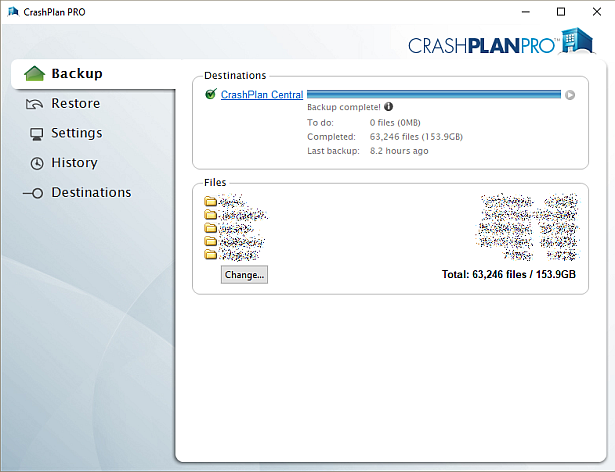
CrashPlan is a Java application which can be difficult to install on a NAS. Way back in January 2012 I decided to simplify it into a Synology package, since I had already created several others. It has been through many versions since that time, as the changelog below shows. Although it used to work on Synology products with ARM and PowerPC CPUs, it unfortunately became Intel-only in October 2016 due to Code 42 Software adding a reliance on some proprietary libraries.
Licence compliance is another challenge – Code 42’s EULA prohibits redistribution. I had to make the Synology package use the regular CrashPlan for Linux download (after the end user agrees to the Code 42 EULA). I then had to write my own script to extract this archive and mimic the Code 42 installer behaviour, but without the interactive prompts of the original.
Synology Package Installation
- In Synology DSM’s Package Center, click Settings and add my package repository:
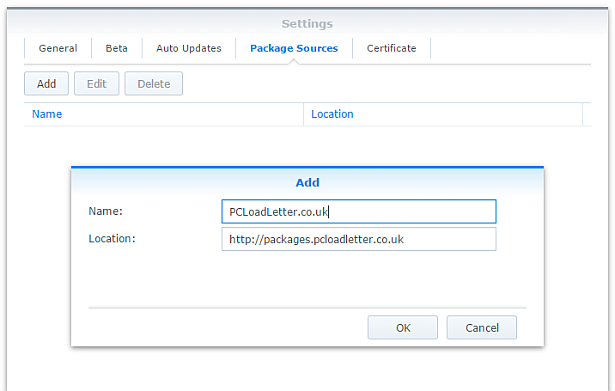
- The repository will push its certificate automatically to the NAS, which is used to validate package integrity. Set the Trust Level to Synology Inc. and trusted publishers:

- Now browse the Community section in Package Center to install CrashPlan:

The repository only displays packages which are compatible with your specific model of NAS. If you don’t see CrashPlan in the list, then either your NAS model or your DSM version are not supported at this time. DSM 5.0 is the minimum supported version for this package, and an Intel CPU is required. - Since CrashPlan is a Java application, it needs a Java Runtime Environment (JRE) to function. It is recommended that you select to have the package install a dedicated Java 8 runtime. For licensing reasons I cannot include Java with this package, so you will need to agree to the licence terms and download it yourself from Oracle’s website. The package expects to find this .tar.gz file in a shared folder called ‘public’. If you go ahead and try to install the package without it, the error message will indicate precisely which Java file you need for your system type, and it will provide a TinyURL link to the appropriate Oracle download page.
- To install CrashPlan PRO you will first need to log into the Admin Console and download the Linux App from the App Download section and also place this in the ‘public’ shared folder on your NAS.
- If you have a multi-bay NAS, use the Shared Folder control panel to create the shared folder called public (it must be all lower case). On single bay models this is created by default. Assign it with Read/Write privileges for everyone.
- If you have trouble getting the Java or CrashPlan PRO app files recognised by this package, try downloading them with Firefox. It seems to be the only web browser that doesn’t try to uncompress the files, or rename them without warning. I also suggest that you leave the Java file and the public folder present once you have installed the package, so that you won’t need to fetch this again to install future updates to the CrashPlan package.
- CrashPlan is installed in headless mode – backup engine only. This will configured by a desktop client, but operates independently of it.
- The first time you start the CrashPlan package you will need to stop it and restart it before you can connect the client. This is because a config file that is only created on first run needs to be edited by one of my scripts. The engine is then configured to listen on all interfaces on the default port 4243.
CrashPlan Client Installation
- Once the CrashPlan engine is running on the NAS, you can manage it by installing CrashPlan on another computer, and by configuring it to connect to the NAS instance of the CrashPlan Engine.
- Make sure that you install the version of the CrashPlan client that matches the version running on the NAS. If the NAS version gets upgraded later, you will need to update your client computer too.
- The Linux CrashPlan PRO client must be downloaded from the Admin Console and placed in the ‘public’ folder on your NAS in order to successfully install the Synology package.
- By default the client is configured to connect to the CrashPlan engine running on the local computer. Run this command on your NAS from an SSH session:
echo `cat /var/lib/crashplan/.ui_info`
Note those are backticks not quotes. This will give you a port number (4243), followed by an authentication token, followed by the IP binding (0.0.0.0 means the server is listening for connections on all interfaces) e.g.:
4243,9ac9b642-ba26-4578-b705-124c6efc920b,0.0.0.0

port,--------------token-----------------,binding
Copy this token value and use this value to replace the token in the equivalent config file on the computer that you would like to run the CrashPlan client on – located here:
C:\ProgramData\CrashPlan\.ui_info (Windows)
“/Library/Application Support/CrashPlan/.ui_info” (Mac OS X installed for all users)
“~/Library/Application Support/CrashPlan/.ui_info” (Mac OS X installed for single user)
/var/lib/crashplan/.ui_info (Linux)
You will not be able to connect the client unless the client token matches on the NAS token. On the client you also need to amend the IP address value after the token to match the Synology NAS IP address.
so using the example above, your computer’s CrashPlan client config file would be edited to:
4243,9ac9b642-ba26-4578-b705-124c6efc920b,192.168.1.100
assuming that the Synology NAS has the IP 192.168.1.100
If it still won’t connect, check that the ServicePort value is set to 4243 in the following files:
C:\ProgramData\CrashPlan\conf\ui_(username).properties (Windows)
“/Library/Application Support/CrashPlan/ui.properties” (Mac OS X installed for all users)
“~/Library/Application Support/CrashPlan/ui.properties” (Mac OS X installed for single user)
/usr/local/crashplan/conf (Linux)
/var/lib/crashplan/.ui_info (Synology) – this value does change spontaneously if there’s a port conflict e.g. you started two versions of the package concurrently (CrashPlan and CrashPlan PRO) - As a result of the nightmarish complexity of recent product changes Code42 has now published a support article with more detail on running headless systems including config file locations on all supported operating systems, and for ‘all users’ versus single user installs etc.
- You should disable the CrashPlan service on your computer if you intend only to use the client. In Windows, open the Services section in Computer Management and stop the CrashPlan Backup Service. In the service Properties set the Startup Type to Manual. You can also disable the CrashPlan System Tray notification application by removing it from Task Manager > More Details > Start-up Tab (Windows 8/Windows 10) or the All Users Startup Start Menu folder (Windows 7).
To accomplish the same on Mac OS X, run the following commands one by one:sudo launchctl unload /Library/LaunchDaemons/com.crashplan.engine.plist sudo mv /Library/LaunchDaemons/com.crashplan.engine.plist /Library/LaunchDaemons/com.crashplan.engine.plist.bak
The CrashPlan menu bar application can be disabled in System Preferences > Users & Groups > Current User > Login Items
Migration from CrashPlan For Home to CrashPlan For Small Business (CrashPlan PRO)
- Leave the regular green branded CrashPlan 4.8.3 Synology package installed.
- Go through the online migration using the link in the email notification you received from Code 42 on 22/08/2017. This seems to trigger the CrashPlan client to begin an update to 4.9 which will fail. It will also migrate your account onto a CrashPlan PRO server. The web page is likely to stall on the Migrating step, but no matter. The process is meant to take you to the store but it seems to be quite flakey. If you see the store page with a $0.00 amount in the basket, this has correctly referred you for the introductory offer. Apparently the $9.99 price thereafter shown on that screen is a mistake and the correct price of $2.50 is shown on a later screen in the process I think. Enter your credit card details and check out if you can. If not, continue.
- Log into the CrashPlan PRO Admin Console as per these instructions, and download the CrashPlan PRO 4.9 client for Linux, and the 4.9 client for your remote console computer. Ignore the red message in the bottom left of the Admin Console about registering, and do not sign up for the free trial. Preferably use Firefox for the Linux version download – most of the other web browsers will try to unpack the .tgz archive, which you do not want to happen.
- Configure the CrashPlan PRO 4.9 client on your computer to connect to your Syno as per the usual instructions on this blog post.
- Put the downloaded Linux CrashPlan PRO 4.9 client .tgz file in the ‘public’ shared folder on your NAS. The package will no longer download this automatically as it did in previous versions.
- From the Community section of DSM Package Center, install the CrashPlan PRO 4.9 package concurrently with your existing CrashPlan 4.8.3 Syno package.
- This will stop the CrashPlan package and automatically import its configuration. Notice that it will also backup your old CrashPlan .identity file and leave it in the ‘public’ shared folder, just in case something goes wrong.
- Start the CrashPlan PRO Synology package, and connect your CrashPlan PRO console from your computer.
- You should see your protected folders as usual. At first mine reported something like “insufficient device licences”, but the next time I started up it changed to “subscription expired”.
- Uninstall the CrashPlan 4.8.3 Synology package, this is no longer required.
- At this point if the store referral didn’t work in the second step, you need to sign into the Admin Console. While signed in, navigate to this link which I was given by Code 42 support. If it works, you should see a store page with some blue font text and a $0.00 basket value. If it didn’t work you will get bounced to the Consumer Next Steps webpage: “Important Changes to CrashPlan for Home” – the one with the video of the CEO explaining the situation. I had to do this a few times before it worked. Once the store referral link worked and I had confirmed my payment details my CrashPlan PRO client immediately started working. Enjoy!
Notes
- The package uses the intact CrashPlan installer directly from Code 42 Software, following acceptance of its EULA. I am complying with the directive that no one redistributes it.
- The engine daemon script checks the amount of system RAM and scales the Java heap size appropriately (up to the default maximum of 512MB). This can be overridden in a persistent way if you are backing up large backup sets by editing /var/packages/CrashPlan/target/syno_package.vars. If you are considering buying a NAS purely to use CrashPlan and intend to back up more than a few hundred GB then I strongly advise buying one of the models with upgradeable RAM. Memory is very limited on the cheaper models. I have found that a 512MB heap was insufficient to back up more than 2TB of files on a Windows server and that was the situation many years ago. It kept restarting the backup engine every few minutes until I increased the heap to 1024MB. Many users of the package have found that they have to increase the heap size or CrashPlan will halt its activity. This can be mitigated by dividing your backup into several smaller backup sets which are scheduled to be protected at different times. Note that from package version 0041, using the dedicated JRE on a 64bit Intel NAS will allow a heap size greater than 4GB since the JRE is 64bit (requires DSM 6.0 in most cases).
- If you need to manage CrashPlan from a remote location, I suggest you do so using SSH tunnelling as per this support document.
- The package supports upgrading to future versions while preserving the machine identity, logs, login details, and cache. Upgrades can now take place without requiring a login from the client afterwards.
- If you remove the package completely and re-install it later, you can re-attach to previous backups. When you log in to the Desktop Client with your existing account after a re-install, you can select “adopt computer” to merge the records, and preserve your existing backups. I haven’t tested whether this also re-attaches links to friends’ CrashPlan computers and backup sets, though the latter does seem possible in the Friends section of the GUI. It’s probably a good idea to test that this survives a package reinstall before you start relying on it. Sometimes, particularly with CrashPlan PRO I think, the adopt option is not offered. In this case you can log into CrashPlan Central and retrieve your computer’s GUID. On the CrashPlan client, double-click on the logo in the top right and you’ll enter a command line mode. You can use the GUID command to change the system’s GUID to the one you just retrieved from your account.
- The log which is displayed in the package’s Log tab is actually the activity history. If you are trying to troubleshoot an issue you will need to use an SSH session to inspect these log files:
/var/packages/CrashPlan/target/log/engine_output.log
/var/packages/CrashPlan/target/log/engine_error.log
/var/packages/CrashPlan/target/log/app.log - When CrashPlan downloads and attempts to run an automatic update, the script will most likely fail and stop the package. This is typically caused by syntax differences with the Synology versions of certain Linux shell commands (like rm, mv, or ps). The startup script will attempt to apply the published upgrade the next time the package is started.
- Although CrashPlan’s activity can be scheduled within the application, in order to save RAM some users may wish to restrict running the CrashPlan engine to specific times of day using the Task Scheduler in DSM Control Panel:
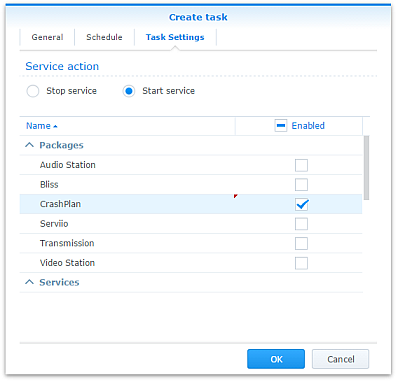
Note that regardless of real-time backup, by default CrashPlan will scan the whole backup selection for changes at 3:00am. Include this time within your Task Scheduler time window or else CrashPlan will not capture file changes which occurred while it was inactive:

- If you decide to sign up for one of CrashPlan’s paid backup services as a result of my work on this, please consider donating using the PayPal button on the right of this page.
Package scripts
For information, here are the package scripts so you can see what it’s going to do. You can get more information about how packages work by reading the Synology 3rd Party Developer Guide.
installer.sh
#!/bin/sh

#--------CRASHPLAN installer script
#--------package maintained at pcloadletter.co.uk


DOWNLOAD_PATH="http://download2.code42.com/installs/linux/install/${SYNOPKG_PKGNAME}"
CP_EXTRACTED_FOLDER="crashplan-install"
OLD_JNA_NEEDED="false"
[ "${SYNOPKG_PKGNAME}" == "CrashPlan" ] && DOWNLOAD_FILE="CrashPlan_4.8.3_Linux.tgz"
[ "${SYNOPKG_PKGNAME}" == "CrashPlanPRO" ] && DOWNLOAD_FILE="CrashPlanPRO_4.*_Linux.tgz"
if [ "${SYNOPKG_PKGNAME}" == "CrashPlanPROe" ]; then
  CP_EXTRACTED_FOLDER="${SYNOPKG_PKGNAME}-install"
  OLD_JNA_NEEDED="true"
  [ "${WIZARD_VER_483}" == "true" ] && { CPPROE_VER="4.8.3"; CP_EXTRACTED_FOLDER="crashplan-install"; OLD_JNA_NEEDED="false"; }
  [ "${WIZARD_VER_480}" == "true" ] && { CPPROE_VER="4.8.0"; CP_EXTRACTED_FOLDER="crashplan-install"; OLD_JNA_NEEDED="false"; }
  [ "${WIZARD_VER_470}" == "true" ] && { CPPROE_VER="4.7.0"; CP_EXTRACTED_FOLDER="crashplan-install"; OLD_JNA_NEEDED="false"; }
  [ "${WIZARD_VER_460}" == "true" ] && { CPPROE_VER="4.6.0"; CP_EXTRACTED_FOLDER="crashplan-install"; OLD_JNA_NEEDED="false"; }
  [ "${WIZARD_VER_452}" == "true" ] && { CPPROE_VER="4.5.2"; CP_EXTRACTED_FOLDER="crashplan-install"; OLD_JNA_NEEDED="false"; }
  [ "${WIZARD_VER_450}" == "true" ] && { CPPROE_VER="4.5.0"; CP_EXTRACTED_FOLDER="crashplan-install"; OLD_JNA_NEEDED="false"; }
  [ "${WIZARD_VER_441}" == "true" ] && { CPPROE_VER="4.4.1"; CP_EXTRACTED_FOLDER="crashplan-install"; OLD_JNA_NEEDED="false"; }
  [ "${WIZARD_VER_430}" == "true" ] && CPPROE_VER="4.3.0"
  [ "${WIZARD_VER_420}" == "true" ] && CPPROE_VER="4.2.0"
  [ "${WIZARD_VER_370}" == "true" ] && CPPROE_VER="3.7.0"
  [ "${WIZARD_VER_364}" == "true" ] && CPPROE_VER="3.6.4"
  [ "${WIZARD_VER_363}" == "true" ] && CPPROE_VER="3.6.3"
  [ "${WIZARD_VER_3614}" == "true" ] && CPPROE_VER="3.6.1.4"
  [ "${WIZARD_VER_353}" == "true" ] && CPPROE_VER="3.5.3"
  [ "${WIZARD_VER_341}" == "true" ] && CPPROE_VER="3.4.1"
  [ "${WIZARD_VER_33}" == "true" ] && CPPROE_VER="3.3"
  DOWNLOAD_FILE="CrashPlanPROe_${CPPROE_VER}_Linux.tgz"
fi
DOWNLOAD_URL="${DOWNLOAD_PATH}/${DOWNLOAD_FILE}"
CPI_FILE="${SYNOPKG_PKGNAME}_*.cpi"
OPTDIR="${SYNOPKG_PKGDEST}"
VARS_FILE="${OPTDIR}/install.vars"
SYNO_CPU_ARCH="`uname -m`"
[ "${SYNO_CPU_ARCH}" == "x86_64" ] && SYNO_CPU_ARCH="i686"
[ "${SYNO_CPU_ARCH}" == "armv5tel" ] && SYNO_CPU_ARCH="armel"
[ "${SYNOPKG_DSM_ARCH}" == "armada375" ] && SYNO_CPU_ARCH="armv7l"
[ "${SYNOPKG_DSM_ARCH}" == "armada38x" ] && SYNO_CPU_ARCH="armhf"
[ "${SYNOPKG_DSM_ARCH}" == "comcerto2k" ] && SYNO_CPU_ARCH="armhf"
[ "${SYNOPKG_DSM_ARCH}" == "alpine" ] && SYNO_CPU_ARCH="armhf"
[ "${SYNOPKG_DSM_ARCH}" == "alpine4k" ] && SYNO_CPU_ARCH="armhf"
[ "${SYNOPKG_DSM_ARCH}" == "monaco" ] && SYNO_CPU_ARCH="armhf"
[ "${SYNOPKG_DSM_ARCH}" == "rtd1296" ] && SYNO_CPU_ARCH="armhf"
NATIVE_BINS_URL="http://packages.pcloadletter.co.uk/downloads/crashplan-native-${SYNO_CPU_ARCH}.tar.xz"
NATIVE_BINS_FILE="`echo ${NATIVE_BINS_URL} | sed -r "s%^.*/(.*)%\1%"`"
OLD_JNA_URL="http://packages.pcloadletter.co.uk/downloads/crashplan-native-old-${SYNO_CPU_ARCH}.tar.xz"
OLD_JNA_FILE="`echo ${OLD_JNA_URL} | sed -r "s%^.*/(.*)%\1%"`"
INSTALL_FILES="${DOWNLOAD_URL} ${NATIVE_BINS_URL}"
[ "${OLD_JNA_NEEDED}" == "true" ] && INSTALL_FILES="${INSTALL_FILES} ${OLD_JNA_URL}"
TEMP_FOLDER="`find / -maxdepth 2 -path '/volume?/@tmp' | head -n 1`"
#the Manifest folder is where friends' backup data is stored
#we set it outside the app folder so it persists after a package uninstall
MANIFEST_FOLDER="/`echo $TEMP_FOLDER | cut -f2 -d'/'`/crashplan"
LOG_FILE="${SYNOPKG_PKGDEST}/log/history.log.0"
UPGRADE_FILES="syno_package.vars conf/my.service.xml conf/service.login conf/service.model"
UPGRADE_FOLDERS="log cache"
PUBLIC_FOLDER="`synoshare --get public | sed -r "/Path/!d;s/^.*\[(.*)\].*$/\1/"`"
#dedicated JRE section
if [ "${WIZARD_JRE_CP}" == "true" ]; then
  DOWNLOAD_URL="http://tinyurl.com/javaembed"
  EXTRACTED_FOLDER="ejdk1.8.0_151"
  #detect systems capable of running 64bit JRE which can address more than 4GB of RAM
  [ "${SYNOPKG_DSM_ARCH}" == "x64" ] && SYNO_CPU_ARCH="x64"
  [ "`uname -m`" == "x86_64" ] && [ ${SYNOPKG_DSM_VERSION_MAJOR} -ge 6 ] && SYNO_CPU_ARCH="x64"
  if [ "${SYNO_CPU_ARCH}" == "armel" ]; then
    JAVA_BINARY="ejdk-8u151-linux-arm-sflt.tar.gz"
    JAVA_BUILD="ARMv5/ARMv6/ARMv7 Linux - SoftFP ABI, Little Endian 2"
  elif [ "${SYNO_CPU_ARCH}" == "armv7l" ]; then
    JAVA_BINARY="ejdk-8u151-linux-arm-sflt.tar.gz"
    JAVA_BUILD="ARMv5/ARMv6/ARMv7 Linux - SoftFP ABI, Little Endian 2"
  elif [ "${SYNO_CPU_ARCH}" == "armhf" ]; then
    JAVA_BINARY="ejdk-8u151-linux-armv6-vfp-hflt.tar.gz"
    JAVA_BUILD="ARMv6/ARMv7 Linux - VFP, HardFP ABI, Little Endian 1"
  elif [ "${SYNO_CPU_ARCH}" == "ppc" ]; then
    #Oracle have discontinued Java 8 for PowerPC after update 6
    JAVA_BINARY="ejdk-8u6-fcs-b23-linux-ppc-e500v2-12_jun_2014.tar.gz"
    JAVA_BUILD="Power Architecture Linux - Headless - e500v2 with double-precision SPE Floating Point Unit"
    EXTRACTED_FOLDER="ejdk1.8.0_06"
    DOWNLOAD_URL="http://tinyurl.com/java8ppc"
  elif [ "${SYNO_CPU_ARCH}" == "i686" ]; then
    JAVA_BINARY="ejdk-8u151-linux-i586.tar.gz"
    JAVA_BUILD="x86 Linux Small Footprint - Headless"
  elif [ "${SYNO_CPU_ARCH}" == "x64" ]; then
    JAVA_BINARY="jre-8u151-linux-x64.tar.gz"
    JAVA_BUILD="Linux x64"
    EXTRACTED_FOLDER="jre1.8.0_151"
    DOWNLOAD_URL="http://tinyurl.com/java8x64"
  fi
fi
JAVA_BINARY=`echo ${JAVA_BINARY} | cut -f1 -d'.'`
source /etc/profile


pre_checks ()
{
  #These checks are called from preinst and from preupgrade functions to prevent failures resulting in a partially upgraded package
  if [ "${WIZARD_JRE_CP}" == "true" ]; then
    synoshare -get public > /dev/null || (
      echo "A shared folder called 'public' could not be found - note this name is case-sensitive. " >> $SYNOPKG_TEMP_LOGFILE
      echo "Please create this using the Shared Folder DSM Control Panel and try again." >> $SYNOPKG_TEMP_LOGFILE
      exit 1
    )

    JAVA_BINARY_FOUND=
    [ -f ${PUBLIC_FOLDER}/${JAVA_BINARY}.tar.gz ] && JAVA_BINARY_FOUND=true
    [ -f ${PUBLIC_FOLDER}/${JAVA_BINARY}.tar ] && JAVA_BINARY_FOUND=true
    [ -f ${PUBLIC_FOLDER}/${JAVA_BINARY}.tar.tar ] && JAVA_BINARY_FOUND=true
    [ -f ${PUBLIC_FOLDER}/${JAVA_BINARY}.gz ] && JAVA_BINARY_FOUND=true

    if [ -z ${JAVA_BINARY_FOUND} ]; then
      echo "Java binary bundle not found. " >> $SYNOPKG_TEMP_LOGFILE
      echo "I was expecting the file ${PUBLIC_FOLDER}/${JAVA_BINARY}.tar.gz. " >> $SYNOPKG_TEMP_LOGFILE
      echo "Please agree to the Oracle licence at ${DOWNLOAD_URL}, then download the '${JAVA_BUILD}' package" >> $SYNOPKG_TEMP_LOGFILE
      echo "and place it in the 'public' shared folder on your NAS. This download cannot be automated even if " >> $SYNOPKG_TEMP_LOGFILE
      echo "displaying a package EULA could potentially cover the legal aspect, because files hosted on Oracle's " >> $SYNOPKG_TEMP_LOGFILE
      echo "server are protected by a session cookie requiring a JavaScript enabled browser." >> $SYNOPKG_TEMP_LOGFILE
      exit 1
    fi
  else
    if [ -z ${JAVA_HOME} ]; then
      echo "Java is not installed or not properly configured. JAVA_HOME is not defined. " >> $SYNOPKG_TEMP_LOGFILE
      echo "Download and install the Java Synology package from http://wp.me/pVshC-z5" >> $SYNOPKG_TEMP_LOGFILE
      exit 1
    fi

    if [ ! -f ${JAVA_HOME}/bin/java ]; then
      echo "Java is not installed or not properly configured. The Java binary could not be located. " >> $SYNOPKG_TEMP_LOGFILE
      echo "Download and install the Java Synology package from http://wp.me/pVshC-z5" >> $SYNOPKG_TEMP_LOGFILE
      exit 1
    fi

    if [ "${WIZARD_JRE_SYS}" == "true" ]; then
      JAVA_VER=`java -version 2>&1 | sed -r "/^.* version/!d;s/^.* version \"[0-9]\.([0-9]).*$/\1/"`
      if [ ${JAVA_VER} -lt 8 ]; then
        echo "This version of CrashPlan requires Java 8 or newer. Please update your Java package. "
        exit 1
      fi
    fi
  fi
}


preinst ()
{
  pre_checks
  cd ${TEMP_FOLDER}
  for WGET_URL in ${INSTALL_FILES}
  do
    WGET_FILENAME="`echo ${WGET_URL} | sed -r "s%^.*/(.*)%\1%"`"
    [ -f ${TEMP_FOLDER}/${WGET_FILENAME} ] && rm ${TEMP_FOLDER}/${WGET_FILENAME}
    wget ${WGET_URL}
    if [[ $? != 0 ]]; then
      if [ -d ${PUBLIC_FOLDER} ] && [ -f ${PUBLIC_FOLDER}/${WGET_FILENAME} ]; then
        cp ${PUBLIC_FOLDER}/${WGET_FILENAME} ${TEMP_FOLDER}
      else
        echo "There was a problem downloading ${WGET_FILENAME} from the official download link, " >> $SYNOPKG_TEMP_LOGFILE
        echo "which was \"${WGET_URL}\" " >> $SYNOPKG_TEMP_LOGFILE
        echo "Alternatively, you may download this file manually and place it in the 'public' shared folder. " >> $SYNOPKG_TEMP_LOGFILE
        exit 1
      fi
    fi
  done

  exit 0
}


postinst ()
{
  if [ "${WIZARD_JRE_CP}" == "true" ]; then
    #extract Java (Web browsers love to interfere with .tar.gz files)
    cd ${PUBLIC_FOLDER}
    if [ -f ${JAVA_BINARY}.tar.gz ]; then
      #Firefox seems to be the only browser that leaves it alone
      tar xzf ${JAVA_BINARY}.tar.gz
    elif [ -f ${JAVA_BINARY}.gz ]; then
      #Chrome
      tar xzf ${JAVA_BINARY}.gz
    elif [ -f ${JAVA_BINARY}.tar ]; then
      #Safari
      tar xf ${JAVA_BINARY}.tar
    elif [ -f ${JAVA_BINARY}.tar.tar ]; then
      #Internet Explorer
      tar xzf ${JAVA_BINARY}.tar.tar
    fi
    mv ${EXTRACTED_FOLDER} ${SYNOPKG_PKGDEST}/jre-syno
    JRE_PATH="`find ${OPTDIR}/jre-syno/ -name jre`"
    [ -z ${JRE_PATH} ] && JRE_PATH=${OPTDIR}/jre-syno
    #change owner of folder tree
    chown -R root:root ${SYNOPKG_PKGDEST}
  fi

  #extract CPU-specific additional binaries
  mkdir ${SYNOPKG_PKGDEST}/bin
  cd ${SYNOPKG_PKGDEST}/bin
  tar xJf ${TEMP_FOLDER}/${NATIVE_BINS_FILE} && rm ${TEMP_FOLDER}/${NATIVE_BINS_FILE}
  [ "${OLD_JNA_NEEDED}" == "true" ] && tar xJf ${TEMP_FOLDER}/${OLD_JNA_FILE} && rm ${TEMP_FOLDER}/${OLD_JNA_FILE}

  #extract main archive
  cd ${TEMP_FOLDER}
  tar xzf ${TEMP_FOLDER}/${DOWNLOAD_FILE} && rm ${TEMP_FOLDER}/${DOWNLOAD_FILE}

  #extract cpio archive
  cd ${SYNOPKG_PKGDEST}
  cat "${TEMP_FOLDER}/${CP_EXTRACTED_FOLDER}"/${CPI_FILE} | gzip -d -c - | ${SYNOPKG_PKGDEST}/bin/cpio -i --no-preserve-owner

  echo "#uncomment to expand Java max heap size beyond prescribed value (will survive upgrades)" > ${SYNOPKG_PKGDEST}/syno_package.vars
  echo "#you probably only want more than the recommended 1024M if you're backing up extremely large volumes of files" >> ${SYNOPKG_PKGDEST}/syno_package.vars
  echo "#USR_MAX_HEAP=1024M" >> ${SYNOPKG_PKGDEST}/syno_package.vars
  echo >> ${SYNOPKG_PKGDEST}/syno_package.vars

  cp ${TEMP_FOLDER}/${CP_EXTRACTED_FOLDER}/scripts/CrashPlanEngine ${OPTDIR}/bin
  cp ${TEMP_FOLDER}/${CP_EXTRACTED_FOLDER}/scripts/run.conf ${OPTDIR}/bin
  mkdir -p ${MANIFEST_FOLDER}/backupArchives

  #save install variables which Crashplan expects its own installer script to create
  echo TARGETDIR=${SYNOPKG_PKGDEST} > ${VARS_FILE}
  echo BINSDIR=/bin >> ${VARS_FILE}
  echo MANIFESTDIR=${MANIFEST_FOLDER}/backupArchives >> ${VARS_FILE}
  #leave these ones out which should help upgrades from Code42 to work (based on examining an upgrade script)
  #echo INITDIR=/etc/init.d >> ${VARS_FILE}
  #echo RUNLVLDIR=/usr/syno/etc/rc.d >> ${VARS_FILE}
  echo INSTALLDATE=`date +%Y%m%d` >> ${VARS_FILE}
  [ "${WIZARD_JRE_CP}" == "true" ] && echo JAVACOMMON=${JRE_PATH}/bin/java >> ${VARS_FILE}
  [ "${WIZARD_JRE_SYS}" == "true" ] && echo JAVACOMMON=\${JAVA_HOME}/bin/java >> ${VARS_FILE}
  cat ${TEMP_FOLDER}/${CP_EXTRACTED_FOLDER}/install.defaults >> ${VARS_FILE}

  #remove temp files
  rm -r ${TEMP_FOLDER}/${CP_EXTRACTED_FOLDER}

  #add firewall config
  /usr/syno/bin/servicetool --install-configure-file --package /var/packages/${SYNOPKG_PKGNAME}/scripts/${SYNOPKG_PKGNAME}.sc > /dev/null

  #amend CrashPlanPROe client version
  [ "${SYNOPKG_PKGNAME}" == "CrashPlanPROe" ] && sed -i -r "s/^version=\".*(-.*$)/version=\"${CPPROE_VER}\1/" /var/packages/${SYNOPKG_PKGNAME}/INFO

  #are we transitioning an existing CrashPlan account to CrashPlan For Small Business?
  if [ "${SYNOPKG_PKGNAME}" == "CrashPlanPRO" ]; then
    if [ -e /var/packages/CrashPlan/scripts/start-stop-status ]; then
      /var/packages/CrashPlan/scripts/start-stop-status stop
      cp /var/lib/crashplan/.identity ${PUBLIC_FOLDER}/crashplan-identity.bak
      cp -R /var/packages/CrashPlan/target/conf/ ${OPTDIR}/
    fi
  fi

  exit 0
}


preuninst ()
{
  `dirname $0`/stop-start-status stop

  exit 0
}


postuninst ()
{
  if [ -f ${SYNOPKG_PKGDEST}/syno_package.vars ]; then
    source ${SYNOPKG_PKGDEST}/syno_package.vars
  fi
  [ -e ${OPTDIR}/lib/libffi.so.5 ] && rm ${OPTDIR}/lib/libffi.so.5

  #delete symlink if it no longer resolves - PowerPC only
  if [ ! -e /lib/libffi.so.5 ]; then
    [ -L /lib/libffi.so.5 ] && rm /lib/libffi.so.5
  fi

  #remove firewall config
  if [ "${SYNOPKG_PKG_STATUS}" == "UNINSTALL" ]; then
    /usr/syno/bin/servicetool --remove-configure-file --package ${SYNOPKG_PKGNAME}.sc > /dev/null
  fi

 exit 0
}


preupgrade ()
{
  `dirname $0`/stop-start-status stop
  pre_checks
  #if identity exists back up config
  if [ -f /var/lib/crashplan/.identity ]; then
    mkdir -p ${SYNOPKG_PKGDEST}/../${SYNOPKG_PKGNAME}_data_mig/conf
    for FILE_TO_MIGRATE in ${UPGRADE_FILES}; do
      if [ -f ${OPTDIR}/${FILE_TO_MIGRATE} ]; then
        cp ${OPTDIR}/${FILE_TO_MIGRATE} ${SYNOPKG_PKGDEST}/../${SYNOPKG_PKGNAME}_data_mig/${FILE_TO_MIGRATE}
      fi
    done
    for FOLDER_TO_MIGRATE in ${UPGRADE_FOLDERS}; do
      if [ -d ${OPTDIR}/${FOLDER_TO_MIGRATE} ]; then
        mv ${OPTDIR}/${FOLDER_TO_MIGRATE} ${SYNOPKG_PKGDEST}/../${SYNOPKG_PKGNAME}_data_mig
      fi
    done
  fi

  exit 0
}


postupgrade ()
{
  #use the migrated identity and config data from the previous version
  if [ -f ${SYNOPKG_PKGDEST}/../${SYNOPKG_PKGNAME}_data_mig/conf/my.service.xml ]; then
    for FILE_TO_MIGRATE in ${UPGRADE_FILES}; do
      if [ -f ${SYNOPKG_PKGDEST}/../${SYNOPKG_PKGNAME}_data_mig/${FILE_TO_MIGRATE} ]; then
        mv ${SYNOPKG_PKGDEST}/../${SYNOPKG_PKGNAME}_data_mig/${FILE_TO_MIGRATE} ${OPTDIR}/${FILE_TO_MIGRATE}
      fi
    done
    for FOLDER_TO_MIGRATE in ${UPGRADE_FOLDERS}; do
    if [ -d ${SYNOPKG_PKGDEST}/../${SYNOPKG_PKGNAME}_data_mig/${FOLDER_TO_MIGRATE} ]; then
      mv ${SYNOPKG_PKGDEST}/../${SYNOPKG_PKGNAME}_data_mig/${FOLDER_TO_MIGRATE} ${OPTDIR}
    fi
    done
    rmdir ${SYNOPKG_PKGDEST}/../${SYNOPKG_PKGNAME}_data_mig/conf
    rmdir ${SYNOPKG_PKGDEST}/../${SYNOPKG_PKGNAME}_data_mig

    #make CrashPlan log entry
    TIMESTAMP="`date "+%D %I:%M%p"`"
    echo "I ${TIMESTAMP} Synology Package Center updated ${SYNOPKG_PKGNAME} to version ${SYNOPKG_PKGVER}" >> ${LOG_FILE}
  fi

  exit 0
}
start-stop-status.sh
#!/bin/sh

#--------CRASHPLAN start-stop-status script
#--------package maintained at pcloadletter.co.uk


TEMP_FOLDER="`find / -maxdepth 2 -path '/volume?/@tmp' | head -n 1`"
MANIFEST_FOLDER="/`echo $TEMP_FOLDER | cut -f2 -d'/'`/crashplan"
ENGINE_CFG="run.conf"
PKG_FOLDER="`dirname $0 | cut -f1-4 -d'/'`"
DNAME="`dirname $0 | cut -f4 -d'/'`"
OPTDIR="${PKG_FOLDER}/target"
PID_FILE="${OPTDIR}/${DNAME}.pid"
DLOG="${OPTDIR}/log/history.log.0"
CFG_PARAM="SRV_JAVA_OPTS"
JAVA_MIN_HEAP=`grep "^${CFG_PARAM}=" "${OPTDIR}/bin/${ENGINE_CFG}" | sed -r "s/^.*-Xms([0-9]+)[Mm] .*$/\1/"`
SYNO_CPU_ARCH="`uname -m`"
TIMESTAMP="`date "+%D %I:%M%p"`"
FULL_CP="${OPTDIR}/lib/com.backup42.desktop.jar:${OPTDIR}/lang"
source ${OPTDIR}/install.vars
source /etc/profile
source /root/.profile


start_daemon ()
{
  #check persistent variables from syno_package.vars
  USR_MAX_HEAP=0
  if [ -f ${OPTDIR}/syno_package.vars ]; then
    source ${OPTDIR}/syno_package.vars
  fi
  USR_MAX_HEAP=`echo $USR_MAX_HEAP | sed -e "s/[mM]//"`

  #do we need to restore the identity file - has a DSM upgrade scrubbed /var/lib/crashplan?
  if [ ! -e /var/lib/crashplan ]; then
    mkdir /var/lib/crashplan
    [ -e ${OPTDIR}/conf/var-backup/.identity ] && cp ${OPTDIR}/conf/var-backup/.identity /var/lib/crashplan/
  fi

  #fix up some of the binary paths and fix some command syntax for busybox
  #moved this to start-stop-status.sh from installer.sh because Code42 push updates and these
  #new scripts will need this treatment too
  find ${OPTDIR}/ -name "*.sh" | while IFS="" read -r FILE_TO_EDIT; do
    if [ -e ${FILE_TO_EDIT} ]; then
      #this list of substitutions will probably need expanding as new CrashPlan updates are released
      sed -i "s%^#!/bin/bash%#!$/bin/sh%" "${FILE_TO_EDIT}"
      sed -i -r "s%(^\s*)(/bin/cpio |cpio ) %\1/${OPTDIR}/bin/cpio %" "${FILE_TO_EDIT}"
      sed -i -r "s%(^\s*)(/bin/ps|ps) [^w][^\|]*\|%\1/bin/ps w \|%" "${FILE_TO_EDIT}"
      sed -i -r "s%\`ps [^w][^\|]*\|%\`ps w \|%" "${FILE_TO_EDIT}"
      sed -i -r "s%^ps [^w][^\|]*\|%ps w \|%" "${FILE_TO_EDIT}"
      sed -i "s/rm -fv/rm -f/" "${FILE_TO_EDIT}"
      sed -i "s/mv -fv/mv -f/" "${FILE_TO_EDIT}"
    fi
  done

  #use this daemon init script rather than the unreliable Code42 stock one which greps the ps output
  sed -i "s%^ENGINE_SCRIPT=.*$%ENGINE_SCRIPT=$0%" ${OPTDIR}/bin/restartLinux.sh

  #any downloaded upgrade script will usually have failed despite the above changes
  #so ignore the script and explicitly extract the new java code using the chrisnelson.ca method
  #thanks to Jeff Bingham for tweaks
  UPGRADE_JAR=`find ${OPTDIR}/upgrade -maxdepth 1 -name "*.jar" | tail -1`
  if [ -n "${UPGRADE_JAR}" ]; then
    rm ${OPTDIR}/*.pid > /dev/null

    #make CrashPlan log entry
    echo "I ${TIMESTAMP} Synology extracting upgrade from ${UPGRADE_JAR}" >> ${DLOG}

    UPGRADE_VER=`echo ${SCRIPT_HOME} | sed -r "s/^.*\/([0-9_]+)\.[0-9]+/\1/"`
    #DSM 6.0 no longer includes unzip, use 7z instead
    unzip -o ${OPTDIR}/upgrade/${UPGRADE_VER}.jar "*.jar" -d ${OPTDIR}/lib/ || 7z e -y ${OPTDIR}/upgrade/${UPGRADE_VER}.jar "*.jar" -o${OPTDIR}/lib/ > /dev/null
    unzip -o ${OPTDIR}/upgrade/${UPGRADE_VER}.jar "lang/*" -d ${OPTDIR} || 7z e -y ${OPTDIR}/upgrade/${UPGRADE_VER}.jar "lang/*" -o${OPTDIR} > /dev/null
    mv ${UPGRADE_JAR} ${TEMP_FOLDER}/ > /dev/null
    exec $0
  fi

  #updates may also overwrite our native binaries
  [ -e ${OPTDIR}/bin/libffi.so.5 ] && cp -f ${OPTDIR}/bin/libffi.so.5 ${OPTDIR}/lib/
  [ -e ${OPTDIR}/bin/libjtux.so ] && cp -f ${OPTDIR}/bin/libjtux.so ${OPTDIR}/
  [ -e ${OPTDIR}/bin/jna-3.2.5.jar ] && cp -f ${OPTDIR}/bin/jna-3.2.5.jar ${OPTDIR}/lib/
  if [ -e ${OPTDIR}/bin/jna.jar ] && [ -e ${OPTDIR}/lib/jna.jar ]; then
    cp -f ${OPTDIR}/bin/jna.jar ${OPTDIR}/lib/
  fi

  #create or repair libffi.so.5 symlink if a DSM upgrade has removed it - PowerPC only
  if [ -e ${OPTDIR}/lib/libffi.so.5 ]; then
    if [ ! -e /lib/libffi.so.5 ]; then
      #if it doesn't exist, but is still a link then it's a broken link and should be deleted first
      [ -L /lib/libffi.so.5 ] && rm /lib/libffi.so.5
      ln -s ${OPTDIR}/lib/libffi.so.5 /lib/libffi.so.5
    fi
  fi

  #set appropriate Java max heap size
  RAM=$((`free | grep Mem: | sed -e "s/^ *Mem: *\([0-9]*\).*$/\1/"`/1024))
  if [ $RAM -le 128 ]; then
    JAVA_MAX_HEAP=80
  elif [ $RAM -le 256 ]; then
    JAVA_MAX_HEAP=192
  elif [ $RAM -le 512 ]; then
    JAVA_MAX_HEAP=384
  elif [ $RAM -le 1024 ]; then
    JAVA_MAX_HEAP=512
  elif [ $RAM -gt 1024 ]; then
    JAVA_MAX_HEAP=1024
  fi
  if [ $USR_MAX_HEAP -gt $JAVA_MAX_HEAP ]; then
    JAVA_MAX_HEAP=${USR_MAX_HEAP}
  fi
  if [ $JAVA_MAX_HEAP -lt $JAVA_MIN_HEAP ]; then
    #can't have a max heap lower than min heap (ARM low RAM systems)
    $JAVA_MAX_HEAP=$JAVA_MIN_HEAP
  fi
  sed -i -r "s/(^${CFG_PARAM}=.*) -Xmx[0-9]+[mM] (.*$)/\1 -Xmx${JAVA_MAX_HEAP}m \2/" "${OPTDIR}/bin/${ENGINE_CFG}"

  #disable the use of the x86-optimized external Fast MD5 library if running on ARM and PPC CPUs
  #seems to be the default behaviour now but that may change again
  [ "${SYNO_CPU_ARCH}" == "x86_64" ] && SYNO_CPU_ARCH="i686"
  if [ "${SYNO_CPU_ARCH}" != "i686" ]; then
    grep "^${CFG_PARAM}=.*c42\.native\.md5\.enabled" "${OPTDIR}/bin/${ENGINE_CFG}" > /dev/null \
     || sed -i -r "s/(^${CFG_PARAM}=\".*)\"$/\1 -Dc42.native.md5.enabled=false\"/" "${OPTDIR}/bin/${ENGINE_CFG}"
  fi

  #move the Java temp directory from the default of /tmp
  grep "^${CFG_PARAM}=.*Djava\.io\.tmpdir" "${OPTDIR}/bin/${ENGINE_CFG}" > /dev/null \
   || sed -i -r "s%(^${CFG_PARAM}=\".*)\"$%\1 -Djava.io.tmpdir=${TEMP_FOLDER}\"%" "${OPTDIR}/bin/${ENGINE_CFG}"

  #now edit the XML config file, which only exists after first run
  if [ -f ${OPTDIR}/conf/my.service.xml ]; then

    #allow direct connections from CrashPlan Desktop client on remote systems
    #you must edit the value of serviceHost in conf/ui.properties on the client you connect with
    #users report that this value is sometimes reset so now it's set every service startup
    sed -i "s/<serviceHost>127\.0\.0\.1<\/serviceHost>/<serviceHost>0\.0\.0\.0<\/serviceHost>/" "${OPTDIR}/conf/my.service.xml"
    #default changed in CrashPlan 4.3
    sed -i "s/<serviceHost>localhost<\/serviceHost>/<serviceHost>0\.0\.0\.0<\/serviceHost>/" "${OPTDIR}/conf/my.service.xml"
    #since CrashPlan 4.4 another config file to allow remote console connections
    sed -i "s/127\.0\.0\.1/0\.0\.0\.0/" /var/lib/crashplan/.ui_info

    #this change is made only once in case you want to customize the friends' backup location
    if [ "${MANIFEST_PATH_SET}" != "True" ]; then

      #keep friends' backup data outside the application folder to make accidental deletion less likely
      sed -i "s%<manifestPath>.*</manifestPath>%<manifestPath>${MANIFEST_FOLDER}/backupArchives/</manifestPath>%" "${OPTDIR}/conf/my.service.xml"
      echo "MANIFEST_PATH_SET=True" >> ${OPTDIR}/syno_package.vars
    fi

    #since CrashPlan version 3.5.3 the value javaMemoryHeapMax also needs setting to match that used in bin/run.conf
    sed -i -r "s%(<javaMemoryHeapMax>)[0-9]+[mM](</javaMemoryHeapMax>)%\1${JAVA_MAX_HEAP}m\2%" "${OPTDIR}/conf/my.service.xml"

    #make sure CrashPlan is not binding to the IPv6 stack
    grep "\-Djava\.net\.preferIPv4Stack=true" "${OPTDIR}/bin/${ENGINE_CFG}" > /dev/null \
     || sed -i -r "s/(^${CFG_PARAM}=\".*)\"$/\1 -Djava.net.preferIPv4Stack=true\"/" "${OPTDIR}/bin/${ENGINE_CFG}"
   else
    echo "Check the package log to ensure the package has started successfully, then stop and restart the package to allow desktop client connections." > "${SYNOPKG_TEMP_LOGFILE}"
  fi

  #increase the system-wide maximum number of open files from Synology default of 24466
  [ `cat /proc/sys/fs/file-max` -lt 65536 ] && echo "65536" > /proc/sys/fs/file-max

  #raise the maximum open file count from the Synology default of 1024 - thanks Casper K. for figuring this out
  #http://support.code42.com/Administrator/3.6_And_4.0/Troubleshooting/Too_Many_Open_Files
  ulimit -n 65536

  #ensure that Code 42 have not amended install.vars to force the use of their own (Intel) JRE
  if [ -e ${OPTDIR}/jre-syno ]; then
    JRE_PATH="`find ${OPTDIR}/jre-syno/ -name jre`"
    [ -z ${JRE_PATH} ] && JRE_PATH=${OPTDIR}/jre-syno
    sed -i -r "s|^(JAVACOMMON=).*$|\1\${JRE_PATH}/bin/java|" ${OPTDIR}/install.vars

    #if missing, set timezone and locale for dedicated JRE
    if [ -z ${TZ} ]; then
      SYNO_TZ=`cat /etc/synoinfo.conf | grep timezone | cut -f2 -d'"'`
      #fix for DST time in DSM 5.2 thanks to MinimServer Syno package author
      [ -e /usr/share/zoneinfo/Timezone/synotztable.json ] \
       && SYNO_TZ=`jq ".${SYNO_TZ} | .nameInTZDB" /usr/share/zoneinfo/Timezone/synotztable.json | sed -e "s/\"//g"` \
       || SYNO_TZ=`grep "^${SYNO_TZ}" /usr/share/zoneinfo/Timezone/tzname | sed -e "s/^.*= //"`
      export TZ=${SYNO_TZ}
    fi
    [ -z ${LANG} ] && export LANG=en_US.utf8
    export CLASSPATH=.:${OPTDIR}/jre-syno/lib

  else
    sed -i -r "s|^(JAVACOMMON=).*$|\1\${JAVA_HOME}/bin/java|" ${OPTDIR}/install.vars
  fi

  source ${OPTDIR}/bin/run.conf
  source ${OPTDIR}/install.vars
  cd ${OPTDIR}
  $JAVACOMMON $SRV_JAVA_OPTS -classpath $FULL_CP com.backup42.service.CPService > ${OPTDIR}/log/engine_output.log 2> ${OPTDIR}/log/engine_error.log &
  if [ $! -gt 0 ]; then
    echo $! > $PID_FILE
    renice 19 $! > /dev/null
    if [ -z "${SYNOPKG_PKGDEST}" ]; then
      #script was manually invoked, need this to show status change in Package Center
      [ -e ${PKG_FOLDER}/enabled ] || touch ${PKG_FOLDER}/enabled
    fi
  else
    echo "${DNAME} failed to start, check ${OPTDIR}/log/engine_error.log" > "${SYNOPKG_TEMP_LOGFILE}"
    echo "${DNAME} failed to start, check ${OPTDIR}/log/engine_error.log" >&2
    exit 1
  fi
}

stop_daemon ()
{
  echo "I ${TIMESTAMP} Stopping ${DNAME}" >> ${DLOG}
  kill `cat ${PID_FILE}`
  wait_for_status 1 20 || kill -9 `cat ${PID_FILE}`
  rm -f ${PID_FILE}
  if [ -z ${SYNOPKG_PKGDEST} ]; then
    #script was manually invoked, need this to show status change in Package Center
    [ -e ${PKG_FOLDER}/enabled ] && rm ${PKG_FOLDER}/enabled
  fi
  #backup identity file in case DSM upgrade removes it
  [ -e ${OPTDIR}/conf/var-backup ] || mkdir ${OPTDIR}/conf/var-backup
  cp /var/lib/crashplan/.identity ${OPTDIR}/conf/var-backup/
}

daemon_status ()
{
  if [ -f ${PID_FILE} ] && kill -0 `cat ${PID_FILE}` > /dev/null 2>&1; then
    return
  fi
  rm -f ${PID_FILE}
  return 1
}

wait_for_status ()
{
  counter=$2
  while [ ${counter} -gt 0 ]; do
    daemon_status
    [ $? -eq $1 ] && return
    let counter=counter-1
    sleep 1
  done
  return 1
}


case $1 in
  start)
    if daemon_status; then
      echo ${DNAME} is already running with PID `cat ${PID_FILE}`
      exit 0
    else
      echo Starting ${DNAME} ...
      start_daemon
      exit $?
    fi
  ;;

  stop)
    if daemon_status; then
      echo Stopping ${DNAME} ...
      stop_daemon
      exit $?
    else
      echo ${DNAME} is not running
      exit 0
    fi
  ;;

  restart)
    stop_daemon
    start_daemon
    exit $?
  ;;

  status)
    if daemon_status; then
      echo ${DNAME} is running with PID `cat ${PID_FILE}`
      exit 0
    else
      echo ${DNAME} is not running
      exit 1
    fi
  ;;

  log)
    echo "${DLOG}"
    exit 0
  ;;

  *)
    echo "Usage: $0 {start|stop|status|restart}" >&2
    exit 1
  ;;

esac
install_uifile & upgrade_uifile
[
  {
    "step_title": "Client Version Selection",
    "items": [
      {
        "type": "singleselect",
        "desc": "Please select the CrashPlanPROe client version that is appropriate for your backup destination server:",
        "subitems": [
          {
            "key": "WIZARD_VER_483",
            "desc": "4.8.3",
            "defaultValue": true
          },          {
            "key": "WIZARD_VER_480",
            "desc": "4.8.0",
            "defaultValue": false
          },
          {
            "key": "WIZARD_VER_470",
            "desc": "4.7.0",
            "defaultValue": false
          },
          {
            "key": "WIZARD_VER_460",
            "desc": "4.6.0",
            "defaultValue": false
          },
          {
            "key": "WIZARD_VER_452",
            "desc": "4.5.2",
            "defaultValue": false
          },
          {
            "key": "WIZARD_VER_450",
            "desc": "4.5.0",
            "defaultValue": false
          },
          {
            "key": "WIZARD_VER_441",
            "desc": "4.4.1",
            "defaultValue": false
          },
          {
            "key": "WIZARD_VER_430",
            "desc": "4.3.0",
            "defaultValue": false
          },
          {
            "key": "WIZARD_VER_420",
            "desc": "4.2.0",
            "defaultValue": false
          },
          {
            "key": "WIZARD_VER_370",
            "desc": "3.7.0",
            "defaultValue": false
          },
          {
            "key": "WIZARD_VER_364",
            "desc": "3.6.4",
            "defaultValue": false
          },
          {
            "key": "WIZARD_VER_363",
            "desc": "3.6.3",
            "defaultValue": false
          },
          {
            "key": "WIZARD_VER_3614",
            "desc": "3.6.1.4",
            "defaultValue": false
          },
          {
            "key": "WIZARD_VER_353",
            "desc": "3.5.3",
            "defaultValue": false
          },
          {
            "key": "WIZARD_VER_341",
            "desc": "3.4.1",
            "defaultValue": false
          },
          {
            "key": "WIZARD_VER_33",
            "desc": "3.3",
            "defaultValue": false
          }
        ]
      }
    ]
  },
  {
    "step_title": "Java Runtime Environment Selection",
    "items": [
      {
        "type": "singleselect",
        "desc": "Please select the Java version which you would like CrashPlan to use:",
        "subitems": [
          {
            "key": "WIZARD_JRE_SYS",
            "desc": "Default system Java version",
            "defaultValue": false
          },
          {
            "key": "WIZARD_JRE_CP",
            "desc": "Dedicated installation of Java 8",
            "defaultValue": true
          }
        ]
      }
    ]
  }
]
Changelog:
- 0047 30/Oct/17 – Updated dedicated Java version to 8 update 151, added support for additional Intel CPUs in x18 Synology products.
- 0046 26/Aug/17 – Updated to CrashPlan PRO 4.9, added support for migration from CrashPlan For Home to CrashPlan For Small Business (CrashPlan PRO). Please read the Migration section on this page for instructions.
- 0045 02/Aug/17 – Updated to CrashPlan 4.8.3, updated dedicated Java version to 8 update 144
- 0044 21/Jan/17 – Updated dedicated Java version to 8 update 121
- 0043 07/Jan/17 – Updated dedicated Java version to 8 update 111, added support for Intel Broadwell and Grantley CPUs
- 0042 03/Oct/16 – Updated to CrashPlan 4.8.0, Java 8 is now required, added optional dedicated Java 8 Runtime instead of the default system one including 64bit Java support on 64 bit Intel CPUs to permit memory allocation larger than 4GB. Support for non-Intel platforms withdrawn owing to Code42’s reliance on proprietary native code library libc42archive.so
- 0041 20/Jul/16 – Improved auto-upgrade compatibility (hopefully), added option to have CrashPlan use a dedicated Java 7 Runtime instead of the default system one, including 64bit Java support on 64 bit Intel CPUs to permit memory allocation larger than 4GB
- 0040 25/May/16 – Added cpio to the path in the running context of start-stop-status.sh
- 0039 25/May/16 – Updated to CrashPlan 4.7.0, at each launch forced the use of the system JRE over the CrashPlan bundled Intel one, added Maven build of JNA 4.1.0 for ARMv7 systems consistent with the version bundled with CrashPlan
- 0038 27/Apr/16 – Updated to CrashPlan 4.6.0, and improved support for Code 42 pushed updates
- 0037 21/Jan/16 – Updated to CrashPlan 4.5.2
- 0036 14/Dec/15 – Updated to CrashPlan 4.5.0, separate firewall definitions for management client and for friends backup, added support for DS716+ and DS216play
- 0035 06/Nov/15 – Fixed the update to 4.4.1_59, new installs now listen for remote connections after second startup (was broken from 4.4), updated client install documentation with more file locations and added a link to a new Code42 support doc
EITHER completely remove and reinstall the package (which will require a rescan of the entire backup set) OR alternatively please delete all except for one of the failed upgrade numbered subfolders in /var/packages/CrashPlan/target/upgrade before upgrading. There will be one folder for each time CrashPlan tried and failed to start since Code42 pushed the update - 0034 04/Oct/15 – Updated to CrashPlan 4.4.1, bundled newer JNA native libraries to match those from Code42, PLEASE READ UPDATED BLOG POST INSTRUCTIONS FOR CLIENT INSTALL this version introduced yet another requirement for the client
- 0033 12/Aug/15 – Fixed version 0032 client connection issue for fresh installs
- 0032 12/Jul/15 – Updated to CrashPlan 4.3, PLEASE READ UPDATED BLOG POST INSTRUCTIONS FOR CLIENT INSTALL this version introduced an extra requirement, changed update repair to use the chrisnelson.ca method, forced CrashPlan to prefer IPv4 over IPv6 bindings, removed some legacy version migration scripting, updated main blog post documentation
- 0031 20/May/15 – Updated to CrashPlan 4.2, cross compiled a newer cpio binary for some architectures which were segfaulting while unpacking main CrashPlan archive, added port 4242 to the firewall definition (friend backups), package is now signed with repository private key
- 0030 16/Feb/15 – Fixed show-stopping issue with version 0029 for systems with more than one volume
- 0029 21/Jan/15 – Updated to CrashPlan version 3.7.0, improved detection of temp folder (prevent use of /var/@tmp), added support for Annapurna Alpine AL514 CPU (armhf) in DS2015xs, added support for Marvell Armada 375 CPU (armhf) in DS215j, abandoned practical efforts to try to support Code42’s upgrade scripts, abandoned inotify support (realtime backup) on PowerPC after many failed attempts with self-built and pre-built jtux and jna libraries, back-merged older libffi support for old PowerPC binaries after it was removed in 0028 re-write
- 0028 22/Oct/14 – Substantial re-write:
Updated to CrashPlan version 3.6.4
DSM 5.0 or newer is now required
libjnidispatch.so taken from Debian JNA 3.2.7 package with dependency on newer libffi.so.6 (included in DSM 5.0)
jna-3.2.5.jar emptied of irrelevant CPU architecture libs to reduce size
Increased default max heap size from 512MB to 1GB on systems with more than 1GB RAM
Intel CPUs no longer need the awkward glibc version-faking shim to enable inotify support (for real-time backup)
Switched to using root account – no more adding account permissions for backup, package upgrades will no longer break this
DSM Firewall application definition added
Tested with DSM Task Scheduler to allow backups between certain times of day only, saving RAM when not in use
Daemon init script now uses a proper PID file instead of Code42’s unreliable method of using grep on the output of ps
Daemon init script can be run from the command line
Removal of bash binary dependency now Code42’s CrashPlanEngine script is no longer used
Removal of nice binary dependency, using BusyBox equivalent renice
Unified ARMv5 and ARMv7 external binary package (armle)
Added support for Mindspeed Comcerto 2000 CPU (comcerto2k – armhf) in DS414j
Added support for Intel Atom C2538 (avoton) CPU in DS415+
Added support to choose which version of CrashPlan PROe client to download, since some servers may still require legacy versions
Switched to .tar.xz compression for native binaries to reduce web hosting footprint - 0027 20/Mar/14 – Fixed open file handle limit for very large backup sets (ulimit fix)
- 0026 16/Feb/14 – Updated all CrashPlan clients to version 3.6.3, improved handling of Java temp files
- 0025 30/Jan/14 – glibc version shim no longer used on Intel Synology models running DSM 5.0
- 0024 30/Jan/14 – Updated to CrashPlan PROe 3.6.1.4 and added support for PowerPC 2010 Synology models running DSM 5.0
- 0023 30/Jan/14 – Added support for Intel Atom Evansport and Armada XP CPUs in new DSx14 products
- 0022 10/Jun/13 – Updated all CrashPlan client versions to 3.5.3, compiled native binary dependencies to add support for Armada 370 CPU (DS213j), start-stop-status.sh now updates the new javaMemoryHeapMax value in my.service.xml to the value defined in syno_package.vars
- 0021 01/Mar/13 – Updated CrashPlan to version 3.5.2
- 0020 21/Jan/13 – Fixes for DSM 4.2
- 018 Updated CrashPlan PRO to version 3.4.1
- 017 Updated CrashPlan and CrashPlan PROe to version 3.4.1, and improved in-app update handling
- 016 Added support for Freescale QorIQ CPUs in some x13 series Synology models, and installer script now downloads native binaries separately to reduce repo hosting bandwidth, PowerQUICC PowerPC processors in previous Synology generations with older glibc versions are not supported
- 015 Added support for easy scheduling via cron – see updated Notes section
- 014 DSM 4.1 user profile permissions fix
- 013 implemented update handling for future automatic updates from Code 42, and incremented CrashPlanPRO client to release version 3.2.1
- 012 incremented CrashPlanPROe client to release version 3.3
- 011 minor fix to allow a wildcard on the cpio archive name inside the main installer package (to fix CP PROe client since Code 42 Software had amended the cpio file version to 3.2.1.2)
- 010 minor bug fix relating to daemon home directory path
- 009 rewrote the scripts to be even easier to maintain and unified as much as possible with my imminent CrashPlan PROe server package, fixed a timezone bug (tightened regex matching), moved the script-amending logic from installer.sh to start-stop-status.sh with it now applying to all .sh scripts each startup so perhaps updates from Code42 might work in future, if wget fails to fetch the installer from Code42 the installer will look for the file in the public shared folder
- 008 merged the 14 package scripts each (7 for ARM, 7 for Intel) for CP, CP PRO, & CP PROe – 42 scripts in total – down to just two! ARM & Intel are now supported by the same package, Intel synos now have working inotify support (Real-Time Backup) thanks to rwojo’s shim to pass the glibc version check, upgrade process now retains login, cache and log data (no more re-scanning), users can specify a persistent larger max heap size for very large backup sets
- 007 fixed a bug that broke CrashPlan if the Java folder moved (if you changed version)
- 006 installation now fails without User Home service enabled, fixed Daylight Saving Time support, automated replacing the ARM libffi.so symlink which is destroyed by DSM upgrades, stopped assuming the primary storage volume is /volume1, reset ownership on /var/lib/crashplan and the Friends backup location after installs and upgrades
- 005 added warning to restart daemon after 1st run, and improved upgrade process again
- 004 updated to CrashPlan 3.2.1 and improved package upgrade process, forced binding to 0.0.0.0 each startup
- 003 fixed ownership of /volume1/crashplan folder
- 002 updated to CrashPlan 3.2
- 001 30/Jan/12 – intial public release
 PC LOAD LETTER
The Java I’m using (1.6 because of the Intel CPU) is giving me a full /tmp folder every time. (A lot of JNAxxxxx.tmo files. Then I get this message: You cannot login to the system because the disk space is full currently. Please restart the system and try again.
Any idease about this?
Is that my Java package, or the one from the Synology Java Manager?
It is your 1.6 Java package, by the way, I can’t backup my files. It keeps disconnecting from the client and the syno package keeps rebooting.
It’s in a loop:
I 12/05/13 03:46PM Preferences saved by the user.
I 12/05/13 03:47PM CrashPlan PROe started, version 3.6.1.4, GUID x..xx.x.x.x.x.x.x.x.x.
I 12/05/13 03:47PM Backup scheduled to always run
I 12/05/13 03:47PM [Default] Scanning for files to back up
I 12/05/13 03:47PM [Default] Starting backup to CeeJay Cloud (EU): 21 files (6.50GB) to back up
I 12/05/13 03:50PM [Default] Scanning for files stopped
I 12/05/13 03:51PM CrashPlan PROe started, version 3.6.1.4, GUID x..xx.x.x.x.x.x.x.x.x.
I 12/05/13 03:51PM Backup scheduled to always run
I 12/05/13 03:51PM [Default] Scanning for files to back up
Any ideas Patters?
I’ve noticed my /tmp folder fills up with *.tmp files owned by ‘crashpla’. Eventually, the Crashplan process no longer backs up and I can no longer log into my NAS via DSM. Once I delete all the *.tmp files via SSH I can login. If I restart the CrashPlan service it starts working again, but eventually the folder fills up again.
@Grant, jeah I’ve got the same problem. As far as found on the net it is a bug in Java.
Is there a solution to this? The problem is plaguing me as well…
I just created a cron job to delete the tmp files on a daily basis. Bandaid, but at least I don’t get locked out of DSM.
The temp files are left when CrashPlan crashes. I have fixed up a new version which moves the Java temp location to /volume1/@tmp and which deletes all jna*.tmp files owned by the daemon user account as it starts. Will release as soon as I have time. So this will stop you being locked out of DSM, but it doesn’t solve the underlying issue of CrashPlan crashing. Did you try making the ulimit change that was posted on here?
I tried the ulimit change in the CrashPlanEngine file, but I see in the logs that the ulimit command is failing: “./CrashPlanEngine: line 7: ulimit: open files: cannot modify limit: Operation not permitted” I assume this is due to a permission issue. Is the crashplan user supposed to have root permission?
Also, after the engine is done analysing the files it needs to backup and starts the backup process, the client loses its connection to the server about every 3 minutes. When I looked in the bin directory I find dozens of log files with the prefix of “restart.” then a time stamp. It looks like the engine is in some sort of restart loop, but I can’t find a reason why. The engine_error.log is empty. What other log files can I check?
Ok, I got my Crashplan working again on DSM5. I uninstalled the package, and blew away the stuff in opt.
However, when I log into it heedlessly (using that port thing that Crashplan says to do), it wants me to set up a password to secure files. I do that, and then the little window with the three check boxes comes up. I check them, then save. Then I lose connection to the Crashplan engine. I load crash plan again, and I’m back to needing to enter some sort of password.
Crashplan is running and backing stuff up again, but the asking for a password is really annoying.
Hi Eric, this is the same thing I’ve been getting after upgrading my client. I posted this last one and someone else also had this issue. it is still backing up. but my version for the synology is still showing version 3.5.3 – 1364274000353 (2013-03-26T05:00:00:353+0000)
is your showing 3.6.3 when you double client on the green house and type version?
Please ignore my last post about the restarts. After I reinstalled CrashPlan after a factory reset of the DS, I forgot to uncomment the heap size parameter in syno_package.vars.
Still can’t figure out the ulimit issue…
I’m running CrashPlan and Java 7 per these instructions on my MacBook Pro Retina (with OS Mavericks) and DS213j and have installed everything fine but keep getting the “CrashPlan has disconnected from the Backup Server” error. I’ve upped the max heap in the syno_package.vars file to 1024M, 1536M, and now 2048M and my backup keeps disconnecting every hour or so. I’ve tried uninstalling and reinstalling both CrashPlan and Java 7 from my Synology. I’ve also stopped ALL other Synology packages and applications so the only two running are CrashPlan and Java 7.
The strangest thing is it seems the backup is actually still making progress, even after it has become disconnected. I tested this by leaving the CrashPlan client closed after a disconnection crash for 3 days – I even received an email saying my DiskStation hadn’t been backed up for 3 days – and when I finally re-opened the CrashPlan client it had definitely made some progress on the initial seed backup I’ve been working through.
Here’s my engine output log:
DiskStation> cat engine_output.log
[12.02.13 16:23:31.476 INFO main root ] Locale changed to English
[12.02.13 16:23:31.482 INFO main root ] *************************************************************
[12.02.13 16:23:31.482 INFO main root ] *************************************************************
[12.02.13 16:23:31.483 INFO main root ] STARTED CrashPlanService
[12.02.13 16:23:31.490 INFO main root ] CPVERSION = 3.5.3 – 1364274000353 (2013-03-26T05:00:00:353+0000)
[12.02.13 16:23:31.491 INFO main root ] LOCALE = English
[12.02.13 16:23:31.497 INFO main root ] ARGS = [ ]
[12.02.13 16:23:31.498 INFO main root ] *************************************************************
[12.02.13 16:23:32.525 INFO main root ] Adding shutdown hook.
[12.02.13 16:23:32.578 INFO main root ] BEGIN Loading Configuration
[12.02.13 16:23:32.834 INFO main root ] BEGIN Copy Custom
[12.02.13 16:23:32.835 INFO main root ] Directories: [.Custom, custom, /volume1/@appstore/CrashPlan/conf/.Custom, /volume1/@appstore/CrashPlan/conf/custom]
[12.02.13 16:23:32.835 INFO main root ] NOT waiting for custom skin to appear
[12.02.13 16:23:32.836 INFO main root ] NO customizations found.
[12.02.13 16:23:32.836 INFO main root ] END Copy Custom
[12.02.13 16:23:32.872 INFO main root ] Loading from default: /volume1/@appstore/CrashPlan/conf/default.service.xml
[12.02.13 16:23:33.433 INFO main root ] Loading from my xml file=conf/my.service.xml
[12.02.13 16:23:34.189 INFO main root ] Loading ServiceConfig, newInstall=false, version=4, configDateMs=1385989881641, installVersion=1364274000353
[12.02.13 16:23:34.301 INFO main root ] OS = Linux
[12.02.13 16:23:34.874 INFO main root ] AuthorityLocation@16278084[ location=central.crashplan.com:443, hideAddress=false ]
[12.02.13 16:23:34.880 INFO main root ] Config already has a value for Java memory heap max; mx=1028m
[12.02.13 16:23:34.880 INFO main root ] END Loading Configuration
jtux Loaded.
The engine error log was blank.
Patters, have you seen this behavior before or has anyone had similar issues? Obviously it is a good thing that it is still backing up, but I’d like to not have to restart the client every hour. Thanks in advance.
Does it work with DSM 5.0? Any experience?
Yes, it’s running with my DS412+ with DSM 5.0!
I can’t seem to get it to work by itself on DSM 5. I can connect to it via the Headless client route, but as soon as I close the connection, it dies.
What I think is happening is that the configuration is getting rewritten in /opt/crashplan/conf/my.service.xml when I close the client.
Ideas?
Is it possible to upgrade on CrashPlan Proe to 3.6.x
Hi
Thank you very much for your work.
Please forgive me if I’m asking a dumb question, but as far as I understand, I must run CrashPlan on my laptop in order to backup my NAS ? I mean, do I absolutely need to leave my laptop running while the backup is going on ? Isn’t there any way to make backups directly from my NAS to Crashplan online services ?
Thanks a lot in advance
Best regards
You’re using CrashPlan on your Laptop just to edit settings. When you close it, as long as the CrashPlan package is showing as Running in DSM then the NAS will continue backing up without your laptop being on.
Yes, sorry about that !
When I first tried, I set up Crashplan to run from 1am to 6am. When I had a look the next morning, it hadn’t worked… Hence my 1st message.
Now, I set it up to work all the time, and it indeed works, even with my laptop closed.
Thank you very much for your work, help & support !
Best regards
As others have said, great work on this. I’ve got it going on a 114 with an existing account but it seems to be quitting and allowing hibernation to start. A few questions:
* where can I best see a log of what’s going on?
* I’ve tried both crontab changes (with restarting crond) and TaskScheduler and seems the same
* what are people doing with CIFS accounts that show as logged on but become idle but still put CP into the slow mode for users logged in?
Thanks,
adrian650
Using DSM4.3 and CrashPlan 3.5.3 I found this worked on my Mac for my DS413j:
1. In Package Center there is a collaboration tab that has both Java 7 and Crashplan – install from there. It’s at the very bottom so may be hard to see.
2. In Applications – right click on CrashPlan and “Open Contents” to find /conf/ui.config – edit that file to servicehost=192.168.x.x (your actual server IP)
3. Restarted CP app – had to log in, etc.
4. Then adopted prior back-up
Very easy – thannks
How do I update CrashPlan. I’m using 3.6 on my client and 3.5 on my syno. Think this is one of the problems.
Hi all.
Anyone got any idea how to best take backup of an CP archive on a Syno out of the Syno? Since you can’t take CP backup of the CP archive
Dear All,
First of all, thank you so much for this wonderful package !
I’ve been using the package for a while, but something strange appears 1 week ago. My “photo-movie” folder is “empty” in my crashplan app (where you can add folders to backup). It’s the same for some other folders but not all??? Of course, all of them are plenty of files… :-)
Now on the first screen of the crashplan app, I see my folder “photo-movie” but saying “1 file 0MB”… it should be more than 450GB….. :-s
Any idea?
Thank you a lot !
Alex
Hi everybody ,
I wish you an happy new year !!!
I installed this package since 5 months . At the beginning, all was well but gradually , the bandwith used by the syno was less than the day before . Now , I upload less than 100k per day ( I should backup around 800G) .
I replaced java 1.6 by 1.7, install again the package , delete all files in tmp directory but it the same trouble, I can’t backup my syno . It seems this issue appear after upgrade of the package but I’m not sure .
Do you have an idea about my trouble ?
thanks
Upload speeds very very much.
It it 9/10 times more a thing at Crashplan than at your place.
You share the bandwith of Crashplan with all other users (on the same server) > Much users (on your server) backing up = slower upload speeds.
Yesterday my upload was about 1Mbps, today 600Kbps.
Requesting to be moved to another server @ CP will be denied :(
Regarding upload speeds I have noticed several things: 1) The original server my Synology was backing up to was slow, so I tried new ones on a PC till I figured out which one worked good and then reuploaded everything. Crashplan will not move your archive. I have tried. They moved mine last year after weeks for frustration following the infamous black friday thing, but the new server also wasn’t too fast. 2) The upload speeds seem to vary greatly from file to file you are uploading. And I’m talking about uncompressible data here and data which is new so dedupe can’t kick in. Very view files only upload at less than 1 MBit/s, where most upload at 3 MBit/s and some other even go at 10 MBit/s. 3) If upload speed is slow it most of the time helps to either stop and start the Crashplan package or just restart the Synology box. I have seen upload speeds jump from 500 KBit/s to 3-5 Mbit/s after doing that.
I have no idea why #2 and #3 are happening. Asked about this here, but no one replied so far. If you have a fast server, meaning #1 is not the issue here then most likely it is slow because of #3, but it also could be caused by “slow files”. I’d love to understand what is going on though.
Try the restart Crashplan “workaround” and see if it helps. It could take a couple of restarts though so don’t except it do be fast right after one restart…
@Marcus: How did you managed to change the server your backing up to??
I used GUID NEW to create a new client ID on a PC then uploaded some stuff to check out the upload speeds. Everytime you do this you are assigned a different server. I repeated this till I was fairly confident that this new server worked for me. Then I had to to this on the Synology till I ended up on the same server I wanted and startet uploading again. This really sucked, but in turn uploading everything again on the new server took less than 2 months where the old one was telling me it’s going to take more than 12 months… After reupload was finished I deleted my old archive to free up the unneeded space at Crashplans end.
Interesting tip. I think you could have re-used the GUID from your PC once you had the fast server, by double clicking on the CrashPlan logo in the CrashPlan management console. There is a command to define a replacement GUID I believe.
Come to think of it: What I actually did was adopt the PC backup archiv. This later on caused me some other issues… But yes, setting the ID should work too. If you adopt a PC backup archiv to a Linux based backup client and you have a backup set which has a patch beginning with \\servername\ then you are in trouble: You cannot use this backup set anymore since it won’t browse to any path at all! I had to manually edit the config file for Crashplan on my Synology to remove \\ to get this fixed ;-)
path, not patch ;-)
Hi,
Thanks you for your answer and your feed back .
Richard, you are right, I saw the answer below from the Cranplan’s site . I tried and the result is nearly the same . Snif . I don’t know what I’ll do if I can’t backup correctly my NAS …. I lost a hard drive this week end and I’m in risk :(
Serge
Soryy, I forgot the link ….
http://support.code42.com/CrashPlan/Latest/Troubleshooting/Can_I_Move_My_Backup_To_A_Server_With_Faster_Speeds
HI
I am new in using crashplan with my Synology 411+. After 2 weeks of backing up all is ok, but it is writing that there is 18 files it can not backup. Do anybody know where to find a logfile on the Synology to see what files it is there is not backed up ?
Thomas
Hi,
first of all: thanks for providing such a nice CrashPlan package for us. Donation is on the way ;)
Two questions:
[*] when checking via Top or ps, I noticed that I have 67 Java processes of CrashPlan processes running. Is that normal behavior, or did I mess anything up?
[*] At present I’m running with Synology provided Java. Is there any difference between your Java install and Syno’s? Any recommendation on which to use?
(Running CrashPlan on a DS1513+ (Intel Atom) with Syno Java 6)
Pingback: Sam Kenny » Blog Archive » In case of Emergency: how to setup Crashplan on a Synology NAS
Hi,
I’m trying to find a way to NOT to start the crasplan package at the startup of the disk station. But I can’t seem to find any scripts in /usr/syno/etc/rc.d, or /usr/local/etc/rc.d related to crashplan. Can you tell me how does it start at boot, and how can I prevent it?
Thanks.
Allright, I have re-installed the whole java and crashplan(Both of them from pcloadletter) part. After the adopt it starts synchronizing and stuff. When it starts the upload part it crashes again and again. Any ideas?
Walter,
I didn’t see an answer to your problem, but I was having the exact same issue and the fix ended up being updating the maxheap setting insyno_package.vars and stopping and restarting the CrashPlan package.
Robin
The affiliate link given in the last bullet point of this blog entry is broken. Is there a working one? I’m gonna drop some coin on CrashPlan’s paid backup service and would be happy to attribute the sale to you patters. I’ll be sure to drop some monetary love to the PayPal bucket too.
This package and the Java ME installer are down right invaluable. Super job!
Hi, no unfortunately Google shutdown their Affiliates programme some time ago and Code 42 never set up an alternative, which was a shame. They said they were looking at Commission Junction but they still weren’t listed last I checked.
Thanks patters. I’ll just have to bump the PayPal donation then. Thanks for your efforts.
Followed the installation guide. Installed Java then Crashplan. Restarted package in DSM.
Then installed client on my windows machine, changed the conf file to point to my NAS IP address.
Crashplan client fails to connect to NAS…
DSM firewall is off so no port should be blocked by the NAS.
Any idea?
Thanks in advance
Managed to work it out! Had forgotten to remove the ‘#’ in the config file!
I have a question about setting priority of the backup-process on the Synology NAS: In the control-panel for the PC (Mac in my case) you can set to numbers: “When user is away, use X percent CPU” and “When user is present, use Y percent CPU”. Now, what does this really mean when the backup-process is running on the NAS? Does it have any relevance at all, or should I set both figures to the same number? (I have noticed a direct correlation between how much CPU my DS 411 is allowed to use and the backup-speed. I guess this has to do with the encryption taking a lot of CPU, right?)
hi,
anyone been able to invite a friend to back to the crashplan synology and it work? for some reason the friends crashplan client is using the private address to connect externally…?? so it doesn’t work
I have a synology DS413j, I previously configured the headless server by entering the destination IP in the ui.properties file, and backup started working flawlessly for 850GB about 12 months ago. Then I updated both crashplan and Java, and I have not been able to backup since. I connect to the crashpan server, conduct a full scan and then get a critical error “you have been disconnected from the backup engine”. I’ve read many a forum and can’t find any reference, so I suspect this is something I must have overlooked when I configured the tools after the update. Any guidance would be appreciated.
Today I upgraded my DS 412+ to DSM 5.0 beta build 4418 and Crashplan is running just fine. I used the Java package by Synology. Since everything worked so well I was temped to install Java 7 since DSM now supports this version on the x86 systems and this worked too. Amazing! :-)
Congratulations! :-)
The following snippet, “All packages must be updated to be compatible with DSM 5.0”, brought my plans of upgrading to a screeching halt as I figured they had done breaking changes across the board. Apparently not.
http://www.synology.com/en-global/support/beta_dsm_5_0
I’ll just be a little more patient until I hear about compatibility from SynoCommunity, as I use 6 of their packages.
But there is no UTF-8 support still, right? So it’s not going to work with all files I think…
I created a folder with special characters and a file in that folder also using special characters. Both were backed up.
Marcus- Did you add the ASCII script to make this work? I have tried to add this but it keeps letting me know that the file is not found. Error 404. I have crashplan installed, put the memory at 1028 and if you look at the logs, it is disconnecting every few seconds. When I connect through the client, I get disconnected from the backup engine after about 1 min every time. Any suggestions on what I am missing? It seems to me that the backup is hanging up on a file type or some other file-related issue….based on the behavior.
David, I just installed Synologys Java Manager along with Java 7 on DSM 5.0 beta, nothing else regarding UTF-8 support. It just worked like a charm. The only thing I did was increase the memory settings to 1536 MB. Have you tried “getlogs”? I’d look thtough the logs to difgure out what is going on. Maybe eben 1024 MB is not enough for what you are doing…
Nervous about 5.0 beta on my only production system. Will all the synology packages work? Did you have to reinstall crash plan or was it there from the 4.3 instance? Finally, did you uninstall prior java before installing synology java
Would be great if the package owner could give an answer regarding the new Java 7 official package and if his own distribution is no longer necessary? I don’t want to make the move only to find out later that some backups are corrupted.
thanks also again for the great work!
HELP- Crashplan was working fine and then all of a sudden, it is now stopping and restarting all the time. The client does not stay connected to the backup engine and Crashplan does not run consistently.
Please could someone who has DSM 5.0 beta on an Intel NAS run the following and report back which version of glibc is running:
/lib/libc.so.6synology> /lib/libc.so.6
GNU C Library stable release version 2.13, by Roland McGrath et al.
Copyright (C) 2011 Free Software Foundation, Inc.
This is free software; see the source for copying conditions.
There is NO warranty; not even for MERCHANTABILITY or FITNESS FOR A
PARTICULAR PURPOSE.
Compiled by GNU CC version 4.6.3.
Compiled on a Linux 3.6.3 system on 2012-12-03.
Available extensions:
crypt add-on version 2.1 by Michael Glad and others
Native POSIX Threads Library by Ulrich Drepper et al
BIND-8.2.3-T5B
libc ABIs: UNIQUE IFUNC
For bug reporting instructions, please see:
.
I have an 710+ model (Intel Atom)…
Great – it looks like Java 7 could finally work on Intel models! Can you try it? My repo is currently advertising it to Intel systems running DSM 5.0.
Please also try my updated CrashPlan package which removes the shim that was used to fake having glibc 2.4 to get realtime backup working. Hopefully, when running CrashPlan using Java 7 you will no longer have the 20 or so active java processes running either (there should only be one). Can you check and report back? Use command
topto view the processes (Control-C to quit).Would it also work with the official Synology Java 7 package? some people report it does. How can we test it (UTF-8 support etc…)?
thanks for your help!
It should do. The main difference seems to be that my package is Java Embedded (specifically for headless systems), whereas Synology’s one is the full Java Runtime Environment I believe.
They want you to install the full SDK. I tried JRE with no luck.
Yes but that shouldn’t matter unless you want to save a little space on your hard drive. I guess they thought this will make it easier than having two options to choose from…
I’m running DSM 5.0 beta on a 412+ (Atom) with Synologys Java package (version 7) and just upgraded to your latest Crashplan package. Seems to run fine, can connect to it and it is backing up data. Also top only shows one Java process,
Hi All,
Has anyone used the invite a friend option so that another crashplan client can send files to your own crashplan server on synology?
thanks
I have. The backups are in a format which you cannot view or get files from, only the person that is backing up the files can. They are not backed up to CrashPlans servers. If your disks go so do those backups on your NAS (it happened to me about 3 weeks ago).
Lets say Shane (me) is backuping up Mom’s files. I then copy the files from Mom that are on Shane’s NAS and I do this every night. My NAS drives go and the data is corrupted (this happened 3 weeks ago to me). Now, I rebuild my NAS and want to have the backup data from Mom’s computer put back on my NAS so she does not have to back everything up again. How do I do that? I am not sure. There has to be a way but not sure what the process is.
The files, by default, get backed up to \\\crashplan\backupArchives with a unique identifier for the name of the folder.
So, here is a listing of the folder on my NAS. I do not map this drive so the path is \\\crashplan\backupArchives. I have also removed some of the folders, as they look the same as the ones listed.
Volume in drive W is crashplan
Directory of W:\backupArchives
01/25/2014 07:01 PM 607498333546086599
0 File(s) 0 bytes
Directory of W:\backupArchives\607498333546086599
01/11/2014 04:58 PM 0 .4to5ind
01/11/2014 04:58 PM 18 607498333546086599
01/30/2014 11:10 PM 1,614 cp.properties
01/11/2014 04:58 PM cpbf0000000000000000000
01/11/2014 05:24 PM cpbf0000000000000122751
01/11/2014 05:56 PM cpbf0000000000000236481
01/18/2014 06:47 PM 663 cpbp
01/30/2014 11:10 PM 120,749,224 cpfmf
01/30/2014 11:10 PM 45,308,619 cpfmfp
01/30/2014 11:10 PM 8 cpfmfs
01/30/2014 11:10 PM 34,033,474 cpfmfx
01/30/2014 11:10 PM 107,363,896 cphdf
01/18/2014 06:47 PM 1,316 cprp
01/30/2014 11:10 PM 66,356 cptl
Directory of W:\backupArchives\607498333546086599\cpbf0000000000000000000
01/11/2014 04:58 PM 23 607498333546086599
01/11/2014 05:24 PM 4,242,518,102 cpbdf
01/25/2014 07:02 PM 1,170,256 cpbmf
3 File(s) 4,243,688,381 bytes
Directory of W:\backupArchives\607498333546086599\cpbf0000000000000122751
01/11/2014 05:24 PM 23 607498333546086599
01/11/2014 05:56 PM 4,242,536,810 cpbdf
01/25/2014 07:02 PM 1,080,256 cpbmf
3 File(s) 4,243,617,089 bytes
Directory of W:\backupArchives\607498333546086599\cpbf0000000000000236481
01/11/2014 05:56 PM 23 607498333546086599
01/11/2014 06:25 PM 4,242,535,437 cpbdf
01/25/2014 07:02 PM 1,080,256 cpbmf
3 File(s) 4,243,615,716 bytes
Total Files Listed:
185 File(s) 246,067,536,201 bytes
59 Dir(s) 6,411,814,256,640 bytes free
As you can see I do not have direct access to the data that is being backed up. So from my Mom’s computer the ability to restore files is available. Something to test before you start backing up other peoples data.
hi Shane,
thanks for your response.
The thing I’m experiencing is that I can invite and see the client but for some reason when the client tries to connect to it is using my internal address which is private and not routable to the internet instead of the public address…? so the client does work in my internal network. so basically I need to see how I can change this or is it that I need to allow a particular port back in?
That is a good question. I know that my mom signed up for Crashplan, maybe that is the issue? The person you are trying to backup, maybe they have to sign up with Crashplan first.
No, I’m fairly sure you can do friend backups for free. You shouldn’t need to open any ports. Your CrashPlan is contactable because it’s signed into Code 42’s servers – like how Skype works, though I guess it may use uPnP once the connection is brokered.
thanks shane and patters
its does connect via the internet to crashplans site… I did actually know this. the client that I invite receives an email to connect and they then register for free to crashplan and download the client to connect to my NAS. this is all good but it will only connect internally if they were on my on my actual network. for some reason it does reconnect use the External IP. the client does show the IP address but it seems to just want to connect to the private IP. must be something that I have done wrong as it is working for you…
As Shane explains, the files are only kept on your NAS and not backed up to CrashPlan servers. Therefore you can use this feature as a way to have (on- or offsite) duplicates of your existing files. This means you shouldn’t erase the originals.
Apparently I have to edit the following file on the diskstation so Crashplan will run for a higher number of files. Does someone have step by step instructions on how to get to this file and edit it????
/volume1/@appstore/CrashPlan/syno_package.vars
Yes, there is an easy way to do that. I find that using portable apps is quick and easy, goto portableapps.com and find WINSCP. Use it to login, using your admin account, and browse to the location. Right click on the file and select EDIT. You are then using a GUI editor rather than a command prompt and VI. It will prompt you to overwrite the file (needing admin rights), say yeah and there you go. Open the file up to ensure that the change has been made. I’ve set my limit to 1024*3 (or 3072). I have 4 GB of ram in my 1512+ and 10 TB.
thanks John.
it works internally with the client to my nas. but not externally.. either its using the private IP address or maybe I need to allow port through firewall??
thanks
Just to be clear, I do not have any other open port, nor do I have Universal Plug N Play enabled. It is a router that comes from my ISP (I also have TV with them). Other than an RDP port open I have not opened any other ports.
I have had this running for a few months now. at the start I remembered it was backing up multiple files concurrently.. say 3 or 4 files at the same time.. now lately I only see 1. is there a setting that I could check or change?
Today I updated my Java and Crashplan when I saw that an update was available for both in DSM 4.3 update 4 package center. After installing them I got a message “backup disabled – not available” in the Crashplan App.
I decided to uninstall Crashplan and then adopt. That went well except for the fact that I lost all 4 of my incoming backups but one from a friend. The NAS itself does not backup to any destination. Computers are able to backup to the NAS again now.
Does someone has an explanation?
so which file do I edit so I can transfer / upload more than 1 file at a time?
hi patters
I uninstalled Java 6 but couldn’t find v7 to load. im running DSM 5 on a 1513+. I ended up running the synology java manager and loading v7 that way. is there much difference between the 2 Java types? does one take more resources than the other? thanks
hi all
has anyone looked into this http://networkrockstar.ca/2014/01/speed-up-crashplan-backups-automagic/ to speed up their uploads? has it made any difference?
Yes, I’ve tried it and it made a difference, but not the difference I hoped for…
1. It did not result in a higher upload speed. My DS 411 is still uploading at around 1 Mb/s
2. It did, however, result in a significantly lower load on the CPU. Previously I had it capped to 90% by inputting that number in the Settings section of the GUI. The result was that the DS used 90% for the Java-task. Now, after effectively telling the Crashplan server to not dedup, the CPU-usage went down to 10-30%, resulting in a more responsive DS.
ah cool. still a pretty good outcome
one last thing… :) is there an automatic solution that has worked with backing up iPhone photos with crashplan that anyone has used?
Ok just did another test for the clients that I invite. From external the client cannot connect to me. if I look at the destination area of the crashplan client for the friend is see that it is not connecting to me showing the internet address 192.168.1.250:4242 then next to this in brackets the public address with the word public next to it. can someone let me know what they are seeing? thanks
Hello,
I’ve one crashplan setup on an old Asus EeePc 901 that is used as a crashplan server for family (over internet) and local computers backup.
I’ve port 4242 opened on the router side to the eeepc IP (4242), don’t remember if it is mandatory or if it was linked to a crashplan bug (affecting all users) a few months ago where non LAN clients cound not access to the server anymore.
Take a look at http://support.code42.com/CrashPlan/Latest/Troubleshooting/Connections_Between_Computers perhaps it will help.
As the eeepc has not a drive large enough (16Gb ssd from memory) to store backups I’ve modified crashplan configuration file to be able to backup to a network share that is on the synology (crashplan GUI doesn’t allow you to backup to network share).
So I have on the NAS share severals directory (one per backuped PC) with CP files inside.
You can backup these files, but they are accessed while crashplan service is running, so in my case, I’ve to first stop the crashplan service on the eeepc and then perform any kind of backup needed on the NAS. From memory you can even, if you loose crashplan server config, perform some kind of re-adopt process, by modifying the config file to make crashplan use a specific archive for a specific client/computer.
A thing that is not possible, at least not easily, is to backup to crashplan cloud, backups files from friends, I think they are more or less able to indentified them.
David
I have a 412+ with the latest version of CrashPlan. When I upload to CrashPlan central I get fast speeds (after changing WAN Dedupe to 1, disabling compression, and setting the DeDupe setting to minimum). Unfortunately, when I try and back up to a friend’s remote machine, I’m getting pathetically slow speeds (~59KB/sec instead of 300KB/sec). Both backup sets are brand new and consist of large VHS converted mkv video files about 1-2 GB each). The remote machine has a 10 Mbit download connection, so my sending files to him should cap at my upload speeds. Any other suggestions on what settings to tweak? Anything I need to change on the remote config?
Pingback: Storage Guy gets a Synology DS1813+ - Datacenter Dude
Help please. I am about to give up on Crashplan. I have the 412+. I have upgraded the memory to 2gb and used SSH to change the memory allocation for Crashplan to 2048. The client keeps “disconnecting from backup engine.” I have about 1TB of data. Any thoughts??? Any help would be greatly appreciated
You could try splitting the backup into smaller backup sets.
I can’t tell you what sizes to use, but I currently have 4 sets, where my first set is around 26000 files at 30 GB in total and the last is 86 files at 275 GB (just to give you an idea of my sets).
Try creating a few sets and see if it will run through smaller sets without problems.
Note that you prioritize your sets, so the most important files are in the first set.
You also chose how often to verify the set-selection, and this is how often it ‘finds out’ about changes. In my case it’s just once a day (I have no experience with the ‘watch file system in real-time’ option).
and in all cases, you should look at the log files for more information (is it ‘out of memory’ or what?).
Thanks John,
Log in package center shows four entries every 1-2 min,
Crashplan Started
Backup Scheduled to always run
Scanning for files to backup
Starting backup to Crashplan Central :71 Files (14.5mb) to back up. The number of files goes up each minute.
That sounds just like the scanning period, i.e. where it figures out what files to back up, before it even starts sending them to CC.
What I am assuming is that it crashes while counting and then just starts over again, but there is (usually) an exception error in one of the log files.
In any case, you should try breaking your backup into smaller sets.
Try changing the value “max open Files” in the CrashPlanEngine-file (/volume1/appstore/CrashPlan/bin/CrashPlanEngine).
Stop CrashPlan, edit the above named file:
After this
#############################################################
# Init script for CrashPlanEngine
#############################################################
insert the following value
#Increase open files limit
ulimit -n 65536
save the file. Restart CrashPlan.
Sometimes also the “max open files” value of the DSM has to be changed, too.
More to read here:
As I can say with about 20 different Synos using CrashPlanPROe in most cases it is the number of files, not the amount of data.
The already mentioned tip to use multiple backup-sets is a good helper.
There is one DS (1813+) saving about 9TB (≈ 500.000 files) of data (it takes the data from another NAS (without the ability to run CrashPlan on it), saves the data on the internal hard drives and sends the files to our Online CrashPlanPROe-servers. The DS has 4GB RAM, (3GB allocated to CrashPlan). We have split the data to about 6 different sets (trying to keep the number of files lower than 100.000 per backup-set).
We also use a standard setting for the advanced settings (at every set!!):
a) Compression -> On
b) deduplication -> Automatic
c) Realtime -> Off
If compression is set to “automatic” the systems needs to check every file, if a compression is “useful”. This takes a lot of RAM and CPU-power.
Very nice insights there, Sven – thanks!
It made me switched from automatic compression to what’s best for my data (e.g. off for vids, on for most everything else).
How to I get to the logs in synology. Instructions please as I looked at the log files under Volume1/@appstore/CrashPlan and they don’t give me much information.
Thank you so much for creating this package.
Sorry if I’m being a total n00b here, but I think line 183 of start-stop-status.sh should read:
[ ! -e /var/packages/${SYNOPKG_PKGNAME}/enabled ] || rm /var/packages/${SYNOPKG_PKGNAME}/enabled ]
The other way around, the script will never remove ‘enabled’ and package will restart after a reboot.
Well spotted. I must have written || when I in fact meant to write &&. I’ll correct for the next version.
Hello, when I change the memory allocation in run.conf, then restart the service, something resets run.conf to the previous value of 512 MB. Any thoughts? Any ideas?
To answer my own question: I edited the file syno_package.vars and now the value is constant. Didn’t grasp the concept of the syno_package file, I apologize.
I got everything up and running on a DS213j,
thanks for the great package.
but, which Java should I use?
With Java 6 installed, the CPU is at 100%,
With Java 7 installed, the RAM is at 100%,
What is better?
Thanks!
None of the above? :-)
Awesome Package! Thanks!
My Grief: My upload speeds are currently quite low. They dropped from somewhere in the 5 MBit/s range to less than 900kBit/s. After a restart, the upload speed starts out high (>20Mbit/s) and drops within minutes to 900kBit/s. That makes the remaining time to upload all my data (2.6 TB remaining) exceed 9 months – ooof….
Any hints on getting the effective upload speed to a value that is more practical than 800-something kBit/s?
DS1513+ with DSM4.3
I increased the Java heap to 1536MB per the instructions in the post.
I set the setting for max file size for deduping to “1” per this guide: http://networkrockstar.ca/2014/01/speed-up-crashplan-backups-automagic/
(And set deducing to AUTO)
Also, I noticed there is a large number of sleeping Java Processes showing on the Diskstation.
Any insight would be appreciated!
Cheers,
Airplanedude
Hello all!
Does anyone had issues with “open files limits” with the NAS?
I have a 411+, working with Patters package for over 1,5 years.
And I have several computers doing backups to my NAS, but one of them my Desktop is no longer being able to backup to Synology. Error says “too many open files”.
Crashplan support team after 2 months of trying to help me said they are no longer helping me because I’m using a NAS, and this is not supported.
Anyway, I tried to raise the “open files limits” following Crashplan advises (http://support.code42.com/Administrator/Latest/Troubleshooting/Too_Many_Open_Files), but it didn’t solve and the limit is still at 1024.
Patters,
In the past I have made a donation using Paypal to you, so I got your e-mail registered in my contacts, that is why I sent you a private message with all the long story. Please take a look at that e-mail if possible.
Thanks,
Flavio
Hi Flavio
Se my comment:
/Casper
Casper,
Thanks for the support.
I have used your suggestion and apparently it is working, because my machine is now sincronizing the files again. I will update this topic once it finishes, because this process of sinc was normal before.
Patters,
And I don’t know if the solution was fully effective or not.
If it was, I guess you can add (ulimit –n 65000) that to the package file, since it is a file produced by you.
Thanks,
Flavio Endo
Casper,
Yes.. confirmed. today it finished all the sync and compact processes. and Yes it is now working normally with the ulimit set.
Thanks again,
Flavio
Is there a way to limit the RAM used by crash plan or java?
My java process is using 241 MB memory
Patters,
Remember in the past that Crashplan updated automatically and we lost our package? Have you done anything to avoid that already? because we just got the notification of the new release 3.6.3 that will be launched tomorrow:
Dear CrashPlan Customer,
We’re pleased to announce CrashPlan 3.6.3 will roll out this week; the rollout is planned to be complete by Feb. 13. This release is an automatic upgrade for all CrashPlan users and no action is required on your part.
CrashPlan 3.6.3 Enhancements
• Improved translations – the CrashPlan apps’ experience in the language of your choice is now updated and improved.
• One-step install for new Mac installations – we simplified the installation experience for Mac users.
• More details for Windows users – it’s now easier for users to identify what version of CrashPlan is running in their Windows program directory.
Other News
• CrashPlan for Mobile. If you’re backing up to the CrashPlan cloud, you can access your protected files on-the-go for free. The CrashPlan mobile app is available for Android, iOS and Windows Mobile.
How Do I Learn More About CrashPlan 3.6.3?
Visit the 3.6.3 release notes on the Code42 Support site.
All the best,
Code42 Product Team
Thanks,
Flavio
They just started the update here at home!.. let’s hope it keeps working!
Here 3.6.3 on all my machines including the Synology 411+, and running normally. Uff! :-)
3.6.3 – 1388556000363 (2014-01-01T06:00:00:363+0000)
hi flavio
good job. did you get an update through the package center on the Synology? mine doesn’t have the update there?
thanks
@dino,
Nope! the update is pushed automatically by CrashPlan.
The package you installed from Patters (from this site) will not show any difference the package is still 3.5.3, but the core changed.
You can verify yours by entering the Crashplan, double click the “green house” on top right of the window, and them type “version” and enter. it will show you your current version.
Regards,
Flavio
i updated my client to 3.6.3 that points to my NAS. i clicked on the home and then typed version it still shows 3.5.3
3.5.3 – 1364274000353 (2013-03-26T05:00:00:353+0000)
another thing i have in my client is a Archive Password Required. each time i fill this part out it disconnects from my NAS. when i start the client up again the Archive Password Required is back. I can see that the backup is still working but unfortunately im still on 3.5.3 :(
any ideas?
thanks
My scripts are designed to improve the chance that the update scripts pushed by Code 42 will work – because they assume bash is the shell, and Synos run ash, and they expect different behaviour from some other binaries like ps.
I see it all worked though :)
Yes I will add the ulimit fix when I update the package to 3.6.3, as well as the fixes to move the Java temp dir and to clean up Java temp files.
I may need a little time to investigate the new mechanism in DSM 5.0 for packages to have their own DSM Help content – that way I can integrate a lot of the additional info from the blog posts into the packages themselves.
Hi patters. I very much appreciate for all your work with the CrashPlan releases. It’s scary to reflect on how dependent I’ve become on a utility freely provided by a bored IT professional such as yourself!! Do you have any idea when we can expect an update to support the new 3.6.3 clients? I’ll gladly put a few more dollars in your tip jar if that helps!!
Dino,
As I told you the update was not done by me, it was automatic. I think they deploy that in batch, maybe you better wait a little bit more. And don’t worry, your 3.5.3 is working fine, isn’t?
Thanks,
Flavio Endo
OK i’ll hang tight… did you get the same in your new client to do with Archive Password Required? its under the Backup section
thanks Flavio
Dino,
No I don’t have that issue. Have you added a passord to the file in the past? And are you sure all the rights to those folders are given to your crashplan user?
Flavio
When CrashPlan is upgraded or re-installed, the daemon account is removed and re-added, so it gets a new UID. If you had particular permissions setup, you will need to make those changes again.
Hi Patters, I haven’t done any changes to the permissions. I just installed the package as was, nothing else changed. I then only upgraded the client which now shows the archive password section but still backing up although still on 3.5.3. I wonder if I need to uninstall and reinstall the it on the synology?
thanks
yeah not worried about it.. it is still backing with 3.5.3
thanks
3.6.3 was released today.
http://download.crashplan.com/installs/linux/install/CrashPlan/CrashPlan_3.6.3_Linux.tgz
Hi Everyone…
Since the last F/W update by Synology, I find the NAS randomly starts up and shuts down with Crashplan and Java 1.6 installed. After a clean install (no Java & Crashplan), everything seems to work just fine.
Has anyone seen this behaviour?
Perhaps try my Java 7 Embedded package since you’re on DSM 5.0. It’s compatible now. No need to remove CrashPlan first, just make sure it’s stopped.
Hi There…
Thank you for a reply..!!
I am on version 4.3 F/W, not DSM 5.0.
Synology have checked the unit, and found no hardware issues. On a complete clean install, this random start/stop behaviour doesn’t occur. Installing Java 1.6 and Crashplan on this current F/W causes my NAS to randomly start and shutdown. Really very frustrating as it never was an issue.
Cheers..!!! :)
One question.
I have an DS 1512+. When I will upgrade to DSM 5.0. I must at first Stop Crashplan, then I must uninstall Java 1.6 and then I install Java 7 and then I start Crashplan?!
Regards
I’d wait on DSM5. It totally killed Crashplan on my 1512.
I’m running DSM 5.0 and my CrashPlan is fine.
Hi,
okay but my question is, if the way ist correct:
I must at first Stop Crashplan, then I must uninstall Java 1.6 and then I install Java 7 and then I start Crashplan?!
yep that’s right Adam
Okay,
thanks dino :)
Hello all,
Unfortunately, the crashplan free plan includes only 30 days of online backup !
So if this is to backup on another didsk or computer, this is not so interresting, and there is already an application provided by Synology to do that …
So , does anyone have an idea to backup big volumes for free in the cloud ?
Thanks in advance
Jerome
The same problem as Dino, here.
My headless client gives a warning: “Archive Password Required”. And each time I fill this part out it disconnects from my NAS. When i start the client up again the Archive Password Required is back. I can see that the backup is still working but unfortunately im still on 3.5.3.
Maybe an automatically change/update by Crashplan? (Synology model: DS213+)
Same problem here. Any solutions yet. It seems to backup fine.
Same boat here.
This “Archive Password Required” seems to be a bug when you use a 3.6.3 client to connect to a 3.5.3 engine. One of my machines upgraded client and engine to 3.6.3 and when I use that to connect to my NAS (which still has the 3.5.3 engine) I get the “Archive Password Required” message as well (but backups still work fine without it). However, I have another machine that is still client and engine at 3.5.3 and when I use that client to connect to my NAS I don’t get the password message. From the change log it looks like they’ve added some options for when you use a private password and I’m guessing this is what is confusing things when you use a 3.6.3 client to talk to a 3.5.3 engine. I suspect once the NAS engine gets upgraded to 3.6.3 this issue won’t occur anymore (I hope).
My Crashplan stopped working. So I tried to reinstall and adopt the settings. Now it wants an initial password from me and crashes every time with a critical error. Can’t get it back working. Won’t backup any data to my existing backup or to any new. :(
After automatic updating windows Crashplan clients to 3.6.3, the crashplan package 3.5.3 from synology did not accept connections. no backups from updated clients performed to synology :(
the synology computer status showed at gray (disconnected) and time to time it switches to green (online) but after next incoming connection from 3.5.3 the satus switched back to gray :(
Please compile 3.6.3 package and put it to repository or give me an instructions how to update it manually. Thanks for the great product.
I had the same problem and managed to install 3.6.3 by first uninstalling, then install and before accepting the EULA you have to edit (vi) the installation script by changing the version from 3.5.3 to 3.6.3. The installation script is found in /yourvolume/@appstore/CrashPlan/.
For security I first moved existing backups to another directory and after adopting the old Synology I moved them back.
Jos – Can you provide more detailed instructions on how you uninstalled/reinstalled? Was this via shell?
I had exactly the same experience that zaz968 did. Two of my machines auto-upgraded to 3.6.3 and no longer connect, while the one that’s still at 3.5.3 works fine. Can you provide any more details as to what you did, Jos?