
UPDATE – CrashPlan For Home (green branding) was retired by Code 42 Software on 22/08/2017. See migration notes below to find out how to transfer to CrashPlan for Small Business on Synology at the special discounted rate.
CrashPlan is a popular online backup solution which supports continuous syncing. With this your NAS can become even more resilient, particularly against the threat of ransomware.
There are now only two product versions:
- Small Business: CrashPlan PRO (blue branding). Unlimited cloud backup subscription, $10 per device per month. Reporting via Admin Console. No peer-to-peer backups
- Enterprise: CrashPlan PROe (black branding). Cloud backup subscription typically billed by storage usage, also available from third parties.
The instructions and notes on this page apply to both versions of the Synology package.
CrashPlan is a Java application which can be difficult to install on a NAS. Way back in January 2012 I decided to simplify it into a Synology package, since I had already created several others. It has been through many versions since that time, as the changelog below shows. Although it used to work on Synology products with ARM and PowerPC CPUs, it unfortunately became Intel-only in October 2016 due to Code 42 Software adding a reliance on some proprietary libraries.
Licence compliance is another challenge – Code 42’s EULA prohibits redistribution. I had to make the Synology package use the regular CrashPlan for Linux download (after the end user agrees to the Code 42 EULA). I then had to write my own script to extract this archive and mimic the Code 42 installer behaviour, but without the interactive prompts of the original.
Synology Package Installation
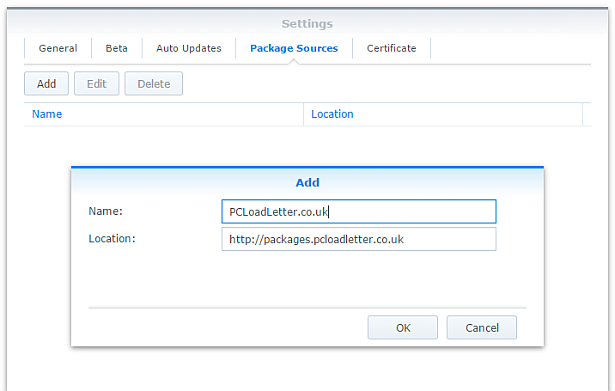
- In Synology DSM’s Package Center, click Settings and add my package repository:
- The repository will push its certificate automatically to the NAS, which is used to validate package integrity. Set the Trust Level to Synology Inc. and trusted publishers:

- Now browse the Community section in Package Center to install CrashPlan:

The repository only displays packages which are compatible with your specific model of NAS. If you don’t see CrashPlan in the list, then either your NAS model or your DSM version are not supported at this time. DSM 5.0 is the minimum supported version for this package, and an Intel CPU is required. - Since CrashPlan is a Java application, it needs a Java Runtime Environment (JRE) to function. It is recommended that you select to have the package install a dedicated Java 8 runtime. For licensing reasons I cannot include Java with this package, so you will need to agree to the licence terms and download it yourself from Oracle’s website. The package expects to find this .tar.gz file in a shared folder called ‘public’. If you go ahead and try to install the package without it, the error message will indicate precisely which Java file you need for your system type, and it will provide a TinyURL link to the appropriate Oracle download page.
- To install CrashPlan PRO you will first need to log into the Admin Console and download the Linux App from the App Download section and also place this in the ‘public’ shared folder on your NAS.
- If you have a multi-bay NAS, use the Shared Folder control panel to create the shared folder called public (it must be all lower case). On single bay models this is created by default. Assign it with Read/Write privileges for everyone.
- If you have trouble getting the Java or CrashPlan PRO app files recognised by this package, try downloading them with Firefox. It seems to be the only web browser that doesn’t try to uncompress the files, or rename them without warning. I also suggest that you leave the Java file and the public folder present once you have installed the package, so that you won’t need to fetch this again to install future updates to the CrashPlan package.
- CrashPlan is installed in headless mode – backup engine only. This will configured by a desktop client, but operates independently of it.
- The first time you start the CrashPlan package you will need to stop it and restart it before you can connect the client. This is because a config file that is only created on first run needs to be edited by one of my scripts. The engine is then configured to listen on all interfaces on the default port 4243.
CrashPlan Client Installation
- Once the CrashPlan engine is running on the NAS, you can manage it by installing CrashPlan on another computer, and by configuring it to connect to the NAS instance of the CrashPlan Engine.
- Make sure that you install the version of the CrashPlan client that matches the version running on the NAS. If the NAS version gets upgraded later, you will need to update your client computer too.
- The Linux CrashPlan PRO client must be downloaded from the Admin Console and placed in the ‘public’ folder on your NAS in order to successfully install the Synology package.
- By default the client is configured to connect to the CrashPlan engine running on the local computer. Run this command on your NAS from an SSH session:
echo `cat /var/lib/crashplan/.ui_info`
Note those are backticks not quotes. This will give you a port number (4243), followed by an authentication token, followed by the IP binding (0.0.0.0 means the server is listening for connections on all interfaces) e.g.:
4243,9ac9b642-ba26-4578-b705-124c6efc920b,0.0.0.0

port,--------------token-----------------,binding
Copy this token value and use this value to replace the token in the equivalent config file on the computer that you would like to run the CrashPlan client on – located here:
C:\ProgramData\CrashPlan\.ui_info (Windows)
“/Library/Application Support/CrashPlan/.ui_info” (Mac OS X installed for all users)
“~/Library/Application Support/CrashPlan/.ui_info” (Mac OS X installed for single user)
/var/lib/crashplan/.ui_info (Linux)
You will not be able to connect the client unless the client token matches on the NAS token. On the client you also need to amend the IP address value after the token to match the Synology NAS IP address.
so using the example above, your computer’s CrashPlan client config file would be edited to:
4243,9ac9b642-ba26-4578-b705-124c6efc920b,192.168.1.100
assuming that the Synology NAS has the IP 192.168.1.100
If it still won’t connect, check that the ServicePort value is set to 4243 in the following files:
C:\ProgramData\CrashPlan\conf\ui_(username).properties (Windows)
“/Library/Application Support/CrashPlan/ui.properties” (Mac OS X installed for all users)
“~/Library/Application Support/CrashPlan/ui.properties” (Mac OS X installed for single user)
/usr/local/crashplan/conf (Linux)
/var/lib/crashplan/.ui_info (Synology) – this value does change spontaneously if there’s a port conflict e.g. you started two versions of the package concurrently (CrashPlan and CrashPlan PRO) - As a result of the nightmarish complexity of recent product changes Code42 has now published a support article with more detail on running headless systems including config file locations on all supported operating systems, and for ‘all users’ versus single user installs etc.
- You should disable the CrashPlan service on your computer if you intend only to use the client. In Windows, open the Services section in Computer Management and stop the CrashPlan Backup Service. In the service Properties set the Startup Type to Manual. You can also disable the CrashPlan System Tray notification application by removing it from Task Manager > More Details > Start-up Tab (Windows 8/Windows 10) or the All Users Startup Start Menu folder (Windows 7).
To accomplish the same on Mac OS X, run the following commands one by one:sudo launchctl unload /Library/LaunchDaemons/com.crashplan.engine.plist sudo mv /Library/LaunchDaemons/com.crashplan.engine.plist /Library/LaunchDaemons/com.crashplan.engine.plist.bak
The CrashPlan menu bar application can be disabled in System Preferences > Users & Groups > Current User > Login Items
Migration from CrashPlan For Home to CrashPlan For Small Business (CrashPlan PRO)
- Leave the regular green branded CrashPlan 4.8.3 Synology package installed.
- Go through the online migration using the link in the email notification you received from Code 42 on 22/08/2017. This seems to trigger the CrashPlan client to begin an update to 4.9 which will fail. It will also migrate your account onto a CrashPlan PRO server. The web page is likely to stall on the Migrating step, but no matter. The process is meant to take you to the store but it seems to be quite flakey. If you see the store page with a $0.00 amount in the basket, this has correctly referred you for the introductory offer. Apparently the $9.99 price thereafter shown on that screen is a mistake and the correct price of $2.50 is shown on a later screen in the process I think. Enter your credit card details and check out if you can. If not, continue.
- Log into the CrashPlan PRO Admin Console as per these instructions, and download the CrashPlan PRO 4.9 client for Linux, and the 4.9 client for your remote console computer. Ignore the red message in the bottom left of the Admin Console about registering, and do not sign up for the free trial. Preferably use Firefox for the Linux version download – most of the other web browsers will try to unpack the .tgz archive, which you do not want to happen.
- Configure the CrashPlan PRO 4.9 client on your computer to connect to your Syno as per the usual instructions on this blog post.
- Put the downloaded Linux CrashPlan PRO 4.9 client .tgz file in the ‘public’ shared folder on your NAS. The package will no longer download this automatically as it did in previous versions.
- From the Community section of DSM Package Center, install the CrashPlan PRO 4.9 package concurrently with your existing CrashPlan 4.8.3 Syno package.
- This will stop the CrashPlan package and automatically import its configuration. Notice that it will also backup your old CrashPlan .identity file and leave it in the ‘public’ shared folder, just in case something goes wrong.
- Start the CrashPlan PRO Synology package, and connect your CrashPlan PRO console from your computer.
- You should see your protected folders as usual. At first mine reported something like “insufficient device licences”, but the next time I started up it changed to “subscription expired”.
- Uninstall the CrashPlan 4.8.3 Synology package, this is no longer required.
- At this point if the store referral didn’t work in the second step, you need to sign into the Admin Console. While signed in, navigate to this link which I was given by Code 42 support. If it works, you should see a store page with some blue font text and a $0.00 basket value. If it didn’t work you will get bounced to the Consumer Next Steps webpage: “Important Changes to CrashPlan for Home” – the one with the video of the CEO explaining the situation. I had to do this a few times before it worked. Once the store referral link worked and I had confirmed my payment details my CrashPlan PRO client immediately started working. Enjoy!
Notes
- The package uses the intact CrashPlan installer directly from Code 42 Software, following acceptance of its EULA. I am complying with the directive that no one redistributes it.
- The engine daemon script checks the amount of system RAM and scales the Java heap size appropriately (up to the default maximum of 512MB). This can be overridden in a persistent way if you are backing up large backup sets by editing /var/packages/CrashPlan/target/syno_package.vars. If you are considering buying a NAS purely to use CrashPlan and intend to back up more than a few hundred GB then I strongly advise buying one of the models with upgradeable RAM. Memory is very limited on the cheaper models. I have found that a 512MB heap was insufficient to back up more than 2TB of files on a Windows server and that was the situation many years ago. It kept restarting the backup engine every few minutes until I increased the heap to 1024MB. Many users of the package have found that they have to increase the heap size or CrashPlan will halt its activity. This can be mitigated by dividing your backup into several smaller backup sets which are scheduled to be protected at different times. Note that from package version 0041, using the dedicated JRE on a 64bit Intel NAS will allow a heap size greater than 4GB since the JRE is 64bit (requires DSM 6.0 in most cases).
- If you need to manage CrashPlan from a remote location, I suggest you do so using SSH tunnelling as per this support document.
- The package supports upgrading to future versions while preserving the machine identity, logs, login details, and cache. Upgrades can now take place without requiring a login from the client afterwards.
- If you remove the package completely and re-install it later, you can re-attach to previous backups. When you log in to the Desktop Client with your existing account after a re-install, you can select “adopt computer” to merge the records, and preserve your existing backups. I haven’t tested whether this also re-attaches links to friends’ CrashPlan computers and backup sets, though the latter does seem possible in the Friends section of the GUI. It’s probably a good idea to test that this survives a package reinstall before you start relying on it. Sometimes, particularly with CrashPlan PRO I think, the adopt option is not offered. In this case you can log into CrashPlan Central and retrieve your computer’s GUID. On the CrashPlan client, double-click on the logo in the top right and you’ll enter a command line mode. You can use the GUID command to change the system’s GUID to the one you just retrieved from your account.
- The log which is displayed in the package’s Log tab is actually the activity history. If you are trying to troubleshoot an issue you will need to use an SSH session to inspect these log files:
/var/packages/CrashPlan/target/log/engine_output.log
/var/packages/CrashPlan/target/log/engine_error.log
/var/packages/CrashPlan/target/log/app.log - When CrashPlan downloads and attempts to run an automatic update, the script will most likely fail and stop the package. This is typically caused by syntax differences with the Synology versions of certain Linux shell commands (like rm, mv, or ps). The startup script will attempt to apply the published upgrade the next time the package is started.
- Although CrashPlan’s activity can be scheduled within the application, in order to save RAM some users may wish to restrict running the CrashPlan engine to specific times of day using the Task Scheduler in DSM Control Panel:
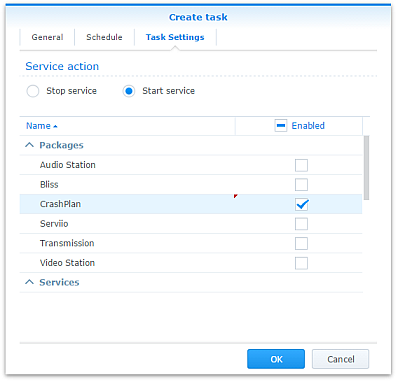
Note that regardless of real-time backup, by default CrashPlan will scan the whole backup selection for changes at 3:00am. Include this time within your Task Scheduler time window or else CrashPlan will not capture file changes which occurred while it was inactive:

- If you decide to sign up for one of CrashPlan’s paid backup services as a result of my work on this, please consider donating using the PayPal button on the right of this page.
Package scripts
For information, here are the package scripts so you can see what it’s going to do. You can get more information about how packages work by reading the Synology 3rd Party Developer Guide.
installer.sh
#!/bin/sh

#--------CRASHPLAN installer script
#--------package maintained at pcloadletter.co.uk


DOWNLOAD_PATH="http://download2.code42.com/installs/linux/install/${SYNOPKG_PKGNAME}"
CP_EXTRACTED_FOLDER="crashplan-install"
OLD_JNA_NEEDED="false"
[ "${SYNOPKG_PKGNAME}" == "CrashPlan" ] && DOWNLOAD_FILE="CrashPlan_4.8.3_Linux.tgz"
[ "${SYNOPKG_PKGNAME}" == "CrashPlanPRO" ] && DOWNLOAD_FILE="CrashPlanPRO_4.*_Linux.tgz"
if [ "${SYNOPKG_PKGNAME}" == "CrashPlanPROe" ]; then
  CP_EXTRACTED_FOLDER="${SYNOPKG_PKGNAME}-install"
  OLD_JNA_NEEDED="true"
  [ "${WIZARD_VER_483}" == "true" ] && { CPPROE_VER="4.8.3"; CP_EXTRACTED_FOLDER="crashplan-install"; OLD_JNA_NEEDED="false"; }
  [ "${WIZARD_VER_480}" == "true" ] && { CPPROE_VER="4.8.0"; CP_EXTRACTED_FOLDER="crashplan-install"; OLD_JNA_NEEDED="false"; }
  [ "${WIZARD_VER_470}" == "true" ] && { CPPROE_VER="4.7.0"; CP_EXTRACTED_FOLDER="crashplan-install"; OLD_JNA_NEEDED="false"; }
  [ "${WIZARD_VER_460}" == "true" ] && { CPPROE_VER="4.6.0"; CP_EXTRACTED_FOLDER="crashplan-install"; OLD_JNA_NEEDED="false"; }
  [ "${WIZARD_VER_452}" == "true" ] && { CPPROE_VER="4.5.2"; CP_EXTRACTED_FOLDER="crashplan-install"; OLD_JNA_NEEDED="false"; }
  [ "${WIZARD_VER_450}" == "true" ] && { CPPROE_VER="4.5.0"; CP_EXTRACTED_FOLDER="crashplan-install"; OLD_JNA_NEEDED="false"; }
  [ "${WIZARD_VER_441}" == "true" ] && { CPPROE_VER="4.4.1"; CP_EXTRACTED_FOLDER="crashplan-install"; OLD_JNA_NEEDED="false"; }
  [ "${WIZARD_VER_430}" == "true" ] && CPPROE_VER="4.3.0"
  [ "${WIZARD_VER_420}" == "true" ] && CPPROE_VER="4.2.0"
  [ "${WIZARD_VER_370}" == "true" ] && CPPROE_VER="3.7.0"
  [ "${WIZARD_VER_364}" == "true" ] && CPPROE_VER="3.6.4"
  [ "${WIZARD_VER_363}" == "true" ] && CPPROE_VER="3.6.3"
  [ "${WIZARD_VER_3614}" == "true" ] && CPPROE_VER="3.6.1.4"
  [ "${WIZARD_VER_353}" == "true" ] && CPPROE_VER="3.5.3"
  [ "${WIZARD_VER_341}" == "true" ] && CPPROE_VER="3.4.1"
  [ "${WIZARD_VER_33}" == "true" ] && CPPROE_VER="3.3"
  DOWNLOAD_FILE="CrashPlanPROe_${CPPROE_VER}_Linux.tgz"
fi
DOWNLOAD_URL="${DOWNLOAD_PATH}/${DOWNLOAD_FILE}"
CPI_FILE="${SYNOPKG_PKGNAME}_*.cpi"
OPTDIR="${SYNOPKG_PKGDEST}"
VARS_FILE="${OPTDIR}/install.vars"
SYNO_CPU_ARCH="`uname -m`"
[ "${SYNO_CPU_ARCH}" == "x86_64" ] && SYNO_CPU_ARCH="i686"
[ "${SYNO_CPU_ARCH}" == "armv5tel" ] && SYNO_CPU_ARCH="armel"
[ "${SYNOPKG_DSM_ARCH}" == "armada375" ] && SYNO_CPU_ARCH="armv7l"
[ "${SYNOPKG_DSM_ARCH}" == "armada38x" ] && SYNO_CPU_ARCH="armhf"
[ "${SYNOPKG_DSM_ARCH}" == "comcerto2k" ] && SYNO_CPU_ARCH="armhf"
[ "${SYNOPKG_DSM_ARCH}" == "alpine" ] && SYNO_CPU_ARCH="armhf"
[ "${SYNOPKG_DSM_ARCH}" == "alpine4k" ] && SYNO_CPU_ARCH="armhf"
[ "${SYNOPKG_DSM_ARCH}" == "monaco" ] && SYNO_CPU_ARCH="armhf"
[ "${SYNOPKG_DSM_ARCH}" == "rtd1296" ] && SYNO_CPU_ARCH="armhf"
NATIVE_BINS_URL="http://packages.pcloadletter.co.uk/downloads/crashplan-native-${SYNO_CPU_ARCH}.tar.xz"
NATIVE_BINS_FILE="`echo ${NATIVE_BINS_URL} | sed -r "s%^.*/(.*)%\1%"`"
OLD_JNA_URL="http://packages.pcloadletter.co.uk/downloads/crashplan-native-old-${SYNO_CPU_ARCH}.tar.xz"
OLD_JNA_FILE="`echo ${OLD_JNA_URL} | sed -r "s%^.*/(.*)%\1%"`"
INSTALL_FILES="${DOWNLOAD_URL} ${NATIVE_BINS_URL}"
[ "${OLD_JNA_NEEDED}" == "true" ] && INSTALL_FILES="${INSTALL_FILES} ${OLD_JNA_URL}"
TEMP_FOLDER="`find / -maxdepth 2 -path '/volume?/@tmp' | head -n 1`"
#the Manifest folder is where friends' backup data is stored
#we set it outside the app folder so it persists after a package uninstall
MANIFEST_FOLDER="/`echo $TEMP_FOLDER | cut -f2 -d'/'`/crashplan"
LOG_FILE="${SYNOPKG_PKGDEST}/log/history.log.0"
UPGRADE_FILES="syno_package.vars conf/my.service.xml conf/service.login conf/service.model"
UPGRADE_FOLDERS="log cache"
PUBLIC_FOLDER="`synoshare --get public | sed -r "/Path/!d;s/^.*\[(.*)\].*$/\1/"`"
#dedicated JRE section
if [ "${WIZARD_JRE_CP}" == "true" ]; then
  DOWNLOAD_URL="http://tinyurl.com/javaembed"
  EXTRACTED_FOLDER="ejdk1.8.0_151"
  #detect systems capable of running 64bit JRE which can address more than 4GB of RAM
  [ "${SYNOPKG_DSM_ARCH}" == "x64" ] && SYNO_CPU_ARCH="x64"
  [ "`uname -m`" == "x86_64" ] && [ ${SYNOPKG_DSM_VERSION_MAJOR} -ge 6 ] && SYNO_CPU_ARCH="x64"
  if [ "${SYNO_CPU_ARCH}" == "armel" ]; then
    JAVA_BINARY="ejdk-8u151-linux-arm-sflt.tar.gz"
    JAVA_BUILD="ARMv5/ARMv6/ARMv7 Linux - SoftFP ABI, Little Endian 2"
  elif [ "${SYNO_CPU_ARCH}" == "armv7l" ]; then
    JAVA_BINARY="ejdk-8u151-linux-arm-sflt.tar.gz"
    JAVA_BUILD="ARMv5/ARMv6/ARMv7 Linux - SoftFP ABI, Little Endian 2"
  elif [ "${SYNO_CPU_ARCH}" == "armhf" ]; then
    JAVA_BINARY="ejdk-8u151-linux-armv6-vfp-hflt.tar.gz"
    JAVA_BUILD="ARMv6/ARMv7 Linux - VFP, HardFP ABI, Little Endian 1"
  elif [ "${SYNO_CPU_ARCH}" == "ppc" ]; then
    #Oracle have discontinued Java 8 for PowerPC after update 6
    JAVA_BINARY="ejdk-8u6-fcs-b23-linux-ppc-e500v2-12_jun_2014.tar.gz"
    JAVA_BUILD="Power Architecture Linux - Headless - e500v2 with double-precision SPE Floating Point Unit"
    EXTRACTED_FOLDER="ejdk1.8.0_06"
    DOWNLOAD_URL="http://tinyurl.com/java8ppc"
  elif [ "${SYNO_CPU_ARCH}" == "i686" ]; then
    JAVA_BINARY="ejdk-8u151-linux-i586.tar.gz"
    JAVA_BUILD="x86 Linux Small Footprint - Headless"
  elif [ "${SYNO_CPU_ARCH}" == "x64" ]; then
    JAVA_BINARY="jre-8u151-linux-x64.tar.gz"
    JAVA_BUILD="Linux x64"
    EXTRACTED_FOLDER="jre1.8.0_151"
    DOWNLOAD_URL="http://tinyurl.com/java8x64"
  fi
fi
JAVA_BINARY=`echo ${JAVA_BINARY} | cut -f1 -d'.'`
source /etc/profile


pre_checks ()
{
  #These checks are called from preinst and from preupgrade functions to prevent failures resulting in a partially upgraded package
  if [ "${WIZARD_JRE_CP}" == "true" ]; then
    synoshare -get public > /dev/null || (
      echo "A shared folder called 'public' could not be found - note this name is case-sensitive. " >> $SYNOPKG_TEMP_LOGFILE
      echo "Please create this using the Shared Folder DSM Control Panel and try again." >> $SYNOPKG_TEMP_LOGFILE
      exit 1
    )

    JAVA_BINARY_FOUND=
    [ -f ${PUBLIC_FOLDER}/${JAVA_BINARY}.tar.gz ] && JAVA_BINARY_FOUND=true
    [ -f ${PUBLIC_FOLDER}/${JAVA_BINARY}.tar ] && JAVA_BINARY_FOUND=true
    [ -f ${PUBLIC_FOLDER}/${JAVA_BINARY}.tar.tar ] && JAVA_BINARY_FOUND=true
    [ -f ${PUBLIC_FOLDER}/${JAVA_BINARY}.gz ] && JAVA_BINARY_FOUND=true

    if [ -z ${JAVA_BINARY_FOUND} ]; then
      echo "Java binary bundle not found. " >> $SYNOPKG_TEMP_LOGFILE
      echo "I was expecting the file ${PUBLIC_FOLDER}/${JAVA_BINARY}.tar.gz. " >> $SYNOPKG_TEMP_LOGFILE
      echo "Please agree to the Oracle licence at ${DOWNLOAD_URL}, then download the '${JAVA_BUILD}' package" >> $SYNOPKG_TEMP_LOGFILE
      echo "and place it in the 'public' shared folder on your NAS. This download cannot be automated even if " >> $SYNOPKG_TEMP_LOGFILE
      echo "displaying a package EULA could potentially cover the legal aspect, because files hosted on Oracle's " >> $SYNOPKG_TEMP_LOGFILE
      echo "server are protected by a session cookie requiring a JavaScript enabled browser." >> $SYNOPKG_TEMP_LOGFILE
      exit 1
    fi
  else
    if [ -z ${JAVA_HOME} ]; then
      echo "Java is not installed or not properly configured. JAVA_HOME is not defined. " >> $SYNOPKG_TEMP_LOGFILE
      echo "Download and install the Java Synology package from http://wp.me/pVshC-z5" >> $SYNOPKG_TEMP_LOGFILE
      exit 1
    fi

    if [ ! -f ${JAVA_HOME}/bin/java ]; then
      echo "Java is not installed or not properly configured. The Java binary could not be located. " >> $SYNOPKG_TEMP_LOGFILE
      echo "Download and install the Java Synology package from http://wp.me/pVshC-z5" >> $SYNOPKG_TEMP_LOGFILE
      exit 1
    fi

    if [ "${WIZARD_JRE_SYS}" == "true" ]; then
      JAVA_VER=`java -version 2>&1 | sed -r "/^.* version/!d;s/^.* version \"[0-9]\.([0-9]).*$/\1/"`
      if [ ${JAVA_VER} -lt 8 ]; then
        echo "This version of CrashPlan requires Java 8 or newer. Please update your Java package. "
        exit 1
      fi
    fi
  fi
}


preinst ()
{
  pre_checks
  cd ${TEMP_FOLDER}
  for WGET_URL in ${INSTALL_FILES}
  do
    WGET_FILENAME="`echo ${WGET_URL} | sed -r "s%^.*/(.*)%\1%"`"
    [ -f ${TEMP_FOLDER}/${WGET_FILENAME} ] && rm ${TEMP_FOLDER}/${WGET_FILENAME}
    wget ${WGET_URL}
    if [[ $? != 0 ]]; then
      if [ -d ${PUBLIC_FOLDER} ] && [ -f ${PUBLIC_FOLDER}/${WGET_FILENAME} ]; then
        cp ${PUBLIC_FOLDER}/${WGET_FILENAME} ${TEMP_FOLDER}
      else
        echo "There was a problem downloading ${WGET_FILENAME} from the official download link, " >> $SYNOPKG_TEMP_LOGFILE
        echo "which was \"${WGET_URL}\" " >> $SYNOPKG_TEMP_LOGFILE
        echo "Alternatively, you may download this file manually and place it in the 'public' shared folder. " >> $SYNOPKG_TEMP_LOGFILE
        exit 1
      fi
    fi
  done

  exit 0
}


postinst ()
{
  if [ "${WIZARD_JRE_CP}" == "true" ]; then
    #extract Java (Web browsers love to interfere with .tar.gz files)
    cd ${PUBLIC_FOLDER}
    if [ -f ${JAVA_BINARY}.tar.gz ]; then
      #Firefox seems to be the only browser that leaves it alone
      tar xzf ${JAVA_BINARY}.tar.gz
    elif [ -f ${JAVA_BINARY}.gz ]; then
      #Chrome
      tar xzf ${JAVA_BINARY}.gz
    elif [ -f ${JAVA_BINARY}.tar ]; then
      #Safari
      tar xf ${JAVA_BINARY}.tar
    elif [ -f ${JAVA_BINARY}.tar.tar ]; then
      #Internet Explorer
      tar xzf ${JAVA_BINARY}.tar.tar
    fi
    mv ${EXTRACTED_FOLDER} ${SYNOPKG_PKGDEST}/jre-syno
    JRE_PATH="`find ${OPTDIR}/jre-syno/ -name jre`"
    [ -z ${JRE_PATH} ] && JRE_PATH=${OPTDIR}/jre-syno
    #change owner of folder tree
    chown -R root:root ${SYNOPKG_PKGDEST}
  fi

  #extract CPU-specific additional binaries
  mkdir ${SYNOPKG_PKGDEST}/bin
  cd ${SYNOPKG_PKGDEST}/bin
  tar xJf ${TEMP_FOLDER}/${NATIVE_BINS_FILE} && rm ${TEMP_FOLDER}/${NATIVE_BINS_FILE}
  [ "${OLD_JNA_NEEDED}" == "true" ] && tar xJf ${TEMP_FOLDER}/${OLD_JNA_FILE} && rm ${TEMP_FOLDER}/${OLD_JNA_FILE}

  #extract main archive
  cd ${TEMP_FOLDER}
  tar xzf ${TEMP_FOLDER}/${DOWNLOAD_FILE} && rm ${TEMP_FOLDER}/${DOWNLOAD_FILE}

  #extract cpio archive
  cd ${SYNOPKG_PKGDEST}
  cat "${TEMP_FOLDER}/${CP_EXTRACTED_FOLDER}"/${CPI_FILE} | gzip -d -c - | ${SYNOPKG_PKGDEST}/bin/cpio -i --no-preserve-owner

  echo "#uncomment to expand Java max heap size beyond prescribed value (will survive upgrades)" > ${SYNOPKG_PKGDEST}/syno_package.vars
  echo "#you probably only want more than the recommended 1024M if you're backing up extremely large volumes of files" >> ${SYNOPKG_PKGDEST}/syno_package.vars
  echo "#USR_MAX_HEAP=1024M" >> ${SYNOPKG_PKGDEST}/syno_package.vars
  echo >> ${SYNOPKG_PKGDEST}/syno_package.vars

  cp ${TEMP_FOLDER}/${CP_EXTRACTED_FOLDER}/scripts/CrashPlanEngine ${OPTDIR}/bin
  cp ${TEMP_FOLDER}/${CP_EXTRACTED_FOLDER}/scripts/run.conf ${OPTDIR}/bin
  mkdir -p ${MANIFEST_FOLDER}/backupArchives

  #save install variables which Crashplan expects its own installer script to create
  echo TARGETDIR=${SYNOPKG_PKGDEST} > ${VARS_FILE}
  echo BINSDIR=/bin >> ${VARS_FILE}
  echo MANIFESTDIR=${MANIFEST_FOLDER}/backupArchives >> ${VARS_FILE}
  #leave these ones out which should help upgrades from Code42 to work (based on examining an upgrade script)
  #echo INITDIR=/etc/init.d >> ${VARS_FILE}
  #echo RUNLVLDIR=/usr/syno/etc/rc.d >> ${VARS_FILE}
  echo INSTALLDATE=`date +%Y%m%d` >> ${VARS_FILE}
  [ "${WIZARD_JRE_CP}" == "true" ] && echo JAVACOMMON=${JRE_PATH}/bin/java >> ${VARS_FILE}
  [ "${WIZARD_JRE_SYS}" == "true" ] && echo JAVACOMMON=\${JAVA_HOME}/bin/java >> ${VARS_FILE}
  cat ${TEMP_FOLDER}/${CP_EXTRACTED_FOLDER}/install.defaults >> ${VARS_FILE}

  #remove temp files
  rm -r ${TEMP_FOLDER}/${CP_EXTRACTED_FOLDER}

  #add firewall config
  /usr/syno/bin/servicetool --install-configure-file --package /var/packages/${SYNOPKG_PKGNAME}/scripts/${SYNOPKG_PKGNAME}.sc > /dev/null

  #amend CrashPlanPROe client version
  [ "${SYNOPKG_PKGNAME}" == "CrashPlanPROe" ] && sed -i -r "s/^version=\".*(-.*$)/version=\"${CPPROE_VER}\1/" /var/packages/${SYNOPKG_PKGNAME}/INFO

  #are we transitioning an existing CrashPlan account to CrashPlan For Small Business?
  if [ "${SYNOPKG_PKGNAME}" == "CrashPlanPRO" ]; then
    if [ -e /var/packages/CrashPlan/scripts/start-stop-status ]; then
      /var/packages/CrashPlan/scripts/start-stop-status stop
      cp /var/lib/crashplan/.identity ${PUBLIC_FOLDER}/crashplan-identity.bak
      cp -R /var/packages/CrashPlan/target/conf/ ${OPTDIR}/
    fi
  fi

  exit 0
}


preuninst ()
{
  `dirname $0`/stop-start-status stop

  exit 0
}


postuninst ()
{
  if [ -f ${SYNOPKG_PKGDEST}/syno_package.vars ]; then
    source ${SYNOPKG_PKGDEST}/syno_package.vars
  fi
  [ -e ${OPTDIR}/lib/libffi.so.5 ] && rm ${OPTDIR}/lib/libffi.so.5

  #delete symlink if it no longer resolves - PowerPC only
  if [ ! -e /lib/libffi.so.5 ]; then
    [ -L /lib/libffi.so.5 ] && rm /lib/libffi.so.5
  fi

  #remove firewall config
  if [ "${SYNOPKG_PKG_STATUS}" == "UNINSTALL" ]; then
    /usr/syno/bin/servicetool --remove-configure-file --package ${SYNOPKG_PKGNAME}.sc > /dev/null
  fi

 exit 0
}


preupgrade ()
{
  `dirname $0`/stop-start-status stop
  pre_checks
  #if identity exists back up config
  if [ -f /var/lib/crashplan/.identity ]; then
    mkdir -p ${SYNOPKG_PKGDEST}/../${SYNOPKG_PKGNAME}_data_mig/conf
    for FILE_TO_MIGRATE in ${UPGRADE_FILES}; do
      if [ -f ${OPTDIR}/${FILE_TO_MIGRATE} ]; then
        cp ${OPTDIR}/${FILE_TO_MIGRATE} ${SYNOPKG_PKGDEST}/../${SYNOPKG_PKGNAME}_data_mig/${FILE_TO_MIGRATE}
      fi
    done
    for FOLDER_TO_MIGRATE in ${UPGRADE_FOLDERS}; do
      if [ -d ${OPTDIR}/${FOLDER_TO_MIGRATE} ]; then
        mv ${OPTDIR}/${FOLDER_TO_MIGRATE} ${SYNOPKG_PKGDEST}/../${SYNOPKG_PKGNAME}_data_mig
      fi
    done
  fi

  exit 0
}


postupgrade ()
{
  #use the migrated identity and config data from the previous version
  if [ -f ${SYNOPKG_PKGDEST}/../${SYNOPKG_PKGNAME}_data_mig/conf/my.service.xml ]; then
    for FILE_TO_MIGRATE in ${UPGRADE_FILES}; do
      if [ -f ${SYNOPKG_PKGDEST}/../${SYNOPKG_PKGNAME}_data_mig/${FILE_TO_MIGRATE} ]; then
        mv ${SYNOPKG_PKGDEST}/../${SYNOPKG_PKGNAME}_data_mig/${FILE_TO_MIGRATE} ${OPTDIR}/${FILE_TO_MIGRATE}
      fi
    done
    for FOLDER_TO_MIGRATE in ${UPGRADE_FOLDERS}; do
    if [ -d ${SYNOPKG_PKGDEST}/../${SYNOPKG_PKGNAME}_data_mig/${FOLDER_TO_MIGRATE} ]; then
      mv ${SYNOPKG_PKGDEST}/../${SYNOPKG_PKGNAME}_data_mig/${FOLDER_TO_MIGRATE} ${OPTDIR}
    fi
    done
    rmdir ${SYNOPKG_PKGDEST}/../${SYNOPKG_PKGNAME}_data_mig/conf
    rmdir ${SYNOPKG_PKGDEST}/../${SYNOPKG_PKGNAME}_data_mig

    #make CrashPlan log entry
    TIMESTAMP="`date "+%D %I:%M%p"`"
    echo "I ${TIMESTAMP} Synology Package Center updated ${SYNOPKG_PKGNAME} to version ${SYNOPKG_PKGVER}" >> ${LOG_FILE}
  fi

  exit 0
}
start-stop-status.sh
#!/bin/sh

#--------CRASHPLAN start-stop-status script
#--------package maintained at pcloadletter.co.uk


TEMP_FOLDER="`find / -maxdepth 2 -path '/volume?/@tmp' | head -n 1`"
MANIFEST_FOLDER="/`echo $TEMP_FOLDER | cut -f2 -d'/'`/crashplan"
ENGINE_CFG="run.conf"
PKG_FOLDER="`dirname $0 | cut -f1-4 -d'/'`"
DNAME="`dirname $0 | cut -f4 -d'/'`"
OPTDIR="${PKG_FOLDER}/target"
PID_FILE="${OPTDIR}/${DNAME}.pid"
DLOG="${OPTDIR}/log/history.log.0"
CFG_PARAM="SRV_JAVA_OPTS"
JAVA_MIN_HEAP=`grep "^${CFG_PARAM}=" "${OPTDIR}/bin/${ENGINE_CFG}" | sed -r "s/^.*-Xms([0-9]+)[Mm] .*$/\1/"`
SYNO_CPU_ARCH="`uname -m`"
TIMESTAMP="`date "+%D %I:%M%p"`"
FULL_CP="${OPTDIR}/lib/com.backup42.desktop.jar:${OPTDIR}/lang"
source ${OPTDIR}/install.vars
source /etc/profile
source /root/.profile


start_daemon ()
{
  #check persistent variables from syno_package.vars
  USR_MAX_HEAP=0
  if [ -f ${OPTDIR}/syno_package.vars ]; then
    source ${OPTDIR}/syno_package.vars
  fi
  USR_MAX_HEAP=`echo $USR_MAX_HEAP | sed -e "s/[mM]//"`

  #do we need to restore the identity file - has a DSM upgrade scrubbed /var/lib/crashplan?
  if [ ! -e /var/lib/crashplan ]; then
    mkdir /var/lib/crashplan
    [ -e ${OPTDIR}/conf/var-backup/.identity ] && cp ${OPTDIR}/conf/var-backup/.identity /var/lib/crashplan/
  fi

  #fix up some of the binary paths and fix some command syntax for busybox
  #moved this to start-stop-status.sh from installer.sh because Code42 push updates and these
  #new scripts will need this treatment too
  find ${OPTDIR}/ -name "*.sh" | while IFS="" read -r FILE_TO_EDIT; do
    if [ -e ${FILE_TO_EDIT} ]; then
      #this list of substitutions will probably need expanding as new CrashPlan updates are released
      sed -i "s%^#!/bin/bash%#!$/bin/sh%" "${FILE_TO_EDIT}"
      sed -i -r "s%(^\s*)(/bin/cpio |cpio ) %\1/${OPTDIR}/bin/cpio %" "${FILE_TO_EDIT}"
      sed -i -r "s%(^\s*)(/bin/ps|ps) [^w][^\|]*\|%\1/bin/ps w \|%" "${FILE_TO_EDIT}"
      sed -i -r "s%\`ps [^w][^\|]*\|%\`ps w \|%" "${FILE_TO_EDIT}"
      sed -i -r "s%^ps [^w][^\|]*\|%ps w \|%" "${FILE_TO_EDIT}"
      sed -i "s/rm -fv/rm -f/" "${FILE_TO_EDIT}"
      sed -i "s/mv -fv/mv -f/" "${FILE_TO_EDIT}"
    fi
  done

  #use this daemon init script rather than the unreliable Code42 stock one which greps the ps output
  sed -i "s%^ENGINE_SCRIPT=.*$%ENGINE_SCRIPT=$0%" ${OPTDIR}/bin/restartLinux.sh

  #any downloaded upgrade script will usually have failed despite the above changes
  #so ignore the script and explicitly extract the new java code using the chrisnelson.ca method
  #thanks to Jeff Bingham for tweaks
  UPGRADE_JAR=`find ${OPTDIR}/upgrade -maxdepth 1 -name "*.jar" | tail -1`
  if [ -n "${UPGRADE_JAR}" ]; then
    rm ${OPTDIR}/*.pid > /dev/null

    #make CrashPlan log entry
    echo "I ${TIMESTAMP} Synology extracting upgrade from ${UPGRADE_JAR}" >> ${DLOG}

    UPGRADE_VER=`echo ${SCRIPT_HOME} | sed -r "s/^.*\/([0-9_]+)\.[0-9]+/\1/"`
    #DSM 6.0 no longer includes unzip, use 7z instead
    unzip -o ${OPTDIR}/upgrade/${UPGRADE_VER}.jar "*.jar" -d ${OPTDIR}/lib/ || 7z e -y ${OPTDIR}/upgrade/${UPGRADE_VER}.jar "*.jar" -o${OPTDIR}/lib/ > /dev/null
    unzip -o ${OPTDIR}/upgrade/${UPGRADE_VER}.jar "lang/*" -d ${OPTDIR} || 7z e -y ${OPTDIR}/upgrade/${UPGRADE_VER}.jar "lang/*" -o${OPTDIR} > /dev/null
    mv ${UPGRADE_JAR} ${TEMP_FOLDER}/ > /dev/null
    exec $0
  fi

  #updates may also overwrite our native binaries
  [ -e ${OPTDIR}/bin/libffi.so.5 ] && cp -f ${OPTDIR}/bin/libffi.so.5 ${OPTDIR}/lib/
  [ -e ${OPTDIR}/bin/libjtux.so ] && cp -f ${OPTDIR}/bin/libjtux.so ${OPTDIR}/
  [ -e ${OPTDIR}/bin/jna-3.2.5.jar ] && cp -f ${OPTDIR}/bin/jna-3.2.5.jar ${OPTDIR}/lib/
  if [ -e ${OPTDIR}/bin/jna.jar ] && [ -e ${OPTDIR}/lib/jna.jar ]; then
    cp -f ${OPTDIR}/bin/jna.jar ${OPTDIR}/lib/
  fi

  #create or repair libffi.so.5 symlink if a DSM upgrade has removed it - PowerPC only
  if [ -e ${OPTDIR}/lib/libffi.so.5 ]; then
    if [ ! -e /lib/libffi.so.5 ]; then
      #if it doesn't exist, but is still a link then it's a broken link and should be deleted first
      [ -L /lib/libffi.so.5 ] && rm /lib/libffi.so.5
      ln -s ${OPTDIR}/lib/libffi.so.5 /lib/libffi.so.5
    fi
  fi

  #set appropriate Java max heap size
  RAM=$((`free | grep Mem: | sed -e "s/^ *Mem: *\([0-9]*\).*$/\1/"`/1024))
  if [ $RAM -le 128 ]; then
    JAVA_MAX_HEAP=80
  elif [ $RAM -le 256 ]; then
    JAVA_MAX_HEAP=192
  elif [ $RAM -le 512 ]; then
    JAVA_MAX_HEAP=384
  elif [ $RAM -le 1024 ]; then
    JAVA_MAX_HEAP=512
  elif [ $RAM -gt 1024 ]; then
    JAVA_MAX_HEAP=1024
  fi
  if [ $USR_MAX_HEAP -gt $JAVA_MAX_HEAP ]; then
    JAVA_MAX_HEAP=${USR_MAX_HEAP}
  fi
  if [ $JAVA_MAX_HEAP -lt $JAVA_MIN_HEAP ]; then
    #can't have a max heap lower than min heap (ARM low RAM systems)
    $JAVA_MAX_HEAP=$JAVA_MIN_HEAP
  fi
  sed -i -r "s/(^${CFG_PARAM}=.*) -Xmx[0-9]+[mM] (.*$)/\1 -Xmx${JAVA_MAX_HEAP}m \2/" "${OPTDIR}/bin/${ENGINE_CFG}"

  #disable the use of the x86-optimized external Fast MD5 library if running on ARM and PPC CPUs
  #seems to be the default behaviour now but that may change again
  [ "${SYNO_CPU_ARCH}" == "x86_64" ] && SYNO_CPU_ARCH="i686"
  if [ "${SYNO_CPU_ARCH}" != "i686" ]; then
    grep "^${CFG_PARAM}=.*c42\.native\.md5\.enabled" "${OPTDIR}/bin/${ENGINE_CFG}" > /dev/null \
     || sed -i -r "s/(^${CFG_PARAM}=\".*)\"$/\1 -Dc42.native.md5.enabled=false\"/" "${OPTDIR}/bin/${ENGINE_CFG}"
  fi

  #move the Java temp directory from the default of /tmp
  grep "^${CFG_PARAM}=.*Djava\.io\.tmpdir" "${OPTDIR}/bin/${ENGINE_CFG}" > /dev/null \
   || sed -i -r "s%(^${CFG_PARAM}=\".*)\"$%\1 -Djava.io.tmpdir=${TEMP_FOLDER}\"%" "${OPTDIR}/bin/${ENGINE_CFG}"

  #now edit the XML config file, which only exists after first run
  if [ -f ${OPTDIR}/conf/my.service.xml ]; then

    #allow direct connections from CrashPlan Desktop client on remote systems
    #you must edit the value of serviceHost in conf/ui.properties on the client you connect with
    #users report that this value is sometimes reset so now it's set every service startup
    sed -i "s/<serviceHost>127\.0\.0\.1<\/serviceHost>/<serviceHost>0\.0\.0\.0<\/serviceHost>/" "${OPTDIR}/conf/my.service.xml"
    #default changed in CrashPlan 4.3
    sed -i "s/<serviceHost>localhost<\/serviceHost>/<serviceHost>0\.0\.0\.0<\/serviceHost>/" "${OPTDIR}/conf/my.service.xml"
    #since CrashPlan 4.4 another config file to allow remote console connections
    sed -i "s/127\.0\.0\.1/0\.0\.0\.0/" /var/lib/crashplan/.ui_info

    #this change is made only once in case you want to customize the friends' backup location
    if [ "${MANIFEST_PATH_SET}" != "True" ]; then

      #keep friends' backup data outside the application folder to make accidental deletion less likely
      sed -i "s%<manifestPath>.*</manifestPath>%<manifestPath>${MANIFEST_FOLDER}/backupArchives/</manifestPath>%" "${OPTDIR}/conf/my.service.xml"
      echo "MANIFEST_PATH_SET=True" >> ${OPTDIR}/syno_package.vars
    fi

    #since CrashPlan version 3.5.3 the value javaMemoryHeapMax also needs setting to match that used in bin/run.conf
    sed -i -r "s%(<javaMemoryHeapMax>)[0-9]+[mM](</javaMemoryHeapMax>)%\1${JAVA_MAX_HEAP}m\2%" "${OPTDIR}/conf/my.service.xml"

    #make sure CrashPlan is not binding to the IPv6 stack
    grep "\-Djava\.net\.preferIPv4Stack=true" "${OPTDIR}/bin/${ENGINE_CFG}" > /dev/null \
     || sed -i -r "s/(^${CFG_PARAM}=\".*)\"$/\1 -Djava.net.preferIPv4Stack=true\"/" "${OPTDIR}/bin/${ENGINE_CFG}"
   else
    echo "Check the package log to ensure the package has started successfully, then stop and restart the package to allow desktop client connections." > "${SYNOPKG_TEMP_LOGFILE}"
  fi

  #increase the system-wide maximum number of open files from Synology default of 24466
  [ `cat /proc/sys/fs/file-max` -lt 65536 ] && echo "65536" > /proc/sys/fs/file-max

  #raise the maximum open file count from the Synology default of 1024 - thanks Casper K. for figuring this out
  #http://support.code42.com/Administrator/3.6_And_4.0/Troubleshooting/Too_Many_Open_Files
  ulimit -n 65536

  #ensure that Code 42 have not amended install.vars to force the use of their own (Intel) JRE
  if [ -e ${OPTDIR}/jre-syno ]; then
    JRE_PATH="`find ${OPTDIR}/jre-syno/ -name jre`"
    [ -z ${JRE_PATH} ] && JRE_PATH=${OPTDIR}/jre-syno
    sed -i -r "s|^(JAVACOMMON=).*$|\1\${JRE_PATH}/bin/java|" ${OPTDIR}/install.vars

    #if missing, set timezone and locale for dedicated JRE
    if [ -z ${TZ} ]; then
      SYNO_TZ=`cat /etc/synoinfo.conf | grep timezone | cut -f2 -d'"'`
      #fix for DST time in DSM 5.2 thanks to MinimServer Syno package author
      [ -e /usr/share/zoneinfo/Timezone/synotztable.json ] \
       && SYNO_TZ=`jq ".${SYNO_TZ} | .nameInTZDB" /usr/share/zoneinfo/Timezone/synotztable.json | sed -e "s/\"//g"` \
       || SYNO_TZ=`grep "^${SYNO_TZ}" /usr/share/zoneinfo/Timezone/tzname | sed -e "s/^.*= //"`
      export TZ=${SYNO_TZ}
    fi
    [ -z ${LANG} ] && export LANG=en_US.utf8
    export CLASSPATH=.:${OPTDIR}/jre-syno/lib

  else
    sed -i -r "s|^(JAVACOMMON=).*$|\1\${JAVA_HOME}/bin/java|" ${OPTDIR}/install.vars
  fi

  source ${OPTDIR}/bin/run.conf
  source ${OPTDIR}/install.vars
  cd ${OPTDIR}
  $JAVACOMMON $SRV_JAVA_OPTS -classpath $FULL_CP com.backup42.service.CPService > ${OPTDIR}/log/engine_output.log 2> ${OPTDIR}/log/engine_error.log &
  if [ $! -gt 0 ]; then
    echo $! > $PID_FILE
    renice 19 $! > /dev/null
    if [ -z "${SYNOPKG_PKGDEST}" ]; then
      #script was manually invoked, need this to show status change in Package Center
      [ -e ${PKG_FOLDER}/enabled ] || touch ${PKG_FOLDER}/enabled
    fi
  else
    echo "${DNAME} failed to start, check ${OPTDIR}/log/engine_error.log" > "${SYNOPKG_TEMP_LOGFILE}"
    echo "${DNAME} failed to start, check ${OPTDIR}/log/engine_error.log" >&2
    exit 1
  fi
}

stop_daemon ()
{
  echo "I ${TIMESTAMP} Stopping ${DNAME}" >> ${DLOG}
  kill `cat ${PID_FILE}`
  wait_for_status 1 20 || kill -9 `cat ${PID_FILE}`
  rm -f ${PID_FILE}
  if [ -z ${SYNOPKG_PKGDEST} ]; then
    #script was manually invoked, need this to show status change in Package Center
    [ -e ${PKG_FOLDER}/enabled ] && rm ${PKG_FOLDER}/enabled
  fi
  #backup identity file in case DSM upgrade removes it
  [ -e ${OPTDIR}/conf/var-backup ] || mkdir ${OPTDIR}/conf/var-backup
  cp /var/lib/crashplan/.identity ${OPTDIR}/conf/var-backup/
}

daemon_status ()
{
  if [ -f ${PID_FILE} ] && kill -0 `cat ${PID_FILE}` > /dev/null 2>&1; then
    return
  fi
  rm -f ${PID_FILE}
  return 1
}

wait_for_status ()
{
  counter=$2
  while [ ${counter} -gt 0 ]; do
    daemon_status
    [ $? -eq $1 ] && return
    let counter=counter-1
    sleep 1
  done
  return 1
}


case $1 in
  start)
    if daemon_status; then
      echo ${DNAME} is already running with PID `cat ${PID_FILE}`
      exit 0
    else
      echo Starting ${DNAME} ...
      start_daemon
      exit $?
    fi
  ;;

  stop)
    if daemon_status; then
      echo Stopping ${DNAME} ...
      stop_daemon
      exit $?
    else
      echo ${DNAME} is not running
      exit 0
    fi
  ;;

  restart)
    stop_daemon
    start_daemon
    exit $?
  ;;

  status)
    if daemon_status; then
      echo ${DNAME} is running with PID `cat ${PID_FILE}`
      exit 0
    else
      echo ${DNAME} is not running
      exit 1
    fi
  ;;

  log)
    echo "${DLOG}"
    exit 0
  ;;

  *)
    echo "Usage: $0 {start|stop|status|restart}" >&2
    exit 1
  ;;

esac
install_uifile & upgrade_uifile
[
  {
    "step_title": "Client Version Selection",
    "items": [
      {
        "type": "singleselect",
        "desc": "Please select the CrashPlanPROe client version that is appropriate for your backup destination server:",
        "subitems": [
          {
            "key": "WIZARD_VER_483",
            "desc": "4.8.3",
            "defaultValue": true
          },          {
            "key": "WIZARD_VER_480",
            "desc": "4.8.0",
            "defaultValue": false
          },
          {
            "key": "WIZARD_VER_470",
            "desc": "4.7.0",
            "defaultValue": false
          },
          {
            "key": "WIZARD_VER_460",
            "desc": "4.6.0",
            "defaultValue": false
          },
          {
            "key": "WIZARD_VER_452",
            "desc": "4.5.2",
            "defaultValue": false
          },
          {
            "key": "WIZARD_VER_450",
            "desc": "4.5.0",
            "defaultValue": false
          },
          {
            "key": "WIZARD_VER_441",
            "desc": "4.4.1",
            "defaultValue": false
          },
          {
            "key": "WIZARD_VER_430",
            "desc": "4.3.0",
            "defaultValue": false
          },
          {
            "key": "WIZARD_VER_420",
            "desc": "4.2.0",
            "defaultValue": false
          },
          {
            "key": "WIZARD_VER_370",
            "desc": "3.7.0",
            "defaultValue": false
          },
          {
            "key": "WIZARD_VER_364",
            "desc": "3.6.4",
            "defaultValue": false
          },
          {
            "key": "WIZARD_VER_363",
            "desc": "3.6.3",
            "defaultValue": false
          },
          {
            "key": "WIZARD_VER_3614",
            "desc": "3.6.1.4",
            "defaultValue": false
          },
          {
            "key": "WIZARD_VER_353",
            "desc": "3.5.3",
            "defaultValue": false
          },
          {
            "key": "WIZARD_VER_341",
            "desc": "3.4.1",
            "defaultValue": false
          },
          {
            "key": "WIZARD_VER_33",
            "desc": "3.3",
            "defaultValue": false
          }
        ]
      }
    ]
  },
  {
    "step_title": "Java Runtime Environment Selection",
    "items": [
      {
        "type": "singleselect",
        "desc": "Please select the Java version which you would like CrashPlan to use:",
        "subitems": [
          {
            "key": "WIZARD_JRE_SYS",
            "desc": "Default system Java version",
            "defaultValue": false
          },
          {
            "key": "WIZARD_JRE_CP",
            "desc": "Dedicated installation of Java 8",
            "defaultValue": true
          }
        ]
      }
    ]
  }
]
Changelog:
- 0047 30/Oct/17 – Updated dedicated Java version to 8 update 151, added support for additional Intel CPUs in x18 Synology products.
- 0046 26/Aug/17 – Updated to CrashPlan PRO 4.9, added support for migration from CrashPlan For Home to CrashPlan For Small Business (CrashPlan PRO). Please read the Migration section on this page for instructions.
- 0045 02/Aug/17 – Updated to CrashPlan 4.8.3, updated dedicated Java version to 8 update 144
- 0044 21/Jan/17 – Updated dedicated Java version to 8 update 121
- 0043 07/Jan/17 – Updated dedicated Java version to 8 update 111, added support for Intel Broadwell and Grantley CPUs
- 0042 03/Oct/16 – Updated to CrashPlan 4.8.0, Java 8 is now required, added optional dedicated Java 8 Runtime instead of the default system one including 64bit Java support on 64 bit Intel CPUs to permit memory allocation larger than 4GB. Support for non-Intel platforms withdrawn owing to Code42’s reliance on proprietary native code library libc42archive.so
- 0041 20/Jul/16 – Improved auto-upgrade compatibility (hopefully), added option to have CrashPlan use a dedicated Java 7 Runtime instead of the default system one, including 64bit Java support on 64 bit Intel CPUs to permit memory allocation larger than 4GB
- 0040 25/May/16 – Added cpio to the path in the running context of start-stop-status.sh
- 0039 25/May/16 – Updated to CrashPlan 4.7.0, at each launch forced the use of the system JRE over the CrashPlan bundled Intel one, added Maven build of JNA 4.1.0 for ARMv7 systems consistent with the version bundled with CrashPlan
- 0038 27/Apr/16 – Updated to CrashPlan 4.6.0, and improved support for Code 42 pushed updates
- 0037 21/Jan/16 – Updated to CrashPlan 4.5.2
- 0036 14/Dec/15 – Updated to CrashPlan 4.5.0, separate firewall definitions for management client and for friends backup, added support for DS716+ and DS216play
- 0035 06/Nov/15 – Fixed the update to 4.4.1_59, new installs now listen for remote connections after second startup (was broken from 4.4), updated client install documentation with more file locations and added a link to a new Code42 support doc
EITHER completely remove and reinstall the package (which will require a rescan of the entire backup set) OR alternatively please delete all except for one of the failed upgrade numbered subfolders in /var/packages/CrashPlan/target/upgrade before upgrading. There will be one folder for each time CrashPlan tried and failed to start since Code42 pushed the update - 0034 04/Oct/15 – Updated to CrashPlan 4.4.1, bundled newer JNA native libraries to match those from Code42, PLEASE READ UPDATED BLOG POST INSTRUCTIONS FOR CLIENT INSTALL this version introduced yet another requirement for the client
- 0033 12/Aug/15 – Fixed version 0032 client connection issue for fresh installs
- 0032 12/Jul/15 – Updated to CrashPlan 4.3, PLEASE READ UPDATED BLOG POST INSTRUCTIONS FOR CLIENT INSTALL this version introduced an extra requirement, changed update repair to use the chrisnelson.ca method, forced CrashPlan to prefer IPv4 over IPv6 bindings, removed some legacy version migration scripting, updated main blog post documentation
- 0031 20/May/15 – Updated to CrashPlan 4.2, cross compiled a newer cpio binary for some architectures which were segfaulting while unpacking main CrashPlan archive, added port 4242 to the firewall definition (friend backups), package is now signed with repository private key
- 0030 16/Feb/15 – Fixed show-stopping issue with version 0029 for systems with more than one volume
- 0029 21/Jan/15 – Updated to CrashPlan version 3.7.0, improved detection of temp folder (prevent use of /var/@tmp), added support for Annapurna Alpine AL514 CPU (armhf) in DS2015xs, added support for Marvell Armada 375 CPU (armhf) in DS215j, abandoned practical efforts to try to support Code42’s upgrade scripts, abandoned inotify support (realtime backup) on PowerPC after many failed attempts with self-built and pre-built jtux and jna libraries, back-merged older libffi support for old PowerPC binaries after it was removed in 0028 re-write
- 0028 22/Oct/14 – Substantial re-write:
Updated to CrashPlan version 3.6.4
DSM 5.0 or newer is now required
libjnidispatch.so taken from Debian JNA 3.2.7 package with dependency on newer libffi.so.6 (included in DSM 5.0)
jna-3.2.5.jar emptied of irrelevant CPU architecture libs to reduce size
Increased default max heap size from 512MB to 1GB on systems with more than 1GB RAM
Intel CPUs no longer need the awkward glibc version-faking shim to enable inotify support (for real-time backup)
Switched to using root account – no more adding account permissions for backup, package upgrades will no longer break this
DSM Firewall application definition added
Tested with DSM Task Scheduler to allow backups between certain times of day only, saving RAM when not in use
Daemon init script now uses a proper PID file instead of Code42’s unreliable method of using grep on the output of ps
Daemon init script can be run from the command line
Removal of bash binary dependency now Code42’s CrashPlanEngine script is no longer used
Removal of nice binary dependency, using BusyBox equivalent renice
Unified ARMv5 and ARMv7 external binary package (armle)
Added support for Mindspeed Comcerto 2000 CPU (comcerto2k – armhf) in DS414j
Added support for Intel Atom C2538 (avoton) CPU in DS415+
Added support to choose which version of CrashPlan PROe client to download, since some servers may still require legacy versions
Switched to .tar.xz compression for native binaries to reduce web hosting footprint - 0027 20/Mar/14 – Fixed open file handle limit for very large backup sets (ulimit fix)
- 0026 16/Feb/14 – Updated all CrashPlan clients to version 3.6.3, improved handling of Java temp files
- 0025 30/Jan/14 – glibc version shim no longer used on Intel Synology models running DSM 5.0
- 0024 30/Jan/14 – Updated to CrashPlan PROe 3.6.1.4 and added support for PowerPC 2010 Synology models running DSM 5.0
- 0023 30/Jan/14 – Added support for Intel Atom Evansport and Armada XP CPUs in new DSx14 products
- 0022 10/Jun/13 – Updated all CrashPlan client versions to 3.5.3, compiled native binary dependencies to add support for Armada 370 CPU (DS213j), start-stop-status.sh now updates the new javaMemoryHeapMax value in my.service.xml to the value defined in syno_package.vars
- 0021 01/Mar/13 – Updated CrashPlan to version 3.5.2
- 0020 21/Jan/13 – Fixes for DSM 4.2
- 018 Updated CrashPlan PRO to version 3.4.1
- 017 Updated CrashPlan and CrashPlan PROe to version 3.4.1, and improved in-app update handling
- 016 Added support for Freescale QorIQ CPUs in some x13 series Synology models, and installer script now downloads native binaries separately to reduce repo hosting bandwidth, PowerQUICC PowerPC processors in previous Synology generations with older glibc versions are not supported
- 015 Added support for easy scheduling via cron – see updated Notes section
- 014 DSM 4.1 user profile permissions fix
- 013 implemented update handling for future automatic updates from Code 42, and incremented CrashPlanPRO client to release version 3.2.1
- 012 incremented CrashPlanPROe client to release version 3.3
- 011 minor fix to allow a wildcard on the cpio archive name inside the main installer package (to fix CP PROe client since Code 42 Software had amended the cpio file version to 3.2.1.2)
- 010 minor bug fix relating to daemon home directory path
- 009 rewrote the scripts to be even easier to maintain and unified as much as possible with my imminent CrashPlan PROe server package, fixed a timezone bug (tightened regex matching), moved the script-amending logic from installer.sh to start-stop-status.sh with it now applying to all .sh scripts each startup so perhaps updates from Code42 might work in future, if wget fails to fetch the installer from Code42 the installer will look for the file in the public shared folder
- 008 merged the 14 package scripts each (7 for ARM, 7 for Intel) for CP, CP PRO, & CP PROe – 42 scripts in total – down to just two! ARM & Intel are now supported by the same package, Intel synos now have working inotify support (Real-Time Backup) thanks to rwojo’s shim to pass the glibc version check, upgrade process now retains login, cache and log data (no more re-scanning), users can specify a persistent larger max heap size for very large backup sets
- 007 fixed a bug that broke CrashPlan if the Java folder moved (if you changed version)
- 006 installation now fails without User Home service enabled, fixed Daylight Saving Time support, automated replacing the ARM libffi.so symlink which is destroyed by DSM upgrades, stopped assuming the primary storage volume is /volume1, reset ownership on /var/lib/crashplan and the Friends backup location after installs and upgrades
- 005 added warning to restart daemon after 1st run, and improved upgrade process again
- 004 updated to CrashPlan 3.2.1 and improved package upgrade process, forced binding to 0.0.0.0 each startup
- 003 fixed ownership of /volume1/crashplan folder
- 002 updated to CrashPlan 3.2
- 001 30/Jan/12 – intial public release
 PC LOAD LETTER
Nevermind. The CP service crashes when I attempt to connect to it with the desktop application.
Forget about Crashplan in combination with the Synology. I am moving over to iDrive, which is even cheaper than CP up to 1 TB and that is enough for me. I am fed up with spending so much time on this issue and this forum which seems to be totally forgotten by its creator, Patters.
Good theory. I subscribed to iDrive until I found out they were installing a 10 year-old vulnerable DLL onto my system to support their software. At least that was true as of early 2013. If I recall correctly, they also store your password in a simple text file on your computer with a 2-letter substitution (A becomes C, B becomes D).
All I’m saying is that you should consider security when you’re choosing any “cloud” solution.
I beg to differ: I’m grateful for the work Patters is doing on this package, but he cannot do support on this. He can offer some guidance on issues, but it is up to the community to do the support since CP will not help us.
On a side note: I have used iDrive a long time ago and moved away from it since then it didn’t offer dedupe. So if you moved or renamed a file you had to upload it again. This might have changed, but you should check!
Good theory. I subscribed to iDrive until I found out they were installing a 10 year-old vulnerable DLL onto my system to support their software. At least that was true as of early 2013. If I recall correctly, they also store your password in a simple text file on your computer with a 2-letter substitution (A becomes C, B becomes D).
All I’m saying is that you should consider security when you’re choosing any “cloud” solution.
Fully agree with Marcus.
Patters did that for the community and have no obligation to solve each one issues. He among the community try to help each other as much as each can.
By the way, he invests a lot of time on this and get some cash donated by the community. Have you done that already?
Thanks!
Hi Flavio,
Yes, as stated in an earlier post, I actually made a donation. Obviously I am not attacking Patters, I am only stating an observation and concluding that indeed support is very limited if not non-existent. And of course it is not fair to expect that from a single person like Patters, I fully agree and understand that. However, all of this does lead me to the conclusion that CP in combination with Synology is not a reliable solution, exactly because it is not supported properly.
BTW, thanks guys for the feedback on iDrive, I will definitely check it out before I invest in that. Ultimately I would love to stay with this CP solution if only it would become reliable. But there is no one (and myself the least!) who has sufficient knowledge to solve the many problems and their root cause(s).
Have you changed the allocated memory size?
I think I found what is causing the crash.
If you look in the /volume1/@appstore/Crashplan/bin folder – you will see a lot of restart.xxx files.
In that file there was a reference to the .pid file two folders down that was unaccessible. I’ve removed the file, restarted the client and up till now everything seems to be running just fine.
Give it a go.
Thanks very much for this, you’re spot on.
one thing patters could do and this would help anybody a lot, if he would use a different software for the website. A kind of “Forum”-template would be great, because this endless thread isn’t a good help. Some users could create som “how tos” and this way would help other users a lot.
Another thing, olije… we are doing our business with CrashPlanPROe and use it a lot on different Synology systems. We help our customers in using that package and we found a solution for all errors we were faced in the last 1-2 years.
That is the difference, between using CrashPlan with their 4$-package against a professional service. ;)
But why don’t You send your CrashPlan logs to CrashPlan? This is a Linux machine (the Synology) so the software should work. Because it is a slow Linux machine with not so much RAM You need to make some compromises (smaller backup jobs), but CrashPlan (the company) should provide some help, what the reason of Your problems is.
We have customers saving about 10TB with DS1812+ with 4GB of RAM, we are talking about ≈ 2 Mio. files, this is running fine and reliable.
I think that indeed a lot of people are indeed looking at the wrong place for their support. Most of the issues are caused by the underlying CP linux application and not by the synology package. The support should come from the CP helpdesk instead from this forum thread. I have already contacted CP helpdesk for problems and if you explain the situation as a linux machine, they will help you in configuring and optimizing your NAS to run without issues.
At the end the support guy did told me that my configuration with the headless package is not really supported by CP but he did solve my issue.
ok, intresting. Could you tell us what the settings were and which hardware you use?
olije, I just said you should contact code42 support to solve your issues, not copy what I do :-)
I have a a DS1513+ with DSM5.0-4493. I backup 226K files / 950GB
The issue I had was that it stopped backing up because the number of files and size was too big. I already had incread the memory of the NAS from 2 to 4GB but CP support told me I also had to increase the memory assigned to the CP process. What I did was:
start a ssh as root
cd /volume1/@appstore/CrashPlan
vi syno_package.vars
Update a line to USR_MAX_HEAP=1024M
I’ve also contacted Code42 support for another issue I had, when CP kept on complaining that certain windows files (thumbs.db) were locked and the backup did not continue. They could solve this after I sent them my logfiles.
I’ve excluded those types of files (Thumbs.db, desktop.ini, @eaDir, #recycle, .crdownload).
Did they solve the problem by excluding the files, or did they have other methods?
I just deleted the files that caused the errors and that solved the problem. But they helped me finding which were the files that caused the issue by analysing the log files.
Hi OecherWolke,
Thanks for your elaborate replies, they are helpful. Reading your last post it dawned on me that my biggest frustration is actually not knowing what will work and what won’t. Obviously my current DS213+ is not good enough to run CP. I have split my backup sets as stated below, which shows that imo I do not have exceptional backup sets. Perhaps it has something to do with the number of files in one directory. But then I am again merely guessing, without understanding it fundamentally.
GB #files Comments
1 2,4 3127 no issues
2 17,1 7527 hangs
3 337,3 28231 no issues
4 35,2 1440 hangs (iPhoto library)
5 2,6 24 no issues
6 304,5 856 no issues
7 22,4 22876 no issues
8 1 118 no issues
9 78,8 7193 no issues
10 64,7 15317 hangs (timemachine backups)
Tot 866 86709
So, the big question is, what hardware should I buy to be able to use CP Home? The CP Pro I find too expensive to consider for home use. I am willing to invest in hardware but will an upgrade to e.g. DS214 play (Intel Atom, 1 GB memory – non expandable) be sufficient?
Cheers.
olije, i would still say to stay with the DS you have and get a Mac Mini to handle the CP backup. So much easier and more reliable.
Hi David. Yes, I read your mail and appreciate your enthusiasm for the Mac Mini solution. However, it seems like such an expensive and redundant solution. I would rather have a new DS (and sell the old one) that can do the job, than having to buy expensive new (or almost new) hardware that seems highly over-qualified for such a simple job. Hence my hesitation to go this way…
If I were you, then I’d remove the “no issues” for now and split one of the “hangs” into even smaller parts. Eventually you’d find your problem, or perhaps notice that CP suddenly completes without issues (e.g. the split reduced memory requirements).
In any case, I have had the normal version of CP running “forever” without problems on an old DS411+II (Intel Atom D525 Dualcore (2C/4T) 1.8GHz x86 Processor 64-bit@DDR2, 1GB of RAM according to http://forum.synology.com/wiki/index.php/What_kind_of_CPU_does_my_NAS_have).
I did upgrade it to 2GB, but that was more to prevent any potential memory issues; not to solve any that I had. Just watching DSM, it’s currently backing up with CPU=3/27% (backing up vs analyzing) and RAM=28%.
I have 6 sets with compression=off, encryption=on, watch=off, open=on where de-dup changes per set:
* 25,735 files (80.5 GB)
* 5,383 files (33.6 GB)
* 292 files (8.9 GB)
* 363 files (1.30 TB)
* 430 files (740.7 TB)
* 1,861 files (589.8 GB)
Hi John,
Seems like your suggestion worked for now. I removed the Timemachine backup set, which consisted of 8k files in one single directory. That seemed to choke CP, leaving me to conclude that it is especially a file number issue rather than a file size issue, although it might also be a combination of the two…
oh, I wish it was 740 TB, but it was a copy&paste error :)
It may be a combination, as you can see from my bacup set-list that the first set is 25k files, but not particularly large files, and the and the fourth set is over 1 TB, but a small number of files.
Perhaps it’s possible for you to re-arrange the files to satisfy CP, although a combination that works today may then not work tomorrow. That would be a shame.
I may be lucky with my sets, as CP is rock solid on my setup, and has been for the longest time.
Perhaps there is a conflict, so CP should be scheduled to perform backups of this folder when Timemachine is *not* using it? Perhaps “Watch file system in real-time” and “Back up open files” should both be off in this case? Experiment.
Also, you may want to try turning off compression, as this will – crucially – reduce memory consumption by just using more bandwidth.
Has anyone taken the step to upgrade to DSM 5.1 Beta, and if so does this CrashPlan package still work after the update? I’d like to try the Beta but can’t afford to have CrashPlan break and don’t have time to debug things if it does. FWIW I’m on a DS412+ upgraded to 2GB of RAM. I’m currently on the latest version of DSM 5.0 (5.0-4493 Update 5).
I share some of your concern regarding the viability of this CP/Synology hack that Patters has been so diligently working on.
DSM 5.1 Beta has been issued and now offers backup links to Microsoft Azure and Amazon Glacier embedded into the DSM software.
Does anyone have experience with any of these backup services?
Thanks.
Hi,
Well, I had a look at the prices and unfortunately CP is still the cheapest, and by far!
Both Glacier and Azure are per Gb per month, and Glacier is ~ 0.01 USD per Gb/month and Azure 0.023.
So as soon as you have > 1GB to backup, it becomes much more expensive than CP :(
Which is still buggy as ever on my DS214play. Keep on scanning and doing nothing, then losing the backups and re-sending everything… hard drives constantly working for nothing :'(
Personally I think Crashplan is being shortsighted. If I were them I’m get in contact with Patters and hire him to keep the package updated. Personally I think if they did that and put out a official headless package for the Synology they would even adjust the cost. For a headless client I could see three tier’s $ for 100GB, $$ for 100-1000GB and $$$ for 1TB+
I’m personally laying off DSM updates to ensure that I’ve got a working Crashplan installation. Right now that’s more important to me then being on the latest and greatest.
Despite my better judgment , I decided to Update from DSM 5.0-4482. My setup was as follows:
Synology DS1511+ (upgraded to 3GB)
5 Drives (2-1TB drives, 2-2TB drives, 1-3TB drive)
DSM 5.0-4482
Patter’s CrashPlan Version 3.6.3-0027
Patter’s Java SE Embedded 8 Version 1.8.0_0132-0023
CrashPlan + 3 Version 3.6.3
MOD: syno_package.vars – changed “#USR_MAX_HEAP=512M” to “USR_MAX_HEAP=2560M”
BackupSet 1 : 1,254 – 1.2 G
BackupSet 2 : 6,172 – 5.9 G
BackupSet 3 : 5,819 – 8.3 G
BackupSet 4 : 4,909 – 10.8 G
BackupSet 5 : 3,668 – 11.1 G
BackupSet 6 : 6,225 – 50.6 G
BackupSet 7 : 6,363 – 43.5 G
BackupSet 8 : 6,608 – 51.6 G
BackupSet 9 : 43,688 – 263.8 G
BackupSet 10: 57,171 – 332.5 G
BackupSet 11: 71,275 – 433.0 G
BackupSet 12: 85,611 – 458.2 G
BackupSet 13: 89,630 – 501.1 G
BackupSet 14: 48,127 – 273.3 G
BackupSet 15: 1,007 – 202.2 G
BackupSet 16:197,763 – 277.5 G
BackupSet 17:159,886 – 124.3 G
Up until yesterday… backups were rock stable.
Decided to upgrade to latest DSM 5.0-4493 Update 5.
Long story short… after trial and error with version of Java 7 vs 8, adoption, many rebooting of the server… looks like I’m back to a stable state with one peculiar exception.
First my current setup:
DSM 5.0-4493 Update 5
Patter’s CrashPlan Version 3.6.3-0027
Patter’s Java SE Embedded 7 Version 1.7.0_6-0027
CrashPlan + 3 Version 3.6.3
Here’s the peculiar part. Things look stable, when I go to my PC and I click onto Crashplan GUI which is directed to my headless DS1511+… everything pops up fine, statuses are fine, backups seem to be working… everything looks peachy.
However, when I go to the Package Center on my DS1511+, the status of the CrashPlan app is “stopped”. But I know it is actually running based on the GUI, plus the fact that my memory usage is pegged at 85-90% used (which was normal for me), and the fact that I could follow new files being backup up to CrashPlan via my mobile app.
Don’t know why the Package Center thinks the CrashPlan is “stopped”, when all indications are to the contrary.
Just thought I’d share… good luck all.
To OecherWolke: Thank you. I submitted a request to Code42 support, as you suggested, and they wrote just the same as you did (probably some problem with righs), but nothing specific.
Finally, I got tired with all this. Today I have reset my Diskstationto factory settings, restored data and some settings (but not users) from local backup, and now my Crashplan is working again. It can seem as a bit too much for restoring one program, but, in fact, I spent less time for Syno resetting and restoring, than what I spent trying to start CP.
If Patters does not invent something more stable, I will consider another backup provider (iDrive looks good now), when my subscription for Crashplan is over.
And a big THANK YOU goes to Patters for his great job. When Code42 does not want to support Synology, it is just fantastic to find a way of installing CP in 5 minutes and without knowing anything about Linux.
Best regards,
Serg
My package gets CrashPlan up and running for small backup sets given the limited amount of RAM on the platform. This is stated in the blog post.
I think a lot of you have overambitious expectations of what this can achieve. Backing up multiple terabytes is clearly too much. I tried a to use CrashPlan PROe on a real server for a business requirement and found that it couldn’t seed the backup of 2TB of files without randomly crashing or getting stuck doing maintenance on Windows 2008 R2! I gave up and used another service. My opinion is that CrashPlan itself is the issue – not running on the Synology platform in particular.
If you think that I am able to work on fixing CrashPlan’s stability – I’m not. I just get the Java application running as a daemon in the way that DSM does things. All the stability issues stem from the software, or rather the lack of physical RAM. Dozens of pages of comments here about precisely which order to do things in, or suspicions that a particular DSM update has broken it are mainly conjecture. My own DS111 has been reliably backing up around 80GB the entire time these discussions have been going on, through each and every DSM upgrade.
It’s been said many times, but dividing the data down into smaller separate sets on different backup schedules is the only viable mitigation for the problems, since RAM is the issue. Anyway, DSM 5.1 will have sync to OneDrive as a feature which will hopefully be a little less resource-intensive than CrashPlan, and may make it completely redundant.
Hi Patters,
Very clear answer and I like your remark about conjecture. That is exactly what it is, although all with the best of intentions! But the lack of consistency throughout all the experiences/hardware configs etc.and the lack of ability to reproduce typical errors prove you’re right. And a statement like this is exactly what this discussion needed in my opinion.
For me, it is clear that this will not be the way forward to backup my 800 GB. Your remark about OneDrive however triggers me. As this is more of a cloud drive solution I wonder how to implement it. I have the 5.1 beta running now but given the way the CloudSync App works, it is only possible to sync one of the root folders with a given service (Google Drive, Dropbox, onedrive, etc.). So how would you suggest to use this service as a backup for the various root folders on a Synology. Would be interesting to hear your expert opinion. Thanks!
Cheers, Olije
Hi patters, you are right, some people think, that Your package is an “official” Installation. No, it is a kind of hack (but a real cool one).
Synology knows of Your package, but I think they don’t support that officially, because of the limitations of such NAS-systems, they don’t want to cope with the complaints.
With a small i3-CPU and 4/8GB of RAM (the bigger Synology machines) it could be more interesting. But Synology is more a client backup, than a server backup. Because more and more data is running on servers, also CrashPlan needs to “rethink” their app. The next major update (4.0) will be a binary application, no java.app. This (I think) will give CrashPlan much more power on multicore cpus, so also bigger backups will work. But we don’t know, if it will still be a split application (GUI/service) and if it will run headless (I think I will).
But regarding the limits… we have customers with 6, 8, 10 TB on a DS1812+ or DS1813+, which is working well, if You have an eye on the limits of the Synology. A “well working” CrashPlan needs some resources (RAM) and power (CPU) to fullfill its job at its best.
Unfortunately once it’s a binary ARM and PowerPC platforms will be locked out.
Anyone have any thoughts on a constant disconnect from the windows client?
I’ve removed everything and reinstalled (both syno side and PC side) and nothing can keep this connection working…
CrashPlan on syno works fine for me now and “survive” to the last DSM 5.0 updates (dsm 5.0 u1, u2 …).
I had a lot of crashes, CrashPlan stopped and so on. now everything is ok. my recipe when it does not work anymore:
stop crasplan package
reboot
uninstall java package
reboot
install java package (i use patters’ java package 6)
reboot
restart CrashPlan
I use 4 backups sets from 110k to 10k files and ~1Gb. 2 destinations (CrashPlan servers and an other network drive). the syno is a target for 3 small friends backups (50Go). The syno is a DS1010+ with 3Gb ram
I’d hoped to install this on a 414j, which has the `comcerto2k` architecture. Any chance the package will support that soon?
Hello,
Is there a problem using DSM 5.1 and crashplan ?
I am using the Synology Java Manager, so I had to reinstall jdk-7u67-linux-i586.gz again after the DSM 5.1 upgrade, but it now runs on DSM 5.1 on my DS411+II.
Read the Known Issues section at the bottom of the page:
https://www.synology.com/en-global/support/beta_dsm_5_1
Personally I expected problems with #5 and #6 as I have SynoCommunity packages installed, but I have not experienced any issues so far.
Using it fine with Java 8 and DSM 5.1
Hi,
i want to change the file : /volume1/@appstore/CrashPlan/syno_package.vars
or this one to
SRV_JAVA_OPTS=”-Dfile.encoding=UTF-8 -Dapp=CrashPlanService -DappBaseName=CrashPlan -Xms128m -Xmx1536m …
Which one override the other? are they the same role ?
Thx
syno_package.vars, which dictates what ends up in the CrashPlan native config files.
Hello. I’m trying to setup Crashplan between two Synology devices (DS411+ and a DS412+) that are on separate networks. I can telnet to port 4242 from both networks (to the opposite synology device) and get the proper response, something like:
Escape character is ‘^]’.
cA-18782|com.code42.messaging.security.SecurityProviderReadyMessage¶¢” /G5½h%n±á7>£«hA©
The backup job just sits at “Waiting for connection”.
I don’t see anything in the error logs at /volume1/@appstore/CrashPlan/log. I do see some errors in the service.log.0 about trying to connect to reflector.crashplan.com.
I don’t see it trying to connect to the configured destination at all, but not even sure where I should see this. On both sides, the opposite synology device shows as grey rather than green.
Any suggestions are appreciated.
James
James,
Ahhhh! Fortunately for you I recently went through this exercise and it’s a simple fix!
In order for Crashplan to a start Code42 needs to be able to verify the status of the destination then direct the client to it. In order to make that happen you need to allow Code42’s servers to talk with your NAS and give it the green light..
So, just add their netblock: 216.17.8.0/24 to the same firewall/NAT rules and it should green up and go!
Good luck, and let us know!
Has anyone had any luck installing this package on the DS415+ – It’s a new unit, and Synology’s first with quad core Atom processor. The CrashPlan package isn’t showing up in package centre, I suspect because the new architecture isn’t recognised as being compatible? Update to the package required?
Can you log in via SSH and run “uname -a” and reply here with the output? I will need to add this new Synology architecture identifier to the packages. Thanks
Hi Patters.
Sure – here you go;
Linux nas-lon 3.2.40 #4519 SMP Fri Sep 19 13:43:25 CST 2014 x86_64 GNU/Linux synology_avoton_415+
Thanks!
Thanks. Also, so I can update the Synology Which CPU Wiki page, can you run “cat /proc/cpuinfo” as well please? Cheers!
Actually, never mind. I was able to deduce which exact CPU was used based on the core count and clock speed from the Synology product specs. Updated wiki entry is live: http://forum.synology.com/wiki/index.php/What_kind_of_CPU_does_my_NAS_have
Hi Patters,
It actually comes out as the following on /proc/cpuinfo;
model name : Intel(R) Atom(TM) CPU C2538 @ 2.40GH
I’m still not seeing those packages in the package centre – have tried refreshing etc. Should I be?
-J
Fixed. Not re-done the packages yet.
Hi Patters,
could you update the Bliss Package as well?
Thanks
Hey Patters. Any idea when you might be able to update at least the Crashplan package? – very cheeky to ask I know. Many thanks!
I would like to add a very pretty please to johns question :-)
Pretty Please here too! Just migrated from a 412+ to a 415+. For all those who have negative comments, I’d like to just say that I had a 412+ upgraded to 2GB and once I split my back up into set have has zero issues for over 18 months! So Many Thanks Patters.
@John, did you follow this page from up to bottom ?
You certainly miss this, right ?
Install the package directly from Package Center in DSM. In Settings -> Package Sources add my package repository URL which is http://packages.pcloadletter.co.uk.
@jolimp: as I understand it, the “CrashPlan” package is actually a collection of files in Patters repository. Each file is linked to a specific NAS hardware architecture.
Here is a link to show you what types of architectures you can expect to see (note the DS415+ is new and not in this list):
http://forum.synology.com/wiki/index.php/What_kind_of_CPU_does_my_NAS_have
and how these “package” files are created per hardware architecture:
http://forum.synology.com/wiki/index.php/Synology_package_files
When you browse Patters repository, you will only see the files – and therefore “packages” – that are valid for *your* NAS hardware architecture.
Going on from there, if a new NAS hardware architecture is introduced, such repositories will simply be empty until specific files are created for this architecture.
This is what John is hinting at in his post.
(note: I’m not sure how up-to-date the links are, but the principle still stands)
(also: you can hit the “reply” link beneath a post to reply to that post directly)
@James
Are they both a connection to the internet ?
4242 is the port for the data exchange
now to have a view of ip adresses and other parameters, i suppose they exchange data with code42 servers (internet needed). it should be this
All,
for those having problems after adopting an old archive, specifically crashplan simply stops after you try and start it, could I recommend you take a look in /volume1/@appstore/CrashPlan/conf/my.services.xml
I know this has previously been suggested as incorrect advice, but after spending an hour on this, I found that after adoption, the IP address of my old server appeared in that file in the section. I also found reference to it in one of the log files (service.log.0) which is what made me suspicious. This didn’t make sense as that old server is gone! I edited this entry to the correct IP of my new server, and the start stop problem magically goes away.
I had also altered the stack size, but it had no impact. My archive isn’t really that big.
Hi Matt – can you take a look back over your submission? I think WordPress dropped the section name you put in a tag (it doesn’t support those in comments). You could use quotes or brackets instead. Thanks!
All (repost with more info),
for those having problems after adopting an old archive, specifically crashplan simply stops after you try and start it, could I recommend you take a look in /volume1/@appstore/CrashPlan/conf/my.services.xml
I know this has previously been suggested as incorrect advice, but after spending an hour on this, I found that after adoption, the IP address of my old server appeared in that file in the “serviceUIConfig” section. I also found reference to it in one of the log files (service.log.0) which is what made me suspicious. This didn’t make sense as that old server is gone! I edited this entry to the correct IP of my new server, and the start stop problem magically goes away.
I had also altered the stack size, but it had no impact. My archive isn’t really that big.
One other thought I had, somewhat in retrospect. I originally had my old data store online (running crashplan) alongside the new one. I copied the data and adopted the old server’s identity. This seemed to work and survive reboots, but I had noticed odd unexplained disk activity on the old server that confused me. It seems that somehow the old server was still being accessed. Only when I turned it off did the new one stop loading.
The log file where I found the IP address of the old server was “service.log.0”.
service.log.0:[09.30.14 23:19:19.143 WARN main com.backup42.service.CPService ] >>>>> CPService is already running on 192.168.1.10:4243 <<<<<
I was looking for 'WARN' logs and was quite surprised to see my new server logging an error with the IP address of the old server! Incidentally, the old server wasn't running at this point, rather confusingly.
I definitely did not configure this on the new server, so can only imagine the adopt process is somehow responsible. I also suspect some people have the "serviceUIConfig" set to 0.0.0.0 rather than a specific IP so may never come across this. I can only imagine that this is a crashplan bug, or maybe feature?
I hope this post is helpful in helping to solve this problem for some other people!
Hi Patters
I have a couple of questions since noticing that your Crashplan package contains a version of bash that is vulnerable to the shellshock vulnerability (CVE-2014-6271, CVE-2014-7169, CVE-2014-7186, CVE-2014-7187, CVE-2014-6277) –
1. Can you confirm that the vulnerability is not remotely executable?
2. Do you have any plans to update to a newer non-vulnerable version of bash?
Thanks
bash in the package was originally only present so that the unmodified installer script could run. After the initial few versions I wrote my own replacement for the CrashPlan installer script anyway. It barely ever runs (look at the ouput of the ‘top’ command), perhaps only during auto upgrades, and so it could probably be entirely removed.
Thanks for the reply. So its not remotely executable and it is only called as part of an upgrade?
I agree – if its not needed it would be easier to remove it.
Thanks again
I’m running a Synology DS712+. I’ve had Crash Plan on it for 6 months running fine. I ran a DSM update last weekend to DSM 5.0-4493 Update 5 dated 2014.09.04. Now after DS reboot Crash Plan is stopped and won’t run. I’ve tried basic troubleshooting but I have limited knowledge of DS. Any advice on how to resolve or at least troubleshoot this would be greatly appreciated. Thanks
Digging a little deeper I’ve found that there is no Java SE Embedded on my DS according to the Package Manager. How CrashPlan worked before, or how any prior copy of Java SE disappeared I can’t explain. My dilemma now is which version of Java SE to install. If I’ve read correctly my DS 712+ has an Intel ATOM D425 processor, which is x86/64 so I should download Java SE Embedded for “x86, Linux”. And if I understand the release notes, “UPDATE 3 – Now with Java 8, and full support for all versions on Intel CPUs running DSM 5.0!” I can / should install Java SE Embedded Version 8. I’ll give that a go. Shout out if you agree or have any advice/warning.
You can install Java and manually, I remember doing this before the package was developed.
Look in the archives here at PcLoadLetter, I am sure they will be still here, or available through google.
Sorry I cannot help get the package back in the package center.
Just to clarify, the Java SE packages are there in my Package Manager, however none of them are installed. How CrashPlan was working on my DS for 6 months without them I’m not sure. Perhaps one of them was uninstalled as a result of the DSM update or an update to Java Manager. Anywho, I’ve downloaded what I hope is the correct version of Java SE Embedded distributable from Oracle and will proceed with (re-)installing the Java SE Embedded package.
CP would not have worked without Java.
However an upgrade of the Java Manager package seems to remove the Java package, it was managing. This has happened to me a few times now.
I installed Java SE Embedded Version 8 and CrashPlan did run briefly but it wouldn’t stay running. So I uninstalled that and tried Java SE Embedded Version 7 and CrashPlan seemed to have the same problem. So I rebooted the DS and now CrashPlan seems to be happy, a backup of my desktop has completed.Not sure if it was reboot or version 7 vs 8 that solved it.
To recap it seems that, as John B. says, when the Java Manager package was updated that removed the Java SE Embedded version. So beware of Java Manager. Is that a bug or intended behaviour?
In my understanding, the Java Embedded package and Java Manager package are two different packages and thus you should pick one OR the other: you should not use both!
If you intall Java Embedded, then you are done: there is no need for Java Manager.
I did read an old post about the need to always reinstall Java Embedded after a DSM upgrade. It was to make sure that UTF-8 support in Java was in place. That may have changed though.
If you install Java Manager, then you need to use the manager itself to install Java itself.
Apparently they’ve designed it so that an upgrade of Java Manager may remove Java.
You therefore need to remember to check Java Manager after an upgrade of that package.
Best practice is to always check your packages after upgrading DSM.
Never assume.
Thanks for writing this down. I had the same problem, uninstalled Java SE Embedded packages after either a DSM or Java Manager update. Not sure which of the two was the cause of the problem, had updates for both.
I downloaded the Java SE 7 file, put it in the Public shared folder and installed the Java SE 7 package without a problem. Crashplan ran again without a restart.
Crash Plan isn’t showing up in the Package Center for the 414j. Is it possible to add support? Thanks.
DiskStation> uname -a
Linux DiskStation 3.2.40 #4493 SMP Thu Sep 18 11:41:49 CST 2014 armv7l GNU/Linux synology_comcerto2k_ds414j
Does it work with the version 5.1 beta (DSM)?
I’ve installed crshplan on my synology ds214play and the client on my mac. I’ve followed all your step and crash plan works quite well but I’ve a little problem…The internal address is always 0.0.0.0:4242 even if I edited the ui.properties of the client (mac side) with the correct ip of my synology. Every few hours the clients keep disconnecting and I’ve to restart it to monitor the crashplan activity…How to fix? (and how to get the proper internal ip?)
Regards,
Emanuele
After upgrading to DSM 5.1, CP service has stopped working :(
Now is OK, after the update I had to install Java.
Dear all,
Just wanted to share my newest strategy for backup. As it does not involve Crashplan I realise I’m going a bit off topic and it may not be the solution for all of you but here goes.
For all our daily documents I set up two, free 30GB accounts with OneDrive (enable camera roll uploading via e.g. iPhone to receive extra 15GB). Using CloudSync (available in 5.1 beta) I sync the two accounts via my DS213+. On my PC and my wife’s Macbook we have Cloudstation installed, enabling both computers to sync with the Diskstation. All changes made are synced in the background to OneDrive through Cloud Sync. Mind you, I have NOT installed the OneDrive client on these computers, only Cloudstation. As a result the Diskstation still operates as the main hub, which I prefer for several reasons.
My next step is to set up a OneDrive business account for $2.50 per month giving me 1TB of space. This I use for my large backup sets, such as home video and photos. (An alternative is the new service Hubic, which gives you 1 TB for 1 EUR per month or 10TB for 10 EUR per month. But Hubic is farily new and mainly focused on the French market so I first want to see what happens with them). This last step still has to prove itself but I have high hopes.
A small drawback of this way of working is that you can only connect one root folder of the Synology to one account. This means either putting multiple folders within one root folder or using multiple (paid) accounts. Hopefully this will be improved in next versions, although it might be inherent to the way of working of Cloud Sync.
Wrapping up, for me this solves my whole Synology backup and enables file access remotely as well, should I need it and not be able to reach my diskstation for any reason. So very 24/7 workable and it relieves me of all the highly frustrating and very time consuming issues with Crashplan. And below 1 TB it is also cheaper (and saves me from buying an extra Mac Mini, as kindly suggested by Davidgelb). Going above 2 TB makes Crashplan cheaper again.
I hope this post is useful, let me know your opinions/remarks/questions.
Cheers, Olije
I have been trying to change the first client PC that I used to configure Crashplan on my 214Play to another pc that I had laying around and have not been able to do so. The first client PC worked fine when I changed the ui.properties file to point to the diskstation and I was able to even change the location for all the incoming backups (4 separate PCs with one remotely from my son at college.) All worked fine. I then changed that client PC back to the original ui.properities file and started backing up that PC to the diskstation. All works fine.
I then tried an old laptop that I had laying around to use that PC as the new client PC to control the diskstation. I installed Crashplan on it and then changed the ui.properties file to point to the diskstation. No matter what I do, when I run crashplan on it, it still acts like a regular PC that is looking for a place to backup not a controlling client for Crashplan on the diskstation.
I went back to the orginal PC that was the client to the diskstation and changed the ui.properties file again to point to the diskstation and it works just like it is suppose to allowing me to control crashplan on the diskstation.
My Question is then: What else is required if you want to change the original Client PC for controlling crashplan on the diskstation to a NEW PC.
This worries me if I ever need to upgrade the controlling PC to a new PC, that I will loose the ability to connect to crashplan on the diskstation.
Thanks for any help… RCH
Make sure you have removed the # from the start of the line un ui.properties, or it will be treated as a comment, rather than a command.
-J
and make sure you are changing the correct file.
I think that at one point you had to change the file in your roaming folder on Windows, but now I change the file in the installation folder, i.e. C:\Program Files\CrashPlan\conf\ui.properties
Don’t forget about Crashplan’s Adopt Computer
This will change the client computer to manage CP headless.
Hi everyone;
First, let me thank all those of you that replied and suggested things that might be a fix for my problem.
This is an update on what my problem was on trying to change to a new Client PC from the original Client PC that was used to configure the diskstation and crashplan.
When the old orginal Client PC ui.properties file was changed back to point to the diskstation it all worked fine. On the new PC no matter what I did, it just acted like a new PC and not the controlling PC to diskstation even tho I changed the ui.properties file to point to the diskstation.
While still trying to figure out why, I accidently used NotePad instead of NodePad2 on the ui.properties file. It showed the file as just one long line (as it should), but I noticed that serviceHost said 127.0.0.1 instead of 192.168.1.5. I closed the file without saving and opened again with NotePad2 and it showed the file with 192.168.1.5. What was going on here, I asked myself!!
What I found out was that the version of NotePad2 I was using was not saving the file when I changed it, it was keeping versions. I downloaded this version of notepad2 off the web when I was setting up the new PC. It is a different NotePad2 program than what I used on the older PC. I didn’t look into it any further, but evidently there is a special way to actually save the file. I did notice that when I “Opened” the file that there was a “Lock” icon on the file, but I didn’t pay much attention to it. I could save the changes if I changed the name of the file. I did so and then renamed and copied to the proper place as ui.properties, and now all works fine.
So, it would seem that you have to make sure you have the right version of NotePad2, that is actually changing the original file and not just making “versions” and not actually changing the original file.
If I had not accidently used just plain NotePad to open the file, I would have not seen that the original file was not being changed. I have since downloaded a new NotePad2 file that works correct.
Again, thanks to all those that tried to help, maybe this will help someone else in the future.
Thanks… RCH
Hi Everyone,
I’m planning to acquire a Synology DS415+ in order to upgrade my synology
According to this page: http://forum.synology.com/wiki/index.php/What_kind_of_CPU_does_my_NAS_have
It seems to be have a Intel Atom C2538 as a processor and needs “avoton” package architecture.
As I’m using CrashPlan, I was wondering if the CrashPlan would be available for this architecture, as it is not listed.
Thanks,
Claude
Hi Claude. See a couple of posts above (Sept 30th). We’re waiting for Patters to update the repository for this architecture…
Pingback: How to install CrashPlan on Synology Diskstation - Mike Tabor
For some reason I can’t download the latest version from your site. Where might I get it? The package center also does not show the files despite being configured correctly. IE I see minecraft, CraftBukkit, openremote etc.
Hi,
Looks like you’re seeing the same problem as the above poster. What model do you have?
Minecraft, CraftBukkit and openremote are the only packages that are architecture independent, so they show up, but the other don’t..
Waiting for patters to update…. :)
I’m running the 415+
Looks like they just pushed an update for the Crashplan client. Noticed that it had stopped.
Got into the logs and saw:
I 10/17/14 02:15PM Upgrade installed – version 1388642400364
Install stopped right after that. Picking Run and it basically fixed the install
I 10/17/14 09:08PM Synology repairing upgrade in /volume1/@appstore/CrashPlan
Patters is there a way to prevent the upgrade or is there a version of the package that I need to be on to get the upgrade to be accepted? I’m running 3.6.3-0026
Just had to upgrade the desktop client to 3.6.4 and then reedit the ui.properties to point back to the Synology
Thanks Richard. Would have taken me a few hours to figure that out, but your “heads-up” made it a 5 minute process.
Yes it updated… and yes it uses more memory again.. the heap size i had to adjust again…
Wich means splitting up my backups again to get is working like before..
So do have startup problems after the upgrade, split your backups or provide crashplan package more heap size memory
I’m not sure when it happened but Code42 have pushed version 3.6.4. My own ARMv5 DS111 updated automatically without incident. I only noticed when I got my new DS214Play installed and tried to adopt the backup (got a destination unavailable your version is too old message).
The good news is that I have very nearly completed the package rewrite. I just need to carry out some ARMv7 testing and it’s done. I have it working on my DS214Play, and I am pleased to announce that it works on the DS414j (Mindspeed Comcerto 2000 CPU).
3.6.4 (at least on osx and windows) uses an embedded Java jre. Does 3.6.4 on synology still use the system wide Java or is it using an embedded version as well?
The system one.
Hello, i am looking for the qnap-package for 3.6.4. Anybody out there with a link for me? Thx
Has anyone run into the problem with the new version 3.6.4 that making a copy of the CrashPlan.app and modifying the ui.properties inside does NOT work? Regardless my changes it always connects to the local machine – which makes headless clients unconfigurable :(
I updated the ui.properties in a temp folder and copied it back to the CrashPlan\conf folder – worked for me with no issues just like for 3.6.3 after confirming admin access – connected with my DiskStation seamlessly.
I didn’t take a copy of the app, though… Is your intent to run two instances of the client for local and headless config?
Strange, that worked. Perhaps a permission issue ?
Thank you for your help ;)
If you’re not using the CrashPlanEngine for actual backup tasks on your Mac you can stop the service like so:
sudo launchctl unload /Library/LaunchDaemons/com.crashplan.engine.plistIf you don’t want it to load on startup you can delete this plist file. And you can remove the menu bar widget by removing it from your login items by editing your account in the Users & Groups portion of System Preferences.
I have the 3.6.4 client on mine and it’s working as expected. Are you sure you’re remembering to uncomment the serviceHost line, as well as entering the NAS IP?
Same problems here.
The new 3.6.4 client seems to ignore the ui.properties, so it connects always to the local machine. If the local machine is disabled, it doesnt connect.
Configuration iMac with crashplan running, Diskstation with Syno package and headless client running.
I copied the Crashplan app, renamed it und editet the ui.properties. This way it worked until 3.6.4.
Are you definitely uncommenting the line (deleting the hash character)? 3.6.4 client definitely targets my NAS correctly from my Mac.
Sure, this is my ui.properties:
#Fri Dec 09 09:50:22 CST 2005
serviceHost=192.168.1.2
#servicePort=4243
#pollerPeriod=1000 # 1 second
#connectRetryDelay=10000 # 10 seconds
#connectRetryAttempts=3
#showWelcome=true
#font.small=
#font.default=
#font.title=
#font.message.header=
#font.message.body=
#font.tab=
192.168.1.2 is the ip of the DS
Maybe try to stop the service daemon on the Mac from running as well. See my comment a few posts back.
I tried to stop it, but than the app doesnt connect at all, so I think, that the settings at ui.properties are ignored somehow. I will do some further testing this afternoon ;)
Could be that the editor you used has made a mess of it somehow. I used nano. So from a terminal window:
sudo nano /Applications/CrashPlan.app/Contents/Resources/Java/conf/ui.propertiesStrange, that worked. Perhaps a permission issue ?
Thank you for your help ;)
You can disable the service without deleting the plist If you add the -w option. This allows you to re-enable later. sudo launchctl unload -w /Library/LaunchDaemons/com.crashplan.engine.plist
OK one more information. No permission issue ;)
It seems that only /Applications/CrashPlan.app/Contents/Resources/Java/conf/ui.properties is used since 3.6.4
So its still possible to copy CrashPlan.app to another location and of course start it, but also teh copied app uses /Applications/CrashPlan.app/Contents/Resources/Java/conf/ui.properties to get its configuration.
This has changed since 3.6.3. Maybe th path is hardcoded now -.-
So you will have to change ui.properties by sudo nano /Applications/CrashPlan.app/Contents/Resources/Java/conf/ui.properties every time you want to access a headless client.
Yes I guess it’s hard-coded. The Daemon certainly is hardcoded to that location, so it makes sense. Annoying if you want to manage more that one CP instance though.
Hello
Should I see the package on my DS415+ yet or is that still in progress? I saw some new Java stuff today.
Also I’m new to this Synology and this packaging tech – out of interest, can anyone point me at some information on why a machine running the same OS and Java needs a specific package?
Cheers
Chris
HI chorltonchris, it has to do with the different CPU architectures that the Synology’s have. See this chart for details http://forum.synology.com/wiki/index.php/What_kind_of_CPU_does_my_NAS_have
I just published the new package version on the repo, and it now supports the comcerto2k (DS414j) and avoton (DS415+) CPUs. Enjoy!
I will need to rewrite this blog post page – it’s very outdated now.
Ace! I can’t wait to try it later on :)
Thanks for your efforts. I, like the others, really appreciate it.
It went without a hitch, very impressive! Thanks again.
Nearly ready for release, just need to fix an issue with in-place upgrade. Here’s the changelog for the upcoming version:
Hi Patters,
Not sure what changed, but CP refuses to start after the upgrade and the CP/log/engine_output.log states:
[10.21.14 20:17:53.585 INFO main root ] JVM temp directory /var/@tmp does not exist!
The CP/bin/run.conf contains a SRV_JAVA_OPS line with a -Djava.io.tmpdir=/var/@tmp value.
Changing this path to /volume1/@tmp allows CP to start, but I also have /tmp (and probably others). Combined with the fact that stopping the CP service does not remove the temporary file created, what folder would be best to use? Is /tmp emptied on restart?
Is it possible to override this value somehow via syno_package.vars so-as to keep the change after the next upgrade?
Use /volume1/@tmp (which my scripts should be forcing).
/tmp is quite a small partition. Both of these are emptied each startup IIRC.
Hi Patters,
thanks for the incredible work… again… The new package works without a hitch on the DS415+…
And for everyone who appreciates patters work as much as I do, I happened to notice a little yellow button on the right side of the page… Just a thought ;-)
Thanks for the update, yesterday I upgraded my DS713+ (1GB) running DSM5.1 beta and 3.6.3 package (automatically upgraded to 3.6.4) without a hitch.
Posting this to say a big “thank you” to the author of this package, Patters!
We have been using Patters package ever since he first released it, on a Synology server equipped with 2 GB of RAM, recently upgraded to 8 GB of RAM. I use it to back up a total of over 3 TB of files, divided into several schedules, the largest of which is around 2 TB. Everything is backing up nicely and I never experienced any issues as long as I make sure that Java is able to take sufficient memory. In syno_package.vars, I have USR_MAX_HEAP=2048M.
With the upgrade to CrashPlan 3.6.4, I had to manually restart the package on the Synology several times before it would run properly. I then had to manually download and install CrashPlan 3.6.4 on the client computer, and stop and disable the CrashPlan service. To get the CrashPlan client on Windows 64-bit to connect to the CrashPlan engine on the Synology I had to uncomment and edit the serviceHost line as well as uncomment the servicePort line in the ui.properties file. Note that on Windows 7 or 8 you must run the editor itself as administrator (even when logged in with full administrative rights) otherwise the ui.properties file will not get saved. Since the CrashPlan client hung I also had to forcefully stop its process and restart it. Now everything is working again as expected.
Thanks again Patters; you are providing a great service to those of us that would like to use CrashPlan on their Synology servers!
I have just read that Patters successfully adopted his backup.
I have been through the Adoption guide many times, but I have never Adopted my backup without messing up. Computer Adoption is my biggest nemesis.
For successful adoption did anyone do anything different to:
login>448 key>restore files>adopt computer?
I do remember I could not restore my files back then because my DS suddenly disappeared from the list.
Thank you
This thread got my Crashplan working again, just when I was about to throw in the towel, thank you all.
Hi Patters
First of all I would like to say a big thank you for developing and maintaining this package. I have been using it on both my DS212 and DS413 without problems for years now. However, I just updated my DS413 with the latest version that you just released today and now the service stops after just a few seconds. I can install and start the package with no problems. I then try to access the UI via a PC, after changing the config file to point to the NAS. It asks me for my existing Crashplan account details (as I uninstalled the old version of the package before installing the new one). After a couple of seconds, it disconnects me from the UI on the PC and on the NAS I can see that the service is now stopped. Looking at the log, it seems to stop while scanning the backup sets for files to backup.
Like I said, everything was working fine until the upgrade. Any suggestions as to what I should be looking for? alternatively, how can I reinstall the previous version of the package?
Having the same issue. Tried uninstalling / re-installing with Java 7 & 8 and not sure what to do from here.
Which NAS model? If you reinstalled you will certainly now have lost your config, but you can still re-adopt. You’ll see that choice offered when you sign in using your existing account. It goes through the motions as if it’s re-sending all the data – but if you look at the data rate you’ll see it’s way faster than it could possibly be uploading the data. I think it just block hashes all your files to thoroughly compare the backup with the real data. My 72GB took about an hour or two in the end.
@patters DS413
Emailed to request access to test.
Emailed to request access to test.
Hi I’m also having the same problem.
Also on an DS413
Its exactly the same symptoms as Richard describes.
@patters: if I can do anything to help fix this problem please don’t hesitate. I’m quite desperate to get this fixed :)
I also am using a DS413 and I think I’m running into the same problem. I just upgraded to CrashPlan 3.6.4 and Java 1.7.0_71.
One detail that I hope might be helpful: the CrashPlan instance on my DiskStation currently doesn’t have any files selected to back up (I’ve just been using it as a target for my machine to back up to). However, when I try to create a backup set on the DiksStation, its CrashPlan instance stops running a few seconds after I select any files to add to the backup set.
Let me know if there’s anything I can do (logs, etc.) to help figure this out, too.
I am very sad to read that it will only support DSM 5+ ;(
I have a DS209 (it can not run DSM 5) and now it is worth nothing for me… and have to buy a new one…
I hoped that crashplan still was an option :(
If you’re still running the old version of the package it will autoupgrade to 3.6.4 (probably already has).
I will try and see if it works. Just reinstalled my mac to get Mac OsX 10.10 – hope it will work then!!
Sry and sweet
It seems to work pretty well indeed.
Will test if also backup later to day
Keep up the good work…
Working great!!
Thanks again for your reply!
Thanks for you work in updating to 3.5.4. Much appreciated.
Hello,
exactly same problem as Richard, running on a DS213+ (PPC / e500)
unisntalled CP 3.63
uninstalled Java 1.60
Updated Java to release 1.71, updated Crashplan to 3.64
Re-adopted.
Now CP crash shortly after service startup. On the synology log, the last i can see is that the service is scanning directories.
I 10/21/14 09:46PM CrashPlan started, version 3.6.4, GUID 597580590420068964
I 10/21/14 09:47PM Backup scheduled to always run
I 10/21/14 09:47PM [Default] Scanning for files to back up
I 10/21/14 09:47PM [Default] Scanning for files completed in < 1 minute: 0 files (0MB) found
I 10/21/14 09:47PM Backup scheduled to run between 01:00 and 06:00
I 10/21/14 09:47PM [xxxxxxxxxxxxxxxxx] Scanning for files to back up
I 10/21/14 09:47PM [xxxxxxxxxxxxxxxxx] Configured to backup the following:
I 10/21/14 09:47PM + /volume1/homes
I 10/21/14 09:47PM * but will NOT backup the following:
I 10/21/14 09:47PM – /volume1/homes/@eaDir
I 10/21/14 09:47PM – /volume1/homes/admin
I 10/21/14 09:47PM – /volume1/homes/crashplan
I 10/21/14 09:47PM – /volume1/homes/guest
I 10/21/14 09:47PM – /volume1/homes/xxxxx/Music/iTunes/Album Artwork
I 10/21/14 09:47PM – /volume1/homes/xxxxx/Searches
I 10/21/14 09:47PM – /volume1/homes/tm
Now by looking at thel logs (engine_output.log)
jtux Loaded.
#
# A fatal error has been detected by the Java Runtime Environment:
#
# SIGSEGV (0xb) at pc=0x0fe79d48, pid=21240, tid=1740633264
#
# JRE version: Java(TM) SE Embedded Runtime Environment (7.0_71-b14) (build 1.7.0_71-b14)
# Java VM: Java HotSpot(TM) Embedded Client VM (24.71-b01 mixed mode linux-ppc )
# Problematic frame:
# C [libc.so.6+0x84d48] malloc_usable_size+0x6ec
#
# Core dump written. Default location: /volume1/@appstore/CrashPlan/core or core.21240
#
# An error report file with more information is saved as:
# /volume1/@appstore/CrashPlan/hs_err_pid21240.log
#
# If you would like to submit a bug report, please visit:
# http://bugreport.sun.com/bugreport/crash.jsp
# The crash happened outside the Java Virtual Machine in native code.
# See problematic frame for where to report the bug.
Hello,
After installing the new package on a DS412+, Crashplan no longer shows any of my backup sets & settings. Do I need to assign a new Computer ID and then Adopt, or is that going to make things worse?
Did you upgrade or re-install? Seems strange you had an issue since yours is an Intel system, and there’s nothing architecture-specific about the upgrade process.
I only did an upgrade.
I ended up searching through the service.logs and finding the XML that contained my previously configured backup sets. I recreated them with that info and CrashPlan then synced with the cloud copy, so I didn’t have to adopt.
I’ve searched around the file system thinking that the my.service.xml that contained my previous configuration was backed up or just located somewhere else during the upgrade, but couldn’t find it.
I’ve not run into this issue with previous updates.
Does the folder /volume1/@appstore/CrashPlan_data_mig still exist on your NAS? The configuration files are moved there by my scripts during the upgrade and then moved back. Normally that folder is then removed.
Patters, I don’t see a /CrashPlan_data_mig folder anywhere.
That would mean that your data files have been migrated then, so I’m not sure what caused your issue.
There is wrong link in the package.
It shows “There was a problem download CrashPlanPROe__Linux.tgz”.
The shown link is wrong. On the CrashPlan-site there is only the 3.6.3-Link shown, but modifying that results to the valid link:
http://download.crashplan.com/installs/linux/install/CrashPlanPROe/CrashPlanPROe_3.6.4_Linux.tgz
but after downloading that package, renaming it to CrashPlanPROe/CrashPlanPROe__Linux.tgz, putting it to the public folder, that package manager displays a positive result of the update, but still shows the “update”-button. The package is only shown as version “-0028” no 3.6.4 before…
after uninstalling the whole package (3.6.3 was installed, updated to 3.6.4 with problems, see above) and installing a “clean 3.6.4” (with the manually downloaded CrashPlanPROe-Linux-Installer) it looks ok….
The new version of my CrashPlanPROe package has a menu choice to determine which actual CrashPlanPROe client version you want. I guess when an in-place upgrade runs it skips that so the variable ends up null. I’ll fix that – I will need to specify a wizard file for the upgrade process too. Thanks for the bug report.
I’ve fixed that issue now.
So I bought my DS412+ a few months back and I’ve only run CrashPlan 3.6.3. Out of fear, I have not updated from DSM 5.0 Update 1. Nor have I updated Java. (I don’t let my NAS receive connections from the outside world, except for CrashPlan.)
Anyway, I’m now wondering when I should upgrade all of these things. And in what order. And I’ve seen some mention of “adopting” backups after upgrading, which also makes me nervous. Is there a recent “upgraders” guide for this stuff?
Patters–if I “survive” this upgrade, I’m going to PayPal you some coin for all your awesome work! (Synology should send you some, too, as I would have bought a QNAP if not for your CrashPlan work!)
(Should I just wait for DSM 5.1??)
Awesome news Patters, thanks for updating the package.
Is there a recommended approach to the order to do things when updating the application and before or after a OS update. Running a DS213 with Java 7
I guess i’m lucky as my upgrade seems to have gone off without a hitch. My problem now, and has been since i first started running this on my NAS is that the backup process if VERY slow compared to what it was previously on my desktop. Before i upgraded to 2GB of RAM i was consistently uploading at 1.9Mb/s, now after the upgrade it’s roughly the same, 1.7Mb/s. How can i speed up the transfer rate?
That’s determined by CrashPlan’s servers. Not too much you can do about that I’m afraid.
I guess i don’t understand why the back up rate would be slower from a NAS drive that it was for my PC. What kind of transfer rate are other getting? I have 2.4TB to go and it says it will take 4.6 months. My Primary concern is that it seems that the drives never go to sleep and the NAS is always on, could this be shortening the life of the NAS/drives?
Is there a known issue on DS413? I just updated the Java and CrashPlan packages and now the CrashPlan package won’t stay running. I’m seeing this in engine_error.log:
DiskStation> cat engine_error.log
*** glibc detected *** /volume1/@appstore/java7/jre/bin/java: malloc(): memory corruption: 0x105d7a78 ***
======= Backtrace: =========
/lib/libc.so.6[0xfe79b74]
/lib/libc.so.6[0xfe7c004]
/lib/libc.so.6(__libc_malloc+0xac)[0xfe7e3c8]
/volume1/@tmp/jna1247813541182339225.tmp(Java_com_sun_jna_Memory_malloc+0x30)[0xf385dbc]
Patters,
I am having the similar crashing issue after the update. Mine will install and run up until I make a file selection for backup or if I adopt a previous backup, as soon as I hit save the service stops.
I have completely uninstalled CP and Java several time with no success
DS213+
DSM 5.1 Beta
Crashplan 3.6.3
Java 1.7.71
Thanks for all your work on this package!