
UPDATE – CrashPlan For Home (green branding) was retired by Code 42 Software on 22/08/2017. See migration notes below to find out how to transfer to CrashPlan for Small Business on Synology at the special discounted rate.
CrashPlan is a popular online backup solution which supports continuous syncing. With this your NAS can become even more resilient, particularly against the threat of ransomware.
There are now only two product versions:
- Small Business: CrashPlan PRO (blue branding). Unlimited cloud backup subscription, $10 per device per month. Reporting via Admin Console. No peer-to-peer backups
- Enterprise: CrashPlan PROe (black branding). Cloud backup subscription typically billed by storage usage, also available from third parties.
The instructions and notes on this page apply to both versions of the Synology package.
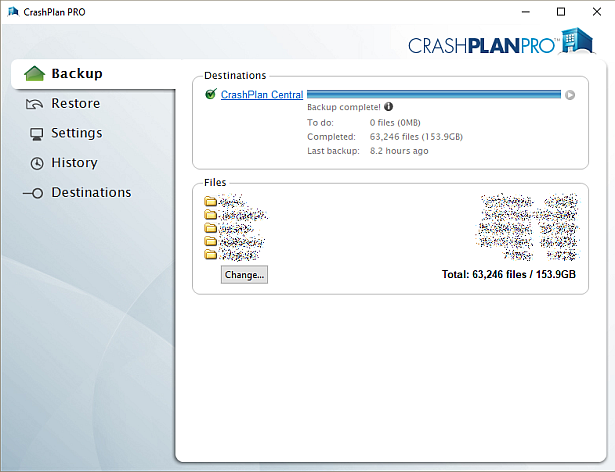
CrashPlan is a Java application which can be difficult to install on a NAS. Way back in January 2012 I decided to simplify it into a Synology package, since I had already created several others. It has been through many versions since that time, as the changelog below shows. Although it used to work on Synology products with ARM and PowerPC CPUs, it unfortunately became Intel-only in October 2016 due to Code 42 Software adding a reliance on some proprietary libraries.
Licence compliance is another challenge – Code 42’s EULA prohibits redistribution. I had to make the Synology package use the regular CrashPlan for Linux download (after the end user agrees to the Code 42 EULA). I then had to write my own script to extract this archive and mimic the Code 42 installer behaviour, but without the interactive prompts of the original.
Synology Package Installation
- In Synology DSM’s Package Center, click Settings and add my package repository:
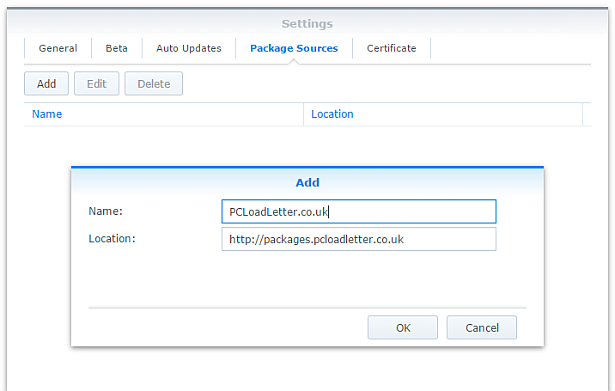
- The repository will push its certificate automatically to the NAS, which is used to validate package integrity. Set the Trust Level to Synology Inc. and trusted publishers:

- Now browse the Community section in Package Center to install CrashPlan:

The repository only displays packages which are compatible with your specific model of NAS. If you don’t see CrashPlan in the list, then either your NAS model or your DSM version are not supported at this time. DSM 5.0 is the minimum supported version for this package, and an Intel CPU is required. - Since CrashPlan is a Java application, it needs a Java Runtime Environment (JRE) to function. It is recommended that you select to have the package install a dedicated Java 8 runtime. For licensing reasons I cannot include Java with this package, so you will need to agree to the licence terms and download it yourself from Oracle’s website. The package expects to find this .tar.gz file in a shared folder called ‘public’. If you go ahead and try to install the package without it, the error message will indicate precisely which Java file you need for your system type, and it will provide a TinyURL link to the appropriate Oracle download page.
- To install CrashPlan PRO you will first need to log into the Admin Console and download the Linux App from the App Download section and also place this in the ‘public’ shared folder on your NAS.
- If you have a multi-bay NAS, use the Shared Folder control panel to create the shared folder called public (it must be all lower case). On single bay models this is created by default. Assign it with Read/Write privileges for everyone.
- If you have trouble getting the Java or CrashPlan PRO app files recognised by this package, try downloading them with Firefox. It seems to be the only web browser that doesn’t try to uncompress the files, or rename them without warning. I also suggest that you leave the Java file and the public folder present once you have installed the package, so that you won’t need to fetch this again to install future updates to the CrashPlan package.
- CrashPlan is installed in headless mode – backup engine only. This will configured by a desktop client, but operates independently of it.
- The first time you start the CrashPlan package you will need to stop it and restart it before you can connect the client. This is because a config file that is only created on first run needs to be edited by one of my scripts. The engine is then configured to listen on all interfaces on the default port 4243.
CrashPlan Client Installation
- Once the CrashPlan engine is running on the NAS, you can manage it by installing CrashPlan on another computer, and by configuring it to connect to the NAS instance of the CrashPlan Engine.
- Make sure that you install the version of the CrashPlan client that matches the version running on the NAS. If the NAS version gets upgraded later, you will need to update your client computer too.
- The Linux CrashPlan PRO client must be downloaded from the Admin Console and placed in the ‘public’ folder on your NAS in order to successfully install the Synology package.
- By default the client is configured to connect to the CrashPlan engine running on the local computer. Run this command on your NAS from an SSH session:
echo `cat /var/lib/crashplan/.ui_info`
Note those are backticks not quotes. This will give you a port number (4243), followed by an authentication token, followed by the IP binding (0.0.0.0 means the server is listening for connections on all interfaces) e.g.:
4243,9ac9b642-ba26-4578-b705-124c6efc920b,0.0.0.0

port,--------------token-----------------,binding
Copy this token value and use this value to replace the token in the equivalent config file on the computer that you would like to run the CrashPlan client on – located here:
C:\ProgramData\CrashPlan\.ui_info (Windows)
“/Library/Application Support/CrashPlan/.ui_info” (Mac OS X installed for all users)
“~/Library/Application Support/CrashPlan/.ui_info” (Mac OS X installed for single user)
/var/lib/crashplan/.ui_info (Linux)
You will not be able to connect the client unless the client token matches on the NAS token. On the client you also need to amend the IP address value after the token to match the Synology NAS IP address.
so using the example above, your computer’s CrashPlan client config file would be edited to:
4243,9ac9b642-ba26-4578-b705-124c6efc920b,192.168.1.100
assuming that the Synology NAS has the IP 192.168.1.100
If it still won’t connect, check that the ServicePort value is set to 4243 in the following files:
C:\ProgramData\CrashPlan\conf\ui_(username).properties (Windows)
“/Library/Application Support/CrashPlan/ui.properties” (Mac OS X installed for all users)
“~/Library/Application Support/CrashPlan/ui.properties” (Mac OS X installed for single user)
/usr/local/crashplan/conf (Linux)
/var/lib/crashplan/.ui_info (Synology) – this value does change spontaneously if there’s a port conflict e.g. you started two versions of the package concurrently (CrashPlan and CrashPlan PRO) - As a result of the nightmarish complexity of recent product changes Code42 has now published a support article with more detail on running headless systems including config file locations on all supported operating systems, and for ‘all users’ versus single user installs etc.
- You should disable the CrashPlan service on your computer if you intend only to use the client. In Windows, open the Services section in Computer Management and stop the CrashPlan Backup Service. In the service Properties set the Startup Type to Manual. You can also disable the CrashPlan System Tray notification application by removing it from Task Manager > More Details > Start-up Tab (Windows 8/Windows 10) or the All Users Startup Start Menu folder (Windows 7).
To accomplish the same on Mac OS X, run the following commands one by one:sudo launchctl unload /Library/LaunchDaemons/com.crashplan.engine.plist sudo mv /Library/LaunchDaemons/com.crashplan.engine.plist /Library/LaunchDaemons/com.crashplan.engine.plist.bak
The CrashPlan menu bar application can be disabled in System Preferences > Users & Groups > Current User > Login Items
Migration from CrashPlan For Home to CrashPlan For Small Business (CrashPlan PRO)
- Leave the regular green branded CrashPlan 4.8.3 Synology package installed.
- Go through the online migration using the link in the email notification you received from Code 42 on 22/08/2017. This seems to trigger the CrashPlan client to begin an update to 4.9 which will fail. It will also migrate your account onto a CrashPlan PRO server. The web page is likely to stall on the Migrating step, but no matter. The process is meant to take you to the store but it seems to be quite flakey. If you see the store page with a $0.00 amount in the basket, this has correctly referred you for the introductory offer. Apparently the $9.99 price thereafter shown on that screen is a mistake and the correct price of $2.50 is shown on a later screen in the process I think. Enter your credit card details and check out if you can. If not, continue.
- Log into the CrashPlan PRO Admin Console as per these instructions, and download the CrashPlan PRO 4.9 client for Linux, and the 4.9 client for your remote console computer. Ignore the red message in the bottom left of the Admin Console about registering, and do not sign up for the free trial. Preferably use Firefox for the Linux version download – most of the other web browsers will try to unpack the .tgz archive, which you do not want to happen.
- Configure the CrashPlan PRO 4.9 client on your computer to connect to your Syno as per the usual instructions on this blog post.
- Put the downloaded Linux CrashPlan PRO 4.9 client .tgz file in the ‘public’ shared folder on your NAS. The package will no longer download this automatically as it did in previous versions.
- From the Community section of DSM Package Center, install the CrashPlan PRO 4.9 package concurrently with your existing CrashPlan 4.8.3 Syno package.
- This will stop the CrashPlan package and automatically import its configuration. Notice that it will also backup your old CrashPlan .identity file and leave it in the ‘public’ shared folder, just in case something goes wrong.
- Start the CrashPlan PRO Synology package, and connect your CrashPlan PRO console from your computer.
- You should see your protected folders as usual. At first mine reported something like “insufficient device licences”, but the next time I started up it changed to “subscription expired”.
- Uninstall the CrashPlan 4.8.3 Synology package, this is no longer required.
- At this point if the store referral didn’t work in the second step, you need to sign into the Admin Console. While signed in, navigate to this link which I was given by Code 42 support. If it works, you should see a store page with some blue font text and a $0.00 basket value. If it didn’t work you will get bounced to the Consumer Next Steps webpage: “Important Changes to CrashPlan for Home” – the one with the video of the CEO explaining the situation. I had to do this a few times before it worked. Once the store referral link worked and I had confirmed my payment details my CrashPlan PRO client immediately started working. Enjoy!
Notes
- The package uses the intact CrashPlan installer directly from Code 42 Software, following acceptance of its EULA. I am complying with the directive that no one redistributes it.
- The engine daemon script checks the amount of system RAM and scales the Java heap size appropriately (up to the default maximum of 512MB). This can be overridden in a persistent way if you are backing up large backup sets by editing /var/packages/CrashPlan/target/syno_package.vars. If you are considering buying a NAS purely to use CrashPlan and intend to back up more than a few hundred GB then I strongly advise buying one of the models with upgradeable RAM. Memory is very limited on the cheaper models. I have found that a 512MB heap was insufficient to back up more than 2TB of files on a Windows server and that was the situation many years ago. It kept restarting the backup engine every few minutes until I increased the heap to 1024MB. Many users of the package have found that they have to increase the heap size or CrashPlan will halt its activity. This can be mitigated by dividing your backup into several smaller backup sets which are scheduled to be protected at different times. Note that from package version 0041, using the dedicated JRE on a 64bit Intel NAS will allow a heap size greater than 4GB since the JRE is 64bit (requires DSM 6.0 in most cases).
- If you need to manage CrashPlan from a remote location, I suggest you do so using SSH tunnelling as per this support document.
- The package supports upgrading to future versions while preserving the machine identity, logs, login details, and cache. Upgrades can now take place without requiring a login from the client afterwards.
- If you remove the package completely and re-install it later, you can re-attach to previous backups. When you log in to the Desktop Client with your existing account after a re-install, you can select “adopt computer” to merge the records, and preserve your existing backups. I haven’t tested whether this also re-attaches links to friends’ CrashPlan computers and backup sets, though the latter does seem possible in the Friends section of the GUI. It’s probably a good idea to test that this survives a package reinstall before you start relying on it. Sometimes, particularly with CrashPlan PRO I think, the adopt option is not offered. In this case you can log into CrashPlan Central and retrieve your computer’s GUID. On the CrashPlan client, double-click on the logo in the top right and you’ll enter a command line mode. You can use the GUID command to change the system’s GUID to the one you just retrieved from your account.
- The log which is displayed in the package’s Log tab is actually the activity history. If you are trying to troubleshoot an issue you will need to use an SSH session to inspect these log files:
/var/packages/CrashPlan/target/log/engine_output.log
/var/packages/CrashPlan/target/log/engine_error.log
/var/packages/CrashPlan/target/log/app.log - When CrashPlan downloads and attempts to run an automatic update, the script will most likely fail and stop the package. This is typically caused by syntax differences with the Synology versions of certain Linux shell commands (like rm, mv, or ps). The startup script will attempt to apply the published upgrade the next time the package is started.
- Although CrashPlan’s activity can be scheduled within the application, in order to save RAM some users may wish to restrict running the CrashPlan engine to specific times of day using the Task Scheduler in DSM Control Panel:
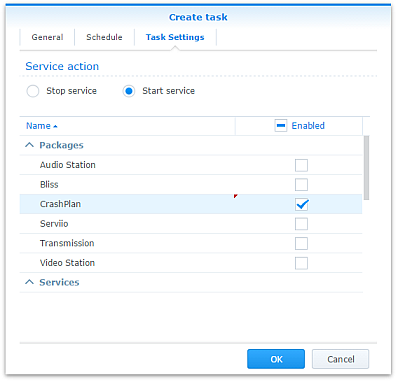
Note that regardless of real-time backup, by default CrashPlan will scan the whole backup selection for changes at 3:00am. Include this time within your Task Scheduler time window or else CrashPlan will not capture file changes which occurred while it was inactive:

- If you decide to sign up for one of CrashPlan’s paid backup services as a result of my work on this, please consider donating using the PayPal button on the right of this page.
Package scripts
For information, here are the package scripts so you can see what it’s going to do. You can get more information about how packages work by reading the Synology 3rd Party Developer Guide.
installer.sh
#!/bin/sh

#--------CRASHPLAN installer script
#--------package maintained at pcloadletter.co.uk


DOWNLOAD_PATH="http://download2.code42.com/installs/linux/install/${SYNOPKG_PKGNAME}"
CP_EXTRACTED_FOLDER="crashplan-install"
OLD_JNA_NEEDED="false"
[ "${SYNOPKG_PKGNAME}" == "CrashPlan" ] && DOWNLOAD_FILE="CrashPlan_4.8.3_Linux.tgz"
[ "${SYNOPKG_PKGNAME}" == "CrashPlanPRO" ] && DOWNLOAD_FILE="CrashPlanPRO_4.*_Linux.tgz"
if [ "${SYNOPKG_PKGNAME}" == "CrashPlanPROe" ]; then
  CP_EXTRACTED_FOLDER="${SYNOPKG_PKGNAME}-install"
  OLD_JNA_NEEDED="true"
  [ "${WIZARD_VER_483}" == "true" ] && { CPPROE_VER="4.8.3"; CP_EXTRACTED_FOLDER="crashplan-install"; OLD_JNA_NEEDED="false"; }
  [ "${WIZARD_VER_480}" == "true" ] && { CPPROE_VER="4.8.0"; CP_EXTRACTED_FOLDER="crashplan-install"; OLD_JNA_NEEDED="false"; }
  [ "${WIZARD_VER_470}" == "true" ] && { CPPROE_VER="4.7.0"; CP_EXTRACTED_FOLDER="crashplan-install"; OLD_JNA_NEEDED="false"; }
  [ "${WIZARD_VER_460}" == "true" ] && { CPPROE_VER="4.6.0"; CP_EXTRACTED_FOLDER="crashplan-install"; OLD_JNA_NEEDED="false"; }
  [ "${WIZARD_VER_452}" == "true" ] && { CPPROE_VER="4.5.2"; CP_EXTRACTED_FOLDER="crashplan-install"; OLD_JNA_NEEDED="false"; }
  [ "${WIZARD_VER_450}" == "true" ] && { CPPROE_VER="4.5.0"; CP_EXTRACTED_FOLDER="crashplan-install"; OLD_JNA_NEEDED="false"; }
  [ "${WIZARD_VER_441}" == "true" ] && { CPPROE_VER="4.4.1"; CP_EXTRACTED_FOLDER="crashplan-install"; OLD_JNA_NEEDED="false"; }
  [ "${WIZARD_VER_430}" == "true" ] && CPPROE_VER="4.3.0"
  [ "${WIZARD_VER_420}" == "true" ] && CPPROE_VER="4.2.0"
  [ "${WIZARD_VER_370}" == "true" ] && CPPROE_VER="3.7.0"
  [ "${WIZARD_VER_364}" == "true" ] && CPPROE_VER="3.6.4"
  [ "${WIZARD_VER_363}" == "true" ] && CPPROE_VER="3.6.3"
  [ "${WIZARD_VER_3614}" == "true" ] && CPPROE_VER="3.6.1.4"
  [ "${WIZARD_VER_353}" == "true" ] && CPPROE_VER="3.5.3"
  [ "${WIZARD_VER_341}" == "true" ] && CPPROE_VER="3.4.1"
  [ "${WIZARD_VER_33}" == "true" ] && CPPROE_VER="3.3"
  DOWNLOAD_FILE="CrashPlanPROe_${CPPROE_VER}_Linux.tgz"
fi
DOWNLOAD_URL="${DOWNLOAD_PATH}/${DOWNLOAD_FILE}"
CPI_FILE="${SYNOPKG_PKGNAME}_*.cpi"
OPTDIR="${SYNOPKG_PKGDEST}"
VARS_FILE="${OPTDIR}/install.vars"
SYNO_CPU_ARCH="`uname -m`"
[ "${SYNO_CPU_ARCH}" == "x86_64" ] && SYNO_CPU_ARCH="i686"
[ "${SYNO_CPU_ARCH}" == "armv5tel" ] && SYNO_CPU_ARCH="armel"
[ "${SYNOPKG_DSM_ARCH}" == "armada375" ] && SYNO_CPU_ARCH="armv7l"
[ "${SYNOPKG_DSM_ARCH}" == "armada38x" ] && SYNO_CPU_ARCH="armhf"
[ "${SYNOPKG_DSM_ARCH}" == "comcerto2k" ] && SYNO_CPU_ARCH="armhf"
[ "${SYNOPKG_DSM_ARCH}" == "alpine" ] && SYNO_CPU_ARCH="armhf"
[ "${SYNOPKG_DSM_ARCH}" == "alpine4k" ] && SYNO_CPU_ARCH="armhf"
[ "${SYNOPKG_DSM_ARCH}" == "monaco" ] && SYNO_CPU_ARCH="armhf"
[ "${SYNOPKG_DSM_ARCH}" == "rtd1296" ] && SYNO_CPU_ARCH="armhf"
NATIVE_BINS_URL="http://packages.pcloadletter.co.uk/downloads/crashplan-native-${SYNO_CPU_ARCH}.tar.xz"
NATIVE_BINS_FILE="`echo ${NATIVE_BINS_URL} | sed -r "s%^.*/(.*)%\1%"`"
OLD_JNA_URL="http://packages.pcloadletter.co.uk/downloads/crashplan-native-old-${SYNO_CPU_ARCH}.tar.xz"
OLD_JNA_FILE="`echo ${OLD_JNA_URL} | sed -r "s%^.*/(.*)%\1%"`"
INSTALL_FILES="${DOWNLOAD_URL} ${NATIVE_BINS_URL}"
[ "${OLD_JNA_NEEDED}" == "true" ] && INSTALL_FILES="${INSTALL_FILES} ${OLD_JNA_URL}"
TEMP_FOLDER="`find / -maxdepth 2 -path '/volume?/@tmp' | head -n 1`"
#the Manifest folder is where friends' backup data is stored
#we set it outside the app folder so it persists after a package uninstall
MANIFEST_FOLDER="/`echo $TEMP_FOLDER | cut -f2 -d'/'`/crashplan"
LOG_FILE="${SYNOPKG_PKGDEST}/log/history.log.0"
UPGRADE_FILES="syno_package.vars conf/my.service.xml conf/service.login conf/service.model"
UPGRADE_FOLDERS="log cache"
PUBLIC_FOLDER="`synoshare --get public | sed -r "/Path/!d;s/^.*\[(.*)\].*$/\1/"`"
#dedicated JRE section
if [ "${WIZARD_JRE_CP}" == "true" ]; then
  DOWNLOAD_URL="http://tinyurl.com/javaembed"
  EXTRACTED_FOLDER="ejdk1.8.0_151"
  #detect systems capable of running 64bit JRE which can address more than 4GB of RAM
  [ "${SYNOPKG_DSM_ARCH}" == "x64" ] && SYNO_CPU_ARCH="x64"
  [ "`uname -m`" == "x86_64" ] && [ ${SYNOPKG_DSM_VERSION_MAJOR} -ge 6 ] && SYNO_CPU_ARCH="x64"
  if [ "${SYNO_CPU_ARCH}" == "armel" ]; then
    JAVA_BINARY="ejdk-8u151-linux-arm-sflt.tar.gz"
    JAVA_BUILD="ARMv5/ARMv6/ARMv7 Linux - SoftFP ABI, Little Endian 2"
  elif [ "${SYNO_CPU_ARCH}" == "armv7l" ]; then
    JAVA_BINARY="ejdk-8u151-linux-arm-sflt.tar.gz"
    JAVA_BUILD="ARMv5/ARMv6/ARMv7 Linux - SoftFP ABI, Little Endian 2"
  elif [ "${SYNO_CPU_ARCH}" == "armhf" ]; then
    JAVA_BINARY="ejdk-8u151-linux-armv6-vfp-hflt.tar.gz"
    JAVA_BUILD="ARMv6/ARMv7 Linux - VFP, HardFP ABI, Little Endian 1"
  elif [ "${SYNO_CPU_ARCH}" == "ppc" ]; then
    #Oracle have discontinued Java 8 for PowerPC after update 6
    JAVA_BINARY="ejdk-8u6-fcs-b23-linux-ppc-e500v2-12_jun_2014.tar.gz"
    JAVA_BUILD="Power Architecture Linux - Headless - e500v2 with double-precision SPE Floating Point Unit"
    EXTRACTED_FOLDER="ejdk1.8.0_06"
    DOWNLOAD_URL="http://tinyurl.com/java8ppc"
  elif [ "${SYNO_CPU_ARCH}" == "i686" ]; then
    JAVA_BINARY="ejdk-8u151-linux-i586.tar.gz"
    JAVA_BUILD="x86 Linux Small Footprint - Headless"
  elif [ "${SYNO_CPU_ARCH}" == "x64" ]; then
    JAVA_BINARY="jre-8u151-linux-x64.tar.gz"
    JAVA_BUILD="Linux x64"
    EXTRACTED_FOLDER="jre1.8.0_151"
    DOWNLOAD_URL="http://tinyurl.com/java8x64"
  fi
fi
JAVA_BINARY=`echo ${JAVA_BINARY} | cut -f1 -d'.'`
source /etc/profile


pre_checks ()
{
  #These checks are called from preinst and from preupgrade functions to prevent failures resulting in a partially upgraded package
  if [ "${WIZARD_JRE_CP}" == "true" ]; then
    synoshare -get public > /dev/null || (
      echo "A shared folder called 'public' could not be found - note this name is case-sensitive. " >> $SYNOPKG_TEMP_LOGFILE
      echo "Please create this using the Shared Folder DSM Control Panel and try again." >> $SYNOPKG_TEMP_LOGFILE
      exit 1
    )

    JAVA_BINARY_FOUND=
    [ -f ${PUBLIC_FOLDER}/${JAVA_BINARY}.tar.gz ] && JAVA_BINARY_FOUND=true
    [ -f ${PUBLIC_FOLDER}/${JAVA_BINARY}.tar ] && JAVA_BINARY_FOUND=true
    [ -f ${PUBLIC_FOLDER}/${JAVA_BINARY}.tar.tar ] && JAVA_BINARY_FOUND=true
    [ -f ${PUBLIC_FOLDER}/${JAVA_BINARY}.gz ] && JAVA_BINARY_FOUND=true

    if [ -z ${JAVA_BINARY_FOUND} ]; then
      echo "Java binary bundle not found. " >> $SYNOPKG_TEMP_LOGFILE
      echo "I was expecting the file ${PUBLIC_FOLDER}/${JAVA_BINARY}.tar.gz. " >> $SYNOPKG_TEMP_LOGFILE
      echo "Please agree to the Oracle licence at ${DOWNLOAD_URL}, then download the '${JAVA_BUILD}' package" >> $SYNOPKG_TEMP_LOGFILE
      echo "and place it in the 'public' shared folder on your NAS. This download cannot be automated even if " >> $SYNOPKG_TEMP_LOGFILE
      echo "displaying a package EULA could potentially cover the legal aspect, because files hosted on Oracle's " >> $SYNOPKG_TEMP_LOGFILE
      echo "server are protected by a session cookie requiring a JavaScript enabled browser." >> $SYNOPKG_TEMP_LOGFILE
      exit 1
    fi
  else
    if [ -z ${JAVA_HOME} ]; then
      echo "Java is not installed or not properly configured. JAVA_HOME is not defined. " >> $SYNOPKG_TEMP_LOGFILE
      echo "Download and install the Java Synology package from http://wp.me/pVshC-z5" >> $SYNOPKG_TEMP_LOGFILE
      exit 1
    fi

    if [ ! -f ${JAVA_HOME}/bin/java ]; then
      echo "Java is not installed or not properly configured. The Java binary could not be located. " >> $SYNOPKG_TEMP_LOGFILE
      echo "Download and install the Java Synology package from http://wp.me/pVshC-z5" >> $SYNOPKG_TEMP_LOGFILE
      exit 1
    fi

    if [ "${WIZARD_JRE_SYS}" == "true" ]; then
      JAVA_VER=`java -version 2>&1 | sed -r "/^.* version/!d;s/^.* version \"[0-9]\.([0-9]).*$/\1/"`
      if [ ${JAVA_VER} -lt 8 ]; then
        echo "This version of CrashPlan requires Java 8 or newer. Please update your Java package. "
        exit 1
      fi
    fi
  fi
}


preinst ()
{
  pre_checks
  cd ${TEMP_FOLDER}
  for WGET_URL in ${INSTALL_FILES}
  do
    WGET_FILENAME="`echo ${WGET_URL} | sed -r "s%^.*/(.*)%\1%"`"
    [ -f ${TEMP_FOLDER}/${WGET_FILENAME} ] && rm ${TEMP_FOLDER}/${WGET_FILENAME}
    wget ${WGET_URL}
    if [[ $? != 0 ]]; then
      if [ -d ${PUBLIC_FOLDER} ] && [ -f ${PUBLIC_FOLDER}/${WGET_FILENAME} ]; then
        cp ${PUBLIC_FOLDER}/${WGET_FILENAME} ${TEMP_FOLDER}
      else
        echo "There was a problem downloading ${WGET_FILENAME} from the official download link, " >> $SYNOPKG_TEMP_LOGFILE
        echo "which was \"${WGET_URL}\" " >> $SYNOPKG_TEMP_LOGFILE
        echo "Alternatively, you may download this file manually and place it in the 'public' shared folder. " >> $SYNOPKG_TEMP_LOGFILE
        exit 1
      fi
    fi
  done

  exit 0
}


postinst ()
{
  if [ "${WIZARD_JRE_CP}" == "true" ]; then
    #extract Java (Web browsers love to interfere with .tar.gz files)
    cd ${PUBLIC_FOLDER}
    if [ -f ${JAVA_BINARY}.tar.gz ]; then
      #Firefox seems to be the only browser that leaves it alone
      tar xzf ${JAVA_BINARY}.tar.gz
    elif [ -f ${JAVA_BINARY}.gz ]; then
      #Chrome
      tar xzf ${JAVA_BINARY}.gz
    elif [ -f ${JAVA_BINARY}.tar ]; then
      #Safari
      tar xf ${JAVA_BINARY}.tar
    elif [ -f ${JAVA_BINARY}.tar.tar ]; then
      #Internet Explorer
      tar xzf ${JAVA_BINARY}.tar.tar
    fi
    mv ${EXTRACTED_FOLDER} ${SYNOPKG_PKGDEST}/jre-syno
    JRE_PATH="`find ${OPTDIR}/jre-syno/ -name jre`"
    [ -z ${JRE_PATH} ] && JRE_PATH=${OPTDIR}/jre-syno
    #change owner of folder tree
    chown -R root:root ${SYNOPKG_PKGDEST}
  fi

  #extract CPU-specific additional binaries
  mkdir ${SYNOPKG_PKGDEST}/bin
  cd ${SYNOPKG_PKGDEST}/bin
  tar xJf ${TEMP_FOLDER}/${NATIVE_BINS_FILE} && rm ${TEMP_FOLDER}/${NATIVE_BINS_FILE}
  [ "${OLD_JNA_NEEDED}" == "true" ] && tar xJf ${TEMP_FOLDER}/${OLD_JNA_FILE} && rm ${TEMP_FOLDER}/${OLD_JNA_FILE}

  #extract main archive
  cd ${TEMP_FOLDER}
  tar xzf ${TEMP_FOLDER}/${DOWNLOAD_FILE} && rm ${TEMP_FOLDER}/${DOWNLOAD_FILE}

  #extract cpio archive
  cd ${SYNOPKG_PKGDEST}
  cat "${TEMP_FOLDER}/${CP_EXTRACTED_FOLDER}"/${CPI_FILE} | gzip -d -c - | ${SYNOPKG_PKGDEST}/bin/cpio -i --no-preserve-owner

  echo "#uncomment to expand Java max heap size beyond prescribed value (will survive upgrades)" > ${SYNOPKG_PKGDEST}/syno_package.vars
  echo "#you probably only want more than the recommended 1024M if you're backing up extremely large volumes of files" >> ${SYNOPKG_PKGDEST}/syno_package.vars
  echo "#USR_MAX_HEAP=1024M" >> ${SYNOPKG_PKGDEST}/syno_package.vars
  echo >> ${SYNOPKG_PKGDEST}/syno_package.vars

  cp ${TEMP_FOLDER}/${CP_EXTRACTED_FOLDER}/scripts/CrashPlanEngine ${OPTDIR}/bin
  cp ${TEMP_FOLDER}/${CP_EXTRACTED_FOLDER}/scripts/run.conf ${OPTDIR}/bin
  mkdir -p ${MANIFEST_FOLDER}/backupArchives

  #save install variables which Crashplan expects its own installer script to create
  echo TARGETDIR=${SYNOPKG_PKGDEST} > ${VARS_FILE}
  echo BINSDIR=/bin >> ${VARS_FILE}
  echo MANIFESTDIR=${MANIFEST_FOLDER}/backupArchives >> ${VARS_FILE}
  #leave these ones out which should help upgrades from Code42 to work (based on examining an upgrade script)
  #echo INITDIR=/etc/init.d >> ${VARS_FILE}
  #echo RUNLVLDIR=/usr/syno/etc/rc.d >> ${VARS_FILE}
  echo INSTALLDATE=`date +%Y%m%d` >> ${VARS_FILE}
  [ "${WIZARD_JRE_CP}" == "true" ] && echo JAVACOMMON=${JRE_PATH}/bin/java >> ${VARS_FILE}
  [ "${WIZARD_JRE_SYS}" == "true" ] && echo JAVACOMMON=\${JAVA_HOME}/bin/java >> ${VARS_FILE}
  cat ${TEMP_FOLDER}/${CP_EXTRACTED_FOLDER}/install.defaults >> ${VARS_FILE}

  #remove temp files
  rm -r ${TEMP_FOLDER}/${CP_EXTRACTED_FOLDER}

  #add firewall config
  /usr/syno/bin/servicetool --install-configure-file --package /var/packages/${SYNOPKG_PKGNAME}/scripts/${SYNOPKG_PKGNAME}.sc > /dev/null

  #amend CrashPlanPROe client version
  [ "${SYNOPKG_PKGNAME}" == "CrashPlanPROe" ] && sed -i -r "s/^version=\".*(-.*$)/version=\"${CPPROE_VER}\1/" /var/packages/${SYNOPKG_PKGNAME}/INFO

  #are we transitioning an existing CrashPlan account to CrashPlan For Small Business?
  if [ "${SYNOPKG_PKGNAME}" == "CrashPlanPRO" ]; then
    if [ -e /var/packages/CrashPlan/scripts/start-stop-status ]; then
      /var/packages/CrashPlan/scripts/start-stop-status stop
      cp /var/lib/crashplan/.identity ${PUBLIC_FOLDER}/crashplan-identity.bak
      cp -R /var/packages/CrashPlan/target/conf/ ${OPTDIR}/
    fi
  fi

  exit 0
}


preuninst ()
{
  `dirname $0`/stop-start-status stop

  exit 0
}


postuninst ()
{
  if [ -f ${SYNOPKG_PKGDEST}/syno_package.vars ]; then
    source ${SYNOPKG_PKGDEST}/syno_package.vars
  fi
  [ -e ${OPTDIR}/lib/libffi.so.5 ] && rm ${OPTDIR}/lib/libffi.so.5

  #delete symlink if it no longer resolves - PowerPC only
  if [ ! -e /lib/libffi.so.5 ]; then
    [ -L /lib/libffi.so.5 ] && rm /lib/libffi.so.5
  fi

  #remove firewall config
  if [ "${SYNOPKG_PKG_STATUS}" == "UNINSTALL" ]; then
    /usr/syno/bin/servicetool --remove-configure-file --package ${SYNOPKG_PKGNAME}.sc > /dev/null
  fi

 exit 0
}


preupgrade ()
{
  `dirname $0`/stop-start-status stop
  pre_checks
  #if identity exists back up config
  if [ -f /var/lib/crashplan/.identity ]; then
    mkdir -p ${SYNOPKG_PKGDEST}/../${SYNOPKG_PKGNAME}_data_mig/conf
    for FILE_TO_MIGRATE in ${UPGRADE_FILES}; do
      if [ -f ${OPTDIR}/${FILE_TO_MIGRATE} ]; then
        cp ${OPTDIR}/${FILE_TO_MIGRATE} ${SYNOPKG_PKGDEST}/../${SYNOPKG_PKGNAME}_data_mig/${FILE_TO_MIGRATE}
      fi
    done
    for FOLDER_TO_MIGRATE in ${UPGRADE_FOLDERS}; do
      if [ -d ${OPTDIR}/${FOLDER_TO_MIGRATE} ]; then
        mv ${OPTDIR}/${FOLDER_TO_MIGRATE} ${SYNOPKG_PKGDEST}/../${SYNOPKG_PKGNAME}_data_mig
      fi
    done
  fi

  exit 0
}


postupgrade ()
{
  #use the migrated identity and config data from the previous version
  if [ -f ${SYNOPKG_PKGDEST}/../${SYNOPKG_PKGNAME}_data_mig/conf/my.service.xml ]; then
    for FILE_TO_MIGRATE in ${UPGRADE_FILES}; do
      if [ -f ${SYNOPKG_PKGDEST}/../${SYNOPKG_PKGNAME}_data_mig/${FILE_TO_MIGRATE} ]; then
        mv ${SYNOPKG_PKGDEST}/../${SYNOPKG_PKGNAME}_data_mig/${FILE_TO_MIGRATE} ${OPTDIR}/${FILE_TO_MIGRATE}
      fi
    done
    for FOLDER_TO_MIGRATE in ${UPGRADE_FOLDERS}; do
    if [ -d ${SYNOPKG_PKGDEST}/../${SYNOPKG_PKGNAME}_data_mig/${FOLDER_TO_MIGRATE} ]; then
      mv ${SYNOPKG_PKGDEST}/../${SYNOPKG_PKGNAME}_data_mig/${FOLDER_TO_MIGRATE} ${OPTDIR}
    fi
    done
    rmdir ${SYNOPKG_PKGDEST}/../${SYNOPKG_PKGNAME}_data_mig/conf
    rmdir ${SYNOPKG_PKGDEST}/../${SYNOPKG_PKGNAME}_data_mig

    #make CrashPlan log entry
    TIMESTAMP="`date "+%D %I:%M%p"`"
    echo "I ${TIMESTAMP} Synology Package Center updated ${SYNOPKG_PKGNAME} to version ${SYNOPKG_PKGVER}" >> ${LOG_FILE}
  fi

  exit 0
}
start-stop-status.sh
#!/bin/sh

#--------CRASHPLAN start-stop-status script
#--------package maintained at pcloadletter.co.uk


TEMP_FOLDER="`find / -maxdepth 2 -path '/volume?/@tmp' | head -n 1`"
MANIFEST_FOLDER="/`echo $TEMP_FOLDER | cut -f2 -d'/'`/crashplan"
ENGINE_CFG="run.conf"
PKG_FOLDER="`dirname $0 | cut -f1-4 -d'/'`"
DNAME="`dirname $0 | cut -f4 -d'/'`"
OPTDIR="${PKG_FOLDER}/target"
PID_FILE="${OPTDIR}/${DNAME}.pid"
DLOG="${OPTDIR}/log/history.log.0"
CFG_PARAM="SRV_JAVA_OPTS"
JAVA_MIN_HEAP=`grep "^${CFG_PARAM}=" "${OPTDIR}/bin/${ENGINE_CFG}" | sed -r "s/^.*-Xms([0-9]+)[Mm] .*$/\1/"`
SYNO_CPU_ARCH="`uname -m`"
TIMESTAMP="`date "+%D %I:%M%p"`"
FULL_CP="${OPTDIR}/lib/com.backup42.desktop.jar:${OPTDIR}/lang"
source ${OPTDIR}/install.vars
source /etc/profile
source /root/.profile


start_daemon ()
{
  #check persistent variables from syno_package.vars
  USR_MAX_HEAP=0
  if [ -f ${OPTDIR}/syno_package.vars ]; then
    source ${OPTDIR}/syno_package.vars
  fi
  USR_MAX_HEAP=`echo $USR_MAX_HEAP | sed -e "s/[mM]//"`

  #do we need to restore the identity file - has a DSM upgrade scrubbed /var/lib/crashplan?
  if [ ! -e /var/lib/crashplan ]; then
    mkdir /var/lib/crashplan
    [ -e ${OPTDIR}/conf/var-backup/.identity ] && cp ${OPTDIR}/conf/var-backup/.identity /var/lib/crashplan/
  fi

  #fix up some of the binary paths and fix some command syntax for busybox
  #moved this to start-stop-status.sh from installer.sh because Code42 push updates and these
  #new scripts will need this treatment too
  find ${OPTDIR}/ -name "*.sh" | while IFS="" read -r FILE_TO_EDIT; do
    if [ -e ${FILE_TO_EDIT} ]; then
      #this list of substitutions will probably need expanding as new CrashPlan updates are released
      sed -i "s%^#!/bin/bash%#!$/bin/sh%" "${FILE_TO_EDIT}"
      sed -i -r "s%(^\s*)(/bin/cpio |cpio ) %\1/${OPTDIR}/bin/cpio %" "${FILE_TO_EDIT}"
      sed -i -r "s%(^\s*)(/bin/ps|ps) [^w][^\|]*\|%\1/bin/ps w \|%" "${FILE_TO_EDIT}"
      sed -i -r "s%\`ps [^w][^\|]*\|%\`ps w \|%" "${FILE_TO_EDIT}"
      sed -i -r "s%^ps [^w][^\|]*\|%ps w \|%" "${FILE_TO_EDIT}"
      sed -i "s/rm -fv/rm -f/" "${FILE_TO_EDIT}"
      sed -i "s/mv -fv/mv -f/" "${FILE_TO_EDIT}"
    fi
  done

  #use this daemon init script rather than the unreliable Code42 stock one which greps the ps output
  sed -i "s%^ENGINE_SCRIPT=.*$%ENGINE_SCRIPT=$0%" ${OPTDIR}/bin/restartLinux.sh

  #any downloaded upgrade script will usually have failed despite the above changes
  #so ignore the script and explicitly extract the new java code using the chrisnelson.ca method
  #thanks to Jeff Bingham for tweaks
  UPGRADE_JAR=`find ${OPTDIR}/upgrade -maxdepth 1 -name "*.jar" | tail -1`
  if [ -n "${UPGRADE_JAR}" ]; then
    rm ${OPTDIR}/*.pid > /dev/null

    #make CrashPlan log entry
    echo "I ${TIMESTAMP} Synology extracting upgrade from ${UPGRADE_JAR}" >> ${DLOG}

    UPGRADE_VER=`echo ${SCRIPT_HOME} | sed -r "s/^.*\/([0-9_]+)\.[0-9]+/\1/"`
    #DSM 6.0 no longer includes unzip, use 7z instead
    unzip -o ${OPTDIR}/upgrade/${UPGRADE_VER}.jar "*.jar" -d ${OPTDIR}/lib/ || 7z e -y ${OPTDIR}/upgrade/${UPGRADE_VER}.jar "*.jar" -o${OPTDIR}/lib/ > /dev/null
    unzip -o ${OPTDIR}/upgrade/${UPGRADE_VER}.jar "lang/*" -d ${OPTDIR} || 7z e -y ${OPTDIR}/upgrade/${UPGRADE_VER}.jar "lang/*" -o${OPTDIR} > /dev/null
    mv ${UPGRADE_JAR} ${TEMP_FOLDER}/ > /dev/null
    exec $0
  fi

  #updates may also overwrite our native binaries
  [ -e ${OPTDIR}/bin/libffi.so.5 ] && cp -f ${OPTDIR}/bin/libffi.so.5 ${OPTDIR}/lib/
  [ -e ${OPTDIR}/bin/libjtux.so ] && cp -f ${OPTDIR}/bin/libjtux.so ${OPTDIR}/
  [ -e ${OPTDIR}/bin/jna-3.2.5.jar ] && cp -f ${OPTDIR}/bin/jna-3.2.5.jar ${OPTDIR}/lib/
  if [ -e ${OPTDIR}/bin/jna.jar ] && [ -e ${OPTDIR}/lib/jna.jar ]; then
    cp -f ${OPTDIR}/bin/jna.jar ${OPTDIR}/lib/
  fi

  #create or repair libffi.so.5 symlink if a DSM upgrade has removed it - PowerPC only
  if [ -e ${OPTDIR}/lib/libffi.so.5 ]; then
    if [ ! -e /lib/libffi.so.5 ]; then
      #if it doesn't exist, but is still a link then it's a broken link and should be deleted first
      [ -L /lib/libffi.so.5 ] && rm /lib/libffi.so.5
      ln -s ${OPTDIR}/lib/libffi.so.5 /lib/libffi.so.5
    fi
  fi

  #set appropriate Java max heap size
  RAM=$((`free | grep Mem: | sed -e "s/^ *Mem: *\([0-9]*\).*$/\1/"`/1024))
  if [ $RAM -le 128 ]; then
    JAVA_MAX_HEAP=80
  elif [ $RAM -le 256 ]; then
    JAVA_MAX_HEAP=192
  elif [ $RAM -le 512 ]; then
    JAVA_MAX_HEAP=384
  elif [ $RAM -le 1024 ]; then
    JAVA_MAX_HEAP=512
  elif [ $RAM -gt 1024 ]; then
    JAVA_MAX_HEAP=1024
  fi
  if [ $USR_MAX_HEAP -gt $JAVA_MAX_HEAP ]; then
    JAVA_MAX_HEAP=${USR_MAX_HEAP}
  fi
  if [ $JAVA_MAX_HEAP -lt $JAVA_MIN_HEAP ]; then
    #can't have a max heap lower than min heap (ARM low RAM systems)
    $JAVA_MAX_HEAP=$JAVA_MIN_HEAP
  fi
  sed -i -r "s/(^${CFG_PARAM}=.*) -Xmx[0-9]+[mM] (.*$)/\1 -Xmx${JAVA_MAX_HEAP}m \2/" "${OPTDIR}/bin/${ENGINE_CFG}"

  #disable the use of the x86-optimized external Fast MD5 library if running on ARM and PPC CPUs
  #seems to be the default behaviour now but that may change again
  [ "${SYNO_CPU_ARCH}" == "x86_64" ] && SYNO_CPU_ARCH="i686"
  if [ "${SYNO_CPU_ARCH}" != "i686" ]; then
    grep "^${CFG_PARAM}=.*c42\.native\.md5\.enabled" "${OPTDIR}/bin/${ENGINE_CFG}" > /dev/null \
     || sed -i -r "s/(^${CFG_PARAM}=\".*)\"$/\1 -Dc42.native.md5.enabled=false\"/" "${OPTDIR}/bin/${ENGINE_CFG}"
  fi

  #move the Java temp directory from the default of /tmp
  grep "^${CFG_PARAM}=.*Djava\.io\.tmpdir" "${OPTDIR}/bin/${ENGINE_CFG}" > /dev/null \
   || sed -i -r "s%(^${CFG_PARAM}=\".*)\"$%\1 -Djava.io.tmpdir=${TEMP_FOLDER}\"%" "${OPTDIR}/bin/${ENGINE_CFG}"

  #now edit the XML config file, which only exists after first run
  if [ -f ${OPTDIR}/conf/my.service.xml ]; then

    #allow direct connections from CrashPlan Desktop client on remote systems
    #you must edit the value of serviceHost in conf/ui.properties on the client you connect with
    #users report that this value is sometimes reset so now it's set every service startup
    sed -i "s/<serviceHost>127\.0\.0\.1<\/serviceHost>/<serviceHost>0\.0\.0\.0<\/serviceHost>/" "${OPTDIR}/conf/my.service.xml"
    #default changed in CrashPlan 4.3
    sed -i "s/<serviceHost>localhost<\/serviceHost>/<serviceHost>0\.0\.0\.0<\/serviceHost>/" "${OPTDIR}/conf/my.service.xml"
    #since CrashPlan 4.4 another config file to allow remote console connections
    sed -i "s/127\.0\.0\.1/0\.0\.0\.0/" /var/lib/crashplan/.ui_info

    #this change is made only once in case you want to customize the friends' backup location
    if [ "${MANIFEST_PATH_SET}" != "True" ]; then

      #keep friends' backup data outside the application folder to make accidental deletion less likely
      sed -i "s%<manifestPath>.*</manifestPath>%<manifestPath>${MANIFEST_FOLDER}/backupArchives/</manifestPath>%" "${OPTDIR}/conf/my.service.xml"
      echo "MANIFEST_PATH_SET=True" >> ${OPTDIR}/syno_package.vars
    fi

    #since CrashPlan version 3.5.3 the value javaMemoryHeapMax also needs setting to match that used in bin/run.conf
    sed -i -r "s%(<javaMemoryHeapMax>)[0-9]+[mM](</javaMemoryHeapMax>)%\1${JAVA_MAX_HEAP}m\2%" "${OPTDIR}/conf/my.service.xml"

    #make sure CrashPlan is not binding to the IPv6 stack
    grep "\-Djava\.net\.preferIPv4Stack=true" "${OPTDIR}/bin/${ENGINE_CFG}" > /dev/null \
     || sed -i -r "s/(^${CFG_PARAM}=\".*)\"$/\1 -Djava.net.preferIPv4Stack=true\"/" "${OPTDIR}/bin/${ENGINE_CFG}"
   else
    echo "Check the package log to ensure the package has started successfully, then stop and restart the package to allow desktop client connections." > "${SYNOPKG_TEMP_LOGFILE}"
  fi

  #increase the system-wide maximum number of open files from Synology default of 24466
  [ `cat /proc/sys/fs/file-max` -lt 65536 ] && echo "65536" > /proc/sys/fs/file-max

  #raise the maximum open file count from the Synology default of 1024 - thanks Casper K. for figuring this out
  #http://support.code42.com/Administrator/3.6_And_4.0/Troubleshooting/Too_Many_Open_Files
  ulimit -n 65536

  #ensure that Code 42 have not amended install.vars to force the use of their own (Intel) JRE
  if [ -e ${OPTDIR}/jre-syno ]; then
    JRE_PATH="`find ${OPTDIR}/jre-syno/ -name jre`"
    [ -z ${JRE_PATH} ] && JRE_PATH=${OPTDIR}/jre-syno
    sed -i -r "s|^(JAVACOMMON=).*$|\1\${JRE_PATH}/bin/java|" ${OPTDIR}/install.vars

    #if missing, set timezone and locale for dedicated JRE
    if [ -z ${TZ} ]; then
      SYNO_TZ=`cat /etc/synoinfo.conf | grep timezone | cut -f2 -d'"'`
      #fix for DST time in DSM 5.2 thanks to MinimServer Syno package author
      [ -e /usr/share/zoneinfo/Timezone/synotztable.json ] \
       && SYNO_TZ=`jq ".${SYNO_TZ} | .nameInTZDB" /usr/share/zoneinfo/Timezone/synotztable.json | sed -e "s/\"//g"` \
       || SYNO_TZ=`grep "^${SYNO_TZ}" /usr/share/zoneinfo/Timezone/tzname | sed -e "s/^.*= //"`
      export TZ=${SYNO_TZ}
    fi
    [ -z ${LANG} ] && export LANG=en_US.utf8
    export CLASSPATH=.:${OPTDIR}/jre-syno/lib

  else
    sed -i -r "s|^(JAVACOMMON=).*$|\1\${JAVA_HOME}/bin/java|" ${OPTDIR}/install.vars
  fi

  source ${OPTDIR}/bin/run.conf
  source ${OPTDIR}/install.vars
  cd ${OPTDIR}
  $JAVACOMMON $SRV_JAVA_OPTS -classpath $FULL_CP com.backup42.service.CPService > ${OPTDIR}/log/engine_output.log 2> ${OPTDIR}/log/engine_error.log &
  if [ $! -gt 0 ]; then
    echo $! > $PID_FILE
    renice 19 $! > /dev/null
    if [ -z "${SYNOPKG_PKGDEST}" ]; then
      #script was manually invoked, need this to show status change in Package Center
      [ -e ${PKG_FOLDER}/enabled ] || touch ${PKG_FOLDER}/enabled
    fi
  else
    echo "${DNAME} failed to start, check ${OPTDIR}/log/engine_error.log" > "${SYNOPKG_TEMP_LOGFILE}"
    echo "${DNAME} failed to start, check ${OPTDIR}/log/engine_error.log" >&2
    exit 1
  fi
}

stop_daemon ()
{
  echo "I ${TIMESTAMP} Stopping ${DNAME}" >> ${DLOG}
  kill `cat ${PID_FILE}`
  wait_for_status 1 20 || kill -9 `cat ${PID_FILE}`
  rm -f ${PID_FILE}
  if [ -z ${SYNOPKG_PKGDEST} ]; then
    #script was manually invoked, need this to show status change in Package Center
    [ -e ${PKG_FOLDER}/enabled ] && rm ${PKG_FOLDER}/enabled
  fi
  #backup identity file in case DSM upgrade removes it
  [ -e ${OPTDIR}/conf/var-backup ] || mkdir ${OPTDIR}/conf/var-backup
  cp /var/lib/crashplan/.identity ${OPTDIR}/conf/var-backup/
}

daemon_status ()
{
  if [ -f ${PID_FILE} ] && kill -0 `cat ${PID_FILE}` > /dev/null 2>&1; then
    return
  fi
  rm -f ${PID_FILE}
  return 1
}

wait_for_status ()
{
  counter=$2
  while [ ${counter} -gt 0 ]; do
    daemon_status
    [ $? -eq $1 ] && return
    let counter=counter-1
    sleep 1
  done
  return 1
}


case $1 in
  start)
    if daemon_status; then
      echo ${DNAME} is already running with PID `cat ${PID_FILE}`
      exit 0
    else
      echo Starting ${DNAME} ...
      start_daemon
      exit $?
    fi
  ;;

  stop)
    if daemon_status; then
      echo Stopping ${DNAME} ...
      stop_daemon
      exit $?
    else
      echo ${DNAME} is not running
      exit 0
    fi
  ;;

  restart)
    stop_daemon
    start_daemon
    exit $?
  ;;

  status)
    if daemon_status; then
      echo ${DNAME} is running with PID `cat ${PID_FILE}`
      exit 0
    else
      echo ${DNAME} is not running
      exit 1
    fi
  ;;

  log)
    echo "${DLOG}"
    exit 0
  ;;

  *)
    echo "Usage: $0 {start|stop|status|restart}" >&2
    exit 1
  ;;

esac
install_uifile & upgrade_uifile
[
  {
    "step_title": "Client Version Selection",
    "items": [
      {
        "type": "singleselect",
        "desc": "Please select the CrashPlanPROe client version that is appropriate for your backup destination server:",
        "subitems": [
          {
            "key": "WIZARD_VER_483",
            "desc": "4.8.3",
            "defaultValue": true
          },          {
            "key": "WIZARD_VER_480",
            "desc": "4.8.0",
            "defaultValue": false
          },
          {
            "key": "WIZARD_VER_470",
            "desc": "4.7.0",
            "defaultValue": false
          },
          {
            "key": "WIZARD_VER_460",
            "desc": "4.6.0",
            "defaultValue": false
          },
          {
            "key": "WIZARD_VER_452",
            "desc": "4.5.2",
            "defaultValue": false
          },
          {
            "key": "WIZARD_VER_450",
            "desc": "4.5.0",
            "defaultValue": false
          },
          {
            "key": "WIZARD_VER_441",
            "desc": "4.4.1",
            "defaultValue": false
          },
          {
            "key": "WIZARD_VER_430",
            "desc": "4.3.0",
            "defaultValue": false
          },
          {
            "key": "WIZARD_VER_420",
            "desc": "4.2.0",
            "defaultValue": false
          },
          {
            "key": "WIZARD_VER_370",
            "desc": "3.7.0",
            "defaultValue": false
          },
          {
            "key": "WIZARD_VER_364",
            "desc": "3.6.4",
            "defaultValue": false
          },
          {
            "key": "WIZARD_VER_363",
            "desc": "3.6.3",
            "defaultValue": false
          },
          {
            "key": "WIZARD_VER_3614",
            "desc": "3.6.1.4",
            "defaultValue": false
          },
          {
            "key": "WIZARD_VER_353",
            "desc": "3.5.3",
            "defaultValue": false
          },
          {
            "key": "WIZARD_VER_341",
            "desc": "3.4.1",
            "defaultValue": false
          },
          {
            "key": "WIZARD_VER_33",
            "desc": "3.3",
            "defaultValue": false
          }
        ]
      }
    ]
  },
  {
    "step_title": "Java Runtime Environment Selection",
    "items": [
      {
        "type": "singleselect",
        "desc": "Please select the Java version which you would like CrashPlan to use:",
        "subitems": [
          {
            "key": "WIZARD_JRE_SYS",
            "desc": "Default system Java version",
            "defaultValue": false
          },
          {
            "key": "WIZARD_JRE_CP",
            "desc": "Dedicated installation of Java 8",
            "defaultValue": true
          }
        ]
      }
    ]
  }
]
Changelog:
- 0047 30/Oct/17 – Updated dedicated Java version to 8 update 151, added support for additional Intel CPUs in x18 Synology products.
- 0046 26/Aug/17 – Updated to CrashPlan PRO 4.9, added support for migration from CrashPlan For Home to CrashPlan For Small Business (CrashPlan PRO). Please read the Migration section on this page for instructions.
- 0045 02/Aug/17 – Updated to CrashPlan 4.8.3, updated dedicated Java version to 8 update 144
- 0044 21/Jan/17 – Updated dedicated Java version to 8 update 121
- 0043 07/Jan/17 – Updated dedicated Java version to 8 update 111, added support for Intel Broadwell and Grantley CPUs
- 0042 03/Oct/16 – Updated to CrashPlan 4.8.0, Java 8 is now required, added optional dedicated Java 8 Runtime instead of the default system one including 64bit Java support on 64 bit Intel CPUs to permit memory allocation larger than 4GB. Support for non-Intel platforms withdrawn owing to Code42’s reliance on proprietary native code library libc42archive.so
- 0041 20/Jul/16 – Improved auto-upgrade compatibility (hopefully), added option to have CrashPlan use a dedicated Java 7 Runtime instead of the default system one, including 64bit Java support on 64 bit Intel CPUs to permit memory allocation larger than 4GB
- 0040 25/May/16 – Added cpio to the path in the running context of start-stop-status.sh
- 0039 25/May/16 – Updated to CrashPlan 4.7.0, at each launch forced the use of the system JRE over the CrashPlan bundled Intel one, added Maven build of JNA 4.1.0 for ARMv7 systems consistent with the version bundled with CrashPlan
- 0038 27/Apr/16 – Updated to CrashPlan 4.6.0, and improved support for Code 42 pushed updates
- 0037 21/Jan/16 – Updated to CrashPlan 4.5.2
- 0036 14/Dec/15 – Updated to CrashPlan 4.5.0, separate firewall definitions for management client and for friends backup, added support for DS716+ and DS216play
- 0035 06/Nov/15 – Fixed the update to 4.4.1_59, new installs now listen for remote connections after second startup (was broken from 4.4), updated client install documentation with more file locations and added a link to a new Code42 support doc
EITHER completely remove and reinstall the package (which will require a rescan of the entire backup set) OR alternatively please delete all except for one of the failed upgrade numbered subfolders in /var/packages/CrashPlan/target/upgrade before upgrading. There will be one folder for each time CrashPlan tried and failed to start since Code42 pushed the update - 0034 04/Oct/15 – Updated to CrashPlan 4.4.1, bundled newer JNA native libraries to match those from Code42, PLEASE READ UPDATED BLOG POST INSTRUCTIONS FOR CLIENT INSTALL this version introduced yet another requirement for the client
- 0033 12/Aug/15 – Fixed version 0032 client connection issue for fresh installs
- 0032 12/Jul/15 – Updated to CrashPlan 4.3, PLEASE READ UPDATED BLOG POST INSTRUCTIONS FOR CLIENT INSTALL this version introduced an extra requirement, changed update repair to use the chrisnelson.ca method, forced CrashPlan to prefer IPv4 over IPv6 bindings, removed some legacy version migration scripting, updated main blog post documentation
- 0031 20/May/15 – Updated to CrashPlan 4.2, cross compiled a newer cpio binary for some architectures which were segfaulting while unpacking main CrashPlan archive, added port 4242 to the firewall definition (friend backups), package is now signed with repository private key
- 0030 16/Feb/15 – Fixed show-stopping issue with version 0029 for systems with more than one volume
- 0029 21/Jan/15 – Updated to CrashPlan version 3.7.0, improved detection of temp folder (prevent use of /var/@tmp), added support for Annapurna Alpine AL514 CPU (armhf) in DS2015xs, added support for Marvell Armada 375 CPU (armhf) in DS215j, abandoned practical efforts to try to support Code42’s upgrade scripts, abandoned inotify support (realtime backup) on PowerPC after many failed attempts with self-built and pre-built jtux and jna libraries, back-merged older libffi support for old PowerPC binaries after it was removed in 0028 re-write
- 0028 22/Oct/14 – Substantial re-write:
Updated to CrashPlan version 3.6.4
DSM 5.0 or newer is now required
libjnidispatch.so taken from Debian JNA 3.2.7 package with dependency on newer libffi.so.6 (included in DSM 5.0)
jna-3.2.5.jar emptied of irrelevant CPU architecture libs to reduce size
Increased default max heap size from 512MB to 1GB on systems with more than 1GB RAM
Intel CPUs no longer need the awkward glibc version-faking shim to enable inotify support (for real-time backup)
Switched to using root account – no more adding account permissions for backup, package upgrades will no longer break this
DSM Firewall application definition added
Tested with DSM Task Scheduler to allow backups between certain times of day only, saving RAM when not in use
Daemon init script now uses a proper PID file instead of Code42’s unreliable method of using grep on the output of ps
Daemon init script can be run from the command line
Removal of bash binary dependency now Code42’s CrashPlanEngine script is no longer used
Removal of nice binary dependency, using BusyBox equivalent renice
Unified ARMv5 and ARMv7 external binary package (armle)
Added support for Mindspeed Comcerto 2000 CPU (comcerto2k – armhf) in DS414j
Added support for Intel Atom C2538 (avoton) CPU in DS415+
Added support to choose which version of CrashPlan PROe client to download, since some servers may still require legacy versions
Switched to .tar.xz compression for native binaries to reduce web hosting footprint - 0027 20/Mar/14 – Fixed open file handle limit for very large backup sets (ulimit fix)
- 0026 16/Feb/14 – Updated all CrashPlan clients to version 3.6.3, improved handling of Java temp files
- 0025 30/Jan/14 – glibc version shim no longer used on Intel Synology models running DSM 5.0
- 0024 30/Jan/14 – Updated to CrashPlan PROe 3.6.1.4 and added support for PowerPC 2010 Synology models running DSM 5.0
- 0023 30/Jan/14 – Added support for Intel Atom Evansport and Armada XP CPUs in new DSx14 products
- 0022 10/Jun/13 – Updated all CrashPlan client versions to 3.5.3, compiled native binary dependencies to add support for Armada 370 CPU (DS213j), start-stop-status.sh now updates the new javaMemoryHeapMax value in my.service.xml to the value defined in syno_package.vars
- 0021 01/Mar/13 – Updated CrashPlan to version 3.5.2
- 0020 21/Jan/13 – Fixes for DSM 4.2
- 018 Updated CrashPlan PRO to version 3.4.1
- 017 Updated CrashPlan and CrashPlan PROe to version 3.4.1, and improved in-app update handling
- 016 Added support for Freescale QorIQ CPUs in some x13 series Synology models, and installer script now downloads native binaries separately to reduce repo hosting bandwidth, PowerQUICC PowerPC processors in previous Synology generations with older glibc versions are not supported
- 015 Added support for easy scheduling via cron – see updated Notes section
- 014 DSM 4.1 user profile permissions fix
- 013 implemented update handling for future automatic updates from Code 42, and incremented CrashPlanPRO client to release version 3.2.1
- 012 incremented CrashPlanPROe client to release version 3.3
- 011 minor fix to allow a wildcard on the cpio archive name inside the main installer package (to fix CP PROe client since Code 42 Software had amended the cpio file version to 3.2.1.2)
- 010 minor bug fix relating to daemon home directory path
- 009 rewrote the scripts to be even easier to maintain and unified as much as possible with my imminent CrashPlan PROe server package, fixed a timezone bug (tightened regex matching), moved the script-amending logic from installer.sh to start-stop-status.sh with it now applying to all .sh scripts each startup so perhaps updates from Code42 might work in future, if wget fails to fetch the installer from Code42 the installer will look for the file in the public shared folder
- 008 merged the 14 package scripts each (7 for ARM, 7 for Intel) for CP, CP PRO, & CP PROe – 42 scripts in total – down to just two! ARM & Intel are now supported by the same package, Intel synos now have working inotify support (Real-Time Backup) thanks to rwojo’s shim to pass the glibc version check, upgrade process now retains login, cache and log data (no more re-scanning), users can specify a persistent larger max heap size for very large backup sets
- 007 fixed a bug that broke CrashPlan if the Java folder moved (if you changed version)
- 006 installation now fails without User Home service enabled, fixed Daylight Saving Time support, automated replacing the ARM libffi.so symlink which is destroyed by DSM upgrades, stopped assuming the primary storage volume is /volume1, reset ownership on /var/lib/crashplan and the Friends backup location after installs and upgrades
- 005 added warning to restart daemon after 1st run, and improved upgrade process again
- 004 updated to CrashPlan 3.2.1 and improved package upgrade process, forced binding to 0.0.0.0 each startup
- 003 fixed ownership of /volume1/crashplan folder
- 002 updated to CrashPlan 3.2
- 001 30/Jan/12 – intial public release
 PC LOAD LETTER
Use sudo -i to login as root using SSH …
“SSH/Telnet only supports logging into the system with accounts belonging to the administrators group. To switch to a root account, please log into the system with SSH/Telnet as a user belonging to the administrators group, run the command sudo -i, and then enter the password of the account used to log in.”
It appears that the the DSM push this AM and/or the release 382 brought the CP service down for me. That said, I was able to clear out all but the recent release, manually apply the patch, and restart just fine under the DSM 6 RTM.
I runs several Synology boxes with CP. As far as i can tell the CP issue with the DSM upgrade are coincidental. We tend not to reboot our boxes and so there are CP upgrades that have not implemented. The DSM upgrade involves a reboot and so the CP upgrade issues occur. When I made sure CP was at version 4.6.0 BEFORE DSM upgrade, I had no problem with DMS upgrade, and CP was fine. For recent CP upgrades I remove all but one of the upgrade directories in /var/packages/CrashPlan/target/upgrade/1435813200460_382.???????????? and restart CP 2 or 3 times. Only on one box did I have an upgrade.sh after the restart attempts. I renamed that to upgrade.sh.old and then restart CP. I hope this works for others.
Yes. This works for me too.
1. log in as admin via ssh
2. cd /var/packages/CrashPlan/target/upgrade
3. sudo rm -rf [all of the directories but one]
4. reboot/restart
Can you please explain how you did the manual update please?
Okay. So essentially if you are on ARM you are screwed because of DSM 6.0. Even if you manage to get it working with DSM 6, the UI on crashplan will be bugged. It sucks.
The best course of action is to downgrade back to DSM 5.2 and then use Crashplan as usual. It will fail the 4.6 update but will work just fine on 4.52 even if computers backup up to it are running 4.6.
If you absolutely want to get 4.6 working via the auto update, then you’ll still need to install DSM 5.2 again. Next manually apply the update. To do so SSH into the synology with putty. Once connected do the following two commands, note the sudo password is the same as the default admin account’s password:
sudo 7z e -y -o/var/packages/CrashPlan/target/lib /var/packages/CrashPlan/target/upgrade/1435813200460_382.jar “*.jar”
sudo 7z e -y -o/var/packages/CrashPlan/target/lang /var/packages/CrashPlan/target/upgrade/1435813200460_382.jar “lang/*”
Note above, if you have a newer update that available you can check and should use that. To check for the update stype the following command and look for the jar files like the above one in the code.
ls -l /var/packages/CrashPlan/target/upgrade/*
Once you have done that, the update is applied. You should be on Crashplan 4.6 on the synology. Now to get it to start you’ll need to set the install.vars file to use your ARM java instead of the x86 java included in the latest Crashplan. This is because code 42 decided to include its own version of java in the latest crashplan, but it will only work on intel cpu devices.
To do this do
sudo vi /var/packages/CrashPlan/target/install.vars
This opens up the file in the built-in text editor, and it’s kind of annoying to use. Here’s what you do.
Press Insert to start editing and then change the following line from:
JAVACOMMON=/volume1/@appstore/CrashPlan/jre/bin/java
into
JAVACOMMON=/volume1/@appstore/java7/jre/bin/java
Press ESC to stop edting. Then type :wq to save and exit the editor. Be sure to not mess anything up. Note that vi is not a noob-friendly editor, it’s all keyboard, no mouse. Use the arrow keys to navigate and backspace to delete. Note also, that your java may be in a different location on your synology. If your Crashplan package won’t start after making this change its likely because you edited the file wrong or you need to point to a different bin/java location on the unit. For example on of the units I had to fix it was under /var/packages/Java7/target/j2sdk-image/bin/java instead.
How ? because i follow your post to apply your patch….jar have been copied, lang also, upgrade.sh renamed but the service wont start on my DS414.
I still have the “repairing upgrade…” message
More detail in case someone has already fixed this. Fresh install of Java 8 (then upgraded to version 77, which is the latest version), followed by fresh install of CrashPlan. Started, stopped, restarted as per instructions. CrashPlan stopped and the upgrade log showed several repeats of:
Thu Mar 24 15:17:01 GMT 2016 : Starting using ../../bin/CrashPlanEngine…
upgrade.sh: line 30: ../../bin/CrashPlanEngine: Permission denied
I checked the permissions on volume1/@appstore/CrashPlan/bin/CrashPlanEngine and found that they were set to read only (not executable) so chmod a+x applied executable permissions for all users.
Started CrashPlan again and it immediately stopped. No change on the upgrade log and history still showed “repairing upgrade”. Nothing in engine_output.log and in engine_error.log:
/var/packages/CrashPlan/scripts/start-stop-status.sh: line 167: /volume1/@appstore/CrashPlan/jre/bin/java: cannot execute binary file: Exec format error
Running vi to show that script shows the following in line 167:
$JAVACOMMON $SRV_JAVA_OPTS -classpath $FULL_CP com.backup42.service.CPService > ${OPTDIR}/log/engine_output.log 2> ${OPTDIR}/log/engine_error.log &
As the error references Java, I’m guessing this is something to do with the format of the command in line 167 of the script, but this is where my lack of Unix knowledge lets me down! Anyone?
Same exact here Mark with the line 167 error.
Same error here : /var/packages/CrashPlan/scripts/start-stop-status.sh: line 167: /volume1/@appstore/CrashPlan/jre/bin/java: cannot execute binary file: Exec format error
With a ds414 arm arch
Same here… DS-215j
Mark, the problem is “java: cannot execute binary file: Exec format error” which means the wrong java version is installed, like you installed the one for Intel instead of ARM (but it depends on which Synology you have).
Please see the page https://pcloadletter.co.uk/2011/08/23/java-package-for-synology/ for instructions on how, and which version, of java to install to get CP to work properly.
I have the same – is there an easy way to log the command that’s trying to be run ?
$/bin/echo $JAVACOMMON $SRV_JAVA_OPTS -classpath $FULL_CP com.backup42.service.CPService > ${OPTDIR}/log/engine_output.log
I’m no expert but this is the command that is failing in start-stop-status.sh …
/volume1/@appstore/CrashPlan/jre/bin/java -Dfile.encoding=UTF-8 -Dapp=CrashPlanService -DappBaseName=CrashPlan -Xms20m -Xmx384m -Dsun.net.inetaddr.ttl=300 -Dnetworkaddress.cache.ttl=300 -Dsun.net.inetaddr.negative.ttl=0 -Dnetworkaddress.cache.negative.ttl=0 -Dc42.native.md5.enabled=false -Djava.io.tmpdir=/volume1/@tmp -Djava.net.preferIPv4Stack=true -classpath /var/packages/CrashPlan/target/lib/com.backup42.desktop.jar:/var/packages/CrashPlan/target/lang
with message:
/volume1/@appstore/CrashPlan/jre/bin/java: cannot execute binary file: Exec format error
I found that Crashplan tries to use the java runtime that was distributed with crashplan, which is probably a intel version, not ARM.
I fixed it by going into ‘/var/packages/CrashPlan/target/install.vars’ and changing line:
JAVACOMMON=/volume1/@appstore/CrashPlan/jre/bin/java
into
JAVACOMMON=/volume1/@appstore/java8/ejdk1.8.0_77/linux_arm_sflt/jre/bin/java
which is where my java lives.
This fixed the problem
@fplanjer: That does fix it – I just tried out a similar trick from http://chrisnelson.ca/2015/07/02/fixing-crashplan-4-3-0-on-synology/ and it is running again. Hope to have it in the package soon :)
Thanks, Martijn
fplanjer’s solution needs to be bolded and put up at the top. I was able to figure out that the problem was an Intel/AMD version of Java and not ARM, but I couldn’t find where CrashPlan was calling it (I knew I had installed the ARM version). Got tired of looking Friday afternoon, and when I got into work this morning, I checked here and saw his post. Changed where CrashPlan was looking and it fired right up. Thank you sir.
Thanks fplanjer, pointing to the correct java binary fixed it for me, too.
This fixed it for me however my Java lay in the following directory – /@appstore/java8/ejdk1.8.0_77/linux_armv6_vfp_hflt/jre/bin
THANKS!
This fixed my issue. However my path for java is the following:
/volume1/@appstore/java8/ejdk1.8.0_06/linux_ppc_e500v2/jre/bin/java
Thanks, fplanjer: that was a step forward; but now I have the following exception (engine_error.log), any ideas?
Exception in thread “Thread-1” com.code42.exception.DebugRuntimeException: Unable to persist ServiceModel, modelFilename=conf/service.model
at com.backup42.service.model.ServiceModel.save(ServiceModel.java:337)
at com.backup42.service.CPService.cleanup(CPService.java:2043)
at com.backup42.service.CPService$1.run(CPService.java:427)
Caused by: java.lang.NoClassDefFoundError: Could not initialize class javax.crypto.JceSecurity
at javax.crypto.Cipher.getInstance(Cipher.java:515)
at com.code42.crypto.CipherPair.initCipher(CipherPair.java:77)
at com.code42.crypto.Blowfish128Crypto.(Blowfish128Crypto.java:73)
at com.code42.crypto.Blowfish128CryptoUtility$BlowfishCache.getInstance(Blowfish128CryptoUtility.java:147)
at com.code42.crypto.Blowfish128CryptoUtility.encrypt(Blowfish128CryptoUtility.java:89)
at com.code42.crypto.Blowfish128CryptoUtility.encryptObject(Blowfish128CryptoUtility.java:54)
at com.backup42.service.model.ServiceModel.save(ServiceModel.java:334)
… 2 more
Here is a modification to your start-stop-status.sh script, replacing lines 60-74. It uses the latest upgrade jar file directly instead. It also removes the requirement of the user SSH in and remove the dynamically named extraction directories.
UPGRADE_JAR=`find ${OPTDIR}/upgrade -maxdepth 1 -name “*.jar” | tail -1`
if [ -n “${UPGRADE_JAR}” ]; then
rm ${OPTDIR}/*.pid > /dev/null
echo “I ${TIMESTAMP} PCLoadLetter: Extracting upgrade from ${UPGRADE_JAR}” >> ${DLOG}
unzip -o ${UPGRADE_JAR} “*.jar” -d ${OPTDIR}/lib/
unzip -o ${UPGRADE_JAR} “lang/*” -d ${OPTDIR}
rm ${UPGRADE_JAR} > /dev/null
echo “I ${TIMESTAMP} PCLoadLetter: Upgrade complete” >> ${DLOG}
fi
Something was broken where it was not able to get the SCRIPT_HOME value properly so it was failing. The log entry was “I 03/24/16 11:55AM Synology repairing upgrade in” which was missing the upgrade script home path. Most likely due to the multiple extraction directories from the failed automatic upgrades. My updated code should take care of that problem too.
Throwing this out there, but a number of the issues being observed may be unique to Java and/or DSM code specific to the given platform architecture requirements (e.g. x86 vs x64 release of JDK).
Tom, I thought about that too. Mine is an ARM based version if that helps. I’ve tried the two version of Java that DSM 8 comes with as well as the Patters version of 8. None seem to work.
I’ll echo Mike’s comment – I am DS424j, therefore ARM as well and a mere 512MB of memory, so using the x86 version. I am using the latest Java 8 with the official Synology Java package.
DS414j!
Mark & Mike – I used to own a DS411+ series unit; but there is no way for me to provide feedback on the 32-bit platform as I have passed that unit along. Currently I’m running x64 JDK package on a DS1815+ w/ 16GB of RAM (which is more than anyone really needs, but the RAM was repurposed).
My Synology is now at DSM 6, and I had the same issue with CrashPlan trying to update to v4.6 (from v4.5.2) and failing. After messing around with it for a couple of hours today, I found a workaround for this issue.
1. Via SSH, copy the JAR file from “var/packages/CrashPlan/target/upgrade” to a different location (it will get deleted in Step 2)
2. Uninstall CrashPlan from the Package Center
3. Install CrashPlan, but right after the service starts, stop it before it starts the upgrade process.
4. Extract the contents in the root of the JAR file from Step 1 into (/var/packages/CrashPlan/target/lib). This is basically a bunch of .JAR files.
5. Extract the contents in the \lang folder in the JAR file into (/var/packages/CrashPlan/target/lang).
6. Once you do this, CrashPlan will be at v4.6 and you will be able to start it from within the Synology Package Center and it will start without trying to update.
Note: There are some commands floating around where you can unzip the JAR file into these folders, but DSM6 no longer has unzip … and I couldn’t figure out the exact commands with 7z. I just extracted the JAR file first with 7z and then copied the files using the cp command.
I hope this helps!
~Joe
Thank you! Have been tearing my hair out for the last week trying to fix this, and these instructions finally got everything working.
I have tried to update manually but is not able to connect to it from my pc no matter what I cange in the config files…..
I hope it will come an update to this package soon.
Damn.
I have been using crashplan for year.
Then I want able to use it at my DS209. Then I bought a DS212j and 2 new harddisk.
Meanwhile I lost my 500gb backup at Crashplan…
Now I would like Crashplan running at my Ds212j.
Im running DSM 6. Java 8.
CrashPlan Client 4.6 at my MacBook Pro.
I was able to get it to work in a few minutes. Now Im stucked.
It forced a failed upgrade 1435813200460_382.jar
I dont have the advance skills but try to run the script fix_cp_patch.sh but failed.
What do I do?
Solved the “Synology repairing update” issue on DSM 6 after CrashPlan automatic update to version 4.6.
The engine_error.log in /var/packages/CrashPlan/target/log showed “CrashPlan/jre/bin/java: cannot execute binary file: Exec format error”.
To fix this:
1. I installed the latest Java to synology.
2 In terminal, I changed to the CrashPlan folder on Synology “cd /var/packages/CrashPlan/target/”
2. I renamed the jre in the CrashPlan folder to a “sudo mv jre _jre”
3. I created a link to the jre installed on Synology: “sudo ln /var/packages/Java7/target/j2sdk-image/jre” (this will create a soft link to jre in the current folder)
4. Then I started CrashPlan from the DSM
Could we have the solution for “repairing upgrade” in the main article instad of in the comments? I remember that i found it some where, but I am having a hard time finding it? Was it to completly remove the package and install it again?
1435813200460_382 is the only i have in my folder, but i cant get it to run?
Any issues when upgrading from DSM 5.2 to today released 6.0?
Hey guys. I posted my fix for this yesterday (worked on 2 NAS devices) but I don’t see it on the list. Here I go again. Please note, I am using DSM 6 now.
1. Save the JAR file int he upgrade directory to a seperate location on your NAS using SSH (it gets deleted in STEP 2)
2. Uninstall Crashplan
3. Reinstall Crashplan – but stop the application immediately after it start (to prevent it from getting to the upgrade process again)
4. SSH into the until and run, “sudo -i” to swap your account to the root account. DSM 6 takes away the root account and you now use an admin account, but I kept getting permissions denied until I swapped to the root.
5. unzip the contents of the JAR file into a temporary location. (Note: I found some unzip commands on blogs but they don’t work with DSM 6 anymore. You need to you “7z” to extract them, but I couldn’t figure out the exact command to extract them to the places I want in step 6 & 7)
6. Move the contents of the JAR (the files in the root – not the subdirectories) in “/var/packages/CrashPlan/target/lib”
7. Move the contents of the JAR that are within the ‘lang’ folder into “/var/packages/CrashPlan/target/lang”
8. Start CrashPlan
I did this on two different NAS devices and it shows starting 4.6.0 in the log file afterwards and does not attempt the update. Both NAS devices are also working fine now and I didn’t even have to reconfigure CrashPlan for them to start backing up again. I also have Java7 (not 8) on my device.
Please note, I think DSM 6 brought about a few new challenges with what is aleady out there. 1. You do not SSH into the device using ROOT, so you need to swap to that account before some of the commands would work. 2. Unzip no longer exists, so you need to use 7z. and 3. The automatic updates script is just failing from CrashPlan, so you need to update it manually by extracting the contents (this one may be the update in general and not specific to DSM 6).
I hope this helps. I’m a Windows guy, so it took me a while to figure it out. I’m sure one of you guru’s can simplify this process or figure out the exact commands to extract the contents to their proper location without so many steps.
Hi, since I went to DSM 6.0 with the new 4.6.0 Package unfortunately crashplan is no longer working. I tried some of the know “Upgrade’ manual workarounds like this here https://idmedia.no/general/crashplan-4-5-0-released/ – just switched to 7z instead of unzip. but it does not start anymore.
Anyone with ideas?
Thanks< Martijn
I modified /var/packages/CrashPlan/scripts/start-stop-status.sh to use 7z
#unzip -o ${OPTDIR}/upgrade/${UPGRADE_VER}.jar “*.jar” -d ${OPTDIR}/lib/
7z e -y -o${OPTDIR}/lib/ ${OPTDIR}/upgrade/${UPGRADE_VER}.jar “*.jar”
#unzip -o ${OPTDIR}/upgrade/${UPGRADE_VER}.jar “lang/*” -d ${OPTDIR}
7z e -y -o${OPTDIR} ${OPTDIR}/upgrade/${UPGRADE_VER}.jar “lang/*”
Lol, guys, I gotta give it to you. You are the most stubborn bunch of nerds which ever tried to run two plainly incompatible systems against all odds :) I am long gone to different solution, but I am still subscribed to this forum just to admire human will :)
jirikafka – I hear you on that. CP is still the most frugal option available out there and my subscription runs through 2018, so I figure I may as well keep pounding away. Run enough people head-first into a wall and the wall will eventually give way. Right?
Where will you run to…?
I have a year plus to decide, so I don’t have to run yet. It is looking like Glacier would be a viable path. I’m just not a fan of the AWS price point for cloud backup storage and I would prefer to remain the keeper of my own keys. Perhaps the landscape will change between now and then.
What is the different solution you moved on to?
yeah I am stuck with the “repairing upgrade” issue, I have a DiskStation 412+ and 6.0-7321 installed. I have tried uninstalling/installing Crashplan to no improvement.
My DS415+ just told me there was an update ready for DSM6 so allowed it to update. Also updated all apps including Java7. Now CrashPlanPro app won’t start. Have stopped and started the DS but no luck. I’m running CPP 4.5.2-0037 which I think is the latest. Is an update needed or should it run on DSM6 as it is? Any advice would be appreciated.
I’m getting the Synology Repairing Upgrade In message now and CP isn’t running. Any ideas on how to fix this?
Found this article:
http://crashplan.setepontos.com/fixing-synology-repairing-upgrade-in-issue/
Bearing in mind that the versions have changed, I had to do it twice for two versions but it appears to be up and running now. One thing to note, the section where it says
Enter command:
unzip -o /var/packages/CrashPlan/target/upgrade/1435726800450_270.jar “*.jar” -d /var/packages/CrashPlan/target/lib/
the “*.jar” and in the next step the “lang/*” weren’t working with the unzip command so I just removed it from the first step (ignored the second) and everything seemed to extract just fine. For those interested, here’s the string that I ran that worked correctly (to note I’m using Crashplan PRO, if you are not make sure to remove the PRO lettering):
unzip -o /var/packages/CrashPlanPRO/target/upgrade/1435813200460_382.jar -d /var/packages/CrashPlanPRO/target/lib/
It would appear that for some reason the package just fails at unzipping the latest download and nothing else. Wonder why!
Reading other comments, could be a clue…
Anyone got his to work with DSM 6.0? I did the manual unpack, but now it is not responsing at all anymore :(
Thanks, Martijn
Bearing in mind unzip was removed in DSM6 you need to replace it with “7z e” like this:
replace unzip -o with “7z e” “file to extract from” “-o/whereto put the extracted files” “specific file to extract”
so an example would be 7z e /var/packages/CrashPlan/target/upgrade/stringofnumbers.jar -o/var/packages/Crashplan/target/ lang/*
From a comment on article : http://chrisnelson.ca/2015/07/02/fixing-crashplan-4-3-0-on-synology/
My CrashPlanPro is now running :)
This is not a real fix, but a workaround to keep CrashPlan running. Being logged as admin, I simply erased folder “upgrade” in @appstore/CrashPlan folder and created file named “upgrade”, same as upgrade folder name. This prevents CrashPlan creating the upgrade folder, so now I see a message about upgrade failure in CrashPlan Desktop connected to NAS, but backup is still running. Of course, the time will come when CrashPlan developers will significantly change network protocols and CrashPlan client wouldn’t be able to work more, but I hope that some real solution will be found by this time. :)
@ded32: Thanks, that workaround stopped the upgrade occurring on my DS414j. As you say, remains to be seen for how long this is effective, but at least it keeps things going while Patters works on a solution to what appears to be a Java issue for Atom-based machines.
Thank you! That worked for me and looks to be a great interim fix.
Brilliant thanks, this stopped mine from failing too. I hadn’t done anything or upgraded DSM so I guess must be to do with latest CrashPlan version?
Thank you!!!
After almost a day trying I fixed it.
The 1435813200460_382 upgrade didnt start. I also got the java error as Mark Venn
My idea was that CP was using the wrong java runtime. It was using its own runtime jre7 but that would not run for some reason.
So I renamed the jre of CP so that it would not be used and made a link to the java that was already installed on the Synology
I did the following:
cd /volume1/@appstore/CrashPlan
mv jre jre-old
ln -s /var/packages/java8/target/ejdk1.8.0_77/linux_arm_sflt/jre jre
and the CP started
I am not an expert but this worked for me. Hope it helps someone
Wim
Thank You !
Hey Wim, can you PM me so I can ask you more detailed questions about how you did this?
Hm… Problems with my package. In a desperate attempt, I tried to uninstall it – hoping I could install it again. But now it does not show up in the list of available packages – and the right repository etc has been configured….
You must replace unzip by 7z
For e.g. : sudo 7z e -y -o/var/packages/CrashPlan/target/lib /var/packages/CrashPlan/target/upgrade/1435813200460_382.jar “*.jar”
sudo 7z e -y -o/var/packages/CrashPlan/target/lang /var/packages/CrashPlan/target/upgrade/1435813200460_382.jar “lang/*”
sudo mv /var/packages/CrashPlan/target/upgrade/1435813200460_382.1458917075197/upgrade.sh /var/packages/CrashPlan/target/upgrade/1435813200460_382.1458917075197/upgrade.sh.old
But there is an other java related problem
Ah, I see. Is 7zip installed on synology devices by default?
Either way, just using the standard unzip worked for me. Could be different with others.
Or follow these steps and you’ll be fine..
http://chrisnelson.ca/2015/07/02/fixing-crashplan-4-3-0-on-synology/
Good luck!
In DSM 6.0 crashplan now offers a differential backup. Does anyone know if any of those backup providers offer an unlimited solution or who is cheapest? Right now I use S3 for one of my most important folders but it is .03 a gig. not a bad price but considering how much I have with crashplan I would need to cut back
I was trying to run the commands as you wrote (replacing it wht the correct filename) but all i get was the following:
No files to process
Files: 0
Size: 0
Compressed: 38488683
Well now the log also says:
upgrade installed – version 1435813200460
Crashplan stopped, version 4.5.2
Nothing regarding “repairing” in the log at the moment
I did try following this but didnt work anyway…
http://www.m2networks.ca/crashplan-crashing-on-synology-dsm-6/
Thanks for this, sorted my issue out. One thing I’ve noticed with the latest DSM is that suddenly ROOT has either been disabled, or the password detached from the admin password. It’s annoying because although I can still do what I need to do via SSH due to a manual elevation request, I can no longer modify any files at all using WinSCP (and im a noob when it comes to linux). Any advice would be greatly appreciated.
execute
sudo su –
from command line and enter admin password. After that, you will be switched to root. Also you can install and run Midnight Commander (mc) package from Synology community, it is nice powerful console file manager/text editor etc.
unzip is gone. Now use 7z instead. See the comment on:
http://chrisnelson.ca/2015/07/02/fixing-crashplan-4-3-0-on-synology/
unzip was removed in dsm version 6.
I managed to mostly get this to work using 7z in the format:
replace unzip -o with “7z e” “file to extract from” “-o/whereto put the extracted files” “specific file to extract”
so an example would be 7z e /var/packages/CrashPlan/target/upgrade/stringofnumbers.jar -o/var/packages/Crashplan/target/ lang/*
For those having problems on upgrading to DSM 6 and finding Crashplan won’t start (or won’t stay running). After following the standard upgrade processes detailed elsewhere (manual unzipping of the jar), you need to do the following:
On the command line type
which java
This will tell you the path of your working java binary (mine was at /var/packages/Java7/target/j2sdk-image/bin/java)
Edit this file (I used vi):
/volume1/@appstore/CrashPlan/install.vars
Change the line starting JAVACOMMON=
Replace everything after the = with your java location (e.g. for me:
JAVACOMMON=/var/packages/Java7/target/j2sdk-image/bin/java
save the file.
Restart Crashplan from the web interface.
The java it was pointing to is for the wrong platform. The instructions above fix that.
Thanks, this seems to solve the issues i had with my DSM 413 that is a ARM based system.
At least now when i connect a client it says 4.6 but the web interface still shows 4.5.2 at the moment, this might be solved later i guess.. fact is now my NAS is doing a full scan of all my data and hopefully this means my data is again secure!
+1 on fixing mine. DS414+ running DSM 6.0.
worked for me. Thx
My current problems with the recent release seem to have been fixed by: upgrading to latest DSM, applying all updates (including java 7) and then removing all the unzip folders in /var/packages/CrashPlan/target/upgrade/ (but keeping the .jar files) and then restarting the service.
cd /var/packages/CrashPlan/target/upgrade
sudo mv 1435813200460_382.jar _1435813200460_382.jar
sudo rm -r ./143*
sudo mv _1435813200460_382.jar 1435813200460_382.jar
sudo 7z e -y /var/packages/CrashPlan/target/upgrade/1435813200460_382.jar “*.jar” -o/var/packages/CrashPlan/target/lib/
sudo 7z e -y /var/packages/CrashPlan/target/upgrade/1435813200460_382.jar “lang/*” -o/var/packages/CrashPlan/target/lib/
Then start package worked for me
ssh as admin then
cd /var/packages/CrashPlan/target/upgrade
sudo mv 1435813200460_382.jar _1435813200460_382.jar
sudo rm -r ./143*
sudo mv _1435813200460_382.jar 1435813200460_382.jar
sudo 7z e -y /var/packages/CrashPlan/target/upgrade/1435813200460_382.jar “*.jar” -o/var/packages/CrashPlan/target/lib/
sudo 7z e -y /var/packages/CrashPlan/target/upgrade/1435813200460_382.jar “lang/*” -o/var/packages/CrashPlan/target/lib/
Then started the package
This is an awesome program, thank you! Are there any plans to release an update that is compatible with DSM v6.x?
Has anyone managed to get version 4.6 working on DSM 6 on an ARM based system? Curious if that’s the main commonality so that brighter minds than mine can come up with an actual solution.
I totally appreciate the work everyone does to support Synology to CrashPlan. You all are amazing and I am grateful for your continued support.
I must admit after about 3-4 years, I am finding it increasingly difficult to get myself around to manually fixing issues that presents itself almost every DSM, CrashPlan or Java update breaks the backup process. Twice in the last 2-3 weeks (CrashPlan and DSM update)
Are there any comparable options that would work will LESS manual intervention?
I am likely staying with my Synology’s and ideally stay with CrashPlan — but may be open to other options if the price, security and service levels are comparable.
Any ideas would be appreciated.
DS413 here so PowerPC arch. Using Patters current Java 8 package. On DSM 6.0-7321.
Also stalled at the line 167 “exec format error” in engine_output.log
OK guys I *may* have found a fix,at least for me.
Looks like what has changed is that crashplan now bundles it’s own java at /var/packages/CrashPlan/target/jre – I don’t think I’ve seen that before?
Anyhow this is the jre it’s trying to use for me, and if that is an Intel compiled jre then yes it will fail.
So I dug out the path to the jre as installed by Patters Java 8 package and symlinked to that instead.
Now I know nothing about the way synology packages work, this is just from my general UNIX background, so this could completely screw up future package updates.
Make sure SSH is enabled
Login in as an admin user
Gain root by running:
sudo su –
Change to crashplan archive:
cd /var/packages/CrashPlan/target
Move failing jre out of the way:
mv jre jre_off
Link to Patters jre:
ln -s /var/packages/java8/target/ejdk1.8.0_06/linux_ppc_e500v2/jre jre
The “linux_ppc_e500v2” will change depending on your CPU, try running this command to see if it’s different for you:
ls /var/packages/java8/target/ejdk1.8.0_06/
Start the package as normal in DSM.
So far it seems to be running fine – now I just have to connect a client to it to see what it’s doing!
Work for me ! DS-414.
Thanks a lot
I do not see a jre directory in the Crashplan folder – and I was getting the same Java errors as others have – inotify etc… Tried the Synology Java7 and Java8 packages and updated install.vars file to point to java executable. Nothing has worked so far. With patters Oracle installation package Crashplan starts and then stops a few minutes later with unrecoverable errors and stack traces.
Any ideas why this may be the case?
DSM6 DS414 ARM arch
So I managed to get the 4.6.0 version running again (was actually 2 patches behind I think, 359 and 382).
This is what I tried to achieve (please note that you should be somewhat proficient in unix to do this, so don’t blame me if it goes sour.)
Read http://chrisnelson.ca/2015/07/02/fixing-crashplan-4-3-0-on-synology/ (regarding how to do manual upgrades) as well as the comments in this thread (regarding using 7z instead of unzip). I have a vague memory that unzip was removed some DSM patches ago – something about it being false positively virus marked, though that could just be my Antivirus installation of course.
I started with upgrading the Java package as it was outdated. I’m using hte Java provided by Synology, and my current version is now 7.0.90-0010. I’m not sure if this was important, but having read the comments on issues with Java, I preferred to patch that first.
On to the action:
* cd /var/packages/CrashPlan/target/upgrade
* find the latest patchdirectory for each version (1435813200460_359.1457372662139 in my case for the 359-patch) start with the oldest patch to be applied
* in my case, the jar-files had been extracted but the patch not applied, so no real need to run 7z
* cd 1435813200460_359.1457372662139
* mv *.jar /var/packages/CrashPlan/target/lib/
* mv lang/* ../../lang/
* mv upgrade.sh upgrade.sh.old
* cd ..
* start crashplan from the Synology ui (it will probably fail again, as there are more patches to be applied)
* repeat the above with the next patch (382 in my case, so the directory was 1435813200460_382.1458974718053 this time)
* start crashplan, check logs
This was the last few lines in my log after doing all this:
I 03/26/16 10:31AM Synology repairing upgrade in /var/packages/CrashPlan/target/upgrade/1435813200460_382.1458967517034
/var/packages/CrashPlan/target/upgrade/1435813200460_382.1458971127877
/var/packages/CrashPlan/target/upgrade/1435813200460_382.1458964182406
/var/packages/CrashPlan/target/upgrade/1435813200460_382.1458965709840
/var/packages/CrashPlan/target/upgrade/1435813200460_382.1458969328724
/var/packages/CrashPlan/target/upgrade/1435813200460_382.1458972924250
/var/packages/CrashPlan/target/upgrade/1435813200460_382.1458974718053
I 03/26/16 10:37AM CrashPlan started, version 4.6.0, GUID 670366876494725219
I 03/26/16 10:37AM Backup scheduled to always run
Looks ok, but will keep monitoring it for the next few days to make sure.
I should probably have added that I have a DS415play which of course uses the INTEL Atom CE5335. Current DSM-version shows as DSM 6.0-7321.
That’s why it work for you.
Arm have a java problem – error 167
I think I’m almost there with my DS114
Got it updated (so I think) following http://chrisnelson.ca/2015/07/02/fixing-crashplan-4-3-0-on-synology/ with some modifications to cope with ssh not being root (for this enter as admin then execute “sudo su -“, also some modificatios for 7z instead of unzip. The service now starts, the log says CrashPlan started, version 4.6.0, GUID … however the DSM service summary screen still says version 4.5.2-0037 … maybe I did something partially wrong.
The bad news is my PC client has a green “ball” but says connecting to the backup destination and the Synology log says: Not ready for backup from MYPC. Reason: The destination is not available. Any ideas of where to look to?
Also, Would the new DSM 6.0 backup tools compare to CrashPlan? Specifically de differential backup (so copying only the small parts of a file that changes, thinking on >1GB PST files).
Many Thanks,
RE: “however the DSM service summary screen still says version 4.5.2-0037”
I think the version number shown in DSM’s package center is only updated when a new version is published by the package author. In other words, what you see is the expected behavior.
mmm … don’t ask.
This didn’t work my CP log at 15:24 was still sohowing the destination is not available and then at 21:29 it has started working. I had done nothing relevant in between …
I was actually looking to this forum and others and waiting for a solution to show up … but … it’s working now … again: mmm … don’t ask. I have no clue.
Hope this is not “intermitent” as Tom T says bellow.
BTW, I would like to thanks Patters & all of you contributing and helping.
Same behaviour here, both for computer to computer backups and computer to NAS backups. Given intermittent nature of computer to computer, might include a CP problem as well as CP on NAS problem
Sorry my comments are seperated, think they are stuck on a moderation queue so I can’t reply to them.
To confirm I was able to do the .ui_info dance and connect a UI session and adopt the old backup (I tried a full reinstall)
Currently have my various other machines actively backing up to the NAS, and the NAS is synchronising files with Crashplan Central.
Everything seems to be working – but as stated earlier I have NO IDEA if what I did will be stable or break the way Synology packages need to work (I seem to get an error when I stop the service for instance). I provided it AS IS so that more experienced Synology heads such as Patters might be able to properly resolve things.
Is there a way to block upgrade until patter release a newer version ?
@bagupremier: Look at @ded32’s suggestion above about creating a file named “upgrade”. That has worked for me (so far!). CrashPlan continues to attempt the upgrade every hour and reports the failure, but that doesn’t appear to have affected the backup between my NAS and Central.
if i do that, crashplan don’t upgrade but it don’t work.
It ask me to select files to backup and never start the backup process.
So crashplan is running, but it don’t do anything.
Sorry to hear that – the solution has worked for me so far.
Here’s what worked for me (DS411+)
ssh admin@
sudo -i
cd /var/packages/CrashPlan/target/upgrade/
sudo mv 1435813200460_382.jar _1435813200460_382.jar
sudo rm -r ./143*
sudo mv _1435813200460_382.jar 1435813200460_382.jar
sudo 7z e -y /var/packages/CrashPlan/target/upgrade/1435813200460_382.jar “*.jar” -o/var/packages/CrashPlan/target/lib/
sudo 7z e -y /var/packages/CrashPlan/target/upgrade/1435813200460_382.jar “lang/*” -o/var/packages/CrashPlan/target/lib/
Then restart package
This kind of got me working again. CrashPlan is running again on my DS1511+ and clients that were previously stuck are backing up now.
However in the web setup screen it still says Version 4.52-0037 and in the logs, it says “CrashPlan started, version 4.6.0, GUID xxxxxxxxxxxxx”.
If it were all simply working I’d probably leave it alone, but I’m not able to connect to the Synology’s Crashplan setup from my main PC. I’ve verified that the token on the Synology matches the one stored in .ui_info on my Win7 machine. In the same file I had 0.0.0.0 as the listening address and also tried changing it to the actual IP of my PC. My .ui.properties file has the correct serviceHost and Port addresses defined. The PC is running V4.6.0 of the CrashPlan software. I’ve tried restarting the package on Synology.
Any ideas or things to try?
Thank you FreddyP!
I tried doing this but on the bottom 2 commands it just tells me No Files to process. yet the .jar is sitting there with the exact name…
Thanks this seemed to work for me. I uninstalled and reinstalled first. Then let Crashplan redownload the 4.6.0 update.
thanks freddy, i was getting so frustrated! curiosity got the better of me upgrading to dsm 6, should have stayed at 5, was perfectly happy lol
What java version do you use? Java 7 or 8?
I get this msg when running the sudo 7z… command:
No files to process
Files: 0
Size: 0
Compressed: 38488683
I upgraded to DSM 6 yesterday on my DS415+ and now CrashPlan backup is not running for 1+ days. On DSM packages area, it says “stopped” for CrashPlan. I tried clicking “Run” two times, but it says starting and then when done, it still says “stopped”.
Do we need another version of CrashPlan package for it to work with DSM 6 which BTW forced me to uninstall and then install new version of Java 8 on DS415+ after DSM 6 upgrade
Same here, but it is running here, but not updated to Crashplan 4.6 yet, so does not work with my other clients.
Patiently waiting for patters to release an upgrade…
For those of you having issues with Java, you may need to manually correct the JAVACOMMON value in /var/packages/CrashPlan/target/install.vars. Use “which java” after ssh’ing into your Diskstation to determine where Java is currently installed. Then update the existing vaule in the install.vars file, if necessary.
The current update.sh script is attempting to call /var/packages/CrashPlan/target/bin/CrashPlanEngine stop/start during the upgrade, but I suspect it should be calling your /var/packages/CrashPlan/scripts/start-stop-status.sh script instead. If that’s true, then the following line should be added to /var/packages/CrashPlan/target/install.vars:
INIT_SCRIPT=/var/packages/CrashPlan/scripts/start-stop-status.sh
If that’s not true, and the CrashPlanEngine script should be called during an upgrade, then this command should be run to allow that script to be executed:
chmod ug+x /var/packages/CrashPlan/target/bin/CrashPlanEngine
I think one of these two options could fix the issue of CrashPlan’s auto-update system breaking everyone’s installation of CrashPlan.
Ok, here is my issue after upgrading to DSM6.
After uninstalling and reinstalling I ran into upgrade problem.
I fixed it according to many articles here and on the web.
Then I ran into Java problem.
I installed Java8 from synology and put the right path into vars file.
Now I can connect to my NAS using interface on my PC, but it does not scan folders.
Here is the error:
Exception in thread “W7855890_ScanWrkr” java.lang.NoClassDefFoundError: Could not initialize class com.code42.jna.inotify.InotifyManager
at com.code42.jna.inotify.JNAInotifyFileWatcherDriver.(JNAInotifyFileWatcherDriver.java:22)
at com.code42.backup.path.BackupSetsManager.initFileWatcherDriver(BackupSetsManager.java:417)
at com.code42.backup.path.BackupSetsManager.startScheduledFileQueue(BackupSetsManager.java:355)
at com.code42.backup.path.BackupSetsManager.access$1600(BackupSetsManager.java:72)
at com.code42.backup.path.BackupSetsManager$ScanWorker.delay(BackupSetsManager.java:1148)
at com.code42.utils.AWorker.run(AWorker.java:157)
at java.lang.Thread.run(Thread.java:745)
Any advice?
Same problem here.
CP run, but the backup won’t start. Same errors in logs
How is it possibile we have not still found an answer?
It looks like a Java problem, we tried everything… I think we are severla hundreds using this kind of backup… How to contact Patters directly?
I would suggest using the PayPal donate button. Before you make the donation for his work, you can leave a final message that he is surely going to get.
Just remember it’s a donation, not a contract fee.
I fixed this error, and CrashPlan is now fully working on my DS214se (DSM 6). I found that the jna.jra that ships with CrashPlan needs to be updated.
I did the following steps:
0. Stop CrashPlan on Synology
1. Download the latest jna from: https://maven.java.net/content/repositories/releases/net/java/dev/jna/jna/4.2.2/jna-4.2.2.jar
2. Upload the jna-4.2.2.jar to Synology (in my case to a temp folder /volume1/temp)
3. SSH into the synology as admin user
3.1 Change to the root user with “sudo -i”
4. Rename (or delete) the jna. that ships with CrashPlan “mv /var/packages/CrashPlan/target/bin/jna.jar /var/packages/CrashPlan/target/bin/jna.ja_”
5. Move the downloaded jna.jar to the CrashPlan folder:
“mv /jna-4.2.2.jar /var/packages/CrashPlan/target/bin/jna.jar” (in my case “mv /volume1/temp/jna-4.2.2.jar /var/packages/CrashPlan/target/bin/jna.jar”
6. Start CrashPlan on Synology
A step in the correct direction, Thanks Heiko, on ppc though (DS413), it breaks now here and the backup fails to start: [03.31.16 22:19:44.259 ERROR main .service.backup.BackupController] Exception setting up BackupController! , java.lang.UnsatisfiedLinkError: Native library (com/sun/jna/linux-ppc/libjnidispatch.so) not found in resource path ([file:/volume1/@appstore/CrashPlan/lib/com.backup42.desktop.jar, file:/volume1/@appstore/CrashPlan/lang/])
STACKTRACE:: java.lang.UnsatisfiedLinkError: Native library (com/sun/jna/linux-ppc/libjnidispatch.so) not found in resource path ([file:/volume1/@appstore/CrashPlan/lib/com.backup42.desktop.jar, file:/volume1/@appstore/CrashPlan/lang/])
Any thoughts?
You are my hero!!!
It works perfectly now on my DS 215j (armV7).
NOTE: I used Java7 by Patters.
Great!!!
How is this working for you now? My backups are running extremely slowly – 100MB file upload is taking hours. No throttling enabled either.
Worked for me! Thanks so much … now I can delete all those files in Amazon :-)
Reading the comments above, I’m going to hold off upgrading to DSM 6 until I’m confident I can get Crashplan working again!
DSM 6 switched from unzip to 7zip, crashplan package does an update after installing resulting in a stopped state, 5 minutes after install … Please fix!
I can’t seem to get a manual upgrade to work :-(
I am one of the several people who is experiencing issues with upgrades as I have in the past. I’m sure this will be resolved within a few weeks, hopefully, and provide a for-dummies solution to the ones of us who have limited technical abilities.
Broader question to the community: what is the end game with Crashplan & Synology? Will it ever be stable enough to be reliable most of the time without having to fiddle with it routinely? Perhaps I don’t represent the majority here, but I’m looking for minimal maintaining, in part due to my technical abilities (lack there of) but mostly time and worry about my stuff being safe. If this is unlikely to ever happen given what we know now, I would rather switch now to a supported solution.
Any thoughts or comments on this topic are highly appreciated :-)
Cheers.
Brian
System: DS414 (arm CPU). DSM 6 stable release
Having fixed it so that Crashplan at least runs (by pointing it at the right java bin), I still have major problems as a couple of people in the comments do too.
When I log in with the GUI, my backup sets haven’t scanned so they don’t have any file counts or sizes and therefore don’t do any backups. This means my own data is not being backed up. In the GUI it says “Initial backup not complete”.
Incoming backups are also misbehaving – when the other computer connects in, it is hit or miss whether the backup will work. For most, they say “Not ready for backup from . Reason: The destination is not available.”.
Every now and then the incoming backups do work and receive data and back it up, but it is by no means consistent.
I have two exceptions that appear in my logs but I’m not sure if they were there before. One is the inotify problem, and the other is an Unable to Reflect problem (IOException trying to reflect through my NAT). I am manually port-forwarding for the CP ports so I’m not sure why it is even trying. In the Settings->Network view, it claims to be happy with the connectivity.
I’ve played about with downloading different jna versions supposedly for ARM but none seem to help.
I have the same problem – tried updating JAVACOMMON to both Java7 and Java8 directories but no luck. I’ve seen elsewhere that there are required binaries which may not be installed…
In my case the JAVACOMMON was already using variables JAVA_HOME which points to the correct path – so I don’t think it’s a Java problem but will keep trying to see how we go.
Any updates?
Same here… I posted above you :-(
Patters
I wonder why there are so many problems lately with crash plan.
Crashpan will not start, latest log was a update
Ronald, this is possibly due to the switch from unzip to 7z in DSM6 … You can update the package but as soon as the crashplan updater kicks in it fails … and switches from running to stopped
Finally got things working. Both engine and client. I thing I noticed with the client was that in patters 4th bullet point, ‘for the client installation’, realize that if you have multiple CrashPlan engines running, that you connect to from the same client GUI, that that 1st port should be the ‘serviceport’ as documented in the link to the CrashPlan site.
I have a ds213+ and have 2 questions
– it seems that updating to dsm 6 will break this crashplan, true?.
– if I stay at dsm 5.2, can i safely update crashplan to 4.6
Thanks.
Hal
We do not know if it is a DSM 6 issue or a 4.6 CP issue.
I would say yes. I’ve upgraded to Crashplan 4.6 but staying on DSM5.2 until there is a fix for it.
I’m on DS214play, should be the same procedure as 213.
/M
Okay, on my ds213+ I updated to 4.6.0 – 1435813200460 – Build: 382, and it runs fine.
Clearly staying away from dsm 6 for now.
hal
I wonder why CrashPlan (or Synology) it self didnt add a Synology Packages instead of letting a single man (Patters) ensure customers to CrashPlan. Its a unfair game, when CrashPlan is changing their headless build so often…
It seems like CrashPlan dosnt want Synology users.
Thnk to Patters
Was thinking exactly that, that’s why I sent them a ticket today complaining and telling them that I am not renewing my plan if this continues.
While I share everyone’s frustration over the lack of formal NAS support for CP, I also recognize that this product was intended (from both a price-point and support model) for desktop clients.
It is pretty clear from the company’s main website that the CrashPlan service is really outside the core business model that Code42 has grown into over the past couple of years. Code42’s core service base, from a revenue perspective at least, is in providing cloud solutions to corporate customers.
I’ve run into the Code42 engineers at a couple of conferences and I suspect that the desktop client is/was a loss-lead marketing tool used gain access to corporate IT departments (e.g. They used to give away free 1-year service coupons on customer calls). I would not be surprised to see the consumer services phased-out over the next couple of years.
Frankly, given the above, I’m quite surprised that they even permit (let alone support) the operating models we have created in our use of the product on a Synology NAS. No one else does…not at this price point at least. To be sure, if there was money to be made in this use model, the company surely would be looking at that opportunity.
Yes, let’s give Patters a hand for sure!
I once asked Code42 support what the issue was supporting Synology and they said it was that the lower end units wouldn’t be able to reliably handle the client side de-duplication they do. Go figure.
Thanks to Patters, I’ve gotten pretty good at fixing crashes, though I’m stuck on the Waiting for Backup situation. But I would love it to see an official release!
Why Crashplan does not make a synology package is a mystery.
But I can guess this is because they make a backup service for users, to backup 1 (or several if family package) computer(s), and not to backup a large/enormous amount of data from a NAS.
more reason to thank Patters for his great effort he’s putting in this package!!
Mystery? Hardly. Few hundreds of users of CP on SYNO with cheapo $5 subscription doesn´t warrant establishing official support, and dev team.
I am sure they are not making money on me… I have 1.5 TB with them..
I did some napkin math.. If you build out a midsize synology nas and fill it with 5TB drives you you hover somewhere around $100 a TB depending on if you do 1 or 2 drives of redundancy and how close to 100% you expect to fill it. I also didn’t include electricity, budget for drive failures and bandwidth cost.
I assume crashplan has better economics of scale but I would guess they are not making money on most of us.
That being said – I think someone could build a big rack of Synology units and offer services in the range of $10 a TB a month and be way cheaper then S3 but more accessible then glacier.
The problem is that there is not a system easily comparable to CP.
I tried Glacier… cheaper, but no web restoration possible.
New HyperBackup does not support life retention, neither web restoration.
Only Crashplan seems to have these features… and I would not like to reupload mi 100 Gbyte archive doing a backup via Network from my PC :(
DSM 6 does break this install, before I upgraded to DSM 6 my install broke with the 4.6 upgrade.
I can not and will not complain, patters has done a great job.
Has anyone heard from patters, he is not said a word lately on the dsm 6 issue?