
UPDATE – CrashPlan For Home (green branding) was retired by Code 42 Software on 22/08/2017. See migration notes below to find out how to transfer to CrashPlan for Small Business on Synology at the special discounted rate.
CrashPlan is a popular online backup solution which supports continuous syncing. With this your NAS can become even more resilient, particularly against the threat of ransomware.
There are now only two product versions:
- Small Business: CrashPlan PRO (blue branding). Unlimited cloud backup subscription, $10 per device per month. Reporting via Admin Console. No peer-to-peer backups
- Enterprise: CrashPlan PROe (black branding). Cloud backup subscription typically billed by storage usage, also available from third parties.
The instructions and notes on this page apply to both versions of the Synology package.
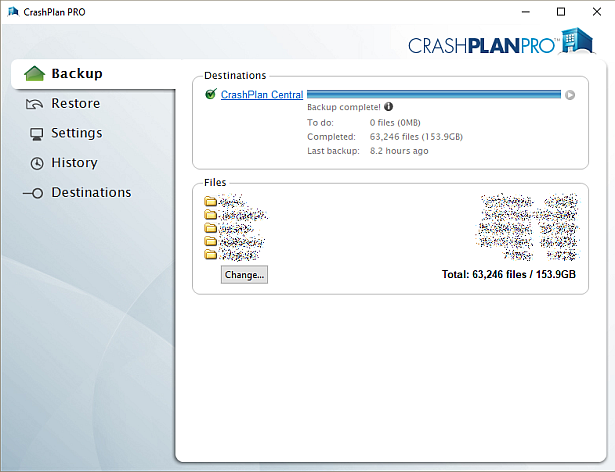
CrashPlan is a Java application which can be difficult to install on a NAS. Way back in January 2012 I decided to simplify it into a Synology package, since I had already created several others. It has been through many versions since that time, as the changelog below shows. Although it used to work on Synology products with ARM and PowerPC CPUs, it unfortunately became Intel-only in October 2016 due to Code 42 Software adding a reliance on some proprietary libraries.
Licence compliance is another challenge – Code 42’s EULA prohibits redistribution. I had to make the Synology package use the regular CrashPlan for Linux download (after the end user agrees to the Code 42 EULA). I then had to write my own script to extract this archive and mimic the Code 42 installer behaviour, but without the interactive prompts of the original.
Synology Package Installation
- In Synology DSM’s Package Center, click Settings and add my package repository:
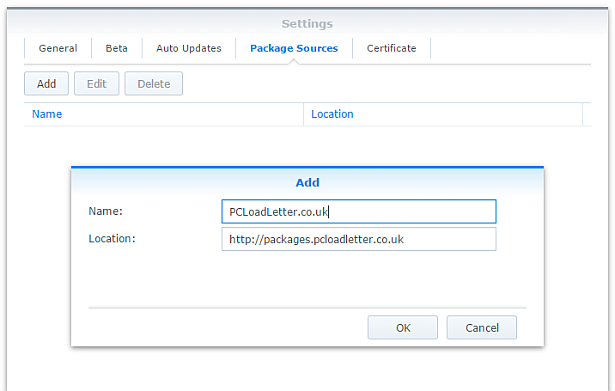
- The repository will push its certificate automatically to the NAS, which is used to validate package integrity. Set the Trust Level to Synology Inc. and trusted publishers:

- Now browse the Community section in Package Center to install CrashPlan:

The repository only displays packages which are compatible with your specific model of NAS. If you don’t see CrashPlan in the list, then either your NAS model or your DSM version are not supported at this time. DSM 5.0 is the minimum supported version for this package, and an Intel CPU is required. - Since CrashPlan is a Java application, it needs a Java Runtime Environment (JRE) to function. It is recommended that you select to have the package install a dedicated Java 8 runtime. For licensing reasons I cannot include Java with this package, so you will need to agree to the licence terms and download it yourself from Oracle’s website. The package expects to find this .tar.gz file in a shared folder called ‘public’. If you go ahead and try to install the package without it, the error message will indicate precisely which Java file you need for your system type, and it will provide a TinyURL link to the appropriate Oracle download page.
- To install CrashPlan PRO you will first need to log into the Admin Console and download the Linux App from the App Download section and also place this in the ‘public’ shared folder on your NAS.
- If you have a multi-bay NAS, use the Shared Folder control panel to create the shared folder called public (it must be all lower case). On single bay models this is created by default. Assign it with Read/Write privileges for everyone.
- If you have trouble getting the Java or CrashPlan PRO app files recognised by this package, try downloading them with Firefox. It seems to be the only web browser that doesn’t try to uncompress the files, or rename them without warning. I also suggest that you leave the Java file and the public folder present once you have installed the package, so that you won’t need to fetch this again to install future updates to the CrashPlan package.
- CrashPlan is installed in headless mode – backup engine only. This will configured by a desktop client, but operates independently of it.
- The first time you start the CrashPlan package you will need to stop it and restart it before you can connect the client. This is because a config file that is only created on first run needs to be edited by one of my scripts. The engine is then configured to listen on all interfaces on the default port 4243.
CrashPlan Client Installation
- Once the CrashPlan engine is running on the NAS, you can manage it by installing CrashPlan on another computer, and by configuring it to connect to the NAS instance of the CrashPlan Engine.
- Make sure that you install the version of the CrashPlan client that matches the version running on the NAS. If the NAS version gets upgraded later, you will need to update your client computer too.
- The Linux CrashPlan PRO client must be downloaded from the Admin Console and placed in the ‘public’ folder on your NAS in order to successfully install the Synology package.
- By default the client is configured to connect to the CrashPlan engine running on the local computer. Run this command on your NAS from an SSH session:
echo `cat /var/lib/crashplan/.ui_info`
Note those are backticks not quotes. This will give you a port number (4243), followed by an authentication token, followed by the IP binding (0.0.0.0 means the server is listening for connections on all interfaces) e.g.:
4243,9ac9b642-ba26-4578-b705-124c6efc920b,0.0.0.0

port,--------------token-----------------,binding
Copy this token value and use this value to replace the token in the equivalent config file on the computer that you would like to run the CrashPlan client on – located here:
C:\ProgramData\CrashPlan\.ui_info (Windows)
“/Library/Application Support/CrashPlan/.ui_info” (Mac OS X installed for all users)
“~/Library/Application Support/CrashPlan/.ui_info” (Mac OS X installed for single user)
/var/lib/crashplan/.ui_info (Linux)
You will not be able to connect the client unless the client token matches on the NAS token. On the client you also need to amend the IP address value after the token to match the Synology NAS IP address.
so using the example above, your computer’s CrashPlan client config file would be edited to:
4243,9ac9b642-ba26-4578-b705-124c6efc920b,192.168.1.100
assuming that the Synology NAS has the IP 192.168.1.100
If it still won’t connect, check that the ServicePort value is set to 4243 in the following files:
C:\ProgramData\CrashPlan\conf\ui_(username).properties (Windows)
“/Library/Application Support/CrashPlan/ui.properties” (Mac OS X installed for all users)
“~/Library/Application Support/CrashPlan/ui.properties” (Mac OS X installed for single user)
/usr/local/crashplan/conf (Linux)
/var/lib/crashplan/.ui_info (Synology) – this value does change spontaneously if there’s a port conflict e.g. you started two versions of the package concurrently (CrashPlan and CrashPlan PRO) - As a result of the nightmarish complexity of recent product changes Code42 has now published a support article with more detail on running headless systems including config file locations on all supported operating systems, and for ‘all users’ versus single user installs etc.
- You should disable the CrashPlan service on your computer if you intend only to use the client. In Windows, open the Services section in Computer Management and stop the CrashPlan Backup Service. In the service Properties set the Startup Type to Manual. You can also disable the CrashPlan System Tray notification application by removing it from Task Manager > More Details > Start-up Tab (Windows 8/Windows 10) or the All Users Startup Start Menu folder (Windows 7).
To accomplish the same on Mac OS X, run the following commands one by one:sudo launchctl unload /Library/LaunchDaemons/com.crashplan.engine.plist sudo mv /Library/LaunchDaemons/com.crashplan.engine.plist /Library/LaunchDaemons/com.crashplan.engine.plist.bak
The CrashPlan menu bar application can be disabled in System Preferences > Users & Groups > Current User > Login Items
Migration from CrashPlan For Home to CrashPlan For Small Business (CrashPlan PRO)
- Leave the regular green branded CrashPlan 4.8.3 Synology package installed.
- Go through the online migration using the link in the email notification you received from Code 42 on 22/08/2017. This seems to trigger the CrashPlan client to begin an update to 4.9 which will fail. It will also migrate your account onto a CrashPlan PRO server. The web page is likely to stall on the Migrating step, but no matter. The process is meant to take you to the store but it seems to be quite flakey. If you see the store page with a $0.00 amount in the basket, this has correctly referred you for the introductory offer. Apparently the $9.99 price thereafter shown on that screen is a mistake and the correct price of $2.50 is shown on a later screen in the process I think. Enter your credit card details and check out if you can. If not, continue.
- Log into the CrashPlan PRO Admin Console as per these instructions, and download the CrashPlan PRO 4.9 client for Linux, and the 4.9 client for your remote console computer. Ignore the red message in the bottom left of the Admin Console about registering, and do not sign up for the free trial. Preferably use Firefox for the Linux version download – most of the other web browsers will try to unpack the .tgz archive, which you do not want to happen.
- Configure the CrashPlan PRO 4.9 client on your computer to connect to your Syno as per the usual instructions on this blog post.
- Put the downloaded Linux CrashPlan PRO 4.9 client .tgz file in the ‘public’ shared folder on your NAS. The package will no longer download this automatically as it did in previous versions.
- From the Community section of DSM Package Center, install the CrashPlan PRO 4.9 package concurrently with your existing CrashPlan 4.8.3 Syno package.
- This will stop the CrashPlan package and automatically import its configuration. Notice that it will also backup your old CrashPlan .identity file and leave it in the ‘public’ shared folder, just in case something goes wrong.
- Start the CrashPlan PRO Synology package, and connect your CrashPlan PRO console from your computer.
- You should see your protected folders as usual. At first mine reported something like “insufficient device licences”, but the next time I started up it changed to “subscription expired”.
- Uninstall the CrashPlan 4.8.3 Synology package, this is no longer required.
- At this point if the store referral didn’t work in the second step, you need to sign into the Admin Console. While signed in, navigate to this link which I was given by Code 42 support. If it works, you should see a store page with some blue font text and a $0.00 basket value. If it didn’t work you will get bounced to the Consumer Next Steps webpage: “Important Changes to CrashPlan for Home” – the one with the video of the CEO explaining the situation. I had to do this a few times before it worked. Once the store referral link worked and I had confirmed my payment details my CrashPlan PRO client immediately started working. Enjoy!
Notes
- The package uses the intact CrashPlan installer directly from Code 42 Software, following acceptance of its EULA. I am complying with the directive that no one redistributes it.
- The engine daemon script checks the amount of system RAM and scales the Java heap size appropriately (up to the default maximum of 512MB). This can be overridden in a persistent way if you are backing up large backup sets by editing /var/packages/CrashPlan/target/syno_package.vars. If you are considering buying a NAS purely to use CrashPlan and intend to back up more than a few hundred GB then I strongly advise buying one of the models with upgradeable RAM. Memory is very limited on the cheaper models. I have found that a 512MB heap was insufficient to back up more than 2TB of files on a Windows server and that was the situation many years ago. It kept restarting the backup engine every few minutes until I increased the heap to 1024MB. Many users of the package have found that they have to increase the heap size or CrashPlan will halt its activity. This can be mitigated by dividing your backup into several smaller backup sets which are scheduled to be protected at different times. Note that from package version 0041, using the dedicated JRE on a 64bit Intel NAS will allow a heap size greater than 4GB since the JRE is 64bit (requires DSM 6.0 in most cases).
- If you need to manage CrashPlan from a remote location, I suggest you do so using SSH tunnelling as per this support document.
- The package supports upgrading to future versions while preserving the machine identity, logs, login details, and cache. Upgrades can now take place without requiring a login from the client afterwards.
- If you remove the package completely and re-install it later, you can re-attach to previous backups. When you log in to the Desktop Client with your existing account after a re-install, you can select “adopt computer” to merge the records, and preserve your existing backups. I haven’t tested whether this also re-attaches links to friends’ CrashPlan computers and backup sets, though the latter does seem possible in the Friends section of the GUI. It’s probably a good idea to test that this survives a package reinstall before you start relying on it. Sometimes, particularly with CrashPlan PRO I think, the adopt option is not offered. In this case you can log into CrashPlan Central and retrieve your computer’s GUID. On the CrashPlan client, double-click on the logo in the top right and you’ll enter a command line mode. You can use the GUID command to change the system’s GUID to the one you just retrieved from your account.
- The log which is displayed in the package’s Log tab is actually the activity history. If you are trying to troubleshoot an issue you will need to use an SSH session to inspect these log files:
/var/packages/CrashPlan/target/log/engine_output.log
/var/packages/CrashPlan/target/log/engine_error.log
/var/packages/CrashPlan/target/log/app.log - When CrashPlan downloads and attempts to run an automatic update, the script will most likely fail and stop the package. This is typically caused by syntax differences with the Synology versions of certain Linux shell commands (like rm, mv, or ps). The startup script will attempt to apply the published upgrade the next time the package is started.
- Although CrashPlan’s activity can be scheduled within the application, in order to save RAM some users may wish to restrict running the CrashPlan engine to specific times of day using the Task Scheduler in DSM Control Panel:
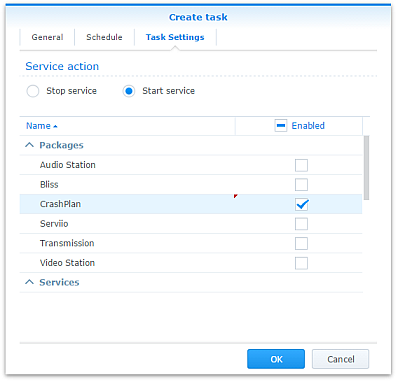
Note that regardless of real-time backup, by default CrashPlan will scan the whole backup selection for changes at 3:00am. Include this time within your Task Scheduler time window or else CrashPlan will not capture file changes which occurred while it was inactive:

- If you decide to sign up for one of CrashPlan’s paid backup services as a result of my work on this, please consider donating using the PayPal button on the right of this page.
Package scripts
For information, here are the package scripts so you can see what it’s going to do. You can get more information about how packages work by reading the Synology 3rd Party Developer Guide.
installer.sh
#!/bin/sh

#--------CRASHPLAN installer script
#--------package maintained at pcloadletter.co.uk


DOWNLOAD_PATH="http://download2.code42.com/installs/linux/install/${SYNOPKG_PKGNAME}"
CP_EXTRACTED_FOLDER="crashplan-install"
OLD_JNA_NEEDED="false"
[ "${SYNOPKG_PKGNAME}" == "CrashPlan" ] && DOWNLOAD_FILE="CrashPlan_4.8.3_Linux.tgz"
[ "${SYNOPKG_PKGNAME}" == "CrashPlanPRO" ] && DOWNLOAD_FILE="CrashPlanPRO_4.*_Linux.tgz"
if [ "${SYNOPKG_PKGNAME}" == "CrashPlanPROe" ]; then
  CP_EXTRACTED_FOLDER="${SYNOPKG_PKGNAME}-install"
  OLD_JNA_NEEDED="true"
  [ "${WIZARD_VER_483}" == "true" ] && { CPPROE_VER="4.8.3"; CP_EXTRACTED_FOLDER="crashplan-install"; OLD_JNA_NEEDED="false"; }
  [ "${WIZARD_VER_480}" == "true" ] && { CPPROE_VER="4.8.0"; CP_EXTRACTED_FOLDER="crashplan-install"; OLD_JNA_NEEDED="false"; }
  [ "${WIZARD_VER_470}" == "true" ] && { CPPROE_VER="4.7.0"; CP_EXTRACTED_FOLDER="crashplan-install"; OLD_JNA_NEEDED="false"; }
  [ "${WIZARD_VER_460}" == "true" ] && { CPPROE_VER="4.6.0"; CP_EXTRACTED_FOLDER="crashplan-install"; OLD_JNA_NEEDED="false"; }
  [ "${WIZARD_VER_452}" == "true" ] && { CPPROE_VER="4.5.2"; CP_EXTRACTED_FOLDER="crashplan-install"; OLD_JNA_NEEDED="false"; }
  [ "${WIZARD_VER_450}" == "true" ] && { CPPROE_VER="4.5.0"; CP_EXTRACTED_FOLDER="crashplan-install"; OLD_JNA_NEEDED="false"; }
  [ "${WIZARD_VER_441}" == "true" ] && { CPPROE_VER="4.4.1"; CP_EXTRACTED_FOLDER="crashplan-install"; OLD_JNA_NEEDED="false"; }
  [ "${WIZARD_VER_430}" == "true" ] && CPPROE_VER="4.3.0"
  [ "${WIZARD_VER_420}" == "true" ] && CPPROE_VER="4.2.0"
  [ "${WIZARD_VER_370}" == "true" ] && CPPROE_VER="3.7.0"
  [ "${WIZARD_VER_364}" == "true" ] && CPPROE_VER="3.6.4"
  [ "${WIZARD_VER_363}" == "true" ] && CPPROE_VER="3.6.3"
  [ "${WIZARD_VER_3614}" == "true" ] && CPPROE_VER="3.6.1.4"
  [ "${WIZARD_VER_353}" == "true" ] && CPPROE_VER="3.5.3"
  [ "${WIZARD_VER_341}" == "true" ] && CPPROE_VER="3.4.1"
  [ "${WIZARD_VER_33}" == "true" ] && CPPROE_VER="3.3"
  DOWNLOAD_FILE="CrashPlanPROe_${CPPROE_VER}_Linux.tgz"
fi
DOWNLOAD_URL="${DOWNLOAD_PATH}/${DOWNLOAD_FILE}"
CPI_FILE="${SYNOPKG_PKGNAME}_*.cpi"
OPTDIR="${SYNOPKG_PKGDEST}"
VARS_FILE="${OPTDIR}/install.vars"
SYNO_CPU_ARCH="`uname -m`"
[ "${SYNO_CPU_ARCH}" == "x86_64" ] && SYNO_CPU_ARCH="i686"
[ "${SYNO_CPU_ARCH}" == "armv5tel" ] && SYNO_CPU_ARCH="armel"
[ "${SYNOPKG_DSM_ARCH}" == "armada375" ] && SYNO_CPU_ARCH="armv7l"
[ "${SYNOPKG_DSM_ARCH}" == "armada38x" ] && SYNO_CPU_ARCH="armhf"
[ "${SYNOPKG_DSM_ARCH}" == "comcerto2k" ] && SYNO_CPU_ARCH="armhf"
[ "${SYNOPKG_DSM_ARCH}" == "alpine" ] && SYNO_CPU_ARCH="armhf"
[ "${SYNOPKG_DSM_ARCH}" == "alpine4k" ] && SYNO_CPU_ARCH="armhf"
[ "${SYNOPKG_DSM_ARCH}" == "monaco" ] && SYNO_CPU_ARCH="armhf"
[ "${SYNOPKG_DSM_ARCH}" == "rtd1296" ] && SYNO_CPU_ARCH="armhf"
NATIVE_BINS_URL="http://packages.pcloadletter.co.uk/downloads/crashplan-native-${SYNO_CPU_ARCH}.tar.xz"
NATIVE_BINS_FILE="`echo ${NATIVE_BINS_URL} | sed -r "s%^.*/(.*)%\1%"`"
OLD_JNA_URL="http://packages.pcloadletter.co.uk/downloads/crashplan-native-old-${SYNO_CPU_ARCH}.tar.xz"
OLD_JNA_FILE="`echo ${OLD_JNA_URL} | sed -r "s%^.*/(.*)%\1%"`"
INSTALL_FILES="${DOWNLOAD_URL} ${NATIVE_BINS_URL}"
[ "${OLD_JNA_NEEDED}" == "true" ] && INSTALL_FILES="${INSTALL_FILES} ${OLD_JNA_URL}"
TEMP_FOLDER="`find / -maxdepth 2 -path '/volume?/@tmp' | head -n 1`"
#the Manifest folder is where friends' backup data is stored
#we set it outside the app folder so it persists after a package uninstall
MANIFEST_FOLDER="/`echo $TEMP_FOLDER | cut -f2 -d'/'`/crashplan"
LOG_FILE="${SYNOPKG_PKGDEST}/log/history.log.0"
UPGRADE_FILES="syno_package.vars conf/my.service.xml conf/service.login conf/service.model"
UPGRADE_FOLDERS="log cache"
PUBLIC_FOLDER="`synoshare --get public | sed -r "/Path/!d;s/^.*\[(.*)\].*$/\1/"`"
#dedicated JRE section
if [ "${WIZARD_JRE_CP}" == "true" ]; then
  DOWNLOAD_URL="http://tinyurl.com/javaembed"
  EXTRACTED_FOLDER="ejdk1.8.0_151"
  #detect systems capable of running 64bit JRE which can address more than 4GB of RAM
  [ "${SYNOPKG_DSM_ARCH}" == "x64" ] && SYNO_CPU_ARCH="x64"
  [ "`uname -m`" == "x86_64" ] && [ ${SYNOPKG_DSM_VERSION_MAJOR} -ge 6 ] && SYNO_CPU_ARCH="x64"
  if [ "${SYNO_CPU_ARCH}" == "armel" ]; then
    JAVA_BINARY="ejdk-8u151-linux-arm-sflt.tar.gz"
    JAVA_BUILD="ARMv5/ARMv6/ARMv7 Linux - SoftFP ABI, Little Endian 2"
  elif [ "${SYNO_CPU_ARCH}" == "armv7l" ]; then
    JAVA_BINARY="ejdk-8u151-linux-arm-sflt.tar.gz"
    JAVA_BUILD="ARMv5/ARMv6/ARMv7 Linux - SoftFP ABI, Little Endian 2"
  elif [ "${SYNO_CPU_ARCH}" == "armhf" ]; then
    JAVA_BINARY="ejdk-8u151-linux-armv6-vfp-hflt.tar.gz"
    JAVA_BUILD="ARMv6/ARMv7 Linux - VFP, HardFP ABI, Little Endian 1"
  elif [ "${SYNO_CPU_ARCH}" == "ppc" ]; then
    #Oracle have discontinued Java 8 for PowerPC after update 6
    JAVA_BINARY="ejdk-8u6-fcs-b23-linux-ppc-e500v2-12_jun_2014.tar.gz"
    JAVA_BUILD="Power Architecture Linux - Headless - e500v2 with double-precision SPE Floating Point Unit"
    EXTRACTED_FOLDER="ejdk1.8.0_06"
    DOWNLOAD_URL="http://tinyurl.com/java8ppc"
  elif [ "${SYNO_CPU_ARCH}" == "i686" ]; then
    JAVA_BINARY="ejdk-8u151-linux-i586.tar.gz"
    JAVA_BUILD="x86 Linux Small Footprint - Headless"
  elif [ "${SYNO_CPU_ARCH}" == "x64" ]; then
    JAVA_BINARY="jre-8u151-linux-x64.tar.gz"
    JAVA_BUILD="Linux x64"
    EXTRACTED_FOLDER="jre1.8.0_151"
    DOWNLOAD_URL="http://tinyurl.com/java8x64"
  fi
fi
JAVA_BINARY=`echo ${JAVA_BINARY} | cut -f1 -d'.'`
source /etc/profile


pre_checks ()
{
  #These checks are called from preinst and from preupgrade functions to prevent failures resulting in a partially upgraded package
  if [ "${WIZARD_JRE_CP}" == "true" ]; then
    synoshare -get public > /dev/null || (
      echo "A shared folder called 'public' could not be found - note this name is case-sensitive. " >> $SYNOPKG_TEMP_LOGFILE
      echo "Please create this using the Shared Folder DSM Control Panel and try again." >> $SYNOPKG_TEMP_LOGFILE
      exit 1
    )

    JAVA_BINARY_FOUND=
    [ -f ${PUBLIC_FOLDER}/${JAVA_BINARY}.tar.gz ] && JAVA_BINARY_FOUND=true
    [ -f ${PUBLIC_FOLDER}/${JAVA_BINARY}.tar ] && JAVA_BINARY_FOUND=true
    [ -f ${PUBLIC_FOLDER}/${JAVA_BINARY}.tar.tar ] && JAVA_BINARY_FOUND=true
    [ -f ${PUBLIC_FOLDER}/${JAVA_BINARY}.gz ] && JAVA_BINARY_FOUND=true

    if [ -z ${JAVA_BINARY_FOUND} ]; then
      echo "Java binary bundle not found. " >> $SYNOPKG_TEMP_LOGFILE
      echo "I was expecting the file ${PUBLIC_FOLDER}/${JAVA_BINARY}.tar.gz. " >> $SYNOPKG_TEMP_LOGFILE
      echo "Please agree to the Oracle licence at ${DOWNLOAD_URL}, then download the '${JAVA_BUILD}' package" >> $SYNOPKG_TEMP_LOGFILE
      echo "and place it in the 'public' shared folder on your NAS. This download cannot be automated even if " >> $SYNOPKG_TEMP_LOGFILE
      echo "displaying a package EULA could potentially cover the legal aspect, because files hosted on Oracle's " >> $SYNOPKG_TEMP_LOGFILE
      echo "server are protected by a session cookie requiring a JavaScript enabled browser." >> $SYNOPKG_TEMP_LOGFILE
      exit 1
    fi
  else
    if [ -z ${JAVA_HOME} ]; then
      echo "Java is not installed or not properly configured. JAVA_HOME is not defined. " >> $SYNOPKG_TEMP_LOGFILE
      echo "Download and install the Java Synology package from http://wp.me/pVshC-z5" >> $SYNOPKG_TEMP_LOGFILE
      exit 1
    fi

    if [ ! -f ${JAVA_HOME}/bin/java ]; then
      echo "Java is not installed or not properly configured. The Java binary could not be located. " >> $SYNOPKG_TEMP_LOGFILE
      echo "Download and install the Java Synology package from http://wp.me/pVshC-z5" >> $SYNOPKG_TEMP_LOGFILE
      exit 1
    fi

    if [ "${WIZARD_JRE_SYS}" == "true" ]; then
      JAVA_VER=`java -version 2>&1 | sed -r "/^.* version/!d;s/^.* version \"[0-9]\.([0-9]).*$/\1/"`
      if [ ${JAVA_VER} -lt 8 ]; then
        echo "This version of CrashPlan requires Java 8 or newer. Please update your Java package. "
        exit 1
      fi
    fi
  fi
}


preinst ()
{
  pre_checks
  cd ${TEMP_FOLDER}
  for WGET_URL in ${INSTALL_FILES}
  do
    WGET_FILENAME="`echo ${WGET_URL} | sed -r "s%^.*/(.*)%\1%"`"
    [ -f ${TEMP_FOLDER}/${WGET_FILENAME} ] && rm ${TEMP_FOLDER}/${WGET_FILENAME}
    wget ${WGET_URL}
    if [[ $? != 0 ]]; then
      if [ -d ${PUBLIC_FOLDER} ] && [ -f ${PUBLIC_FOLDER}/${WGET_FILENAME} ]; then
        cp ${PUBLIC_FOLDER}/${WGET_FILENAME} ${TEMP_FOLDER}
      else
        echo "There was a problem downloading ${WGET_FILENAME} from the official download link, " >> $SYNOPKG_TEMP_LOGFILE
        echo "which was \"${WGET_URL}\" " >> $SYNOPKG_TEMP_LOGFILE
        echo "Alternatively, you may download this file manually and place it in the 'public' shared folder. " >> $SYNOPKG_TEMP_LOGFILE
        exit 1
      fi
    fi
  done

  exit 0
}


postinst ()
{
  if [ "${WIZARD_JRE_CP}" == "true" ]; then
    #extract Java (Web browsers love to interfere with .tar.gz files)
    cd ${PUBLIC_FOLDER}
    if [ -f ${JAVA_BINARY}.tar.gz ]; then
      #Firefox seems to be the only browser that leaves it alone
      tar xzf ${JAVA_BINARY}.tar.gz
    elif [ -f ${JAVA_BINARY}.gz ]; then
      #Chrome
      tar xzf ${JAVA_BINARY}.gz
    elif [ -f ${JAVA_BINARY}.tar ]; then
      #Safari
      tar xf ${JAVA_BINARY}.tar
    elif [ -f ${JAVA_BINARY}.tar.tar ]; then
      #Internet Explorer
      tar xzf ${JAVA_BINARY}.tar.tar
    fi
    mv ${EXTRACTED_FOLDER} ${SYNOPKG_PKGDEST}/jre-syno
    JRE_PATH="`find ${OPTDIR}/jre-syno/ -name jre`"
    [ -z ${JRE_PATH} ] && JRE_PATH=${OPTDIR}/jre-syno
    #change owner of folder tree
    chown -R root:root ${SYNOPKG_PKGDEST}
  fi

  #extract CPU-specific additional binaries
  mkdir ${SYNOPKG_PKGDEST}/bin
  cd ${SYNOPKG_PKGDEST}/bin
  tar xJf ${TEMP_FOLDER}/${NATIVE_BINS_FILE} && rm ${TEMP_FOLDER}/${NATIVE_BINS_FILE}
  [ "${OLD_JNA_NEEDED}" == "true" ] && tar xJf ${TEMP_FOLDER}/${OLD_JNA_FILE} && rm ${TEMP_FOLDER}/${OLD_JNA_FILE}

  #extract main archive
  cd ${TEMP_FOLDER}
  tar xzf ${TEMP_FOLDER}/${DOWNLOAD_FILE} && rm ${TEMP_FOLDER}/${DOWNLOAD_FILE}

  #extract cpio archive
  cd ${SYNOPKG_PKGDEST}
  cat "${TEMP_FOLDER}/${CP_EXTRACTED_FOLDER}"/${CPI_FILE} | gzip -d -c - | ${SYNOPKG_PKGDEST}/bin/cpio -i --no-preserve-owner

  echo "#uncomment to expand Java max heap size beyond prescribed value (will survive upgrades)" > ${SYNOPKG_PKGDEST}/syno_package.vars
  echo "#you probably only want more than the recommended 1024M if you're backing up extremely large volumes of files" >> ${SYNOPKG_PKGDEST}/syno_package.vars
  echo "#USR_MAX_HEAP=1024M" >> ${SYNOPKG_PKGDEST}/syno_package.vars
  echo >> ${SYNOPKG_PKGDEST}/syno_package.vars

  cp ${TEMP_FOLDER}/${CP_EXTRACTED_FOLDER}/scripts/CrashPlanEngine ${OPTDIR}/bin
  cp ${TEMP_FOLDER}/${CP_EXTRACTED_FOLDER}/scripts/run.conf ${OPTDIR}/bin
  mkdir -p ${MANIFEST_FOLDER}/backupArchives

  #save install variables which Crashplan expects its own installer script to create
  echo TARGETDIR=${SYNOPKG_PKGDEST} > ${VARS_FILE}
  echo BINSDIR=/bin >> ${VARS_FILE}
  echo MANIFESTDIR=${MANIFEST_FOLDER}/backupArchives >> ${VARS_FILE}
  #leave these ones out which should help upgrades from Code42 to work (based on examining an upgrade script)
  #echo INITDIR=/etc/init.d >> ${VARS_FILE}
  #echo RUNLVLDIR=/usr/syno/etc/rc.d >> ${VARS_FILE}
  echo INSTALLDATE=`date +%Y%m%d` >> ${VARS_FILE}
  [ "${WIZARD_JRE_CP}" == "true" ] && echo JAVACOMMON=${JRE_PATH}/bin/java >> ${VARS_FILE}
  [ "${WIZARD_JRE_SYS}" == "true" ] && echo JAVACOMMON=\${JAVA_HOME}/bin/java >> ${VARS_FILE}
  cat ${TEMP_FOLDER}/${CP_EXTRACTED_FOLDER}/install.defaults >> ${VARS_FILE}

  #remove temp files
  rm -r ${TEMP_FOLDER}/${CP_EXTRACTED_FOLDER}

  #add firewall config
  /usr/syno/bin/servicetool --install-configure-file --package /var/packages/${SYNOPKG_PKGNAME}/scripts/${SYNOPKG_PKGNAME}.sc > /dev/null

  #amend CrashPlanPROe client version
  [ "${SYNOPKG_PKGNAME}" == "CrashPlanPROe" ] && sed -i -r "s/^version=\".*(-.*$)/version=\"${CPPROE_VER}\1/" /var/packages/${SYNOPKG_PKGNAME}/INFO

  #are we transitioning an existing CrashPlan account to CrashPlan For Small Business?
  if [ "${SYNOPKG_PKGNAME}" == "CrashPlanPRO" ]; then
    if [ -e /var/packages/CrashPlan/scripts/start-stop-status ]; then
      /var/packages/CrashPlan/scripts/start-stop-status stop
      cp /var/lib/crashplan/.identity ${PUBLIC_FOLDER}/crashplan-identity.bak
      cp -R /var/packages/CrashPlan/target/conf/ ${OPTDIR}/
    fi
  fi

  exit 0
}


preuninst ()
{
  `dirname $0`/stop-start-status stop

  exit 0
}


postuninst ()
{
  if [ -f ${SYNOPKG_PKGDEST}/syno_package.vars ]; then
    source ${SYNOPKG_PKGDEST}/syno_package.vars
  fi
  [ -e ${OPTDIR}/lib/libffi.so.5 ] && rm ${OPTDIR}/lib/libffi.so.5

  #delete symlink if it no longer resolves - PowerPC only
  if [ ! -e /lib/libffi.so.5 ]; then
    [ -L /lib/libffi.so.5 ] && rm /lib/libffi.so.5
  fi

  #remove firewall config
  if [ "${SYNOPKG_PKG_STATUS}" == "UNINSTALL" ]; then
    /usr/syno/bin/servicetool --remove-configure-file --package ${SYNOPKG_PKGNAME}.sc > /dev/null
  fi

 exit 0
}


preupgrade ()
{
  `dirname $0`/stop-start-status stop
  pre_checks
  #if identity exists back up config
  if [ -f /var/lib/crashplan/.identity ]; then
    mkdir -p ${SYNOPKG_PKGDEST}/../${SYNOPKG_PKGNAME}_data_mig/conf
    for FILE_TO_MIGRATE in ${UPGRADE_FILES}; do
      if [ -f ${OPTDIR}/${FILE_TO_MIGRATE} ]; then
        cp ${OPTDIR}/${FILE_TO_MIGRATE} ${SYNOPKG_PKGDEST}/../${SYNOPKG_PKGNAME}_data_mig/${FILE_TO_MIGRATE}
      fi
    done
    for FOLDER_TO_MIGRATE in ${UPGRADE_FOLDERS}; do
      if [ -d ${OPTDIR}/${FOLDER_TO_MIGRATE} ]; then
        mv ${OPTDIR}/${FOLDER_TO_MIGRATE} ${SYNOPKG_PKGDEST}/../${SYNOPKG_PKGNAME}_data_mig
      fi
    done
  fi

  exit 0
}


postupgrade ()
{
  #use the migrated identity and config data from the previous version
  if [ -f ${SYNOPKG_PKGDEST}/../${SYNOPKG_PKGNAME}_data_mig/conf/my.service.xml ]; then
    for FILE_TO_MIGRATE in ${UPGRADE_FILES}; do
      if [ -f ${SYNOPKG_PKGDEST}/../${SYNOPKG_PKGNAME}_data_mig/${FILE_TO_MIGRATE} ]; then
        mv ${SYNOPKG_PKGDEST}/../${SYNOPKG_PKGNAME}_data_mig/${FILE_TO_MIGRATE} ${OPTDIR}/${FILE_TO_MIGRATE}
      fi
    done
    for FOLDER_TO_MIGRATE in ${UPGRADE_FOLDERS}; do
    if [ -d ${SYNOPKG_PKGDEST}/../${SYNOPKG_PKGNAME}_data_mig/${FOLDER_TO_MIGRATE} ]; then
      mv ${SYNOPKG_PKGDEST}/../${SYNOPKG_PKGNAME}_data_mig/${FOLDER_TO_MIGRATE} ${OPTDIR}
    fi
    done
    rmdir ${SYNOPKG_PKGDEST}/../${SYNOPKG_PKGNAME}_data_mig/conf
    rmdir ${SYNOPKG_PKGDEST}/../${SYNOPKG_PKGNAME}_data_mig

    #make CrashPlan log entry
    TIMESTAMP="`date "+%D %I:%M%p"`"
    echo "I ${TIMESTAMP} Synology Package Center updated ${SYNOPKG_PKGNAME} to version ${SYNOPKG_PKGVER}" >> ${LOG_FILE}
  fi

  exit 0
}
start-stop-status.sh
#!/bin/sh

#--------CRASHPLAN start-stop-status script
#--------package maintained at pcloadletter.co.uk


TEMP_FOLDER="`find / -maxdepth 2 -path '/volume?/@tmp' | head -n 1`"
MANIFEST_FOLDER="/`echo $TEMP_FOLDER | cut -f2 -d'/'`/crashplan"
ENGINE_CFG="run.conf"
PKG_FOLDER="`dirname $0 | cut -f1-4 -d'/'`"
DNAME="`dirname $0 | cut -f4 -d'/'`"
OPTDIR="${PKG_FOLDER}/target"
PID_FILE="${OPTDIR}/${DNAME}.pid"
DLOG="${OPTDIR}/log/history.log.0"
CFG_PARAM="SRV_JAVA_OPTS"
JAVA_MIN_HEAP=`grep "^${CFG_PARAM}=" "${OPTDIR}/bin/${ENGINE_CFG}" | sed -r "s/^.*-Xms([0-9]+)[Mm] .*$/\1/"`
SYNO_CPU_ARCH="`uname -m`"
TIMESTAMP="`date "+%D %I:%M%p"`"
FULL_CP="${OPTDIR}/lib/com.backup42.desktop.jar:${OPTDIR}/lang"
source ${OPTDIR}/install.vars
source /etc/profile
source /root/.profile


start_daemon ()
{
  #check persistent variables from syno_package.vars
  USR_MAX_HEAP=0
  if [ -f ${OPTDIR}/syno_package.vars ]; then
    source ${OPTDIR}/syno_package.vars
  fi
  USR_MAX_HEAP=`echo $USR_MAX_HEAP | sed -e "s/[mM]//"`

  #do we need to restore the identity file - has a DSM upgrade scrubbed /var/lib/crashplan?
  if [ ! -e /var/lib/crashplan ]; then
    mkdir /var/lib/crashplan
    [ -e ${OPTDIR}/conf/var-backup/.identity ] && cp ${OPTDIR}/conf/var-backup/.identity /var/lib/crashplan/
  fi

  #fix up some of the binary paths and fix some command syntax for busybox
  #moved this to start-stop-status.sh from installer.sh because Code42 push updates and these
  #new scripts will need this treatment too
  find ${OPTDIR}/ -name "*.sh" | while IFS="" read -r FILE_TO_EDIT; do
    if [ -e ${FILE_TO_EDIT} ]; then
      #this list of substitutions will probably need expanding as new CrashPlan updates are released
      sed -i "s%^#!/bin/bash%#!$/bin/sh%" "${FILE_TO_EDIT}"
      sed -i -r "s%(^\s*)(/bin/cpio |cpio ) %\1/${OPTDIR}/bin/cpio %" "${FILE_TO_EDIT}"
      sed -i -r "s%(^\s*)(/bin/ps|ps) [^w][^\|]*\|%\1/bin/ps w \|%" "${FILE_TO_EDIT}"
      sed -i -r "s%\`ps [^w][^\|]*\|%\`ps w \|%" "${FILE_TO_EDIT}"
      sed -i -r "s%^ps [^w][^\|]*\|%ps w \|%" "${FILE_TO_EDIT}"
      sed -i "s/rm -fv/rm -f/" "${FILE_TO_EDIT}"
      sed -i "s/mv -fv/mv -f/" "${FILE_TO_EDIT}"
    fi
  done

  #use this daemon init script rather than the unreliable Code42 stock one which greps the ps output
  sed -i "s%^ENGINE_SCRIPT=.*$%ENGINE_SCRIPT=$0%" ${OPTDIR}/bin/restartLinux.sh

  #any downloaded upgrade script will usually have failed despite the above changes
  #so ignore the script and explicitly extract the new java code using the chrisnelson.ca method
  #thanks to Jeff Bingham for tweaks
  UPGRADE_JAR=`find ${OPTDIR}/upgrade -maxdepth 1 -name "*.jar" | tail -1`
  if [ -n "${UPGRADE_JAR}" ]; then
    rm ${OPTDIR}/*.pid > /dev/null

    #make CrashPlan log entry
    echo "I ${TIMESTAMP} Synology extracting upgrade from ${UPGRADE_JAR}" >> ${DLOG}

    UPGRADE_VER=`echo ${SCRIPT_HOME} | sed -r "s/^.*\/([0-9_]+)\.[0-9]+/\1/"`
    #DSM 6.0 no longer includes unzip, use 7z instead
    unzip -o ${OPTDIR}/upgrade/${UPGRADE_VER}.jar "*.jar" -d ${OPTDIR}/lib/ || 7z e -y ${OPTDIR}/upgrade/${UPGRADE_VER}.jar "*.jar" -o${OPTDIR}/lib/ > /dev/null
    unzip -o ${OPTDIR}/upgrade/${UPGRADE_VER}.jar "lang/*" -d ${OPTDIR} || 7z e -y ${OPTDIR}/upgrade/${UPGRADE_VER}.jar "lang/*" -o${OPTDIR} > /dev/null
    mv ${UPGRADE_JAR} ${TEMP_FOLDER}/ > /dev/null
    exec $0
  fi

  #updates may also overwrite our native binaries
  [ -e ${OPTDIR}/bin/libffi.so.5 ] && cp -f ${OPTDIR}/bin/libffi.so.5 ${OPTDIR}/lib/
  [ -e ${OPTDIR}/bin/libjtux.so ] && cp -f ${OPTDIR}/bin/libjtux.so ${OPTDIR}/
  [ -e ${OPTDIR}/bin/jna-3.2.5.jar ] && cp -f ${OPTDIR}/bin/jna-3.2.5.jar ${OPTDIR}/lib/
  if [ -e ${OPTDIR}/bin/jna.jar ] && [ -e ${OPTDIR}/lib/jna.jar ]; then
    cp -f ${OPTDIR}/bin/jna.jar ${OPTDIR}/lib/
  fi

  #create or repair libffi.so.5 symlink if a DSM upgrade has removed it - PowerPC only
  if [ -e ${OPTDIR}/lib/libffi.so.5 ]; then
    if [ ! -e /lib/libffi.so.5 ]; then
      #if it doesn't exist, but is still a link then it's a broken link and should be deleted first
      [ -L /lib/libffi.so.5 ] && rm /lib/libffi.so.5
      ln -s ${OPTDIR}/lib/libffi.so.5 /lib/libffi.so.5
    fi
  fi

  #set appropriate Java max heap size
  RAM=$((`free | grep Mem: | sed -e "s/^ *Mem: *\([0-9]*\).*$/\1/"`/1024))
  if [ $RAM -le 128 ]; then
    JAVA_MAX_HEAP=80
  elif [ $RAM -le 256 ]; then
    JAVA_MAX_HEAP=192
  elif [ $RAM -le 512 ]; then
    JAVA_MAX_HEAP=384
  elif [ $RAM -le 1024 ]; then
    JAVA_MAX_HEAP=512
  elif [ $RAM -gt 1024 ]; then
    JAVA_MAX_HEAP=1024
  fi
  if [ $USR_MAX_HEAP -gt $JAVA_MAX_HEAP ]; then
    JAVA_MAX_HEAP=${USR_MAX_HEAP}
  fi
  if [ $JAVA_MAX_HEAP -lt $JAVA_MIN_HEAP ]; then
    #can't have a max heap lower than min heap (ARM low RAM systems)
    $JAVA_MAX_HEAP=$JAVA_MIN_HEAP
  fi
  sed -i -r "s/(^${CFG_PARAM}=.*) -Xmx[0-9]+[mM] (.*$)/\1 -Xmx${JAVA_MAX_HEAP}m \2/" "${OPTDIR}/bin/${ENGINE_CFG}"

  #disable the use of the x86-optimized external Fast MD5 library if running on ARM and PPC CPUs
  #seems to be the default behaviour now but that may change again
  [ "${SYNO_CPU_ARCH}" == "x86_64" ] && SYNO_CPU_ARCH="i686"
  if [ "${SYNO_CPU_ARCH}" != "i686" ]; then
    grep "^${CFG_PARAM}=.*c42\.native\.md5\.enabled" "${OPTDIR}/bin/${ENGINE_CFG}" > /dev/null \
     || sed -i -r "s/(^${CFG_PARAM}=\".*)\"$/\1 -Dc42.native.md5.enabled=false\"/" "${OPTDIR}/bin/${ENGINE_CFG}"
  fi

  #move the Java temp directory from the default of /tmp
  grep "^${CFG_PARAM}=.*Djava\.io\.tmpdir" "${OPTDIR}/bin/${ENGINE_CFG}" > /dev/null \
   || sed -i -r "s%(^${CFG_PARAM}=\".*)\"$%\1 -Djava.io.tmpdir=${TEMP_FOLDER}\"%" "${OPTDIR}/bin/${ENGINE_CFG}"

  #now edit the XML config file, which only exists after first run
  if [ -f ${OPTDIR}/conf/my.service.xml ]; then

    #allow direct connections from CrashPlan Desktop client on remote systems
    #you must edit the value of serviceHost in conf/ui.properties on the client you connect with
    #users report that this value is sometimes reset so now it's set every service startup
    sed -i "s/<serviceHost>127\.0\.0\.1<\/serviceHost>/<serviceHost>0\.0\.0\.0<\/serviceHost>/" "${OPTDIR}/conf/my.service.xml"
    #default changed in CrashPlan 4.3
    sed -i "s/<serviceHost>localhost<\/serviceHost>/<serviceHost>0\.0\.0\.0<\/serviceHost>/" "${OPTDIR}/conf/my.service.xml"
    #since CrashPlan 4.4 another config file to allow remote console connections
    sed -i "s/127\.0\.0\.1/0\.0\.0\.0/" /var/lib/crashplan/.ui_info

    #this change is made only once in case you want to customize the friends' backup location
    if [ "${MANIFEST_PATH_SET}" != "True" ]; then

      #keep friends' backup data outside the application folder to make accidental deletion less likely
      sed -i "s%<manifestPath>.*</manifestPath>%<manifestPath>${MANIFEST_FOLDER}/backupArchives/</manifestPath>%" "${OPTDIR}/conf/my.service.xml"
      echo "MANIFEST_PATH_SET=True" >> ${OPTDIR}/syno_package.vars
    fi

    #since CrashPlan version 3.5.3 the value javaMemoryHeapMax also needs setting to match that used in bin/run.conf
    sed -i -r "s%(<javaMemoryHeapMax>)[0-9]+[mM](</javaMemoryHeapMax>)%\1${JAVA_MAX_HEAP}m\2%" "${OPTDIR}/conf/my.service.xml"

    #make sure CrashPlan is not binding to the IPv6 stack
    grep "\-Djava\.net\.preferIPv4Stack=true" "${OPTDIR}/bin/${ENGINE_CFG}" > /dev/null \
     || sed -i -r "s/(^${CFG_PARAM}=\".*)\"$/\1 -Djava.net.preferIPv4Stack=true\"/" "${OPTDIR}/bin/${ENGINE_CFG}"
   else
    echo "Check the package log to ensure the package has started successfully, then stop and restart the package to allow desktop client connections." > "${SYNOPKG_TEMP_LOGFILE}"
  fi

  #increase the system-wide maximum number of open files from Synology default of 24466
  [ `cat /proc/sys/fs/file-max` -lt 65536 ] && echo "65536" > /proc/sys/fs/file-max

  #raise the maximum open file count from the Synology default of 1024 - thanks Casper K. for figuring this out
  #http://support.code42.com/Administrator/3.6_And_4.0/Troubleshooting/Too_Many_Open_Files
  ulimit -n 65536

  #ensure that Code 42 have not amended install.vars to force the use of their own (Intel) JRE
  if [ -e ${OPTDIR}/jre-syno ]; then
    JRE_PATH="`find ${OPTDIR}/jre-syno/ -name jre`"
    [ -z ${JRE_PATH} ] && JRE_PATH=${OPTDIR}/jre-syno
    sed -i -r "s|^(JAVACOMMON=).*$|\1\${JRE_PATH}/bin/java|" ${OPTDIR}/install.vars

    #if missing, set timezone and locale for dedicated JRE
    if [ -z ${TZ} ]; then
      SYNO_TZ=`cat /etc/synoinfo.conf | grep timezone | cut -f2 -d'"'`
      #fix for DST time in DSM 5.2 thanks to MinimServer Syno package author
      [ -e /usr/share/zoneinfo/Timezone/synotztable.json ] \
       && SYNO_TZ=`jq ".${SYNO_TZ} | .nameInTZDB" /usr/share/zoneinfo/Timezone/synotztable.json | sed -e "s/\"//g"` \
       || SYNO_TZ=`grep "^${SYNO_TZ}" /usr/share/zoneinfo/Timezone/tzname | sed -e "s/^.*= //"`
      export TZ=${SYNO_TZ}
    fi
    [ -z ${LANG} ] && export LANG=en_US.utf8
    export CLASSPATH=.:${OPTDIR}/jre-syno/lib

  else
    sed -i -r "s|^(JAVACOMMON=).*$|\1\${JAVA_HOME}/bin/java|" ${OPTDIR}/install.vars
  fi

  source ${OPTDIR}/bin/run.conf
  source ${OPTDIR}/install.vars
  cd ${OPTDIR}
  $JAVACOMMON $SRV_JAVA_OPTS -classpath $FULL_CP com.backup42.service.CPService > ${OPTDIR}/log/engine_output.log 2> ${OPTDIR}/log/engine_error.log &
  if [ $! -gt 0 ]; then
    echo $! > $PID_FILE
    renice 19 $! > /dev/null
    if [ -z "${SYNOPKG_PKGDEST}" ]; then
      #script was manually invoked, need this to show status change in Package Center
      [ -e ${PKG_FOLDER}/enabled ] || touch ${PKG_FOLDER}/enabled
    fi
  else
    echo "${DNAME} failed to start, check ${OPTDIR}/log/engine_error.log" > "${SYNOPKG_TEMP_LOGFILE}"
    echo "${DNAME} failed to start, check ${OPTDIR}/log/engine_error.log" >&2
    exit 1
  fi
}

stop_daemon ()
{
  echo "I ${TIMESTAMP} Stopping ${DNAME}" >> ${DLOG}
  kill `cat ${PID_FILE}`
  wait_for_status 1 20 || kill -9 `cat ${PID_FILE}`
  rm -f ${PID_FILE}
  if [ -z ${SYNOPKG_PKGDEST} ]; then
    #script was manually invoked, need this to show status change in Package Center
    [ -e ${PKG_FOLDER}/enabled ] && rm ${PKG_FOLDER}/enabled
  fi
  #backup identity file in case DSM upgrade removes it
  [ -e ${OPTDIR}/conf/var-backup ] || mkdir ${OPTDIR}/conf/var-backup
  cp /var/lib/crashplan/.identity ${OPTDIR}/conf/var-backup/
}

daemon_status ()
{
  if [ -f ${PID_FILE} ] && kill -0 `cat ${PID_FILE}` > /dev/null 2>&1; then
    return
  fi
  rm -f ${PID_FILE}
  return 1
}

wait_for_status ()
{
  counter=$2
  while [ ${counter} -gt 0 ]; do
    daemon_status
    [ $? -eq $1 ] && return
    let counter=counter-1
    sleep 1
  done
  return 1
}


case $1 in
  start)
    if daemon_status; then
      echo ${DNAME} is already running with PID `cat ${PID_FILE}`
      exit 0
    else
      echo Starting ${DNAME} ...
      start_daemon
      exit $?
    fi
  ;;

  stop)
    if daemon_status; then
      echo Stopping ${DNAME} ...
      stop_daemon
      exit $?
    else
      echo ${DNAME} is not running
      exit 0
    fi
  ;;

  restart)
    stop_daemon
    start_daemon
    exit $?
  ;;

  status)
    if daemon_status; then
      echo ${DNAME} is running with PID `cat ${PID_FILE}`
      exit 0
    else
      echo ${DNAME} is not running
      exit 1
    fi
  ;;

  log)
    echo "${DLOG}"
    exit 0
  ;;

  *)
    echo "Usage: $0 {start|stop|status|restart}" >&2
    exit 1
  ;;

esac
install_uifile & upgrade_uifile
[
  {
    "step_title": "Client Version Selection",
    "items": [
      {
        "type": "singleselect",
        "desc": "Please select the CrashPlanPROe client version that is appropriate for your backup destination server:",
        "subitems": [
          {
            "key": "WIZARD_VER_483",
            "desc": "4.8.3",
            "defaultValue": true
          },          {
            "key": "WIZARD_VER_480",
            "desc": "4.8.0",
            "defaultValue": false
          },
          {
            "key": "WIZARD_VER_470",
            "desc": "4.7.0",
            "defaultValue": false
          },
          {
            "key": "WIZARD_VER_460",
            "desc": "4.6.0",
            "defaultValue": false
          },
          {
            "key": "WIZARD_VER_452",
            "desc": "4.5.2",
            "defaultValue": false
          },
          {
            "key": "WIZARD_VER_450",
            "desc": "4.5.0",
            "defaultValue": false
          },
          {
            "key": "WIZARD_VER_441",
            "desc": "4.4.1",
            "defaultValue": false
          },
          {
            "key": "WIZARD_VER_430",
            "desc": "4.3.0",
            "defaultValue": false
          },
          {
            "key": "WIZARD_VER_420",
            "desc": "4.2.0",
            "defaultValue": false
          },
          {
            "key": "WIZARD_VER_370",
            "desc": "3.7.0",
            "defaultValue": false
          },
          {
            "key": "WIZARD_VER_364",
            "desc": "3.6.4",
            "defaultValue": false
          },
          {
            "key": "WIZARD_VER_363",
            "desc": "3.6.3",
            "defaultValue": false
          },
          {
            "key": "WIZARD_VER_3614",
            "desc": "3.6.1.4",
            "defaultValue": false
          },
          {
            "key": "WIZARD_VER_353",
            "desc": "3.5.3",
            "defaultValue": false
          },
          {
            "key": "WIZARD_VER_341",
            "desc": "3.4.1",
            "defaultValue": false
          },
          {
            "key": "WIZARD_VER_33",
            "desc": "3.3",
            "defaultValue": false
          }
        ]
      }
    ]
  },
  {
    "step_title": "Java Runtime Environment Selection",
    "items": [
      {
        "type": "singleselect",
        "desc": "Please select the Java version which you would like CrashPlan to use:",
        "subitems": [
          {
            "key": "WIZARD_JRE_SYS",
            "desc": "Default system Java version",
            "defaultValue": false
          },
          {
            "key": "WIZARD_JRE_CP",
            "desc": "Dedicated installation of Java 8",
            "defaultValue": true
          }
        ]
      }
    ]
  }
]
Changelog:
- 0047 30/Oct/17 – Updated dedicated Java version to 8 update 151, added support for additional Intel CPUs in x18 Synology products.
- 0046 26/Aug/17 – Updated to CrashPlan PRO 4.9, added support for migration from CrashPlan For Home to CrashPlan For Small Business (CrashPlan PRO). Please read the Migration section on this page for instructions.
- 0045 02/Aug/17 – Updated to CrashPlan 4.8.3, updated dedicated Java version to 8 update 144
- 0044 21/Jan/17 – Updated dedicated Java version to 8 update 121
- 0043 07/Jan/17 – Updated dedicated Java version to 8 update 111, added support for Intel Broadwell and Grantley CPUs
- 0042 03/Oct/16 – Updated to CrashPlan 4.8.0, Java 8 is now required, added optional dedicated Java 8 Runtime instead of the default system one including 64bit Java support on 64 bit Intel CPUs to permit memory allocation larger than 4GB. Support for non-Intel platforms withdrawn owing to Code42’s reliance on proprietary native code library libc42archive.so
- 0041 20/Jul/16 – Improved auto-upgrade compatibility (hopefully), added option to have CrashPlan use a dedicated Java 7 Runtime instead of the default system one, including 64bit Java support on 64 bit Intel CPUs to permit memory allocation larger than 4GB
- 0040 25/May/16 – Added cpio to the path in the running context of start-stop-status.sh
- 0039 25/May/16 – Updated to CrashPlan 4.7.0, at each launch forced the use of the system JRE over the CrashPlan bundled Intel one, added Maven build of JNA 4.1.0 for ARMv7 systems consistent with the version bundled with CrashPlan
- 0038 27/Apr/16 – Updated to CrashPlan 4.6.0, and improved support for Code 42 pushed updates
- 0037 21/Jan/16 – Updated to CrashPlan 4.5.2
- 0036 14/Dec/15 – Updated to CrashPlan 4.5.0, separate firewall definitions for management client and for friends backup, added support for DS716+ and DS216play
- 0035 06/Nov/15 – Fixed the update to 4.4.1_59, new installs now listen for remote connections after second startup (was broken from 4.4), updated client install documentation with more file locations and added a link to a new Code42 support doc
EITHER completely remove and reinstall the package (which will require a rescan of the entire backup set) OR alternatively please delete all except for one of the failed upgrade numbered subfolders in /var/packages/CrashPlan/target/upgrade before upgrading. There will be one folder for each time CrashPlan tried and failed to start since Code42 pushed the update - 0034 04/Oct/15 – Updated to CrashPlan 4.4.1, bundled newer JNA native libraries to match those from Code42, PLEASE READ UPDATED BLOG POST INSTRUCTIONS FOR CLIENT INSTALL this version introduced yet another requirement for the client
- 0033 12/Aug/15 – Fixed version 0032 client connection issue for fresh installs
- 0032 12/Jul/15 – Updated to CrashPlan 4.3, PLEASE READ UPDATED BLOG POST INSTRUCTIONS FOR CLIENT INSTALL this version introduced an extra requirement, changed update repair to use the chrisnelson.ca method, forced CrashPlan to prefer IPv4 over IPv6 bindings, removed some legacy version migration scripting, updated main blog post documentation
- 0031 20/May/15 – Updated to CrashPlan 4.2, cross compiled a newer cpio binary for some architectures which were segfaulting while unpacking main CrashPlan archive, added port 4242 to the firewall definition (friend backups), package is now signed with repository private key
- 0030 16/Feb/15 – Fixed show-stopping issue with version 0029 for systems with more than one volume
- 0029 21/Jan/15 – Updated to CrashPlan version 3.7.0, improved detection of temp folder (prevent use of /var/@tmp), added support for Annapurna Alpine AL514 CPU (armhf) in DS2015xs, added support for Marvell Armada 375 CPU (armhf) in DS215j, abandoned practical efforts to try to support Code42’s upgrade scripts, abandoned inotify support (realtime backup) on PowerPC after many failed attempts with self-built and pre-built jtux and jna libraries, back-merged older libffi support for old PowerPC binaries after it was removed in 0028 re-write
- 0028 22/Oct/14 – Substantial re-write:
Updated to CrashPlan version 3.6.4
DSM 5.0 or newer is now required
libjnidispatch.so taken from Debian JNA 3.2.7 package with dependency on newer libffi.so.6 (included in DSM 5.0)
jna-3.2.5.jar emptied of irrelevant CPU architecture libs to reduce size
Increased default max heap size from 512MB to 1GB on systems with more than 1GB RAM
Intel CPUs no longer need the awkward glibc version-faking shim to enable inotify support (for real-time backup)
Switched to using root account – no more adding account permissions for backup, package upgrades will no longer break this
DSM Firewall application definition added
Tested with DSM Task Scheduler to allow backups between certain times of day only, saving RAM when not in use
Daemon init script now uses a proper PID file instead of Code42’s unreliable method of using grep on the output of ps
Daemon init script can be run from the command line
Removal of bash binary dependency now Code42’s CrashPlanEngine script is no longer used
Removal of nice binary dependency, using BusyBox equivalent renice
Unified ARMv5 and ARMv7 external binary package (armle)
Added support for Mindspeed Comcerto 2000 CPU (comcerto2k – armhf) in DS414j
Added support for Intel Atom C2538 (avoton) CPU in DS415+
Added support to choose which version of CrashPlan PROe client to download, since some servers may still require legacy versions
Switched to .tar.xz compression for native binaries to reduce web hosting footprint - 0027 20/Mar/14 – Fixed open file handle limit for very large backup sets (ulimit fix)
- 0026 16/Feb/14 – Updated all CrashPlan clients to version 3.6.3, improved handling of Java temp files
- 0025 30/Jan/14 – glibc version shim no longer used on Intel Synology models running DSM 5.0
- 0024 30/Jan/14 – Updated to CrashPlan PROe 3.6.1.4 and added support for PowerPC 2010 Synology models running DSM 5.0
- 0023 30/Jan/14 – Added support for Intel Atom Evansport and Armada XP CPUs in new DSx14 products
- 0022 10/Jun/13 – Updated all CrashPlan client versions to 3.5.3, compiled native binary dependencies to add support for Armada 370 CPU (DS213j), start-stop-status.sh now updates the new javaMemoryHeapMax value in my.service.xml to the value defined in syno_package.vars
- 0021 01/Mar/13 – Updated CrashPlan to version 3.5.2
- 0020 21/Jan/13 – Fixes for DSM 4.2
- 018 Updated CrashPlan PRO to version 3.4.1
- 017 Updated CrashPlan and CrashPlan PROe to version 3.4.1, and improved in-app update handling
- 016 Added support for Freescale QorIQ CPUs in some x13 series Synology models, and installer script now downloads native binaries separately to reduce repo hosting bandwidth, PowerQUICC PowerPC processors in previous Synology generations with older glibc versions are not supported
- 015 Added support for easy scheduling via cron – see updated Notes section
- 014 DSM 4.1 user profile permissions fix
- 013 implemented update handling for future automatic updates from Code 42, and incremented CrashPlanPRO client to release version 3.2.1
- 012 incremented CrashPlanPROe client to release version 3.3
- 011 minor fix to allow a wildcard on the cpio archive name inside the main installer package (to fix CP PROe client since Code 42 Software had amended the cpio file version to 3.2.1.2)
- 010 minor bug fix relating to daemon home directory path
- 009 rewrote the scripts to be even easier to maintain and unified as much as possible with my imminent CrashPlan PROe server package, fixed a timezone bug (tightened regex matching), moved the script-amending logic from installer.sh to start-stop-status.sh with it now applying to all .sh scripts each startup so perhaps updates from Code42 might work in future, if wget fails to fetch the installer from Code42 the installer will look for the file in the public shared folder
- 008 merged the 14 package scripts each (7 for ARM, 7 for Intel) for CP, CP PRO, & CP PROe – 42 scripts in total – down to just two! ARM & Intel are now supported by the same package, Intel synos now have working inotify support (Real-Time Backup) thanks to rwojo’s shim to pass the glibc version check, upgrade process now retains login, cache and log data (no more re-scanning), users can specify a persistent larger max heap size for very large backup sets
- 007 fixed a bug that broke CrashPlan if the Java folder moved (if you changed version)
- 006 installation now fails without User Home service enabled, fixed Daylight Saving Time support, automated replacing the ARM libffi.so symlink which is destroyed by DSM upgrades, stopped assuming the primary storage volume is /volume1, reset ownership on /var/lib/crashplan and the Friends backup location after installs and upgrades
- 005 added warning to restart daemon after 1st run, and improved upgrade process again
- 004 updated to CrashPlan 3.2.1 and improved package upgrade process, forced binding to 0.0.0.0 each startup
- 003 fixed ownership of /volume1/crashplan folder
- 002 updated to CrashPlan 3.2
- 001 30/Jan/12 – intial public release
 PC LOAD LETTER
Hello Patters,
I don’t understand, but since yesterday (since update DSM 4.1-2657)
The Backup doesn’t work.
Look this picture : http://imageshack.us/scaled/landing/716/problemcrashplansyno.jpg
Do you have an idea ??
Thanks for your help !
Sorry for my bad english… i’m french ;)
Same situation here. Updated to 4.1-2661 and the backup stopped working.
I guess with each update there’s a risk that the package wont work.
I upgraded and CP is fine on my NAS.
How can we help figuring out what is wrong?
If you want, I can give you access to the NAS if you want to take a look…
Thanks in advance !
Hi utopik – sorry for the delay responding. I most often check and approve the comments from my phone’s WordPress app which won’t let me follow hyperlinks in the comments so I’ve only just seen your picture. I’m not sure about that problem. What does the package’s log tab look like? Have you tried increasing the heap size? How much data are you trying to seed to CrashPlan Central?
Log here: http://imageshack.us/f/23/32592405.jpg/
Not sure – doesn’t look like RAM is a problem (no recurring restarts every few minutes). I guess you could try CrashPlan support. They may be reluctant to support it once they see it’s running on Synology, but you may get some help.
On the other hand it would be good to let them know occasionally that the ‘synology-crashplan’ userbase is alive and well so they have incentive to support it. =)
For testing, I have reinstall crashplan, but now when I start crashplan on syno, i have already this message : “Wait a few seconds, then stop and restart the package to allow desktop cient connections” But the service never starts.
Logs are empty.
Thanks again for your help
I will try to reinstall it tonight also.
I reinstalled and adopted my DS and now everything works again.
Allthough I am only uploading at 50-100 KB/s, but i’ll let it run for a few hours and start it again tomorrow.
Happy to hear this Gaunts ! I have not the same chance !!
Patters, do you have an idea for my problem ?
I can’t start Crashplan service after the reinstall, i have always the same message : “Wait a few seconds, then stop and restart the package to allow desktop cient connections”
CrashPlan can’t start.
Thanks for your help.
Can you try removing CrashPlan, and Java, rebooting the NAS, then installing them again?
Did you autostart the package after install? I did that, then waited 30 sec, then stopped it, then waited 30 sec, then started it again.
Did you restart your DS after uninstall?
Yes of course, i have wait more of 30 seconds. And after i have restart my DS413.. but always the same error.
Today, crashplan doesn’t work. He is stopped, and i can’t start crashplan.
Thanks all for your help !
Had the same problem as “utopik”; package didn’t start.
Deleted the tar.gz from “public”, re-downloaded and reinstalled java, and now it works like a charm.
Hi,
I got in the exact same situation after having upgraded a DS212+ to DSM 4.1-2661.
CrashPlan backend seems to starts normally. I can connect to it with CrashPlan.
Up to now, CrashPlan worked perfectly and it was fully backup to all destination when DSM was upgraded.
I tried to recreate a back-set, stop and start CrashPlan but it keeps saying for all backupsets:
Last backup “Initial backup not complete”
To do : 0 files (0 MB)
Completed : 0 files (0 MB)
Any hint to make it worked back again?
Claude
I finally uninstall CrashPlan, reinstall it, all with the package “buttons”. I then did a stop and start of CrashPlan. I then launched the client logged in with the existing account. I then adopted the DS and it starts to back up again, after having done with synchronizing.
I also had to change the chown CrashPlanBackupArchive folder as the UID had change 1044 instead of 1042 at theprevious install.
It would be nice not to have to do that at each DSM upgrade
The larger UID will be the actual one. Each time you upgrade or re-install the package the crashplan daemon user account is destroyed and recreated (which results in a new UID).
Hi Patters,
as a lot of people around here I also have the problem that after updating your solution crashplan won’t stop? Can you help us out with this? Kind regards, Norbert
Hm, obviously I had your old repo and after updateing to the new url, your package was updated fine. But now, all my settings have gone, all my backups are gone :(
This will take weeks ………
Adopt your old data once you log in. This is explained in the blog post.
Pingback: Scott Hanselman
Hi, I know this is not directly related to this package, but maybe some of you Linux gurus out there can answer this. I have just setup MailServer on my DiskStation and everything is working fine. All the users’ emails are stored in their respective “home” directory. However, when I try to back these up using CrashPlan (after checking the “Show Hidden Files” box on the CrashPlan UI), I can see the individual “.Maildir” directories for each user, but when I expand the selection, there are no files shown below them in the CrashPlan IU and none of the data is being backed up.
Am I missing something here? I have looked through all of the options on the CrashPlan screen and cannot see anything obvious. Is it not possible to backup these directories with CrashPlan. I can successfully back them up to external USB disk using the DSM backup program.
Can anybody out there offer any help with this?
CrashPlan cannot back up open databases. You would need to find some way of exporting or duplicating them on a scheduled basis first. This is in the FAQs over at crashplan.com I believe.
I solved this by having my DS backing up my /home/.Maildir and then Crashplan makes a backup of this backup in the cloud. For me it works although I have not yet restored one of the backups to see if everything is still readable. At least all the files are there…
OK, glad it’s not only me having this problem! Your idea sounds like a plan. I will give it a try later.
Tried this last night and it works perfectly!! Thanks very much for the suggestion Erik.
Hi.
I want to upgrade my RAM in my DS1512+ I must reinstall CrashPlan to use the more RAM or it will works automatically?!
Thanks for your help
Telling crashplan to use the ram requires modification of the startup settings.
Are you sure you need it though? I’m backing up a serious amount of data and CP never had issues running out of RAM
It will automatically use up to the default allocation of 512MB. To increase beyond that you’ll need to edit /volume1/@appstore/CrashPlan/syno_package.vars
Thanks for the fast reply.
And these changes I can do over ssh?!
Yes. I did it via ssh and vi editor.
I’m having trouble with the Installation of the package. I go to the Settings tab in Package Sources and add http://packages.pcloadletter.co.uk for the location. After a couple of minutes, I receive the message “Invalid location!” Any help is greatly appreciated.
Hi Greg – where are you in the world, and which ISP do you use? I’d hate to discover that my hosting server is banned by some ISPs (that’s the reason I moved it once already).
Fixed. This was an issue with Package Center being unable to connect. Just required a change to the DNS settings (perhaps because of upgrade to DSM 4.1?). Thanks.
Patters, I’d like to send you a £10 Amazon voucher as a thankyou for providing this package and giving such top notched support when Crashplan dish out updates. Hopefully it will inspire you to keep on updating this brilliant package that has made my life so much easier for ensuring all my treasured photos are kept backed up. If you email me your address I will send you the voucher code.
Hello together,
since a couple of days I have a strange problem with Crashplan on a DS212.
I am unable to modify the list of backuped folders. If i click on the “select…” button on the “backup” tab a new windows opens with the notice loading… and there it keeps hanging.
Any ideas? Directory Permissions?
Hi, I have the same issue here. Just says loading… when trying to browse my Synology DS411j. I have uninstalled both Java and Crashplan, reinstalled both and rebooted DS411j.
Ok, found the issue. This has something to do with Windows when managing the headless client. When removing my.service.xml and restarting CrashPlan on Synology and then wait and restart again and then use my Ubuntu for headless administration it works. I can browse the Synology folders and add them to backup.
There seems to be some kind of issue when doing this from Windows as in my.service.xml you can se a reference to c:\Users\userprofile.
Hello here !
I have reinstall crashplan, and now i have this message : “Wait a few seconds, then stop and restart the package to allow desktop client connections”
I have restart my DS, but same problem
CrashPlan doesn’t start.
Thank’s in advance.
Hi,
for those like me which doesn’t have a account there. today a big deal:
http://www.crashplan.com
Check it out. I have bought it for some bucks :) Family Account for $6 for 1 year :D
The deal just startet: I just subscribed for one year at cost of $0,00!
That is indeed a big deal.
Crashplan is currently free as part of their black friday sale…
Hi, I tried installing your package, and installed the java first, but the crashplan installation wont work. Has anyone else had this problem?

When I use the PC client to change the settings in the Diskstation, would it have any effect to change the “when user is present 20 percent CPU”?
I’m thinking when am I “present” on my DS? Only when I am logged in?
Since yesterday crashplan-package would not start onmy DS212+
The protocol in the package-center says “Synology repairing upgrade in /volume1/@appstore/ …”
(see this screenshot: http://i.imgur.com/GL4QN.jpg)
well … my fault!
When I tried to reinstall Java … I recognized, that I had an old package-source configured. After having it changed to “http://packages.pcloadletter.co.uk.” things seem to work well now: I had to update the crashplan-package – and the backup is running again. :)
Glad you’re fixed up!
For those of you that have had problems since updating DSM, I think the issue is likely to be a UTF-8/locale issue. When you update DSM, you lose the modifications my Java package makes to provide UTF-8 support. This would explain why only some of you have found a problem. US/UK users would probably never notice, but users of other languages with additional characters would encounter errors. I just noticed this while fixing the Bliss package on my syno (some of my music files have accents that were causing errors).
To fix this, open Package Center, stop all packages that use Java, remove and re-install my Java package, then start CrashPlan again. Hopefully you should be back up and running. Let me know…
Hi Patters,
de-installing Java and Crashplan and after that re-installing them worked out for me!
Kind regards for your great support in this.
No problem! I have updated the Notes section with this info.
Well, that kind of sucked. I did a migration from the “native” CrashPlan installation using the migration script, and although it looked like everything worked… sometime overnight, it decided to clobber all of my offload backups. I ended up needing to do a manual edit of my.service.xml so that it would stop complaining about “The backup location is not accessible.” Changing the default location in the UI didn’t fix it, so… the edit of my.service.xml.
Unfortunately, by then, my local backups were gone. Not much I can do about it at this point, seeing as the entire /volume1/crashplan/backupArchives directory was empty, and the migration script called the uninstaller, which deleted my entire /opt/crashplan directory….
That’s Code42’s uninstaller – I can’t really be accountable for what that does. This is the main reason I decided to package CrashPlan – to give people a consistent setup with sensible defaults for Synology.
These files weren’t in the old location – they were in /volume1/crashplan/backupArchives.
It was after I ran the migration script, and everything was in the new location, that everything got deleted. I checked after the migration script ran to see that the /volume1/crashplan/backupArchives folder was populated, but then something happened to clear out the new folderr. It’s possible (I can’t say for certain) that when CrashPlan started up, it noticed that there were items in backupArchives it couldn’t account for (as the configuration file said that all of the files were in the old location), so deleted the ones in the new location.
Hye,
I have a DS213 and I try to install CrashPlan.
It is my first NAS and after those thinks (see hereunder) I don’t know what to do.
To summary, I do the following :
-Enable the User Homes service.
-Create a public folder, which contains : ejre-7u6-fcs-b24-linux-arm-sflt-headless-10_aug_2012.tar.gz
-Add : http://packages.pcloadletter.co.uk, in the package center
-Install Java SE for Embedded 7
-Install CrashPlan
-Restart the nas
In my package center, I observe :
-Java SE for Embedded 7, statut : stop ;
-Crashplan is runing
I observe nothing in the main menu related Java, nor Crashplan
So, now what I have to do? Please help me, it is my first NAS
In advance thanks
All of what you described so far is normal. Stop and restart the CrashPlan package in Package Center on the NAS at least once. Now you need to install the CrashPlan client on another computer and use that to manage the CrashPlan engine that’s running on the NAS. Details are in the Instructions section. This is because the NAS can’t run Java apps in a graphical environment. Scott Hanselman wrote up some more newbie-friendly instructions with screenshots here, which you might find easier to follow:
http://www.hanselman.com/blog/HowToSetUpCrashPlanCloudBackupHeadlessOnASynologyNASBackupStrategies.aspx
You save me ;-)
Great T H A N K S
Patters, thanks for all your help on this! I have a DS413 (Freescale QorIQ P1022), and from searching the web and looking on your notes, it does not seem that there is a way to get this to work with my processor… is this true and do you have any suggestions?
Thanks!
*And by help on this, I mean putting together this awesome package!
QorIQ is supported by my package.
Ahh sorry, I cleared and retyped my message and left out the important part…
The package itself works great, but CP does not detect changes to my files, it seems inotify may not work with my processor?
I don’t have a QorIQ test system so I’ll need a little help. What version of glibc is reported if you run /lib/libc.so.6
Are there any inotify disabled messages in /volume1/@appstore/CrashPlan/log/engine_error.log or engine_output.log?
Remember that although the realtime backup may not currently work on QorIQ systems, CrashPlan will nonetheless scan all files for changes every day at 3:00am.
Sorry for the VERY delayed Reply… I set it to rescan and put this on the backburner, finally getting back to it…
GNU C Library stable release version 2.8
engine_error.log did not open in ‘vi’ seems to be empty?
This is what showed up in ‘engine_output.log’
”
Locale changed to English
*************************************************************
*************************************************************
STARTED CrashPlanService
CPVERSION = 3.4.1 – 1349845200340 (2012-10-10T05:00:00:340+0000)
LOCALE = English
ARGS = [ ]
*************************************************************
Adding shutdown hook.
BEGIN Loading Configuration
BEGIN Copy Custom
Directories: [.Custom, custom, /volume1/@appstore/CrashPlan/conf/.Custom, /volu
NOT waiting for custom skin to appear
NO customizations found.
END Copy Custom
Loading from default: /volume1/@appstore/CrashPlan/conf/default.service.xml
Loading from my xml file=conf/my.service.xml
Loading ServiceConfig, newInstall=false, version=3, configDateMs=1361658399701,
OS = Linux
AuthorityLocation@11098444[ location=central.crashplan.com:443, hideAddress=fal
Config already has a value for Java memory heap max; mx=512m
END Loading Configuration
”
***I have another question… I have been having issues with synchronizing block information freezing, system resources are all running low usage, and I changed the heap size based on your instructions you posted in the notes section. It looks like the max heap size (when looking at the above log file) is still 512, instead of 1024, which i set it to (I reset the entire system to make sure it took hold). Do you think this is related?
I also found this:
512m
in the app.log file
With the block Sync, when it runs, the percentage completed will advance for a few minutes then stop, and then after 10 minutes or so, the backup will restart (according to the history.log file, it is because the destination was disconnected) and sync quickly up to the point where it froze, then add another few minutes of additional percentage sync on top of the previous. I have just finished re-syncing the blocks, and the backup has resumed as normal. I have about 1.8 TB of data to back up, about half are large mkv files from my movie collection). I have not had any issues with the backup itself, and it has been a while since I have noticed a block sync.
Any ideas on these issues:
-Watch file system in real time
-Block synchronization stops repeatedly
-Is my heap size still 512?
and what else do I need to check to help troubleshoot?
Thanks!
Update: it does appear that the heap size is too small, during the backup, it will restart, indicative of heap size issues. are there any known issues with QorlQ and adjusting the heap size as defined in your notes section? And how can I check to see that it is indeed increased correctly?
Thanks!
Hi Patters,
I am using an Intel box (DS1511+) but since upgrading to the DSM 4.2 official release yesterday, Crashplan is acting very strangely. It appears that it can no longer see certain directories, or at least it is refusing to scan them. So a backup that was previously several hundred Gb, is now saying it is a few hundred Mb and complete. But the directory listing is only showing the first directories and the rest is empty, but not scanning?
I tried changing the directory privileges so that Crashplan has read/write access, though I did not think this was necessary. This did appear to help, but only with one of the backup sets? The rest are the same as above. Is it possible that 4.2 has changed the security to limit packages accessing every file?
Also, I checked the logs and noticed that although a ‘ps | grep Crash’ shows the Java heap size as 2048 (I have 3Gb and was previously increasing the heap size to fix the scanning error), the log engine_error.log shows “Config already has a value for Java memory heap max; mx=512m”.
The new Crashplan 3.5.2 package was working really well and I am concerned that something in DSM 4.2 has broken it!
I’ve managed to backup 530 of 710 gb, but now backup keeps stopping. Can you step me through how to increase the Java heap size? I have no experience using the command line interface, but I have logged in as root using SSH via PuTTY. I’m running a DS211. Thanks in advance!!
What can we do to help get the 3.4.1 CrashPlanPRO package ready?
That should be done now – thanks for the heads up, Code 42 delayed the PRO release compared to the others for some reason. Let me know if it works ok.
Hi,
when I will update my NAS ( to the new Firmware 2661 ) I must then re-install CrashPlan or it will work?!
No, but you will need to stop the package and remove and reinstall the Java package. Otherwise you’ll lose UTF-8 character support.
After upgrading to DSM 4.1-2661 the Windows client got stick at “waiting for backup.” After reinstalling java, Crashplan package, and Crashplan windows client, the client is now stuck at “unable to connect to the backup engine, retry?”
Recommendations?
Nevermind – a reboot of the NAS and Windows did it. Thanks for this package! Donation made.
Okay,
so I will make a update. Than I stop the CrashPlan App. Reinstall the Java Package and then I will start teh CrashPlan APP?!
Thanks for your help.
Regards
Pingback: Scott Hanselman的中文博客
This was working perfectly for months and then it stopped working. Seems like the auto-upgrade failed as the .jar file it was looking for was missing and was instead in the /volume/@appstore/CrashPlan/upgrade directory
So I took the time to update to DSM 4.1, and also upgrade the java and crashplan packages to the newest. Now I can start crashplan and my hosts connect… but after a few minutes the crashplan service starts. There’s nothing in the logs, just things like service starting and service stopping. But nothing to say e.g “Fatal error, stopping the service now”
After the most recent update, CrashPlan continues to do the necessary nightly backups, for which I’m grateful. But the service no longer starts automatically, which is problematic as we’ve been experiencing unplanned power failures recently. Is there something I can manually configure to ensure the service restarts when the NAS boots?
Thanks,
::Leigh
I think this is an issue with your Synology, not a general issue. I have never seen this, but some people had the issue moving to DSM 4.1.
Package Center should save a zero byte file called /var/packages/CrashPlan/enabled when the package is launched manually. I think this is checked for at bootup, and when found that particular package will be started. Perhaps it got corrupted?
I think patters is on to something, but just in case you’re using crontab scheduling and you’ve recently changed your backup configuration in CrashPlan, then I suggest that you verify that these still match each other (i.e. the crontab start/stop times vs. when CrashPlan is configured to verify data changes and perform the actual backup).
I’m probably missing the point but I was hoping this would allow me to backup from my main work PC and use my Synology NAS as the destination.
It seems this is not possible and that your great work is focused on allowing NAS users to backup their work on their NAS (just as one would with a PC install – local backup) and/or remote (CrashPlan’s cloud servers).
Is there a way to do what I would like to do?
Local work PC -> NAS backup using CrashPlan
(I’m trying out CrashPlan standard version and it doesn’t let me access my NAS as a backup destination)
thanks for your time
You need to use the CrashPlan client to manage your NAS’s CrashPlan instance, get the friend code from the GUI, then use that code on your work PC’s CrashPlan instance. It ought to work in the way you’ve explained you need it to.
One quick question:
After I successfully have installed and configured Crashplan on my Synology (intel cpu) can I delete the “Public” shared folder?
Thanks!
You could, but you may need it to reinstall Java at a later time when you upgrade DSM for instance, so I’d recommend just leaving it.
I have CrashPlan up and running taking backups of my NAS and I have allowd a friend to take a backup of his data to my NAS (and his data ends up in the /volume1/crashplan/backupArchives directory as it should).
However, I am unable to perform a cloud backup of the /volume1/crashplan/backupArchives directory and checking “Show hidden files” shows a lot of “cp” files with a stop-sign on the file-icon which would indicate that CrashPlan stops these files from being backed up (on purpose).
Does anyone know if it’s possible to perform “cloud backups of friends backups”?
CrashPlan specifically stops this because that would undermine what they charge you money for.
Or rather, what they /could/ be charging me money for :-)
You see, I purchased the CrashPlan+ Family Unlimited package in order to get a simple cloud backup service for my family, but decided not to use it in this manner as everyone will be able to restore everyone elses data (or only me, if I keep the password a secret, but I’d still have access to their personal data).
I wanted to look into CrashPlan PRO but living in Denmark I get a “Sorry, CrashPlan PRO is not available in your area” message.
So unfortunately – at this time, atleast – they can’t provide what I want: a simple cloud backup solution for my family with individual passwords allowing everyone to manage their own backups/restores while keeping personal data, well, personal.
I’m now testing “friends” (siblings, actually) backing up to my NAS, not offering them unlimited storage and hoping that CrashPlan PRO will eventually be offered world wide.
Btw, I found this link and it seems that the first global pattern is what’s stopping us:
http://support.crashplan.com/doku.php/articles/admin_excludes
Patters,
I just updated my Synology DS213 to the latest version of the DSM (4.1-2661). After the update, the CrashPlan engine is running, but my backup from Synology –> CrashPlan Central says “Waiting for backup” and “Initial backup not complete”. When I push the play button, nothing happens. I was not prompted to adopt a previous computer when I first launched the CrashPlan GUI after doing the DSM upgrade.
My inbound backups to the Synology are saying “Backup disabled — not available” when I view them in the GUI on the Synology. Inbound backups aren’t disabled so I’m not sure what’s going on.
Prior to doing this DSM upgrade, I’d been running CrashPlan 3.4.1-017 and it was working fine with DSM 4.1-2647 before I did the DSM upgrade. I also have Java SE for Embedded 7 installed from your repo.
What do I need to do to get my backups going again?
Thanks for your help!
P.S. — I have uninstalled and reinstalled the Java SE for Embedded 7 package but have not uninstalled and reinstalled the CrashPlan package since doing the DSM upgrade. After uninstalling and reinstalling the Java package, the problem persists.
Ok, I uninstalled and re-installed the CrashPlan package and was then prompted to adopt a computer when I re-launched the CrashPlan GUI. I did the adoption and it now appears that all is working well.
This was my first time doing a DSM upgrade as I’m new to Synology, but I’m glad to know getting the CrashPlan engine going again on the Synology isn’t a big deal.
Pingback: Installer CrashPlan sur votre serveur NAS Synology | Tech2Tech.fr : Blog d'un technicien informatique avec de l'info, du high tech et un peu de geekerie dedans !
translate of installation in french here : http://www.tech2tech.fr/astuces/installer-crashplan-sur-votre-serveur-nas-synology/
Hello, looks like Oracle has updated the Java 6 and 7 build numbers again and there’s no way to download the older ones you package expects to find.
Could you update your package to support the new Java download names when you have a chance?
Many thanks!
He’s already done it :-D
I’m still trying to install CrashPlan, but it just won’t install, let alone run.
Any one having the same kind of problems?
I try to install java (6), but it won’t install, and neither crashplan (any version of it).
Last try, today, with the latest system software, DSM 4.1-2661
Am I missing something?
Did you follow the Java installation instructions to the letter?
Did you download the specific file for you NAS CPU from Orcacle?
Did you place it in the public shared folder?
Did you SSH your NAS and verify the downloaded file access attributes to make sure it is accessible to everyone?
Other than that I don’t have any suggestions – it worked like a charm for me (thanks patters ;)
from my Nas;
pwd > /volume1/public
-rwxrwxrwx 1 admin users 33165140 Dec 15 18:12 ejre-7u10-fcs-b18-linux-arm-sflt-headless-28_nov_2012.gz
Check on the file, folder and permissions
Trying to install/run the java 7 SE for embedded package.
Fails everytime. Very annoying.
I even tried installing both version (6 & 7), none of them working.
Hello,
I need to edit run.conf, but once I reset crashplan service it gets rewritten to initial state, even if I remove write permission.
What am I missing?
Thanks!
There is a new Firmware for the DS. Can I upgrade and then I stop the CrashPlan Package. Then I reinstall Java again. And after that I can start CrashPlan Package?!
Thanks for your help
Yep. That’s exactly what you should do.
This was working fine, but I am getting constant errors now. I have updated DSM, reinstalled both the Crashplan and Java packages, restarted Synology and Windows… any ideas? Using DS212 and Windows 7. Backup size is 220 gigs or so.
PROBLEM 1: Log shows CrashPlan restarting every few minutes, with incorrect config. I know it’s set to backup “always” (not between 01:00 and 06:00) and there are 10s of gigs to back up. Log excerpt:
I 12/23/12 06:34PM CrashPlan started
I 12/23/12 06:35PM Backup scheduled to run between 01:00 and 06:00
I 12/23/12 06:35PM [Default] Scanning for files to back up
I 12/23/12 06:35PM [Default] Starting backup to CrashPlan Central: 135 files (121.60MB) to back up
I 12/23/12 06:41PM CrashPlan started
I 12/23/12 06:41PM Backup scheduled to run between 01:00 and 06:00
I 12/23/12 06:41PM [Default] Scanning for files to back up
I 12/23/12 06:41PM [Default] Starting backup to CrashPlan Central: 135 files (121.60MB) to back up
I 12/23/12 06:47PM CrashPlan started
I 12/23/12 06:47PM Backup scheduled to run between 01:00 and 06:00
I 12/23/12 06:47PM [Default] Scanning for files to back up
I 12/23/12 06:47PM [Default] Starting backup to CrashPlan Central: 135 files (121.60MB) to back up
PROBLEM 2: Error on Windows client “CrashPlan has been disconnected from the backup engine” every time, after being open a few seconds.
Many thanks in advance!
mine did this too for a couple days (135Gb to go, 1.7Tb uploaded)
i fixed it just now by:
– stopping CP in the syno gui
– updating to 2668
– reinstalling java
– updating the heap size to 1024M per the third bullet in the notes
– re-starting crashplan
the app then started sending again
Thanks.
Updating the heap size (per the third bullet in the notes) was the key for me. It also prompted the ram upgrade I had been planning for a while (going from 1 –> 3GB on the DS1812+).
It’s been running for ~ 42 hrs. now without restarting.
The DS212 only has 256M RAM…so I’m just stuck? It’s a real shame the RAM can’t be upgraded in the consumer/SB level Synology boxes.
If so, I love the Synology software, but it may be time to sell it and build a FreeNAS box or something…
a bit of an ssh newbie here but how did you update that heap size.. i got to the file but have no way of editing it in putty/busybox. thanks. this was the one that needs to be edited /volume1/@appstore/CrashPlan/syno_package.vars
Help and thanks.
Look up how to use the text editor ‘vi’. Or failing that, you could add this file to Config File Editor (see the part in the main article about cron for details).
I’m having the same problems (Log shows CP restarting every few minutes, client says “disconnected” after being open for a few seconds to minutes).
Sorry, I haven’t figured it out yet either.
John Paul
Firstly I want to say thank you so much Patters for what you have done to allow us to use our Syno boxes with CP. I have a ds212J and have had almost flawless backups etc…my issue is that in the last few weeks it Simply is “analyzing” and not backing up….I updated and and reinstalled to no effect..The only thing I did not do is change the heap size as I did not want to get involved in ssh and cli type commands as I prefer the windows desktop management. do you think that is what I need to do ?
thank you sir for all that you do and a wonderful 2013 to you and your family.
Not sure – but yes I’d try that. How big is your backup set? The J series have very little RAM so you won’t reasonably be able to back up very much.
I had no issues for 200-300gb…now I added a bit more and got 512gb backed up but it has stopped there. thanks for your amazingly fast reply
My backup speed is very slow on a 412+. I increased memory MIN (256m) and MAX-HEAP.(768m).
No success.
I deactivated all services, I don’t need.
No success.
Then I saw in /volume1/@appstore/CrashPlan/bin/CrashPlanEngine a
nice -n 19
before the java call and modified it to
nice -n -19
But that didn’t help either….
Memory seems to be ok, as swap space isn’t used:
total used free shared buffers
Mem: 1013804 721052 292752 0 27196
Swap: 2097084 0 2097084
Total: 3110888 721052 2389836
The synology is backing up with max 350kbps, my windows workstation with 2.1Mbps. (Tested running one at a time.)
Where is the problem?
CU,
Markus
CrashPlan confirmed problem at their site. I now have the problem even with Windows…
No solution from crashplan. I tried the beta package for amazon glacier and get the full upload speed. Maybe this is the better solution for some of us….
Hi, i have try to install the crashplan with this package on my Synology DS 210j but when i try to connect i have this error on my windows terminal “channel 3: open failed: administratively prohibited: open failed”
any idea??
I have installed it on a DS213, on the LAN it runs perfect. But when I am trying to connect to it as a destination computer from outside of my firewall (Linksys E1500), I have a “Wainting for connection” gray dot besides it. I can connect without problems to an other laptop, which is also behind the firewall, so it does not seems to be a firewall problem. Any ideas?
Thanks, L
Hello :)
Have you seen the changes for DMS 4.2?
“Java Manager & Tomcat
Java Manager helps you to install JDK and JRE on your DiskStation to run business applications. for models: RS10613xs+, RS3413xs+, DS2413+, DS713+, DS3612xs, RS3412RPxs , RS3412xs, RS2212+, RS2212RP+, DS1812+, DS1512+, RS812RP+, RS812+, DS712+, DS412+, DS3611xs, RS3411RPxs, RS3411xs, RS2211RP+, RS2211+, DS2411+, DS1511+, DS411+II, DS411+, DS1010+, RS810RP+, RS810+, DS710+.
At a glance that looks like a list of the Intel models only.
Just updated to 4.2-3160 for testing
Turned off crashplan, uninstalled patters’ ejre and installed the official java manager, which basically has you go to the oracle site and download jdk6u.bin and upload manually.
Crashplan connected fine after a restart, and uploads and restores.
I don’t see much benefit compared to patters’ ejre (which is a smaller file and maybe less overhead?) to synology’s full jdk if you only use it for CP. No change in performance and/or cpu/ram usage.
I have a DS1812, which I just upgraded to DSM4.2 beta and installed the new and official java manager, and then used that to install java 6b38.
That made CrashPlan package possible to install, but after install I cannot start CrashPlan. Nothing simply happens when selecting start on the CrashPlan package. No entries in the CrashPlan log file neither. A reboot of my DS1812 did not made CrashPlan run.
Did you do anything special to get CrashPlan running on DSM4.2 beta?
Can you please let me know how exactly you uninstalled erje? Did you just remove the package or do something else?
Reason for my asking: I just remeoved the erje package and installed the Java Manager, but my Crashplan no longer starts u…
I have the same problem as Ulrik.
Can you let us know how exactly you uninstalled your ejre?
Thanks!
I didn’t do anything special…
1. upgraded to 4.2
2. from Package Center, clicked on CrashPlan, then Action button, select Stop
3. from Package Center, clicked on Java SE for Embedded 6, then Action, select Uninstall
4. from Package Center, clicked on install for Java Manager
5. from the Tools Menu (top left) clicked on Java Manager
click Download under JDK in Java SE 6 Update 38
downloaded jdk-6u38-linux-i586.bin
uploaded that to Java Manager for install
6. from Package Center, clicked on CrashPlan, then Action, then Start
I think verified connectivity via the desktop tool from my desktop machine and all was well, did not need a reset
same issue on my 1812+
(load java manager, install java, install crashplan+). it starts, nothing happens (I can’t connect to the headless client)
No log entries …
Oh HELL yes! Thank you, sir!
Same problem on my 1812+.
Installed Java Manager + Java 6u38
Installed CrashPlan
CrashPlan does not start. Only the “Turn crashplan off and on again ….” message appears, nothing happens :(
In my crashplan client I’m getting notified “To do: 148 files (2.4mb)” and assume these are database files of some sort. According to the Crashplan documentation I should be able to look in C:\ProgramData\CrashPlan\Log\backup_files.log.0 and see which files aren’t being backed up. On my client this file is empty. Is this because I’m running the headless client and if so, would the logs be on the Synology NAS unit – if so does anyone know where? Regards, Andrew.
the logs are in /usr/local/crashplan/log unless you changed the location during the install
Thanks for the reply ds1511+, but I don’t have a crashplan folder under /usr/local.
Any other ideas?
Just did a search on this site:
The log which is displayed in the package’s Log tab is actually the activity history. If you’re trying to troubleshoot an issue you will need to use an SSH session to inspect the two engine log files which are:
/volume1/@appstore/CrashPlan/log/engine_output.log
/volume1/@appstore/CrashPlan/log/engine_error.log
I guess I need to RTFM!
:)
My package does change the default paths though. I think you’re referring to a manual Linux installation.
not enough caffeine that morning…glad Andrew figured it out no thanks to me :-/
Install the Perl package before installing the CrashPlan package. That got my CP started and accessible.
Solved it for mee too, thank you Morten. Without the Perl package installed the install script misses some commands. E. g. the service users were not created. I’m running a DS411+. The same applies to the Bliss Package. Keep up the good work patters, I really appreciate it.
That’s a bit irritating that Synology would alter their base distro like this.
Ok, I just updated to DSM 4.2 beta but the Perl package was already installed (presumably because it was an existing part of 4.1). Since 4.1 is the newest in-box firmware and Synology product will have, how is it possible some of you upgraded to 4.2 and then didn’t have Perl installed? Did you deliberately remove it?
Hi Patters!
I just bought a brand new DS713+ and since it comes without DSM installed I went for the 4.2 Beta directly.
Ah right I see. It’s so long since I got mine I forgot they came with nothing installed! :)
So I have two choices going forward, drop the perl password randomizer, or check for Perl package if DSM version > 4.1.
I’ve been analyzing DSM 4.2’s Package Center with Wireshark and I can see that Synology are using TLS now so I can’t reverse engineer my own DSM 4.2 style repo with screenshots. Well not unless they publish the specs…
I have fixed up all my packages to remove the Perl dependency. Uploading now.
Hi, I installed this using your instructions and everything was working great until yesterday when crashplan stopped working. I have 1.8TB of data and using Synology 1512+ using a mac. Now, suddenly, i am getting: Critical Error: Crashplan has been disconnected from the backup engine.
I am novice but reading online I have tried increasing the ram to 1024 and it is still not working. Please help! I can provide additional information, as needed… Thanks so much!
Thanks Morten! Same for me, brand new DS713+ installed today, tried everything to get CP working and finally tried Perl package… THANKS! 4.2 Beta DSM
If you need to edit the config file to get more memory for CrashPlan (“if you are backing up very large backup sets by editing /volume1/@appstore/CrashPlan/syno_package.vars”) I installed Config File Editor from this page: http://www.mertymade.com/syno/ and added the above path to the editor and can now (if ever needed) very quickly edit and get more memory for CrashPlan (I have 4Gb RAM in my brand new DS713+
Thanks Johan! I used that Config File Editor to add more RAM (I’m running the DS713+ too). Works like a charm!!
And of course thanks to patters for putting in all the work!
Where/How in the editor you added the path… Sorry, I am novice and just trying to fix my crashplan as it is disconnecting frequently! Thanks!
Hi! Start “Config File Editor”, choose “Config File Editor” in menu, add “/volume1/@appstore/CrashPlan/syno_package.vars,CrashPlan” (without quotes) at the bottom. Save. Choose “CrashPlan” from menu and edit the string.
[Edited for size]
Patters, incredible effort you’ve done here for the community!
[had difficulty connecting Mac client to NAS]
UPDATE: Ok I found out you have to point the client to the headless client as per this article:
http://support.crashplan.com/doku.php/how_to/configure_a_headless_client
Might be handy to include that for other readers. :)
Matt
You can do it that way but that’s rather over-complicated, which is why I removed the link to that page. It was confusing too many people. The best way is to edit conf/ui.properties in your Mac’s CrashPlan folder as per point 7 in the Notes section. Then you can connect directly on your LAN, rather than having to establish an SSH connection to the NAS first.