
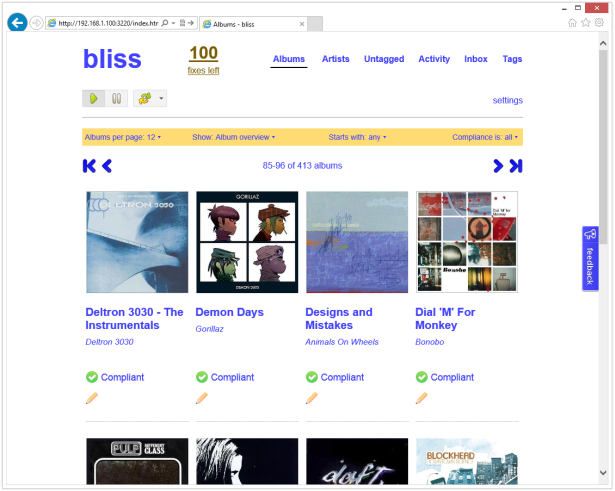
Bliss is a Java application written by Dan Gravell which can manage file names, tags and album art for your music collection and which can also enforce their consistency. It is designed to be left running once installed so that albums you add later will have these same policies applied to them automatically. It supports a wide range of music formats, and effortlessly deals with very large collections – apparently even ones containing quite obscure recordings. My own collection didn’t really put this to the test, since it doesn’t contain bootlegs, live sets or rarities plus I had also already obtained cover art for it (from back when CoverFlow first graced the screen of my iPhone 2G).
I could see from referrals to this blog that people were asking Dan for a Synology package which he didn’t have the time to investigate, and so I thought that it would make an interesting little project, especially since a NAS is the ideal device to run Bliss on. Although there was already a Howto post on the Synology forums, that guide only really covered getting the basic functionality of Bliss up and running – it was missing the best bits: the filesystem watching and audio fingerprinting features. These depend on natively compiled binaries, which Bliss doesn’t include for ARM or PowerPC CPUs. Getting these working provided precisely the sort of challenge I like. Not only were they difficult to compile, but getting them integrated into the various OSGi ‘bundles’ that make up Bliss was quite involved too.
Bliss uses an open source library called Chromaprint, itself part of the wider Acoustid project. The aim is to scan an audio file, to produce a fingerprint of the sound, and then to compare this against an open online database such as MusicBrainz.org to identify music regardless of compression codec used. Its author Lukáš Lalinský explains how it works.
Synology Package Installation
- In Synology DSM’s Package Center, click Settings and add my package repository:
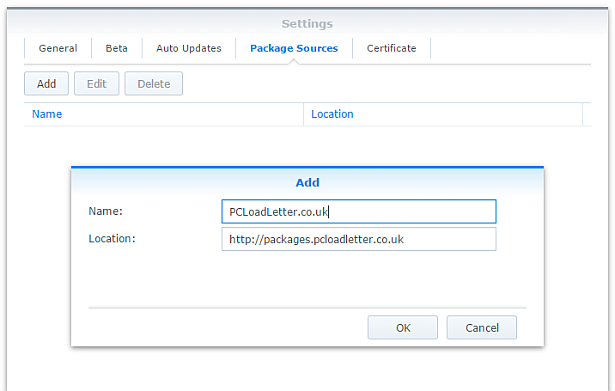
- The repository will push its certificate automatically to the NAS, which is used to validate package integrity. Set the Trust Level to Synology Inc. and trusted publishers:

- Since Bliss is a Java application, you will need to install one of my Java SE Embedded packages first (Java 7 or 8) if you have not already done so. Read the instructions on that page carefully too.
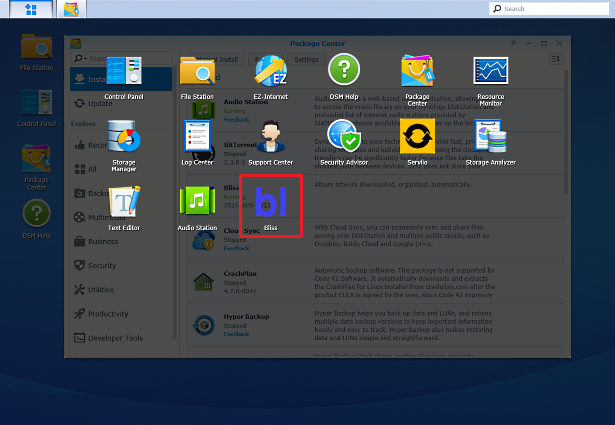
- Now browse the Community section in Package Center to install Bliss:

The repository only displays packages which are compatible with your specific model of NAS. If you don’t see Bliss in the list, then either your NAS model or your DSM version are not supported at this time. DSM 5.0 is the minimum supported version for this package, though you will need DSM 6.0 or later for audio fingerprinting support. - When the Bliss package is running you can manage it using the icon in the main DSM application menu using the button in the top left corner:
Package scripts
For information, here are the package scripts so you can see what it’s going to do. You can get more information about how packages work by reading the Synology 3rd Party Developer Guide.
installer.sh
#!/bin/sh

#--------BLISS installer script
#--------package maintained at pcloadletter.co.uk


DOWNLOAD_URL="`wget -qO- http://www.blisshq.com/app/latest-linux-version`"
DOWNLOAD_FILE="`echo ${DOWNLOAD_URL} | sed -r "s%^.*/(.*)%\1%"`"
SYNO_CPU_ARCH="`uname -m`"
[ "${SYNO_CPU_ARCH}" == "x86_64" ] && [ ${SYNOPKG_DSM_VERSION_MAJOR} -ge 6 ] && SYNO_CPU_ARCH="x64"
[ "${SYNO_CPU_ARCH}" == "x86_64" ] && SYNO_CPU_ARCH="i686"
[ "${SYNOPKG_DSM_ARCH}" == "armada375" ] && SYNO_CPU_ARCH="armv7l"
[ "${SYNOPKG_DSM_ARCH}" == "armada38x" ] && SYNO_CPU_ARCH="armhfneon"
[ "${SYNOPKG_DSM_ARCH}" == "comcerto2k" ] && SYNO_CPU_ARCH="armhfneon"
[ "${SYNOPKG_DSM_ARCH}" == "alpine" ] && SYNO_CPU_ARCH="armhfneon"
[ "${SYNOPKG_DSM_ARCH}" == "alpine4k" ] && SYNO_CPU_ARCH="armhfneon"
[ "${SYNOPKG_DSM_ARCH}" == "monaco" ] && SYNO_CPU_ARCH="armhfneon"
[ ${SYNOPKG_DSM_VERSION_MAJOR} -ge 6 ] && NATIVE_BINS_URL="http://packages.pcloadletter.co.uk/downloads/bliss-native-${SYNO_CPU_ARCH}.tar.xz"
NATIVE_BINS_FILE="`echo ${NATIVE_BINS_URL} | sed -r "s%^.*/(.*)%\1%"`"
#'ua' prefix means wget user-agent will be customized
INSTALL_FILES="ua${DOWNLOAD_URL} ${NATIVE_BINS_URL}"
PID_FILE="${SYNOPKG_PKGDEST}/bliss.pid"
TEMP_FOLDER="`find / -maxdepth 2 -path '/volume?/@tmp' | head -n 1`"
APP_TEMP="${TEMP_FOLDER}/${SYNOPKG_PKGNAME}"
source /etc/profile


pre_checks ()
{
  if [ -z ${JAVA_HOME} ]; then
    echo "Java is not installed or not properly configured. JAVA_HOME is not defined. " >> $SYNOPKG_TEMP_LOGFILE
    echo "Download and install the Java Synology package from http://wp.me/pVshC-z5" >> $SYNOPKG_TEMP_LOGFILE
    exit 1
  fi

  if [ ! -f ${JAVA_HOME}/bin/java ]; then
    echo "Java is not installed or not properly configured. The Java binary could not be located. " >> $SYNOPKG_TEMP_LOGFILE
    echo "Download and install the Java Synology package from http://wp.me/pVshC-z5" >> $SYNOPKG_TEMP_LOGFILE
    exit 1
  fi

  JAVA_VER=`java -version 2>&1 | sed -r "/^.* version/!d;s/^.* version \"[0-9]\.([0-9]).*$/\1/"`
  if [ ${JAVA_VER} -lt 7 ]; then
    echo "This version of Bliss requires Java 7 or newer. Please update your Java package. " >> $SYNOPKG_TEMP_LOGFILE
    exit 1
  fi

  if [ ${SYNOPKG_DSM_VERSION_MAJOR} -lt 6 ]; then
    echo "Please note that native binary support for song identification via audio fingerprinting requires DSM 6.0" >> $SYNOPKG_TEMP_LOGFILE
  fi
}


preinst ()
{
  pre_checks
  cd ${TEMP_FOLDER}
  for WGET_URL in ${INSTALL_FILES}
  do
    WGET_FILENAME="`echo ${WGET_URL} | sed -r "s%^.*/(.*)%\1%"`"
    [ -f ${TEMP_FOLDER}/${WGET_FILENAME} ] && rm ${TEMP_FOLDER}/${WGET_FILENAME}
    #this will allow blisshq.com to track the number of downloads from Synology users
    WGET_URL=`echo ${WGET_URL} | sed -e "s/^ua/--user-agent=Synology --referer=http:\/\/pcloadletter.co.uk\/2012\/09\/17\/bliss-package-for-synology /"`
    wget ${WGET_URL}
    if [[ $? != 0 ]]; then
      if [ -d ${PUBLIC_FOLDER} ] && [ -f ${PUBLIC_FOLDER}/${WGET_FILENAME} ]; then
        cp ${PUBLIC_FOLDER}/${WGET_FILENAME} ${TEMP_FOLDER}
      else
        echo "There was a problem downloading ${WGET_FILENAME} from the official download link, " >> $SYNOPKG_TEMP_LOGFILE
        echo "which was \"${WGET_URL}\" " >> $SYNOPKG_TEMP_LOGFILE
        echo "Alternatively, you may download this file manually and place it in the 'public' shared folder. " >> $SYNOPKG_TEMP_LOGFILE
        exit 1
      fi
    fi
  done

  exit 0
}


postinst ()
{
  #run the installer
  cd ${TEMP_FOLDER}
  echo "INSTALL_PATH=${SYNOPKG_PKGDEST}" > ${TEMP_FOLDER}/bliss-synology.properties
  java -jar ${TEMP_FOLDER}/${DOWNLOAD_FILE} -options ${TEMP_FOLDER}/bliss-synology.properties > /dev/null && rm ${TEMP_FOLDER}/${DOWNLOAD_FILE}
  rm ${TEMP_FOLDER}/bliss-synology.properties
  sed -i "s%^#!/bin/bash%#!/bin/sh%" ${SYNOPKG_PKGDEST}/bin/bliss.sh

  #stow jar files containing Synology versions of native code
  if [ -f ${TEMP_FOLDER}/${NATIVE_BINS_FILE} ]; then
    mkdir ${SYNOPKG_PKGDEST}/syno-native
    cd ${SYNOPKG_PKGDEST}/syno-native
    tar xJf ${TEMP_FOLDER}/${NATIVE_BINS_FILE}
  fi
  #record the CPU architecture
  echo "${SYNO_CPU_ARCH}" > syno_cpu_arch.txt

  #make changes to Bliss launcher script so that pid file is created for Java process
  sed -r -i "s%^(exec .*)$%\1 > ${SYNOPKG_PKGDEST}/bliss.out 2>\&1 \&%" ${SYNOPKG_PKGDEST}/bin/bliss.sh
  echo "echo \$! > ${PID_FILE}" >> ${SYNOPKG_PKGDEST}/bin/bliss.sh

  #set some additional system properties (temp folder, prefs sync interval)
  EXTRA_OPTS="-Djava.io.tmpdir=${TEMP_FOLDER} -Djava.util.prefs.syncInterval=86400 -Djava.net.preferIPv4Stack=true"
  sed -r -i "s%-splash:bliss-splash.png%${EXTRA_OPTS}%" ${SYNOPKG_PKGDEST}/bin/bliss.sh
  sed -r -i "s%-XX:HeapDumpPath=/tmp%-XX:HeapDumpPath=${TEMP_FOLDER}%" ${SYNOPKG_PKGDEST}/bin/bliss.sh

  #create log file to allow package start errors to be captured
  [ -e ${SYNOPKG_PKGDEST}/bliss.out ] || touch ${SYNOPKG_PKGDEST}/bliss.out

  #add firewall config
  /usr/syno/bin/servicetool --install-configure-file --package /var/packages/${SYNOPKG_PKGNAME}/scripts/${SYNOPKG_PKGNAME}.sc > /dev/null

  exit 0
}


preuninst ()
{
  `dirname $0`/stop-start-status stop

  exit 0
}


postuninst ()
{
  #clean up temp
  [ -d ${TEMP_FOLDER}/Bliss ] && rm -rf ${TEMP_FOLDER}/Bliss

  #remove firewall config
  if [ "${SYNOPKG_PKG_STATUS}" == "UNINSTALL" ]; then
    /usr/syno/bin/servicetool --remove-configure-file --package ${SYNOPKG_PKGNAME}.sc > /dev/null
  fi

  exit 0
}


preupgrade ()
{
  `dirname $0`/stop-start-status stop
  pre_checks

  exit 0
}


postupgrade ()
{
  exit 0
}
start-stop-status.sh
#!/bin/sh

#--------BLISS start-stop-status script
#--------package maintained at pcloadletter.co.uk


PKG_FOLDER="`dirname $0 | cut -f1-4 -d'/'`"
ENGINE_SCRIPT="${PKG_FOLDER}/target/bin/bliss.sh"
DNAME="`dirname $0 | cut -f4 -d'/'`"
PID_FILE="${PKG_FOLDER}/target/bliss.pid"
DLOG="${PKG_FOLDER}/target/bliss.out"
SYNO_CPU_ARCH="`cat ${PKG_FOLDER}/target/syno-native/syno_cpu_arch.txt`"
source /etc/profile
source /root/.profile


start_daemon ()
{
  #update the package version number in case of an in-app update
  BLISS_BUNDLE_DIR="`grep -r --include='*.info' com.elsten.bliss.bundle ${PKG_FOLDER}/target/felix-cache/ | cut -f1 -d':'`"
  BLISS_BUNDLE_DIR="`dirname ${BLISS_BUNDLE_DIR}`"
  BLISS_VERSION=`grep "version" ${PKG_FOLDER}/INFO | sed -r "s/^.*([0-9]{8}).*$/\1/"`
  if [ -d ${BLISS_BUNDLE_DIR} ]; then
    find ${BLISS_BUNDLE_DIR} -name *.jar > /tmp/bliss-v-check.txt
    while IFS="" read -r FILE_TO_PARSE; do
      if [ -e ${FILE_TO_PARSE} ]; then
        #no unzip command in DSM 6.0
        if [ -e /usr/bin/7z ]; then
          DETECTED_VERSION=`7z e -so ${FILE_TO_PARSE} META-INF/MANIFEST.MF 2> /dev/null | grep Bundle-Version | cut -f4 -d'.' |  cut -c1-8`
        else
          DETECTED_VERSION=`unzip -p ${FILE_TO_PARSE} META-INF/MANIFEST.MF | grep Bundle-Version | cut -f4 -d'.' |  cut -c1-8`
        fi
      fi
      if [ ${DETECTED_VERSION} -gt ${BLISS_VERSION} ]; then
        BLISS_VERSION=${DETECTED_VERSION}
      fi
    done < /tmp/bliss-v-check.txt
  fi
  rm /tmp/bliss-v-check.txt
  sed -r -i "s/^version=\"[0-9]{8}/version=\"${BLISS_VERSION}/" /var/packages/Bliss/INFO

  #update the CPU-specific repository customizations (in case of an in-app update)
  #catch both armv5te and armv7l
  if [ "${SYNO_CPU_ARCH}" != "${SYNO_CPU_ARCH/arm/}" ]; then
    sed -i "s/policy\.tag\.auto\.linux\.x86/policy\.tag\.auto\.linux\.ARM_le/g" ${PKG_FOLDER}/target/bliss-bundle/repository.xml
  fi
  if [ "${SYNO_CPU_ARCH}" == "ppc" ]; then
    sed -i "s/policy\.tag\.auto\.linux\.x86/policy\.tag\.auto\.linux\.PowerPC/g" ${PKG_FOLDER}/target/bliss-bundle/repository.xml
  fi

  #overwrite native lib bundles with syno versions (in case of an in-app update)
  if [ -e ${PKG_FOLDER}/target/syno-native/ ]; then
    cp ${PKG_FOLDER}/target/syno-native/* ${PKG_FOLDER}/target/bliss-bundle
  fi

  cd ${PKG_FOLDER}
  ${ENGINE_SCRIPT} > /dev/null 2>> ${DLOG}
  if [ -z ${SYNOPKG_PKGDEST} ]; then
    #script was manually invoked, need this to show status change in Package Center
    [ -e ${PKG_FOLDER}/enabled ] || touch ${PKG_FOLDER}/enabled
  fi
}


stop_daemon ()
{
  echo "Stopping ${DNAME}" >> ${DLOG}
  kill `cat ${PID_FILE}`
  wait_for_status 1 20 || kill -9 `cat ${PID_FILE}`
  rm -f ${PID_FILE}
  if [ -z ${SYNOPKG_PKGDEST} ]; then
    #script was manually invoked, need this to show status change in Package Center
    [ -e ${PKG_FOLDER}/enabled ] && rm ${PKG_FOLDER}/enabled
  fi
}


daemon_status ()
{
  if [ -f ${PID_FILE} ] && kill -0 `cat ${PID_FILE}` > /dev/null 2>&1; then
    return
  fi
  rm -f ${PID_FILE}
  return 1
}


wait_for_status ()
{
  counter=$2
  while [ ${counter} -gt 0 ]; do
    daemon_status
    [ $? -eq $1 ] && return
    let counter=counter-1
    sleep 1
  done
  return 1
}


case $1 in
  start)
    if daemon_status; then
      echo ${DNAME} is already running with PID `cat ${PID_FILE}`
      exit 0
    else
      echo Starting ${DNAME} ...
      start_daemon
      exit $?
    fi
  ;;

  stop)
    if daemon_status; then
      echo Stopping ${DNAME} ...
      stop_daemon
      exit $?
    else
      echo ${DNAME} is not running
      exit 0
    fi
  ;;

  restart)
    stop_daemon
    start_daemon
    exit $?
  ;;

  status)
    if daemon_status; then
      echo ${DNAME} is running with PID `cat ${PID_FILE}`
      exit 0
    else
      echo ${DNAME} is not running
      exit 1
    fi
  ;;

  log)
    echo "${DLOG}"
    exit 0
  ;;

  *)
    echo "Usage: $0 {start|stop|status|restart}" >&2
    exit 1
  ;;

esac
Changelog:
- 20160606-0011 Substantial overhaul for DSM 6.0, incorporating many enhancements developed for other packages, updated to Bliss version 20160606, DSM 6.0 newer is now required for audio track fingerprinting (fpcalc is compiled to depend on ffmpeg 2.7.1), added support for several newer Synology products, improved accuracy of temp folder detection, in-app updating should also be fixed
- 20150522-0010 Substantial re-write (hence the long delay):
Updated to Bliss version 20150522
DSM 5.0 newer is now required (fpcalc is compiled to depend on FFmpeg 2.0.2)
Now that Intel systems running DSM 5.0+ use a newer glibc, replacement Intel binaries are no longer needed
Added support for Mindspeed Comcerto 2000 CPU in DS414j
Added support for Intel Atom C2538 (avoton) CPU in various models
Added support for ppc853x CPU in older PowerPC models
Added support for Marvell Armada 375 CPU in DS215j
Added support for Intel Evansport CPU in DS214Play and DS415Play
Switched to using root account – no more adding account permissions, package upgrades will no longer break this
DSM Firewall application definition added
Tested with DSM Task Scheduler to allow package to start/stop at certain times of day, saving RAM when not needed
Daemon init script now uses a proper PID file instead of the unreliable method of using grep on the output of ps
Daemon init script can be run from the command line
Switched to .tar.xz compression for native binaries to reduce web hosting storage footprint
Improved accuracy of temp folder detection
Package is now signed with repository private key
User Agent customization while downloading Bliss package from blisshq.com to allow download stats gathering - 20130213-0009 Updated to Bliss 20130213, and will correctly report version in Package Center after an in-app update
- 20130131-0008 Updated to Bliss 20130131
- 20121112-0007 Fixes for DSM 4.2
- 20121112-006 Updated to Bliss 20121112
- 20121019-005 Updated to Bliss 20121019
- 20121002-004 Updated to Bliss 20121002
- 20120830-003 Added support for Freescale QorIQ PowerPC CPUs used in some Synology x13 series products, PowerPC processors in previous Synology generations with older glibc versions are not supported
- 20120830-002 Hopefully fixed Java prefs polling issue that prevented NAS hibernation
- 20120830-001 initial public release
Build Notes
Chromaprint uses some complex maths functions that FFmpeg can provide (specifically Fourier Transform), and FFmpeg’s shared libraries are already included with Synology DSM. Building Chromaprint linked to those existing libraries results in a minuscule 78KB build of fpcalc, rather than the statically compiled ones for various OS and CPU architectures included with Bliss, which weigh in at several megabytes each. I think I’m finally ‘getting’ what open source is all about, which is nice since that was my objective in experimenting with my NAS. To prevent fpcalc building and linking to its dynamic library libchromaprint.so and to get it to detect FFmpeg properly I had to carefully inspect the Makefiles to find the correct build syntax:
FFMPEG_DIR=${TOOLCHAIN} cmake -DCMAKE_BUILD_TYPE=Release -DBUILD_EXAMPLES=ON -DBUILD_SHARED_LIBS=NO .
FFMPEG_DIR is the base folder from which CMake will look for lib/libavcodec.so and include/libavcodec/avfft.h.
Once I had got past the obstacle of compiling the native code, I needed to liaise back and forth with Dan to understand how Bliss was dealing with its libraries and how I could replace the built-in versions. Originally this was quite a kludge but Dan has since abstracted out the native binaries into their own OSGI bundle fragments which makes things a lot easier, and allows Bliss to survive in-app updates until those native components are superseded. The Synology package provides the following architecture-specific jar files (with corresponding edits to their manifest) which contain the fpcalc binary from Chromaprint. Thank you to Dan for all the quick answers!
- com.elsten.bliss.policy.tag.auto.linux.x86-1.0.1.jar
- com.elsten.bliss.policy.tag.auto.linux.amd64-1.0.1.jar
- com.elsten.bliss.policy.tag.auto.linux.ARM_le-1.0.1.jar (various versions)
- com.elsten.bliss.policy.tag.auto.linux.PowerPC-1.0.1.jar
 PC LOAD LETTER
1813+ with Java 6 working, but a notice that this app could not start automatically? Not shure what to do because Bliss will also not start automatically. I’m sure it’s me doing something wrong :-)
With the new DSM 5.0 Bliss will no longer run.
Does removing and reinstalling Java fix it?
Sorry for the late reaction. I had to reinstall java and bliss but on reinstall bliss it would not download the jar file. The jar file had to be downloaded manually and placed in the public folder or it wouldn’t install. I lost my config but at least it works now.
Do we still need Java SE embedded 7 or the package can be run with Java SE embedded 8 ?
Not sure, time to experiment. I suggest asking on the Serviio forum.
Hello
Since Dan, the author, has released a new version (might ne in beta but addresses a few bloking bugs), would it be possible to package it for DSM 5?
Thanks very much
Nicolas
Rest assured – it’s on my list (now that CrashPlan and Serviio are updated). The issue is finding some free time.
Good news, thanks !! ( I bought the unlimited fixes but I can’t use it since it crashes after 30mn, and this should be solved in the latest beta…)
thanks again
Hello, do you still plan to package the latest version?
Thanks,
Nicolas
I also wait for this – so any of your help – much appreciated!
Hi Dan, the Bliss version on my Synology device already shows version 20140318. I suppose you’ve already updated Bliss. Could this be?
Hi Dan, could you comment on my previous question? Anyway, thanks for all your great work!
Sorry, slipped through the cracks. However, I don’t understand the question. Are you asking why is the version so recent? Is this related to the DSM 5.0 issue?
Well, I’ve found out what happened. I’ve originally installed Bliss from your repository. This initially showed version 20130213 of Bliss, but it’s interesting that Bliss has a built-in ‘update’ functionality. Meaning Bliss updated itself to version 20140318 beginning of march, and today to version 20140522.
All this without using your repository. Does this have any complications or risks?
The only thing I can think of is that updates to patters’ custom builds of the audio fingerprinter would not be included.
Well, I recently updated Bliss te version 20140702 using the internal update functionality of Bliss. And it seems broken now. The Bliss webpage is still appearing, but my music isn’t being found.
I’m providing some details on the Bliss logfiles. These are indeed showing some errors, like missing dependencies:
http://screencast.com/t/Vl7bXvWPN
http://screencast.com/t/lTZyqTF3
http://screencast.com/t/8UmcHb7eg
The problem is the update… you need to delete the felix-cache folder. See http://www.blisshq.com/support/faq/install-first-use/fixing-update.html although instructions for Synology aren’t there, you basically need to follow the Linux instructions but for the Synology file locations.
If you send me your debug archive (see http://www.blisshq.com/support/reporting-problems.html ) I can see where the felix-cache is.
Yes, fixed this by loggin in with telnet and user root. Deleted the felix-cache folder. Bliss is working again, thanks!
How hard would it be to get this running on a Marvell Armada cpu, aka the DS213j? Or is the architecture such that it would be impossible?
It should be possible, but I was getting a weird error while attempting to compile jnotify IIRC. The exact same source compiled fine for the other architectures. I submitted a support ticket to Synology to see if they could help but they couldn’t recreate the problem. I’ll try and take another look when I get some time.
Honestly, that would be amazing. DSM’s audio manager is reading all of my carefully curated (via Musicbee) tags as one huge mess of split albums and “feat.” notes.
Let me know if there’s any testing or anything I could do to help such a thing along!
Interesting… you could connect MP3Tag or similar to the NAS and try setting the “album artist” tag. Hope that helps…
I just got it cross compiled using the latest toolchain so I should be able to put a package together. Gotta build fpcalc now.
Is that with DSM 5.0? That’s great news.
Hi Dan, yes that was using the DSM 5.0 toolchain. Synology have changed the version of FFmpeg that’s bundled with the system so my currently available package will lack a functioning fpcalc.
Let me know if I can help at all…
Dan – are you building fpcalc from Chromaprint 1.1, or an older version?
No, I think it’s 0.7 actually. I should upgrade! AFAIK 1.1 should still work.
Can you (or anyone else with an Armada 370 or Armada XP CPU running DSM 5.0) download this and run it? I’ve compiled it to depend on the FFmpeg libavcodec version that’s included with DSM 5.0.
cd /volume1/@tmpwget http://dl.dropboxusercontent.com/u/1188556/fpcalc1.1-armv7l.tgz
tar xvzf fpcalc1.1-armv7l.tgz
cd fpcalc1.1-armv7l
./fpcalc
Does it run?
Pingback: Bliss & Music Management | Rebelpeon
I (as you might have guessed) have a DS213j running an armada370. Would it help if I were to run/test it? If so just tell me what I’d be looking for and I’ll jump on it — excited to get Bliss up and running.
If you are running DSM 5.0 can you run those commands in my last post from an SSH session (which will download and extract it to a temp folder)? Does fpcalc run without showing an error? Can you post the screen output please?
I went ahead and tried the commands as you requested — got to the second-to-last with no trouble. On the second to last, I got “cannot cd to [etc}” as an error — I went ahead and tried the last command, but it didn’t seem to run anything. Here’s a screen shot of exactly what happened:
Let me know if that is good news, bad news, or no news at all — and how I can help you from here. Thanks for giving this a shot.
That’s perfect – thanks. fpcalc has indeed launched and returned the command syntax, demonstrating that it works linking to the DSM 5.0 version of libavcodec.so.55 that’s already on your system (it would have failed with an error if not). I’ve built an ARMv5 version using the same process and I can confirm that it’s fine on my DS111. Now I need to cross compile the binaries for the other Synology CPU architectures – there are five now: armv5te, armv7l, armv7l (with NEON), i686, ppc. Then I should be able to release a new version of the package.
Hey I just wanted to check back in and see if there was any possibility of that Bliss package for the DS213j on the horizon? Totally understand if it’s a backburner project, just figured it couldn’t hurt to ask.
Yes, sorry for the long delay. I did manage to get jnotify and fpcalc built for the armada370, so it will happen – just need to find some time to get it packaged.
No problem! Thanks so much for all your work, I really appreciate it (and so, I imagine, do all the other music tagging enthusiasts with an armada370).
Hi there,
Given the rather large number of comments above I am taking the liberty to run a question by you to see if you can help me. I’m trying to run Bliss on a DS211+. The installation seems to work fine. After installation the Package Manager also states the app is running but no action on the default Bliss port.
What I have checked:
1. That the package is installed in /var/packages/Bliss >> CHECK
2. That JAVA is correctly installed >> CHECK
3. Forcing a start from the cli; “sh /var/packages/Bliss/scripts/start-stop-status.sh start”
AH, something not quite right with a couple of files
“find: /felix-cache: No such file or directory
grep: /var/packages//INFO: No such file or directory
sed: can’t read /bliss-bundle/repository.xml: No such file or directory
sed: can’t read /bliss-bundle/repository.xml: No such file or directory
cp: cannot stat `/syno-native/*’: No such file or directory”
Yet I don’t think this is what makes the app tumble as we can now read:
“Starting …
FAIL”
so for some reason the app fails to start, but not a lot of information in the /var/log/messages:
“Jul 3 14:52:25 DiskStation PkgSynoMan.cgi: pkgcurltool.cpp:350 https://djfil.servebe er.com/repository/, Failed to request packages, httpResponseCode=404
Jul 3 14:52:37 DiskStation geticon.cgi: pkgcurltool.cpp:458 http://www.synology.com/ pkg_img/Python/2.7.6-0016/thumb_72.png, Failed to request packages, httpResponse Code=404
Jul 3 14:54:57 DiskStation geticon.cgi: pkgcurltool.cpp:458 http://www.synology.com/ pkg_img/Python/2.7.6-0016/thumb_72.png, Failed to request packages, httpResponse Code=404″
It doesn’t seem to help (or at least I can’t find any pointers in this output). Any help much appreciated.
Cheers Jappie
Hi Jappie. It looks like the environment variables that point to bliss’s location are not configured. The paths you quote are not complete:
find: /felix-cache: No such file or directory
grep: /var/packages//INFO: No such file or directory
sed: can’t read /bliss-bundle/repository.xml: No such file or directory
sed: can’t read /bliss-bundle/repository.xml: No such file or directory
The smoking gun is the second one which has the double forward slash “//” which suggests some string manipulation has gone awry. But I think all paths there are missing something. The bliss folder should be prepended to the other paths e.g. “/Volumes/@bliss.app/felix-cache” (can’t remember the exact path).
patters might have more idea what has gone wrong, but maybe this relates to running it from the command line.
Hi Gravelld,
Thanks for your helpful comment and you confirm what I already thought; variables are indeed not properly taken into account. Now the real question is if this is related to running the script from CLI or if there is another cause. FWIW; the variables are in and by themselves not defined in the script and I would almost assume these are “generic” system variables that are used in the same way for other applications, so can not understand why it would fail in this script.
The variables as they are used in the script are:
${SYNOPKG_PKGDEST}/felix-cache
/var/packages/${SYNOPKG_PKGNAME}/INFO
${SYNOPKG_PKGDEST}/bliss-bundle/repository.xml
Cheers Jappie
These SYNO variables only exist in the context of the DSM Package Center. This is why running these scripts will fail when you try to run them manually.
Hi patters, thanks for your precious feedback. I understand now that I can’t make the package run from the command line, yet is there any other way to get some useful debugging output as to why the package isn’t working properly even if in the Package console it says it’s started?
Just to eliminate the most likely causes;
-I am within the network so no need for port-forwarding for the used port (of the top of my head 3220)
-Java is installed and properly running
Any other ideas?
Cheers Jappie
I thought there was a “log” or “journal” in the Synology interface that shows stdout/stderr from a process? Can you copy/paste that?
ERROR: Bundle com.elsten.bliss.bootstrapbundle [1] Error starting file:/volume1/@appstore/Bliss/bin/./../bundle/com.elsten.bliss.bootstrapbundle.jar (org.osgi.framework.BundleException: Unresolved constraint in bundle com.elsten.bliss.bootstrapbundle [1]: Unable to resolve 1.0: missing requirement [1.0] osgi.ee; (&(osgi.ee=JavaSE)(version=1.6)))
org.osgi.framework.BundleException: Unresolved constraint in bundle com.elsten.bliss.bootstrapbundle [1]: Unable to resolve 1.0: missing requirement [1.0] osgi.ee; (&(osgi.ee=JavaSE)(version=1.6))
at org.apache.felix.framework.Felix.resolveBundleRevision(Felix.java:3826)
at org.apache.felix.framework.Felix.startBundle(Felix.java:1868)
at org.apache.felix.framework.Felix.setActiveStartLevel(Felix.java:1191)
at org.apache.felix.framework.FrameworkStartLevelImpl.run(FrameworkStartLevelImpl.java:295)
at java.lang.Thread.run(Thread.java:744)
It looks like it’s looking for Java 6 but cannot find it. Have you changed the installed Java on the NAS?
Hi,
I just checked and although this maybe a Java related problem, the output from “which java” is this: /volume1/@appstore/java8/ejdk1.8.0/linux_arm_sflt/jre/bin/java
So it seems to me Java is available but could it be a version incompatibility or conflict?
Also from the package center I can see the Java installation and looking at the log I find the following:
java version “1.8.0”
Java(TM) SE Embedded Runtime Environment (build 1.8.0-b132, headless)
Java HotSpot(TM) Embedded Client VM (build 25.0-b70, mixed mode)
System installed locales:
C
cs_CZ.utf8
da_DK.utf8
de_DE.utf8
en_US.utf8
es_ES.utf8
fr_FR.utf8
hu_HU.utf8
it_IT.utf8
ja_JP.utf8
ko_KR.utf8
nb_NO.utf8
nl_NL.utf8
pl_PL.utf8
POSIX
pt_BR.utf8
pt_PT.utf8
ru_RU.utf8
sv_SE.utf8
tr_TR.utf8
zh_CN.utf8
zh_TW.utf8
JAVA_HOME=/volume1/@appstore/java8/ejdk1.8.0/linux_arm_sflt/jre
TZ=Europe/Brussels
Cheers Jappie
Yes, although in theory bliss will run on Java 8 (e.g. in Windows, Linux etc) it insists it requires Java 6, so it won’t run. You need a way of installing Java 6 and pointing bliss at it… at which point my knowledge of Synology runs out… sorry.
First of all nice blog, congratulations and thank you for maintaining your repository.
Is there any chance to see a version of Bliss for the Marvel Armada (ARMv7) CPUs? Downloading of album cover art is really a killer feature missing in Audio Station.
On a side note, is there any reason to maintain your own repository instead of using Synocommunity?
Thank you.
Hey Ivan. I can’t comment on the repository because that’s patters’ domain (literally), but I can comment on bliss because I am the programmer. If you have ways that bliss can better support Synology users (other than support for ARM), please let me know… e.g. specific ways that Audio Station works such as rules about cover art, filenames, specific tags, that sort of thing.
Hello,
I tried to install Bliss today but all that is proposed is a bliss version stated 20130213-0009 …
I thought I would get an up-to-date version. Is it the last one that has been packaged for synology (Intel-based) ?
Do I need to compile by myself if I want something more recent?
Thanks
Nicolas
Hello Nicolas,
I’ve just install Bliss yesterday and I noticed this too, but don’t worry, it will install the last version!
Ok thanks. Now I just need to find a way to install java6 along with already installed java8… :((
I think you can install differents java version (6, 7 and 8) with java manager from synology repo, and choose which you want to use.
Need some help getting Bliss to run. I have had Bliss up & running, but just noticed it was down. When starting I get a “Failed to run package service error”. One time I looked at the Bliss log to see it was not finding Java, this was most likely due to DSM updates. I have reinstalled Java 7 & Bliss, but still get a “Failed to run package service error” with no information in the Bliss Log.
Any ideas?
fixed the problem… wrong file permissions on the ‘homes’ directory.
Could u please indicate why should be the right permission?
Hello, Just reporting the package won’t start on dsm 5.1 beta.
Thanks for the update Frederic!
Update : The Synology interface says “unable to start package” but Bliss is working if you go straight to it’s webpage. I have the version 20141027 running with java 8.
Hi Fred,
I’m not getting that result. It says “unable to start package”, but there’s nothing on the default port of 3220. I checked application.cfg and that is indeed the right port.
Have you tested 5.1 yet, Dan?
Thanks!
Completly uninstall Bliss and java and then install java8 and Bliss.
It would be cool to have a database autosave outside of the bliss folder to avoid the x weeks of re-creating it each time I re-install Bliss on my NAS (after each java update).
You don’t need to uninstall dependent packages to update Java. Just stop bliss, update Java, then start bliss. Same for DSM updates.
On my DS212j It won’t work and I have to re-install java and Bliss after each DSM update and each java update because bliss won’t start.
If Java 8 is installed, and Java 6/7 is not, I am fairly certain you will need to re-install bliss. The reason is that the framework bliss uses to start (Apache Felix) didn’t support Java 8, until I updated the version in the latest release. This was also affecting Windows and Linux users.
I’m not 100% sure however if the embedded nature of this JRE *was* supported… but I don’t think so.
No go, Guys. I uninstalled Java 7. I installed Java 8 (and put that file from Oracle’s site in public). I installed Bliss and I immediately get, “failed to run package service” (I misquoted before). Any ideas? I’m running DSM 5.1 on 1813+.
I reset my synology to factory and now it works!
Oh, ok, so it’s now working and your previous message is no longer valid? I wonder what the reset did…
Yes, my message is no longer valid.
It does error and show as “Stopped” in DSM, but the site works (and I’m guessing perfectly).
Just wanted to say I got the same result as Fred. After the DMS 5.1 update, I was getting the “failed to run package service” error. I reinstalled Java 7 and Bliss. Same error message, but the log then said Bliss had started. I directed my brower to “localhost:3220” and sure enough, it’s there. And yet the Synology package station still tells me it hasn’t started.
Thanks John… helps to see how many other people experience this.
Hi patters,
are you planning to port the package to the avoton platform? (By the way the Crashplan packages works perfectly so far)
How can I manually update bliss version to 20141027? The update link in bliss is saying I have the latest version 20140917. I’ve already removed Java 6 and installed Java 8.
Frederic how did you update bliss to 20141027?
You have to uninstall Bliss and java and install java 8 and then Bliss.
Also, the in-app update only refreshes its knowledge of the latest version once – the first time you visit the update page on each restart. So you can restart bliss and visit the update page.
In this case though, it’s best to re-install because Java 8 support cannot be given via an in-app update…
Hi! I’ve just reinstalled a new NAS and am having trouble with http://packages.pcloadletter.co.uk as a source (I’m just not getting any of the packages). Is this just me or an issue with the feed?
me too: “It does error and show as “Stopped” in DSM, but the site works (and I’m guessing perfectly).” (Synology DS 713+ 5.1 Java 7_71)
many fixes fail > (Permission denied)
Is that not a problem with the permissions on your music files? Send me a debug archive as per http://www.blisshq.com/support/reporting-problems.html
Any chance that Bliss could be updated so that it works with the latest DS415Play ?
Not to hijack, but I also wanted to check in and see if there was any news on when that Bliss package for the DS213j/armada370 might be uploaded?
Thanks again!
Same for you Will, is it lack of support for the latest DSM that’s stopping this?
Can I ask what’s stopping this… is it the lack of support for the latest DSM?
Hi,
are you asking patters or the users? Having a DS415+ I can tell you that the bliss package does not show up in the package center because the packages so far do not support the new CPU platforms (in my case “avoton”). For bliss to work on those DS´s patters would have to adapt the packages or if they don´t need adapting (quite often the existing intel packages work fine) add the platform to the package files. As I have not found a way to manually download the .spk files from patters repository to try to simply install the intel version of the package it is up to patters to modify the packages (as he has done already for his crashplan packages [which work amazingly well by the way, kudos to patters for providing them :-)]).
Regards
Twilek
I’m asking as a followup to the conversation earlier in this thread — I just happen to be TERRIBLE at forums, so I replied to the wrong person! Sorry about that.
I was asking anyone that knew ;)
Given that this is an Atom chipset does it not just support Intel x86 instructions? Therefore wouldn’t the existing code work? I wonder if it is just a case of declarations and configuration in the package…
You are right the normal Intel packages normally do work with the avoton Platform unmodified. But as long as the the INFO File in the package does not include the platform it will not show up in the package center. For packages you can manually download one can try to modify it oneself but when it is in a repository I have not found a way to get the .spk file to modify it.
Thanks. It’s a package build problem then…
Hello. I have the DS1515+ and am unable to see the bliss package in the package center in DSM. I was able to successfully install crash plan so i know it’s not an issue with my settings. Can anyone help?
Just look up one comment thread. The DS1515+ like the DS415+ also has an Atom Processor needing the avoton plattform. The Bliss package has not been ported yet.
Can you please port, gravelld? I just upgraded to 1815+ and I wanted to try Bliss finally, but can’t.
Would love to but it’s finding the time… You can always use a desktop/laptop to connect to the Synology…
also wanted to check on the status for a compiled package for the Armada_370 processor! Thanks as always.
I have been struggling to get Bliss set up on my 1813+ as well. I cleaned out the old manual install I had, removed the old Java SE, installed the latest DSM 5.1 3022, then installed Java SE 8 embedded from this site (after downloading the ejdk-8u33-fcs-linux-i586.gz package and putting it in public). I then installed the Bliss package, but it said it failed to run the package after install. I tried rebooting, but it still won’t start up. If I click on the Show Log link in the package manager, it says No Data. Unlike the above comments, if I try to visit the url http://:3220/ it does not connect, so it definitely appears the package isn’t starting. :/
Could anyone share additional troubleshooting tasks I could try?
I am having a similar Problem.
First of all I am using a DS415play with Intel Atom (evansport arch) so the first problem was to get this package installed.
I downloaded the .spk from pcloadletter, untared it, added my cpu architecture to the INFO-file, set a new download-url inside the installer.sh, as the one from blissHQ seems to be dead, created a new tarball, renamed it to end with .spk instead of .tar and did a manual install in synology packet manager. All worked fine.
Now when I try to start the service I am gettin this error message saying “failed to run the package “.
The packages log-file says:
Will provision:
Deploying …
Starting
and then a log4j error stating that a file is missing:
Java.io.FileNotFoundException: /var/@tmp/Bliss/bliss-jetty.log (No such file or directory)
I will try to find out more and keep you updated.
Now I am getting another error and the first vanished magically…
java.net.BindException: Address already in use
This address seems to be an already used Port but port 3220 is not used by any other application. i wonder which port it could be…
I’m working on a rewritten Bliss package.
The likelihood is that it’s bliss that is still running. See if you can find out what process it is; if it is a java process you can probably stop it.
Hi
Bliss is not enlisted after adding http://http://packages.pcloadletter.co.uk/ to my sources.
I’ve also tried to install it by manually downloading the package. I’ve tried with bliss-native-i686.tar.xz
I have a DS214play
Thanks
Hi, I’m in the process of re-writing the bliss package and hope to release fairly soon. Scripts and done and tested, got to do the binary compiling.
Great news patters!
Any news on the new version of the package?
Also really looking forward to Bliss on my DS213j!
Only commenting to join the throng of people anxiously awaiting the updated package (:
(have to comment to subscribe to email notifications)
same here
Synology 1513+, DSM 5.1, bliss not installing… (“can’t install bliss” message)
patters, any luck with a new package? Is it Armada compatible?
Thanks!
Having the same install problem on DSM 5.1, on Synology Rackstation 3412XS (Intel). Have java8 installed, and pointed correctly (i believe) because filebot works just fine, and requires java8
Package will install, but not start. No data in the log.
Main reason to install is looking to reference the fpcalc options for use with filebot instead of downloading and updating the binary every time there is a chromaprint update. That way updating is all via the Package Center.
EDIT: I should mention that previous installations of Bliss (today) said that it wouldn’t start because another instance of Bliss was already running, although I couldn’t get to :3220. Now, after a RackStation restart and Bliss reinstall, there is no data in the log.
Likewise really keen to get bliss going on dsm 5
I’m also on Armada 370 and keen to test new versions.
I’d never heard of Bliss before and almost didn’t even click the link because it only really shouts about the album art side of things – if it also does batches and runs in the background, then… well, it’s what I’ve been searching for all these years.
Yeah, it’s more than just album art. I just have that as the front page (still) because it’s the main reason people search for bliss and use it. Should change it some day…
You seriously should… I for one have been looking for something like this forever… Now that I’ve got a media player that I can’t simply browse the folder structure easily with, it’s a real chore to find my tunes:)
I still haven’t installed it, as I’d like to wait for the 213J version (hope it’s still in the pipeline) but are there any vids or docs of the auto tagging side of it and exactly how that works?
No videos unfortunately but http://www.blisshq.com/tour/auto-tagging.html and http://www.blisshq.com/support/tutorials/using-bliss-to-auto-tag-your-music-files/index.html might help.
Yup yup… It certainly does look like it will meet all my needs then… Only other question I have now is how it deals with having a large collection chucked at it… I’ve tried MusicBrainz before and told it to have a go at tagging my whole collection (some 500GB) and basically it politely told me to sod off (or at least my machine hanging indefinitely told me this).
Presumably it’s ok to point Bliss at the full collection, or would I need to do it in batches?
Oh, sorry, and one more… There are the two ways it’ll try and tag files, either based on folder structure, or by DB lookup, but can these be mixed and matched? What I mean is, although my collection is sorted by artist/album/track, etc, I’m not 100% sure that every file is correct, so I’d like some kind of sanity check. For example, if a file’s name says it is Artist_x/Album_y/Track-02, if the fingerprint of it is way off, will I get some kind of warning/flag which will allow me to double-check the file in question?
It doesn’t tag files according to filepath, only fingerprint (currently). See http://ideas.blisshq.com/forums/21939-bliss/suggestions/2458603-use-the-folder-and-file-name-to-help-identify-song
Fingerprinting on the Untagged page is only used when there are *no* tags (or the tags are some predefined value – “Unknown Album”/”Unknown Artist” or zero length tags.
For the other missing information rules, bliss performs a tag based lookup first and if that fails it uses fingerprinting.
bliss should support collections of arbitrary size, but obviously it will take longer to churn through them in one rescan.
Ah, sorry, my bad – I was sure I’d read somewhere that it could do it based on folder structure. If not, no worries I guess, though I think I second the notion in that feature request of using the folder/file location as a first-guess on the tag, to then be used as a basis for the DB look up.
See, I have a sneaking suspicion that some of my files have actually been tagged incorrectly due to some overzealous MusicBrainzing on my part in the past, and having this kind of sanity-check would boost my confidence that all is well. Still, it looks like it would still help to bring the majority of my music into some kind of order…
Thanks for the advice – I look forward to getting my hands on it for the Armada 370
Hi patters,
First thanks for your packages.
I have bliss installed on my DS1511+ and have gone to install it on a new DS1515+ and the package is not showing up. Not sure what is going on.
Thanks
Hi,
I have successfully installed Java SE embedded 8u33 (ejdk-8u33-fcs-linux-i586.gz) on my DS411+II with Intel Atom D525. I cannot install the bliss package from your repo, i just get error, failed to install “bliss”. I am running DSM 5.2-5565. Any ideas thanks?
Hello I read through the posts and it isn’t clear to me if the package was rebuilt to show up for Intel Atom processors. I have a DS1815+ running DSM 5.2-5565 Update 2. I added the repository and could install Java SE 8 but Bliss still doesn’t show up for me. Sounds like there is a more manual way to install it, can someone provide more details about the work around, it wasn’t clear to me. I am a complete noob when it comes to this, I just got my server days ago.
I think the DS1815+ uses Intel Atom C2538, that’s the same family of processors as DS1515 which I know doesn’t work…
Hi I bought a new ds 214play and I would like to use bliss on my nas.
I add your repository: http://packages.pcloadletter.co.uk/ but unfortunately I’m not able to see bliss package to download. I can see all the other package but not bliss one. what is it wrong ?
Hi, i have the same problem with a DS215j. I see and can install the Java SE Embedded but i don’t find the bliss package…
Did you try today? I just updated the package.
Can someone check whether it works with a 64bit Intel CPU? I only have i686 (evansport).
Hi patters, now i tried again and it works. Thanks a lot!
Hello, I cannot install Bliss on a DS412+, I have the following error after clicking on install:
3220 port configured for this package is used by another service or reserved to the system.
Please disable or change the service in conflict or contact the developer to modify the package configuration.
I opened port 3220 on my router so please help, thank you.
Check if the other packages on the NAS are using the 3220 port, if none are using it restart the NAS and try again.
Great update Patters!
After the update I had problems with CPU at 99% all the time and very slow navigation in the DSM interface so I stopped Bliss, reinstalled Java 8 and restarted Bliss, everything is ok now.
:-)
Just tried installing Java 8SE and Bliss on my DS213j last night. The installs all completed successfully, but Bliss won’t run…has anyone else got Bliss working on a DS213j?
I’m running DSM 5.2-5592 Update 2.
Again, not getting Bliss to work on my ds213j… here are some more details to hopefully aid in troubleshooting. When I click on Bliss, it opens a new tab in my browser but then just displays this:
HTTP ERROR 500
Problem accessing /. Reason:
vtable stub
Caused by:
java.lang.IncompatibleClassChangeError: vtable stub
at scala.collection.SeqLike$class.size(SeqLike.scala:106)
…
Did you see below: https://pcloadletter.co.uk/2012/09/17/bliss-package-for-synology/comment-page-2/#comment-127778 ? That’s the same error message.
I have downloaded and installed the package on ds214play. It starts but I have the following message:
Error 404 – Not Found.
No context on this server matched or handled this request.
Contexts known to this server are: •/ —> o.e.j.w.WebAppContext{/,file:/root/.bliss/jetty-ui/webapp/},file:/var/packages/Bliss/target/bin/../felix-cache/bundle29/version0.0/bundle.jar
What is it wrong?
Well that is strange. My own NAS which I tested the package on is a DS214Play. Did you leave it for a little while for the server to start up? It can take a minute or so.
Yep, just tested on mine – this is completely normal. Leave it another 10 seconds or so and it runs fine. The Apache Tomcat webserver is a little slow to start.
Yes, this message is sometimes displayed as bliss is starting. Especially on the first start. Let us know if it started working…
Just tried it on my 213j – gets as far as installing but then on run I get ‘Exception occurred while processing /
Message: java.lang.IncompatibleClassChangeError: vtable stub
…
java.lang.Thread.run(Thread.java:745)
This was running Java SE Embedded 8. Tried uninstalling 8 and installing 7, but despite the presence of ejre-7u75-fcs-b13-linux-arm-vfp-hflt-client_headless-18_dec_2014.gz in the right place, it kept saying that it couldn’t find it…
That’s about as far as my competence with these things goes… Any further assists in getting it running on a 213j gratefully received :)
Is this a totally clean install? Have you even had bliss installed before? Is there any more in the bug report? Where exactly do you see the error?
Hi, no never had Bliss installed before. There’s plenty more in the bug report, but I’ll need to give a link off to somewhere as I don’t want my comments to fill too many screens :)
Will have a look when I get home tonight and pastebin it somewhere. The error appears when starting bliss at http://my-213j-address:3220
You’ve downloaded the wrong Java 7. It’s confusing because although your CPU has a hardware FPU, the Linux has been compiled to access it using the soft float ABI. The package error message will tell you which one to download.
Ok, I’ll have to have a look at the error later, but pretty sure the error I was getting was saying that it was missing the exact file that I already had. Still, as I don’t have access to the machine atm, I’ll have a closer look and report back.
Thanks
The filename you reported contains ‘hflt’ (which means hard float). That’s how I could tell.
I get the same error on the Synology EDS14 (Armada 370). The Java SE Embedded installer told me to use the files “ejre-7u75-fcs-b13-linux-arm-vfp-sfit-client-headless-18_dec_2014.tar.gz” (for “Java SE Embedded 7”) and “ejdk-8u51-linux-arm-sfit.tar.gz” (for “Java SE Embedded 8”). Both do not work with the bliss package.
After bliss installation I get the error (as SW):
Message: java.lang.IncompatibleClassChangeError: vtable stub
I am getting the same error on my ds213j. Tried both Java 8 and Java 7 SE with soft float. Tried reinstalling bliss on both. The only thing that Bliss asked me to change was to open port 2330 (I think) on my router…but that didn’t seem to fix the problem…
I get the same problems on ds213j and java 7 (installed as regular jre or embedded). It seemed to work once, but I refreshed the page and it was gone. Runs on my mac, but this is not really a solution to manage tags for a few thousands files.
Just to note a gotcha that had me stumped for a while. I previously had installed Bliss manually on my DS1515+ via nigel’s instructions here: http://forum.synology.com/enu/viewtopic.php?f=37&t=43744. Somewhere along the way I also updated my /root/.profile default shell from ash to bash as per johnk.dev.null’s instructions here: http://forum.synology.com/enu/viewtopic.php?f=90&t=73239. I then proceeded to remove the manual bliss installation and install via patters’ Bliss package and Java embedded SE version 8. All appeared to install successfully and the Bliss package showed status of “running” via PackageManager, however trying to browse to the Bliss homepage would throw an error, and checking the Bliss/Java embedded logs in PackageManager would show “No Data”. I finally worked out / remembered that I needed to revert my default shell from bash back to ash and then run the Bliss package install. After doing that, all is working well. Many thanks to patters for putting together this Bliss SPK! cheers!
patters, I had someone email me saying the plugin wouldn’t run after in-app update with the message (in the Synology UI): “Failed to run the package service”.
What are the debugging steps in this case? Where are the logs so we can find out what went wrong?
Patters, thank you very much for the package – I love it! At the same time I am quite uncomfortable that it runs as root… any plan on making a version that runs as a normal user. I would rather go through the pain of setting permission than having third party software running as root…
Hi,
Just wondering if the automatic updates should be working?
Do you mean the bliss in-app update? If so, try again, then send a debug archive – “Help” then “Download debug archive” to our support address: http://www.blisshq.com/contact.html
The Synology automatic package updates won’t work with this package, you’ll only be notified to update manually to the new package version. The package is not Bliss itself it is a way to install Bliss on your nas so you won’t be notified for a new Bliss version except when browsing to the update page of Bliss (bottom right link) but sometimes when there’s a new Bliss version that page doesn’t report it (cache problem?) so you have to stop and restart the package and browse back to the page to get your update.
Dan I will list a bug report for you just to check.
I was not referring to the synology package update process at all, but to the bliss internal update process. I have bliss 20150811 currently installed on DS1515+. I can see that update 20150825 is available. Click on update. It tells me to get my coffee while it is downloading. Says it has downloaded and done the update. bliss stops and restarts. I go back into bliss and I still see that version 20150811 is there. Check the settings and the new ‘white space’ setting is absent. Clear cache/browsing history on safari and chrome repeat processes and still no change. Stop bliss on Diskstation and restart – no change. Restarted Diskstation – no change
When it says “Go brew a coffee” wait for a short error message just before Bliss restarts.
patters, I forget… is java.io.tmpdir supposed to be set to something?
I have had emails from a Synology package user where the bliss files are being created in his root folder (as in “/”, not “/root/”). I asked him to create a log of his system properties and this caught my eye:
java.io.tmpdir=
If string manipulation is used to work out the working directories for bliss, maybe this is just being added to an empty string, hence root.
The problem that motivated this is that the root filesystem is quite small and soon runs out of space.
This might explain why I can’t update my RS814+ can’t run automatic updates anymore. It says there’s not enough space.
Anyone got any idea what I can safely remove out of this directory listing, without breaking bliss?
http://l.njpc.it/1MZu6xs
Cheers,
Pete
Pete,
I deleted everything with bliss in the name – files and directories. Also fpcalc file and the syno arc txt file. That got my space back.
I remove platters Java install and used the synology Java manager to install Java 7. This seemed to fix up my paths. I also uninstalled bliss before reinstalling it again.
I don’t have the files being created in the root directory anymore.
All the best
Thanks very much, I’m back up and running too now!
I have found the 2 Bliss folders and the bliss temp files, but I dont find the other files to remove. Where can I find them ? Thank you.
Hi,
Is there a plan to have this package also working on a DS216Play?
I’m a long time user of Bliss and finally upgraded my old Synology to a newer one that will run DSM5.x The package Centre will show all the applications of PC LoadLetter but except Bliss. I’m guessing the DS216play has a new type of processor (STM STiH412), not supported by this package?
Anyways… I was so hoping to finally run Bliss on my Synology.
thanks
Hi, yes it will be possible. Shouldn’t take long, but it’s a question of finding some time.