OpenRemote package for Synology NAS

Since creating the Synology packages for Java I have noticed that they are being referred to by some diverse projects, and one that caught my eye was OpenRemote. Since a NAS is a low power always-on system, it’s a perfect candidate to run home automation control software. As you would expect, the project’s strapline summarizes its intent nicely:

Choose Any Hardware. Design On Any Panel. Deploy On Any Platform. Control Everything.
The Open Source Way.

OpenRemoteFullscreen


Download

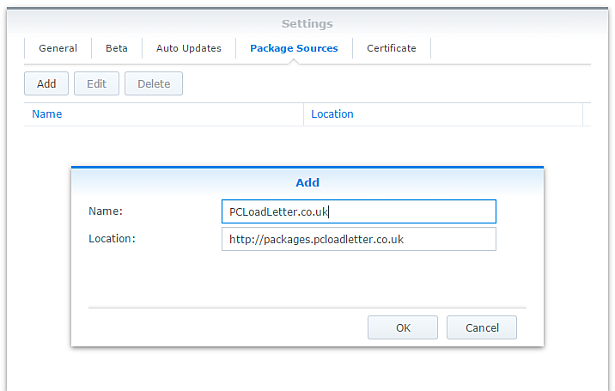
On DSM 3.2 or later, you can install directly from Package Center. In Settings -> Package Sources add my package repository URL which is
http://packages.pcloadletter.co.uk


Instructions

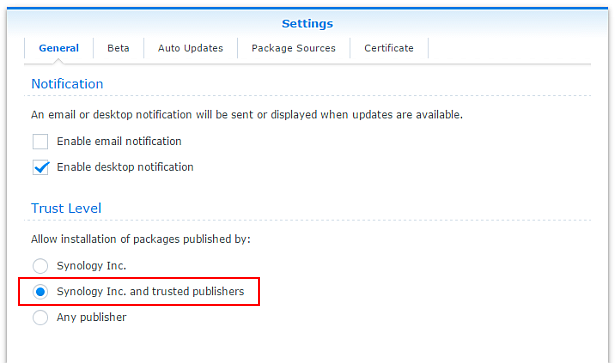
This package can be installed on an unmodified NAS – no hacking is required. It has been tested on DSM 3.2, and 4.0. Here’s what you need to do:

  • In the DSM User control panel enable the User Home service
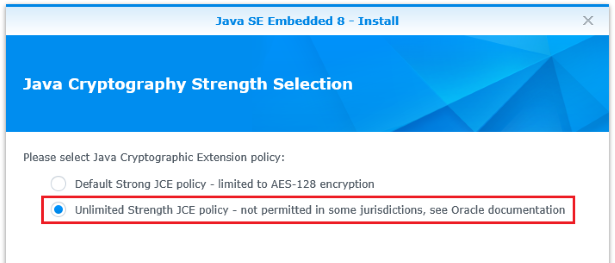
  • Using the DSM Package Center install my Java SE for Embedded Synology package for your CPU type
  • Install the OpenRemote Synology package
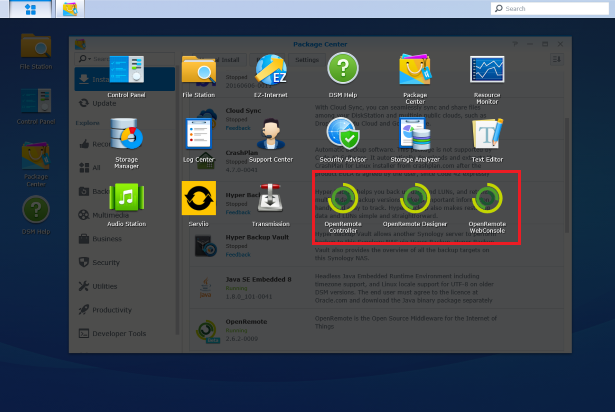
  • Give it a few seconds to start, then you can use the OpenRemote icons in the DSM drop down menu in the top-left. These new icons will only be visible to admin users in DSM
  • Finally, you will need to update the webapp.port value in OpenRemote Designer to 18581 like so:

OpenRemote saves your designs in the cloud with your online account, and the controller syncs with those designs. You can see the controller’s underlying Catalina log by clicking More Info in the Package Center. DSM Package Center installs the application to /volume1/@appstore/OpenRemote though from what I understand, on multi-volume systems the user is prompted for a destination volume. If you need to edit config files, or look at other logs in detail via SSH – that’s where you’ll find them.


Package scripts

For info, here are the scripts inside the package. The security-conscious among you can untar the package and take a look at the contents for yourself.

installer.sh

#!/bin/sh

#--------OPENREMOTE installer script
#--------package maintained at pcloadletter.co.uk

DOWNLOAD_FILE="OpenRemote-Controller-2.0.1.zip"
DOWNLOAD_PATH="http://downloads.sourceforge.net/project/openremote"
EXTRACTED_FOLDER="OpenRemote-Controller-2.0.1"
DOWNLOAD_URL="${DOWNLOAD_PATH}/${DOWNLOAD_FILE}"
DAEMON_USER="`echo ${SYNOPKG_PKGNAME} | awk {'print tolower($_)'}`"
DAEMON_PASS="`openssl rand 12 -base64 2>nul`"
DAEMON_ID="${SYNOPKG_PKGNAME} daemon user"
ENGINE_SCRIPT="openremote.sh"
MIGRATION_FOLDER="${DAEMON_USER}_data_mig"
INSTALL_FILES="${DOWNLOAD_URL}"
source /etc/profile
TEMP_FOLDER="`find / -maxdepth 2 -name '@tmp' | head -n 1`"
PRIMARY_VOLUME="/`echo $TEMP_FOLDER | cut -f2 -d'/'`"


preinst ()
{
  if [ -z ${JAVA_HOME} ]; then
    echo "Java is not installed or not properly configured. JAVA_HOME is not defined. "
    echo "Download and install the Java Synology package from http://wp.me/pVshC-z5"
    exit 1
  fi
  
  if [ ! -f ${JAVA_HOME}/bin/java ]; then
    echo "Java is not installed or not properly configured. The Java binary could not be located. "
    echo "Download and install the Java Synology package from http://wp.me/pVshC-z5"
    exit 1
  fi
  
  #is the User Home service enabled?
  UH_SERVICE=maybe
  synouser --add userhometest Testing123 "User Home test user" 0 "" ""
  UHT_HOMEDIR=`cat /etc/passwd | sed -r '/User Home test user/!d;s/^.*:User Home test user:(.*):.*$/\1/'`
  if echo $UHT_HOMEDIR | grep '/var/services/homes/' > /dev/null; then
    if [ ! -d $UHT_HOMEDIR ]; then
      UH_SERVICE=false
    fi
  fi
  synouser --del userhometest
  #remove home directory (needed since DSM 4.1)
  [ -e /var/services/homes/userhometest ] && rm -r /var/services/homes/userhometest
  if [ ${UH_SERVICE} == "false" ]; then
    echo "The User Home service is not enabled. Please enable this feature in the User control panel in DSM."
    exit 1
  fi

  cd ${TEMP_FOLDER}
  for WGET_URL in ${INSTALL_FILES}
  do
    WGET_FILENAME="`echo ${WGET_URL} | sed -r "s%^.*/(.*)%\1%"`"
    [ -f ${TEMP_FOLDER}/${WGET_FILENAME} ] && rm ${TEMP_FOLDER}/${WGET_FILENAME}
    wget ${WGET_URL}
    if [[ $? != 0 ]]; then
      if [ -d ${PUBLIC_FOLDER} ] && [ -f ${PUBLIC_FOLDER}/${DOWNLOAD_FILE} ]; then
        cp ${PUBLIC_FOLDER}/${DOWNLOAD_FILE} ${TEMP_FOLDER}
      else     
        echo "There was a problem downloading ${WGET_FILENAME} from the official download link, "
        echo "which was \"${WGET_URL}\" "
        echo "Alternatively, you may download this file manually and place it in the 'public' shared folder. "
        exit 1
      fi
    fi
  done
  
  exit 0
}


postinst ()
{
  #create daemon user
  synouser --add ${DAEMON_USER} ${DAEMON_PASS} "${DAEMON_ID}" 0 "" ""
  
  #determine the daemon user homedir and save that variable in the user's profile
  #this is needed because new users seem to inherit a HOME value of /root which they have no permissions for
  DAEMON_HOME="`cat /etc/passwd | grep "${DAEMON_ID}" | cut -f6 -d':'`"
  su - ${DAEMON_USER} -s /bin/sh -c "echo export HOME=\'${DAEMON_HOME}\' >> .profile"
  su - ${DAEMON_USER} -s /bin/sh -c "echo export CATALINA_PID=~/.daemon.pid >> .profile"
  
  #extract main archive
  cd ${TEMP_FOLDER}
  unzip ${TEMP_FOLDER}/${DOWNLOAD_FILE} && rm ${TEMP_FOLDER}/${DOWNLOAD_FILE}
  mv ${TEMP_FOLDER}/${EXTRACTED_FOLDER}/* ${SYNOPKG_PKGDEST}
  rmdir ${TEMP_FOLDER}/${EXTRACTED_FOLDER}
  mv ${SYNOPKG_PKGDEST}/passgen ${SYNOPKG_PKGDEST}/bin
  chmod +x ${SYNOPKG_PKGDEST}/bin/${ENGINE_SCRIPT}
  
  #TCP port 8081 is in use on Synology so we need to move Catalina to another port - 18581
  #This regex was tricky, but possible thanks to http://austinmatzko.com/2008/04/26/sed-multi-line-search-and-replace/
  sed -i -n '1h;1!H;${;g;s%\(<Connector executor="HTTP-ThreadPool".*port="\)8080\(".* />\)%\118581\2%;p;}' ${SYNOPKG_PKGDEST}/conf/server.xml
  sed -i "s/^webapp.port=.*$/webapp.port=18581/" ${SYNOPKG_PKGDEST}/webapps/controller/WEB-INF/classes/config.properties

  #change owner of folder tree
  chown -R ${DAEMON_USER} ${SYNOPKG_PKGDEST}
  
  exit 0
}


preuninst ()
{
  #make sure server is stopped
  su - ${DAEMON_USER} -s /bin/sh -c "${SYNOPKG_PKGDEST}/bin/${ENGINE_SCRIPT} stop -force"
  sleep 10
  
  exit 0
}


postuninst ()
{
  #remove daemon user
  synouser --del ${DAEMON_USER}
  
  #remove daemon user's home directory (needed since DSM 4.1)
  [ -e /var/services/homes/${DAEMON_USER} ] && rm -r /var/services/homes/${DAEMON_USER}
  
  exit 0
}
 

start-stop-status.sh

#!/bin/sh

#--------OPENREMOTE start-stop-status script
#--------package maintained at pcloadletter.co.uk

DAEMON_USER="`echo ${SYNOPKG_PKGNAME} | awk {'print tolower($_)'}`"
DAEMON_ID="${SYNOPKG_PKGNAME} daemon user"
ENGINE_SCRIPT="openremote.sh"
DAEMON_USER_SHORT=`echo ${DAEMON_USER} | cut -c 1-8`


daemon_status ()
{
  ps | grep "^ *[0-9]* ${DAEMON_USER_SHORT} .*java" > /dev/null
}

case $1 in
  start)
    DAEMON_HOME="`cat /etc/passwd | grep "${DAEMON_ID}" | cut -f6 -d':'`"
    
    #set the current timezone for Java so that log timestamps are accurate
    #we need to use the modern timezone names so that Java can figure out DST
    SYNO_TZ=`cat /etc/synoinfo.conf | grep timezone | cut -f2 -d'"'`
    SYNO_TZ=`grep "^${SYNO_TZ}" /usr/share/zoneinfo/Timezone/tzname | sed -e "s/^.*= //"`
    grep "^export TZ" ${DAEMON_HOME}/.profile > /dev/null \
     && sed -i "s%^export TZ=.*$%export TZ='${SYNO_TZ}'%" ${DAEMON_HOME}/.profile \
     || echo export TZ=\'${SYNO_TZ}\' >> ${DAEMON_HOME}/.profile
    
    #start OpenRemote in background mode
    su - ${DAEMON_USER} -s /bin/sh -c "cd ${SYNOPKG_PKGDEST}/bin && ./${ENGINE_SCRIPT} start &"
  
    #set up symlinks for the DSM GUI
    if [ -d /usr/syno/synoman/webman/3rdparty ]; then
      ln -s ${SYNOPKG_PKGDEST}/DSM/OpenRemoteController /usr/syno/synoman/webman/3rdparty/OpenRemoteController
      ln -s ${SYNOPKG_PKGDEST}/DSM/OpenRemoteDesigner /usr/syno/synoman/webman/3rdparty/OpenRemoteDesigner
      ln -s ${SYNOPKG_PKGDEST}/DSM/OpenRemoteWebConsole /usr/syno/synoman/webman/3rdparty/OpenRemoteWebConsole
    fi
  
    exit 0
	;;

  stop)
    su - ${DAEMON_USER} -s /bin/sh -c "${SYNOPKG_PKGDEST}/bin/${ENGINE_SCRIPT} stop -force"
    
    #remove DSM icon symlinks
    rm /usr/syno/synoman/webman/3rdparty/OpenRemote*
    
    exit 0
  ;;

  status)
    if daemon_status ; then
      exit 0
    else
      exit 1
    fi
 	;;

  log)
    echo "${SYNOPKG_PKGDEST}/logs/catalina.out"
    exit 0
  ;;
esac
 

Changelog:

  • 2.0.1-0008 Fixes for DSM 4.2
  • 2.0.1-006 updated to release 2.0.1, merged the package scripts for easier maintenance
  • 2.0.0-005 updated to release 2.0 with Web Console, package now downloads installation files directly from openremote.org, removed Java 6 check, timezone support for Java, icons vanish from DSM menu when package in stopped state, added URL for Web Console to Package Info in Package Center
  • 2.0.0_20110611-004 fixed missing panel.xml error due to relative path problem in openremote.sh, documented on OpenRemote forum
  • 2.0.0_20110611-003 fixed controller TCP port after autodiscover from panel
  • 2.0.0_20110611-002 updated for package repo to allow update notification, made Java 6 mandatory and added link to user forum in More Info
  • 2.0.0_SNAPSHOT_20110611 v1 initial spk release
 
 
About these ads

89 thoughts on “OpenRemote package for Synology NAS

  1. Franck

    Excellent !!!

    a very big THANKS
    just installed on my Syno DS1010+, works fine, and so simple to install

    thanks again for your work

    Franck

    Reply
  2. Franck

    I have a problem for the port configuration, I can’t change the 8080 to 18581, when I start the app, I can’t find my panels, because the controller that is discover in the settings of the app, indicates “http://192.168.1.11:8080/Controller ” but never with the good port.

    When I tried to add a new controller manualy with the good port, the app indicates: “Panel List Error panel.xml not found”

    If you know where I am wrong…

    Thanks

    Franck

    Reply
    1. patters Post author

      Hi Franck, I finally got around to taking a look at this last night using my iPad as a panel. I think I have fixed that issue, but I had some difficulty trying to make a test button (that could just be me being unfamiliar with the software though). Use my package repository URL to install, that way you will be notified automatically of future versions.

      Reply
  3. Individual

    patters, could you, maybe, do .spk for the following?

    - periscope subtitle downloader
    - twonky mediaserver 6.0.37 – kirkwood

    Reply
    1. patters Post author

      Sorry, it’s a lot of work making a package. I only did it for OpenRemote because it was very similar in its needs to one I’d already made, and there was a forum post where some other guys had already worked a lot of the issues out. I don’t really have time to look at these other software titles, especially as I have no personal interest in using them.

      Reply
  4. moxli

    Hey Patters,

    Thanks for your labor and efforts to make this world easier to live in! I installed OpenRemote on my Synology DS209 and it works just fine.

    I’m going to try to create my small “Smart home”. And the first thing I want to try is temperature, pressure and humidity measure in my room. I want to use 1-wire sensors as Maxim DS1820, AAG TAI-8540 etc. First I’m concerning about is OWFS. It is said that we should have it installed and configured:

    http://www.openremote.org/display/docs/OpenRemote+2.0+How+To+-+1-Wire+Sensors

    But how? Do you know?

    ++ I also wanted to find find out if you included in your *.spk-OpenRemote package that script that start OpenRemote automatically as DS starts. Or should create that script by our-self as it described here:

    http://www.openremote.org/display/docs/OpenRemote+2.0+How+To+-+Controller+on+Synology+NAS?focusedCommentId=19433213#comment-19433213

    Alex.

    Reply
    1. patters Post author

      Hi, glad it’s useful to you! I don’t really know anything about 1-wire, but there are a few posts I noticed that suggest that it might be tricky:
      http://forum.synology.com/enu/viewtopic.php?f=27&t=43297

      http://translate.google.co.uk/translate?hl=en&sl=de&u=http://www.synology-forum.de/showthread.html%3F17277-Synology-und-OWFS-%281-Wire-Filesystem%29&ei=xdPMToiZPIfJhAeV1tDhDQ&sa=X&oi=translate&ct=result&resnum=2&ved=0CDgQ7gEwAQ&prev=/search%3Fq%3Dowfs%2Bsynology%26hl%3Den%26client%3Dfirefox-a%26hs%3D3MW%26rls%3Dorg.mozilla:en-GB:official%26prmd%3Dimvns

      Reply
  5. moxli

    Thank you for reply!

    You know I really dig it! It so cool to use my Syno as a head of smart home in addition to other tasks.

    Would you please unveil how d’you use it? So I might add some possibilities too having known that you’ve done it..

    Reply
    1. patters Post author

      It’s not something I’ve tried but it looks like the instructions are here:
      http://openremote.org/display/docs/OpenRemote+2.0+How+To+-+Web+Console+Installation

      The location of the OpenRemote package’s files once installed on the syno is /volume1/@appstore/OpenRemote
      You can’t use the File Browser in DSM to browse this location though, you’ll need to use a terminal session.

      EDIT – just tested it, it works fine. In keeping with the Controller, the webconsole URL would be:
      http://yoursynoIP:18581/webconsole/

      (assuming the .war file was renamed to webconsole.war)
      I may add this to the next version of the package.

      Reply
  6. Rde

    Hi,

    Is there a chance that this would run with Jamvm ?
    That is available as ipkg for my ppc synology.
    You seem to know alot about this stuff.
    So you might be able to tell if its worth investing my time in trying to get it to run.

    Reply
  7. moxli

    Thanks Man! Just keep in touch and follow up. This thing OpenRemote is amazing!! Now Web Console is great plus too..

    Reply
  8. Juha Lindfors

    Hello,

    Just a quick ping on OpenRemote, there’s a new release (2.0) available at http://download.openremote.org. If you plan on updating the Synology package, you’ll want to include this release.

    The Controller 2.0 also includes (embedded) the Web Console panel (currently v2.0 Alpha2 — still developer version) so no need to prepare separate packages for Web Console. It is running as an additional archive in the Tomcat runtime. Going forward the Web Console will be included in the Controller distribution.

    Let us know if there’s anything we can do to help with the maintenance of these packages.

    Best regards,

    – Juha

    Reply
    1. patters Post author

      Thanks Juha. I’ll put something together soon, hopefully this evening. With other packages I’ve built more recently I’ve tended to follow a model of using wget to fetch the installation files directly from the website concerned and making any edits to configs and so on by script. I’ll do that for OpenRemote, which ought to make things much easier going forward.

      Reply
    2. patters Post author

      Ok, the package has been updated, just Refresh in Package Center and you’ll see the update badge. The modifications to the config files for port numbers are done by script now rather than by hand so new versions can be deployed much more easily. I just thought I’d feed back that the Web Console doesn’t work properly on IE Mobile on Windows Phone 7.5. On my Nokia Lumia 800 if I set IE to prefer full websites rather than mobile ones then it does seem ok, so it might be something quite simple to fix.

      Reply
      1. Juha Lindfors

        Thanks for reporting the issue with Mobile IE. This browser was not one which we targeted initially (in fact I was blissfully ignorant that a mobile version of IE existed) so compatibility has not been tested.

        Unclear at the moment if anyone in the dev team has a device with Mobile IE to test with. This may be something we need to have community address and patch.

        The issue can be tracked at http://jira.openremote.org/browse/WEBCONSOLE-45 — it is useful to leave comments if Mobile IE support is important to you.

  9. Yngwie Chou

    Thanks for the excellent package, Patters!

    One more question, how can I upgrade to the latest openremote version after installed with your package?

    Reply
  10. ccaramel

    Hi, thank you for the package, working in Syno 710+ with DSM4.0.
    It seems that the package use a lot of memory (maybe due to Java 6).
    Is there a way to reduce it?
    When shutting down the package with package center, java process remains actives.
    Is there a way to overcome this?, the one I found i to log in ssh as root and kill java processes.
    regards,
    Christian.

    Reply
  11. hi

    Hi all,

    I’ve tried to install OpenRemote on my Synology following: http://www.openremote.org/display/docs/OpenRemote+2.0+How+To+-+Controller+on+Synology+NAS

    however I’ve issues booting the service. As I don’t know much about Linux can anyone help me out what’s wrong with the install? I get following feedback when trying to enable the service:

    ./openremote.sh run
    Using CATALINA_BASE: /usr/local/OpenRemote
    Using CATALINA_HOME: /usr/local/OpenRemote
    Using CATALINA_TMPDIR: /usr/local/OpenRemote/temp
    Using JRE_HOME: /volume1/@appstore/java7/jre
    Apr 24, 2012 12:18:11 PM org.apache.catalina.core.AprLifecycleListener init
    INFO: The APR based Apache Tomcat Native library which allows optimal performance in production environments was not found on the java.library.path: /usr/local/OpenRemote/webapps/controller/WEB-INF/lib/native
    Apr 24, 2012 12:18:11 PM org.apache.coyote.http11.Http11Protocol init
    INFO: Initializing Coyote HTTP/1.1 on http-8081
    Apr 24, 2012 12:18:11 PM org.apache.catalina.startup.Catalina load
    INFO: Initialization processed in 4580 ms
    Apr 24, 2012 12:18:12 PM org.apache.catalina.core.StandardService start
    INFO: Starting service Catalina
    Apr 24, 2012 12:18:12 PM org.apache.catalina.core.StandardEngine start
    INFO: Starting Servlet Engine: Apache Tomcat/6.0.18
    Apr 24, 2012 12:18:20 PM org.openremote.controller.bootstrap.Startup redirectJULtoLog4j
    INFO: Initialized JUL to LOG4J Redirector.
    Controller 2012-04-24 12:18:31,412 ERROR DefaultQuartzScheduler_QuartzSchedulerThread org.quartz.core.ErrorLogger.schedulerError(2166) | An error occured instantiating job to be executed. job= ‘DEFAULT.controllerXMLChangeListenJob’
    org.quartz.SchedulerException: Problem instantiating class ‘org.openremote.controller.config.ControllerXMLChangeListener’ – [See nested exception: java.lang.NoSuchMethodError: org.quartz.SchedulerException.(Ljava/lang/String;Ljava/lang/Exception;)V]
    at org.quartz.core.JobRunShell.initialize(JobRunShell.java:136)
    at org.quartz.core.QuartzSchedulerThread.run(QuartzSchedulerThread.java:384)
    Caused by: java.lang.NoSuchMethodError: org.quartz.SchedulerException.(Ljava/lang/String;Ljava/lang/Exception;)V
    at org.springframework.scheduling.quartz.AdaptableJobFactory.newJob(AdaptableJobFactory.java:41)
    at org.quartz.core.JobRunShell.initialize(JobRunShell.java:129)
    … 1 more
    ——– Started thread for sensor 45 switch FRAME L_Data.req 0.0.0 -> 0/3/1 Data: 0×00
    Apr 24, 2012 12:18:39 PM org.apache.coyote.http11.Http11Protocol start
    INFO: Starting Coyote HTTP/1.1 on http-8081
    Apr 24, 2012 12:18:39 PM org.apache.catalina.startup.Catalina start
    INFO: Server startup in 27748 ms
    Apr 24, 2012 12:18:39 PM org.apache.catalina.core.StandardServer await
    SEVERE: StandardServer.await: create8005:
    java.net.BindException: Address already in use
    at java.net.PlainSocketImpl.socketBind(Native Method)
    at java.net.AbstractPlainSocketImpl.bind(AbstractPlainSocketImpl.java:376)
    at java.net.ServerSocket.bind(ServerSocket.java:376)
    at java.net.ServerSocket.(ServerSocket.java:237)
    at org.apache.catalina.core.StandardServer.await(StandardServer.java:373)
    at org.apache.catalina.startup.Catalina.await(Catalina.java:642)
    at org.apache.catalina.startup.Catalina.start(Catalina.java:602)
    at sun.reflect.NativeMethodAccessorImpl.invoke0(Native Method)
    at sun.reflect.NativeMethodAccessorImpl.invoke(NativeMethodAccessorImpl.java:57)
    at sun.reflect.DelegatingMethodAccessorImpl.invoke(DelegatingMethodAccessorImpl.java:43)
    at java.lang.reflect.Method.invoke(Method.java:601)
    at org.apache.catalina.startup.Bootstrap.start(Bootstrap.java:288)
    at org.apache.catalina.startup.Bootstrap.main(Bootstrap.java:413)

    Apr 24, 2012 12:18:39 PM org.apache.coyote.http11.Http11Protocol pause
    INFO: Pausing Coyote HTTP/1.1 on http-8081
    Exception in thread “Thread-4″ java.lang.IllegalStateException: Shutdown in progress
    at java.lang.ApplicationShutdownHooks.remove(ApplicationShutdownHooks.java:82)
    at java.lang.Runtime.removeShutdownHook(Runtime.java:237)
    at org.openremote.controller.protocol.knx.ip.IpTunnelClient.disconnect(IpTunnelClient.java:140)
    at org.openremote.controller.protocol.knx.ip.IpTunnelClient$ShutdownHook.run(IpTunnelClient.java:247)
    Apr 24, 2012 12:18:40 PM org.apache.catalina.core.StandardService stop
    INFO: Stopping service Catalina
    log4j:WARN No appenders could be found for logger (org.openremote.controller.statuscache.StatusCache).
    log4j:WARN Please initialize the log4j system properly.
    Exception in thread “Thread-5″ java.lang.NullPointerException
    at org.openremote.controller.protocol.knx.ApplicationProtocolDataUnit.getProtocolDataUnit(ApplicationProtocolDataUnit.java:505)
    at org.openremote.controller.protocol.knx.KNXCommand.getCEMIFrame(KNXCommand.java:500)
    at org.openremote.controller.protocol.knx.KNXCommand.toString(KNXCommand.java:267)
    at java.lang.String.valueOf(String.java:2902)
    at java.lang.StringBuilder.append(StringBuilder.java:128)
    at org.openremote.controller.protocol.knx.GroupValueRead.read(GroupValueRead.java:135)
    at org.openremote.controller.component.Sensor.readStatus(Sensor.java:131)
    at org.openremote.controller.statuscache.PollingMachineThread.run(PollingMachineThread.java:65)
    Apr 24, 2012 12:18:42 PM org.apache.coyote.http11.Http11Protocol destroy
    INFO: Stopping Coyote HTTP/1.1 on http-8081

    Reply
  12. Ivan Sørensen

    Have just installed this on DS712+ DSM 4.0-2228, all installed well, but when starting controller or web console I only get a white window…please help…

    Reply
    1. patters Post author

      What does the Log tab of the Java Package say? Can you see the Java & HotSpot versions? If so Java is installed ok.

      Reply
      1. Ivan

        My own fault there, I was trying from the outside, so I had to make some rules in router…

        Have one more question – I’m trying to get Samsung TV commands to work, but how do I set the IP adress – on openremote site there is an guide where you have to manualy set the IP, but ho do I find this file on Synology…

      2. patters Post author

        The OpenRemote files can be found in /volume1/@appstore/OpenRemote. Beyond that I’m not sure :)

  13. alex_dom

    If someone interested in 1-wire using on OpenRemote with your Synology NAS and doesn’t know how to install OWFS, which is requied to be installed in prior of installing OWFS?

    Here is the instruction(on russian, but prety clear to follow) of how to do that:

    http://www.synology-forum.ru/wiki/index.php/OWFS_1-wire_on_Synology

    And here is the threat on the Russian Forum about 1-Wire & OWFS & Home Authomation(including hardware description):

    http://www.synology-forum.ru/index.php?showtopic=3640

    Reply
      1. alex_dom

        Hey Marcus! Glade to hear from you! If you want – you could compile it. But there’s ready-to-install pre-compiled for all verity of Synology CPU.

        Just follow the link from my message above. There is the list of “Ready-to-install packages”. Choose your CPU and download it. Then do this:

        1) Copy the downloaded package onto your Synology DS(let’s say /volume1/temp)

        2) cd /

        3) tar -xvzf /volume1/temp/.tar.gz -C /

        4) mkdir /mnt/1-wire

        Then use the following commands to create two start-up and two kill scripts for the OWFS-services:

        1) S72owfs:

        Create file:

        cat > S72owfs

        Add the following text into this file:

        #!/bin/sh

        if [ ! -d /mnt/1-wire ]
        then
        mkdir -p /mnt/1-wire
        fi

        export LD_LIBRARY_PATH=/lib:/opt/lib

        /opt/bin/owserver -uall -p 3000 &
        sleep 1
        /opt/bin/owfs -s 3000 /mnt/1-wire &

        exit 0

        Use Ctrl+D to exit editing file

        2) S73owhttpd:

        Create file:

        cat > S73owhttpd

        Add the following text into this file:

        #!/bin/sh

        export LD_LIBRARY_PATH=/lib:/opt/lib

        PID=`ps | grep -E ‘[A-z0-9/]+/owserver($| )’ | awk ‘ { print $1 } ‘`

        if [ -n "$PID" ]
        then
        /opt/bin/owhttpd -s 3000 -p 3001 &
        fi
        exit 0

        Use Ctrl+D to exit editing file

        3) K71owhttpd:

        Create file:

        cat > K71owhttpd

        Add the following text into this file:

        #!/bin/sh

        PID=`ps | grep -E ‘[A-z0-9/]+/owhttpd($| )’ | awk ‘ { print $1 } ‘`

        if [ -n "$PID" ]
        then
        kill -s KILL $PID
        fi
        exit 0

        Use Ctrl+D to exit editing file

        4) K72owfs

        Create file:

        cat > K72owfs

        Add the following text into this file:

        #!/bin/sh

        PID=`ps | grep -E ‘[A-z0-9/]+/owserver($| )’ | awk ‘ { print $1 } ‘`

        if [ -d /mnt/1-wire ]
        then
        umount /mnt/1-wire > /dev/null 2>/dev/null
        fi
        echo $PID
        if [ -n "$PID" ]
        then
        kill -KILL $PID
        fi

        exit 0

        Use Ctrl+D to exit editing file

        Copy this scripts into /opt/etc/init.d/ and make them executable:

        chmod +x /opt/etc/init.d/*ow*

        That is all

      2. Marcus

        Thanks for the info about owfs.
        I found the download and created a packaged for my Atom based DS1512. This way all the “manual” steps are not necessary :)

      3. chris

        I would need a version for the DS107+ Marvell Orion mv5281 ARM Processor …
        tx

      4. patters Post author

        The first problem would be to try and get a working Java Runtime Environment. The Oracle one won’t work on that because it’s OABI not EABI I believe.

  14. Mauricio

    Patters,

    Thanks for your great contribution. The package installed with no issues and my android shows the controller too. I am missing a key element and was hoping you could help. How can I install the X10 CM15A drivers on my synology 209? If you can provide instructions or a package it would be great help. Thanks.

    Reply
    1. matejicek

      Hello I was in the same situation have you found since our topics a solution for mochad on a synology NAS ?

      Reply
  15. Marcus

    Hi Patters,
    this is Marcus from OpenRemote and I received a Atom based DS1512+ to test and better support OpenRemore on Synology. Can you contact me via email (marcus at openremote dot org)? For the Atom based models I would like to use OpenJDK and not depend on Oracle.
    Thanks and keep up the good work.

    Reply
    1. Mauricio

      Marcus,

      I hope you can help with this comment I posted for Patters ” Patters, Thanks for your great contribution. The package installed with no issues and my android shows the controller too. I am missing a key element and was hoping you could help. How can I install the X10 CM15A drivers on my synology 209? If you can provide instructions or a package it would be great help. Thanks.”

      Thanks.

      Reply
    1. Marcus

      Works again :)
      Patters, my OpenJDK.spk is ready and works fine for Atom based boxes and no other download is needed.
      I was able to install your OpenRemote version without any problems afterwards.
      Can you provide me with some information regarding the webservice and the JSON response needed to host a package repo?

      Reply
  16. Marcus

    Patters,
    I still have a problem with the timezone even though I integrated the stuff you did to export TZ in /root/.profile.
    DSM shows the correct time.
    Console command “date” is 2 hours behind.
    Log file from OpenRemote is 1 hour behind.
    Any help is appreciated.

    Reply
  17. Pingback: OpenRemote: complément idéal de la Zibase… | ZiBASE CLUB

    1. MT

      I succesfully installed it in a DS209. I am only missing one key element for my home automation. Has anyone compiled a driver for an X10 CM15A USB interface?

      Reply
  18. joshhate

    This is exciting! It is my first go at HA, and I’m having some trouble. OpenRemote installed fine on my Synology DS212J; XBMC 11.0 (ATV2) has HTTP control enabled (and I have successfully sent commands from another app); OpenRemote app is running on iPad 2; commands have been established for XBMC control using JSON rpc. Depsite all this, the commands don’t ever make it to the XBMC from the iPad. Just wondering if anyone had any ideas on how to troubleshoot this?

    Reply
  19. Hendrik

    Having recently acquired a Synology DS213+ and planning to use Z-Wave, in a first instance for controlling my heating, I discovered your OpenRemote package for Synology.
    Which would be a great solution!
    Even better, the required Java package, made available by you as well, is available for the specific processor of my NAS (QorIQ PPC). Which of course is great news, since it was introduced only a few months ago.

    However, after reading into the matter for several hours, I still have the following questions remaining which I hope you could help me with:
    - Has Z-Wave been included in OpenRemote in general yet and if so, is it included in your package? The OpenRemote main webpage mentions it being compatible with Z-Wave and the Beta tester thread on their forum has been closed. Which all indicate it has been included in OpenRemote. But the situation does not seem 100% clear.
    - Does your package contain (or will it contain) the necessary drivers for Z-Wave sticks directly plugged into the USB port of the NAS? From what I have read, the necessary drivers have to be compiled with the help of a Linux PC (which I do not have at my disposal) and some Linux knowledge (which, again, I do not have at my disposal).

    The resaon for these questions is of course that in case they are answered positively, this would mean my NAS will be the only device I need (and need to keep powered 24/24) to control Z-Wave compatible devices.

    It would be great if you (or another user) could enlighten me on these two questions.
    Even better would be to solve them of course if needed ;-)

    Thank you in advance!

    Reply
    1. patters Post author

      Hi Hendrik, I’m afraid I don’t know much about OpenRemote at all beyond having created the package, but it’s possible another reader may answer.

      Reply
      1. Hendrik

        Thank you for having taken the time to read and answer.
        Hopefully someone else with the needed knowledge will jump in indeed…

    2. marcus@openremote.org

      The Z-Wave Jar for OpenRemote will be released soon. Patters package has to be updated to the latest controller which he can easily do, once we release. Just keep reading the OpenRemote forums. The beta test is closed and I mentioned on the forums that a public version will be released soon. Stay tuned .

      Reply
  20. Juha Lindfors

    Minor update to OpenRemote Controller is available: http://download.openremote.org/2.0.1

    Controller 2.0.1 (2012-11-21)
    =============================

    – Update Web Console implementation to 2.0.0 FINAL
    – Change Tomcat runtime default logging to file size
    bound (10MB per file) instead of unlimited file
    size logging

    More details can be found here: http://openremote.org/display/project/2012/11/21/OpenRemote+Controller+2.0.1+Released

    May be interesting enough to update the Synology package?

    Reply
    1. patters Post author

      Thanks Juha. I have updated the package. The controller and the designer seem ok, but I didn’t seem to be able to load my sample design in the Web Console. Thing is I don’t use OpenRemote so I could be doing something wrong. Perhaps another user can comment…

      Reply
      1. pz1

        I have the basic free package of 20121124 up and running on DS212+. I am busy getting the PRO version to work as well. Webconsole is functioning (also on my Android 4.0 now). I still have a problem with synchonisation of panels with the Synobox

    2. Juha Lindfors

      Minor update to OpenRemote Controller is available: http://download.openremote.org/2.0.2

      Controller 2.0.2 (2013-02-26)
      ============================

      – Update Web Console implementation to 2.1.0 (Richard Turner, ORCJAVA-312)
      – Bug fix: sensor status cache was throwing a runtime exception
      which was not handled if a panel requested a sensor status on
      a sensor which failed to start (due to configuration or
      other errors). The unhandled exception caused the client
      call to fail instead of gracefully falling back to default or
      error value. (Eric Bariaux, ORCJAVA-268)
      – Bug fix: logging generated errors (null pointer exception) at
      shutdown (Eric Bariaux, ORCJAVA-222)

      More details can be found here:
      http://openremote.org/display/project/2013/02/26/OpenRemote+Controller+2.0.2+Released

      Reply
  21. IceFluffy

    I’m having trouble with drools…
    How do I solve this on the NAS?

    ERROR 2012-12-03 21:50:37,734 : Cannot start event processor ‘Drools Rule Engine’ : Unable to load dialect ‘org.drools.rule.builder.dialect.java.JavaDialectConfiguration:java:org.drools.rule.builder.dialect.java.JavaDialectConfiguration’
    org.drools.RuntimeDroolsException: Unable to load dialect ‘org.drools.rule.builder.dialect.java.JavaDialectConfiguration:java:org.drools.rule.builder.dialect.java.JavaDialectConfiguration’
    at org.drools.compiler.PackageBuilderConfiguration.addDialect(PackageBuilderConfiguration.java:283)
    at org.drools.compiler.PackageBuilderConfiguration.buildDialectConfigurationMap(PackageBuilderConfiguration.java:268)
    at org.drools.compiler.PackageBuilderConfiguration.init(PackageBuilderConfiguration.java:181)
    at org.drools.compiler.PackageBuilderConfiguration.(PackageBuilderConfiguration.java:159)
    at org.drools.compiler.PackageBuilder.(PackageBuilder.java:210)
    at org.drools.compiler.PackageBuilder.(PackageBuilder.java:143)
    at org.drools.builder.impl.KnowledgeBuilderFactoryServiceImpl.newKnowledgeBuilder(KnowledgeBuilderFactoryServiceImpl.java:34)
    at org.drools.builder.KnowledgeBuilderFactory.newKnowledgeBuilder(KnowledgeBuilderFactory.java:47)
    at org.openremote.controller.statuscache.rules.RuleEngine.getValidKnowledgePackages(RuleEngine.java:484)
    at org.openremote.controller.statuscache.rules.RuleEngine.start(RuleEngine.java:253)
    at org.openremote.controller.statuscache.EventProcessorChain.start(EventProcessorChain.java:112)
    at org.openremote.controller.statuscache.StatusCache.start(StatusCache.java:120)
    at org.openremote.controller.deployer.Version20ModelBuilder.buildSensorModel(Version20ModelBuilder.java:615)
    at org.openremote.controller.deployer.Version20ModelBuilder.build(Version20ModelBuilder

    more

    Reply
      1. IceFluffy

        Oops, I am using Java 7 indeed.

        I wiill try downgrading to 6 and see what it gives.
        Thanks for the help, I’ll post the outcome here as soon as i have em

  22. Veance

    Hello Patters, Marcus and everybody,
    Package very useful, works well.
    I’d liike to start working with RRD4J Graphs.
    I can’t find the rrd folder with the rrd4j-config.xml in the OpenRemote app folder,should it be included in the stable version 2.0.1 ?
    Great job, thanks, and merry Christmas,

    Veance

    Reply
    1. Marcus

      The 2.0.1 version does not include rrd4j. The 2.1-developer-snapshot from sourceforge does. You will have to download that and install over the one from Patters and eventually change some files.
      I don’t know which files patters changed in his package.

      Reply
      1. Veance

        Thanks Marcus for the answer, I can build a package with the developer version, it’s not my first package.
        Thanks,
        Veance

  23. Michal

    After updating to the latest version today (2.0.1-0007) the package stays stopped on my DS1512+ (DSM 4.1-2661). I’ve updated Serviio too (1.1.0-0016) and it is running OK. Any thoughts?

    Reply
    1. patters Post author

      I’ll take a look. Probably something small. It’s been a bit problematic – this move to DSM 4.2 caused me to have to rebuild all my packages at once. That’s a lot of change…

      Reply
  24. Michel Rahal

    Hello,

    I just updated Open Remote synology package. The new package, 2.0.1-0007, doesn’t star on my nas(DSM 4.1). How can I get the old one 2.0.1-0006 back?

    Reply
  25. Michel Rahal

    Thank you for the fast update. 2.0.1-0008 start. But open remote still not working. And the designer part became silly(when you click on panel or device, the panel goes up and down).
    Is it possible to get 0006 somewhere, until you fixe the new version?

    Reply
    1. Pieter Zanstra

      Designer behaviour has afaik nothing to do with with the controller for which Patters has made a package. Unfortunately I can not help you with the old spk, because at the time I was unable to download it.
      @Patters: I don’t know if you are aware of this: OpenRemote has registered port 8688 with the IANA organisation as default for the controller. Please consider changing the port 18581 into that new number. Makes deploying different controllers less cumbersome.
      Pieter

      Reply
  26. paqueuc

    Hello,
    Congratulation, your package works great !
    I just need to access the tomcat log file of the controller as I have issues with the telnet protocol of OR.
    I would like to analyse this log file but I’m not able to find it on DSM 4.1 as everything is hidden. Do I need to implement SSH to do so ? Or is there a way to do it through the graphical interface of DSM ? And where do you stock this log file please ?
    Thanks for your help.
    Paqueuc

    Reply
  27. denis

    Hey guys,

    is it possible to use the following syno package as a driver between openremote and a Aeon Labs Z-Wave Series 2 USB bridge? :D

    http://wiki.synozwave.com/index.php?title=Installation/en&setlang=en

    (development is in french – english translation with link above)

    Or is there another way to use the Z-Wave USB stick?
    I don’t want to use X10 devices! I prefere a wireless solution.
    And I don’t want a usb-to-whatever converter to use a specific bridge!

    This will be so great!!! just install java, openremote and synozwave….plug in z-wave stick and have fun :D

    Thanks for your answers!

    Denis

    Reply
    1. Teerling

      As the world is more than SynoZwave and OpenRemote, I think a separate device driver package is more appropriate for such USB sticks.

      Reply
  28. Juha Lindfors

    Update to OpenRemote Controller is available: http://download.openremote.org/2.0.2

    This is a minor update to the existing 2.0.0 and 2.0.1 releases which includes an updated version of Web Console control panel, and two minor bug fixes:

    Controller 2.0.2 (2013-02-26)
    ============================

    – Update Web Console implementation to 2.1.0 (Richard Turner, ORCJAVA-312)
    – Bug fix: sensor status cache was throwing a runtime exception
    which was not handled if a panel requested a sensor status on
    a sensor which failed to start (due to configuration or
    other errors). The unhandled exception caused the client
    call to fail instead of gracefully falling back to default or
    error value. (Eric Bariaux, ORCJAVA-268)
    – Bug fix: logging generated errors (null pointer exception) at
    shutdown (Eric Bariaux, ORCJAVA-222)

    More details can be found here: http://openremote.org/display/project/2013/02/26/OpenRemote+Controller+2.0.2+Released

    Reply
  29. Ulf

    I run OpenRemote 2.0.1-0008 on a DS213+ with DSM 4.2. Thank you for the packages!. Everything works fine accept the web console. Any idea?

    Reply
  30. seth

    Works GREAT!! thx

    now trying to get a lagarto server on NAS…

    always running into: ‘can’t find working C++ compiler’!!

    Reply
  31. maurelio79

    Hi, i was curious about this open remote and so i decided to try it.

    To try it:

    - i opened an account with Oracle
    - i downloaded and installed Java on my synology nas
    - i installed Open Remote on synology
    - i opened an account on Open Remote Designer
    - i changed port value

    Now i start Open Remote Controller from my NAS, try to login and i receive “Authentication failed, please check your username and password.”

    With same credential i can login in Open Remote Designer.

    So i try to write a post in the forum ( http://www.openremote.org/display/forums/User+Forum ) and i found out that my credential are not allowed to write a topic….. ok

    - i opened another account, but when i try, after clicked on Sign UP, i get an error page with hundred of java error lines that starts with:

    “org.springframework.dao.DataIntegrityViolationException: Hibernate operation: could not update: [com.atlassian.confluence.setup.bandana.ConfluenceBandanaRecord#1769477]; SQL []; Data truncation: Data too long for column ‘BANDANAVALUE’ at row 1; nested exception is com.mysql.jdbc.MysqlDataTruncation: Data truncation: Data too long for column ‘BANDANAVALUE’ at row 1
    at org.springframework.jdbc.support.SQLStateSQLExceptionTranslator.translate(SQLStateSQLExceptionTranslator.java:110)

    caused by: com.mysql.jdbc.MysqlDataTruncation: Data truncation: Data too long for column ‘BANDANAVALUE’ at row 1
    at com.mysql.jdbc.MysqlIO.checkErrorPacket(MysqlIO.java:3513)”

    and after the stack trace, at the bottom of the page, there are my data with my password in plain text on html page!!

    Now, what else i need to do to try this Open Remote??

    Thanks very much and sorry for my bad english

    Reply
  32. Dave C

    Hi Patters, over on openremote.org you asked about PowerPC e500v2 support. Did you ever get this? I’ve ordered a DS213+ and am hoping I can get OpenRemote to work. Thanks.

    Reply

Leave a Reply

Fill in your details below or click an icon to log in:

WordPress.com Logo

You are commenting using your WordPress.com account. Log Out / Change )

Twitter picture

You are commenting using your Twitter account. Log Out / Change )

Facebook photo

You are commenting using your Facebook account. Log Out / Change )

Connecting to %s