
There is a lot of good Java software, but it’s difficult to get Java running on a NAS. I decided to do something about that, mainly to pave the way for a Serviio package that didn’t require a huge guide to install. In compliance with the Oracle EULA the Java binaries cannot be redistributed, so this package looks for the downloaded .tar.gz archive in the public shared folder on the NAS. The end user is required to register with Oracle to get the file, as you can see from the description below. I also added locale support to the underlying Linux since Java requires this for UTF-8 support when reading from the filesystem (DSM 4.3 later included this). Timezone support is also configured.
This package installs Java SE Embedded which is purposefully designed to run on low specification headless hardware. It should be noted that Synology Java Manager (only available on Intel products) is the full Java Runtime Environment, and consequently uses more RAM. By default you should use Java 8, unless the application you want to run specifically requires Java 7.
Please note that Oracle ceased maintaining Java 6 in 2012, so it should be considered a serious security vulnerability. The Java 6 package has been withdrawn from the package repository for this reason. If you need it to run a particular piece of software you may download it here for manual installation. Please also note that Oracle retired support for PowerPC CPUs following Java 8 Update 6, so the PowerPC package remains at that version.

Instructions
- In Synology DSM’s Package Center, click Settings and add my package repository:
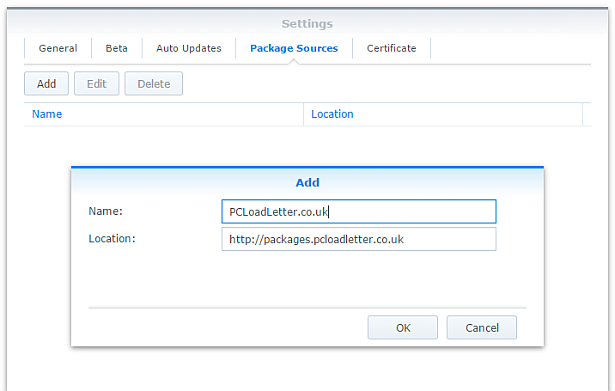
- The repository will push its certificate automatically to the NAS, which is used to validate package integrity. Set the Trust Level to Synology Inc. and trusted publishers:

- Now browse the Community section in Package Center to install a Java SE Embedded package:

The repository only displays packages which are compatible with your specific model of NAS. If you don’t see Java Embedded in the list, then either your NAS model or your DSM version are not supported at this time. - If you have a multi-bay NAS, use the Shared Folder control panel to create a shared folder called public (it must be all lower case). On single bay models this is created by default. Assign it with Read/Write privileges for everyone.
- Register with Oracle and download the appropriate version of Java SE Embedded for your CPU architecture and save in the public shared folder on your NAS. Note that to get any version of Java older than the current one you will need to follow the Oracle Java SE Embedded Downloads Archive link on that page. If in doubt, attempt to install the package first, and the error message will tell you which specific download version is required.
- If you have trouble getting the Java archive recognised, try downloading it with a different web browser. Some browsers try to help by uncompressing the file, or renaming it without warning. I have tried to code around most of these behaviours. Use Firefox if all else fails.
Package scripts
For information, here are the package scripts so you can see what it’s going to do. You can get more information about how packages work by reading the Synology 3rd Party Developer Guide.
installer.sh
#!/bin/sh

#--------JAVA installer script
#--------package maintained at pcloadletter.co.uk

COMMENT="# Synology Java Package"
SYNO_CPU_ARCH="`uname -m`"
[ "`echo ${SYNO_CPU_ARCH} | cut -c1-7`" == "armv5te" ] && SYNO_CPU_ARCH="armv5tel"
#--------Synology switched Armada 370 systems from SoftFP to HardFP EABI for DSM 6.0
[ "${SYNOPKG_DSM_ARCH}" == "armada370" ] && [ ${SYNOPKG_DSM_VERSION_MAJOR} -gt 5 ] && SYNO_CPU_ARCH="armv7l-hflt"
[ "${SYNOPKG_DSM_ARCH}" == "armada375" ] && SYNO_CPU_ARCH="armv7l-hflt"
[ "${SYNOPKG_DSM_ARCH}" == "armada38x" ] && SYNO_CPU_ARCH="armv7l-hflt"
[ "${SYNOPKG_DSM_ARCH}" == "comcerto2k" ] && SYNO_CPU_ARCH="armv7l-hflt"
[ "${SYNOPKG_DSM_ARCH}" == "alpine" ] && SYNO_CPU_ARCH="armv7l-hflt"
[ "${SYNOPKG_DSM_ARCH}" == "alpine4k" ] && SYNO_CPU_ARCH="armv7l-hflt"
[ "${SYNOPKG_DSM_ARCH}" == "monaco" ] && SYNO_CPU_ARCH="armv7l-hflt"
[ "${SYNOPKG_DSM_ARCH}" == "x86_64" ] && [ "${WIZARD_JRE_EE}" == "true" ] && SYNO_CPU_ARCH="i686"
[ "${SYNOPKG_DSM_ARCH}" == "x86_64" ] && [ ${SYNOPKG_DSM_VERSION_MAJOR} -lt 6 ] && SYNO_CPU_ARCH="i686"

if [ "${SYNOPKG_PKGNAME}" == "java6" ]; then
  DOWNLOAD_URL="http://tinyurl.com/javaembedarchive"
  EXTRACTED_FOLDER="ejre1.6.0_38"
  JCE_BINARY="jce_policy-6.zip"
  JCE_URL="http://tinyurl.com/java-jce6"
  JCE_FOLDER="jce"
  if [ "`echo ${SYNO_CPU_ARCH} | cut -c1-7`" == "armv5te" ]; then
    JAVA_BINARY="ejre-1_6_0_38-fcs-b05-linux-arm-sflt-eabi-headless-13_nov_2012.tar.gz"
    JAVA_BUILD="ARMv5 Linux - Headless EABI"
  elif [ "${SYNO_CPU_ARCH}" == "armv7l" ]; then
    JAVA_BINARY="ejre-1_6_0_38-fcs-b05-linux-arm-vfp-eabi-headless-13_nov_2012.tar.gz"
    JAVA_BUILD="ARMv6/7 Linux - Headless EABI, VFP, SoftFP ABI, Little Endian"
  elif [ "${SYNO_CPU_ARCH}" == "i686" ]; then
    JAVA_BINARY="ejre-1_6_0_38-fcs-b05-linux-i586-headless-13_nov_2012.tar.gz"
    JAVA_BUILD="x86 Linux Small Footprint - Headless"
  elif [ "${SYNO_CPU_ARCH}" == "x86_64" ]; then
    JAVA_BINARY="ejre-1_6_0_38-fcs-b05-linux-i586-headless-13_nov_2012.tar.gz"
    JAVA_BUILD="x86 Linux Small Footprint - Headless"
  elif [ "${SYNO_CPU_ARCH}" == "ppc" ]; then
    JAVA_BINARY="ejre-1_6_0_38-fcs-b05-linux-ppc-e500v2-headless-13_nov_2012.tar.gz"
    JAVA_BUILD="Power Architecture Linux - Headless - e500v2 core"
  fi

elif [ "${SYNOPKG_PKGNAME}" == "java7" ]; then
  DOWNLOAD_URL="http://tinyurl.com/javaembed"
  EXTRACTED_FOLDER="ejre1.7.0_75"
  JCE_BINARY="UnlimitedJCEPolicyJDK7.zip"
  JCE_URL="http://tinyurl.com/java-jce7"
  JCE_FOLDER="UnlimitedJCEPolicy"
  if [ "${SYNO_CPU_ARCH}" == "armv5tel" ]; then
    JAVA_BINARY="ejre-7u75-fcs-b13-linux-arm-sflt-headless-18_dec_2014.tar.gz"
    JAVA_BUILD="ARMv5 Linux - Headless EABI, SoftFP ABI, Little Endian"
  elif [ "${SYNO_CPU_ARCH}" == "armv7l" ]; then
    JAVA_BINARY="ejre-7u75-fcs-b13-linux-arm-vfp-sflt-client_headless-18_dec_2014.tar.gz"
    JAVA_BUILD="ARMv6/7 Linux - Headless - Client Compiler EABI, VFP, SoftFP ABI, Little Endian"
  elif [ "${SYNO_CPU_ARCH}" == "armv7l-hflt" ]; then
    JAVA_BINARY="ejre-7u75-fcs-b13-linux-arm-vfp-hflt-client_headless-18_dec_2014.tar.gz"
    JAVA_BUILD="ARMv6/7 Linux - Headless - Client Compiler EABI, VFP, HardFP ABI, Little Endian"
  elif [ "${SYNO_CPU_ARCH}" == "i686" ]; then
    JAVA_BINARY="ejre-7u75-fcs-b13-linux-i586-headless-18_dec_2014.tar.gz"
    JAVA_BUILD="x86 Linux Small Footprint - Headless"
  elif [ "${SYNO_CPU_ARCH}" == "x86_64" ]; then
    JAVA_BINARY="ejre-7u75-fcs-b13-linux-i586-headless-18_dec_2014.tar.gz"
    JAVA_BUILD="x86 Linux Small Footprint - Headless"
  elif [ "${SYNO_CPU_ARCH}" == "ppc" ]; then
    JAVA_BINARY="ejre-7u75-fcs-b13-linux-ppc-e500v2-headless-18_dec_2014.tar.gz"
    JAVA_BUILD="Power Architecture Linux - Headless - e500v2 with double-precision SPE Floating Point Unit"
  fi

elif [ "${SYNOPKG_PKGNAME}" == "java8" ]; then
  DOWNLOAD_URL="http://tinyurl.com/javaembed"
  EXTRACTED_FOLDER="ejdk1.8.0_211"
  JCE_BINARY="jce_policy-8.zip"
  JCE_URL="http://tinyurl.com/java-jce8"
  JCE_FOLDER="UnlimitedJCEPolicyJDK8"
  if [ "${SYNO_CPU_ARCH}" == "armv5tel" ]; then
    JAVA_BINARY="ejdk-8u211-linux-arm-sflt.tar.gz"
    JAVA_BUILD="ARMv5/ARMv6/ARMv7 Linux - SoftFP ABI, Little Endian 2"
  elif [ "${SYNO_CPU_ARCH}" == "armv7l" ]; then
    JAVA_BINARY="ejdk-8u211-linux-arm-sflt.tar.gz"
    JAVA_BUILD="ARMv5/ARMv6/ARMv7 Linux - SoftFP ABI, Little Endian 2"
  elif [ "${SYNO_CPU_ARCH}" == "armv7l-hflt" ]; then
    JAVA_BINARY="ejdk-8u211-linux-armv6-vfp-hflt.tar.gz"
    JAVA_BUILD="ARMv6/ARMv7 Linux - VFP, HardFP ABI, Little Endian 1"
  elif [ "${SYNO_CPU_ARCH}" == "aarch64" ]; then
    JAVA_BINARY="jdk-8u211-linux-arm64-vfp-hflt.tar.gz"
    JAVA_BUILD="Linux ARM 64 Hard Float ABI"
    DOWNLOAD_URL="http://tinyurl.com/java8arm64"
    EXTRACTED_FOLDER="jdk1.8.0_211"
  elif [ "${SYNO_CPU_ARCH}" == "i686" ]; then
    JAVA_BINARY="ejdk-8u211-linux-i586.tar.gz"
    JAVA_BUILD="x86 Linux Small Footprint - Headless"
  elif [ "${SYNO_CPU_ARCH}" == "x86_64" ]; then
    JAVA_BINARY="jre-8u211-linux-x64.tar.gz"
    JAVA_BUILD="Linux x64"
    EXTRACTED_FOLDER="jre1.8.0_211"
    DOWNLOAD_URL="http://tinyurl.com/java8x64"
  elif [ "${SYNO_CPU_ARCH}" == "ppc" ]; then
    #Oracle have discontinued Java 8 for PowerPC after update 6
    JAVA_BINARY="ejdk-8u6-fcs-b23-linux-ppc-e500v2-12_jun_2014.tar.gz"
    JAVA_BUILD="Power Architecture Linux - Headless - e500v2 with double-precision SPE Floating Point Unit"
    EXTRACTED_FOLDER="ejdk1.8.0_06"
  fi
fi

JAVA_BINARY=`echo ${JAVA_BINARY} | cut -f1 -d'.'`
PUBLIC_FOLDER="`synoshare --get public | sed -r "/Path/!d;s/^.*\[(.*)\].*$/\1/"`"
TEMP_FOLDER="`find / -maxdepth 2 -path '/volume?/@tmp' | head -n 1`"
NATIVE_BINS_URL="http://packages.pcloadletter.co.uk/downloads/java-native-${SYNO_CPU_ARCH}.tar.xz"
NATIVE_BINS_FILE="`echo ${NATIVE_BINS_URL} | sed -r "s%^.*/(.*)%\1%"`"
#DSM versions older than 4.3 need locale support adding, don't download unless needed
[ ! -e /usr/bin/locale ] && INSTALL_FILES="${NATIVE_BINS_URL}"
source /etc/profile


preinst ()
{
  synoshare -get public > /dev/null || (
    echo "A shared folder called 'public' could not be found - note this name is case-sensitive. " >> $SYNOPKG_TEMP_LOGFILE
    echo "Please create this using the Shared Folder DSM Control Panel and try again." >> $SYNOPKG_TEMP_LOGFILE
    exit 1
  )

  JAVA_BINARY_FOUND=

  if [ -n "${JAVA_HOME}" ]; then
    echo "It seems from /etc/profile that a Java Runtime is already installed at ${JAVA_HOME}. Uninstall it and try again." >> $SYNOPKG_TEMP_LOGFILE
    exit 1
  fi

  [ -f ${PUBLIC_FOLDER}/${JAVA_BINARY}.tar.gz ] && JAVA_BINARY_FOUND=true
  [ -f ${PUBLIC_FOLDER}/${JAVA_BINARY}.tar ] && JAVA_BINARY_FOUND=true
  [ -f ${PUBLIC_FOLDER}/${JAVA_BINARY}.tar.tar ] && JAVA_BINARY_FOUND=true
  [ -f ${PUBLIC_FOLDER}/${JAVA_BINARY}.gz ] && JAVA_BINARY_FOUND=true

  if [ -z ${JAVA_BINARY_FOUND} ]; then
    echo "Java binary bundle not found. " >> $SYNOPKG_TEMP_LOGFILE
    echo "I was expecting the file ${PUBLIC_FOLDER}/${JAVA_BINARY}.tar.gz. " >> $SYNOPKG_TEMP_LOGFILE
    echo "Please agree to the Oracle licence at ${DOWNLOAD_URL}, then download the '${JAVA_BUILD}' package" >> $SYNOPKG_TEMP_LOGFILE
    echo "and place it in the 'public' shared folder on your NAS. This download cannot be automated even if " >> $SYNOPKG_TEMP_LOGFILE
    echo "displaying a package EULA could potentially cover the legal aspect, because files hosted on Oracle's " >> $SYNOPKG_TEMP_LOGFILE
    echo "server are protected by a session cookie requiring a JavaScript enabled browser." >> $SYNOPKG_TEMP_LOGFILE
    exit 1
  fi

  if [ "${WIZARD_JCE_UL}" == "true" ]; then
    if [ ! -f ${PUBLIC_FOLDER}/${JCE_BINARY} ]; then
      echo "JCE Unlimited Strength binary bundle not found. " >> $SYNOPKG_TEMP_LOGFILE
      echo "I was expecting the file ${PUBLIC_FOLDER}/${JCE_BINARY} " >> $SYNOPKG_TEMP_LOGFILE
      echo "Please agree to the Oracle licence at ${JCE_URL}, then download the Unlimited Strength Jurisdiction Policy Files zip file " >> $SYNOPKG_TEMP_LOGFILE
      echo "and place it in the 'public' shared folder on your NAS. " >> $SYNOPKG_TEMP_LOGFILE
      exit 1
    fi
  fi

  cd ${TEMP_FOLDER}
  for WGET_URL in ${INSTALL_FILES}
  do
    WGET_FILENAME="`echo ${WGET_URL} | sed -r "s%^.*/(.*)%\1%"`"
    [ -f ${TEMP_FOLDER}/${WGET_FILENAME} ] && rm ${TEMP_FOLDER}/${WGET_FILENAME}
    wget ${WGET_URL}
    if [[ $? != 0 ]]; then
      if [ -d ${PUBLIC_FOLDER} ] && [ -f ${PUBLIC_FOLDER}/${WGET_FILENAME} ]; then
        cp ${PUBLIC_FOLDER}/${WGET_FILENAME} ${TEMP_FOLDER}
      else
        echo "There was a problem downloading ${WGET_FILENAME} from the official download link, " >> $SYNOPKG_TEMP_LOGFILE
        echo "which was \"${WGET_URL}\" " >> $SYNOPKG_TEMP_LOGFILE
        echo "Alternatively, you may download this file manually and place it in the 'public' shared folder. " >> $SYNOPKG_TEMP_LOGFILE
        exit 1
      fi
    fi
  done

  exit 0
}


postinst ()
{
  WORKING_DIR=`pwd`

  #ldd tool is very useful but not included in DSM
  if [ ! -e /usr/local/bin/ldd ]; then
    mkdir -p /usr/local/bin
    cp ${SYNOPKG_PKGDEST}/tools/ldd-${SYNO_CPU_ARCH} /usr/local/bin/ldd
  fi

  #extract native binaries if needed
  if [ -e ${TEMP_FOLDER}/${NATIVE_BINS_FILE} ]; then
    cd ${SYNOPKG_PKGDEST}
    #older DSM tar uses different command line switch for xz archives
    tar xJf ${TEMP_FOLDER}/${NATIVE_BINS_FILE} || tar xaf ${TEMP_FOLDER}/${NATIVE_BINS_FILE}
    rm ${TEMP_FOLDER}/${NATIVE_BINS_FILE}
  fi

  #extract Java (Web browsers love to interfere with .tar.gz files)
  cd ${PUBLIC_FOLDER}
  if [ -f ${JAVA_BINARY}.tar.gz ]; then
    #Firefox seems to be the only browser that leaves it alone
    tar xzf ${JAVA_BINARY}.tar.gz
  elif [ -f ${JAVA_BINARY}.gz ]; then
    #Chrome
    tar xzf ${JAVA_BINARY}.gz
  elif [ -f ${JAVA_BINARY}.tar ]; then
    #Safari
    tar xf ${JAVA_BINARY}.tar
  elif [ -f ${JAVA_BINARY}.tar.tar ]; then
    #Internet Explorer
    tar xzf ${JAVA_BINARY}.tar.tar
  fi

  #install Java
  if [ "${EXTRACTED_FOLDER}" != "${EXTRACTED_FOLDER/jdk/}" ]; then
    mv ${EXTRACTED_FOLDER} ${SYNOPKG_PKGDEST}
    JRE_PATH="`find ${SYNOPKG_PKGDEST}/${EXTRACTED_FOLDER} -name jre`"
  else
    mv ${EXTRACTED_FOLDER} ${SYNOPKG_PKGDEST}/jre
    JRE_PATH="${SYNOPKG_PKGDEST}/jre"
  fi

  #install unlimited crypto policy files if requested
  if [ "${WIZARD_JCE_UL}" == "true" ]; then
    if [ -e /usr/bin/7z ]; then
      7z x ${JCE_BINARY} > /dev/null 2>&1
    else
      unzip ${JCE_BINARY}
    fi
    mv ${JCE_FOLDER}/* ${JRE_PATH}/lib/security
    rmdir ${JCE_FOLDER}
  fi

  #change owner of folder tree
  chown -R root:root ${SYNOPKG_PKGDEST}

  echo "NOTE - This package does *not* start and stop like other packages. " >> $SYNOPKG_TEMP_LOGFILE
  echo "Java is correctly installed if you can see the runtime and HotSpot version numbers, " >> $SYNOPKG_TEMP_LOGFILE
  echo "and locale information in the package Log tab." >> $SYNOPKG_TEMP_LOGFILE

  exit 0
}


preuninst ()
{
  exit 0
}


postuninst ()
{
  #clean up profile mods
  sed -i "/${COMMENT}/d" /etc/profile
  sed -i "/${COMMENT}/d" /root/.profile

  #leave locale support in place on older DSM versions - too risky to delete system binaries

  exit 0
}
start-stop-status.sh
#!/bin/sh

JRE_PATH="`find /var/packages/${SYNOPKG_PKGNAME}/target/ -name jre`"
COMMENT="# Synology Java Package"
#set the current timezone for Java so that log timestamps are accurate, modern timezone names so DST works
SYNO_TZ=`cat /etc/synoinfo.conf | grep timezone | cut -f2 -d'"'`
#fix for DST time in DSM 5.2 thanks to MinimServer Syno package author
[ -e /usr/share/zoneinfo/Timezone/synotztable.json ] \
 && SYNO_TZ=`jq ".${SYNO_TZ} | .nameInTZDB" /usr/share/zoneinfo/Timezone/synotztable.json | sed -e "s/\"//g"` \
 || SYNO_TZ=`grep "^${SYNO_TZ}" /usr/share/zoneinfo/Timezone/tzname | sed -e "s/^.*= //"`

EnvCheck ()
#updates to DSM will reset these changes so check them each startup
{
  #/etc/profile should contain 5 lines added by this package tagged with trailing comments
  COUNT=`grep -c "$COMMENT$" /etc/profile`
  if [ $COUNT != 5 ]; then

    #remove any existing mods
    sed -i "/${COMMENT}/d" /etc/profile

    #add required environment variables
    echo "PATH=\$PATH:${JRE_PATH}/bin ${COMMENT}" >> /etc/profile
    echo "JAVA_HOME=${JRE_PATH} ${COMMENT}" >> /etc/profile
    echo "CLASSPATH=.:${JRE_PATH}/lib ${COMMENT}" >> /etc/profile
    echo "LANG=en_US.utf8 ${COMMENT}" >> /etc/profile
    echo "export CLASSPATH JAVA_HOME LANG PATH ${COMMENT}" >> /etc/profile
  fi

  #/root/.profile should contain 3 lines added by this package tagged with trailing comments
  COUNT=`grep -c "$COMMENT$" /root/.profile`
  if [ $COUNT != 3 ]; then

    #remove any existing mods
    sed -i "/${COMMENT}/d" /root/.profile

    #add required environment variables
    echo "PATH=\$PATH:${JRE_PATH}/bin ${COMMENT}" >> /root/.profile
    echo "TZ='${SYNO_TZ}' ${COMMENT}" >> /root/.profile
    echo "export PATH TZ ${COMMENT}" >> /root/.profile
  fi

  #timezone needs setting each startup in case system value has changed
  sed -i "s%^TZ=.* ${COMMENT}%TZ='${SYNO_TZ}' ${COMMENT}%" /root/.profile

  #DSM versions older than 4.3 need locale support adding
  if [ ! -e /usr/bin/locale ]; then

    #build missing locale with UTF-8 support (don't think it matters which language)
    cp ${SYNOPKG_PKGDEST}/bin/* /usr/bin
    cp -R ${SYNOPKG_PKGDEST}/share/i18n /usr/share
    if [ ! -d /usr/lib/locale ]; then
      mkdir /usr/lib/locale
    fi
    localedef -c -f UTF-8 -i en_US en_US.utf8
  fi

  #DSM versions up to 5.1 are missing the zoneinfo timezone definitions which causes inaccurate log timestamps
  #thanks to CoolRaoul here: http://forum.synology.com/enu/viewtopic.php?f=19&t=69232#p310553
  #to revert, just remove everything apart from 'Timezone' 'zone.tab' from /usr/share/zoneinfo
  if [ ! -e /usr/share/zoneinfo/Europe/London ]; then
    cp -R ${SYNOPKG_PKGDEST}/zoneinfo/* /usr/share/zoneinfo/
  fi

}

case $1 in
  start)
    EnvCheck
    source /etc/profile
    source /root/.profile

    #evidence of whether Java can start successfully is written to the package log
    java -version > ${SYNOPKG_PKGDEST}/output.log 2>&1
    echo >> ${SYNOPKG_PKGDEST}/output.log
    echo System installed locales: >> ${SYNOPKG_PKGDEST}/output.log
    locale -a >> ${SYNOPKG_PKGDEST}/output.log
    echo >> ${SYNOPKG_PKGDEST}/output.log
    echo JAVA_HOME=$JAVA_HOME >> ${SYNOPKG_PKGDEST}/output.log
    echo TZ=$TZ >> ${SYNOPKG_PKGDEST}/output.log

    exit 0
  ;;

  stop)
    exit 0
  ;;

  status)
    source /etc/profile
    source /root/.profile
    if [ -e "${JAVA_HOME}/bin/java" ]; then
      exit 0
    else
      exit 1
    fi
  ;;

  log)
    echo "${SYNOPKG_PKGDEST}/output.log"
    exit 0
  ;;

esac
install_uifile
[
  {
    "step_title": "Java Runtime Environment Selection",
    "items": [
      {
        "type": "singleselect",
        "desc": "Please select the Java version to install:",
        "subitems": [
          {
            "key": "WIZARD_JRE_EE",
            "desc": "Java SE Embedded 8 (smaller memory footprint, 32bit)",
            "defaultValue": true
          },
          {
            "key": "WIZARD_JRE_SE",
            "desc": "Java SE 8 (64bit)",
            "defaultValue": false
          }
        ]
      }
    ]
  },
  {
    "step_title": "Java Cryptography Strength Selection",
    "items": [
      {
        "type": "singleselect",
        "desc": "Please select Java Cryptographic Extension policy:",
        "subitems": [
          {
            "key": "WIZARD_JCE_STD",
            "desc": "Default Strong JCE policy - limited to AES-128 encryption",
            "defaultValue": true
          },
          {
            "key": "WIZARD_JCE_UL",
            "desc": "Unlimited Strength JCE policy - not permitted in some jurisdictions, see Oracle documentation",
            "defaultValue": false
          }
        ]
      }
    ]
  }
]
Changelog:
- 0050 17/Apr/19 – Updated to Java 8u211, added support for DS119j
- 0049 11/Apr/19 – Updated to Java 8u201, fixed issue where x86_64 CPUs would ignore user selection and always install 64bit Java SE
- 0048 22/Aug/18 – Updated to Java 8u181, added option to select 64bit full Java SE for x86_64 CPUs
- 0047 14/May/18 – Updated to Java 8u171
- 0046 20/Feb/18 – Updated to Java 8u161, experimental aarch64 support
- 0045 30/Oct/17 – Updated to Java 8u151, added support for new CPUs in x17 and x18 models
- 0044 02/Aug/17 – Updated to Java 8u144
- 0043 21/Jan/17 – Updated to Java 8u121
- 0042 07/Jan/17 – Updated to Java 8u111, fixed Armada 370/XP systems running DSM 6.0 which had switched from soft to hard float ABI
- 0041 25/Jul/16 – Added support for unlimited strength cryptography (default is strong)
- 0040 20/Jul/16 – Updated to Java 8u101
- 0039 26/Apr/16 – Updated to Java 8u91
- 0038 24/Mar/16 – Updated to Java 8u77
- 0037 07/Feb/16 – Updated to Java 8u73
- 0036 26/Jan/16 – Updated to Java 8u71
- 0035 14/Dec/15 – Updated to Java 8u65, added support for models DS716+ and DS216play
- 0034 19/Aug/15 – Fixed timezone DST issue with DSM 5.2, added support for DS215+
- 0033 07/Aug/15 – Updated to Java 8u51, PowerPC build remains at 8u6
- 0032 13/Jul/15 – Fixed timezone issue with DSM 5.2, updated main blog post documentation
- 0031 25/Jan/15 – Fixed issue with version 0030 for systems with more than one volume
- 0030 21/Jan/15 – Improved temp folder detection, updated to Java 7u75 and Java 8u33 (Oracle did not publish a version for PowerPC)
- 0029 25/Dec/14 – DSM timezone zone.tab file is no longer overwritten, which had been prompting a malware alert in DSM 5.1 Security Advisor
- 0028 20/Oct/14 – Updated to Java 7u71, added missing zoneinfo timezone definitions to fix inaccurate timestamps for non-GMT timezones (checked every startup), switched native binary archives from .tgz to .tar.xz format to reduce size
- 0027 18/Oct/14 – Updated Java 8 to 8u6, added support for Mindspeed Comcerto 2000 CPU in DS414j for Java 7 and Java 8
- 0026 24/Jun/14 – DSM updates will no longer break Java
- 0025 31/May/14 – Updated to Java 7u60
- 0024 31/May/14 – Updated to Java 7u55
- 0023 27/May/14 – Added Java 8 support
- 0022 30/Jan/14 – Updated to Java 7u51
- 0021 15/Nov/13 – Locale support is no longer downloaded and added to DSM 4.3 or newer since it’s already present
- 0020 30/Oct/13 – Added support for Intel Atom Evansport and Armada XP CPUs in new DSx14 products, removed Early Access JDK 8 support since it did not run on the Armada SoCs
- 0019 17/Oct/13 – Updated to Java 7u45
- 0018 11/Oct/13 – Updated to Java 7u40, and JDK8 Early Access b106
- 0017 05/Jun/13 – For Armada370 CPU changed from ARMv7 Server JVM to Client JVM since the Server one turned out to be unstable. Added support for Early Access JDK 8 for Armada 370.
- 0016 21/May/13 – Added Armada370 CPU support (DS213j)
- 0015 18/Apr/13 – Updated to Java 7u21, Java 6 Embedded seems to be no longer maintained by Oracle
- 0014 13/Feb/13 – Fixed metadata for DSM 4.2 Package Center
- 013 13/Dec/12 – Updated to Java 6u38 and Java 7u10
- 012 10/Dec/12 – Installer script fetches native binaries separately to reduce bandwidth on repo hosting
- 011 Added support for Freescale QorIQ PowerPC CPUs used in some Synology x13 series products, PowerQUICC PowerPC processors in previous Synology generations with older glibc versions are not supported
- 010 updated to Java 6u34 and Java 7u6
- 009 corrected timezone bug for Atlantic and Pacific timezones which may have caused error messages when in fact the package had installed correctly
- 008 unified the build scripts
- 007 included the locale binaries to simplify installation, fixed environment variables for root user (inc. timezone with DST support), displayed Java version information and env vars in Log tab, incremented Java to latest versions 6u32 and 7u4, fixed detection of renamed .tar.gz archives downloaded by Google Chrome
- 006 fixed path issue for root user on non-bootstrapped systems, updated info link to refer back to this page, and improved description text
- 005 incremented JRE versions to match new releases from Oracle
- 004 forced check for existence of ‘public’ shared folder
- 003 fixed a stupid typo that stopped 002 from working :)
- 002 rewrote scripts to be easier to maintain, and to allow for web browsers that untar or rename the Java and toolchain binary bundles as they’re saved
- 001 23/Aug/11 – fixed package repo support, defined as a non-runnable service, prevented more than one JRE being installed, saved files into actual package folder rather than @appstore/java now that package names can be separate from Package Center display names
- v3 initial spk release (I think!)
 PC LOAD LETTER
Hi. Followed all the instructions and have Jave 8 installed and Bliss running but when I select the url (http://192.168.0.50:3220) I just hit a cannot connect page. Help please…?!
Hi
Can you help – I have been successfully using the Java SE 8 on sysnology but have just tried to upgrade to the latest version by uninstalling the previous. I downloaded the latest and uploaded successfully to the NAS. The problem is when i hit ‘Run’ it says ‘starting’ but then stops.
The log says
/var/packages/java8/scripts/start-stop-status.sh: line 74: java: command not found
the file i uploaded is 1.8.0_101-0041
Any help would be great.
Thanks
Tony
on my DS415+ the installer.sh was failing due to ‘uname -m’ returning “x86_64” which wasn’t accounted for. I manually installed everything to get it working, we’d need a package update to fix it properly.
Installing Java SE Embedded 8 via PCLOADLETTER on my Sonos Play 5 does not work, because it recommends Version Update 161, which is the only version not available on the oracle website (page not found after clicking on their own link). The newer Version Update 171 is not supported from your package. By just renaming 171 to 161 in the public folder, the installation works but I can’t start it afterwards because the command to start “was not found”. Can you update your package or help, because oracle won’t. It’s oracle. :)
Hi, every time I am trying to install the “Java SE Embedded 8” package, I’m getting the error “Failed to download “java8″.”
Does anybody know a Solution?
The packge has been updated, let me know if this is still an issue.
I’m trying to install Bliss with Java 8, but all your link takes me to is the latest: ejdk-8u111, and yet the error message in the program is asking for 8u101. Please could you offer me a link to the correct solution here. Many thanks Ian
Hi Patters can u update the package to 171 pls
thank u
Baris
Hello, I am new to java. I have installed java8 to my DS211j according to above instructions as I want to create some programs using java.
After installing the package I can’t see “java” command in bash. I tried to look for its location and I found java program on /volume1/@appstore/java8/ejdk1.8.0_101/linux_arm_sflt/jre/bin
So do I just add this path to $PATH variable and it should work? Or should I run scripts mentioned above (installer.sh, postinst.sh etc.) in specyfic order? It seems that those scripts just do not work.
Second thing – does this package also contains jdk? I can’t javac program anywhere,
Maybe those questions are basic ones, but I am new to it, so please help :)
hey ! is it possible to start and stop the execution without a lot of commands ?
because it takes a lot of ressources !
any suggestion would be great :)
thanks
Hi, Oracle updated the embed code to 8u111. Any chance of updating the Jave embed package?
hey ! do you have planned an update for “ejdk-8u111-linux-i586.tar.gz” ?
because we can’t install java now.
thk’s a lot for your work
Hello. Great work on this. Oracle has since updated their java to version 8u111. I can’t find a link to download the 8u101. Can you please update your package to reflect the latest java version?
Thank you
This is fixed now.
Is there any way to set a universal system property that directs any NAS package that needs Java to use this patters Java installation ?
While installing community packages that require Java, Package Center will often not let the install proceed without first installing some version or other of Java – so you may end up with 3-4 prerequisite Java packages installed that are more or less the same (using the same files from Oracle) but by different community publishers …
Looks like Java Embedded has moved onto 111 – do we need an update? Is it possible to ignore the version number?
For others, the 101 version can still be found here: http://www.oracle.com/technetwork/java/embedded/embedded-se/downloads/javaseembedded8u101-3104361.html
This link to v101 works thanks. Ian
But you only get the old version if you’re registered at Oracle. I want to install Java 8 but can’t because they moved to 111 but the Installer demands 101. Is there a ways to update?
Hey,
i am trying to install the 101 version. When I try to install the package it gives me the issue, that it cannot find the “gz” package. Oracle names it differently after the download. The name then ist: ejdk-8u101-fcs-b13-linux-arm-sflt-21_jun_2016.tar <— HEEEELP Plz
Ok fixed that, but the package does not start. I renamed the file. Is that the Problem, because the installation was successful or is my DS to old. Got an 211j.
The Java package has been updated to Java 8 update 111, and it will now work on ARMv7 systems that broke after DSM 6.0 changed the whole Linux distro’s ABI.
Hi there
I tryied to install the newest version today. I can install the package but when i want to start the packsage with the package manager on my DSM 6.0.2 it dosn’t start. No warnings or fails appear. Do you maybe have a solution?
thank you!
best regards
Claudio
Hello. Oracle has since updated their java to version 8u121. I can’t find a link to download the 8u111. Can you please update your package to reflect the latest java version?
Thank you
Done
Hey patters. I’m unable to install Java 8 at the moment. I get a message:
“Java binary bundle not found. I was expecting the file /volume1/public/.tar.gz”
I have both the GZ files:
me@ds216j:/volume1/public$ ls
ejdk-8u111-linux-arm-sflt.tar.gz ejdk-8u111-linux-armv6-vfp-hflt.tar.gz
Looks like the JAVA_BINARY variable isn’t being correctly resolved but I can’t work out why. I have downloaded installer.sh to test it, but it looks like just running it doesn’t give certain variables, e.g. how is SYNOPKG_PKGNAME set?
Hi Dan – I’ve updated the package for the newer JRE 8u121. Lots of the variables only exist in the shell the package manager invokes which is why developing for Synology is such a pain. When a script derails it’s hard to debug, other than by building a new copy of the package and testing, but having it echo output to a log.
Synolog DS216j: Java binary bundle not found. I was expecting the file /volume1/public/.tar.gz
ejdk-8u121-linux-armv6-vfp-hflt.tar.gz is in public folder. :(
See my latest comment at the bottom of the page.
Fixed. Was a stupid typo.
Hi, I have a Synology DS216j. The last version that worked was Version 8 Update 101. I cant install any version afterwards anymore. I have put ejdk-8u121-linux-armv6-vfp-hflt.tar.gz in the public folder, but during install i get the message: Java binary Bundle not found. I was expecting the file /volume1/public/.tar.gz
What can i do?
The only reason I can see for this happening is that Synology is not exposing the expected value for the package manager variable “${SYNOPKG_DSM_ARCH}”. For your system that value should be “armada38x”, as seen here. Can you try downloading and manually installing this modified version of the package which will output a more descriptive error text:
https://dl.dropboxusercontent.com/u/1188556/java1.8.0_121-merged-0043.spk
It should now say “Java binary bundle for ${SYNOPKG_DSM_ARCH} not found…”
Please let me know what it reports for the value of ${SYNOPKG_DSM_ARCH} when it fails to install.
Sorry, i thought that my last post wasn’t saved, so I created another one. Alex = apollo821
I installed the package manually and this it what it says:
Java binary bundle for armada38x not found.
So it seems to be correctly set.
I see the problem. It was a stupid typo. I’d written armv7l-hlft instead of armv7l-hflt which is actually quite hard to see even when you’re looking for typos. Fix imminent.
Fixed
It works! Tank you very much! :)
Heelo where can find serviio 1.6.1 spk packages for dsm 5.0
Here:
http://forum.serviio.org/viewtopic.php?f=14&t=22892
I have a Java error trying to run OpenHAB2 on my DS414 exactly like:
https://github.com/openhab/openhab-syno-spk/issues/52
DSM 6 is installed.
/proc/cpuinfo reports:
Processor : Marvell PJ4Bv7 Processor rev 2 (v7l)
Hardware : Marvell Armada XP Development Board
Based on the change log I expected to install the hard float version, but the package insisted on installing the soft float. Is the package correct that I should have the soft float Java?
uname -a returns armv7l synology_armadaxp_ds414
One option I tested is to rename the Oracle package. So when I renamed ejdk-8u121-linux-armv6-vfp-hflt.tar.gz to ejdk-8u121-linux-arm-sflt.tar.gz, Java loaded and OpenHAB seems OK.
I tried to install java8 on my DS411 (ARM) The installations seems to be successfull, but the java does not start.
I too a look into the problem and as far as I can tell the start_stop_status script writes
“PATH=$PATH:/var/packages/java8/target/ejdk1.8.0 121/linux arm sflt/jre/bin”
int /root/.profile which likely supposed to be
“PATH=$PATH:/var/packages/java8/target/ejdk1.8.0_121/linux_arm_sflt/jre/bin”
instead.
Any ideas?
I just thought I’d add my latest story to the mix… After persevering with Crashplan on Synology/Xpenology for about 5 years now, I’ve finally given up. I moved to Synology Hyper Backup To Amazon Cloud. Same yearly price for unlimited backups ($59 or so) and so far, it has saturated my upstream continuously at 20Mbit doing the initial backup. Thats something that Crashplan only very rarely managed.
Thanks for all your hard work in getting this working over the years.
Just realised this is in the wrong section. Doh!
Dear Patters…
I have a small issue with the package… Few months ago, I have installed the Java package with ejdk 8u101… and I have also used your package for open remote… I am working with a synology DS 214 cpu MARVELL Armada XP MV78230 and DSM 6. Everything was fine… then I have encoutered some bugs with open remote and I have decided to reinstalled the java package and open remote… the problem is now that the package is provided for ejdk 8u121… the installation of both packages work fine and they seem to run perfectly… but I can not see the open remote controller (page blank or even read the log of the package)… I suspect some compatibility issues with the java package… what do you think ?
Thanks in advance
Hello. Oracle has since updated their java to version 8u131. I can’t find a link to download the 8u121. Can you please update your package to reflect the latest java version?
Thank you
There is no x86 download for the 121 version. All I see is ejdk-8u121-linux-i586.tar.gz
Can you update, as the i586 gives me an error when I try to install Crashplan
Hello,
Can you update to ejdk-8u131-linux-armv6-vfp-hflt.tar.gz, the 8u121 version isn’t downloadable anymore.
Got a 212+, looking at ejdk-8u131-linux-arm-sflt.tar.gz
got it through the script by just renaming the file back to 121. Kind of supriced there…
but then I ran in to this JAVA_HOME not being defined.
don’t get any real suggestions here so i suspect my shortcut got back to me.
Key Q; How to define JAVA_HOME
br anders
I might just have accidentily found it in the etc/profile – links was all wrong there. at least now it does not fail at the same spot….
Hi – Looks like Java version at Tinyurl address is now 131 (specifically ejdk-8u131-fcs-b11-linux-i586-15_mar_2017.tar), so standard install no longer works… Is it possible to update please?
Thanks
I have installed Java 8 on DS213+, latest seems to be .6 but need at least .101 for OpenHAB2 cloud.
Is it possible to install a more recent version on DS213+?
When will your great script support current Oracle Java SE Embedded Version 8 Update 131 version?
Trying to install Serviio to my NAS but can’t get beyond the Java stage. Message pops up during install about “not finding expected file” 121 in “public” folder (which I have created). The Oracle webpage sited only serves up version 131 so I’m assuming that is the issue.
The latest Java Version was released at April 18th, but the App is still running the old version. Will there be an update soon?
Since April 18, Java Embedded is available in version 8u131. Can I use the same installer and just use the new java archive, or do I have to wait for a new Synology package?
Hi the version is now update 131 is that why I cannot install using the script provided? Is there a work around I can use. I looked at the scripts but they’re too complicated for me!
Thanks for help.
PaulM
It looks like there’s been another update. To 131. Is this why the script fails?
Thanks for your help
Paul M
I also tried renaming the 131package file to 121. The install proceeded ok, but then Serviio failed with a Java_Home is not defined message
I can install java 8 to run on my DS415+ (with either JCE policy), but it will not run. java 7 installs and runs fine. suggestions?
Hi, Have installed this version on my DS111 successfully 1.8.0_144 but have this in the logs:
/var/packages/java8/scripts/start-stop-status.sh: line 74: java: command not found
…
JAVA_HOME=
and when I try to install Minecraft server, I get ‘Java home is not defined’ error
How I can fix the problem?
thank you!
Hello,
It looks like Java SE 8 has been updated to build 151, does the install script need an update? or is there a workaround for this install?
Thank you!
Updated. Thanks for letting me know.
Installed version 1.8.0_151 on my DS1515+ but have this error in the logs when trying to start the process:
/var/packages/java8/scripts/start-stop-status.sh: line 74: java: command not found
…
JAVA_HOME=
Please UNSUBSCRIBE me from your website.
I have no idea what the website is or what my username and password are. There is no unsubscribe link on these emails and that is illegal. There is also no link to whatever the forum is that the emails are coming from.
I have been receiving these emails for several years and am totally sick of it.
Thankyou!
I have no control over this. You will need to log into your WordPress.com account and remove the notifications in your account settings. I would guess it’s Notification Settings > Comments > Comments on other sites > uncheck Notify me of replies to my comments.
Looks like it’s not installed correctly on DS-418j
http://forum.serviio.org/viewtopic.php?f=14&t=24238#p116103
any help would be appreciated
I have updated the package with experimental aarch64 support for this architecture. Please can you try it and report whether it works? It will prompt you to download the full (not Embedded) JDK 8 which is the only one that seems to have an aarch64 compile.
java 1.8.0_152 and 9.0.1 are out
Hi – Looks like Java version at Tinyurl address is now 161, so standard install which looks for 151 version no longer works… Is it possible to update please?
Thanks
Done
Is this still working?
I can find Java 7 and 8 SE Embedded, but I can’t find the Majong Mincraft.
I have a DS215j
Hi,
I just removed an older version of Java from my NAS (Synology DS211+) because I wanted to update java. Now this file: ejdk-8u161-linux-arm-sflt.tar.gz is missing and it isn´t available on the oracle hompage anymore. I searched now for two days without any result. Can someone please help me out. Maybe someone has this file on harddrive and can send it to me.
I’ve uploaded the file for you, hope it helps :) -> http://www.share-online.biz/dl/RTKJTI7PEA
Unfortunately that is the i586, not the ARM version
Thank you so much!! Helped alot 😃
Hi Stefan do u found the 161 version anywhere
Hi Stefan & barisakkum
Did u find the version anywhere ? (ejdk-8u161-linux-arm-sflt.tar.gz) ??
Richard
can you please update to 171 java? 161 is not available at java website
Hi can u update the script to 171, there is a new Java Version
any update for Java v171?
Maybe someone could upload the 161 File for us?
THank you,
Wolf
Same problem here…version update needed
Any word on updating the script for 171?
Unfortunately I have the same issue, the archive on Oracle does not work somehow and thus there is no way to download the ejdk-8u161-linux-arm-sflt.tar.gz.
Lessons learned, be quicker with upgrade :S
Hi :-)
Just wanted to reinstall JAVA (my NAS chrashed) … yur script is only for JAVA 8u161 … But the Downloadlink @ ORACLE is broken for this Version … any possibility to upgrade your script for JAVA 8u171 ?? ragrds, RIchard
Need the file: ejdk-8u161-linux-arm-sflt.tar.gz
One option I tested is to rename the Oracle package. So download the current version for your hardware from oracle and rename it to the name the script requires.