
UPDATE – CrashPlan For Home (green branding) was retired by Code 42 Software on 22/08/2017. See migration notes below to find out how to transfer to CrashPlan for Small Business on Synology at the special discounted rate.
CrashPlan is a popular online backup solution which supports continuous syncing. With this your NAS can become even more resilient, particularly against the threat of ransomware.
There are now only two product versions:
- Small Business: CrashPlan PRO (blue branding). Unlimited cloud backup subscription, $10 per device per month. Reporting via Admin Console. No peer-to-peer backups
- Enterprise: CrashPlan PROe (black branding). Cloud backup subscription typically billed by storage usage, also available from third parties.
The instructions and notes on this page apply to both versions of the Synology package.
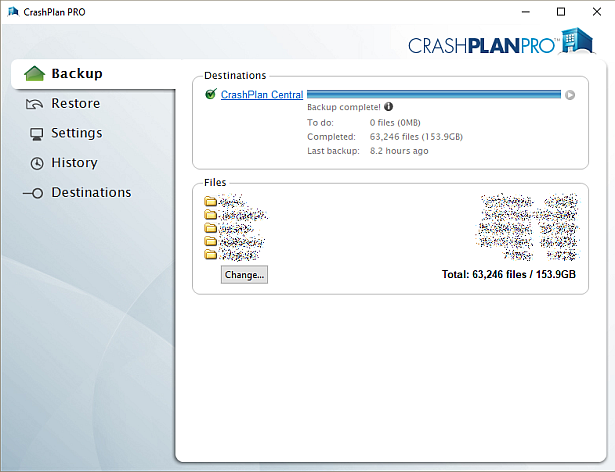
CrashPlan is a Java application which can be difficult to install on a NAS. Way back in January 2012 I decided to simplify it into a Synology package, since I had already created several others. It has been through many versions since that time, as the changelog below shows. Although it used to work on Synology products with ARM and PowerPC CPUs, it unfortunately became Intel-only in October 2016 due to Code 42 Software adding a reliance on some proprietary libraries.
Licence compliance is another challenge – Code 42’s EULA prohibits redistribution. I had to make the Synology package use the regular CrashPlan for Linux download (after the end user agrees to the Code 42 EULA). I then had to write my own script to extract this archive and mimic the Code 42 installer behaviour, but without the interactive prompts of the original.
Synology Package Installation
- In Synology DSM’s Package Center, click Settings and add my package repository:
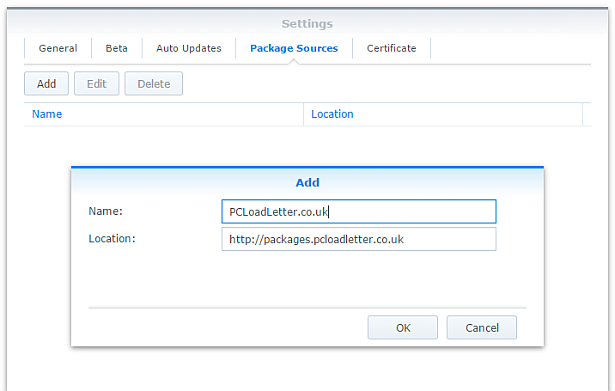
- The repository will push its certificate automatically to the NAS, which is used to validate package integrity. Set the Trust Level to Synology Inc. and trusted publishers:

- Now browse the Community section in Package Center to install CrashPlan:

The repository only displays packages which are compatible with your specific model of NAS. If you don’t see CrashPlan in the list, then either your NAS model or your DSM version are not supported at this time. DSM 5.0 is the minimum supported version for this package, and an Intel CPU is required. - Since CrashPlan is a Java application, it needs a Java Runtime Environment (JRE) to function. It is recommended that you select to have the package install a dedicated Java 8 runtime. For licensing reasons I cannot include Java with this package, so you will need to agree to the licence terms and download it yourself from Oracle’s website. The package expects to find this .tar.gz file in a shared folder called ‘public’. If you go ahead and try to install the package without it, the error message will indicate precisely which Java file you need for your system type, and it will provide a TinyURL link to the appropriate Oracle download page.
- To install CrashPlan PRO you will first need to log into the Admin Console and download the Linux App from the App Download section and also place this in the ‘public’ shared folder on your NAS.
- If you have a multi-bay NAS, use the Shared Folder control panel to create the shared folder called public (it must be all lower case). On single bay models this is created by default. Assign it with Read/Write privileges for everyone.
- If you have trouble getting the Java or CrashPlan PRO app files recognised by this package, try downloading them with Firefox. It seems to be the only web browser that doesn’t try to uncompress the files, or rename them without warning. I also suggest that you leave the Java file and the public folder present once you have installed the package, so that you won’t need to fetch this again to install future updates to the CrashPlan package.
- CrashPlan is installed in headless mode – backup engine only. This will configured by a desktop client, but operates independently of it.
- The first time you start the CrashPlan package you will need to stop it and restart it before you can connect the client. This is because a config file that is only created on first run needs to be edited by one of my scripts. The engine is then configured to listen on all interfaces on the default port 4243.
CrashPlan Client Installation
- Once the CrashPlan engine is running on the NAS, you can manage it by installing CrashPlan on another computer, and by configuring it to connect to the NAS instance of the CrashPlan Engine.
- Make sure that you install the version of the CrashPlan client that matches the version running on the NAS. If the NAS version gets upgraded later, you will need to update your client computer too.
- The Linux CrashPlan PRO client must be downloaded from the Admin Console and placed in the ‘public’ folder on your NAS in order to successfully install the Synology package.
- By default the client is configured to connect to the CrashPlan engine running on the local computer. Run this command on your NAS from an SSH session:
echo `cat /var/lib/crashplan/.ui_info`
Note those are backticks not quotes. This will give you a port number (4243), followed by an authentication token, followed by the IP binding (0.0.0.0 means the server is listening for connections on all interfaces) e.g.:
4243,9ac9b642-ba26-4578-b705-124c6efc920b,0.0.0.0

port,--------------token-----------------,binding
Copy this token value and use this value to replace the token in the equivalent config file on the computer that you would like to run the CrashPlan client on – located here:
C:\ProgramData\CrashPlan\.ui_info (Windows)
“/Library/Application Support/CrashPlan/.ui_info” (Mac OS X installed for all users)
“~/Library/Application Support/CrashPlan/.ui_info” (Mac OS X installed for single user)
/var/lib/crashplan/.ui_info (Linux)
You will not be able to connect the client unless the client token matches on the NAS token. On the client you also need to amend the IP address value after the token to match the Synology NAS IP address.
so using the example above, your computer’s CrashPlan client config file would be edited to:
4243,9ac9b642-ba26-4578-b705-124c6efc920b,192.168.1.100
assuming that the Synology NAS has the IP 192.168.1.100
If it still won’t connect, check that the ServicePort value is set to 4243 in the following files:
C:\ProgramData\CrashPlan\conf\ui_(username).properties (Windows)
“/Library/Application Support/CrashPlan/ui.properties” (Mac OS X installed for all users)
“~/Library/Application Support/CrashPlan/ui.properties” (Mac OS X installed for single user)
/usr/local/crashplan/conf (Linux)
/var/lib/crashplan/.ui_info (Synology) – this value does change spontaneously if there’s a port conflict e.g. you started two versions of the package concurrently (CrashPlan and CrashPlan PRO) - As a result of the nightmarish complexity of recent product changes Code42 has now published a support article with more detail on running headless systems including config file locations on all supported operating systems, and for ‘all users’ versus single user installs etc.
- You should disable the CrashPlan service on your computer if you intend only to use the client. In Windows, open the Services section in Computer Management and stop the CrashPlan Backup Service. In the service Properties set the Startup Type to Manual. You can also disable the CrashPlan System Tray notification application by removing it from Task Manager > More Details > Start-up Tab (Windows 8/Windows 10) or the All Users Startup Start Menu folder (Windows 7).
To accomplish the same on Mac OS X, run the following commands one by one:sudo launchctl unload /Library/LaunchDaemons/com.crashplan.engine.plist sudo mv /Library/LaunchDaemons/com.crashplan.engine.plist /Library/LaunchDaemons/com.crashplan.engine.plist.bak
The CrashPlan menu bar application can be disabled in System Preferences > Users & Groups > Current User > Login Items
Migration from CrashPlan For Home to CrashPlan For Small Business (CrashPlan PRO)
- Leave the regular green branded CrashPlan 4.8.3 Synology package installed.
- Go through the online migration using the link in the email notification you received from Code 42 on 22/08/2017. This seems to trigger the CrashPlan client to begin an update to 4.9 which will fail. It will also migrate your account onto a CrashPlan PRO server. The web page is likely to stall on the Migrating step, but no matter. The process is meant to take you to the store but it seems to be quite flakey. If you see the store page with a $0.00 amount in the basket, this has correctly referred you for the introductory offer. Apparently the $9.99 price thereafter shown on that screen is a mistake and the correct price of $2.50 is shown on a later screen in the process I think. Enter your credit card details and check out if you can. If not, continue.
- Log into the CrashPlan PRO Admin Console as per these instructions, and download the CrashPlan PRO 4.9 client for Linux, and the 4.9 client for your remote console computer. Ignore the red message in the bottom left of the Admin Console about registering, and do not sign up for the free trial. Preferably use Firefox for the Linux version download – most of the other web browsers will try to unpack the .tgz archive, which you do not want to happen.
- Configure the CrashPlan PRO 4.9 client on your computer to connect to your Syno as per the usual instructions on this blog post.
- Put the downloaded Linux CrashPlan PRO 4.9 client .tgz file in the ‘public’ shared folder on your NAS. The package will no longer download this automatically as it did in previous versions.
- From the Community section of DSM Package Center, install the CrashPlan PRO 4.9 package concurrently with your existing CrashPlan 4.8.3 Syno package.
- This will stop the CrashPlan package and automatically import its configuration. Notice that it will also backup your old CrashPlan .identity file and leave it in the ‘public’ shared folder, just in case something goes wrong.
- Start the CrashPlan PRO Synology package, and connect your CrashPlan PRO console from your computer.
- You should see your protected folders as usual. At first mine reported something like “insufficient device licences”, but the next time I started up it changed to “subscription expired”.
- Uninstall the CrashPlan 4.8.3 Synology package, this is no longer required.
- At this point if the store referral didn’t work in the second step, you need to sign into the Admin Console. While signed in, navigate to this link which I was given by Code 42 support. If it works, you should see a store page with some blue font text and a $0.00 basket value. If it didn’t work you will get bounced to the Consumer Next Steps webpage: “Important Changes to CrashPlan for Home” – the one with the video of the CEO explaining the situation. I had to do this a few times before it worked. Once the store referral link worked and I had confirmed my payment details my CrashPlan PRO client immediately started working. Enjoy!
Notes
- The package uses the intact CrashPlan installer directly from Code 42 Software, following acceptance of its EULA. I am complying with the directive that no one redistributes it.
- The engine daemon script checks the amount of system RAM and scales the Java heap size appropriately (up to the default maximum of 512MB). This can be overridden in a persistent way if you are backing up large backup sets by editing /var/packages/CrashPlan/target/syno_package.vars. If you are considering buying a NAS purely to use CrashPlan and intend to back up more than a few hundred GB then I strongly advise buying one of the models with upgradeable RAM. Memory is very limited on the cheaper models. I have found that a 512MB heap was insufficient to back up more than 2TB of files on a Windows server and that was the situation many years ago. It kept restarting the backup engine every few minutes until I increased the heap to 1024MB. Many users of the package have found that they have to increase the heap size or CrashPlan will halt its activity. This can be mitigated by dividing your backup into several smaller backup sets which are scheduled to be protected at different times. Note that from package version 0041, using the dedicated JRE on a 64bit Intel NAS will allow a heap size greater than 4GB since the JRE is 64bit (requires DSM 6.0 in most cases).
- If you need to manage CrashPlan from a remote location, I suggest you do so using SSH tunnelling as per this support document.
- The package supports upgrading to future versions while preserving the machine identity, logs, login details, and cache. Upgrades can now take place without requiring a login from the client afterwards.
- If you remove the package completely and re-install it later, you can re-attach to previous backups. When you log in to the Desktop Client with your existing account after a re-install, you can select “adopt computer” to merge the records, and preserve your existing backups. I haven’t tested whether this also re-attaches links to friends’ CrashPlan computers and backup sets, though the latter does seem possible in the Friends section of the GUI. It’s probably a good idea to test that this survives a package reinstall before you start relying on it. Sometimes, particularly with CrashPlan PRO I think, the adopt option is not offered. In this case you can log into CrashPlan Central and retrieve your computer’s GUID. On the CrashPlan client, double-click on the logo in the top right and you’ll enter a command line mode. You can use the GUID command to change the system’s GUID to the one you just retrieved from your account.
- The log which is displayed in the package’s Log tab is actually the activity history. If you are trying to troubleshoot an issue you will need to use an SSH session to inspect these log files:
/var/packages/CrashPlan/target/log/engine_output.log
/var/packages/CrashPlan/target/log/engine_error.log
/var/packages/CrashPlan/target/log/app.log - When CrashPlan downloads and attempts to run an automatic update, the script will most likely fail and stop the package. This is typically caused by syntax differences with the Synology versions of certain Linux shell commands (like rm, mv, or ps). The startup script will attempt to apply the published upgrade the next time the package is started.
- Although CrashPlan’s activity can be scheduled within the application, in order to save RAM some users may wish to restrict running the CrashPlan engine to specific times of day using the Task Scheduler in DSM Control Panel:
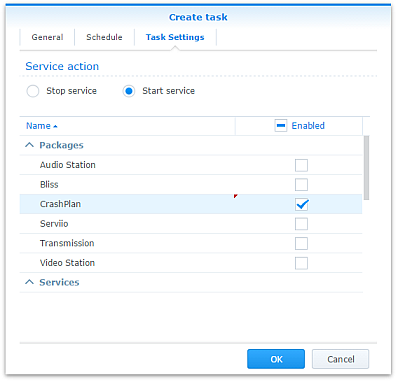
Note that regardless of real-time backup, by default CrashPlan will scan the whole backup selection for changes at 3:00am. Include this time within your Task Scheduler time window or else CrashPlan will not capture file changes which occurred while it was inactive:

- If you decide to sign up for one of CrashPlan’s paid backup services as a result of my work on this, please consider donating using the PayPal button on the right of this page.
Package scripts
For information, here are the package scripts so you can see what it’s going to do. You can get more information about how packages work by reading the Synology 3rd Party Developer Guide.
installer.sh
#!/bin/sh

#--------CRASHPLAN installer script
#--------package maintained at pcloadletter.co.uk


DOWNLOAD_PATH="http://download2.code42.com/installs/linux/install/${SYNOPKG_PKGNAME}"
CP_EXTRACTED_FOLDER="crashplan-install"
OLD_JNA_NEEDED="false"
[ "${SYNOPKG_PKGNAME}" == "CrashPlan" ] && DOWNLOAD_FILE="CrashPlan_4.8.3_Linux.tgz"
[ "${SYNOPKG_PKGNAME}" == "CrashPlanPRO" ] && DOWNLOAD_FILE="CrashPlanPRO_4.*_Linux.tgz"
if [ "${SYNOPKG_PKGNAME}" == "CrashPlanPROe" ]; then
  CP_EXTRACTED_FOLDER="${SYNOPKG_PKGNAME}-install"
  OLD_JNA_NEEDED="true"
  [ "${WIZARD_VER_483}" == "true" ] && { CPPROE_VER="4.8.3"; CP_EXTRACTED_FOLDER="crashplan-install"; OLD_JNA_NEEDED="false"; }
  [ "${WIZARD_VER_480}" == "true" ] && { CPPROE_VER="4.8.0"; CP_EXTRACTED_FOLDER="crashplan-install"; OLD_JNA_NEEDED="false"; }
  [ "${WIZARD_VER_470}" == "true" ] && { CPPROE_VER="4.7.0"; CP_EXTRACTED_FOLDER="crashplan-install"; OLD_JNA_NEEDED="false"; }
  [ "${WIZARD_VER_460}" == "true" ] && { CPPROE_VER="4.6.0"; CP_EXTRACTED_FOLDER="crashplan-install"; OLD_JNA_NEEDED="false"; }
  [ "${WIZARD_VER_452}" == "true" ] && { CPPROE_VER="4.5.2"; CP_EXTRACTED_FOLDER="crashplan-install"; OLD_JNA_NEEDED="false"; }
  [ "${WIZARD_VER_450}" == "true" ] && { CPPROE_VER="4.5.0"; CP_EXTRACTED_FOLDER="crashplan-install"; OLD_JNA_NEEDED="false"; }
  [ "${WIZARD_VER_441}" == "true" ] && { CPPROE_VER="4.4.1"; CP_EXTRACTED_FOLDER="crashplan-install"; OLD_JNA_NEEDED="false"; }
  [ "${WIZARD_VER_430}" == "true" ] && CPPROE_VER="4.3.0"
  [ "${WIZARD_VER_420}" == "true" ] && CPPROE_VER="4.2.0"
  [ "${WIZARD_VER_370}" == "true" ] && CPPROE_VER="3.7.0"
  [ "${WIZARD_VER_364}" == "true" ] && CPPROE_VER="3.6.4"
  [ "${WIZARD_VER_363}" == "true" ] && CPPROE_VER="3.6.3"
  [ "${WIZARD_VER_3614}" == "true" ] && CPPROE_VER="3.6.1.4"
  [ "${WIZARD_VER_353}" == "true" ] && CPPROE_VER="3.5.3"
  [ "${WIZARD_VER_341}" == "true" ] && CPPROE_VER="3.4.1"
  [ "${WIZARD_VER_33}" == "true" ] && CPPROE_VER="3.3"
  DOWNLOAD_FILE="CrashPlanPROe_${CPPROE_VER}_Linux.tgz"
fi
DOWNLOAD_URL="${DOWNLOAD_PATH}/${DOWNLOAD_FILE}"
CPI_FILE="${SYNOPKG_PKGNAME}_*.cpi"
OPTDIR="${SYNOPKG_PKGDEST}"
VARS_FILE="${OPTDIR}/install.vars"
SYNO_CPU_ARCH="`uname -m`"
[ "${SYNO_CPU_ARCH}" == "x86_64" ] && SYNO_CPU_ARCH="i686"
[ "${SYNO_CPU_ARCH}" == "armv5tel" ] && SYNO_CPU_ARCH="armel"
[ "${SYNOPKG_DSM_ARCH}" == "armada375" ] && SYNO_CPU_ARCH="armv7l"
[ "${SYNOPKG_DSM_ARCH}" == "armada38x" ] && SYNO_CPU_ARCH="armhf"
[ "${SYNOPKG_DSM_ARCH}" == "comcerto2k" ] && SYNO_CPU_ARCH="armhf"
[ "${SYNOPKG_DSM_ARCH}" == "alpine" ] && SYNO_CPU_ARCH="armhf"
[ "${SYNOPKG_DSM_ARCH}" == "alpine4k" ] && SYNO_CPU_ARCH="armhf"
[ "${SYNOPKG_DSM_ARCH}" == "monaco" ] && SYNO_CPU_ARCH="armhf"
[ "${SYNOPKG_DSM_ARCH}" == "rtd1296" ] && SYNO_CPU_ARCH="armhf"
NATIVE_BINS_URL="http://packages.pcloadletter.co.uk/downloads/crashplan-native-${SYNO_CPU_ARCH}.tar.xz"
NATIVE_BINS_FILE="`echo ${NATIVE_BINS_URL} | sed -r "s%^.*/(.*)%\1%"`"
OLD_JNA_URL="http://packages.pcloadletter.co.uk/downloads/crashplan-native-old-${SYNO_CPU_ARCH}.tar.xz"
OLD_JNA_FILE="`echo ${OLD_JNA_URL} | sed -r "s%^.*/(.*)%\1%"`"
INSTALL_FILES="${DOWNLOAD_URL} ${NATIVE_BINS_URL}"
[ "${OLD_JNA_NEEDED}" == "true" ] && INSTALL_FILES="${INSTALL_FILES} ${OLD_JNA_URL}"
TEMP_FOLDER="`find / -maxdepth 2 -path '/volume?/@tmp' | head -n 1`"
#the Manifest folder is where friends' backup data is stored
#we set it outside the app folder so it persists after a package uninstall
MANIFEST_FOLDER="/`echo $TEMP_FOLDER | cut -f2 -d'/'`/crashplan"
LOG_FILE="${SYNOPKG_PKGDEST}/log/history.log.0"
UPGRADE_FILES="syno_package.vars conf/my.service.xml conf/service.login conf/service.model"
UPGRADE_FOLDERS="log cache"
PUBLIC_FOLDER="`synoshare --get public | sed -r "/Path/!d;s/^.*\[(.*)\].*$/\1/"`"
#dedicated JRE section
if [ "${WIZARD_JRE_CP}" == "true" ]; then
  DOWNLOAD_URL="http://tinyurl.com/javaembed"
  EXTRACTED_FOLDER="ejdk1.8.0_151"
  #detect systems capable of running 64bit JRE which can address more than 4GB of RAM
  [ "${SYNOPKG_DSM_ARCH}" == "x64" ] && SYNO_CPU_ARCH="x64"
  [ "`uname -m`" == "x86_64" ] && [ ${SYNOPKG_DSM_VERSION_MAJOR} -ge 6 ] && SYNO_CPU_ARCH="x64"
  if [ "${SYNO_CPU_ARCH}" == "armel" ]; then
    JAVA_BINARY="ejdk-8u151-linux-arm-sflt.tar.gz"
    JAVA_BUILD="ARMv5/ARMv6/ARMv7 Linux - SoftFP ABI, Little Endian 2"
  elif [ "${SYNO_CPU_ARCH}" == "armv7l" ]; then
    JAVA_BINARY="ejdk-8u151-linux-arm-sflt.tar.gz"
    JAVA_BUILD="ARMv5/ARMv6/ARMv7 Linux - SoftFP ABI, Little Endian 2"
  elif [ "${SYNO_CPU_ARCH}" == "armhf" ]; then
    JAVA_BINARY="ejdk-8u151-linux-armv6-vfp-hflt.tar.gz"
    JAVA_BUILD="ARMv6/ARMv7 Linux - VFP, HardFP ABI, Little Endian 1"
  elif [ "${SYNO_CPU_ARCH}" == "ppc" ]; then
    #Oracle have discontinued Java 8 for PowerPC after update 6
    JAVA_BINARY="ejdk-8u6-fcs-b23-linux-ppc-e500v2-12_jun_2014.tar.gz"
    JAVA_BUILD="Power Architecture Linux - Headless - e500v2 with double-precision SPE Floating Point Unit"
    EXTRACTED_FOLDER="ejdk1.8.0_06"
    DOWNLOAD_URL="http://tinyurl.com/java8ppc"
  elif [ "${SYNO_CPU_ARCH}" == "i686" ]; then
    JAVA_BINARY="ejdk-8u151-linux-i586.tar.gz"
    JAVA_BUILD="x86 Linux Small Footprint - Headless"
  elif [ "${SYNO_CPU_ARCH}" == "x64" ]; then
    JAVA_BINARY="jre-8u151-linux-x64.tar.gz"
    JAVA_BUILD="Linux x64"
    EXTRACTED_FOLDER="jre1.8.0_151"
    DOWNLOAD_URL="http://tinyurl.com/java8x64"
  fi
fi
JAVA_BINARY=`echo ${JAVA_BINARY} | cut -f1 -d'.'`
source /etc/profile


pre_checks ()
{
  #These checks are called from preinst and from preupgrade functions to prevent failures resulting in a partially upgraded package
  if [ "${WIZARD_JRE_CP}" == "true" ]; then
    synoshare -get public > /dev/null || (
      echo "A shared folder called 'public' could not be found - note this name is case-sensitive. " >> $SYNOPKG_TEMP_LOGFILE
      echo "Please create this using the Shared Folder DSM Control Panel and try again." >> $SYNOPKG_TEMP_LOGFILE
      exit 1
    )

    JAVA_BINARY_FOUND=
    [ -f ${PUBLIC_FOLDER}/${JAVA_BINARY}.tar.gz ] && JAVA_BINARY_FOUND=true
    [ -f ${PUBLIC_FOLDER}/${JAVA_BINARY}.tar ] && JAVA_BINARY_FOUND=true
    [ -f ${PUBLIC_FOLDER}/${JAVA_BINARY}.tar.tar ] && JAVA_BINARY_FOUND=true
    [ -f ${PUBLIC_FOLDER}/${JAVA_BINARY}.gz ] && JAVA_BINARY_FOUND=true

    if [ -z ${JAVA_BINARY_FOUND} ]; then
      echo "Java binary bundle not found. " >> $SYNOPKG_TEMP_LOGFILE
      echo "I was expecting the file ${PUBLIC_FOLDER}/${JAVA_BINARY}.tar.gz. " >> $SYNOPKG_TEMP_LOGFILE
      echo "Please agree to the Oracle licence at ${DOWNLOAD_URL}, then download the '${JAVA_BUILD}' package" >> $SYNOPKG_TEMP_LOGFILE
      echo "and place it in the 'public' shared folder on your NAS. This download cannot be automated even if " >> $SYNOPKG_TEMP_LOGFILE
      echo "displaying a package EULA could potentially cover the legal aspect, because files hosted on Oracle's " >> $SYNOPKG_TEMP_LOGFILE
      echo "server are protected by a session cookie requiring a JavaScript enabled browser." >> $SYNOPKG_TEMP_LOGFILE
      exit 1
    fi
  else
    if [ -z ${JAVA_HOME} ]; then
      echo "Java is not installed or not properly configured. JAVA_HOME is not defined. " >> $SYNOPKG_TEMP_LOGFILE
      echo "Download and install the Java Synology package from http://wp.me/pVshC-z5" >> $SYNOPKG_TEMP_LOGFILE
      exit 1
    fi

    if [ ! -f ${JAVA_HOME}/bin/java ]; then
      echo "Java is not installed or not properly configured. The Java binary could not be located. " >> $SYNOPKG_TEMP_LOGFILE
      echo "Download and install the Java Synology package from http://wp.me/pVshC-z5" >> $SYNOPKG_TEMP_LOGFILE
      exit 1
    fi

    if [ "${WIZARD_JRE_SYS}" == "true" ]; then
      JAVA_VER=`java -version 2>&1 | sed -r "/^.* version/!d;s/^.* version \"[0-9]\.([0-9]).*$/\1/"`
      if [ ${JAVA_VER} -lt 8 ]; then
        echo "This version of CrashPlan requires Java 8 or newer. Please update your Java package. "
        exit 1
      fi
    fi
  fi
}


preinst ()
{
  pre_checks
  cd ${TEMP_FOLDER}
  for WGET_URL in ${INSTALL_FILES}
  do
    WGET_FILENAME="`echo ${WGET_URL} | sed -r "s%^.*/(.*)%\1%"`"
    [ -f ${TEMP_FOLDER}/${WGET_FILENAME} ] && rm ${TEMP_FOLDER}/${WGET_FILENAME}
    wget ${WGET_URL}
    if [[ $? != 0 ]]; then
      if [ -d ${PUBLIC_FOLDER} ] && [ -f ${PUBLIC_FOLDER}/${WGET_FILENAME} ]; then
        cp ${PUBLIC_FOLDER}/${WGET_FILENAME} ${TEMP_FOLDER}
      else
        echo "There was a problem downloading ${WGET_FILENAME} from the official download link, " >> $SYNOPKG_TEMP_LOGFILE
        echo "which was \"${WGET_URL}\" " >> $SYNOPKG_TEMP_LOGFILE
        echo "Alternatively, you may download this file manually and place it in the 'public' shared folder. " >> $SYNOPKG_TEMP_LOGFILE
        exit 1
      fi
    fi
  done

  exit 0
}


postinst ()
{
  if [ "${WIZARD_JRE_CP}" == "true" ]; then
    #extract Java (Web browsers love to interfere with .tar.gz files)
    cd ${PUBLIC_FOLDER}
    if [ -f ${JAVA_BINARY}.tar.gz ]; then
      #Firefox seems to be the only browser that leaves it alone
      tar xzf ${JAVA_BINARY}.tar.gz
    elif [ -f ${JAVA_BINARY}.gz ]; then
      #Chrome
      tar xzf ${JAVA_BINARY}.gz
    elif [ -f ${JAVA_BINARY}.tar ]; then
      #Safari
      tar xf ${JAVA_BINARY}.tar
    elif [ -f ${JAVA_BINARY}.tar.tar ]; then
      #Internet Explorer
      tar xzf ${JAVA_BINARY}.tar.tar
    fi
    mv ${EXTRACTED_FOLDER} ${SYNOPKG_PKGDEST}/jre-syno
    JRE_PATH="`find ${OPTDIR}/jre-syno/ -name jre`"
    [ -z ${JRE_PATH} ] && JRE_PATH=${OPTDIR}/jre-syno
    #change owner of folder tree
    chown -R root:root ${SYNOPKG_PKGDEST}
  fi

  #extract CPU-specific additional binaries
  mkdir ${SYNOPKG_PKGDEST}/bin
  cd ${SYNOPKG_PKGDEST}/bin
  tar xJf ${TEMP_FOLDER}/${NATIVE_BINS_FILE} && rm ${TEMP_FOLDER}/${NATIVE_BINS_FILE}
  [ "${OLD_JNA_NEEDED}" == "true" ] && tar xJf ${TEMP_FOLDER}/${OLD_JNA_FILE} && rm ${TEMP_FOLDER}/${OLD_JNA_FILE}

  #extract main archive
  cd ${TEMP_FOLDER}
  tar xzf ${TEMP_FOLDER}/${DOWNLOAD_FILE} && rm ${TEMP_FOLDER}/${DOWNLOAD_FILE}

  #extract cpio archive
  cd ${SYNOPKG_PKGDEST}
  cat "${TEMP_FOLDER}/${CP_EXTRACTED_FOLDER}"/${CPI_FILE} | gzip -d -c - | ${SYNOPKG_PKGDEST}/bin/cpio -i --no-preserve-owner

  echo "#uncomment to expand Java max heap size beyond prescribed value (will survive upgrades)" > ${SYNOPKG_PKGDEST}/syno_package.vars
  echo "#you probably only want more than the recommended 1024M if you're backing up extremely large volumes of files" >> ${SYNOPKG_PKGDEST}/syno_package.vars
  echo "#USR_MAX_HEAP=1024M" >> ${SYNOPKG_PKGDEST}/syno_package.vars
  echo >> ${SYNOPKG_PKGDEST}/syno_package.vars

  cp ${TEMP_FOLDER}/${CP_EXTRACTED_FOLDER}/scripts/CrashPlanEngine ${OPTDIR}/bin
  cp ${TEMP_FOLDER}/${CP_EXTRACTED_FOLDER}/scripts/run.conf ${OPTDIR}/bin
  mkdir -p ${MANIFEST_FOLDER}/backupArchives

  #save install variables which Crashplan expects its own installer script to create
  echo TARGETDIR=${SYNOPKG_PKGDEST} > ${VARS_FILE}
  echo BINSDIR=/bin >> ${VARS_FILE}
  echo MANIFESTDIR=${MANIFEST_FOLDER}/backupArchives >> ${VARS_FILE}
  #leave these ones out which should help upgrades from Code42 to work (based on examining an upgrade script)
  #echo INITDIR=/etc/init.d >> ${VARS_FILE}
  #echo RUNLVLDIR=/usr/syno/etc/rc.d >> ${VARS_FILE}
  echo INSTALLDATE=`date +%Y%m%d` >> ${VARS_FILE}
  [ "${WIZARD_JRE_CP}" == "true" ] && echo JAVACOMMON=${JRE_PATH}/bin/java >> ${VARS_FILE}
  [ "${WIZARD_JRE_SYS}" == "true" ] && echo JAVACOMMON=\${JAVA_HOME}/bin/java >> ${VARS_FILE}
  cat ${TEMP_FOLDER}/${CP_EXTRACTED_FOLDER}/install.defaults >> ${VARS_FILE}

  #remove temp files
  rm -r ${TEMP_FOLDER}/${CP_EXTRACTED_FOLDER}

  #add firewall config
  /usr/syno/bin/servicetool --install-configure-file --package /var/packages/${SYNOPKG_PKGNAME}/scripts/${SYNOPKG_PKGNAME}.sc > /dev/null

  #amend CrashPlanPROe client version
  [ "${SYNOPKG_PKGNAME}" == "CrashPlanPROe" ] && sed -i -r "s/^version=\".*(-.*$)/version=\"${CPPROE_VER}\1/" /var/packages/${SYNOPKG_PKGNAME}/INFO

  #are we transitioning an existing CrashPlan account to CrashPlan For Small Business?
  if [ "${SYNOPKG_PKGNAME}" == "CrashPlanPRO" ]; then
    if [ -e /var/packages/CrashPlan/scripts/start-stop-status ]; then
      /var/packages/CrashPlan/scripts/start-stop-status stop
      cp /var/lib/crashplan/.identity ${PUBLIC_FOLDER}/crashplan-identity.bak
      cp -R /var/packages/CrashPlan/target/conf/ ${OPTDIR}/
    fi
  fi

  exit 0
}


preuninst ()
{
  `dirname $0`/stop-start-status stop

  exit 0
}


postuninst ()
{
  if [ -f ${SYNOPKG_PKGDEST}/syno_package.vars ]; then
    source ${SYNOPKG_PKGDEST}/syno_package.vars
  fi
  [ -e ${OPTDIR}/lib/libffi.so.5 ] && rm ${OPTDIR}/lib/libffi.so.5

  #delete symlink if it no longer resolves - PowerPC only
  if [ ! -e /lib/libffi.so.5 ]; then
    [ -L /lib/libffi.so.5 ] && rm /lib/libffi.so.5
  fi

  #remove firewall config
  if [ "${SYNOPKG_PKG_STATUS}" == "UNINSTALL" ]; then
    /usr/syno/bin/servicetool --remove-configure-file --package ${SYNOPKG_PKGNAME}.sc > /dev/null
  fi

 exit 0
}


preupgrade ()
{
  `dirname $0`/stop-start-status stop
  pre_checks
  #if identity exists back up config
  if [ -f /var/lib/crashplan/.identity ]; then
    mkdir -p ${SYNOPKG_PKGDEST}/../${SYNOPKG_PKGNAME}_data_mig/conf
    for FILE_TO_MIGRATE in ${UPGRADE_FILES}; do
      if [ -f ${OPTDIR}/${FILE_TO_MIGRATE} ]; then
        cp ${OPTDIR}/${FILE_TO_MIGRATE} ${SYNOPKG_PKGDEST}/../${SYNOPKG_PKGNAME}_data_mig/${FILE_TO_MIGRATE}
      fi
    done
    for FOLDER_TO_MIGRATE in ${UPGRADE_FOLDERS}; do
      if [ -d ${OPTDIR}/${FOLDER_TO_MIGRATE} ]; then
        mv ${OPTDIR}/${FOLDER_TO_MIGRATE} ${SYNOPKG_PKGDEST}/../${SYNOPKG_PKGNAME}_data_mig
      fi
    done
  fi

  exit 0
}


postupgrade ()
{
  #use the migrated identity and config data from the previous version
  if [ -f ${SYNOPKG_PKGDEST}/../${SYNOPKG_PKGNAME}_data_mig/conf/my.service.xml ]; then
    for FILE_TO_MIGRATE in ${UPGRADE_FILES}; do
      if [ -f ${SYNOPKG_PKGDEST}/../${SYNOPKG_PKGNAME}_data_mig/${FILE_TO_MIGRATE} ]; then
        mv ${SYNOPKG_PKGDEST}/../${SYNOPKG_PKGNAME}_data_mig/${FILE_TO_MIGRATE} ${OPTDIR}/${FILE_TO_MIGRATE}
      fi
    done
    for FOLDER_TO_MIGRATE in ${UPGRADE_FOLDERS}; do
    if [ -d ${SYNOPKG_PKGDEST}/../${SYNOPKG_PKGNAME}_data_mig/${FOLDER_TO_MIGRATE} ]; then
      mv ${SYNOPKG_PKGDEST}/../${SYNOPKG_PKGNAME}_data_mig/${FOLDER_TO_MIGRATE} ${OPTDIR}
    fi
    done
    rmdir ${SYNOPKG_PKGDEST}/../${SYNOPKG_PKGNAME}_data_mig/conf
    rmdir ${SYNOPKG_PKGDEST}/../${SYNOPKG_PKGNAME}_data_mig

    #make CrashPlan log entry
    TIMESTAMP="`date "+%D %I:%M%p"`"
    echo "I ${TIMESTAMP} Synology Package Center updated ${SYNOPKG_PKGNAME} to version ${SYNOPKG_PKGVER}" >> ${LOG_FILE}
  fi

  exit 0
}
start-stop-status.sh
#!/bin/sh

#--------CRASHPLAN start-stop-status script
#--------package maintained at pcloadletter.co.uk


TEMP_FOLDER="`find / -maxdepth 2 -path '/volume?/@tmp' | head -n 1`"
MANIFEST_FOLDER="/`echo $TEMP_FOLDER | cut -f2 -d'/'`/crashplan"
ENGINE_CFG="run.conf"
PKG_FOLDER="`dirname $0 | cut -f1-4 -d'/'`"
DNAME="`dirname $0 | cut -f4 -d'/'`"
OPTDIR="${PKG_FOLDER}/target"
PID_FILE="${OPTDIR}/${DNAME}.pid"
DLOG="${OPTDIR}/log/history.log.0"
CFG_PARAM="SRV_JAVA_OPTS"
JAVA_MIN_HEAP=`grep "^${CFG_PARAM}=" "${OPTDIR}/bin/${ENGINE_CFG}" | sed -r "s/^.*-Xms([0-9]+)[Mm] .*$/\1/"`
SYNO_CPU_ARCH="`uname -m`"
TIMESTAMP="`date "+%D %I:%M%p"`"
FULL_CP="${OPTDIR}/lib/com.backup42.desktop.jar:${OPTDIR}/lang"
source ${OPTDIR}/install.vars
source /etc/profile
source /root/.profile


start_daemon ()
{
  #check persistent variables from syno_package.vars
  USR_MAX_HEAP=0
  if [ -f ${OPTDIR}/syno_package.vars ]; then
    source ${OPTDIR}/syno_package.vars
  fi
  USR_MAX_HEAP=`echo $USR_MAX_HEAP | sed -e "s/[mM]//"`

  #do we need to restore the identity file - has a DSM upgrade scrubbed /var/lib/crashplan?
  if [ ! -e /var/lib/crashplan ]; then
    mkdir /var/lib/crashplan
    [ -e ${OPTDIR}/conf/var-backup/.identity ] && cp ${OPTDIR}/conf/var-backup/.identity /var/lib/crashplan/
  fi

  #fix up some of the binary paths and fix some command syntax for busybox
  #moved this to start-stop-status.sh from installer.sh because Code42 push updates and these
  #new scripts will need this treatment too
  find ${OPTDIR}/ -name "*.sh" | while IFS="" read -r FILE_TO_EDIT; do
    if [ -e ${FILE_TO_EDIT} ]; then
      #this list of substitutions will probably need expanding as new CrashPlan updates are released
      sed -i "s%^#!/bin/bash%#!$/bin/sh%" "${FILE_TO_EDIT}"
      sed -i -r "s%(^\s*)(/bin/cpio |cpio ) %\1/${OPTDIR}/bin/cpio %" "${FILE_TO_EDIT}"
      sed -i -r "s%(^\s*)(/bin/ps|ps) [^w][^\|]*\|%\1/bin/ps w \|%" "${FILE_TO_EDIT}"
      sed -i -r "s%\`ps [^w][^\|]*\|%\`ps w \|%" "${FILE_TO_EDIT}"
      sed -i -r "s%^ps [^w][^\|]*\|%ps w \|%" "${FILE_TO_EDIT}"
      sed -i "s/rm -fv/rm -f/" "${FILE_TO_EDIT}"
      sed -i "s/mv -fv/mv -f/" "${FILE_TO_EDIT}"
    fi
  done

  #use this daemon init script rather than the unreliable Code42 stock one which greps the ps output
  sed -i "s%^ENGINE_SCRIPT=.*$%ENGINE_SCRIPT=$0%" ${OPTDIR}/bin/restartLinux.sh

  #any downloaded upgrade script will usually have failed despite the above changes
  #so ignore the script and explicitly extract the new java code using the chrisnelson.ca method
  #thanks to Jeff Bingham for tweaks
  UPGRADE_JAR=`find ${OPTDIR}/upgrade -maxdepth 1 -name "*.jar" | tail -1`
  if [ -n "${UPGRADE_JAR}" ]; then
    rm ${OPTDIR}/*.pid > /dev/null

    #make CrashPlan log entry
    echo "I ${TIMESTAMP} Synology extracting upgrade from ${UPGRADE_JAR}" >> ${DLOG}

    UPGRADE_VER=`echo ${SCRIPT_HOME} | sed -r "s/^.*\/([0-9_]+)\.[0-9]+/\1/"`
    #DSM 6.0 no longer includes unzip, use 7z instead
    unzip -o ${OPTDIR}/upgrade/${UPGRADE_VER}.jar "*.jar" -d ${OPTDIR}/lib/ || 7z e -y ${OPTDIR}/upgrade/${UPGRADE_VER}.jar "*.jar" -o${OPTDIR}/lib/ > /dev/null
    unzip -o ${OPTDIR}/upgrade/${UPGRADE_VER}.jar "lang/*" -d ${OPTDIR} || 7z e -y ${OPTDIR}/upgrade/${UPGRADE_VER}.jar "lang/*" -o${OPTDIR} > /dev/null
    mv ${UPGRADE_JAR} ${TEMP_FOLDER}/ > /dev/null
    exec $0
  fi

  #updates may also overwrite our native binaries
  [ -e ${OPTDIR}/bin/libffi.so.5 ] && cp -f ${OPTDIR}/bin/libffi.so.5 ${OPTDIR}/lib/
  [ -e ${OPTDIR}/bin/libjtux.so ] && cp -f ${OPTDIR}/bin/libjtux.so ${OPTDIR}/
  [ -e ${OPTDIR}/bin/jna-3.2.5.jar ] && cp -f ${OPTDIR}/bin/jna-3.2.5.jar ${OPTDIR}/lib/
  if [ -e ${OPTDIR}/bin/jna.jar ] && [ -e ${OPTDIR}/lib/jna.jar ]; then
    cp -f ${OPTDIR}/bin/jna.jar ${OPTDIR}/lib/
  fi

  #create or repair libffi.so.5 symlink if a DSM upgrade has removed it - PowerPC only
  if [ -e ${OPTDIR}/lib/libffi.so.5 ]; then
    if [ ! -e /lib/libffi.so.5 ]; then
      #if it doesn't exist, but is still a link then it's a broken link and should be deleted first
      [ -L /lib/libffi.so.5 ] && rm /lib/libffi.so.5
      ln -s ${OPTDIR}/lib/libffi.so.5 /lib/libffi.so.5
    fi
  fi

  #set appropriate Java max heap size
  RAM=$((`free | grep Mem: | sed -e "s/^ *Mem: *\([0-9]*\).*$/\1/"`/1024))
  if [ $RAM -le 128 ]; then
    JAVA_MAX_HEAP=80
  elif [ $RAM -le 256 ]; then
    JAVA_MAX_HEAP=192
  elif [ $RAM -le 512 ]; then
    JAVA_MAX_HEAP=384
  elif [ $RAM -le 1024 ]; then
    JAVA_MAX_HEAP=512
  elif [ $RAM -gt 1024 ]; then
    JAVA_MAX_HEAP=1024
  fi
  if [ $USR_MAX_HEAP -gt $JAVA_MAX_HEAP ]; then
    JAVA_MAX_HEAP=${USR_MAX_HEAP}
  fi
  if [ $JAVA_MAX_HEAP -lt $JAVA_MIN_HEAP ]; then
    #can't have a max heap lower than min heap (ARM low RAM systems)
    $JAVA_MAX_HEAP=$JAVA_MIN_HEAP
  fi
  sed -i -r "s/(^${CFG_PARAM}=.*) -Xmx[0-9]+[mM] (.*$)/\1 -Xmx${JAVA_MAX_HEAP}m \2/" "${OPTDIR}/bin/${ENGINE_CFG}"

  #disable the use of the x86-optimized external Fast MD5 library if running on ARM and PPC CPUs
  #seems to be the default behaviour now but that may change again
  [ "${SYNO_CPU_ARCH}" == "x86_64" ] && SYNO_CPU_ARCH="i686"
  if [ "${SYNO_CPU_ARCH}" != "i686" ]; then
    grep "^${CFG_PARAM}=.*c42\.native\.md5\.enabled" "${OPTDIR}/bin/${ENGINE_CFG}" > /dev/null \
     || sed -i -r "s/(^${CFG_PARAM}=\".*)\"$/\1 -Dc42.native.md5.enabled=false\"/" "${OPTDIR}/bin/${ENGINE_CFG}"
  fi

  #move the Java temp directory from the default of /tmp
  grep "^${CFG_PARAM}=.*Djava\.io\.tmpdir" "${OPTDIR}/bin/${ENGINE_CFG}" > /dev/null \
   || sed -i -r "s%(^${CFG_PARAM}=\".*)\"$%\1 -Djava.io.tmpdir=${TEMP_FOLDER}\"%" "${OPTDIR}/bin/${ENGINE_CFG}"

  #now edit the XML config file, which only exists after first run
  if [ -f ${OPTDIR}/conf/my.service.xml ]; then

    #allow direct connections from CrashPlan Desktop client on remote systems
    #you must edit the value of serviceHost in conf/ui.properties on the client you connect with
    #users report that this value is sometimes reset so now it's set every service startup
    sed -i "s/<serviceHost>127\.0\.0\.1<\/serviceHost>/<serviceHost>0\.0\.0\.0<\/serviceHost>/" "${OPTDIR}/conf/my.service.xml"
    #default changed in CrashPlan 4.3
    sed -i "s/<serviceHost>localhost<\/serviceHost>/<serviceHost>0\.0\.0\.0<\/serviceHost>/" "${OPTDIR}/conf/my.service.xml"
    #since CrashPlan 4.4 another config file to allow remote console connections
    sed -i "s/127\.0\.0\.1/0\.0\.0\.0/" /var/lib/crashplan/.ui_info

    #this change is made only once in case you want to customize the friends' backup location
    if [ "${MANIFEST_PATH_SET}" != "True" ]; then

      #keep friends' backup data outside the application folder to make accidental deletion less likely
      sed -i "s%<manifestPath>.*</manifestPath>%<manifestPath>${MANIFEST_FOLDER}/backupArchives/</manifestPath>%" "${OPTDIR}/conf/my.service.xml"
      echo "MANIFEST_PATH_SET=True" >> ${OPTDIR}/syno_package.vars
    fi

    #since CrashPlan version 3.5.3 the value javaMemoryHeapMax also needs setting to match that used in bin/run.conf
    sed -i -r "s%(<javaMemoryHeapMax>)[0-9]+[mM](</javaMemoryHeapMax>)%\1${JAVA_MAX_HEAP}m\2%" "${OPTDIR}/conf/my.service.xml"

    #make sure CrashPlan is not binding to the IPv6 stack
    grep "\-Djava\.net\.preferIPv4Stack=true" "${OPTDIR}/bin/${ENGINE_CFG}" > /dev/null \
     || sed -i -r "s/(^${CFG_PARAM}=\".*)\"$/\1 -Djava.net.preferIPv4Stack=true\"/" "${OPTDIR}/bin/${ENGINE_CFG}"
   else
    echo "Check the package log to ensure the package has started successfully, then stop and restart the package to allow desktop client connections." > "${SYNOPKG_TEMP_LOGFILE}"
  fi

  #increase the system-wide maximum number of open files from Synology default of 24466
  [ `cat /proc/sys/fs/file-max` -lt 65536 ] && echo "65536" > /proc/sys/fs/file-max

  #raise the maximum open file count from the Synology default of 1024 - thanks Casper K. for figuring this out
  #http://support.code42.com/Administrator/3.6_And_4.0/Troubleshooting/Too_Many_Open_Files
  ulimit -n 65536

  #ensure that Code 42 have not amended install.vars to force the use of their own (Intel) JRE
  if [ -e ${OPTDIR}/jre-syno ]; then
    JRE_PATH="`find ${OPTDIR}/jre-syno/ -name jre`"
    [ -z ${JRE_PATH} ] && JRE_PATH=${OPTDIR}/jre-syno
    sed -i -r "s|^(JAVACOMMON=).*$|\1\${JRE_PATH}/bin/java|" ${OPTDIR}/install.vars

    #if missing, set timezone and locale for dedicated JRE
    if [ -z ${TZ} ]; then
      SYNO_TZ=`cat /etc/synoinfo.conf | grep timezone | cut -f2 -d'"'`
      #fix for DST time in DSM 5.2 thanks to MinimServer Syno package author
      [ -e /usr/share/zoneinfo/Timezone/synotztable.json ] \
       && SYNO_TZ=`jq ".${SYNO_TZ} | .nameInTZDB" /usr/share/zoneinfo/Timezone/synotztable.json | sed -e "s/\"//g"` \
       || SYNO_TZ=`grep "^${SYNO_TZ}" /usr/share/zoneinfo/Timezone/tzname | sed -e "s/^.*= //"`
      export TZ=${SYNO_TZ}
    fi
    [ -z ${LANG} ] && export LANG=en_US.utf8
    export CLASSPATH=.:${OPTDIR}/jre-syno/lib

  else
    sed -i -r "s|^(JAVACOMMON=).*$|\1\${JAVA_HOME}/bin/java|" ${OPTDIR}/install.vars
  fi

  source ${OPTDIR}/bin/run.conf
  source ${OPTDIR}/install.vars
  cd ${OPTDIR}
  $JAVACOMMON $SRV_JAVA_OPTS -classpath $FULL_CP com.backup42.service.CPService > ${OPTDIR}/log/engine_output.log 2> ${OPTDIR}/log/engine_error.log &
  if [ $! -gt 0 ]; then
    echo $! > $PID_FILE
    renice 19 $! > /dev/null
    if [ -z "${SYNOPKG_PKGDEST}" ]; then
      #script was manually invoked, need this to show status change in Package Center
      [ -e ${PKG_FOLDER}/enabled ] || touch ${PKG_FOLDER}/enabled
    fi
  else
    echo "${DNAME} failed to start, check ${OPTDIR}/log/engine_error.log" > "${SYNOPKG_TEMP_LOGFILE}"
    echo "${DNAME} failed to start, check ${OPTDIR}/log/engine_error.log" >&2
    exit 1
  fi
}

stop_daemon ()
{
  echo "I ${TIMESTAMP} Stopping ${DNAME}" >> ${DLOG}
  kill `cat ${PID_FILE}`
  wait_for_status 1 20 || kill -9 `cat ${PID_FILE}`
  rm -f ${PID_FILE}
  if [ -z ${SYNOPKG_PKGDEST} ]; then
    #script was manually invoked, need this to show status change in Package Center
    [ -e ${PKG_FOLDER}/enabled ] && rm ${PKG_FOLDER}/enabled
  fi
  #backup identity file in case DSM upgrade removes it
  [ -e ${OPTDIR}/conf/var-backup ] || mkdir ${OPTDIR}/conf/var-backup
  cp /var/lib/crashplan/.identity ${OPTDIR}/conf/var-backup/
}

daemon_status ()
{
  if [ -f ${PID_FILE} ] && kill -0 `cat ${PID_FILE}` > /dev/null 2>&1; then
    return
  fi
  rm -f ${PID_FILE}
  return 1
}

wait_for_status ()
{
  counter=$2
  while [ ${counter} -gt 0 ]; do
    daemon_status
    [ $? -eq $1 ] && return
    let counter=counter-1
    sleep 1
  done
  return 1
}


case $1 in
  start)
    if daemon_status; then
      echo ${DNAME} is already running with PID `cat ${PID_FILE}`
      exit 0
    else
      echo Starting ${DNAME} ...
      start_daemon
      exit $?
    fi
  ;;

  stop)
    if daemon_status; then
      echo Stopping ${DNAME} ...
      stop_daemon
      exit $?
    else
      echo ${DNAME} is not running
      exit 0
    fi
  ;;

  restart)
    stop_daemon
    start_daemon
    exit $?
  ;;

  status)
    if daemon_status; then
      echo ${DNAME} is running with PID `cat ${PID_FILE}`
      exit 0
    else
      echo ${DNAME} is not running
      exit 1
    fi
  ;;

  log)
    echo "${DLOG}"
    exit 0
  ;;

  *)
    echo "Usage: $0 {start|stop|status|restart}" >&2
    exit 1
  ;;

esac
install_uifile & upgrade_uifile
[
  {
    "step_title": "Client Version Selection",
    "items": [
      {
        "type": "singleselect",
        "desc": "Please select the CrashPlanPROe client version that is appropriate for your backup destination server:",
        "subitems": [
          {
            "key": "WIZARD_VER_483",
            "desc": "4.8.3",
            "defaultValue": true
          },          {
            "key": "WIZARD_VER_480",
            "desc": "4.8.0",
            "defaultValue": false
          },
          {
            "key": "WIZARD_VER_470",
            "desc": "4.7.0",
            "defaultValue": false
          },
          {
            "key": "WIZARD_VER_460",
            "desc": "4.6.0",
            "defaultValue": false
          },
          {
            "key": "WIZARD_VER_452",
            "desc": "4.5.2",
            "defaultValue": false
          },
          {
            "key": "WIZARD_VER_450",
            "desc": "4.5.0",
            "defaultValue": false
          },
          {
            "key": "WIZARD_VER_441",
            "desc": "4.4.1",
            "defaultValue": false
          },
          {
            "key": "WIZARD_VER_430",
            "desc": "4.3.0",
            "defaultValue": false
          },
          {
            "key": "WIZARD_VER_420",
            "desc": "4.2.0",
            "defaultValue": false
          },
          {
            "key": "WIZARD_VER_370",
            "desc": "3.7.0",
            "defaultValue": false
          },
          {
            "key": "WIZARD_VER_364",
            "desc": "3.6.4",
            "defaultValue": false
          },
          {
            "key": "WIZARD_VER_363",
            "desc": "3.6.3",
            "defaultValue": false
          },
          {
            "key": "WIZARD_VER_3614",
            "desc": "3.6.1.4",
            "defaultValue": false
          },
          {
            "key": "WIZARD_VER_353",
            "desc": "3.5.3",
            "defaultValue": false
          },
          {
            "key": "WIZARD_VER_341",
            "desc": "3.4.1",
            "defaultValue": false
          },
          {
            "key": "WIZARD_VER_33",
            "desc": "3.3",
            "defaultValue": false
          }
        ]
      }
    ]
  },
  {
    "step_title": "Java Runtime Environment Selection",
    "items": [
      {
        "type": "singleselect",
        "desc": "Please select the Java version which you would like CrashPlan to use:",
        "subitems": [
          {
            "key": "WIZARD_JRE_SYS",
            "desc": "Default system Java version",
            "defaultValue": false
          },
          {
            "key": "WIZARD_JRE_CP",
            "desc": "Dedicated installation of Java 8",
            "defaultValue": true
          }
        ]
      }
    ]
  }
]
Changelog:
- 0047 30/Oct/17 – Updated dedicated Java version to 8 update 151, added support for additional Intel CPUs in x18 Synology products.
- 0046 26/Aug/17 – Updated to CrashPlan PRO 4.9, added support for migration from CrashPlan For Home to CrashPlan For Small Business (CrashPlan PRO). Please read the Migration section on this page for instructions.
- 0045 02/Aug/17 – Updated to CrashPlan 4.8.3, updated dedicated Java version to 8 update 144
- 0044 21/Jan/17 – Updated dedicated Java version to 8 update 121
- 0043 07/Jan/17 – Updated dedicated Java version to 8 update 111, added support for Intel Broadwell and Grantley CPUs
- 0042 03/Oct/16 – Updated to CrashPlan 4.8.0, Java 8 is now required, added optional dedicated Java 8 Runtime instead of the default system one including 64bit Java support on 64 bit Intel CPUs to permit memory allocation larger than 4GB. Support for non-Intel platforms withdrawn owing to Code42’s reliance on proprietary native code library libc42archive.so
- 0041 20/Jul/16 – Improved auto-upgrade compatibility (hopefully), added option to have CrashPlan use a dedicated Java 7 Runtime instead of the default system one, including 64bit Java support on 64 bit Intel CPUs to permit memory allocation larger than 4GB
- 0040 25/May/16 – Added cpio to the path in the running context of start-stop-status.sh
- 0039 25/May/16 – Updated to CrashPlan 4.7.0, at each launch forced the use of the system JRE over the CrashPlan bundled Intel one, added Maven build of JNA 4.1.0 for ARMv7 systems consistent with the version bundled with CrashPlan
- 0038 27/Apr/16 – Updated to CrashPlan 4.6.0, and improved support for Code 42 pushed updates
- 0037 21/Jan/16 – Updated to CrashPlan 4.5.2
- 0036 14/Dec/15 – Updated to CrashPlan 4.5.0, separate firewall definitions for management client and for friends backup, added support for DS716+ and DS216play
- 0035 06/Nov/15 – Fixed the update to 4.4.1_59, new installs now listen for remote connections after second startup (was broken from 4.4), updated client install documentation with more file locations and added a link to a new Code42 support doc
EITHER completely remove and reinstall the package (which will require a rescan of the entire backup set) OR alternatively please delete all except for one of the failed upgrade numbered subfolders in /var/packages/CrashPlan/target/upgrade before upgrading. There will be one folder for each time CrashPlan tried and failed to start since Code42 pushed the update - 0034 04/Oct/15 – Updated to CrashPlan 4.4.1, bundled newer JNA native libraries to match those from Code42, PLEASE READ UPDATED BLOG POST INSTRUCTIONS FOR CLIENT INSTALL this version introduced yet another requirement for the client
- 0033 12/Aug/15 – Fixed version 0032 client connection issue for fresh installs
- 0032 12/Jul/15 – Updated to CrashPlan 4.3, PLEASE READ UPDATED BLOG POST INSTRUCTIONS FOR CLIENT INSTALL this version introduced an extra requirement, changed update repair to use the chrisnelson.ca method, forced CrashPlan to prefer IPv4 over IPv6 bindings, removed some legacy version migration scripting, updated main blog post documentation
- 0031 20/May/15 – Updated to CrashPlan 4.2, cross compiled a newer cpio binary for some architectures which were segfaulting while unpacking main CrashPlan archive, added port 4242 to the firewall definition (friend backups), package is now signed with repository private key
- 0030 16/Feb/15 – Fixed show-stopping issue with version 0029 for systems with more than one volume
- 0029 21/Jan/15 – Updated to CrashPlan version 3.7.0, improved detection of temp folder (prevent use of /var/@tmp), added support for Annapurna Alpine AL514 CPU (armhf) in DS2015xs, added support for Marvell Armada 375 CPU (armhf) in DS215j, abandoned practical efforts to try to support Code42’s upgrade scripts, abandoned inotify support (realtime backup) on PowerPC after many failed attempts with self-built and pre-built jtux and jna libraries, back-merged older libffi support for old PowerPC binaries after it was removed in 0028 re-write
- 0028 22/Oct/14 – Substantial re-write:
Updated to CrashPlan version 3.6.4
DSM 5.0 or newer is now required
libjnidispatch.so taken from Debian JNA 3.2.7 package with dependency on newer libffi.so.6 (included in DSM 5.0)
jna-3.2.5.jar emptied of irrelevant CPU architecture libs to reduce size
Increased default max heap size from 512MB to 1GB on systems with more than 1GB RAM
Intel CPUs no longer need the awkward glibc version-faking shim to enable inotify support (for real-time backup)
Switched to using root account – no more adding account permissions for backup, package upgrades will no longer break this
DSM Firewall application definition added
Tested with DSM Task Scheduler to allow backups between certain times of day only, saving RAM when not in use
Daemon init script now uses a proper PID file instead of Code42’s unreliable method of using grep on the output of ps
Daemon init script can be run from the command line
Removal of bash binary dependency now Code42’s CrashPlanEngine script is no longer used
Removal of nice binary dependency, using BusyBox equivalent renice
Unified ARMv5 and ARMv7 external binary package (armle)
Added support for Mindspeed Comcerto 2000 CPU (comcerto2k – armhf) in DS414j
Added support for Intel Atom C2538 (avoton) CPU in DS415+
Added support to choose which version of CrashPlan PROe client to download, since some servers may still require legacy versions
Switched to .tar.xz compression for native binaries to reduce web hosting footprint - 0027 20/Mar/14 – Fixed open file handle limit for very large backup sets (ulimit fix)
- 0026 16/Feb/14 – Updated all CrashPlan clients to version 3.6.3, improved handling of Java temp files
- 0025 30/Jan/14 – glibc version shim no longer used on Intel Synology models running DSM 5.0
- 0024 30/Jan/14 – Updated to CrashPlan PROe 3.6.1.4 and added support for PowerPC 2010 Synology models running DSM 5.0
- 0023 30/Jan/14 – Added support for Intel Atom Evansport and Armada XP CPUs in new DSx14 products
- 0022 10/Jun/13 – Updated all CrashPlan client versions to 3.5.3, compiled native binary dependencies to add support for Armada 370 CPU (DS213j), start-stop-status.sh now updates the new javaMemoryHeapMax value in my.service.xml to the value defined in syno_package.vars
- 0021 01/Mar/13 – Updated CrashPlan to version 3.5.2
- 0020 21/Jan/13 – Fixes for DSM 4.2
- 018 Updated CrashPlan PRO to version 3.4.1
- 017 Updated CrashPlan and CrashPlan PROe to version 3.4.1, and improved in-app update handling
- 016 Added support for Freescale QorIQ CPUs in some x13 series Synology models, and installer script now downloads native binaries separately to reduce repo hosting bandwidth, PowerQUICC PowerPC processors in previous Synology generations with older glibc versions are not supported
- 015 Added support for easy scheduling via cron – see updated Notes section
- 014 DSM 4.1 user profile permissions fix
- 013 implemented update handling for future automatic updates from Code 42, and incremented CrashPlanPRO client to release version 3.2.1
- 012 incremented CrashPlanPROe client to release version 3.3
- 011 minor fix to allow a wildcard on the cpio archive name inside the main installer package (to fix CP PROe client since Code 42 Software had amended the cpio file version to 3.2.1.2)
- 010 minor bug fix relating to daemon home directory path
- 009 rewrote the scripts to be even easier to maintain and unified as much as possible with my imminent CrashPlan PROe server package, fixed a timezone bug (tightened regex matching), moved the script-amending logic from installer.sh to start-stop-status.sh with it now applying to all .sh scripts each startup so perhaps updates from Code42 might work in future, if wget fails to fetch the installer from Code42 the installer will look for the file in the public shared folder
- 008 merged the 14 package scripts each (7 for ARM, 7 for Intel) for CP, CP PRO, & CP PROe – 42 scripts in total – down to just two! ARM & Intel are now supported by the same package, Intel synos now have working inotify support (Real-Time Backup) thanks to rwojo’s shim to pass the glibc version check, upgrade process now retains login, cache and log data (no more re-scanning), users can specify a persistent larger max heap size for very large backup sets
- 007 fixed a bug that broke CrashPlan if the Java folder moved (if you changed version)
- 006 installation now fails without User Home service enabled, fixed Daylight Saving Time support, automated replacing the ARM libffi.so symlink which is destroyed by DSM upgrades, stopped assuming the primary storage volume is /volume1, reset ownership on /var/lib/crashplan and the Friends backup location after installs and upgrades
- 005 added warning to restart daemon after 1st run, and improved upgrade process again
- 004 updated to CrashPlan 3.2.1 and improved package upgrade process, forced binding to 0.0.0.0 each startup
- 003 fixed ownership of /volume1/crashplan folder
- 002 updated to CrashPlan 3.2
- 001 30/Jan/12 – intial public release
 PC LOAD LETTER
I did this:
“I did some more digging and managed to actually resolve my issue and am once again successfully backing up to the cloud. I changed the file /volume1/@appstore/CrashPlan/syno_package.vars by editing in vi to remove the # in front of the command: #USR_MAX_HEAP=XXXX and making XXXX=1536 After editing, I re-started the package”
and this:
“Suggested values for devices with 1GB RAM and 2GB swap, not running any other memory intensive applications: modify the first line in /opt/crashplan/bin/run.conf
from:
SRV_JAVA_OPTS=”-Dfile.encoding=UTF-8 -Dapp=CrashPlanService -DappBaseName=CrashPlan -Xms20m -Xmx512m …
to:
SRV_JAVA_OPTS=”-Dfile.encoding=UTF-8 -Dapp=CrashPlanService -DappBaseName=CrashPlan -Xms128m -Xmx1536m …”
And now I am back up and running again.
I’m running CrashPlan on my DS415Play. Everything was working fine with 3.7.0 for several days, I got about 220GB of my 400GB initial backup done. However, since then I am having a ton of issues with the CrashPlan process “freezing” for several minutes at a time where there is no upload activity (Synology shows upstream has stopped, and the CP client will lock up and show no activity). During this time the kswapd0 process on the NAS goes nuts and uses between 20-25% CPU, and I can see the physical RAM usage of the CP Java process fall considerably. Then, the RAM usage will spike back up and everything is fine for another few minutes, then it all happens over again. Has anyone seen this before and know how to fix it? I tried changing my USR_MAX_HEAP and SRV_JAVA_OPTS options as others have, but this has not fixed the issue. Is it simply a matter of my DS415Play hitting a RAM wall? This backup set is around 100k files (my MP3 and photo collections) but for some reason CP reports nearly twice as many files when it scans. I am not sure if that’s related to the problem, but I felt it was worth noting.
I’m currently rebuilding my file list to see if that improves things. I’ve also stopped all other packages to give CP as much RAM as possible during this initial backup. If I can get it running reasonably well I’ll just strt and stop the process on a schedule going forward to “catch up” overnight.
Still having the “remote client likely has an invalid PbK”… This is driving me crazy…
Hi all, issue:
– Crashplan stopped working
– Synology gave a message that I needed to upgrade crashplan. When I tried to run the update (3.7.0-0030) is gives directly the error message: “Could not install crashplan”.
– I tried to remove the crashplan package completely and then do a fresh install. Same problem/error. Tried also removal by using these commands: https://pcloadletter.co.uk/2012/01/30/crashplan-syno-package/comment-page-1/#comment-2396
– Tried to reinstall Java SE embedded by using community packages (I tried 6, 7 and 8) I also get directly the error message: “Could not install Java Embedded SE xx”. I did a manual reinstall of Java using the Java Manager (version: jdk-7u75-linux-i586.gz). That worked.
– When I try a manual package install `(crashplan3.7.0-merged-0030.spk) I directly get the error message “This package doesn’t contain a digital signature”.
Could this be the issue?
I hope anyone can help…
Best regards,
In Package Center settings, change the Trust setting to Any Publisher.
That worked. Thanks!
Excellent, that worked, thanks mate!
When updating to the lastest release (0030) the Eula pops up, but when I have it install it simply says install failed.
I updated Java to what I believe is the latest build: 1.7.0_76
Installed the latest DSM and rebooted.
Still fails to install
I am running a 1812+ Synology.
I’m not a linux guru so any help finding and fixing the problem would be great!
Matt
I don’t know why, but I tried again to install the package and today it worked just fine and appears to have backed up all my needed data. I just had to wait a month?
Just a FYI, I have 5.0.4528 running, and by just doing a update of the Crashplan app after it had stoped (which it did when it tried to auto-update), everything worked as it should, after I clicked start it started up as normal, and my windows client connected to it as it should straight away. Good job Patters!
hi,
I’m also seeing crashplan stopping every 8 minutes.
happening since 3.7.0 upgrade.
http://bit.ly/1xVliNM
it looks like Crashplan stops after uploading a single file
Firstly patters, just wanted to thank you for the fantastic efforts on this… you single-handedly led me to spend a decent amount of money on a 3 year family subscription! Have you tried getting in contact directly with crash plan for them to more openly and proactively support your efforts?
Anyhow I have now upgraded to 3.7.0 as well (after getting caught for a while by the trusted publisher settings issue – not the most helpful error message from the synology!) but am experiencing weird behaviour – basically the backup log shows crash plan frequently stopping, restarting and trying to backup the same set of files..
It spent the best part of today doing this in repeat for 2 files of 1.5MB size and then eventually moved onto the below… have tried stopping and restarting the service and the mac client to no avail.. thanks for any advice!
Example of log:
I 01/26/15 01:27AM CrashPlan started, version 3.7.0, GUID 654070501410865558
I 01/26/15 01:27AM Backup scheduled to always run
I 01/26/15 01:27AM [Default] Scanning for files to back up
I 01/26/15 01:28AM [Default] Starting backup to CrashPlan Central: 49 files (127.80MB) to back up
I 01/26/15 01:30AM Stopping CrashPlan
I 01/26/15 01:30AM [Default] Scanning for files stopped
I 01/26/15 01:30AM CrashPlan started, version 3.7.0, GUID 654070501410865558
I 01/26/15 01:30AM Backup scheduled to always run
I 01/26/15 01:30AM [Default] Scanning for files to back up
I 01/26/15 01:30AM [Default] Starting backup to CrashPlan Central: 49 files (127.80MB) to back up
I’ve got the same problem… CP keeps starting and stopping over an d over again. I’ve read that is has something to do with use of memory, but how can I change the use of memory on my NAS? (Synology DS214+)
Thank you for releasing 0030. I was running 0028 just fine, but the auto upgrade to0029 stopped the service from running. Now with 0030, the service on the Synology DS415+ running DSM 5.1 seems to work fine, but my 3.7.0 crash plan GUI client that was formerly running fine on my iMac now crashes after about one minute or so. It appears to be taking to the sinology and moving a file when about one minute into this process it crashes.
I tested by running another crash plan client on another iMac and got the same results.
I think there may be an issue with 0030. Any suggestions on how to debug?
thanks
Dave S
Did you update your client? It won’t work if the client is still on 3.6.4.
hi,
looks like crashplan is stopping after each upload:
any suggestions?
DS213j
DSM 5 latest
3.7.0 in both client and nas
synology’s java manager with 7.55u
Can you try stopping CrashPlan, logging in via SSH and doing the following:
cd /volume1/@appstore/CrashPlan/binmv jna-3.2.5.jar jna-3.2.5.jar.bak
wget https://dl.dropboxusercontent.com/u/1188556/test/jna-3.2.5.jar
Then start it back up. Any better?
I am experiencing the same thing as belnas, and followed your suggestion. Now it is scanning files, but won’t finish. It keeps restarting the scan. I am on a Mac, and the crash plan client keeps closing too.
It didn’t worked :(
Crashplan scans files,
and then stops.
Also, I have a DS213J as well. Could be a memory issue as we only have 512M
@Scott, 512M is certainly a limitation,
but my setup was working flawlessly before the 3.7.0 upgrade…
…backing up >2Tb in 5 backup sets of <100k files each, and uploading at 5m/s
so, I'm totally lost now.
I don't know what else to try.
hi, from 2 days my nas crash plan server cannot acces cloud crash plan.
I have done the “ra, restart” thing, uninstall + re install it. No change
Telnet to the crash plan cloud from the server answer Ok
Anyone got this, or have an idea about the issue ?
Thx
Yes, I have the same problem. No solution though…
Hi
Ok, I got it back up&running. As stated several times, I increased the heap size and the allocated space in RAM. But, this wasn’t enough, and I also had to decrease the number of files to be backed up.
Plus, from the look of the past few days’ comments, it looks like it happened for lots of different people. Which means that Tuesday’s update uses more RAM than before, for some reasons.
Patters, can you please have a look at it? Do you want some log files?
Best regards
I really can’t influence the way the CrashPlan engine works I’m afraid. Pretty much if it launches, my work is done.
Hi
Thanks for your answer. I understand what you mean, and I really appreciate the work that you’ve done.
But it looks to me like the issue that’s happening has started occurring with your latest update, not since Code42’s. Anyway, I understand your fair point.
Best regards
As Chermette mentioned when I manually had modified the install to work 3.7.0 all was fine, it’s only since I did your official update? can someone point me to the heap size and ram modifications to make?
I have the DS414 with 1gb ram so would have thought I would be okay…
Extremely frustrating since I’ve gone and recently bought the 3 year family subscription to crash plan!
Anyone else with the DS414 or a device with 1gb ram having it working fine on the latest version?
Yep, i got a ds214play with 1gb ram and it work as a charm
I cannot connect the Crashplan on synology using the Windows desktop application. Both are latest version. Worked very well before the update. Did the same (changing the ip adress in the ui.properties). But the desktop apllication cannot connect to the backup engine…
Did you ever get this resolved? I am having the same issue – cannot connect to CrashPlan central…
The new package works perfectly on my DS214+ (ARM based). However, I tried installing it on a DS412+ (Intel based) and it doesn’t upgrade nor install. Even after complete removal of the package, I still get a notification “failed to install Crashplan” in the Package Manager. Any ideas?
Package Center Trust settings need changing to allow all publishers.
I’ve tried installing CrashPlan PROe server version 3.5.5-0020 on my Synology 1512+, running DSM 5.1-5022
The package fails to install with the following error “There was a problem downloading crashplan-native-i686.tgz from the official link, which was http://packages.pcloadletter.co.uk/downloads/crashplan-native-i686.tgz Alternatively, you may download this file manually and place it in the ‘public’ shared folder.
When I look at the web address there is a file ending .tar.xy and no file ending .tgz.
I tried downloading this file, extracting it and the compressing it back to crashplan-native-i686.tgz. Then placing it in the public folder.
Crashplan then appears to install correctly, but I am unable to start the package.
I have been trying for a couple of days to work out how to fix this problem, but with no success. Any help would be much appreciated.
Hi,
thanks for your great instructions, but I still can’t get it to work.
I try installing it on a DS215j and the installation works fine. But the status is “stopped” and when I click on “start” it falls back to “stopped”.
When I open the log, it shows a blank log file with nothing in it – any ideas?
Michael
It’s not currently working on that system I’m afraid. I need to spend some time troubleshooting.
FYI, I checked via SSH and noticed the following problems:
The CrashplanEngine script refers to /bin/bash which does not exist (though I don’t know if that script is even used)
The other problem is that /var/lib/crashplan is completely empty.
I hope this helps you boil down the problem.
Hi,
I’m also running a new Synology DS215j. Do you have any clue, why it is not working ? Maybe I could help troubleshooting. (I’m new to Synology DSM, but I know other embedded linux distros)
Hi all,
I’ve managed to get CrashPlan working on a DS215J. The issue is with the installer.sh script. It would seem the DS215J needs the armle binaries not the armhf ones.
I downloaded the package and edited the installer.sh script changing :
[ “${SYNOPKG_DSM_ARCH}” == “armada375″ ] && SYNO_CPU_ARCH=”armhf”
To
[ “${SYNOPKG_DSM_ARCH}” == “armada375″ ] && SYNO_CPU_ARCH=”armle”
Re-TAR the package and the perform a manual install.
Hopefully @patters can alter the package for all to use.
Thanks for your great work.
I fixed this earlier tonight using this same method having been given access to a system to test. Only now am I finally going back over my blog comments to see that you had already provided the solution!
Code 42’s installer is compacted with cpio which is needs a binary utility of the same name to unpack it. That was failing, because the version of cpio for ARM with hard float (armhf – which works on the DS414j) was expecting the system’s main GNU C library to be at least at version 2.17. However, the version of libc used to build the DS215j is only version 2.13.
I tried to find various different armhf builds of cpio from inside Debian and Ubuntu packages, but none of them would work. They all crashed.
In the end I got it working by making the DS215j use the armle (regular ARM) binaries. This works nicely, and I can confirm that realtime backup also works – so CrashPlan senses changes to the filesystem in realtime and schedules those changes to be synchronized in the next 15min backup.
I’m still not able to get it to work on a new DS215j. It doesn’t give any errors during installation, but it stays in “Stopped” even when I click “Run”. Any ideas on this one? Would love to get it to work, otherwise will have to find another solution.
I fixed DS215j support tonight. Uninstall and reinstall and it will work.
Hi,
I know that there are tons of other important things to do and I don’t want to push on that, I just want to ask, if you will try to fix that issue or not. I need to decide if I change my backup strategy.
Thanks a lot for your feedback and for your investment. You should present your donate button a bit larger, its hard to find ;o)
If you need some log files from DS215j or if I can help somehow else, please let me know!
regards
Michael
I fixed DS215j support tonight. Uninstall and reinstall and it will work.
I am the proud owner of a new 215j and long time Crashplan user. If there is anything I can do to help get it working on the 215j’s please let me know. While not the strongest Linux admin around I do have a few years under my belt.
Just fixed it :)
Uninstall CrashPlan package and reinstall and it will work.
Hi,
thank you very much. It works like charm. I’m backing up between 4,8 and 5,2 Mbps.
Great!
Question: Does the CPU settings in the crashplan Pro client app have any effect on how it runs on the server? I currently have the settings to run at up to 80% of CPU on user idle or present, but Crashplan still only chugs along at 35-40%. I’m not complaining, as I’ve gotten about 8mbps upload pretty consistently; but since the server isn’t doing much else I thought I’d bump it up a bit. But I see it’s not really having an effect on anything. Is this feature supported? If not, no worries, I’ll just let it run. Thanks!
Can anyone point to the memory heap changes etc that I can try out on my ds414 in order to see if this can get crash plan working again? I really don’t understand why this 3.7.0 update (the patters one rather than the workaround which didn’t cause the problem) has completely stopped the package from working.. very frustrating having bought a 3 year license!
Hmmmm…. I am running version 3.7.0-0030 on my DS713+ and I notice the same behavior as some other people here. The backup starts the scan and after a few minutes the Crashplan service stops on the NAS and restarts and the process starts all over again.
Same behavior as all the others up here. Running 3.7.0-0030 on my DS1511. The backup starts the scan and after a few minutes the Crashplan service stops scanning. I did notice that the number of files it reports while scanning doesn’t seem to add up to the real numbers. It is much larger than reality, like 3 or 4 times larger. I wonder if it’s related. Everything worked well for many months before the update, nothing else changed except the update.
Same problem here on DS1515+ after 3.7.0-0030 update.
Same behaviour here as stated above. Running 3.7.0-0030 on DS411 with DSM 5.1-5022 Update 1
Are you able to grant me SSH access to your NAS? One way to settle this would be to use the exact same binaries that were in my 3.6.4 package (for Jnotify in particular). If the problems persist then the change can only have been introduced by Code 42.
Was that question for me? ;-)
It was aimed at Steven, but you can help if you’re willing to grant me access and if you have that same issue. Which model of NAS?
If it could help solve the issue i’m willing to do that. I have same starting/stopping behaviour as stated above. Running 3.7.0-0030 on DS411 with DSM 5.1-5022 Update 1.
Screenshot of logs: https://www.dropbox.com/s/xzg4l39l337mikw/Screenshot%202015-02-17%2008.04.10.png?dl=0
Real size of backup is 1.1TB.
I would rather focus on Intel for now, because I know that my own ARM system is ok. In fact my own Intel system is fine. But I want to remotely check out an Intel CrashPlan Syno with a large backup set.
I would expect that there’s some kind of additional memory overhead introduced with 3.7.0, and while your backup selection fitted within the memory constraints of 3.6.4 on your NAS, now suddenly it doesn’t. But because your backup set and archive is already so large, I guess there is no way back. You could try doing what some people on here have done and increase the heap to larger than your RAM size which will be horrible and slow, but it may allow you to downsize your backup set and instead have several smaller ones.
I guess a good way to test would be to create a new sample backup set. Disable backup on the original one, and try to see if the new backup set actually works without constantly disconnecting.
Several backup sets is not an functionality in basic CrashPlan, correct?
It is certainly available in normal green CrashPlan with a paid subscription.
Hm. I’m trying to reply but getting an ‘you’ve already said this’ message. But not seeing my comment
@Patters, have you identified the issue of the continuously stopping and starting of the 3.7.0?
Do you think is it solvable?
Crashplan was working nicely before the 3.7.0,
and now it stops just before starting to backup.
Shall I forget about Crahsplan on a DS213j at all?
or is there any hope to have it up and running again?
Thanks for your work,
*I started a glacier backup, but that will cost me $30/month for 3TB only in storage :(
As far as I can tell these issues were introduced by CrashPlan itself after the move to 3.7.0 unfortunately. My package is mainly concerned with wrapping the service up in a way that the Synology expects and so on. I can’t really influence how the code behaves.
Or is there any way to rollback to a previous version that worked?
CrashPlan push updates from their end. So even if you install 3.6.4 it would get broken by their updater. Also once your backup archive on their servers has been updated you can’t go back.
I’m also seeing the start/stop problem. DS415+ DSM 5.1-5022 Update 2 (just updated) and Crashplan 3.7.0-0030 Maybe some how be related to the crashplan client on my mac.
When I started writing this the log pattern was start, stop, waits a little over 2 minutes, then self start, stop, etc. A few things which are different than before 3.7:
– With crashplan stopped and the DS idle (0% CPU, 0 traffic), I’m still seeing 67% of my 2GB RAM in use.
– Even when the service isn’t running my mac client appears to connect to the DS. I used to see a message that it couldn’t connect. Now it launches, and I can resume a backup. This will create a start/stop entry in the log, and the CPU revs up on the DS.
– Log pattern is the same before DSM 5.1-5022 Update 2 (from Update 1) and after
Did more investigation:
– Paused large job, stopped Crashplan service, powered down DS, restarted. Crashplan defaulted to running.
– Opened Mac client, unpaused the large backup job, everything seemed ok, then Mac client crashed.
– DS log entries show a different pattern of start, process 1 file, stop, repeat. This is better than nothing, so will leave this for now.
Will update again when I have time to look at this again.
As others suggested ssh’d in and edited USR_MAX_HEAP=2048M (which was commented out before) in this file:
/volume1/@appstore/CrashPlan/syno_package.vars
It hasn’t been an hour yet, but this seems to have stabilized everything, including the crashing Mac client. I’ve seen the java process consuming up to 950MB of RAM.
My DS212j (DSM 5.1-5022 Update 2) running CrashPaln 3.7.0-0030 will not hibernate the HDDs anymore. Have any of you experienced similar problems?
I have set all the log settings to OFF (in /volume1/@appstore/CrashPlan/conf/service.log.properties) this worked for me in the previous version, but it is not working anymore.
Any ideas on how to get HDD hibernating to working again.
Hi Patters, I am running Crashplan version 3.7.0-0030 on my DS213+. The backup continuously stopping after scanning a few hundreds of thousands files, and then starting again. The moment that scanning of files stopped is always on my folder wich contains my (large) video files.
Can you solve this issue? Thanks in advance!
Hi. Also getting the stop/start issue on a DS214play since updating to 0030. I would be very grateful for a solution, temporary or permanent as I have not been able to back up my NAS for some time. Many thanks!
Newest updates of Synology DSM/Crashplan APP/Crashplan Desktop are not working.
The Desktop updated itself last week, which caused it to lose connection to the APP. I updated the APP, and it did allow me to connect, but they were not connecting to the CrashPlan Cloud. I was several months behind on DSM updates, so I went ahead and updated that. Now the APP will not launch. Please Help.
current versions:
DSM: DSM 5.1-5022 Update 2
APP: 3.7.0-0030
Desktop: 3.7.0
I’ve set DSM to allow “untrusted publishers” as well.
You can trick the package to upgrade over the top of an existing installation if you edit the package INFO file to an older version number. So in an SSH session try:
cp /var/packages/CrashPlan/INFO /volume1/@tmpvi /var/packages/CrashPlan/INFO
Press I to enter insert mode.
Move the cursor to the version line and drop the package version suffix from 0030 to 0029
Hit Escape
type :
type wq!
Now refresh Package Center and upgrade CrashPlan which will keep all your settings and synchronization state etc.
I get the message as below:
>cp /var/packages/CrashPlan/INFO /volume1/@tmp
>cp: can’t stat ‘/var/packages/CrashPlan/INFO’: No such file or directory
I Get this message:
>cp /var/packages/CrashPlan/INFO /volume1/@tmp
>cp: can’t stat ‘/var/packages/CrashPlan/INFO’: No such file or directory
If you get that then the installation must be damaged. Did you notice the case sensitivity in that path?
Yes, I noticed the case sensitivity. How do i repair the installation?
I uninstalled CrashplanPRO from the syno. I tried to reinstall and i get “Java is not installed or not properly configured. JAVA_HOME is not defined. Downlaod and install”
Java is installed as it has been the whole time
DSM updates used to break Java, but the current package version fixes itself automatically. Are you up to date? A reboot should cure that particular issue if so.
At the beginning you mentioned CrashPlan only, not CrashPlanPRO which uses a different package name – which is why that command didn’t work.
OK, so what do i do now. Now i cannot install CrashPlanPRO because Java is not working. I rebooted the Syno, and still get the same error.
I’d suggest removing and reinstalling Java.
I was having similar trouble on the DS214+ after updating Crashplan to 3.7.0 and updating the headless client package. A Java update didn’t help either, but after updating to the latest DSM everything is working again. Thanks patters!
I think i just fixed it, looks like the new version is really RAM hungry, at least 50% more. I had to modify the USR_MAX_HEAP setting to 1600Megs. It was 1024 megs before. It might not even be enough since the java process already shows 1500megs usage and the backup is not finished yet.
Hello,
I don’t understand, I have install java embeded and crashplan 3.7 0030 for the first time but it’s not working
/var/packages/CrashPlan/scripts/start-stop-status.sh start
Starting CrashPlan …
sed: /var/packages/CrashPlan/target/bin/restartLinux.sh: No such file or directory
find: /var/packages/CrashPlan/target/upgrade: No such file or directory
/var/packages/CrashPlan/scripts/start-stop-status.sh: line 5: can’t create : nonexistent directory
/var/packages/CrashPlan/scripts/start-stop-status.sh: line 10: can’t create /var/packages/CrashPlan/target/log/engine_output.log: nonexistent directory
renice: setpriority: No such process
Could you help me please,
Thank you
Caro
I fixed DS215j support tonight. Uninstall and reinstall and it will work.
Hello,
I have installed java embeded and crashplan 3.7 0030 for the first time, it’s not workin.
I have Synology 215j, and i have this error :
/var/packages/CrashPlan/target/bin/restartLinux.sh: No such file or directory
Could you help me please,
Thank You
Caro
I fixed DS215j support tonight. Uninstall and reinstall and it will work.
Thank you, it’s working on 215j.
Have a good day
I have a brand new DS1815+ with almost nothing on it, trying to get CrashPlan set up before I start loading it up with data. I’ve gone through the standard installation, but the service keeps stopping itself a couple seconds after starting. Here’s the engine_output.log: http://pastebin.com/raw.php?i=nR06GfYw
The engine_error.log is empty and the system log doesn’t contain anything related to CrashPlan.
I increased heap to 1536M (of my 2GB, soon to be expanded to 16GB) using Chris’s instructions above (editing /volume1/@appstore/CrashPlan/syno_package.vars and /volume1/@appstore/CrashPlan/bin/run.conf). The pasted logs are from after that change, but aren’t any different than before the change, other than the mention of heap size in the log.
Any ideas of what to try? I can set up remote access (for patters) to the box if that will help.
That seems odd. Normally it’s stable on Intel. Did you try Java 7 or 8? You shouldn’t use Java 6 these days.
Is this issue with the DS215j that was just fixed the same issue as the DS1815+? It seems to have the same symptom any way. What was done to fix the DS215j?
That was related to which ARM binaries to use hard float or regular. It should have used hard float really but the glibc version on the DS215j is too old. Not much to do with Intel.
I installed Java with Java Manager, per these instructions: https://miketabor.com/install-crashplan-synology/
It says I’m using Java 7.
I uninstalled and re-installed the CrashPlan package just now and the same problem is occurring. I’ve set up an account for you on my DS1815+ if you want to take a look at the problem. How can I securely deliver the credentials to you?
Pro Tip: Don’t set your SSH port to 4242 or CrashPlan will silently fail because the port it wants to use is already taken.
Changed my SSH port and everything’s working (:
After a few weeks of failures, my backup is working again. Scanning of files is finished now. A few gigabytes of data is ready to backup to my destinations now. The reason why the backups works again is unknown to me. (no updates are installed in the past day’s) Only the crashplan service must I manually start, because the package was stopped today.
I’m also running 3.7.0-0030 on my DS213+.
I fixed the restarting issue by increasing the USR_MAX_HEAP too to 1500meg ish.
However, now I have an old problem return. If I set the uploading bandwidth limit to say 10meg, Crashplan uploads at that speed but somehow throttles the speed on the rest of my network, practically bringing everything else to a standstill while it uploads.
It does seem like the new version of crash plan is much more memory consumptive and that 512MB is too small a heap size – it would be interested to know from code42 why this is the case but in the interim it seems like the only fix is the following:
Edit the file “syno_package.vars” located at (research ssh’ing into the synology as root and vi if a newbie):
/volume1/@appstore/CrashPlan/syno_package.vars
Change the line beginning “USR_MAX_HEAP” to:
USR_MAX_HEAP=1024M
I have a synology ds414 which has 1GB ram – I would not recommend doing this change if your synology only has 512MB.
Patters – massively appreciate all your work but you’ve been a bit quiet of late… could I ask what diskstation you are using, how much ram you have and what setting you yourself are using for this?
Also have you ever gotten directly in touch with code42 re better supporting your efforts? They’ve likely made a lot of money out of it (including from myself) so should be a bit more open to making the synology package stable..
As a follow-on to this, the good/great news is that my crashplan has now been running for the past few hours without the constant stop/start.. looking at processes on the NAS I can see that Java is consuming ~710MB of memory – hence definitely is a memory issue and the crashplan update resulted in a significant increase in memory requirements…
Hi – I’ve been on a course, followed by some holiday so haven’t had much time for responding on here. I used to have a DS111 (256MB). I now have a DS214Play (1GB). I only backup around 70GB and have not had any issues. I used it to keep all the code for these Synology projects safe, and photos.
I did try to contact Code42 several times back when I was first putting the package together, and later when I was trying to solve realtime backup on Intel systems (which another user fixed) but they weren’t any help. Unfortunately they don’t offer any support to edge-case systems like headless NAS units. They did once look at some logs for me once they kind of knew who I was, but it was a best effort kind of thing (maybe about the realtime backup not working on PowerPC), and we never got to the bottom of it.
Thanks for clarifying – mine has been working again for the last day and a half now with just one stop, restart and full system scan… total of ~575GB.
A bit ridiculous regarding Code42 – I will send them an email myself also (and encourage others to) since you are the sole reason I paid for a 3-year family plan so they should do more to appreciate and support this business!
Does this means that D213j owners (512Mb non-upgradable) should forget about CrashPlan as a backup strategy?
For large backups probably. Should be ok for small backup requirements.
Followed this, but still no dice for me (DS1513+). My backup set is over 2TB.
Though, changing this setting did get me from immediate start/stop to starting, detecting the remaining data set to be backed up (around 700GB). And subsequently stopping after 2 minutes. No backup done.
Still looking for a solution.
I am running a DS1513+ and patters install of Crashplan is working fine for me with several quite large backup sets. I have 4096 MB RAM. Running DSM 5.1-5022 Update 2. Synology Java install 1.7.0_51. patters CrashPlan install 3.7.0-0030. I did uncomment the config line at /volume1/@appstore/CrashPlan/syno_package.vars and edit so that “USR_MAX_HEAP=2048M”. I run Crashplan sets of 704,805 files / 1.6TB, 114,552 files / 437.1GB, 2,942 files 984.1GB, 102,368 files / 132.9 GB. I back up to a second CP machine inhouse, Crashplan Central, and a remote CP server hosted by a friend. My CP Advanced Backup Settings are Data de-duplication “Minimal”, Compression “Automatic”, Encryption “Enabled”, Back up open files, and one set has Watch file system in real time. I have two clients and two friends backing up a total to 2TB to me. Let me know if you need any other information about my setup / configuration.
@AJ Willmer
Went back to check my config files and realised that the cause was not uncommenting USR_MAX_HEAP even after changing to 1024M. Which I have changed to 2048M as I too upgraded the RAM to 4GB.
So I have that sorted. Speed is still abysmal at 1.4Mbps but that’s better than not backing up at all.
So thank you for mentioning uncommenting, minor blunders can cause major headaches.
@Clarence is your ‘dismal’ speed issue when backing up to CrashPlan Central? I am always stuck in 1.5-18 Mb/s backing up to CrashPlan Central. However I am able to back up to Crashplan Friends at almost my full WAN UP speed, just shy of 20Mb/s. (I want gigabit internet!)
Oops, that was 1.5 to 1.8 Mb/s to Crashplan Central.
Anybody with a DS412+ successfully running DSM 5.1 Update 2 yet?
I’m on a DS412+ with DSM 5.1-5022 Update 2 running version 3.7.0-0030 of Patters package and am having no problems.
Hi Brad J.
Out of curiosity, how big is your backup set?
I have a DS412+ running DSM 5.1-5022 Update 2 and still running the 3.6.4-0028 version of Patters and not having any issues. My backup set is just over 500GB.
Thanks,
jkasal
jkasal,
The backup set on my DS412+ is a little over 300GB.
Brad
For others here, I upgraded earlier today and all seems fine.
Hi there, i searched for a solution to this problem. I found where someone posted the exact same issue back in November of 2014 but the person, Stephen Cranfill, did not get a response. I just re-installed the desktop client and I am getting the message “Destination unavailable – you have an older version). I am running 3.7.0-0030 on DS412+ with 2GB ram, running DSM 5.4-4493 Update 7. How do i fix the problem causing this error message?
Hi Christopher. I was the one who originally posted that issue. I don’t recall exactly what fixed it, but I do recall completely removing Crashplan and removing any trace of it after SSHing into the box. After that, I reinstalled and it worked again. This was also a day or so later, so it could have been timing too. Perhaps something was wonky on CP’s end.
Hi Stephen! I was able to fix that issue by uninstalling the client through the win7 uninstall box, and then deleting the Crashplan folder under program Data. This is also a “complete uninstall” according to Code 42. That worked for me.
Just wanted to share my idea: because of the issues with CP I now set up the Diskstation as an iSCSI target and selected the new drive in Windows as the target path for CrashPlan. Works like a charm :-)
I’m at a total loss – CrashPlan no successfully starts. I’ve been using this solution for more than a year so I’m pretty familiar with how to configure it. I worked through the previous update issue by manually unzipping the files. Now with version 30 CrashPlan fails to run on my 1513+. I’ve uninstalled both Java 7 and CrashPlan and reinstalled without success. All I find in the log file is that CrashPlan has started with a GUID. The engine_output log looks normal and the engine_error log is empty. So it’s as if the process hangs without doing any work. Not surprisingly, I can’t connect to from the desktop either. Can anyone please suggest what I can do?
You need to either allow it more RAM (increase Max_Heap_Size) or create more backup sets. I agree, the new version seems to require more RAM than previous to complete the same backup sets. I currently have my max_heap set at 3Gb.
I’m afraid I’ve already tried that without success. I have 3GB allocated to heap and had previously established multiple sets. I think the problem is more fundamental as I don’t believe CrashPlan is even starting. There’s nothing to indicate that it’s scanning files for example.
I am in a similar situation as Chip. I have CrashPlan installed however I am not able to connect to the CrashPlan engine. I cant logon using the client configured to point to the servers ip address, and the clients cant connect to preform the back up. The service reports that it is running and there are no errors in the logs. I have two Synology servers both the same, on one it works (it has only one volume), on the other i have the problem (its has two volumes). It was previously working on both.
I have tried reinstalling both java and the crashplan package. I have increased the memory as discussed. When comparing the one that is working and the one that is not, I notice that in the /volume1/@appstore/CrashPlan/log/app.log Under the License section it says ServiceModel.authorized=false. Could that be the problem or perhaps just because I have not reconfigure the engine since restarting?
I also while logged on as root over ssh I tried to run this command to see the status but was given a security error.
/var/packages/CrashPlan/scripts/start-stop-status status.
Any advice how I can diagnose the issue preventing CrashPlan from loading correctly?
I am considering removing the second volume to see if this is the cause.
Regards, and thanks for the package.
This looks very much like the problems I am having (see my comments on Jan. 20 at 5:30). My Crashplan service also seems to run, but clients are unable to connect, and I also cannot logon using the client configured to point to the servers ip address. Any help would be appreciated.
Not sure what to tell you. Mine would start and then slowly ramp up the memory consumed until it hit ‘Max_Heap’ then it would crash, restart and start over. I previously had Max_Heap set to 1750Mb but now it is set to 3076Mb with the same backup sets. Even with Max_Heap set at 2536Mb it would still bomb. One other thing, even when Resource Monitor says that Java is using 2.2Gb for example, running the ‘Top’ command from an SSH session shows it is using 3.3Gb.
Yes, very similar maxx. I also have 2 x DS1513+ but on neither one does CrashPlan work. Both utilize just 1 volume and both were working until about 45 days ago (according to CrashPlan website data). I also notice there are some strange messages in the log/service.log.0 file regarding issues with a remote peer (I’m not sure if this is CrashPlan central, or the second Synology box), including this line: WE have an old version, localVersion=1388728800370 (2014-01-03T06:00:00:370+0000), remoteVersion=1413349200416 (2014-10-15T05:00:00:416+0000), remoteGuid=-5795313247234236037 after which connections are dropped.
I removed my second volume to see if it was causing the issue. I also removed (moved) my old archives and then reinstalled Crashplan. No change to the issue as described above. I also see the message WE have an old version, localVersion=1388728800370. However the working server is running the same version.
I also see a some disconnections after this occurs.
I’m trying to install CrashPlan, it is working fine on my DS213J, but on my new DS1515+, after accepting the terms I get an alert saying ‘Cannot install “CrashPlan”‘. Is the DS1515+ not supported?
Did you make sure that Package Center -> Settings -> Trust Level = “Any Publisher”?
This was indeed the problem, thank you very much
Greetings – I’ve been reading through these comments and am hoping for a bit of hand holding. I currently have a Synology DS414 running DSM 5.0-4493 update 3 and the Crashplan package 3.6.3-0027. Crashplan is working great using a Cron job to get it to run every night for a few hours.
My Mac file sharing service has stopped working reliably on the Synology and I’m thinking I need to update the DSM but have to admit I’m scared to do so – I’m worried about screwing up my backup solution.
What is the best process for updating this stuff? Left to my own devices I would just update the DSM, then update Java and the Crashplan package through the package center while Crashplan isn’t running. Is that the proper way to do things? Are there other steps I’m missing or should this be done in a different order for some reason?
Also, my backup set is quickly approaching 1TB. With the ds414 only having 1GB of RAM, is it going to be a problem upgrading to Crashplan 3.7, seeing as it’s more RAM hungry?
Thanks in advance!
Really great package, have been using it for over a year backing up all the files on my Synology box but I’ve just recently run into an issue. I’m backing up multiple TB’s in one main set and have had the memory allocation set to 2048 which has been fine but my backup recently started crashing. I increased the memory to 3072 but this isnt helping either, Crashplan no longer crashes but it doesnt backup anything either, just kinda sits there doing nothing “analyzing” one file. This has only started happening when updating to the newer version so I had a couple of ideas and wondered if anyone would be able to advise.
Firstly is it possible to revert to an earlier version, it seems like previous versions were far less of a memory hog? Otherwise does anyone think that splitting my data into multiple sets might help at all?
I have got other backups in place but use Crashplan as my fallback offsite DR. Have also just renewed for another year so not being able to use it would be a real bummer. Have tried the usual reinstalling / rechecking filesystem all to no avail. Any help or advice would be greatly appreciated. Many Thanks
Just installed the update to the Java 7 Embedded and now crash plan will not start. Getting the error “Failed to run package service” It was working before the update. Any ideas?
I did the version downgrade trick and reinstalled the latest version and it is working again.
Hi everyone.
Read through in detail, and don’t think anyone else is having the same problem. I’ve managed to update both my Client and Sinology to 3.7, and I’m fairly confident its running as the CrashPlan website when i log in says my NAS has connected recently, however, its the Client i can’t get to connect from my Mac.
I have updated my Mac”s client (which also runs crash plan locally), and what I used todo was have two instances of the client running, one connected locally, the other, I changed the ui.properties files and pointed it to my NAS. This worked fine till 3.7, and now no matter what i put in ui.properties, it ALWAYS connect to the local service on my Mac?? :( Do I need todo something differently now with 3.7? Am i doing something wrong?
Thanks in Advance
Rich
Hi, I have this up and running on a DS215j, thanks for all the help. The backups are running properly, but Crashplan is ignoring the backup schedule I’ve set up on the remote UI (I only want it to run overnight). Is this a known issue? Any ideas how to fix it?
Just noticed that I had the same problem as many others where the CrashPlan package was stopped recently. Might have been around the time of the latest Synology DSM update.
Anyway, changing the heap size didn’t help. And nowhere in the logs was there an indication that it had crashed so changing that was unlikely the solution. But the I checked the memory usage and it was ~40% even though CrashPlan was not running. It should have been ~10%. Checking with top I noticed that there was still a Java process alive that was using +2GB memory, as if it was running CrashPlan. Killing that and then restarting the CrashPlan package solved my problem. So you might want to try and reboot the NAS and see if it helps.
A related question. Is there any way of monitoring services in DSM and have an email sent out if a service has died? CrashPlan has now silently stopped twice in two months and that is not good.
I too had the same problem as many above that CrashPlan had stopped. And according to the logs it kept starting/stopping with no more info. This was on a DS1515+. I’m not sure if it stopped exactly when I applied the latest DSM update but I suspect that it was then it happened.
Anyway, after trying to extend the heap size based on comments above with no success I started looking at free memory and running processes. And I soon discovered that even though CrashPlan was not running I had a Java process running occupying the same amount of memory as CrashPlan usually does. So I killed that process and after that I could start CrashPlan again and it is now running happily again with same memory settings as before.
Now logging in and killing processes might be too technical but if anyone else has this problem try restarting your Synology NAS and see if that helps.
As a sidenote, since CrashPlan has now silently died twice this year, is there a way to have the Synology NAS monitor services and alert me if a service fails? If this keeps on happening then this is not a viable backup solution since you can be fooled into thinking that all is well…until you notice in the emails from CrashPlan that it has lost contact with your NAS.