
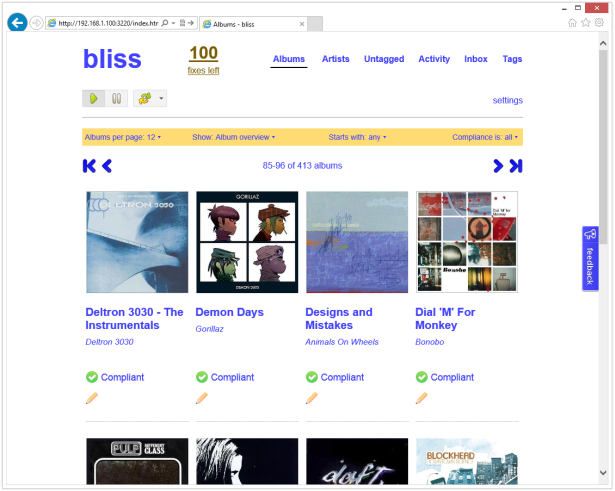
Bliss is a Java application written by Dan Gravell which can manage file names, tags and album art for your music collection and which can also enforce their consistency. It is designed to be left running once installed so that albums you add later will have these same policies applied to them automatically. It supports a wide range of music formats, and effortlessly deals with very large collections – apparently even ones containing quite obscure recordings. My own collection didn’t really put this to the test, since it doesn’t contain bootlegs, live sets or rarities plus I had also already obtained cover art for it (from back when CoverFlow first graced the screen of my iPhone 2G).
I could see from referrals to this blog that people were asking Dan for a Synology package which he didn’t have the time to investigate, and so I thought that it would make an interesting little project, especially since a NAS is the ideal device to run Bliss on. Although there was already a Howto post on the Synology forums, that guide only really covered getting the basic functionality of Bliss up and running – it was missing the best bits: the filesystem watching and audio fingerprinting features. These depend on natively compiled binaries, which Bliss doesn’t include for ARM or PowerPC CPUs. Getting these working provided precisely the sort of challenge I like. Not only were they difficult to compile, but getting them integrated into the various OSGi ‘bundles’ that make up Bliss was quite involved too.
Bliss uses an open source library called Chromaprint, itself part of the wider Acoustid project. The aim is to scan an audio file, to produce a fingerprint of the sound, and then to compare this against an open online database such as MusicBrainz.org to identify music regardless of compression codec used. Its author Lukáš Lalinský explains how it works.
Synology Package Installation
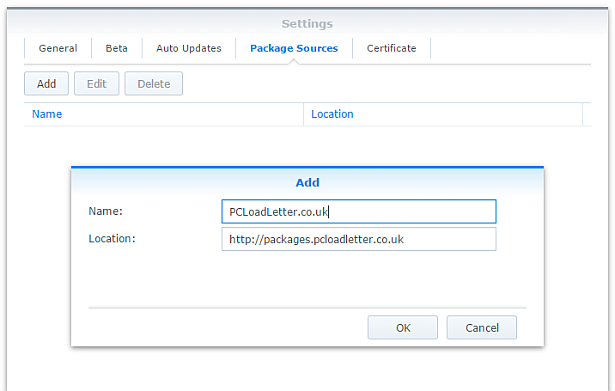
- In Synology DSM’s Package Center, click Settings and add my package repository:
- The repository will push its certificate automatically to the NAS, which is used to validate package integrity. Set the Trust Level to Synology Inc. and trusted publishers:

- Since Bliss is a Java application, you will need to install one of my Java SE Embedded packages first (Java 7 or 8) if you have not already done so. Read the instructions on that page carefully too.
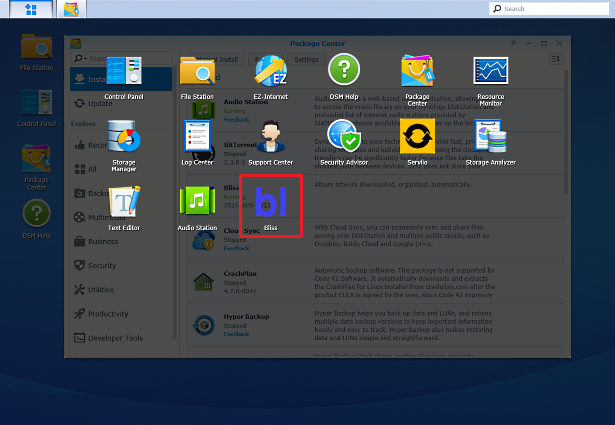
- Now browse the Community section in Package Center to install Bliss:

The repository only displays packages which are compatible with your specific model of NAS. If you don’t see Bliss in the list, then either your NAS model or your DSM version are not supported at this time. DSM 5.0 is the minimum supported version for this package, though you will need DSM 6.0 or later for audio fingerprinting support. - When the Bliss package is running you can manage it using the icon in the main DSM application menu using the button in the top left corner:
Package scripts
For information, here are the package scripts so you can see what it’s going to do. You can get more information about how packages work by reading the Synology 3rd Party Developer Guide.
installer.sh
#!/bin/sh

#--------BLISS installer script
#--------package maintained at pcloadletter.co.uk


DOWNLOAD_URL="`wget -qO- http://www.blisshq.com/app/latest-linux-version`"
DOWNLOAD_FILE="`echo ${DOWNLOAD_URL} | sed -r "s%^.*/(.*)%\1%"`"
SYNO_CPU_ARCH="`uname -m`"
[ "${SYNO_CPU_ARCH}" == "x86_64" ] && [ ${SYNOPKG_DSM_VERSION_MAJOR} -ge 6 ] && SYNO_CPU_ARCH="x64"
[ "${SYNO_CPU_ARCH}" == "x86_64" ] && SYNO_CPU_ARCH="i686"
[ "${SYNOPKG_DSM_ARCH}" == "armada375" ] && SYNO_CPU_ARCH="armv7l"
[ "${SYNOPKG_DSM_ARCH}" == "armada38x" ] && SYNO_CPU_ARCH="armhfneon"
[ "${SYNOPKG_DSM_ARCH}" == "comcerto2k" ] && SYNO_CPU_ARCH="armhfneon"
[ "${SYNOPKG_DSM_ARCH}" == "alpine" ] && SYNO_CPU_ARCH="armhfneon"
[ "${SYNOPKG_DSM_ARCH}" == "alpine4k" ] && SYNO_CPU_ARCH="armhfneon"
[ "${SYNOPKG_DSM_ARCH}" == "monaco" ] && SYNO_CPU_ARCH="armhfneon"
[ ${SYNOPKG_DSM_VERSION_MAJOR} -ge 6 ] && NATIVE_BINS_URL="http://packages.pcloadletter.co.uk/downloads/bliss-native-${SYNO_CPU_ARCH}.tar.xz"
NATIVE_BINS_FILE="`echo ${NATIVE_BINS_URL} | sed -r "s%^.*/(.*)%\1%"`"
#'ua' prefix means wget user-agent will be customized
INSTALL_FILES="ua${DOWNLOAD_URL} ${NATIVE_BINS_URL}"
PID_FILE="${SYNOPKG_PKGDEST}/bliss.pid"
TEMP_FOLDER="`find / -maxdepth 2 -path '/volume?/@tmp' | head -n 1`"
APP_TEMP="${TEMP_FOLDER}/${SYNOPKG_PKGNAME}"
source /etc/profile


pre_checks ()
{
  if [ -z ${JAVA_HOME} ]; then
    echo "Java is not installed or not properly configured. JAVA_HOME is not defined. " >> $SYNOPKG_TEMP_LOGFILE
    echo "Download and install the Java Synology package from http://wp.me/pVshC-z5" >> $SYNOPKG_TEMP_LOGFILE
    exit 1
  fi

  if [ ! -f ${JAVA_HOME}/bin/java ]; then
    echo "Java is not installed or not properly configured. The Java binary could not be located. " >> $SYNOPKG_TEMP_LOGFILE
    echo "Download and install the Java Synology package from http://wp.me/pVshC-z5" >> $SYNOPKG_TEMP_LOGFILE
    exit 1
  fi

  JAVA_VER=`java -version 2>&1 | sed -r "/^.* version/!d;s/^.* version \"[0-9]\.([0-9]).*$/\1/"`
  if [ ${JAVA_VER} -lt 7 ]; then
    echo "This version of Bliss requires Java 7 or newer. Please update your Java package. " >> $SYNOPKG_TEMP_LOGFILE
    exit 1
  fi

  if [ ${SYNOPKG_DSM_VERSION_MAJOR} -lt 6 ]; then
    echo "Please note that native binary support for song identification via audio fingerprinting requires DSM 6.0" >> $SYNOPKG_TEMP_LOGFILE
  fi
}


preinst ()
{
  pre_checks
  cd ${TEMP_FOLDER}
  for WGET_URL in ${INSTALL_FILES}
  do
    WGET_FILENAME="`echo ${WGET_URL} | sed -r "s%^.*/(.*)%\1%"`"
    [ -f ${TEMP_FOLDER}/${WGET_FILENAME} ] && rm ${TEMP_FOLDER}/${WGET_FILENAME}
    #this will allow blisshq.com to track the number of downloads from Synology users
    WGET_URL=`echo ${WGET_URL} | sed -e "s/^ua/--user-agent=Synology --referer=http:\/\/pcloadletter.co.uk\/2012\/09\/17\/bliss-package-for-synology /"`
    wget ${WGET_URL}
    if [[ $? != 0 ]]; then
      if [ -d ${PUBLIC_FOLDER} ] && [ -f ${PUBLIC_FOLDER}/${WGET_FILENAME} ]; then
        cp ${PUBLIC_FOLDER}/${WGET_FILENAME} ${TEMP_FOLDER}
      else
        echo "There was a problem downloading ${WGET_FILENAME} from the official download link, " >> $SYNOPKG_TEMP_LOGFILE
        echo "which was \"${WGET_URL}\" " >> $SYNOPKG_TEMP_LOGFILE
        echo "Alternatively, you may download this file manually and place it in the 'public' shared folder. " >> $SYNOPKG_TEMP_LOGFILE
        exit 1
      fi
    fi
  done

  exit 0
}


postinst ()
{
  #run the installer
  cd ${TEMP_FOLDER}
  echo "INSTALL_PATH=${SYNOPKG_PKGDEST}" > ${TEMP_FOLDER}/bliss-synology.properties
  java -jar ${TEMP_FOLDER}/${DOWNLOAD_FILE} -options ${TEMP_FOLDER}/bliss-synology.properties > /dev/null && rm ${TEMP_FOLDER}/${DOWNLOAD_FILE}
  rm ${TEMP_FOLDER}/bliss-synology.properties
  sed -i "s%^#!/bin/bash%#!/bin/sh%" ${SYNOPKG_PKGDEST}/bin/bliss.sh

  #stow jar files containing Synology versions of native code
  if [ -f ${TEMP_FOLDER}/${NATIVE_BINS_FILE} ]; then
    mkdir ${SYNOPKG_PKGDEST}/syno-native
    cd ${SYNOPKG_PKGDEST}/syno-native
    tar xJf ${TEMP_FOLDER}/${NATIVE_BINS_FILE}
  fi
  #record the CPU architecture
  echo "${SYNO_CPU_ARCH}" > syno_cpu_arch.txt

  #make changes to Bliss launcher script so that pid file is created for Java process
  sed -r -i "s%^(exec .*)$%\1 > ${SYNOPKG_PKGDEST}/bliss.out 2>\&1 \&%" ${SYNOPKG_PKGDEST}/bin/bliss.sh
  echo "echo \$! > ${PID_FILE}" >> ${SYNOPKG_PKGDEST}/bin/bliss.sh

  #set some additional system properties (temp folder, prefs sync interval)
  EXTRA_OPTS="-Djava.io.tmpdir=${TEMP_FOLDER} -Djava.util.prefs.syncInterval=86400 -Djava.net.preferIPv4Stack=true"
  sed -r -i "s%-splash:bliss-splash.png%${EXTRA_OPTS}%" ${SYNOPKG_PKGDEST}/bin/bliss.sh
  sed -r -i "s%-XX:HeapDumpPath=/tmp%-XX:HeapDumpPath=${TEMP_FOLDER}%" ${SYNOPKG_PKGDEST}/bin/bliss.sh

  #create log file to allow package start errors to be captured
  [ -e ${SYNOPKG_PKGDEST}/bliss.out ] || touch ${SYNOPKG_PKGDEST}/bliss.out

  #add firewall config
  /usr/syno/bin/servicetool --install-configure-file --package /var/packages/${SYNOPKG_PKGNAME}/scripts/${SYNOPKG_PKGNAME}.sc > /dev/null

  exit 0
}


preuninst ()
{
  `dirname $0`/stop-start-status stop

  exit 0
}


postuninst ()
{
  #clean up temp
  [ -d ${TEMP_FOLDER}/Bliss ] && rm -rf ${TEMP_FOLDER}/Bliss

  #remove firewall config
  if [ "${SYNOPKG_PKG_STATUS}" == "UNINSTALL" ]; then
    /usr/syno/bin/servicetool --remove-configure-file --package ${SYNOPKG_PKGNAME}.sc > /dev/null
  fi

  exit 0
}


preupgrade ()
{
  `dirname $0`/stop-start-status stop
  pre_checks

  exit 0
}


postupgrade ()
{
  exit 0
}
start-stop-status.sh
#!/bin/sh

#--------BLISS start-stop-status script
#--------package maintained at pcloadletter.co.uk


PKG_FOLDER="`dirname $0 | cut -f1-4 -d'/'`"
ENGINE_SCRIPT="${PKG_FOLDER}/target/bin/bliss.sh"
DNAME="`dirname $0 | cut -f4 -d'/'`"
PID_FILE="${PKG_FOLDER}/target/bliss.pid"
DLOG="${PKG_FOLDER}/target/bliss.out"
SYNO_CPU_ARCH="`cat ${PKG_FOLDER}/target/syno-native/syno_cpu_arch.txt`"
source /etc/profile
source /root/.profile


start_daemon ()
{
  #update the package version number in case of an in-app update
  BLISS_BUNDLE_DIR="`grep -r --include='*.info' com.elsten.bliss.bundle ${PKG_FOLDER}/target/felix-cache/ | cut -f1 -d':'`"
  BLISS_BUNDLE_DIR="`dirname ${BLISS_BUNDLE_DIR}`"
  BLISS_VERSION=`grep "version" ${PKG_FOLDER}/INFO | sed -r "s/^.*([0-9]{8}).*$/\1/"`
  if [ -d ${BLISS_BUNDLE_DIR} ]; then
    find ${BLISS_BUNDLE_DIR} -name *.jar > /tmp/bliss-v-check.txt
    while IFS="" read -r FILE_TO_PARSE; do
      if [ -e ${FILE_TO_PARSE} ]; then
        #no unzip command in DSM 6.0
        if [ -e /usr/bin/7z ]; then
          DETECTED_VERSION=`7z e -so ${FILE_TO_PARSE} META-INF/MANIFEST.MF 2> /dev/null | grep Bundle-Version | cut -f4 -d'.' |  cut -c1-8`
        else
          DETECTED_VERSION=`unzip -p ${FILE_TO_PARSE} META-INF/MANIFEST.MF | grep Bundle-Version | cut -f4 -d'.' |  cut -c1-8`
        fi
      fi
      if [ ${DETECTED_VERSION} -gt ${BLISS_VERSION} ]; then
        BLISS_VERSION=${DETECTED_VERSION}
      fi
    done < /tmp/bliss-v-check.txt
  fi
  rm /tmp/bliss-v-check.txt
  sed -r -i "s/^version=\"[0-9]{8}/version=\"${BLISS_VERSION}/" /var/packages/Bliss/INFO

  #update the CPU-specific repository customizations (in case of an in-app update)
  #catch both armv5te and armv7l
  if [ "${SYNO_CPU_ARCH}" != "${SYNO_CPU_ARCH/arm/}" ]; then
    sed -i "s/policy\.tag\.auto\.linux\.x86/policy\.tag\.auto\.linux\.ARM_le/g" ${PKG_FOLDER}/target/bliss-bundle/repository.xml
  fi
  if [ "${SYNO_CPU_ARCH}" == "ppc" ]; then
    sed -i "s/policy\.tag\.auto\.linux\.x86/policy\.tag\.auto\.linux\.PowerPC/g" ${PKG_FOLDER}/target/bliss-bundle/repository.xml
  fi

  #overwrite native lib bundles with syno versions (in case of an in-app update)
  if [ -e ${PKG_FOLDER}/target/syno-native/ ]; then
    cp ${PKG_FOLDER}/target/syno-native/* ${PKG_FOLDER}/target/bliss-bundle
  fi

  cd ${PKG_FOLDER}
  ${ENGINE_SCRIPT} > /dev/null 2>> ${DLOG}
  if [ -z ${SYNOPKG_PKGDEST} ]; then
    #script was manually invoked, need this to show status change in Package Center
    [ -e ${PKG_FOLDER}/enabled ] || touch ${PKG_FOLDER}/enabled
  fi
}


stop_daemon ()
{
  echo "Stopping ${DNAME}" >> ${DLOG}
  kill `cat ${PID_FILE}`
  wait_for_status 1 20 || kill -9 `cat ${PID_FILE}`
  rm -f ${PID_FILE}
  if [ -z ${SYNOPKG_PKGDEST} ]; then
    #script was manually invoked, need this to show status change in Package Center
    [ -e ${PKG_FOLDER}/enabled ] && rm ${PKG_FOLDER}/enabled
  fi
}


daemon_status ()
{
  if [ -f ${PID_FILE} ] && kill -0 `cat ${PID_FILE}` > /dev/null 2>&1; then
    return
  fi
  rm -f ${PID_FILE}
  return 1
}


wait_for_status ()
{
  counter=$2
  while [ ${counter} -gt 0 ]; do
    daemon_status
    [ $? -eq $1 ] && return
    let counter=counter-1
    sleep 1
  done
  return 1
}


case $1 in
  start)
    if daemon_status; then
      echo ${DNAME} is already running with PID `cat ${PID_FILE}`
      exit 0
    else
      echo Starting ${DNAME} ...
      start_daemon
      exit $?
    fi
  ;;

  stop)
    if daemon_status; then
      echo Stopping ${DNAME} ...
      stop_daemon
      exit $?
    else
      echo ${DNAME} is not running
      exit 0
    fi
  ;;

  restart)
    stop_daemon
    start_daemon
    exit $?
  ;;

  status)
    if daemon_status; then
      echo ${DNAME} is running with PID `cat ${PID_FILE}`
      exit 0
    else
      echo ${DNAME} is not running
      exit 1
    fi
  ;;

  log)
    echo "${DLOG}"
    exit 0
  ;;

  *)
    echo "Usage: $0 {start|stop|status|restart}" >&2
    exit 1
  ;;

esac
Changelog:
- 20160606-0011 Substantial overhaul for DSM 6.0, incorporating many enhancements developed for other packages, updated to Bliss version 20160606, DSM 6.0 newer is now required for audio track fingerprinting (fpcalc is compiled to depend on ffmpeg 2.7.1), added support for several newer Synology products, improved accuracy of temp folder detection, in-app updating should also be fixed
- 20150522-0010 Substantial re-write (hence the long delay):
Updated to Bliss version 20150522
DSM 5.0 newer is now required (fpcalc is compiled to depend on FFmpeg 2.0.2)
Now that Intel systems running DSM 5.0+ use a newer glibc, replacement Intel binaries are no longer needed
Added support for Mindspeed Comcerto 2000 CPU in DS414j
Added support for Intel Atom C2538 (avoton) CPU in various models
Added support for ppc853x CPU in older PowerPC models
Added support for Marvell Armada 375 CPU in DS215j
Added support for Intel Evansport CPU in DS214Play and DS415Play
Switched to using root account – no more adding account permissions, package upgrades will no longer break this
DSM Firewall application definition added
Tested with DSM Task Scheduler to allow package to start/stop at certain times of day, saving RAM when not needed
Daemon init script now uses a proper PID file instead of the unreliable method of using grep on the output of ps
Daemon init script can be run from the command line
Switched to .tar.xz compression for native binaries to reduce web hosting storage footprint
Improved accuracy of temp folder detection
Package is now signed with repository private key
User Agent customization while downloading Bliss package from blisshq.com to allow download stats gathering - 20130213-0009 Updated to Bliss 20130213, and will correctly report version in Package Center after an in-app update
- 20130131-0008 Updated to Bliss 20130131
- 20121112-0007 Fixes for DSM 4.2
- 20121112-006 Updated to Bliss 20121112
- 20121019-005 Updated to Bliss 20121019
- 20121002-004 Updated to Bliss 20121002
- 20120830-003 Added support for Freescale QorIQ PowerPC CPUs used in some Synology x13 series products, PowerPC processors in previous Synology generations with older glibc versions are not supported
- 20120830-002 Hopefully fixed Java prefs polling issue that prevented NAS hibernation
- 20120830-001 initial public release
Build Notes
Chromaprint uses some complex maths functions that FFmpeg can provide (specifically Fourier Transform), and FFmpeg’s shared libraries are already included with Synology DSM. Building Chromaprint linked to those existing libraries results in a minuscule 78KB build of fpcalc, rather than the statically compiled ones for various OS and CPU architectures included with Bliss, which weigh in at several megabytes each. I think I’m finally ‘getting’ what open source is all about, which is nice since that was my objective in experimenting with my NAS. To prevent fpcalc building and linking to its dynamic library libchromaprint.so and to get it to detect FFmpeg properly I had to carefully inspect the Makefiles to find the correct build syntax:
FFMPEG_DIR=${TOOLCHAIN} cmake -DCMAKE_BUILD_TYPE=Release -DBUILD_EXAMPLES=ON -DBUILD_SHARED_LIBS=NO .
FFMPEG_DIR is the base folder from which CMake will look for lib/libavcodec.so and include/libavcodec/avfft.h.
Once I had got past the obstacle of compiling the native code, I needed to liaise back and forth with Dan to understand how Bliss was dealing with its libraries and how I could replace the built-in versions. Originally this was quite a kludge but Dan has since abstracted out the native binaries into their own OSGI bundle fragments which makes things a lot easier, and allows Bliss to survive in-app updates until those native components are superseded. The Synology package provides the following architecture-specific jar files (with corresponding edits to their manifest) which contain the fpcalc binary from Chromaprint. Thank you to Dan for all the quick answers!
- com.elsten.bliss.policy.tag.auto.linux.x86-1.0.1.jar
- com.elsten.bliss.policy.tag.auto.linux.amd64-1.0.1.jar
- com.elsten.bliss.policy.tag.auto.linux.ARM_le-1.0.1.jar (various versions)
- com.elsten.bliss.policy.tag.auto.linux.PowerPC-1.0.1.jar
 PC LOAD LETTER
Hi patters can u give me a hint with that bliss package on synology, since it runs as root
i have the problem with the automatic renaming after that all files changed to owner root and the audio station package can no longer find the files :( when i change the owner manuallly with ssh it works again, may u have a solution for that ?? thanks ia. Harald
hi. all instructions followed and seemingly running but when i open the bliss url i just get a failed to connect page. any thoughts pls?
Same issue here – on DS213air. What can I do to fix this?
Files that get moved through Bliss will not be detected by Sinology’s media indexing service. Is there a way to fix this, e.g. run /usr/syno/bin/synoindex -a /volume1/music/artist/album/filename.avi after bliss fixes a file path?
There’s no way of doing this in bliss unfortunately. Best I can suggest right now is hooking into inotify yourself but this can be difficult – there will be a lot of file changes!
I’d suggest the best thing to do, is have it run as a CronJob / Scheduled task every couple of hours.
You can have instant indexation for changes from third apps with inotify and media-indexer. I use this hook since a while and it works great!
Source (in french!) : http://blogmotion.fr/systeme/indexer-media-11535
Quick translation :
– Add new custom repository : http://synology.francis-besset.com
– Install in order : inotify-tools and Media Indexer
– Media Indexer ask which folders you want to watch : set your media directories (ex: /volume1/music/) separated by a colon (:)
– It’s done!
So how does it work? Will it keep my Synology awake 24/7?
Great tip!
same problem here i think its because bliss is running as root, when i change ownership of the files to a user its indexed from syno again. Anyone knows a solution?
Reporting “Failed to run the package service” error on DSM 6.0 beta 2 (was working properly on beta 1).
… Now it’s working properly after a 5th attempt to run the package…
Thanks for the update… let us know if you see anything else.
I tried a while ago to get this working on my 213j and failed… Looking through the comments I’m not even sure if anyone has managed to get it going.
Any chance of a complete idiot’s step-by-step guide for getting it going on a 213j, including exactly which Java version, etc?
(I’ve just updated to DSM 5.2-5644 Update 3)
I’m in the same boat as you. DSM6 and java 7 running. I even manage to install Bliss, but cannot access it by the user interface: xxx.xxx.xxx.xxx:3220. Even inside my network i get a connection refused error.
Have you tried https://pcloadletter.co.uk/2012/09/17/bliss-package-for-synology/comment-page-3/#comment-144838 ?
Quite a number of these comments pre-date the recent package update so the issues described will be fixed in the current release version 0011. The comments had been in the blog moderation queue which had got backlogged. I had prioritised working on the packages, hence the delay.
Has anyone figured out how to remove the leftover empty folders? Usually it doesn’t bother me much as I access the music through DS Audio, but when I want to copy something to an external drive it annoys me
Do you mean after renaming music files/folders? I have seen this with Synology because of extra hidden files the Synology sometimes places in the folders. Can you send a debug archive to see if there are more we need to cover? “Help” then “Download debug archive”.
For now, you can normally use a third party empty folder remover from your desktop/laptop. Which OS are you on?
Also please vote for http://ideas.blisshq.com/forums/21939-bliss/suggestions/3821233-removing-folders-after-files-move
That’s what I mean. I am on OSX mainly, any recommendation which software to use?
Will send debug archive later.
I would probably use find on the Terminal. http://superuser.com/questions/529186/how-can-i-delete-empty-folders-in-mac-os-x
Hi patters. Dan asked me to post this error I’m experiencing.
Its related to a previous post (https://pcloadletter.co.uk/2012/09/17/bliss-package-for-synology/comment-page-2/#comment-130038)
The problem I’m facing is BLISS installs to the root partition which, over time, uses all the space and causes my NAS volumes to crash.
Based on the comments in #130038, I have done the following;
– Uninstalled Bliss & Java via DSM Package centre
– Deleted all remaining Bliss files & folders using WinSCP and Putty
– Installed Java Manager via DSM Package centre and updated to Java version 7
– Reinstalled Bliss (via DSM Package centre – version 20150522-0010), but it still goes to my root partition.
Here are the details for my Synology setup;
– Java Manager insists on installing version jdk-7u51-linuz-i586 – it does not accept any other version, even the latest version 8.
– DSM 5.2-5644 (Update5)
– Synology Model – 1812+
Hope you can advise
What is the path of the folder that causes the root partition to fill up?
patters, for context, some users of the add-in were reporting installing the Java from Synology Java manager – https://pcloadletter.co.uk/2012/09/17/bliss-package-for-synology/comment-page-2/#comment-133810
Its in the root (“/”)
NAS> ..Bliss
Is there anything being done to fix auto-updates?
I’ve tried synocommunity Java (7 and 8) and the synology package, all run Bliss fine but update never works, no error message – the page says it’s successful.
The newly downloaded bliss update always goes in root (“/”), as do a number of other bliss files. Surely it’s not just two of us with this issue?
I don’t think it is just the two of you, no… I’ve had a good few reports of this.
The solutions suggested above where to use the Java 7 available under Synology Java Manager, then re-install bliss. Is that what you tried?
Yes, but the update still doesn’t work (and bliss files are still put into “/”).
I upgraded to DSM 6.0 today and it completely killed by bliss config. When bliss starts up now it back to unregistered and all my settings are lost. I tried updating again in hopes this new “config” would allow an update but it still doesn’t work.
There is a how to for a Docker install of Bliss for the QNap NAS on the Bliss site:
http://www.blisshq.com/music-library-management-blog/2015/12/01/installing-bliss-qnap-docker-container-station/
Why not try it with the Synology. I have not tried it with DSM 6 yet but seems to be working under the latest version of 5. No reason it will not work with 6. Gets rid of the problems with filling up the / directory.
Laurie, are you saying it works under Docker on DSM 5? Would be good if that were the case. How’s the resource usage?
Hi Dan,
Got your message after I started upgrading to DSM 6. I nuked everything and I have just begun again. Before I nuked it, it appeared to be working OK but I now can’t give you the resources it was using as I did not take any notice. I am in the process of copying all the music back to my NAS. With DSM 6 there are a few more options for the Container which were missing from the previous version but were shown on the QNAP install. Memory allocation being the main one.
A quick play has it starting OK on DSM 6, but I will not get a real good look at it until I have finished copying all my files over and the system settles down. It did appear to solve my issue of the root directory becoming full, when using platters package. I can set where the files are written to using Docker. Not that I am for one second saying there are issues with this package (platters). The size of my music collection is the issue. A smaller collection will work 100% with this package and may well be far more efficient and easier to install run etc.
The image created on my Synology NAS using the QNAP tutorial is 407MB. Bigger than the one I created using Alpine Linux but mine had problems that I could see and not resolve. I can not see the problems that I saw using this one. Sure a smaller distro would be good but the main thing is that it works properly.
Will report back again when all my data is back in place. A few days away I think.
I was debating trying it. I also noticed two other docker builds in the repo. May give one of these a try.
Hi Rick,
Try the one on the QNAP site. The one based on Alpine linux by Strop was my attempt and it has some issues.
Laurie – while smaller install size is a good thing, I’m less concerned with that and more concerned with the runtime performance.
If you are having trouble with the size of the collection that’s a problem with bliss, not the add-in that patters has made.
Or should I be more concerned with the install size? Is the size allocated for Docker containers restricted?
Dan,
The issue with the package is that it is writing files to the /root/.bliss directory that it creates rather than to the /volume1/@appstore/bliss directory (memory of correct path might be bad here). The larger your music collection the more space it takes up. As this part of the partition is very small, as you know, it fills up. The disk station then stops working until the files are deleted. That path variable needs to be fixed somehow.
Runtime performance, if you give me some parameters, I will try and do some experimenting for you. On DSM 6 you can set processor priority to Low/Medium/High as well as set memory usage. Size concerns for me are mainly on memory usage though I have the ability to expand my onboard memory whilst other models will not. My concerns about a larger container meaning more memory usage is a misunderstanding of how docker works – I think.
I would not worry about install sizes at this time. I have to be honest my biggest problem at the moment appears to be permissions and coming to grips with that. I am playing with a number of docker images tonight trying to come to grips with it. The Bliss image I generated from the QNAP instructions is not the biggest – by a long way.
All the best
Ok, I see what you mean about collection size now. That makes sense.
I switched over to the “QNAP” docker (Synology DSM 6.0), I couldn’t take the package from here eating my root directory anymore (and the fact it needed root to begin with).
Running a little fat – 2GB RAM. I didn’t set limits on my container resources, I’m guessing it taps out at 2GB due to 32-bit Java? I don’t really care since I have plenty to spare.
Dan,
Sorry for the delay in getting back on this. It seems to be working fine on DSM6 as Rick has stated. Not too memory hungry either I thought. Through circumstances I have had to go back to DSM5.2 and still running it in Docker. Showing only using 220MB of memory and about 1-5% CPU usage. On the data side I have not got all my music back up there yet but it is running about 1GB on disk – this would never fit on the Synology previously, so the first time that I have been confident that I can do my whole collection with Bliss.
Interesting, I’m not sure why it would be using 2GB. bliss is configured to only use 128MB of internal application memory (total memory use probably more like 180MB once you add Java overhead). Are you definitely looking at what is being used, or what Docker has allocated as headroom (I don’t know enough about Docker yet to even say if that is possible).
After the initial scan my docker container is down to 430MB RAM. I’ll be keeping it running this way, seems cleaner than the syn package.
Hi,
I just installed the package on my DS213j using Java SE 8 and all seemed well at first – I had the paths all showing as Bliss said they should in the logs…
I can’t start Bliss though. When I try to run it in the package manager, it seems to start and then say it’s failed… The log now says:
/var/packages/Bliss/scripts/start-stop-status.sh: line 64: /var/packages/Bliss/target/bin/bliss.sh: Permission denied
How do I go about giving permission (and who to)?
Sorry I don’t Linux very good :)
Sounds like the a similar issue to what @sw is facing below! Still looking into this…
An update…
The docker version has been working great for the last week. Today it updated to the latest bliss release without any problems.
Did you update the Docker container itself, or bliss from within the Docker container?
Just bliss from within the docker, the bliss files are saved outside the container on a NAS share.
Thanks.
I’ve been trying to get this running on my 213j (DSM 6.0-7321 update 3) for a while and was stumped at first by permissions…
After poking around the web trying to get some other packages running with DSM 6 and following the troubleshooting steps for them, I created a Bliss user BEFORE installing Bliss. After this, I was still getting permissions errors which were fixed by chowning /vars/packages/Bliss to Bliss owner
Then I didn’t get any log errors but just ‘Package failed to start’ …
This was fixed by chowning /volume1/@appstore/Bliss to the Bliss user and group. (I initially tried giving it 777 rights but that failed).
I then rejoiced when Bliss said it had started!
Go to my_url:3220 and I’m told it refuses to answer….
Silly me, open up firewall, and…. Boooo! Still no joy…
I’ve tried testing it with Java SE Embedded 7 instead of 8 but still nothing.
After trying uninstalling Bliss and reinstalling with different Java versions, the ‘Bliss’ user was deleted, and although I didn’t recreate it, Bliss still runs (but still doesn’t open on port 3220)
Can you suggest anything else I could try now?
update to the above, when I run it over my local network, it still doesn’t start, but rather than refused connection, I get:
Something unexpected happened while serving the page at /
Does that give some clues?
It’s a little hard to say without further debugging and logs – are there any more logs in DSM?
bliss does also keep some “working” files – these will be stored in a temporary folder somewhere. These probably also need the permissions set on them…
Might you have been affected by the bug that means the working files are stored in the root folder – “.bliss”?
debug log from my_ip:3221/debug
is here:
https://dl.dropboxusercontent.com/u/25252217/bliss.debug.22-29-43_2016-4-25.zip
if that assists at all?
The .bliss folder in root has these dirs:
activePolicies
data
jetty-debug
jetty-ui
settings
Should these be somewhere else? And any ideas where the temporary folder might be? Or any hints as to how to find it?
Ah… in your debug archive: “IncompatibleClassChangeError: vtable stub”. See https://pcloadletter.co.uk/2012/09/17/bliss-package-for-synology/comment-page-2/#comment-127778 which suggests you have the wrong version of Java.
Your temporary folder is in: /volume1/@tmp
I have tried with both SE Embedded 7 and 8 and I get no reply on port 3220 with either, although I haven’t tried them both on the local network (which at least gives me an error of sorts). Can try that later.
Are there any other SE versions I can try? Those are the only two that are listed via the pcloadletter package archive…
@tmp is already 777, so may try setting up the Bliss user again and reinstalling everything and chowning to Bliss (as that did inexplicably fix a few things last time)
Maybe there are different errors for the different Java versions… try with the other one, and send me a new debug archive.
ok, started again from scratch. I had JSE7 installed when I sent that last log.
This time, uninstalled Bliss, uninstalled Java.
Add user Bliss to group sc-media.
Reinstalled Java 8, using ejdk-8u91-linux-arm-sflt.tar.gz as suggested by the installer.
Reinstall Bliss.
Start = Fail.
Log says:
/var/packages/Bliss/scripts/start-stop-status.sh: line 64: /var/packages/Bliss/target/bin/bliss.sh: Permission denied
do
chown -R Bliss:sc-media
on
/var/packages/Bliss
/volume1/@appstore/Bliss
up until this point, I stil get the error above in the logs.
Then chown
/usr/syno/etc/packages/Bliss
and I get ‘Failed to run the package service’.
Figure I’ll chown ALL the things:
> find . -iname ‘bliss’ -type d
gives me 12 directories dotted about the place.
I chown them all, and it still fails to start the package service.
Figure I’ll try JSE7 again now that I’ve chowned everything there is to chown.
Uninstall 8, reinstall 7. (without reinstalling Bliss) but still no go…
So now I don’t even have any error logs to show, and I’m properly stumped as to what to try next, unless I do need to reinstall Bliss after a reinstall of JSE?
Unlike the last time, when the package was failing to start, I’m still getting the log error above when it fails:
/var/packages/Bliss/scripts/start-stop-status.sh: line 64: /var/packages/Bliss/target/bin/bliss.sh: Permission denied
but I don’t know what else I can give permissions to!
Looking through bliss.sh there’s just a reference to ${INSTALL_HOME}/felix-cache
but I can’t find that anywhere – could that be the problem?
Anyway, pardon the length of this post – it’s also for my reference should I ever get this working :)
felix-cache is a cache of the code used to run bliss. It is created when bliss is first started, so if bliss isn’t starting, it won’t be created. But obviously the correct permissions are required on the ${INSTALL_HOME} directory.
What I’m not sure about is your method of creating a bliss user before the install is causing problems. Do you know if another bliss user is added anyway? I think this is possible – it’s the uid which has to be unique. If you have changed all the permissions for another bliss user then that might break things. Also, normally it’s “bliss”, not “Bliss”… but maybe the add-in also has a capitalised user name.
The reason I created Bliss instead of bliss is
a) that worked, to a degree, last time and
b) the pages that have hinted that this process might make a difference (mostly looking at getting the headphones app working) all have the app name as the user name, and the Bliss app is capitalized.
There is no other bliss user created (at least there isn’t one around now) but maybe it’ll be worth trying again with a lower-case username. Then might just go through and check that all the variables are being filled in right… But that’ll be for another day.
Only question I have from last night’s attempts is: does it make any difference if I installed the new version of JSE without first uninstalling Bliss?
I don’t know the answer to whether you can easily swap JREs unfortunately…
My thoughts are why not just let the add-in deal with the username?
well, that’s just the thing… If I don’t create a user before install, then no user is created at all…
It does delete the user I’ve created on uninstall, but no new one is created on reinstall… I just tried again, uninstalling JRE first, then reinstalling everything, and there is no Bliss/bliss user….
I think it might be a change since DSM 6 (most of the talk I’ve seen of creating a user for apps relate to post DSM 6)
Interesting, any references for that? Maybe an API has changed… or something.
Hmm, well, now that I’m searching for it, I can’t find anything that says exactly what I say above… It seems usernames ARE still created on other apps, but some permissions need to be changed… I guess I must have got the wrong end of the stick somewhere along the line…
BUT, a bliss user is definitely NOT being created on my NAS when I install Bliss, so something’s definitely amiss… Perhaps it’s just a problem on the 213j…
You know what – I’m not even sure myself now, it might be that it runs as root… that rings a bell actually. I’m not being much help, sorry. Hopefully patters sees this and can advise?
If it does run as root that should mean that permissions aren’t an issue, at least!
…and yet permission errors are what I’m getting in the logs when it fails to start…
any clues from patters would be most welcome :)
This page seems a little dead… Is there any work being done to:
– Fix the problems with Bliss writing into the root directory? Only just noticed this happening and caught it in time before it killed my Synology
– Fix the problems with Bliss not updating itself correctly? It thinks it has, but then it is still stuck at the old version.
I realise I could use Docker, but that’s yet another thing to look after as I don’t need it for anything else.
Thanks in advance
Andy.
Hi Andy, I think both problems are related – the update doesn’t work because of the root issue.
This isn’t dead, it’s uppermost in my thoughts; that’s all I can say at the moment…
Thanks Dan. I bought an unlimited Bliss license a while ago and having it running properly on my Synology would be ‘the icing on the cake’. I’ve just started re-ripping my entire CD collection again as ALAC (Previously ripped piecemeal over the years with varying encodings and bitrates) and it would be so useful!
Andy.
same here… I’m keeping a close eye on this thread to see when there is a package for my new Synology 216play
Agree with Andy on this one. I would like to utilise my full license too, and have tried several times to get round the issue of Bliss writing to the root directly…all with no success.
Paul
Definitely trying to get something to you… I realise it’s a poor substitute for what you actually want to do, but you can use the same licence on a computer connected to the NAS.
Paul,
You could always try running bliss in the Docker environment in the short term till the root issue is fixed.
Hi, I have a DS211, installed Java 8 SE sucessfully and Bliss afterwards without any errors. However I cannot access the bliss url http://:3220. Looking at the bliss protokoll it says:
ERROR: Resolver: Install error – com.elsten.bliss.policy.tag.auto.linux.ARM_le
java.io.IOException: Error accessing file:/var/packages/Bliss/target/bliss-bundle/com.elsten.bliss.policy.tag.auto.linux.ARM_le-1.0.1.jar
at org.apache.felix.bundlerepository.impl.FileUtil.openURL(FileUtil.java:217)
at org.apache.felix.bundlerepository.impl.FileUtil.openURL(FileUtil.java:199)
at org.apache.felix.bundlerepository.impl.ResolverImpl.deploy(ResolverImpl.java:615)
at com.elsten.bliss.bootstrapbundle.Activator$RepositoryAdminTracker.installFromDirectory(Activator.java:219)
at com.elsten.bliss.bootstrapbundle.Activator$RepositoryAdminTracker.addingService(Activator.java:63)
at org.osgi.util.tracker.ServiceTracker$Tracked.customizerAdding(ServiceTracker.java:932)
at org.osgi.util.tracker.ServiceTracker$Tracked.customizerAdding(ServiceTracker.java:864)
at org.osgi.util.tracker.AbstractTracked.trackAdding(AbstractTracked.java:256)
at org.osgi.util.tracker.AbstractTracked.track(AbstractTracked.java:229)
at org.osgi.util.tracker.ServiceTracker$Tracked.serviceChanged(ServiceTracker.java:894)
at org.apache.felix.framework.util.EventDispatcher.invokeServiceListenerCallback(EventDispatcher.java:943)
at org.apache.felix.framework.util.EventDispatcher.fireEventImmediately(EventDispatcher.java:794)
at org.apache.felix.framework.util.EventDispatcher.fireServiceEvent(EventDispatcher.java:544)
at org.apache.felix.framework.Felix.fireServiceEvent(Felix.java:4445)
at org.apache.felix.framework.Felix.registerService(Felix.java:3431)
at org.apache.felix.framework.BundleContextImpl.registerService(BundleContextImpl.java:346)
at org.apache.felix.framework.BundleContextImpl.registerService(BundleContextImpl.java:320)
at org.apache.felix.bundlerepository.impl.Activator.start(Activator.java:71)
at org.apache.felix.framework.util.SecureAction.startActivator(SecureAction.java:645)
at org.apache.felix.framework.Felix.activateBundle(Felix.java:2154)
at org.apache.felix.framework.Felix.startBundle(Felix.java:2072)
at org.apache.felix.framework.Felix.setActiveStartLevel(Felix.java:1299)
at org.apache.felix.framework.FrameworkStartLevelImpl.run(FrameworkStartLevelImpl.java:304)
at java.lang.Thread.run(Thread.java:745)
Caused by: java.io.FileNotFoundException: /var/packages/Bliss/target/bliss-bundle/com.elsten.bliss.policy.tag.auto.linux.ARM_le-1.0.1.jar (No such file or directory)
at java.io.FileInputStream.open0(Native Method)
at java.io.FileInputStream.open(FileInputStream.java:195)
at java.io.FileInputStream.
What can I do? Or what did I do wrong?
Thanks for your help.
Hello, can anyone help me? I don’t get Bliss to run on my DS211. I installed Java SE Embedded 8. Afterwards Bliss. It says that it is running but I cannot access it’s link: http://:3220. Looking at the log it says:
ERROR: Resolver: Install error – com.elsten.bliss.policy.tag.auto.linux.ARM_le
java.io.IOException: Error accessing file:/var/packages/Bliss/target/bliss-bundle/com.elsten.bliss.policy.tag.auto.linux.ARM_le-1.0.1.jar
at org.apache.felix.bundlerepository.impl.FileUtil.openURL(FileUtil.java:217)
at org.apache.felix.bundlerepository.impl.FileUtil.openURL(FileUtil.java:199)
at org.apache.felix.bundlerepository.impl.ResolverImpl.deploy(ResolverImpl.java:615)
at com.elsten.bliss.bootstrapbundle.Activator$RepositoryAdminTracker.installFromDirectory(Activator.java:219)
at com.elsten.bliss.bootstrapbundle.Activator$RepositoryAdminTracker.addingService(Activator.java:63)
at org.osgi.util.tracker.ServiceTracker$Tracked.customizerAdding(ServiceTracker.java:932)
at org.osgi.util.tracker.ServiceTracker$Tracked.customizerAdding(ServiceTracker.java:864)
at org.osgi.util.tracker.AbstractTracked.trackAdding(AbstractTracked.java:256)
at org.osgi.util.tracker.AbstractTracked.track(AbstractTracked.java:229)
at org.osgi.util.tracker.ServiceTracker$Tracked.serviceChanged(ServiceTracker.java:894)
at org.apache.felix.framework.util.EventDispatcher.invokeServiceListenerCallback(EventDispatcher.java:943)
at org.apache.felix.framework.util.EventDispatcher.fireEventImmediately(EventDispatcher.java:794)
at org.apache.felix.framework.util.EventDispatcher.fireServiceEvent(EventDispatcher.java:544)
at org.apache.felix.framework.Felix.fireServiceEvent(Felix.java:4445)
at org.apache.felix.framework.Felix.registerService(Felix.java:3431)
at org.apache.felix.framework.BundleContextImpl.registerService(BundleContextImpl.java:346)
at org.apache.felix.framework.BundleContextImpl.registerService(BundleContextImpl.java:320)
at org.apache.felix.bundlerepository.impl.Activator.start(Activator.java:71)
at org.apache.felix.framework.util.SecureAction.startActivator(SecureAction.java:645)
at org.apache.felix.framework.Felix.activateBundle(Felix.java:2154)
at org.apache.felix.framework.Felix.startBundle(Felix.java:2072)
at org.apache.felix.framework.Felix.setActiveStartLevel(Felix.java:1299)
at org.apache.felix.framework.FrameworkStartLevelImpl.run(FrameworkStartLevelImpl.java:304)
at java.lang.Thread.run(Thread.java:745)
Caused by: java.io.FileNotFoundException: /var/packages/Bliss/target/bliss-bundle/com.elsten.bliss.policy.tag.auto.linux.ARM_le-1.0.1.jar (No such file or directory)
at java.io.FileInputStream.open0(Native Method)
at java.io.FileInputStream.open(FileInputStream.java:195)
at java.io.FileInputStream.
What can I do or what did i wrong?
Cheers.
I think this is the second time I’ve heard of this error – is your device supported? Maybe it isn’t pulling down the file if your device isn’t on a list of supported models…
Hi Dan, thank you for your answer. What list of supported devices are you talking about and where can I find it? I thought that anything that shows up in my Synology package center can be installed. And that was the case for Java SE 7/8 an Bliss package.
It’s more of a semi educated guess than anything else. I noticed the CPU for DS211 (Marvell Kirkwood) is not mentioned in the post above…
Okay… and this means I won’t get Bliss to work on my DS211 no matter what I do???
I’m really sorry to be obtuse but I don’t know; I’m just speculating as to why that file isn’t being downloaded (it looks like the fingerprinter that patters compiled to run on ARM).
What do I have to do to reply here? Somehow my comments are always ignored. :-(
Human controlled moderation queue. A huge mass of blog comments are made by spambots.
Okay, then sorry for this human spam. Would you help me anyway?
My docker broke when I tried to update to the latest bliss version.
For anyone using docker, FYI, I modified the DockerFile to use the latest Ubuntu (not trusty) as well as Java 8 and everything is running fine.
I tried using docker but haven’t been able to get it running properly, is there a step-by-step guide anywhere? I think it’s a security issue because the docker is running but it can’t be accessed in any way. Strange.
I have similar error as Stephan on June 12.
Error accessing file:/var/packages/Bliss/target/bliss-bundle/com.elsten.bliss.policy.tag.auto.linux.PowerPC-1.0.1.jar
I have similar file but different version:
com.elsten.bliss.policy.tag.auto.linux.PowerPC-1.0.0.jar
Anyway to make it work?
Thanks
> uname -a
Linux xxx 2.6.32.12 #7393 SMP Thu Jun 2 19:48:24 CST 2016 ppc GNU/Linux synology_qoriq_413
> java -version
java version “1.8.0_06”
Well, I just copied and renamed the file to match the version required. It didn’t work first, but after multiple trials of reboots and bliss restarts at some point it starts working by some magic.
Did you see that I published a new version of the package which resolves this issue?
I did it before the update. Will check. Thanks!
Hi. I have a Synology DS213air and followed the above instructions. Now have Java SE Embedded 8 installed and running. Installed Bliss onto the NAS from within the Package Center. It says it’s running, but everytime I click the app, I get a page with title “Problem loading page” and the text: “Unable to connect. Firefox can’t establish a connection to the server at 192.168.1.87:3220.” Any idea how I can get to the web interface or where I could be going wrong? Thanks
Has an Error preventing it from booting on ARM.
It is looking for tag.auto.linux.ARM-1.0.1.jar, which doesnt exist (the file is 1.0.0)
(TEMPORARY) FIX FOR NO BOOTING BLISS:
Tried downloading it on my Synology DS412.
“booted” in DSM, but UI wouldnt show up. Log showed a FileNotFound, which lead me to a misnamed/misversioned file. It is looking for tag.linux.ARM.1.0.1.jar, but the file is actually 1.0.0.
Renaming the file didn’t help either unfortunately, since it gave me a 404-page.
Error 404 – Not Found.
No context on this server matched or handled this request.
Contexts known to this server are:
/ —> o.e.j.w.WebAppContext{/,file:/root/.bliss/jetty-ui/webapp/},file:/var/packages/Bliss/target/bin/../felix-cache/bundle48/version0.0/bundle.jar
Clicking that link hovewer, suddenly got me into a booted Bliss :D
I don’t really think this is intended though, so I thought I’d mention it.
Thanks! The “WebAppContext” message is normally just a temporary message shown when bliss is starting. If you refreshed the page a few seconds later, that might also work.
Thanks for finding this!
It worked fine for roughly 5 months and now suddenly stopped working on my Synology. When I want to start the app, it just stops. If I want to check the logs in the app window, the entire UI freezes. Sometimes the log window will open but it’s extremely slow, as if an enormous amount of data is available.
Can you get access to the Synology file system to send the bliss logs? They should be /volume1/@tmp I think – “bliss.log”.
Hi all, I’ve finally overhauled a new version to support DSM 6.0 and all the Synology devices that have come along since the last release. It still runs as root for now, though I suspect I’ll need to change that to overcome the media indexing issues with Synology Audio Station that arise when Bliss makes fixes to the music collection as root.
Hi patters. The only obvious thing would be seeing fpcalc appearing on the process list periodically… It normally runs for a few seconds, so you should see it.
Hello!
Already talked about this a little by mail with Dan, and he asked me to also post here.
I have a DS213j running DSM 6. I begun all this after a clean install. Apart from bliss and “patters” Java, i only have default app/programs installed.
Time line:
Installed patters Java 7 and Bliss.
Didn’t started. After several attempts, i did launched and i was able to access the 3220 page. After click at config icon it crashed. Went to the :3221/debug and got the log.
After that i talked to Dan by mail.
Unsitalled Bliss and Java 7.
Installed Java 8 and Bliss.
This time, it don’t started.
I got the Access denied error that several other users reported above.
What should i do? I can send some log file, if needed.
Thanks a lot!
I took a look at the line number for the logs you sent me:
start-stop-status.sh: line 57: /var/packages/Bliss/target/bin/bliss.sh: Permission denied
I ssh’d into my machine and displayed the permissions:
$ ls -l /var/packages/Bliss/target/bin/bliss.sh
-rwxr-xr-x 1 root root 1618 Aug 24 09:55 /var/packages/Bliss/target/bin/bliss.sh
That means it’s actually executable by anyone (although other problems may occur later).
I suspect you don’t even have the file…
Are you able to ssh in and run the command above:
ls -l /var/packages/Bliss/target/bin/bliss.sh
https://www.synology.com/en-global/knowledgebase/DSM/help/DSM/AdminCenter/system_terminal
This is the return for that command:
-rw-r–r– 1 root root 1618 Aug 24 09:48 /var/packages/Bliss/target/bin/bliss.sh
Thanks a lot!
Ok, just set permissions to 777. Now i got the following error:
error: Unable to access the jarfile /var/packages/targert/bin/../bin/felix.jar
What are the permissions for /var/packages/target/bin/felix.jar ?
(Note you made a typo “targert” in your post, I assume this wasn’t what was being outputted).
Yes, I was a typo. And the referred directory doesn’t exist, so no permissions there. Hehehe
I have, under the /var/packages/ only the aplications folders, such as the stations apps, HiperBackup, Bliss, Java8, etc… But no target folder there.
What my next step? :P
When bliss.sh runs it looks for the current directory of the bliss.sh script, converts that to the parent folder, and then adds “/bin/felix.jar” to the end to locate the felix.jar file.
So that should go from /var/packages/Bliss/target/bin/bliss.sh to the parent at /var/packages/Bliss/target/ and then find felix at /var/packages/Bliss/target/bin/felix.jar
However, your path appears to be missing “Bliss”. This might suggest bliss.sh is in /var/packages/target/bin/bliss.sh rather than /var/packages/Bliss/target/bin/bliss.sh
It seems your install is rather messed up. I hesitate to suggest this but could you just uninstall, make sure everything is removed from the drive and re-install?
Can you please elaborate a little more what do you mean by “make sure everything is removed from the drive”? I already uninstall it several time during this process, so i think that only doing it by the package manager won’t get me anywhere different.
Thanks a lot for your support and patience.
After uninstalling, my packages folder got like these:
login as: evilinheaven
evilinheaven@192.168.31.50‘s password:
evilinheaven@Gondor:~$ cd ..
evilinheaven@Gondor:/var/services/homes$ cd ..
evilinheaven@Gondor:/var/services$ cd ..
evilinheaven@Gondor:/var$ ls
cache db empty lock packages services state target
crash dynlib lib log run spool synobackup tmp
evilinheaven@Gondor:/var$ cd packages
evilinheaven@Gondor:/var/packages$ ls
AudioStation DownloadStation java8 PhotoStation VideoStation
CloudStation HyperBackup MediaServer PHP5.6
Should i erase anything else manually?
Should i uninstall patters Java 8 also?
Thanks!
No, leave that. Install bliss now and report what appears. I would expect just a “Bliss” folder. Then try running again.
Ok. Installed it again. Now i’m back to the error: start-stop-status.sh: line 57: /var/packages/Bliss/target/bin/bliss.sh: Permission denied
No good, Bliss still not starts.
Did the chmod to 755 on bliss.sh and noting new.
Nothing new on the registry.
What my next step?
Kind of idle here at work right now… Hehehe
Tried to run the bliss.sh to see what’s happening.
Below what i got:
evilinheaven@Gondor:/var/packages/Bliss/target/bin$ sh bliss.sh
bliss.sh: line 1: /volume1/@appstore/Bliss/bliss.pid: Permission denied
evilinheaven@Gondor:/var/packages/Bliss/target/bin$ cd /volume1/@appstore/Bliss/
evilinheaven@Gondor:/volume1/@appstore/Bliss$ ls
bin bliss.out bundle datatables.licence NOTICE syno-native
bliss-bundle bliss.pid conf launch4j.licence scala.licence ui
evilinheaven@Gondor:/volume1/@appstore/Bliss$ ls -l bliss.pid
ls: cannot access bliss.pid: No such file or directory
evilinheaven@Gondor:/volume1/@appstore/Bliss$ sudo chmod 755 bliss.pid
chmod: cannot access ‘bliss.pid’: No such file or directory
You can’t directly execute bliss.sh unless you’re running as the correct user – root I think at the moment.
Here are my permissions for bliss.sh:
The path to bliss.sh is as so:
felix.jar is in the same folder as bliss.sh:
When bliss runs it does so as root:
See what the differences are to your system…
Hey @all,
any chance to see a new actual Version of Bliss for the Synology?
Thanks!
Brudertac
If you install the latest it should install the latest version of bliss. Is that not what you are seeing?
Running the latest Synology package and the update function within Bliss doesn’t appear to work – It is on version 20160606, and when I check for updates it says its already on the latest version?
I suggest making a Docker Container for Diskstations who support Docker.
Have made this a few days earlier because i just wanted to try it and it works perfect.
Hi Andy. Where are you getting the version from – if it’s in the Synology UI you have to review it after starting bliss (it defaults to the version when the add-in was last changed).
For the in-app update it’s a bug that bliss has to be restarted to see the new version…
Weird. Restarted Bliss from Synology UI a number of times previously, but this time it seems it worked – Selected update from within the Bliss Web UI and the newer version was detected. There was something in the Logs about update server not being found.
Hmmm, this might be related to the move to HTTPS… I’ll get in touch with patters.
Hi Any news on this? I’m trying to update from 20160830 to 20161108 but I keep getting the No record of online repository for update message
You will have to update via DSM unfortunately – uninstall then re-install.
This I think will lose settings, so please take a record of them or see https://www.blisshq.com/music-library-management-blog/2015/01/27/moving-settings-different-computer/
Having just been hit by the .bliss directory making my NAS unbootable twice ( the first time i had thought it was something else and reinstalled my entire system . The second I dug deeper and removed the .bliss from root , no regrets as its been a great learning experience) I was wondering if there are any thoughts on fixing this outside the docker route
I’ve tested using both the Patters and Synology supplied JAVA and the .bliss folder is still tehre
Whaaaaaat? Really? I thought we fixed this a month or two ago.
Ok, I can see what is going on I think. I’ll email patters.
ta
Any news on this?
I emailed patters with what I thought was the fix – he hasn’t got back to me just yet…
Thanks Dan, much appreciated.
HI , is the fix something we can do (i.e a config file edit etc) or does it need to be a package change
HI , is the fix something we can do (i.e a config file edit etc) or does it need to be a package change
I think you should be able to do it yourself if you were happy editing some files. Or at least for testing purposes.
The bliss start script is at /volume1/@appstore/Bliss/bin/bliss.sh . If you edit it and place the following line at the start:
VMARGS=-Dbliss_working_directory=/volume1/@tmp/bliss
That would save the database inside .bliss inside /volume1/@tmp/bliss
So the file would look like:
#!/bin/sh
#
# Shell script to run bliss
VMARGS=-Dbliss_working_directory=/volume1/@tmp/bliss
INSTALL_HOME=`dirname “$0″`/..
[…]
I’m not sure if @tmp is trashed between restarts, if so you might want a different place, maybe in the bliss appstore folder at /volume1/@appstore/Bliss.
Maybe there’s a way of changing the environment variable for VMARGS to avoid changing bliss.sh?
HI ,
So I’ve used the /volume1/@appstore/Bliss folder as this in package directory setup seems to be the standard for data stores across other apps. Its up and running and the .bliss folder is in the right place. Will set it running and see what happens :)
Great, let us know!
Its been working like a charm. Thank you Dan
Thanks!
Hello, i’m getting the “….start-stop-status.sh: line 57: /var/packages/Bliss/target/bin/bliss.sh: permission denied error” when trying to install on a Synology DS115j. I’ve tried with Jave SE 7 and 8. I’m not technical at all, just wondering if i’m doing something wrong or there is a workaround for this?
Thanks, Ian.
I’m also getting the message….. Something unexpected happened while serving the page at / ……rather than the web interface when i start Bliss running. Anyone know why this is happening?
Cheers
Ian
So did you get bliss running in the end (re. your post of October 25th)?
Still no luck I’m afraid. It shows as running in the package centre but still returns the error saying that it is unable to generate the web page, and it also maxes out the CPU. I’ve tried using various versions of Java but the same problem continues. Is the CPU simply not powerful enough?
Erm, well it may or may not be (it’s certainly going to be taxing on that machine, depending on how many rules you enable), but that’s not the cause of this error message I don’t think.
Do you see anything in the logs in DSM? See the add-in page.
Can you delete everything then start over? I wrote up all the instructions in one place here: https://www.blisshq.com/synology-music-organizer.html
Thanks for replying. There’s hundreds of lines of logging for Bliss the Package Centre, but there’s no way to copy even a single line of it unfortunately. I don’t really know what to look for but there is:
java.lang.IncompatibleClassChangeError: vtable stub
that crops up a couple of times. I’ve tried Java 7, Java 8, the embedded versions recommended in your instructions, and the version recommended to run Minim Server and BubbleServer (BubbleServer runs ok incidentally).
I think this may be almost impossible to troubleshoot unless you have an inkling of what the problem is – but i completely understand if you don’t.
That’s definitely the error message when the wrong Java version is installed.
You definitely need to use the embedded versions of Java as required by patters.
Does the DS115J run the Java version we require correctly? It should appear installed in the DSM console.
Both of patters versions of Java 7 and 8 appear to install and run correctly – they show as running in the package centre and show their version number/hotspot in the logs as their installer advises they should. Tried both yesterday – uninstalling Bliss first both times – and when installed Bliss showed the same Java incompatibly message when running on Java 7 or 8.
Cheers
Without that model to test on I’m not sure then… I guess the only workaround will be to install on another computer and connect to the NAS…
Ok, thanks for your suggestions anyway
Hi Dan,
I’ve installed latest package on syno 214+. Latest DSM 6. Got 5500 albums, and bought unlimited fixes.
It ran for a couple of days, but now my NAS stopped working, because /dev/root is 100% full.
How can I get this running again. And should I change something with Bliss config files to prevent writing to /dev/root?
Hi, I’ve only just seen your question! Please see the response here: https://pcloadletter.co.uk/2012/09/17/bliss-package-for-synology/comment-page-3/#comment-146665
So in short it’s a bit difficult.
We’re going to have a fix real soon I hope.
HI , I cant update to the latest version as my version says – Synology install
The current version of bliss is 20160919. You are using the latest version.
Can you uninstall/install from DSM? From memory there’s an issue with that version, and prior versions, because of blisshq.com’s move to HTTPS.
that did it
oh did the fix go in for the store of the database going onto the root of the synology
Not yet, as far as I am aware…
Hej Dan. I have a Synology DS3617xs. Ive added http://packages.pcloadletter.co.uk/ to my packet source, but no bliss. I havve checked “any publisher”
I’m not 100% sure but could this be because it’s a Xeon, i.e. not requiring all the ARM related stuff done for this package? Or maybe because it’s a newer x17 device? I’m not expecting you to answer those questions Ulrik!
Do the other packages appear, e.g. Java, Serviio, Crashplan?
Yes all other packages appears
It’s a new architecture: braswell. I’ll need to add it to the package.
OK thank you for clarifying. What is the time estimate?
This is displaying : craftbukkit, Crashplan, crashplan pro, crashplan proe cleint, java SE 7. Java SE 8, Minecraft, Open remote, and Serviio
Hi
I am stuck on the latest DSM5 version, hardware won’t allow updating to DSM6. Got Bliss version 20160405-0010 up and running. Unfortunately it doesn’t detect new files anymore, although it states it is listening for file changes in the activity screen. Got all the logs sent to Dan but he can’t find anything in them. Any idea what might be wrong with the package I am using?
Any way to update the ffmpeg etc. manually to be able to install the latest Bliss package?
Cheers
Ziemowit
BTW, its a DS1010+, if that matters
New files detection is via Java, the fpcalc binary (which depends on FFmpeg’s libraries) is only used for fingerprinting unknown audio files so it’s not essential.
What does this mean? Can I do anything to update to latest Bliss?
If I pause and unpause or completely restart bliss it will detect the new files.
I don’t think I was clear in my offline email. I think the issue is probably down to a bug in bliss, which has since been fixed. The version you are on was one of the early ones which ported the file notification stuff to the standard Java implementation of file watching, there were a few bugs in the first few releases after that.
I have installed Java version 1.8.0_33-0031
There are much newer Java versions than that. Java 8 Embedded 1.8.0_121 is available on my repository, which might fix your issue.
No improvement after updating to the latest Java and restarting Diskstation
Since the bug seems to be in the last bliss package available for DSM5, is there any chance to update dependencies and install a newer bliss version without installing DSM6?
In the bottom right corner of the Bliss UI there’s an in-app update button which will take you to the latest version.
There is no difference at all between the version of the package you get with DSM 5 versus DSM 6, it’s just that the audio fingerprinting won’t work on DSM 5.
It should be noted that unfortunately the in app update feature for versions prior to 20161213 will only update to 20161213 and no further… but you’re right, that should fix it… not sure why I didn’t think of that before…
In app update fixed it, thanks!
Now fingerprinting is not working anymore, but I assume that bliss would only utilise that if there was no ID3 present, so there should be no real limitation resulting from that update, right?
Correct.
It should also use fingerprinting when there’s no metadata/artwork found for any existing tags. What makes you say it isn’t working?
Well, patters said so previously…
If fingerprinting was working before, I can’t think of see a reason it won’t now. The interface has not changed in the two versions. The fpcalc binaries should not have been overwritten when updating.
If he’s using the latest package version, fpcalc is compiled to be dependent on the FFmpeg version that’s included DSM 6.0, but he’s still on DSM 5.2 which has significantly older version.
But the fpcalc bundle won’t be updated by in-app update, so he should be using the same one you built for DSM 5.x… am I missing something?
Hi All,
seems there is a new version of Java (8u121, dated Dec 2016), but Oracle changed the name of the file download, so it won’t install anymore.
I fixed this by simply changing the download file to the one that the installer was expecting.
anyone else had this issue ?
That’s weird, it worked for me the other day. How did you change the name of the file?
hello
just edited the file name once i had saved it to my NAS in the public folder
so when you downloaded from Oracle what file name did you get ?
the file name i downloaded was :
ejdk-8u121-fcs-b13-linux-i586-12_dec_2016
but the Java loader was expecting :
ejdk-8u121-linux-i586.tar.gz
so i simply renamed it, restarts dates installation and everything went fine
David
oh and meant to say, the file i downloaded was the x86 small footprint file from here :
http://www.oracle.com/technetwork/java/embedded/embedded-se/downloads/index.html
and Oracle list the file name on that page as :
ejdk-8u121-linux-i586.tar.gz
but like i say it ACTUALLY downloads and saves as :
ejdk-8u121-fcs-b13-linux-i586-12_dec_2016
so simply renamed it back to what it claimed it was in the first place !
is this making sense ;-)
Yes, it makes sense. Maybe it’s because you are downloading the x86 version. In my case I was downloading ejdk-8u121-linux-armv6-vfp-hflt.tar.gz which is exactly what is expected.
Maybe Oracle decided to change the name of the file, could it be more lenient I wonder?
Bliss java issue. Any idea how to resolve?
–>
bliss version: 20170220
Exception in thread “main” java.lang.reflect.InvocationTargetException
at sun.reflect.NativeMethodAccessorImpl.invoke0(Native Method)
at sun.reflect.NativeMethodAccessorImpl.invoke(NativeMethodAccessorImpl.java:62)
at sun.reflect.DelegatingMethodAccessorImpl.invoke(DelegatingMethodAccessorImpl.java:43)
at java.lang.reflect.Method.invoke(Method.java:498)
at com.elsten.bliss.bootstrap.BoostrapOld$.delayedEndpoint$com$elsten$bliss$bootstrap$BoostrapOld$1(BootstrapOld.scala:92)
at com.elsten.bliss.bootstrap.BoostrapOld$delayedInit$body.apply(BootstrapOld.scala:27)
at scala.Function0$class.apply$mcV$sp(Function0.scala:34)
at scala.runtime.AbstractFunction0.apply$mcV$sp(AbstractFunction0.scala:12)
at scala.App$$anonfun$main$1.apply(App.scala:76)
at scala.App$$anonfun$main$1.apply(App.scala:76)
at scala.collection.immutable.List.foreach(List.scala:381)
at scala.collection.generic.TraversableForwarder$class.foreach(TraversableForwarder.scala:35)
at scala.App$class.main(App.scala:76)
at com.elsten.bliss.bootstrap.BoostrapOld$.main(BootstrapOld.scala:27)
at com.elsten.bliss.bootstrap.Bootstrap.main(Bootstrap.java:11)
Caused by: com.google.inject.ProvisionException: Unable to provision, see the following errors:
1) Error injecting constructor, java.lang.NoSuchMethodError: org.mapdb.DBMaker.classLoader(Ljava/lang/ClassLoader;)Lorg/mapdb/DBMaker;
at com.elsten.bliss.main.Platform.(Platform.java:107)
while locating com.elsten.bliss.main.Platform
This relates to a fix made in the latest version. Have you installed previous versions? If so, could you delete then re-install?
I have got the same issue as above….”bliss version: 20170220
Exception in thread “main” java.lang.reflect.InvocationTargetException……”
I installed bliss using Patters Synology installer. All ran fine. I then tried to update using the web UI and after that it starts, but then stops the service with the error as above.
I have tried uninstalling and reinstalling but no joy. Could it be down to the fact that Patters installer is on version 20160606 (or is that just the date of the installer package, but it pulls a relatively recent version of bliss?)
What would be the best way of fixing. Do I need to SSH and delete any left over files from the uninstall?
Yeah, that’s right. I worked this through with another couple of users on email – the cause is files left from uninstall, because the package hasn’t been updated to deal with the new versions of bliss.
Succinctly, you need to:
1) Uninstall bliss
2) Delete the /root/.bliss/code folder
3) Re-install bliss
At that point it should work. (2) is the hard bit – if you are handy with SSH or you can use an SCP client it’s fairly straightforward…
BTW, the version shown initially in the package list is the latest version at the time the package (not bliss inside the package) was last updated. It would also update with older versions too, once installed, but again this is something that won’t work until the package works with the newer versions of bliss.
I have got the same issue as above….”bliss version: 20170220
Exception in thread “main” java.lang.reflect.InvocationTargetException……”
I installed bliss using Patters Synology installer. All ran fine. I then tried to update using the web UI and after that it starts, but then stops the service with the error as above.
I have tried uninstalling and reinstalling but no joy. Could it be down to the fact that Patters installer is on version 20160606 (or is that just the date of the installer package, but it pulls a relatively recent version of bliss?)
What would be the best way of fixing. Do I need to SSH and delete any left over files from the uninstall?
if you are on DSM 6, this can help for the SSH part : https://www.synology.com/fr-fr/knowledgebase/DSM/tutorial/General/How_to_login_to_DSM_with_root_permission_via_SSH_Telnet
Hello Dan!
I decided to give Bliss another go on my 213j running DSM6. I installed the last Java 8 (patters) and Bliss (20160606-0011) from the package manager. But when a tried to start Bliss i got the following error :
[ERROR] Falied to find a properties file (but properties were acessed).
[ERROR] ‘EMBED’ snippet failed with message: FIXME trying to embed a template named ‘albumOverviewContent’, but template not foud.
After this messages, if i insist reloading the Bliss address, i get the bad and old vtable stub incompatible class change error on java.
What can/should i do to fix it?
Thanks a lot!
João Galante
I’ve seen that “EMBED” error message another time on someone else’s installation. Best I can suggest is that I do some screen sharing with you and we look at it together…
Ok, if you are willing to be that helpful, all i can do is thanks and accept it!
How and when can we do it? I live in Brazil, so maybe the timezone will be quite different, but don’t mind doing that in late/early hours.
I already use Chrome remote desktop on my machines, don’t know if it would be ok for you. Don’t mind using another (free or trial) program for that, just name it.
Thanks a lot Dan!
I normally use join.me . Please email me at support at blisshq.com and we can arrange. Probably my afternoon would be best.
Hello,
First, thank you for building this plugin. It has helped me clean up my library quite a lot, however, I notice there are a few updates to Bliss recently that have changed the structure a little and updates won’t work to these versions. I see the install/removal scripts are pretty straight forward, so has anyone tried to upgrade to the latest 20170220 release?
Thanks.
Installation of the new versions has worked for me every time, however there are some things you need to know:
– Deleting the package doesn’t delete all code versions, so re-installation can’t be used to fix in-app update problems (you must manually delete /root/.bliss/code for that)
– Fingerprinting, and any other work patters has done to adapt native features, doesn’t work
I got it to install by your suggestion with the removal of the .bliss directory. Thank you.
on a side-note, I tried to create fingerprints for my files a long time ago via MusicBrainz itself and tag the files, some worked and some didn’t, but the NAS version doesn’t do fingerprinting then how does it identify then besides straight name/album lookups if it can’t calculate it. Also what did you mean by work patters?
Thanks.
Nathan
patters is the maintainer of the plugin and the webmaster of this website (see elsewhere in the thread).
If fingerprinting doesn’t work, bliss just uses existing tags to make name based lookups. That includes: album name, artist name, track numbers and track names.
Installation of the new versions has worked for me every time, however there are some things you need to know:
– Deleting the package doesn’t delete all code versions, so re-installation can’t be used to fix in-app update problems (you must manually delete /root/.bliss/code for that)
– Fingerprinting, and any other work patters has done to adapt native features, doesn’t work
Excited to try this out! However, it appears it doesn’t support quickconnect? I guess I’ll have to direct connect at home. Also, bliss shows as a package now, but it “failed” in install and does not show in the notification log as having installed. Perhaps this means I have other issues afoot? Cheers.
DS214Play, DSM 6.1-07 Update 2
Can you start it? Can you show the logs (both from install and start) – send by email if you’d rather: https://www.blisshq.com/contact.html
Everyone – I’ve made available a manual install SPK from here:
https://www.blisshq.com/music-library-management-blog/2017/04/05/synology-package-update-spk/
This fixes all but the fingerprinting in the Synology package. I’m working with patters to get this into his repository soon.
Just wanted to see if there was anything that could be done to help with the fingerprinting feature on the synology. I know it is possible as I found another command line app called beets which is able to run on the synology and do the fingerprinting and lookups to musicbrainz there.
Thanks,
Nathan
We just need a way of compiling fpcalc for Synology. I’ve noticed this exists: https://synocommunity.com/package/chromaprint (Chromaprint contains fpcalc). I wonder if it could be used…
Hello,
Bliss is currently running as root on my Synology. The problem I am having with that is the content in my media library is owned by the administrator user so it can be shared out properly. When Bliss edits a tag, it changes the ownership of the directory structure and music file to root so I am getting access denied errors.
Has anyone tried to run Bliss as an alternative user on linux/synology? Say administrator?
I figure the first part of this is changing the start-stop-status.sh script to add a USER variable and call the ${ENGINE_SCRIPT} with
su – ${USER} ${ENGINE_SCRIPT} > /dev/null 2>> ${DLOG}
and copying the root’s .profile content into the ${USER}’s home .profile.
Otherwise, if it runs as root, is there a parameter that can be set to change user once running or to write out as another owner?
Thanks,
Nathan
We have discussed this before, trouble is, which user should you use? Is there a “music” user e.g. used by Audio Station?
Is there a way of parameterising start-stop-status and having a UI widget pass the value?
There is currently no way of changing the user in bliss, although technically it is possible. Please suggest it here: http://ideas.blisshq.com
Well, I tried to change it in the startup script and had it pass the user ID to do the su as the user, but it failed to start properly as the administrator user.
So I went with plan B for now, installing inotify-tools via entware and setting up a inotifywait script to monitor file create access on my mp3 directory and change the owner, group back to administrator:users and mod 664 for any files re-created.
If I could get it to run under another user that would be more direct and use less resources, but this is working for now.
Could you send the script to me? I’d like to write it up for the blog, could be generally useful on other devices too. Or you could write the blog post… Or you could put it on GitHub or whatever and I can link to it…
Good afternoon, I sent an email with the scripts and how I put it together.
Thanks!