
UPDATE – The instructions and notes on this page apply to both the Minecraft and the CraftBukkit packages hosted on my repo. Now works on QorIQ CPU Synology models!
Minecraft is an intriguing game. I only recently bought it after a friend had recommended it. There’s a lot to like: the striking retro visual style, the mellow sporadic music, exploring the procedurally generated world, the logical way items are crafted, multiplayer collaboration, and emergent gameplay. Notch its creator certainly deserves the fortune he’s now sitting on. I thoroughly recommend you watch this short documentary all about it.

Right after I released the Java package for Synology a couple of people mentioned that they wanted to use it for installing a Minecraft server. Now that I have the game, I decided to try that too. I had assumed that the ARM CPUs would not be capable of running it, and the first tests seemed to confirm this. I decided it would be worth creating a package nonetheless since the Intel CPU NAS units would be ok, especially with their extra RAM. However, with a little performance tuning it actually runs acceptably (no lag when mining blocks) on my ARM powered DS111 which only has 256MB. The CPU load is 100% for a while at first, but soon after playing it settles down to around 60%. I have briefly tested with two players connected and after a bit of lag at first (one second delay to mine a block) it does seem to settle down.
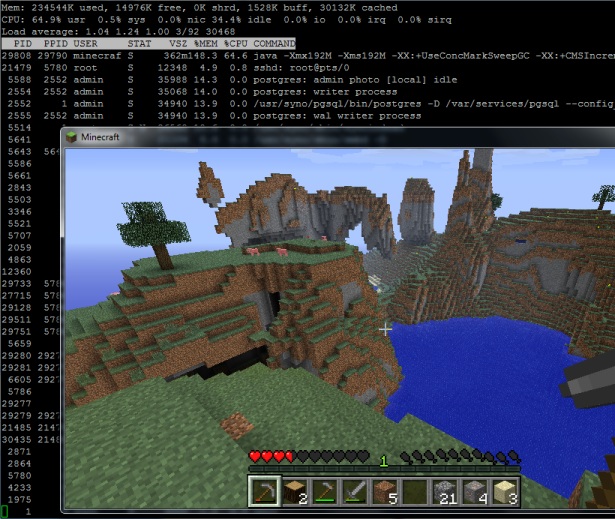
Minecraft showing draw distance and server load running on a Synology DS111
Installation
- This package is not CPU specific. If you have Java it will run. At the moment that means ARM, Intel and QorIQ PowerPC processors, but not the older PowerPCs.
- In the User Control Panel in DSM, enable the User Homes service.
- Install the package directly from Package Center in DSM. In Settings -> Package Sources add my package repository URL which is http://packages.pcloadletter.co.uk. You will need to install either one of my Java SE for Embedded packages first (Java 6 or 7).
Notes
- The package fetches the minecraft server jar file from Mojang as it is installed. I am complying with their wish that no one redistributes it.
- The server daemon script checks the amount of system RAM and scales the Java heap size appropriately. It also applies a few performance tweaks to Java to try to reduce garbage collection latency.
- The first time you run the server it will create a new world, which can take a few minutes. You cannot interrupt this but you can check on progress by repeatedly viewing the Log tab.
- Because the time investments in playing Minecraft can be so considerable, when you uninstall the package it will back up the world folder and settings to /volume1/public/minecraftworld.todaysdate.bak to prevent accidental deletion.
- The package supports upgrades to future versions while preserving the world folder and server settings.
- If you want to transplant an existing world folder into the server, copy it to /volume1/@appstore/Minecraft. You will also need to run chown -R minecraft /volume1/@appstore/Minecraft to grant ownership of the files to the daemon user.
- The first time you run the package, the server config file /volume1/@appstore/Minecraft/server.properties is generated. The next time it is launched, my script reduces the default draw distance for ARM CPUs from 10 chunks to 7. This was appropriate for my DS111 to prevent latency when mining blocks, but you may wish to reduce this further on the J series NAS units which have less RAM and slower CPUs. Other server files (white-list.txt etc.) are found in the same folder. For CraftBukkit the files are in the folder /volume1/@appstore/Craftbukkit/server.properties (note the capitalization – the CraftBukkit project seemed to change this after I had already created the package with a lower case ‘b’).
- The simplest way to edit these config files if you’re not really confident with Linux is to install Merty’s Config File Editor package, which requires the official Synology Perl package to be installed too (since DSM 4.2). Load Config File Editor, then in the dropdown menu edit Config File Editor’s own config (it’s the last in the list) and add the lines:
/volume1/@appstore/Minecraft/server.properties,Minecraft-properties

/volume1/@appstore/Minecraft/white-list.txt,Minecraft-whitelist

/volume1/@appstore/Minecraft/ops.txt,Minecraft-ops
Make sure to add an extra blank line underneath, save, then relaunch CFE and you’ll have entries for Minecraft in the dropdown. You’ll need to restart the Minecraft package for any changes to take effect. - It was a bit tricky to get the server to shut down gracefully without just killing the Java process. We need it to shutdown properly so it saves the active chunks to disk first. Most of the guides on the Net use the screen binary which isn’t included with Synology DSM, and I didn’t want to have to make a version of the package for each CPU architecture. I found that I could use tail to send the last line of the file /tmp/stdin.minecraft to the server (/tmp/stdin.craftbukkit for the CraftBukkit package). This is how the stop command is issued. You could send your own commands, for instance echo say Hello players >> /tmp/stdin.minecraft. You can verify that the command was received by looking at the server log in Package Center.
- The server runs on the default TCP port for Minecraft (25565) so you will need to port forward this on your router if you want it to be publicly accessible.
Package scripts
For information, here are the package scripts so you can see what it’s going to do. You can get more information about how packages work by reading the Synology Package wiki.
installer.sh
#!/bin/sh

#--------MINECRAFT/CRAFTBUKKIT installer script
#--------package maintained at pcloadletter.co.uk

if [ "${SYNOPKG_PKGNAME}" == "Minecraft" ]; then
  DOWNLOAD_PATH="http://s3.amazonaws.com/MinecraftDownload/launcher"
  DOWNLOAD_FILE="minecraft_server.jar"
  UPGRADE_FILES="server.properties *.txt world"
fi
if [ "${SYNOPKG_PKGNAME}" == "Craftbukkit" ]; then
  DOWNLOAD_PATH="http://cbukk.it"
  DOWNLOAD_FILE="craftbukkit-beta.jar"
  UPGRADE_FILES="server.properties *.txt *.yml world world_nether world_the_end plugins bukkit_update"
fi

DOWNLOAD_URL="${DOWNLOAD_PATH}/${DOWNLOAD_FILE}"
DAEMON_USER="`echo ${SYNOPKG_PKGNAME} | awk {'print tolower($_)'}`"
DAEMON_ID="${SYNOPKG_PKGNAME} daemon user"
DAEMON_PASS="`openssl rand 12 -base64 2>/dev/null`"
MIGRATION_FOLDER="${DAEMON_USER}_data_mig"
ENGINE_SCRIPT="/var/packages/${SYNOPKG_PKGNAME}/scripts/launcher.sh"
INSTALL_FILES="${DOWNLOAD_URL}"
source /etc/profile
TEMP_FOLDER="`find / -maxdepth 2 -name '@tmp' | head -n 1`"
PRIMARY_VOLUME="/`echo $TEMP_FOLDER | cut -f2 -d'/'`"
WORLD_BACKUP="${PRIMARY_VOLUME}/public/${DAEMON_USER}world.`date +\"%d-%b\"`.bak"

preinst ()
{
  if [ -z ${JAVA_HOME} ]; then
    echo "Java is not installed or not properly configured. JAVA_HOME is not defined. "
    echo "Download and install the Java Synology package from http://wp.me/pVshC-z5"
    exit 1
  fi

  if [ ! -f ${JAVA_HOME}/bin/java ]; then
    echo "Java is not installed or not properly configured. The Java binary could not be located. "
    echo "Download and install the Java Synology package from http://wp.me/pVshC-z5"
    exit 1
  fi

  #is the User Home service enabled?
  UH_SERVICE=maybe
  synouser --add userhometest Testing123 "User Home test user" 0 "" ""
  UHT_HOMEDIR=`cat /etc/passwd | sed -r '/User Home test user/!d;s/^.*:User Home test user:(.*):.*$/\1/'`
  if echo $UHT_HOMEDIR | grep '/var/services/homes/' > /dev/null; then
    if [ ! -d $UHT_HOMEDIR ]; then
      UH_SERVICE=false
    fi
  fi
  synouser --del userhometest
  #remove home directory (needed since DSM 4.1)
  [ -e /var/services/homes/userhometest ] && rm -r /var/services/homes/userhometest
  if [ ${UH_SERVICE} == "false" ]; then
    echo "The User Home service is not enabled. Please enable this feature in the User control panel in DSM."
    exit 1
  fi

  cd ${TEMP_FOLDER}
  for WGET_URL in ${INSTALL_FILES}
  do
    WGET_FILENAME="`echo ${WGET_URL} | sed -r "s%^.*/(.*)%\1%"`"
    [ -f ${TEMP_FOLDER}/${WGET_FILENAME} ] && rm ${TEMP_FOLDER}/${WGET_FILENAME}
    wget ${WGET_URL}
    if [[ $? != 0 ]]; then
      if [ -d ${PUBLIC_FOLDER} ] && [ -f ${PUBLIC_FOLDER}/${WGET_FILENAME} ]; then
        cp ${PUBLIC_FOLDER}/${WGET_FILENAME} ${TEMP_FOLDER}
      else
        echo "There was a problem downloading ${WGET_FILENAME} from the official download link, "
        echo "which was \"${WGET_URL}\" "
        echo "Alternatively, you may download this file manually and place it in the 'public' shared folder. "
        exit 1
      fi
    fi
  done

  exit 0
}


postinst ()
{
  #create daemon user
  synouser --add ${DAEMON_USER} ${DAEMON_PASS} "${DAEMON_ID}" 0 "" ""

  mv ${TEMP_FOLDER}/${DAEMON_USER}*.jar ${SYNOPKG_PKGDEST}/${DAEMON_USER}.jar

  #determine the daemon user homedir and save that variable in the user's profile
  #this is needed because new users seem to inherit a HOME value of /root which they have no permissions for
  DAEMON_HOME="`cat /etc/passwd | grep "${DAEMON_ID}" | cut -f6 -d':'`"
  su - ${DAEMON_USER} -s /bin/sh -c "echo export HOME=\'${DAEMON_HOME}\' >> .profile"

  #change owner of folder tree
  chown -R ${DAEMON_USER} ${SYNOPKG_PKGDEST}

  exit 0
}


preuninst ()
{
  #make sure server is stopped
  su - ${DAEMON_USER} -s /bin/sh -c "${ENGINE_SCRIPT} stop ${SYNOPKG_PKGNAME} ${SYNOPKG_PKGDEST}"
  sleep 10

  #if a world exists, back it up to the public folder, just in case...
  if [ -d ${SYNOPKG_PKGDEST}/world ]; then
    if [ ! -d ${WORLD_BACKUP} ]; then
      mkdir -p ${WORLD_BACKUP}
    fi
    for ITEM in ${UPGRADE_FILES}; do
      mv ${SYNOPKG_PKGDEST}/${ITEM} ${WORLD_BACKUP}
    done
  fi

  exit 0
}


postuninst ()
{
  #remove daemon user
  synouser --del ${DAEMON_USER}

  #remove daemon user's home directory (needed since DSM 4.1)
  [ -e /var/services/homes/${DAEMON_USER} ] && rm -r /var/services/homes/${DAEMON_USER}

  exit 0
}


preupgrade ()
{
  #make sure the server is stopped
  su - ${DAEMON_USER} -s /bin/sh -c "${ENGINE_SCRIPT} stop ${SYNOPKG_PKGNAME} ${SYNOPKG_PKGDEST}"
  sleep 10

  #if a world exists, back it up
  if [ -d ${SYNOPKG_PKGDEST}/world ]; then
    mkdir ${SYNOPKG_PKGDEST}/../${MIGRATION_FOLDER}
    for ITEM in ${UPGRADE_FILES}; do
      if [ -e ${SYNOPKG_PKGDEST}/${ITEM} ]; then
        mv ${SYNOPKG_PKGDEST}/${ITEM} ${SYNOPKG_PKGDEST}/../${MIGRATION_FOLDER}
      fi
    done
  fi

  exit 0
}


postupgrade ()
{
  #use the migrated data files from the previous version
  if [ -d ${SYNOPKG_PKGDEST}/../${MIGRATION_FOLDER}/world ]; then
    for ITEM in ${UPGRADE_FILES}; do
      if [ -e ${SYNOPKG_PKGDEST}/../${MIGRATION_FOLDER}/${ITEM} ]; then
        mv ${SYNOPKG_PKGDEST}/../${MIGRATION_FOLDER}/${ITEM} ${SYNOPKG_PKGDEST}
      fi
    done
    rmdir ${SYNOPKG_PKGDEST}/../${MIGRATION_FOLDER}

    #daemon user has been deleted and recreated so we need to reset ownership (new UID)
    chown -R ${DAEMON_USER} ${SYNOPKG_PKGDEST}
  fi

  exit 0
}
start-stop-status.sh
#!/bin/sh

#--------MINECRAFT/CRAFTBUKKIT start-stop-status script
#--------package maintained at pcloadletter.co.uk

DAEMON_USER="`echo ${SYNOPKG_PKGNAME} | awk {'print tolower($_)'}`"
DAEMON_ID="${SYNOPKG_PKGNAME} daemon user"
ENGINE_SCRIPT="/var/packages/${SYNOPKG_PKGNAME}/scripts/launcher.sh"
DAEMON_USER_SHORT=`echo ${DAEMON_USER} | cut -c 1-8`

daemon_status ()
{
    ps | grep "^ *[0-9]* ${DAEMON_USER_SHORT} .*java" > /dev/null
}

case $1 in
  start)
    DAEMON_HOME="`cat /etc/passwd | grep "${DAEMON_ID}" | cut -f6 -d':'`"

    #set the current timezone for Java so that log timestamps are accurate
    #we need to use the modern timezone names so that Java can figure out DST
    SYNO_TZ=`cat /etc/synoinfo.conf | grep timezone | cut -f2 -d'"'`
    SYNO_TZ=`grep "^${SYNO_TZ}" /usr/share/zoneinfo/Timezone/tzname | sed -e "s/^.*= //"`
    grep "^export TZ" ${DAEMON_HOME}/.profile > /dev/null \
     && sed -i "s%^export TZ=.*$%export TZ='${SYNO_TZ}'%" ${DAEMON_HOME}/.profile \
     || echo export TZ=\'${SYNO_TZ}\' >> ${DAEMON_HOME}/.profile

    su - ${DAEMON_USER} -s /bin/sh -c "${ENGINE_SCRIPT} start ${DAEMON_USER} ${SYNOPKG_PKGDEST} &"
    exit 0
  ;;

  stop)
    su - ${DAEMON_USER} -s /bin/sh -c "${ENGINE_SCRIPT} stop ${DAEMON_USER} ${SYNOPKG_PKGDEST}"
    exit 0
  ;;

  status)
    if daemon_status ; then
      exit 0
    else
      exit 1
    fi
  ;;

  log)
    echo "${SYNOPKG_PKGDEST}/server.log"
    exit 0
  ;;
esac
launcher.sh
#!/bin/sh

#--------MINECRAFT/CRAFTBUKKIT server launcher script
#--------package maintained at pcloadletter.co.uk

#--------Allows graceful shutdown of server without CPU-specific binaries
#--------You can send commands to the running server like so:
#--------    echo say Hello players >> /tmp/stdin.minecraft
#--------    echo say Hello players >> /tmp/stdin.craftbukkit

DAEMON_USER=$2
SYNOPKG_PKGDEST=$3
DAEMON_USER_SHORT=`echo ${DAEMON_USER} | cut -c 1-8`
JAR_FILE=${SYNOPKG_PKGDEST}/$2.jar

case $1 in
  start)
    if [ -f /tmp/stdin.${DAEMON_USER} ]; then
      rm /tmp/stdin.${DAEMON_USER}
    fi
    touch /tmp/stdin.${DAEMON_USER}
    cd ${SYNOPKG_PKGDEST}
    if [ ! -f syno-marker.txt ]; then
      if [ -f server.properties ]; then
        sed -i "s/A Minecraft Server/A Synology Minecraft Server/" server.properties

        #ARM CPU lags a lot, so reduce drawing distance from 10 chunks to 6
        cat /proc/cpuinfo | grep "CPU architecture: 5TE" > /dev/null \
         && sed -i "s/^view-distance=10/view-distance=6/" server.properties

        #record that these mods have been made
        echo config updated > syno-marker.txt
      fi
    fi
    JAVA_OPTS='-XX:+UseConcMarkSweepGC -XX:+CMSIncrementalPacing -XX:+AggressiveOpts'
    RAM=$((`free | grep Mem: | sed -e "s/^ *Mem: *\([0-9]*\).*$/\1/"`/1024))
    if [ $RAM -le 128 ]; then
      JAVA_MAX_HEAP=80M
    elif [ $RAM -le 256 ]; then
      JAVA_MAX_HEAP=192M
    elif [ $RAM -le 512 ]; then
      JAVA_MAX_HEAP=448M
    elif [ $RAM -le 1024 ]; then
      JAVA_MAX_HEAP=896M
    elif [ $RAM -le 2048 ]; then
      JAVA_MAX_HEAP=1792M
    elif [ $RAM -gt 2048 ]; then
      JAVA_MAX_HEAP=2048M
    fi
    JAVA_START_HEAP=${JAVA_MAX_HEAP}
    tail -n 0 -f /tmp/stdin.${DAEMON_USER} | java -Xmx${JAVA_START_HEAP} -Xms${JAVA_MAX_HEAP} ${JAVA_OPTS} -jar ${JAR_FILE} nogui
  ;;

  stop)
    echo say shutting down.. >> /tmp/stdin.${DAEMON_USER}
    sleep 5
    echo stop >> /tmp/stdin.${DAEMON_USER}
    sleep 10
    kill -9 `ps | grep "^ *[0-9]* ${DAEMON_USER_SHORT}.*tail -n 0 -f /tmp/stdin.${DAEMON_USER}" | sed -e "s/^ *\([0-9]*\).*$/\1/"`
    if [ -f /tmp/stdin.${DAEMON_USER} ]; then
      rm /tmp/stdin.${DAEMON_USER}
    fi
  ;;
esac
Changelog:
- 0015 updated to Minecraft 1.5.2, CraftBukkit beta 1.5.2-R0.1
- 0014 updated to Minecraft 1.4.7, CraftBukkit beta 1.4.7-R0.1, and fixes for DSM 4.2
- 013 updated to Minecraft 1.4.6, and CraftBukkit beta 1.4.6-R0.3
- 012 updated to Minecraft 1.4.5, and CraftBukkit 1.3.2-R1.0
- 011 updated to Minecraft 1.4.2
- 010 updated to Minecraft 1.3.2, and CraftBukkit 1.3.1-R2.0
- 009 package scripts fully re-written to unify the Minecraft and CraftBukkit packages
- 008 updated to Minecraft 1.3.1, unified most scripts into a single installer script, and incorporated minor enhancements from my other packages
- 007 updated to Minecraft 1.2.3
- 006 reduced Java max heap to 80MB on 128MB systems, fixed timezone support each server start
- 005 fixed Java max heap size behaviour on systems with more than 2GB RAM
- 004 fixed wget SSL problem preventing jar download on some systems
- 003 updated to Minecraft 1.1
- 002 server config files are also migrated during version upgrades, and backed up during uninstall. My script’s edits to server.properties are made only once, rather than every startup
- 001 intial public release
 PC LOAD LETTER
please update package for 1.3 please and thank you for making this package.
Hi, it doesn’t work anymore with the new version of Mincecraft : “Internal exception: java.net.SocketException: Connection reset”. My son and his cousin (who did uncarefully the update) can’t play… Please if you can update something or give the trick to make it work again, THANKS !
Hi ! Great stuff. My kid is so proud to have own Minecraft Server ;) We have been playing it for some time, but last time I can see that after Minecraft upgrade to 1.3.1 We cannot access to Minecraft server due to some Java exception. When I have downgraded my minecraft to 1.2.4 it works fine, Is there any workoround to use your Minecraft Server with 1.3.1 version ?
I’ll have a look soon.
I have re-written the scripts – just need to test. Going out for a few hours but it ought to be done later.
Done. Does it work?
Hi ! I have uninstal .007 and try to install .008 but there is strange msg: “The user home service is not enabled. Please enable … ” bla bla bla. I have never seen such a info in previous versions during instalation. There was no changes on my synology (DSM 4.0)
Yes that’s expected – it’s necessary for the timezone to be correctly determined by Java (and therefore by Minecraft’s logs). User settings are needed for the daemon user that runs minecraft. To enable User Homes Service, you can find it in the User Control Panel in DSM. It’s one of the buttons on the top of that control panel.
Because the installation failed, depending on whether you upgraded or uninstalled your existing world data will be in a different location and will need to be manually copied across before you run the new version. I can explain how, but I need to know which you action you performed – uninstall, or upgrade (which failed with the error)?
Wow! What a timing I have enabled homeuser and now instalation was OK. Now I will check if it is working with 1.3.1. BTW why don’t I have to enabled homeuser in .007 ?
That setting wasn’t necessary before because I changed the package to incorporate some of the improvements I have made to the other Synology packages I maintain.
So I have checked if it is working and it looks like not. I have try via LAN and WAN too. Minecraft server is displayed on the list with red mark “can’t reach server”. I have checked and there was no changes in my router and port redirection is set up as it should be (and was working with MN 1.2.4/ server .007).
Intel or ARM? I have tested this on both. Did you check the log? If it’s a new install, it was probably still generating the world data.
ARM DS212j. Where I can find the Minecraft server logs ? I still got “cant reach server” and “connection:refused”
The Log tab in Package Center. On ARM CPU it will take a while to generate a world. The Log tab doesn’t refresh dynamically, so you need to close it and re-open it to see new entries appear.
I see. . Now I can see – “preparing spawn area 97% , then (done) and then can’t keep up is the system time changed or system overload.
It does that when the ARM CPU can’t keep up, with the result that the game lags slightly. You should be able to connect now. If you can’t then you must have some firewall issue locally, or your NAS has perhaps changed IP. If you want to test, the older 007 package version is here:
http://dl.dropbox.com/u/1188556/blog/old/minecraft1.2.3-noarch-007.spk
Thanks – I will check it and mabye it should be done first reboot my NAS. I will inform you after my test mabye tonight (CET)
It works fine ona WAN/LAN. Thank you. It looks like you were right and it was some problem with NAS. After reboot it works fine. Greets from Poland… :)
Great. Do you need to recover the world data from your previous install, or are you ok with that?
No I do not have new world created – it was just some test so theres no need to look for any old data. Anyway thanks…
Hi again ! Few days with server and I don’t know why but it stops from time to time without any additional info in log. Mabye it is not enough resources with my DS212J, but during play teher no other processes that could made so. Can I give to the server more ram ? How can I do it ?
Have a look at the logic for setting RAM size in /var/packages/Minecraft/scripts/launcher.sh. You can edit the numbers in there. Increasing it could slow your system down quite a bit as it will be paging to disk a lot.
Nut whoch value – there ale few of them. can you advise ?
SOrry I have misspel my last post :) There are loop with if/else and few amount where I can change RAM. Can you advise which one ? the one is marked with arrows….
Hi, I can’t download Craftbukkit :(
Yes, I need to recover world data from previous install. How do I go about that?
If you uninstalled then re-installed, there will be a world backup at /volume1/public/minecraftworld.(date).bak as described in the notes on this page. To restore that, uninstall Minecraft. Re-install it, but don’t start the package. Then type this, being sure to replace (date) with the actual name of the backup folder you see in the ls output:
If upgrading the package in Package Center has failed, the world data will be in /volume1/@appstore/mc_data_migration. Re-install Minecraft without starting it, then:
Hi Patters,
Thank you for this package. I had no trouble to get it working (except finding the right java and placing it.) But now i seem to have some trouble finding the @appstore folder, since i what to edit a little in the settings. I don’t know if it is some kind of hidden folder or what?
Also this folder: /var/packages/Minecraft/scripts/launcher.sh
I feel like a total noob, but i can’t seem to google the answer.
I hope you or somebody can help me :-)
Thanks.
Both of the folders you mention are invisible through the normal NAS file shares. You would need to use a telnet or SSH session logged in as root to see them. So to edit these files you would need some minimal Linux knowledge (such as how to use the text editor vi).
Ah i thought i might have to use the Telnet or SSH. I will try to fiddle around with it. Thank you :)
Btw. Do you know the Tekkit mod pack (http://www.technicpack.net/tekkit/) ? It Do you think it would be possible to get that working?
Thank you for your time.
It seems the Minecraft package is up to 1.3.2 but Bukkit is still on 1.3.1 — any plans for an update to CraftBukkit?
They haven’t made one yet, and they mention that they probably won’t:
http://forums.bukkit.org/threads/craftbukkit-1-3-1-r2-0-is-now-available.94551/
There is a 2nd release of the 1.3.1 version though, so I’ll make a new update all the same.
You do know that you rock, right? ;)
what can i do with this error?
—- Minecraft Crash Report —-
// Don’t be sad. I’ll do better next time, I promise!
Time: 9/2/12 6:55 AM
Description: Exception in server tick loop
java.lang.OutOfMemoryError: Java heap space
at net.minecraft.server.NibbleArray.(SourceFile:9)
at net.minecraft.server.ChunkSection.(ChunkSection.java:17)
at net.minecraft.server.Chunk.(Chunk.java:89)
at net.minecraft.server.ChunkProviderHell.getOrCreateChunk(SourceFile:201)
at org.bukkit.craftbukkit.generator.NormalChunkGenerator.getOrCreateChunk(NormalChunkGenerator.java:41)
at net.minecraft.server.ChunkProviderServer.getChunkAt(ChunkProviderServer.java:95)
at net.minecraft.server.MinecraftServer.d(MinecraftServer.java:260)
at net.minecraft.server.MinecraftServer.a(MinecraftServer.java:225)
at net.minecraft.server.DedicatedServer.init(DedicatedServer.java:140)
at net.minecraft.server.MinecraftServer.run(MinecraftServer.java:378)
at net.minecraft.server.ThreadServerApplication.run(SourceFile:539)
Relevant Details:
– Minecraft Version: 1.3.1
– Operating System: Linux (arm) version 2.6.32.12
– Java Version: 1.7.0_06, Oracle Corporation
– Java VM Version: Java HotSpot(TM) Embedded Client VM (mixed mode), Oracle Corporation
– Memory: 47768 bytes (0 MB) / 82313216 bytes (78 MB) up to 82313216 bytes (78 MB)
– JVM Flags: 5 total; -Xmx80M -Xms80M -XX:+UseConcMarkSweepGC -XX:+CMSIncrementalPacing -XX:+AggressiveOpts
– CraftBukkit Information:
Running: CraftBukkit version git-Bukkit-1.3.1-R2.0-b2340jnks (MC: 1.3.1) (Implementing API version 1.3.1-R2.0) true
Plugins: {}
Warnings: DEFAULT
Threads: { WAITING Reference Handler: [java.lang.Object.wait(Native Method), java.lang.Object.wait(Object.java:503), java.lang.ref.Reference$ReferenceHandler.run(Reference.java:133)], WAITING Finalizer: [java.lang.Object.wait(Native Method), java.lang.ref.ReferenceQueue.remove(ReferenceQueue.java:135), java.lang.ref.ReferenceQueue.remove(ReferenceQueue.java:151), java.lang.ref.Finalizer$FinalizerThread.run(Finalizer.java:177)], RUNNABLE DestroyJavaVM: [], TIMED_WAITING Thread-4: [java.lang.Thread.sleep(Native Method), net.minecraft.server.ThreadSleepForever.run(SourceFile:44)], RUNNABLE Signal Dispatcher: [], TIMED_WAITING Thread-6: [java.lang.Object.wait(Native Method), org.bukkit.craftbukkit.scheduler.CraftScheduler.run(CraftScheduler.java:94), java.lang.Thread.run(Thread.java:722)], WAITING Snooper Timer: [java.lang.Object.wait(Native Method), java.lang.Object.wait(Object.java:503), java.util.TimerThread.mainLoop(Timer.java:526), java.util.TimerThread.run(Timer.java:505)], RUNNABLE Server thread: [java.lang.Thread.dumpThreads(Native Method), java.lang.Thread.getAllStackTraces(Thread.java:1618), org.bukkit.craftbukkit.CraftCrashReport.call(CraftCrashReport.java:28), net.minecraft.server.CrashReport.a(CrashReport.java:43), net.minecraft.server.CrashReport.g(CrashReport.java:38), net.minecraft.server.CrashReport.(CrashReport.java:28), net.minecraft.server.MinecraftServer.run(MinecraftServer.java:423), net.minecraft.server.ThreadServerApplication.run(SourceFile:539)], RUNNABLE Listen thread: [java.net.PlainSocketImpl.socketAccept(Native Method), java.net.AbstractPlainSocketImpl.accept(AbstractPlainSocketImpl.java:398), java.net.ServerSocket.implAccept(ServerSocket.java:522), java.net.ServerSocket.accept(ServerSocket.java:490), net.minecraft.server.DedicatedServerConnectionThread.run(DedicatedServerConnectionThread.java:62)], RUNNABLE Thread-5: [java.io.FileInputStream.readBytes(Native Method), java.io.FileInputStream.read(FileInputStream.java:242), java.io.BufferedInputStream.fill(BufferedInputStream.java:235), java.io.BufferedInputStream.read(BufferedInputStream.java:254), java.io.FilterInputStream.read(FilterInputStream.java:83), jline.console.ConsoleReader$1.read(ConsoleReader.java:167), jline.internal.InputStreamReader.read(InputStreamReader.java:267), jline.internal.InputStreamReader.read(InputStreamReader.java:204), jline.console.ConsoleReader.readCharacter(ConsoleReader.java:995), jline.console.ConsoleReader.readLine(ConsoleReader.java:1167), net.minecraft.server.ThreadCommandReader.run(ThreadCommandReader.java:31)], WAITING Thread-8: [sun.misc.Unsafe.park(Native Method), java.util.concurrent.locks.LockSupport.park(LockSupport.java:186), java.util.concurrent.locks.AbstractQueuedSynchronizer$ConditionObject.await(AbstractQueuedSynchronizer.java:2043), java.util.concurrent.LinkedBlockingQueue.take(LinkedBlockingQueue.java:442), org.bukkit.craftbukkit.ChunkCompressionThread.run(ChunkCompressionThread.java:40), java.lang.Thread.run(Thread.java:722)],}
– Type: Dedicated Server
– Is Modded: Definitely; ‘craftbukkit’
– Profiler Position: N/A (disabled)
– Player Count: 0 / 20; []
– World world Entities: ~ERROR~ OutOfMemoryError: Java heap space
– World world Players: 0 total; []
– World world Chunk Stats: ServerChunkCache: 625 Drop: 0
– World world_nether Entities: 0 total; []
– World world_nether Players: 0 total; []
– World world_nether Chunk Stats: ServerChunkCache: 139 Drop: 0
– World world_the_end Entities: 0 total; []
– World world_the_end Players: 0 total; []
– World world_the_end Chunk Stats: ServerChunkCache: 0 Drop: 0
No idea sorry. Maybe report it to bukkit.org.
the log say that is a java.lang.OutOfMemoryError: Java heap space
and my NAS is a DS211j
Well you’ve got very little RAM. You can increase the heap size by editing the logic in /var/packages/Craftbukkit/scripts/launcher.sh but it will most likely run like crap on your system as it swaps to disk like mad. Bear in mind that Minecraft wants 1GB of RAM and you have 128MB.
I tried some configs yet on this file, but well i will assume that i can run a server on this nas x) ty
Hi, thanks for craftbukkit, working well on my 412+, however it really does chew up the ram.
Is it possible to use cron to auto start-stop the server? I cant quiet figure out how to do that with a package like this.
thanks.
Hi, i can’t download craftbukkit!? :(
only the normal minecraft server
Hi – not sure how that happened but it’s fixed now. The previous host I was using removed my access to all the files so I had to find them again in my build folders on my NAS, and I guess I made a mistake with that one. Enjoy…
I have jus installed Craftbukkit on a DS2411 and it works, but stopping the server is a problem. Not sure if I understood the part about using tail and /tmp/stdin.craftbukkit.
It should just stop with the stop button in Package Center. Is that not working?
No. It says that it’s stopped after a little while, but I could still log into the gameserver and all the Java processes were still running. If I run /stop as OP ingame its shut’s down the server just like it should and I can start it without any problems from the package manager.
Testing on my NAS just now, I find that it does actually stop though notice that it can take over a minute to actually exit. This is from my log:
2012-09-10 16:15:20 [INFO] [Server] shutting down..2012-09-10 16:15:23 [INFO] CONSOLE: Stopping the server..
2012-09-10 16:16:19 [INFO] Stopping server
2012-09-10 16:16:19 [INFO] Saving players
2012-09-10 16:16:19 [INFO] Saving worlds
2012-09-10 16:16:19 [INFO] Saving chunks for level 'world'/net.minecraft.server.WorldProviderNormal@239f6
2012-09-10 16:16:20 [WARNING] DSCT: Socket closed
2012-09-10 16:16:20 [INFO] Closing listening thread
2012-09-10 16:16:29 [INFO] Saving chunks for level 'world_nether'/net.minecraft.server.WorldProviderHell@8af0b0
2012-09-10 16:16:30 [INFO] Saving chunks for level 'world_the_end'/net.minecraft.server.WorldProviderTheEnd@fed6f7
2012-09-10 16:16:32 [INFO] Stopping server
The last log entry is when I logged out from the game.
2012-09-11 16:20:55 [INFO] Trollgaard lost connection: disconnect.quitting
Then one from Essentials I believe:
2012-09-11 16:37:48 [INFO] [Metrics] Connection timed out
I stopped the server at 17:44 and it says “stopped” in Appcenter. The next message (also from Essentials I think) says:
2012-09-11 17:47:19 [INFO] [Metrics] Server returned HTTP response code:502 for URL: http://metrics.essentials3.net/report/Essentials
This can be turnd of i the Essentials config I believe, so I’ll do that later, but the last message is:
2012-09-11 17:51:06 [WARNING] Time ran backwards! Did the system time change?
I notice there are a few more of those from earlier today. Also with -or is the server overloaded?
At 18:06 I can still log in on the server and run the /stop command from ingame as I’m OP. All this shows in the log and the server shuts down as it should.
I have copied in my own world from another server I had, but I had the same problem without mods installed. I’m thinking of one thing though. The world is not called world. Would this have something to say for the shutdown of the server itself?
When playing with 1 player(me) logged in, the CPU load is between 19 and 25%. And the RAM at around 18%. I notice as I stop the server from the appcenter it goes up to a stable 39% CPU and an extra 10-15% RAM usage. As if something starts to hang.
QUICKUPDATE: The owner of the NAS just updated to dsm 4.1-2636. That seems to have solved the problem! Thank you for your time Patters! Sorry for wasting it though. I thought he had it fully updated…
That’s ok. Keep in mind that I have never tested this with any plugins though, and plugins might affect shutdown behaviour.
You wrote:
“ARM powered DS111 which only has 256MB. The CPU load is 100% for a while at first, but soon after playing it settles down to around 60%.”
I just setup a craftbukkit server on my DS 213. CPU is still at 99%, RAM at 64%. Is there any way to optimize this? CPU does not settle down, even if no player is online. I know the server needs 1 GB RAM, and the CPU now has to swap. I already set the default draw distance from 10 chunks to 7. Any idea how to calm the CPU down?
TIA and thanks for the great package.
Not sure I’m afraid. I also noticed that on new worlds I made during testing more recently it does seem to stick at 99%.
Thank you for your answer. One result is the process continously writing the warning message to the log file. The log file is pretty long now. Is there a way to delete the minecraft log file?
Installed on DS211. Prior to installation, RAM was about 45%, CPU load close to nothing.
After installation (1.3.1-10), RAM changes to about 80%, CPU hovers around 100%? The high CPU load is continuous over all the time the package is started, i.e. hours and days? Any suggestions about how to moderate this very high CPU usage?
The minecraft package is installed on DS211 – DSM 4.1-2636 – 2012/08/29
This is really a nOOb question , I installed everything fine but i can’t find the minecraft start icon anywhere on the NAS , not in the menu , not on the desktop …anyone know how to start minecraft?
Go to package center, go to installed packages, click run on Minecraft package.
Thanks Patters for a great package. I have this installed on a 1511+.Package Center is showing that status is stopped yet server is still running because I can log in and play. The Run button is lit up but when I press it I get Processing Please Wait and just goes back to status stopped. Anyone have any ideas?
TIA
Im still having a stop/start server issue. Stopping the package in package center does nothing. I have to stop the server with /stop command then go to package center stop the package because it still shows as running then start the package and server will start. Is this normal? Anybody? This is driving me nuts.
Hi, i have successfully installed Minecraft on my ds212j!
but i have a question : I want to modify the “server.properties” file.
How can I do this ?
Thank you
You can only do this by logging in to your NAS via SSH or telnet. An you’ll need to understand how to use the Linux text editor called vi (you’ll need to read a short guide, it’s difficult if you’re not familiar with it). The blog post explains where the file is.
Well, you can edit the server.properties file in an text editor on your local installation and tranfer it via telnet session to to the app/@minecraft folder as described above (and chown it, too, as described)
Hi Patters,
Thanks for the great work with craftbukkit! My kids love having a server running just for them!
I tried to get Tekkit server installed but so far cant get it to start. It looks nearly identical to the craftbukkit with all the mods pre-installed.
Any idea’s on how to get it working? My kids would go nuts if we could get it running!
Again, thanks for all your packages!
cheers
That would be nice to see with tekkit
How to download craftbukkit for a Nas Synology DS1511+ Intel x86 ?
I downloaded java (ejre1.6.0_34 because ejre7 not responding) and craftbukkit 1.3.1-R2.0 for Linux ! The craftbukkit Linux is the craftbukkit for my ds1511+ ??? Thanks
Hi patters
Thanks for the great minecraft package. I’ve tried to also install CraftBukkit, but it won’t seem to run…java.lang.NullPointerExceptions ?
I’ve found that if I start the minecraft package first, then craftbukkit, then craftbukkit does not load. If I do it in the opposite order then craftbukkit will load, but a different “server.properties” file must be being used for minecraft, as the normal one is clearly not loaded.
Is it possible that you ONLY run Craftbukkit package (which includes minecraft) OR the minecraft package?
Sorted – and learned a lot in the process – what great packages patters. I’ve added on the multiverse plugin to Craftbukkit – absolutely awesome, now the kids and I can share all our favourite worlds on the Synology DS, and move easily between them at will.
I just wish there was an easy plugin or software for copying/moving files around the Synology in the hidden @ folders, would make life easier.
Julian
You can use Filezilla to connect to your syno using the SCP protocol and browse the whole filesystem like an FTP site, which is probably the easiest way. Be sure to connect as the admin user though, it doesn’t seem to work as root.
I tried Filezilla, but when I connect, I’m unable to see the @appstore (or other @) directory. Is there more required?
is it not in /volume1?
I don’t get access to volume1 for some reason via filezilla, I just see the shared folders like home, homes, video, etc.
I’ve finally got this sorted/worked around…I created a new shared folder in DSM called “apps” then via putty/terminal used the command “mount –bind /volume1/@appstore /volume1/apps”.
Now the craftbukkit folder is available in explorer in windows, although I still need to (I think, based on couple of tests) chown some of the files when I copy them in.
How can I change the entries in ops.txt (don’t know the password for user minecraft)?
I found the easiest way for me was to install the package called “config file editor”, then using Dsm via web browser you can view and edit ops, admin, and server properties easily.
The path for the files will be /volume1/@appstore/minecraft
Thanks for that advice. I managed to get everything installed, but no config files come up when I put in that address. Do I need to add the name of the file?
Folders and filenames are case sensitive in Linux so it’s best to copy and paste from my example rather than type it out.
is it not possible to use it with dsm 3.1? because there is no package center, only package management, where you can upload package files but no possibility to add via url a repository…
Yes you can install manually on DSM 3.1:
http://packages.pcloadletter.co.uk/downloads/java1.6.0_34-merged-011.spk
http://packages.pcloadletter.co.uk/downloads/minecraft1.3.2-noarch-010.spk
cool, perfect, thanks a lot! :)
ok, got it now- thanks
Hi,
I’m new to Minecraft and Synology but my kids play the game a lot and wanted to set up a server. I installed it using your instructions on a 1511+ (had to download the java manually and put it in the public folder) but seemed to work fine and automatically set up a world that they both log onto and play with no lag. My problem is that I don’t know how to assign owner or ops privileges. The minecraft folder only contains a singe .profile file with a couple of lines in it. Any advice on this?
Thanks.
Have a look back at the section about Config File Editor in the notes. I’ve updated it for what you’re looking for.
I’m seeing, over at least a day or so, that the craftbukkit user is spawning multiple java processes. This is leading to a large slow down so that even with just 2 players on my DS412+ (w/ 4GB RAM) becomes very laggy. Any idea why I’m seeing multiple Java processes for this one user, with multiple PIDs? I suppose I should mention that crashplan is the same way.
For CrashPlan that seems to be by design (on Intel). I think it started to happen once Code42 released version 3.2. I’m not sure for CraftBukkit. Can you try stopping the package, then seeing if they all stop together. If not, you could have several orphaned processes running at once. Kill them all with:
kill -9 pidThen start the package normally and look at the output of the command top. Do multiple java processes start?
Yes, it looks like they stop together, and start together (on the looks of it, about 20 processes). This seems OK for awhile, but if the server has been running for a day or so, multiple processes start consuming 25%+ CPU each which really slows things down.
Hmmm. Not sure then. I don’t know how Java manages threads. At first it looked like some kind of problem with CrashPlan doing it, but then I noticed that Serviio never does this so I figured it was probably intentional. I can’t speak for CraftBukkit though. Might be worth asking on their forum for instance.
Hello,
Installation works just fine, the package is installed and runs whitout problems, however when I try to connect it says, failed to login bad login. Anybody an idea ???
Thnx
Forgot to mention that there are green bars, so it seems to be online but I am not welcome due to the bad login message….
Login to what? To the DSM, or via terminal, or to minecraft?
Srry my mistake, it works after changing the config file: online mode to false
Thanks for replying,
André
Just an update on my CraftBukkit server (DS1512+). I had been experiencing java RAM utilisation around 96% resulting in the “server” crashing sometimes, however after upgrading to 3GB of RAM it’s now sitting comfortably at around 46% RAM (almost entirely on java processes). Working a treat! Now if only there was a way to get the synology box to run a World of Warcraft server…
Hi there, just ordered a 412+ to upgrade my 211+.
I started to play minecraft and can’t wait to test your package, many thanks for providing an out of the box solution. :)
Quorn
I had no trouble getting it working on a 412/Java 6, I’ve followed the Config File Editor instructions and can edit the config files fine.
Also a noob.
How do i install plugins to craftbukkit when the @appstore folder is hidden?
It is difficult! I have tried FileZilla but it didn’t work. (used the admin account)
Can’t find a guide to it! HELP :/
create a shared folder in Synology DSM called apps.
Then connect to Synology via terminal and enter the line “mount –bind /volume1/@appstore /volume1/apps” this allows you to then access the @appstore directory via DSM using the apps folder you created.
Hi Pattern, thanks for your work. The server is running well and friends can connect from all over the world :) I still didn’t find out how I can see the config file and directory. I tried to use the “mount –bind /volume1/@appstore /volume1/apps”, but that didn’t work for me :(
Can you publish a short guide howto get access to the config directory through Windows?
I have a DS710+ by the way. Running on DSM 4.1-2647. I don’t know if there are differences in the DSM versions…
Hi, Read the notes section above from Patters, where he has provided the full details on accessing the configuration files, using the package from Merty via the Synology DSM (web interface).
Does not look like the –bind copied over, it’s two dashes after mount ” mount –bind”…and you must be in the terminal as root (which has the same password as admin.
Still not displaying as entered here, just make sure you put two dashes before the word bind.
Thanks, now it works like a charm. Just copy pasting the world doesn’t work I believe? Do I need to use telnet commands for that to work too?
@charles…yes you copy and paste the world across however you then need to (refer to the notes section) chown the directory to the minecraft user, using terminal. J
I can’t change anything in the directory apps. Not in Windows. But I can login via FTP as the minecraft daemon user. Then I can edit the files. This way I don’t need to chown the files anymore, right?
Julian, Minecraft is running fine now. I tried to setup a tekkit server with the installer patters made.
I installed CraftBukkit succesfully
I started CraftBukkit succesfully
I can see the server in Tekkit.
(So far so good)
When I try to connect it says : “java.net.SocketException: Connection reset”
In the log, there is only one error (?): “[WARNING] Time ran backwards! Did the system time change?”
The normal version of Minecraft is running fine on port 25561, the CraftBukkit server is running, but cannot be accessed on port 25562. What’s wrong?
I’m using the ds710+.
Hey, just wanted to thank you for the awesome solution for running Minecraft on my 1511+, it works great! Was wondering if you’ll be updating the package to 1.4.2 in the near future, or if there’s an easy way to do it that I’m missing.
Thanks!
Also would love to see craftbukkit/minecraft updates to 1.4.2.
Please release an update for mc 1.42!!!
I already did, I just didn’t have time to update this page – check Package Center.
Hmm, I’m not seeing a new release for it. When I look at the package, the information still says 1.3, and doesn’t offer an update.
Screenshot of what I’m seeing:

He means that there is a new release out http://www.mojang.com/2012/10/minecraft-1-4-2-pre-release/ and he would to have it compiled for the Synology I think
Patters has updated the minecraft and java packages, and you will see them listed in Dsm with an update available (as at right now craft bukkit does not show an update of minecraft 1.4.2, which is what my kids use). Thanks in advance to patters and I suggest posters using this package seriously consider making a small donation via PayPal.
If you are not seeing the update button in package Center in synology Dsm then please check your package Center settings to make sure you have the correct repository which is packages.pcloadletter.co.uk
J
Ah, aha. I hadn’t noticed that the link had been updated. I still had it on pcloadletter.comlu.com. Updated the link in Package Sources, and there it was. Awesome! :)
Hi Patters, any idea when you might be updating the craftbukkit to use minecraft 1.4.2? Or is there a way I can copy over the minecraft files to craftbukkit so it’s not on 1.3? Many thanks, Julian
bukkit.org haven’t released a stable version yet which is why I left it for now.
Up to now there is no recommened build of craftbukkit 1.4. Follow this page http://bukkit.org/ there you can see when it is released.
If you want to use the beta version of 1.4. just download there the jar file and replace the craftbukkit.jar with the beta version. Stop craftbukkit first and restart it after replacing.
Hi Patters, i like the guide but i’m very stuck with it.
I have a Synology 211j and when i try to load your packages all i get is an “Invalid Location” error. The page still loads in a web browser so i really don’t know where i’m going wrong.
Any ideas?
Minecraft is running fine now. I tried to setup a tekkit server with the installer patters made.
I installed CraftBukkit succesfully
I started CraftBukkit succesfully
I can see the server in Tekkit.
(So far so good)
When I try to connect it says : “java.net.SocketException: Connection reset”
In the log, there is only one error (?): “[WARNING] Time ran backwards! Did the system time change?”
The normal version of Minecraft is running fine on port 25561, the CraftBukkit server is running, but cannot be accessed on port 25562. What’s wrong?
I’m using the ds710+.
Hello
When there is an update to 1.4 craft?
MfG AR
It’s still in Beta at bukkit.org. You could install the Syno package and separately download the JAR file and overwrite the package’s one if you want.
Please read the comments. This question was answered very often already. If you are talking about craftbukkit, take a look on there hp and see it is not released. Do you talk about minecraft, download the minecraft.jar and replace that one on your server with the new one.
Sorry, wrong position
I really appreciate the work you’ve done, I am curious though… How do you make the server update to the latest version? 1.4.4 just released but I can’t figure out how to make update. Much appreciated.
Please release an update on 1.4.4 soon!!! Or is it possible to do it local on the harddisk?
Please read the comments. This question was answered very often already. If you are talking about craftbukkit, take a look on there hp and see it is not released. Do you talk about minecraft, download the minecraft.jar and replace that one on your server with the new one.
I’ve been here a bit, and I can’t see it clearly answered to be honest. However, it seems you mean to download the jave version of minecraft_server.jar, then rename it to minecraft.jar in the /@appstore/Minecraft directory, then chown the file? At least that’s what I did and it seems to have worked.
Hi Julian.
yes, thats what I mean. I do the same with craftbukkit and it works. Before replacing you have to stopp the minecraftserver.
Thanks Fraggle – when you “do the same with craftbukkit”, do you mean you just update the minecraft.jar for craftbukkit, or do you (both?) also get any files from craftbukkit? Last time (1.4.2) I looked around craft I could not see any compatabile version and they seemed to be lagging behind, possibly now further!
Hi Julian,
I just update the jar file for craftbukkit. It is independent of the normal minecraft. At the moment (last check yesterday) there was no 1.4.4 version. They will skip it and will release directly 1.4.5. But up to now there is only a developer version.
Thanks Fraggle. I DL’d a craftbukkit 1.4.5 beta “1.4.5-R0.1” (apparently the minecraft 1.4.4 client is compatible with both 1.4.4 servers, and 1.4.5)…it seems to be working!
Many thanks (and as always, thanks Patters!)
Thanks for the information about the beta version. Then I can update my server today too :)
Thanks for your help. Worked fine for mc 1.4.4.
Hi patters. Is it possible to add mods to this version of minecraft? I have attempted to modify the minecraft.jar file for some basic mods but the game fails to start. Thanks.
I updated by lowering the version # in the minecraft.INFO file and it seemed to work. Could somebody please post a step by step tutorial to do this with minecraft.jar? I’m not very good with Linux commands. TIA
Hi Patters.
Great job on those packages. Thank you.
If there any chance you could create package for ioQuake3 server for Synology NASes?
Someone posted request at synocommunity three months ago, but noone was interested in.
I believe that might be great idea.
How about that?
Hi
After latest upgrade, package is not starting from Synology Package Center.
However server is working – when started manually (from shell).
Thanks in advance for investigating.
Hi,
Het is gelukt om Java SE, Minecraft en Bukkit apps op mijn Synology DS213 te zetten. Hoe kan ik bukkit op mijn NAS gebruiken nu?
Dear Patters
Having updated to Minecraft 1.4.5, I am no longer able to my Synology Minecraft server. Do you reckon that you will update your server package in the time to come?
All best
Peter
Hi.
does anyone know how to be ops.. i can’t find out for the sake of me how to became ops
pleas answere me :P
there’s an fil in Craftbukkit directory called ops.txt edit it and fill it with your name ;)
please update package for 1.4 please and thank you for making this package.
Any news when the 1.4.6 upgrade is comming?
Any news on when an update for this might be available for minecraft server 1.4.6?
Thanks,
Phillip
I’ve just installed minecraft 1.4.6 on a 412. No issues.
Only real issue is that I can’t copy to the @appstore folder. I’ve tried in terminal ssh and telnet. I’ve tried rsync scp and every variation of syntax. I’ve used and checked the if and of addresses and all the switches including trying sudo.
I’m misunderstanding something basic about admin rights to access this folder as the install process does no have a problem and I can changer the server properties file using the configuration editor.
Any ideas any one?
how can you install 1.4.6 on your nas when the package aint out yet ?
The package will always install the latest version from Mojang at install time. If I’m slow to update the package you can edit the version number in the text file /var/packages/Minecraft/INFO to a lower number and then Package Centre will reinstall the current package for you (downloading the latest Mojang release in the process).
I have updated the package to 1.4.6 now in any case.
You need to use the root account in ssh (which has the same password as the admin one).
I thought as much but also thought I’d logged as the root ssh as its pretty much the only password I use for the 412.
Next question is therefore, how can you tell what you are logged in as? As if I’m not in the root account how do you make sure you are?
Bye the bye, Very happy with performance of server it works over a local network and pretty ok over some very slow ‘broadband’ Connections. Now will try craftbukkit. Wondering how to combine ‘worlds’ or link them? Will search the forums etc….. Big Thankyou for the tutorial as it really is about as clear as it can be. Learning has taken place.
In regards to root access…you will know you are logged in as root, because the ssh/terminal program will prompt you with “user:” at which point you will type “root”.
In terms of craftbukkit. run craftbakkit either on a separate port (by modifying the server properties file), or use craftbukkit only (craftbukkit includes a minecraft server). Get the craftbukkit addon called multi-verse and portals…works great and simple to use follow their documentation.
Hi there, i got problem with stop command, it doesn’t work since i updated my dsm to 4.1, and i need to kill -9 the pids under ssh :(
Then i still would like to have an example of commands for crond the services, cause every tries i did myself failed :(
Thanks a lot.
How can you install plugins on your server?
copy the jar file in the plugins folder. thats all
Hello, After installing te plugin and restarting the server, the server stops….
How to install mod?? i really want to host a computercraft server :)
try to update.. to 1.4.6.03 but the Download failed allways
i think it should be
DOWNLOAD_PATH=”http://cbukk.it/latest-beta
DOWNLOAD_FILE=”craftbukkit-beta.jar”
I’d already made that change, however the spk was sitting in the wrong folder on the repo. Fixed now.
I have just tested this on my Syno. Some people had mentioned the java thread not exiting properly. It does in fact exit, though it took around two whole minutes to do so in a proper way, saving the chunks – so allow plenty of time.
Unfortunately it seems that CraftBukkit now saves coloured messages in the log output which prevents the Log tab in Package Center from showing it. So to check the log, you’ll need to either SSH into your NAS, or add /volume1/@appstore/Craftbukkit/server.log to Config File Editor’s list of files (see main post above for details).