
UPDATE – The instructions and notes on this page apply to both the Minecraft and the CraftBukkit packages hosted on my repo. Now works on QorIQ CPU Synology models!
Minecraft is an intriguing game. I only recently bought it after a friend had recommended it. There’s a lot to like: the striking retro visual style, the mellow sporadic music, exploring the procedurally generated world, the logical way items are crafted, multiplayer collaboration, and emergent gameplay. Notch its creator certainly deserves the fortune he’s now sitting on. I thoroughly recommend you watch this short documentary all about it.

Right after I released the Java package for Synology a couple of people mentioned that they wanted to use it for installing a Minecraft server. Now that I have the game, I decided to try that too. I had assumed that the ARM CPUs would not be capable of running it, and the first tests seemed to confirm this. I decided it would be worth creating a package nonetheless since the Intel CPU NAS units would be ok, especially with their extra RAM. However, with a little performance tuning it actually runs acceptably (no lag when mining blocks) on my ARM powered DS111 which only has 256MB. The CPU load is 100% for a while at first, but soon after playing it settles down to around 60%. I have briefly tested with two players connected and after a bit of lag at first (one second delay to mine a block) it does seem to settle down.
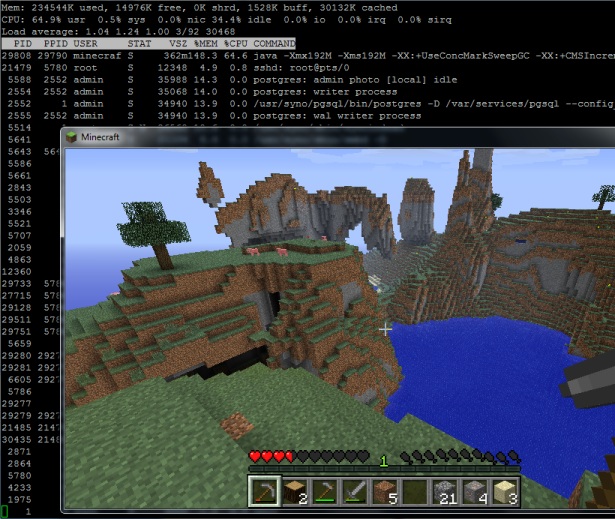
Minecraft showing draw distance and server load running on a Synology DS111
Installation
- This package is not CPU specific. If you have Java it will run. At the moment that means ARM, Intel and QorIQ PowerPC processors, but not the older PowerPCs.
- In the User Control Panel in DSM, enable the User Homes service.
- Install the package directly from Package Center in DSM. In Settings -> Package Sources add my package repository URL which is http://packages.pcloadletter.co.uk. You will need to install either one of my Java SE for Embedded packages first (Java 6 or 7).
Notes
- The package fetches the minecraft server jar file from Mojang as it is installed. I am complying with their wish that no one redistributes it.
- The server daemon script checks the amount of system RAM and scales the Java heap size appropriately. It also applies a few performance tweaks to Java to try to reduce garbage collection latency.
- The first time you run the server it will create a new world, which can take a few minutes. You cannot interrupt this but you can check on progress by repeatedly viewing the Log tab.
- Because the time investments in playing Minecraft can be so considerable, when you uninstall the package it will back up the world folder and settings to /volume1/public/minecraftworld.todaysdate.bak to prevent accidental deletion.
- The package supports upgrades to future versions while preserving the world folder and server settings.
- If you want to transplant an existing world folder into the server, copy it to /volume1/@appstore/Minecraft. You will also need to run chown -R minecraft /volume1/@appstore/Minecraft to grant ownership of the files to the daemon user.
- The first time you run the package, the server config file /volume1/@appstore/Minecraft/server.properties is generated. The next time it is launched, my script reduces the default draw distance for ARM CPUs from 10 chunks to 7. This was appropriate for my DS111 to prevent latency when mining blocks, but you may wish to reduce this further on the J series NAS units which have less RAM and slower CPUs. Other server files (white-list.txt etc.) are found in the same folder. For CraftBukkit the files are in the folder /volume1/@appstore/Craftbukkit/server.properties (note the capitalization – the CraftBukkit project seemed to change this after I had already created the package with a lower case ‘b’).
- The simplest way to edit these config files if you’re not really confident with Linux is to install Merty’s Config File Editor package, which requires the official Synology Perl package to be installed too (since DSM 4.2). Load Config File Editor, then in the dropdown menu edit Config File Editor’s own config (it’s the last in the list) and add the lines:
/volume1/@appstore/Minecraft/server.properties,Minecraft-properties

/volume1/@appstore/Minecraft/white-list.txt,Minecraft-whitelist

/volume1/@appstore/Minecraft/ops.txt,Minecraft-ops
Make sure to add an extra blank line underneath, save, then relaunch CFE and you’ll have entries for Minecraft in the dropdown. You’ll need to restart the Minecraft package for any changes to take effect. - It was a bit tricky to get the server to shut down gracefully without just killing the Java process. We need it to shutdown properly so it saves the active chunks to disk first. Most of the guides on the Net use the screen binary which isn’t included with Synology DSM, and I didn’t want to have to make a version of the package for each CPU architecture. I found that I could use tail to send the last line of the file /tmp/stdin.minecraft to the server (/tmp/stdin.craftbukkit for the CraftBukkit package). This is how the stop command is issued. You could send your own commands, for instance echo say Hello players >> /tmp/stdin.minecraft. You can verify that the command was received by looking at the server log in Package Center.
- The server runs on the default TCP port for Minecraft (25565) so you will need to port forward this on your router if you want it to be publicly accessible.
Package scripts
For information, here are the package scripts so you can see what it’s going to do. You can get more information about how packages work by reading the Synology Package wiki.
installer.sh
#!/bin/sh

#--------MINECRAFT/CRAFTBUKKIT installer script
#--------package maintained at pcloadletter.co.uk

if [ "${SYNOPKG_PKGNAME}" == "Minecraft" ]; then
  DOWNLOAD_PATH="http://s3.amazonaws.com/MinecraftDownload/launcher"
  DOWNLOAD_FILE="minecraft_server.jar"
  UPGRADE_FILES="server.properties *.txt world"
fi
if [ "${SYNOPKG_PKGNAME}" == "Craftbukkit" ]; then
  DOWNLOAD_PATH="http://cbukk.it"
  DOWNLOAD_FILE="craftbukkit-beta.jar"
  UPGRADE_FILES="server.properties *.txt *.yml world world_nether world_the_end plugins bukkit_update"
fi

DOWNLOAD_URL="${DOWNLOAD_PATH}/${DOWNLOAD_FILE}"
DAEMON_USER="`echo ${SYNOPKG_PKGNAME} | awk {'print tolower($_)'}`"
DAEMON_ID="${SYNOPKG_PKGNAME} daemon user"
DAEMON_PASS="`openssl rand 12 -base64 2>/dev/null`"
MIGRATION_FOLDER="${DAEMON_USER}_data_mig"
ENGINE_SCRIPT="/var/packages/${SYNOPKG_PKGNAME}/scripts/launcher.sh"
INSTALL_FILES="${DOWNLOAD_URL}"
source /etc/profile
TEMP_FOLDER="`find / -maxdepth 2 -name '@tmp' | head -n 1`"
PRIMARY_VOLUME="/`echo $TEMP_FOLDER | cut -f2 -d'/'`"
WORLD_BACKUP="${PRIMARY_VOLUME}/public/${DAEMON_USER}world.`date +\"%d-%b\"`.bak"

preinst ()
{
  if [ -z ${JAVA_HOME} ]; then
    echo "Java is not installed or not properly configured. JAVA_HOME is not defined. "
    echo "Download and install the Java Synology package from http://wp.me/pVshC-z5"
    exit 1
  fi

  if [ ! -f ${JAVA_HOME}/bin/java ]; then
    echo "Java is not installed or not properly configured. The Java binary could not be located. "
    echo "Download and install the Java Synology package from http://wp.me/pVshC-z5"
    exit 1
  fi

  #is the User Home service enabled?
  UH_SERVICE=maybe
  synouser --add userhometest Testing123 "User Home test user" 0 "" ""
  UHT_HOMEDIR=`cat /etc/passwd | sed -r '/User Home test user/!d;s/^.*:User Home test user:(.*):.*$/\1/'`
  if echo $UHT_HOMEDIR | grep '/var/services/homes/' > /dev/null; then
    if [ ! -d $UHT_HOMEDIR ]; then
      UH_SERVICE=false
    fi
  fi
  synouser --del userhometest
  #remove home directory (needed since DSM 4.1)
  [ -e /var/services/homes/userhometest ] && rm -r /var/services/homes/userhometest
  if [ ${UH_SERVICE} == "false" ]; then
    echo "The User Home service is not enabled. Please enable this feature in the User control panel in DSM."
    exit 1
  fi

  cd ${TEMP_FOLDER}
  for WGET_URL in ${INSTALL_FILES}
  do
    WGET_FILENAME="`echo ${WGET_URL} | sed -r "s%^.*/(.*)%\1%"`"
    [ -f ${TEMP_FOLDER}/${WGET_FILENAME} ] && rm ${TEMP_FOLDER}/${WGET_FILENAME}
    wget ${WGET_URL}
    if [[ $? != 0 ]]; then
      if [ -d ${PUBLIC_FOLDER} ] && [ -f ${PUBLIC_FOLDER}/${WGET_FILENAME} ]; then
        cp ${PUBLIC_FOLDER}/${WGET_FILENAME} ${TEMP_FOLDER}
      else
        echo "There was a problem downloading ${WGET_FILENAME} from the official download link, "
        echo "which was \"${WGET_URL}\" "
        echo "Alternatively, you may download this file manually and place it in the 'public' shared folder. "
        exit 1
      fi
    fi
  done

  exit 0
}


postinst ()
{
  #create daemon user
  synouser --add ${DAEMON_USER} ${DAEMON_PASS} "${DAEMON_ID}" 0 "" ""

  mv ${TEMP_FOLDER}/${DAEMON_USER}*.jar ${SYNOPKG_PKGDEST}/${DAEMON_USER}.jar

  #determine the daemon user homedir and save that variable in the user's profile
  #this is needed because new users seem to inherit a HOME value of /root which they have no permissions for
  DAEMON_HOME="`cat /etc/passwd | grep "${DAEMON_ID}" | cut -f6 -d':'`"
  su - ${DAEMON_USER} -s /bin/sh -c "echo export HOME=\'${DAEMON_HOME}\' >> .profile"

  #change owner of folder tree
  chown -R ${DAEMON_USER} ${SYNOPKG_PKGDEST}

  exit 0
}


preuninst ()
{
  #make sure server is stopped
  su - ${DAEMON_USER} -s /bin/sh -c "${ENGINE_SCRIPT} stop ${SYNOPKG_PKGNAME} ${SYNOPKG_PKGDEST}"
  sleep 10

  #if a world exists, back it up to the public folder, just in case...
  if [ -d ${SYNOPKG_PKGDEST}/world ]; then
    if [ ! -d ${WORLD_BACKUP} ]; then
      mkdir -p ${WORLD_BACKUP}
    fi
    for ITEM in ${UPGRADE_FILES}; do
      mv ${SYNOPKG_PKGDEST}/${ITEM} ${WORLD_BACKUP}
    done
  fi

  exit 0
}


postuninst ()
{
  #remove daemon user
  synouser --del ${DAEMON_USER}

  #remove daemon user's home directory (needed since DSM 4.1)
  [ -e /var/services/homes/${DAEMON_USER} ] && rm -r /var/services/homes/${DAEMON_USER}

  exit 0
}


preupgrade ()
{
  #make sure the server is stopped
  su - ${DAEMON_USER} -s /bin/sh -c "${ENGINE_SCRIPT} stop ${SYNOPKG_PKGNAME} ${SYNOPKG_PKGDEST}"
  sleep 10

  #if a world exists, back it up
  if [ -d ${SYNOPKG_PKGDEST}/world ]; then
    mkdir ${SYNOPKG_PKGDEST}/../${MIGRATION_FOLDER}
    for ITEM in ${UPGRADE_FILES}; do
      if [ -e ${SYNOPKG_PKGDEST}/${ITEM} ]; then
        mv ${SYNOPKG_PKGDEST}/${ITEM} ${SYNOPKG_PKGDEST}/../${MIGRATION_FOLDER}
      fi
    done
  fi

  exit 0
}


postupgrade ()
{
  #use the migrated data files from the previous version
  if [ -d ${SYNOPKG_PKGDEST}/../${MIGRATION_FOLDER}/world ]; then
    for ITEM in ${UPGRADE_FILES}; do
      if [ -e ${SYNOPKG_PKGDEST}/../${MIGRATION_FOLDER}/${ITEM} ]; then
        mv ${SYNOPKG_PKGDEST}/../${MIGRATION_FOLDER}/${ITEM} ${SYNOPKG_PKGDEST}
      fi
    done
    rmdir ${SYNOPKG_PKGDEST}/../${MIGRATION_FOLDER}

    #daemon user has been deleted and recreated so we need to reset ownership (new UID)
    chown -R ${DAEMON_USER} ${SYNOPKG_PKGDEST}
  fi

  exit 0
}
start-stop-status.sh
#!/bin/sh

#--------MINECRAFT/CRAFTBUKKIT start-stop-status script
#--------package maintained at pcloadletter.co.uk

DAEMON_USER="`echo ${SYNOPKG_PKGNAME} | awk {'print tolower($_)'}`"
DAEMON_ID="${SYNOPKG_PKGNAME} daemon user"
ENGINE_SCRIPT="/var/packages/${SYNOPKG_PKGNAME}/scripts/launcher.sh"
DAEMON_USER_SHORT=`echo ${DAEMON_USER} | cut -c 1-8`

daemon_status ()
{
    ps | grep "^ *[0-9]* ${DAEMON_USER_SHORT} .*java" > /dev/null
}

case $1 in
  start)
    DAEMON_HOME="`cat /etc/passwd | grep "${DAEMON_ID}" | cut -f6 -d':'`"

    #set the current timezone for Java so that log timestamps are accurate
    #we need to use the modern timezone names so that Java can figure out DST
    SYNO_TZ=`cat /etc/synoinfo.conf | grep timezone | cut -f2 -d'"'`
    SYNO_TZ=`grep "^${SYNO_TZ}" /usr/share/zoneinfo/Timezone/tzname | sed -e "s/^.*= //"`
    grep "^export TZ" ${DAEMON_HOME}/.profile > /dev/null \
     && sed -i "s%^export TZ=.*$%export TZ='${SYNO_TZ}'%" ${DAEMON_HOME}/.profile \
     || echo export TZ=\'${SYNO_TZ}\' >> ${DAEMON_HOME}/.profile

    su - ${DAEMON_USER} -s /bin/sh -c "${ENGINE_SCRIPT} start ${DAEMON_USER} ${SYNOPKG_PKGDEST} &"
    exit 0
  ;;

  stop)
    su - ${DAEMON_USER} -s /bin/sh -c "${ENGINE_SCRIPT} stop ${DAEMON_USER} ${SYNOPKG_PKGDEST}"
    exit 0
  ;;

  status)
    if daemon_status ; then
      exit 0
    else
      exit 1
    fi
  ;;

  log)
    echo "${SYNOPKG_PKGDEST}/server.log"
    exit 0
  ;;
esac
launcher.sh
#!/bin/sh

#--------MINECRAFT/CRAFTBUKKIT server launcher script
#--------package maintained at pcloadletter.co.uk

#--------Allows graceful shutdown of server without CPU-specific binaries
#--------You can send commands to the running server like so:
#--------    echo say Hello players >> /tmp/stdin.minecraft
#--------    echo say Hello players >> /tmp/stdin.craftbukkit

DAEMON_USER=$2
SYNOPKG_PKGDEST=$3
DAEMON_USER_SHORT=`echo ${DAEMON_USER} | cut -c 1-8`
JAR_FILE=${SYNOPKG_PKGDEST}/$2.jar

case $1 in
  start)
    if [ -f /tmp/stdin.${DAEMON_USER} ]; then
      rm /tmp/stdin.${DAEMON_USER}
    fi
    touch /tmp/stdin.${DAEMON_USER}
    cd ${SYNOPKG_PKGDEST}
    if [ ! -f syno-marker.txt ]; then
      if [ -f server.properties ]; then
        sed -i "s/A Minecraft Server/A Synology Minecraft Server/" server.properties

        #ARM CPU lags a lot, so reduce drawing distance from 10 chunks to 6
        cat /proc/cpuinfo | grep "CPU architecture: 5TE" > /dev/null \
         && sed -i "s/^view-distance=10/view-distance=6/" server.properties

        #record that these mods have been made
        echo config updated > syno-marker.txt
      fi
    fi
    JAVA_OPTS='-XX:+UseConcMarkSweepGC -XX:+CMSIncrementalPacing -XX:+AggressiveOpts'
    RAM=$((`free | grep Mem: | sed -e "s/^ *Mem: *\([0-9]*\).*$/\1/"`/1024))
    if [ $RAM -le 128 ]; then
      JAVA_MAX_HEAP=80M
    elif [ $RAM -le 256 ]; then
      JAVA_MAX_HEAP=192M
    elif [ $RAM -le 512 ]; then
      JAVA_MAX_HEAP=448M
    elif [ $RAM -le 1024 ]; then
      JAVA_MAX_HEAP=896M
    elif [ $RAM -le 2048 ]; then
      JAVA_MAX_HEAP=1792M
    elif [ $RAM -gt 2048 ]; then
      JAVA_MAX_HEAP=2048M
    fi
    JAVA_START_HEAP=${JAVA_MAX_HEAP}
    tail -n 0 -f /tmp/stdin.${DAEMON_USER} | java -Xmx${JAVA_START_HEAP} -Xms${JAVA_MAX_HEAP} ${JAVA_OPTS} -jar ${JAR_FILE} nogui
  ;;

  stop)
    echo say shutting down.. >> /tmp/stdin.${DAEMON_USER}
    sleep 5
    echo stop >> /tmp/stdin.${DAEMON_USER}
    sleep 10
    kill -9 `ps | grep "^ *[0-9]* ${DAEMON_USER_SHORT}.*tail -n 0 -f /tmp/stdin.${DAEMON_USER}" | sed -e "s/^ *\([0-9]*\).*$/\1/"`
    if [ -f /tmp/stdin.${DAEMON_USER} ]; then
      rm /tmp/stdin.${DAEMON_USER}
    fi
  ;;
esac
Changelog:
- 0015 updated to Minecraft 1.5.2, CraftBukkit beta 1.5.2-R0.1
- 0014 updated to Minecraft 1.4.7, CraftBukkit beta 1.4.7-R0.1, and fixes for DSM 4.2
- 013 updated to Minecraft 1.4.6, and CraftBukkit beta 1.4.6-R0.3
- 012 updated to Minecraft 1.4.5, and CraftBukkit 1.3.2-R1.0
- 011 updated to Minecraft 1.4.2
- 010 updated to Minecraft 1.3.2, and CraftBukkit 1.3.1-R2.0
- 009 package scripts fully re-written to unify the Minecraft and CraftBukkit packages
- 008 updated to Minecraft 1.3.1, unified most scripts into a single installer script, and incorporated minor enhancements from my other packages
- 007 updated to Minecraft 1.2.3
- 006 reduced Java max heap to 80MB on 128MB systems, fixed timezone support each server start
- 005 fixed Java max heap size behaviour on systems with more than 2GB RAM
- 004 fixed wget SSL problem preventing jar download on some systems
- 003 updated to Minecraft 1.1
- 002 server config files are also migrated during version upgrades, and backed up during uninstall. My script’s edits to server.properties are made only once, rather than every startup
- 001 intial public release
 PC LOAD LETTER
yes! now it works! but i was unpacient and install the new server.jar alredy manually on the Nas :-)
I have a 710+ and my Son like the Bukkit server. he is playing with his FB friends :-) i put 2GB Memory on the Synology. After few hours of playing the ram is full an a restart of the bukkit server is necessary.
Hi Patters, I use a plugin called Bukkit Update, which automatically downloads the latest versions of the Craftbukkit plugins. It creates/uses a directory called “bukkit_update” in the root of the Craftbukkit install directory (/volume1/@appstore/Craftbukkit/bukkit_update). When I run the update from Package Center, the bukkit_update directory is deleted. Is there a way to prevent this from happening during the update? Thanks.
I’ll have to modify the package to do that next time it needs looking at. Can you let me know when they release a non beta 1.4.6 release? Thanks.
Ok, great, thanks. I will let you know when the 1.4.6 release moves to recommended.
This fix is in the new version. It won’t be apparent until you upgrade to the version after that.
Patters, I get a red “x” over the server with a red 1.5 next to it. I presume that there is a v1.5 of server now? Any plans on getting it updated?
Thanks,
CP-
wehre can i find the start stop script, i like to play with the Memory settings. but i can’t find it.
Great package. I installed it on a Synology 211+ running fine. I only have the problem, when destroying some blocks in Minecraft itself. it needs up to 5 seconds until the block disappears. A little bit confusing. Any idea why this the case?
That’s because the system doesn’t really have enough resources.
Pff finally I worked it out…
If you want to upload your world to your NAS.
1. Simply go to your Command prompt (CMD)
2. type “telnet 192.168.0.1″ your ip adress is different
3. loging with ”root’ and ” and then your password. Im my case “admin” (you wont see the password in telnet, its there but it wont show your pass for safety.
4. make a map on your nas synology called ”apps”
5. go back to telnet, and type “mount –bind /volume1/@appstore /volume1/apps
6. go to your nas folder called “apps”
7. I know you love me
P.S. here you can easily config your server too!
mount -o bind /volume1/@appstore/ /volume1/Apps/
with “mount -bind” it does not work for me. “/” at begin and end. The folder Names are Case sensitive.
The i put a small Script to /usr/syno/etc.defaults/rc.d/
to mount and unmount the Bind.
#!/bin/sh
# Apps_mount.sh
# mount/bind some folders on startup
# and umount them on shutdown/reboot
case $1 in
start)
/bin/mount -o bind /volume1/@appstore/ /volume1/Apps/
;;
stop)
/bin/umount /volume1/Apps/
;;
*)
echo “Usage: $0 [start|stop]”
;;
esac
http://www.synology-wiki.de/index.php/Mount_Bind
Good stuff! It would be great if this package was compatible with the Java JDK that can be installed using the new Diskstation 4.1 beta Java Manager.
Well, Diskstation 4.2 beta I meant :-)
Sorry, my bad. A manually created symlink in the @Appstore folder prevented the installation. Works fine for DSM4.2 beta.
is there a way to install mod? like computer craft?
Having some troubles after the latest update. I clicked on the “update” button on Java, and it didn’t ask me to dl anything new, it just ran through an update process. Then I clicked “update” on the Minecraft package, and it updated normally. But when I launched Minecraft again and tried to access the server, it told me that I wasn’t on the whitelist.
Checking the log, I found [WARNING] messages:
Failed to load operators list: java.io.FileNotFoundException: ./ops.txt (No such file or directory)
Failed to load white-list: java.ioFileNotFoundException: ./white-list.txt (No such file or directory)
Anybody have an idea of what went wrong and how to fix?
Ended up having to just re-do the whitelist and the ops list, using the mount method Olli suggested (mount -o bind) to access @appstore. Everything seems to be running normally now.
THNAKS for the good work
But have to add MOD into the server ?
And why does the world (map) reset after a upgrade ?
/Steffen
Is it possible to make a “Tekkit Lite” package? I’m able to place the server on my NAS, but I still need to figure a way for not launching the server via SSH (Via PuTTY)
I’ve got the DS110+, can’t install Java from your package list. So i did it with Debian (http://chreggy.fr/thegeek/2012/01/10/crashplan-sur-un-synology-powerpc-ds109/). But then I want to install the minecraft bukkit server and got the error message “JAVA_HOME is not defined”. What can I do now?
Hello got the same issue on My ds209+
where can i find a way to modify the java home parameter ?
i got my java here
/volume1/@appstore/debian/powerpc/opt/ejre1.7.0_06
PowerQUICC CPU is not supported by my package. You’ll need to use chreggy’s Java package which uses a Debian chroot environement. My Minecraft package may not work in that though.
Hello “patters” Well i was not precise enough in my question…
i got a ds209+ with a processor that don’t support the java7_en.spk posted on this page but
I got both chreggy’s spk installed (Debian chroot environment for the e500v2 “debian.spk” and the java.spk for e500v2)
but when i install Your minecraft installer script i get the “java home ” ….
thx
//Emanuel
I’ve got the server running on my NAS. It’s working fine so far. Only problem that I have now is when I go to package center -> Minecraft and then click on the log tab. If I wan’t to close that tab it hangs due to the fact the log has grown alot since I got many of my friends playing on it(Have to re-open my browser and re-login to my NAS to continue with other things on my NAS. I don’t know if it’s something that can be solved easily. But it would definatly be something to look at.
Ignore my post above, I found a solution.
Ruben, I am having the same issue. How did you resolve this?
When your logged into your NAS and go to package center and then click on the Minecraft package if you wan’t to look at the log file. Be sure to swtich back to the other tab(The none log file one) and then you can safily exit it.
Thanks for the updates man! kids here love ya!.. rly appreciate it! =)
btw im running with synology 1511+ and got no problems at all.. cheers!
hello all! First off, well done on this!
My question is
1/ Is there a list of server settings that describe what does what?
2/ I want to add the Teknik mod for minecraft, (/volume1/@appstore/Craftbukkit/server.properties).. Is that possible?
Apologies, copied the wrong thing. I mean to say in the brackets http://www.technicpack.net/tekkit/
Maybe a stupid newbie question but will this Synology version work on Minecraft PE if installed on local SYnology NAS and played within the LAN?
No. Minecraft PE has no server version
I should say, Minecraft 2, apparently coming out soon is going to have a server that will persist for Pocket Edition.
Put it in a DS211j and it ran, but playability was iffy. The lag along with the HD’s going nuts with accessing made it slow and problematic. It needs a beefy NAS to actually be playable. One of the big NAS arrays Synology puts out, yeah. But nothing smaller than a 4 bay to put some play time into it.
DSM 4.1-2668 JavaSE, current release of Java.
Hi Patters, you said : “it actually runs acceptably (no lag when mining blocks) on my ARM powered DS111 which only has 256MB. The CPU load is 100% for a while at first, but soon after playing it settles down to around 60%.”
So, I’ve installed it on my DS212+ which has the same cpu type, but a bit faster (2.0GHZ) and 512MB of RAM. But the cpu load always is 100% and mining lag is around 2-3 sec.
How is that possible while it runs without lag on your DS111?
I wrote that about a year ago though. Perhaps the code has changed substantially since then and is now less tolerant of low memory environments.
Hai,
I have installed it on my DS212+ and i am can not connected to the server, the log is this!
2013-02-06 23:08:02 [INFO] Starting minecraft server version 1.4.7
2013-02-06 23:08:02 [WARNING] To start the server with more ram, launch it as “java -Xmx1024M -Xms1024M -jar minecraft_server.jar”
2013-02-06 23:08:02 [INFO] Loading properties
2013-02-06 23:08:02 [INFO] Default game type: SURVIVAL
2013-02-06 23:08:02 [INFO] Generating keypair
2013-02-06 23:08:07 [INFO] Starting Minecraft server on 192.168.2.2:8888
2013-02-06 23:08:08 [INFO] Preparing level “world”
2013-02-06 23:08:09 [INFO] Preparing start region for level 0
2013-02-06 23:08:10 [INFO] Preparing spawn area: 6%
2013-02-06 23:08:11 [INFO] Preparing spawn area: 16%
2013-02-06 23:08:12 [INFO] Preparing spawn area: 25%
2013-02-06 23:08:13 [INFO] Preparing spawn area: 36%
2013-02-06 23:08:14 [INFO] Preparing spawn area: 52%
2013-02-06 23:08:15 [INFO] Preparing spawn area: 69%
2013-02-06 23:08:16 [INFO] Preparing spawn area: 86%
2013-02-06 23:08:17 [INFO] Done (9,764s)! For help, type “help” or “?”
2013-02-06 23:08:22 [WARNING] Can’t keep up! Did the system time change, or is the server overloaded?
2013-02-06 23:08:36 [INFO] /192.168.2.100:4768 lost connection
2013-02-06 23:08:53 [WARNING] Can’t keep up! Did the system time change, or is the server overloaded?
2013-02-06 23:08:59 [WARNING] Can’t keep up! Did the system time change, or is the server overloaded?
2013-02-06 23:09:36 [WARNING] Can’t keep up! Did the system time change, or is the server overloaded?
2013-02-06 23:09:39 [WARNING] Can’t keep up! Did the system time change, or is the server overloaded?
2013-02-06 23:09:54 [WARNING] Can’t keep up! Did the system time change, or is the server overloaded?
What are the problem, thanks……
Great guide, thanks. Wondering if anyone has been able to get this running smooth on a 413j series? With only one client connected, enemies are choppy and “teleporting”.
Thanks for this wonderful package !
There’s a little problem though, the ram used by the server is not released after a player disconnects.
I have a ds713+ (1GB RAM), each time I connect to the MC server, about 5 more percent of ram are used. So after a few disconnect/reconnect, the ram is at 70% and never go down.
I have succesfully installed your minecraft server package on my 710+. Works like a charm, and no issues while installing. So firstly, many thanks for this package! Made my kids very happy!
I do have a question w.r.t. long term performance: if I start playing via my server, I see that the RAM slowly fills up to about 97% capacity. That seems to make my other applications run slower, and also puts heavy loads on my hard-drives (lot of data swapping I guess due to memory shortage). So now I reset my minecraft package (manual stop/start) every day to clear the memory issue (brings it down to ~30% after reset).
My questions:
– is there any way to prevent filling up the memory that (can I set a limit to how much memory is allowed to be used)?
– And if so: how to do this, and what is then advised to run smoothly for max 5 players?
– is there a way to regularly (e.g. at night) reset this package to clear the memory without automatic complete restart of my NAS (for a complete restart I already have a scheduler)? Perhaps via a script, or even better via a package scheduler?
Thanks for input on this.
Paul
Synology 710+, standard config (1 GB RAM)
Can you publish a Technic/Tekkit version? Or can anyone tell me how to make it happen on my DS1511+?
Heya, I am having some problems with plugins, most of them are for 1.4.7 R1.0 but I believe there’s a slightly older version in this package? Any way to update it to that version or will that cause more problems?
how do you shut down the server,
Also I suffer from the memory problem as well, it goes away when I shut down the craftbukkit
First, many thanks for your work on the package. Very cool that it is so easy to run Minecraft server on Synology NAS.
I upgraded Minecraft to 1.5 only to find out that it’s not compatible with the 1.4.7 on the server. Do you have an estimate when an upgraded package will be available? Thanks
Hello
I have the same problem. Hope there will be a good solution to the problem soon :-)
Same thing happened to me, hopefully the update will come soon, can’t wait :) Thanks in advance
Luckily it’s very easy to downgrade, so no rush here :)
I’m new, where can I find Minecraft 1.4.7 for Mac and PC. Please help
Just to let you guys know you can upgrade your server your self.
you need to mount your apps folder (and thus your minecraft folder) so that you can easily access it through windows, then you just download the minecraft server and copy it into the minecraft folder. look back through the historical posts here and you will find everything you need.
I managed to do it and lets just say I’m not the best when it comes to programming
Hi patters.
I have been trying to find volume1/@appstore but i cant seem to find it.
Plz help, thanks
You cannot see this folder in DSM, only when using an SSH session.
How do I clear the log. My DS211 hangs when I try to close the page..
Solved :-)
How?
I installed and used “WebConsole Beta” to navigate to the Craftbukkit folder, and manually deleted the file…
A restart created a new server.log
PS
Editing the file server.log is also possible…. To keep what yoy want and delete the bs..
Hoi Chris,
I did exactly what you described. That is:
– shut down the mincraft server via package center
– rename the existing minecraft.jar file
– I copy the minecraft_server.jar file to the volume1/@appstore/Minecraft directory
– then start the minecraft server –> but it does not start
So I think I miss a step: I probably have to execute the minecraft_server.jar file? If so: how do I do that?
Thanks,
Paul
Paul,
I managed to update my installed CraftBukkit. This is what I did (on my DS211).
I have no Linux skills, so I use some extra software to browse my Syno ans upload files.
– Install Web Console (http://www.web-console.org/download/)
– use web Consoles ” file manager” and browse to the Craftbukkit folder (3 x up)
– delete (or better….rename!) the craftbukkit.jar
– upload the new cradtbukkit jar (make sure it is spelled right!)
– select the craftbukkit.jar file and click on CHMOD to make it read/writable
– done!
I bet the permissions were the reason for you problem. I found out I have to CHMOD the files, because I had an issue getting a plugin to work. Modifying the permission solved the issue!
Good luck!
OK. It works. Here’s what I did:
– shut down the minecraft server via package center
– login to DS with putty (login as root)
– go to volume1/@appstore/Minecraft (unix command: cd /volume1/@appstore/Minecraft)
– rename the existing minecraft.jar file (unix command is: mv minecraft.jar minecraft_old.jar)
– download the minecraft_server.jar file from minecraft.net (–> take the linux version obviously)
– copy the downloaded .jar file to a location on your DS (e.g. I have a public directory for this purpose; if you don’t know how to do this from windows, simply use the DS file manager instead and upload the file to the DS)
– copy the downloaded minecraft_server.jar file to the volume1/@appstore/Minecraft directory (unix command is:cp /volume1/public/minecraft_server.jar .)
– rename .jra file (unix command: mv minecraft_server.jar minecraft.jar)
– start package with package center
Et voila. Good luck with updating…
Thanks for the guide!
Easier way to get the new server directly to the folder after renaming the old one;
wget –no-check-certificate https://s3.amazonaws.com/MinecraftDownload/launcher/minecraft_server.jar
All that needs is to display the correct version in the package center, but that is a minor thing.
Thank you for the directions and commands. Unfortunately, i stil can not get the 1.6.2 version to work. I did each step and the server is running. but when i do the direct connect to my server, its still says 1.5.2 Am I missing a change configuration step or something. Again thank you for your time..
ok, way dumb question here: i have the server successfully installed on my Synology box. what address do i use to reference it within my Minecraft client?
never mind. i figured it out.
I tried connecting to my new server with a 1.47 client and got the message “Out dated client”. in package center it suggests that my server 1.4x. in the log, it suggests 1.5.1. any thoughts?
update your client when you start it. it will prompt you and you just choose yes
Hoping someone has maybe come across this same challenge:
I am running the above package on my NAS, but its more for my mates than myself. From what I have seen, running minecraft on windows provides you with a nice console/management type screen where you can see the live logs etc
Is there any kind of management tool available, or some way of have access to that same console while this package is running on my NAS? If I view the package log, it doesn’t appear to be live and seeing who is online can be ardous :(
How to acces craftbukkit or minecraft panel?
Hi, I’ve created a web console for a tekkit lite version of this.
I was planning on submitting it to the synocommunity repo, but apparently some changes are required first before they will accept it. (They also don’t like apps that download files apparently…)
If you want to try it out, download it from here, http://www.gentleflat.com/temp/tekkitlite_noarch_0.6.1-017.spk
Hi, the package is working great, its a real shame I can’t port my Classic Server over, as I spent a good 6 months building a world with some friends, do you think its possible to run a Tekkit Classic server in the same way?
Done! (Sorry it took so long)
Go to http://packages.page81.net to download or, just add it as a repo to the Synology Package Manager.
Time for an update @ 1.5.1. Thanks
Little bit rude don’t you think? “Hi Paters, would love it if you have time to update to 1.51 when you can. Thanks”…might be received in a better light.
I second that Julian !
Thanks for the post.
Fortunately, even when Patters doesn’t have time to update the package (it is a freely provided tool, after all) you can still update your server by editing your minecraft.info file to an earlier version. The package will then say an update is available and you can update normally. Since it updates using the jar file directly from Mojong, you’ll get the latest version.
Hi Stan,
Your suggestion sounds like a convenient way to do an update; perhaps easier than downloading and copying over the jar manually…but where is the minecraft.info you mention located, I can’t see anything called that under the @apps/Minecraft ?
i instal the package and the java but craftbukkit don’t appear in panel,how to acces him?
Hi Paters, would love it if you have time to update to 1.51 when you can.
Thanks
;)
I installed the package and it works BUT how can i upgrade it? i tried to copy my world over the default one but i don’t have the authorizations to do it. Then i tried to change the authorizations with chmod but it is not working: Permission denied – even when i do it with the admin user. Then i tried to change the psw of the minecraft user and connect with it to change the authorizations but for some reason the telnet window immediatly closes when i try this. For the other users it does not close the windows. Any help would be greath. I use windows 7 64 bit for the telnet & minecraft client and a ds412+ for the minecraft server.
Make sure the package is not running while you try to copy your old world over. Follow the various tips on here to mount the @apps folder so you can do this through the WebUI makes it easier. Also read the tips on installing the Synology package Config File Editor, you will find that helps for editing the server.properties etc.
Might be a silly question, but is this Minecraft server accessible from mobile devices, such as ipad/ipod or android?
Thanks
No. Mobile devices run Minecraft PE (pocket edition) which does not *yet* have a server application.
Tnx! i’ll seach for it!
Hi!
Is it possible to use world’s that where build on a machine that run’s the server under windows 8, if yes how and where do I put them?
Yes, review the instructions in the comments section regarding copying files to the @appstore. You then just copy your “world” into the world folder (suggest you take the existing world folder and rename it “world-original” or similar).
any update comming ??
Pingback: Setup af Minecraft server på en Synology DS | Emil Agerskov Thuesen
Could you add the direwolf20 pack? available here, http://feed-the-beast.com/download.php
I’ve tried to make it myself and managed to hack something together using your spk, but I don’t believe that the server was stopping propperly.
Thanks
I’m new at trying to make minecraft run on my synology ds 412+. I installed java SE for Embedded 6 succesfully. And I installed the minecraft package succesfully. I got three warnings (1. server.properties does not exist 2. failed to load operators-list 3. failed to load white-list)
I get the line starting minecraft server on *:25565
I have no Idea what to do next? Can’t see anything interesting in my folders that has been created? I got a minecraft file in my homes/minecraft which has a .profile file. But nothing else.
I can’t seem to find any server.properties file or whatsoever. I try to find the folders using ssh or ftp, but nothing really seems to help me out. I’m probably being to much of a noob to even try to start a minecraft server, but who knows with your help…
Quick question:
I installed everything as described and it works like a charm, so thanks for that.
But I have problems trying to edit the server config files, uploading a world etc.
When i try to connect to the NAS via ftp/ssh, it wont connect with the root user. The other users connect without a problem. Root does not use the admin password and i read somewhere the password could be synopass, but this does not help. SSH is activated, as well as ftp/sftp and the ports are opened in my router.
Anybody got the same problem or a solution?
Hey there,
Also installed this package, and its running fine.
I do however have a few questions:
1.
I want my server to automatically stop and start every evening/morning.
With the synology’s Task planner in the control panel you can add a task with a script.
I added the following script: /var/packages/Craftbukkit/scripts/launcher.sh
executing as the user root and the user “Craftbukkit” but my server is not starting nor stoppig.
How can I make this work?
2.
I want to clear the logfile in the package center, how do I do this?
Seems I followed all the right steps but I get an error when I start the server
Everything else builds out like it’s suppose to but…
An unknown error occurred when attempting to perform this command
any ideas?
hi ,really i’m very bad with it, i’m trying with this package, i have installed, but how i can play with it? ,there is a manual for it? ,i’m looking but i can find it… thanks…