
UPDATE – The instructions and notes on this page apply to both the Minecraft and the CraftBukkit packages hosted on my repo. Now works on QorIQ CPU Synology models!
Minecraft is an intriguing game. I only recently bought it after a friend had recommended it. There’s a lot to like: the striking retro visual style, the mellow sporadic music, exploring the procedurally generated world, the logical way items are crafted, multiplayer collaboration, and emergent gameplay. Notch its creator certainly deserves the fortune he’s now sitting on. I thoroughly recommend you watch this short documentary all about it.

Right after I released the Java package for Synology a couple of people mentioned that they wanted to use it for installing a Minecraft server. Now that I have the game, I decided to try that too. I had assumed that the ARM CPUs would not be capable of running it, and the first tests seemed to confirm this. I decided it would be worth creating a package nonetheless since the Intel CPU NAS units would be ok, especially with their extra RAM. However, with a little performance tuning it actually runs acceptably (no lag when mining blocks) on my ARM powered DS111 which only has 256MB. The CPU load is 100% for a while at first, but soon after playing it settles down to around 60%. I have briefly tested with two players connected and after a bit of lag at first (one second delay to mine a block) it does seem to settle down.
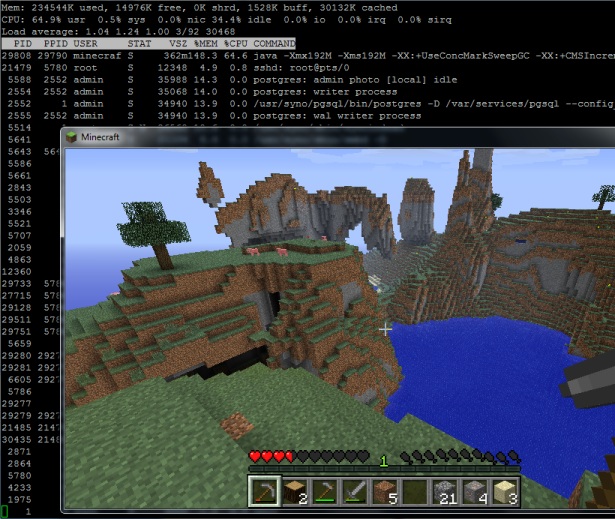
Minecraft showing draw distance and server load running on a Synology DS111
Installation
- This package is not CPU specific. If you have Java it will run. At the moment that means ARM, Intel and QorIQ PowerPC processors, but not the older PowerPCs.
- In the User Control Panel in DSM, enable the User Homes service.
- Install the package directly from Package Center in DSM. In Settings -> Package Sources add my package repository URL which is http://packages.pcloadletter.co.uk. You will need to install either one of my Java SE for Embedded packages first (Java 6 or 7).
Notes
- The package fetches the minecraft server jar file from Mojang as it is installed. I am complying with their wish that no one redistributes it.
- The server daemon script checks the amount of system RAM and scales the Java heap size appropriately. It also applies a few performance tweaks to Java to try to reduce garbage collection latency.
- The first time you run the server it will create a new world, which can take a few minutes. You cannot interrupt this but you can check on progress by repeatedly viewing the Log tab.
- Because the time investments in playing Minecraft can be so considerable, when you uninstall the package it will back up the world folder and settings to /volume1/public/minecraftworld.todaysdate.bak to prevent accidental deletion.
- The package supports upgrades to future versions while preserving the world folder and server settings.
- If you want to transplant an existing world folder into the server, copy it to /volume1/@appstore/Minecraft. You will also need to run chown -R minecraft /volume1/@appstore/Minecraft to grant ownership of the files to the daemon user.
- The first time you run the package, the server config file /volume1/@appstore/Minecraft/server.properties is generated. The next time it is launched, my script reduces the default draw distance for ARM CPUs from 10 chunks to 7. This was appropriate for my DS111 to prevent latency when mining blocks, but you may wish to reduce this further on the J series NAS units which have less RAM and slower CPUs. Other server files (white-list.txt etc.) are found in the same folder. For CraftBukkit the files are in the folder /volume1/@appstore/Craftbukkit/server.properties (note the capitalization – the CraftBukkit project seemed to change this after I had already created the package with a lower case ‘b’).
- The simplest way to edit these config files if you’re not really confident with Linux is to install Merty’s Config File Editor package, which requires the official Synology Perl package to be installed too (since DSM 4.2). Load Config File Editor, then in the dropdown menu edit Config File Editor’s own config (it’s the last in the list) and add the lines:
/volume1/@appstore/Minecraft/server.properties,Minecraft-properties

/volume1/@appstore/Minecraft/white-list.txt,Minecraft-whitelist

/volume1/@appstore/Minecraft/ops.txt,Minecraft-ops
Make sure to add an extra blank line underneath, save, then relaunch CFE and you’ll have entries for Minecraft in the dropdown. You’ll need to restart the Minecraft package for any changes to take effect. - It was a bit tricky to get the server to shut down gracefully without just killing the Java process. We need it to shutdown properly so it saves the active chunks to disk first. Most of the guides on the Net use the screen binary which isn’t included with Synology DSM, and I didn’t want to have to make a version of the package for each CPU architecture. I found that I could use tail to send the last line of the file /tmp/stdin.minecraft to the server (/tmp/stdin.craftbukkit for the CraftBukkit package). This is how the stop command is issued. You could send your own commands, for instance echo say Hello players >> /tmp/stdin.minecraft. You can verify that the command was received by looking at the server log in Package Center.
- The server runs on the default TCP port for Minecraft (25565) so you will need to port forward this on your router if you want it to be publicly accessible.
Package scripts
For information, here are the package scripts so you can see what it’s going to do. You can get more information about how packages work by reading the Synology Package wiki.
installer.sh
#!/bin/sh

#--------MINECRAFT/CRAFTBUKKIT installer script
#--------package maintained at pcloadletter.co.uk

if [ "${SYNOPKG_PKGNAME}" == "Minecraft" ]; then
  DOWNLOAD_PATH="http://s3.amazonaws.com/MinecraftDownload/launcher"
  DOWNLOAD_FILE="minecraft_server.jar"
  UPGRADE_FILES="server.properties *.txt world"
fi
if [ "${SYNOPKG_PKGNAME}" == "Craftbukkit" ]; then
  DOWNLOAD_PATH="http://cbukk.it"
  DOWNLOAD_FILE="craftbukkit-beta.jar"
  UPGRADE_FILES="server.properties *.txt *.yml world world_nether world_the_end plugins bukkit_update"
fi

DOWNLOAD_URL="${DOWNLOAD_PATH}/${DOWNLOAD_FILE}"
DAEMON_USER="`echo ${SYNOPKG_PKGNAME} | awk {'print tolower($_)'}`"
DAEMON_ID="${SYNOPKG_PKGNAME} daemon user"
DAEMON_PASS="`openssl rand 12 -base64 2>/dev/null`"
MIGRATION_FOLDER="${DAEMON_USER}_data_mig"
ENGINE_SCRIPT="/var/packages/${SYNOPKG_PKGNAME}/scripts/launcher.sh"
INSTALL_FILES="${DOWNLOAD_URL}"
source /etc/profile
TEMP_FOLDER="`find / -maxdepth 2 -name '@tmp' | head -n 1`"
PRIMARY_VOLUME="/`echo $TEMP_FOLDER | cut -f2 -d'/'`"
WORLD_BACKUP="${PRIMARY_VOLUME}/public/${DAEMON_USER}world.`date +\"%d-%b\"`.bak"

preinst ()
{
  if [ -z ${JAVA_HOME} ]; then
    echo "Java is not installed or not properly configured. JAVA_HOME is not defined. "
    echo "Download and install the Java Synology package from http://wp.me/pVshC-z5"
    exit 1
  fi

  if [ ! -f ${JAVA_HOME}/bin/java ]; then
    echo "Java is not installed or not properly configured. The Java binary could not be located. "
    echo "Download and install the Java Synology package from http://wp.me/pVshC-z5"
    exit 1
  fi

  #is the User Home service enabled?
  UH_SERVICE=maybe
  synouser --add userhometest Testing123 "User Home test user" 0 "" ""
  UHT_HOMEDIR=`cat /etc/passwd | sed -r '/User Home test user/!d;s/^.*:User Home test user:(.*):.*$/\1/'`
  if echo $UHT_HOMEDIR | grep '/var/services/homes/' > /dev/null; then
    if [ ! -d $UHT_HOMEDIR ]; then
      UH_SERVICE=false
    fi
  fi
  synouser --del userhometest
  #remove home directory (needed since DSM 4.1)
  [ -e /var/services/homes/userhometest ] && rm -r /var/services/homes/userhometest
  if [ ${UH_SERVICE} == "false" ]; then
    echo "The User Home service is not enabled. Please enable this feature in the User control panel in DSM."
    exit 1
  fi

  cd ${TEMP_FOLDER}
  for WGET_URL in ${INSTALL_FILES}
  do
    WGET_FILENAME="`echo ${WGET_URL} | sed -r "s%^.*/(.*)%\1%"`"
    [ -f ${TEMP_FOLDER}/${WGET_FILENAME} ] && rm ${TEMP_FOLDER}/${WGET_FILENAME}
    wget ${WGET_URL}
    if [[ $? != 0 ]]; then
      if [ -d ${PUBLIC_FOLDER} ] && [ -f ${PUBLIC_FOLDER}/${WGET_FILENAME} ]; then
        cp ${PUBLIC_FOLDER}/${WGET_FILENAME} ${TEMP_FOLDER}
      else
        echo "There was a problem downloading ${WGET_FILENAME} from the official download link, "
        echo "which was \"${WGET_URL}\" "
        echo "Alternatively, you may download this file manually and place it in the 'public' shared folder. "
        exit 1
      fi
    fi
  done

  exit 0
}


postinst ()
{
  #create daemon user
  synouser --add ${DAEMON_USER} ${DAEMON_PASS} "${DAEMON_ID}" 0 "" ""

  mv ${TEMP_FOLDER}/${DAEMON_USER}*.jar ${SYNOPKG_PKGDEST}/${DAEMON_USER}.jar

  #determine the daemon user homedir and save that variable in the user's profile
  #this is needed because new users seem to inherit a HOME value of /root which they have no permissions for
  DAEMON_HOME="`cat /etc/passwd | grep "${DAEMON_ID}" | cut -f6 -d':'`"
  su - ${DAEMON_USER} -s /bin/sh -c "echo export HOME=\'${DAEMON_HOME}\' >> .profile"

  #change owner of folder tree
  chown -R ${DAEMON_USER} ${SYNOPKG_PKGDEST}

  exit 0
}


preuninst ()
{
  #make sure server is stopped
  su - ${DAEMON_USER} -s /bin/sh -c "${ENGINE_SCRIPT} stop ${SYNOPKG_PKGNAME} ${SYNOPKG_PKGDEST}"
  sleep 10

  #if a world exists, back it up to the public folder, just in case...
  if [ -d ${SYNOPKG_PKGDEST}/world ]; then
    if [ ! -d ${WORLD_BACKUP} ]; then
      mkdir -p ${WORLD_BACKUP}
    fi
    for ITEM in ${UPGRADE_FILES}; do
      mv ${SYNOPKG_PKGDEST}/${ITEM} ${WORLD_BACKUP}
    done
  fi

  exit 0
}


postuninst ()
{
  #remove daemon user
  synouser --del ${DAEMON_USER}

  #remove daemon user's home directory (needed since DSM 4.1)
  [ -e /var/services/homes/${DAEMON_USER} ] && rm -r /var/services/homes/${DAEMON_USER}

  exit 0
}


preupgrade ()
{
  #make sure the server is stopped
  su - ${DAEMON_USER} -s /bin/sh -c "${ENGINE_SCRIPT} stop ${SYNOPKG_PKGNAME} ${SYNOPKG_PKGDEST}"
  sleep 10

  #if a world exists, back it up
  if [ -d ${SYNOPKG_PKGDEST}/world ]; then
    mkdir ${SYNOPKG_PKGDEST}/../${MIGRATION_FOLDER}
    for ITEM in ${UPGRADE_FILES}; do
      if [ -e ${SYNOPKG_PKGDEST}/${ITEM} ]; then
        mv ${SYNOPKG_PKGDEST}/${ITEM} ${SYNOPKG_PKGDEST}/../${MIGRATION_FOLDER}
      fi
    done
  fi

  exit 0
}


postupgrade ()
{
  #use the migrated data files from the previous version
  if [ -d ${SYNOPKG_PKGDEST}/../${MIGRATION_FOLDER}/world ]; then
    for ITEM in ${UPGRADE_FILES}; do
      if [ -e ${SYNOPKG_PKGDEST}/../${MIGRATION_FOLDER}/${ITEM} ]; then
        mv ${SYNOPKG_PKGDEST}/../${MIGRATION_FOLDER}/${ITEM} ${SYNOPKG_PKGDEST}
      fi
    done
    rmdir ${SYNOPKG_PKGDEST}/../${MIGRATION_FOLDER}

    #daemon user has been deleted and recreated so we need to reset ownership (new UID)
    chown -R ${DAEMON_USER} ${SYNOPKG_PKGDEST}
  fi

  exit 0
}
start-stop-status.sh
#!/bin/sh

#--------MINECRAFT/CRAFTBUKKIT start-stop-status script
#--------package maintained at pcloadletter.co.uk

DAEMON_USER="`echo ${SYNOPKG_PKGNAME} | awk {'print tolower($_)'}`"
DAEMON_ID="${SYNOPKG_PKGNAME} daemon user"
ENGINE_SCRIPT="/var/packages/${SYNOPKG_PKGNAME}/scripts/launcher.sh"
DAEMON_USER_SHORT=`echo ${DAEMON_USER} | cut -c 1-8`

daemon_status ()
{
    ps | grep "^ *[0-9]* ${DAEMON_USER_SHORT} .*java" > /dev/null
}

case $1 in
  start)
    DAEMON_HOME="`cat /etc/passwd | grep "${DAEMON_ID}" | cut -f6 -d':'`"

    #set the current timezone for Java so that log timestamps are accurate
    #we need to use the modern timezone names so that Java can figure out DST
    SYNO_TZ=`cat /etc/synoinfo.conf | grep timezone | cut -f2 -d'"'`
    SYNO_TZ=`grep "^${SYNO_TZ}" /usr/share/zoneinfo/Timezone/tzname | sed -e "s/^.*= //"`
    grep "^export TZ" ${DAEMON_HOME}/.profile > /dev/null \
     && sed -i "s%^export TZ=.*$%export TZ='${SYNO_TZ}'%" ${DAEMON_HOME}/.profile \
     || echo export TZ=\'${SYNO_TZ}\' >> ${DAEMON_HOME}/.profile

    su - ${DAEMON_USER} -s /bin/sh -c "${ENGINE_SCRIPT} start ${DAEMON_USER} ${SYNOPKG_PKGDEST} &"
    exit 0
  ;;

  stop)
    su - ${DAEMON_USER} -s /bin/sh -c "${ENGINE_SCRIPT} stop ${DAEMON_USER} ${SYNOPKG_PKGDEST}"
    exit 0
  ;;

  status)
    if daemon_status ; then
      exit 0
    else
      exit 1
    fi
  ;;

  log)
    echo "${SYNOPKG_PKGDEST}/server.log"
    exit 0
  ;;
esac
launcher.sh
#!/bin/sh

#--------MINECRAFT/CRAFTBUKKIT server launcher script
#--------package maintained at pcloadletter.co.uk

#--------Allows graceful shutdown of server without CPU-specific binaries
#--------You can send commands to the running server like so:
#--------    echo say Hello players >> /tmp/stdin.minecraft
#--------    echo say Hello players >> /tmp/stdin.craftbukkit

DAEMON_USER=$2
SYNOPKG_PKGDEST=$3
DAEMON_USER_SHORT=`echo ${DAEMON_USER} | cut -c 1-8`
JAR_FILE=${SYNOPKG_PKGDEST}/$2.jar

case $1 in
  start)
    if [ -f /tmp/stdin.${DAEMON_USER} ]; then
      rm /tmp/stdin.${DAEMON_USER}
    fi
    touch /tmp/stdin.${DAEMON_USER}
    cd ${SYNOPKG_PKGDEST}
    if [ ! -f syno-marker.txt ]; then
      if [ -f server.properties ]; then
        sed -i "s/A Minecraft Server/A Synology Minecraft Server/" server.properties

        #ARM CPU lags a lot, so reduce drawing distance from 10 chunks to 6
        cat /proc/cpuinfo | grep "CPU architecture: 5TE" > /dev/null \
         && sed -i "s/^view-distance=10/view-distance=6/" server.properties

        #record that these mods have been made
        echo config updated > syno-marker.txt
      fi
    fi
    JAVA_OPTS='-XX:+UseConcMarkSweepGC -XX:+CMSIncrementalPacing -XX:+AggressiveOpts'
    RAM=$((`free | grep Mem: | sed -e "s/^ *Mem: *\([0-9]*\).*$/\1/"`/1024))
    if [ $RAM -le 128 ]; then
      JAVA_MAX_HEAP=80M
    elif [ $RAM -le 256 ]; then
      JAVA_MAX_HEAP=192M
    elif [ $RAM -le 512 ]; then
      JAVA_MAX_HEAP=448M
    elif [ $RAM -le 1024 ]; then
      JAVA_MAX_HEAP=896M
    elif [ $RAM -le 2048 ]; then
      JAVA_MAX_HEAP=1792M
    elif [ $RAM -gt 2048 ]; then
      JAVA_MAX_HEAP=2048M
    fi
    JAVA_START_HEAP=${JAVA_MAX_HEAP}
    tail -n 0 -f /tmp/stdin.${DAEMON_USER} | java -Xmx${JAVA_START_HEAP} -Xms${JAVA_MAX_HEAP} ${JAVA_OPTS} -jar ${JAR_FILE} nogui
  ;;

  stop)
    echo say shutting down.. >> /tmp/stdin.${DAEMON_USER}
    sleep 5
    echo stop >> /tmp/stdin.${DAEMON_USER}
    sleep 10
    kill -9 `ps | grep "^ *[0-9]* ${DAEMON_USER_SHORT}.*tail -n 0 -f /tmp/stdin.${DAEMON_USER}" | sed -e "s/^ *\([0-9]*\).*$/\1/"`
    if [ -f /tmp/stdin.${DAEMON_USER} ]; then
      rm /tmp/stdin.${DAEMON_USER}
    fi
  ;;
esac
Changelog:
- 0015 updated to Minecraft 1.5.2, CraftBukkit beta 1.5.2-R0.1
- 0014 updated to Minecraft 1.4.7, CraftBukkit beta 1.4.7-R0.1, and fixes for DSM 4.2
- 013 updated to Minecraft 1.4.6, and CraftBukkit beta 1.4.6-R0.3
- 012 updated to Minecraft 1.4.5, and CraftBukkit 1.3.2-R1.0
- 011 updated to Minecraft 1.4.2
- 010 updated to Minecraft 1.3.2, and CraftBukkit 1.3.1-R2.0
- 009 package scripts fully re-written to unify the Minecraft and CraftBukkit packages
- 008 updated to Minecraft 1.3.1, unified most scripts into a single installer script, and incorporated minor enhancements from my other packages
- 007 updated to Minecraft 1.2.3
- 006 reduced Java max heap to 80MB on 128MB systems, fixed timezone support each server start
- 005 fixed Java max heap size behaviour on systems with more than 2GB RAM
- 004 fixed wget SSL problem preventing jar download on some systems
- 003 updated to Minecraft 1.1
- 002 server config files are also migrated during version upgrades, and backed up during uninstall. My script’s edits to server.properties are made only once, rather than every startup
- 001 intial public release
 PC LOAD LETTER
I have been running the bukkit package on my DS213+ for about a week or 2 now and I find it quite unstable.
Even at my local network I sometimes get time-outs. I doubt the plug-ins running on the server have anything to do with it. Besides Bukkit, SabNZB and CouchPotato I have no other custom packages installed and/or running. (Both Sab en Cp are not “working” when the lag occurs)
My network infrastructure is solid and is excluded from the problem.
The error being spammed in the logfile is as follows:
[WARNING] Can’t keep up! Did the system time change, or is the server overloaded?
Can anyone help me?
Could it indeed be the amount of plugins, is it the internal clock of the DS being synchronized with a website or could it be a lack of ram?
That error means the CPU can’t keep up with what needs processing in your world. Though it works on other models, if you’re buying a NAS specifically for Minecraft you really ought to use an Intel CPU model.
My cpu is at 10% when running the bukkit package.
I didn’t buy the NAS for minecraft though, and I think a dedicated server would be better than a NAS.
Anyhow, thanks for the reply.
Any plans to update to Minecraft 1.6.2?
Also: THANK YOU SO MUCH!!!! Even if you don’t update I’m having a blast with a bunch of friends, this really rocks. Keep on keeping on :)
Des the DS213+ that uses a Freescale QorIQ P1022 processor support this package
Great job thank you! how to install mods? thank you in advance
Where can I find the start-stop-status.sh and launcher.sh? I want to add something to it so I can use ‘SCREEN’ to monitor the java app’s output.
I have a DS110J (Arm) if this is necessary.
Greets, Justin.
/var/packages/Minecraft/scripts
Thanks a lot for the Minecraft package. I works as a charm and my kids are thrilled. Any chance you will provide packages for worldedit and essentials in the near future? thx in advance.
Thanks for this package, it’s nice for the boys to have their own server. But i am trying to install some plugins, and the normal way doesn’t work (mkdir plugins, cp jar file and restart sever). Is it possible to use plugins in this package?
You might need to run:
chown -R craftbukkit /volume1/@appstore/Craftbukkit/pluginsGreat stuff thanks a lot :) how can I add craftbukkit plugs in on my nas running Linux?
Are it combatible to Synology Diskstation 213+?
i mean craftbukkit
1.6 version , not suport?
I updated my Minecraft Synology server to 1.6.2.
* First of all, MAKE SURE YOU STOP THE MINECRAFT SERVER, then…
* Log into your diskstation via ssh
* Go to /volume1/@appstore/Minecraft
* Rename minecraft.jar to minecraft.1.5.2.jar (this is to preserve it just in case you have any issues)
* Then download the new server jar from Minecraft.net:
`wget https://s3.amazonaws.com/Minecraft.Download/versions/1.6.2/minecraft_server.1.6.2.jar`
* Lastly, rename minecraft_server.1.6.2.jar to minecraft.jar
How do you rename minecraft.jar to mine craft.1.5.2.jar? I get an error saying permission denied. Also, what command is used to copy the new .jar file to the NAS? Thanks if you can help, would love to get this running again.
Login with SSH as root which uses the same password as the admin account.
Hmm. Nice that the script automatically checks the amount of RAM in my NAS and sets the heap size accordingly but is it also possible to limit it to a certain amount of RAM? Like 512MB?
I always have to stop/start the package after a few days because the RAM is completely maxed out.
I got the server running and i can even join but my CPU is always at 99%.
I had the 1.5.2 version and even the 1.6.2 but nothing changed, its still at 99% and laggy.
Has anyone a solution for that?
Thanks in advance.
I’ve tried with a DS213j, but I’m not able to connect. The error message from clients is: “Can’t reach server”. But my other servers are found from the same clients. Everything is inside LAN, so no internet or router configuration.
The automatic stopping is also not working in all cases: I just did a restart of the DS without stopping the service manually and now I have several Minecraft instances running on the DS. The start script should check if an instance is already running to prevent that.
To be more precise, stoppping the service does not work at all from web interface or command line…
I’ve now spend some hours debugging the scripts, but everything looks like it is described here:
a stop message is echoed to /tmp/stdin.minecraft
the tail -n 0 process is killed
/tmp/stdin.minecraft is deleted
But the java process is still running. Even if I try to send own messages (of course before stopping) has no effect. Also a manual echo stop >> /tmp/stdin.minecraft has no effect.
In /volume1/@appstore/Minecraft/server.log I can monitor normal startup messages, but no connect or stop messages. Startup is really fast with about 8 seconds, but after that nothing happens.
If I then kill the java process manually, I get normal shutdown messages: Stopping, Closing, Saving players and Saving world.
Hey Manfred,
have you manually updated minecraft to 1.6.2? Your error messages indicate that you did not change the owner of the minecraft jar to the minecraft daemon. That prevents the script to shut it down. it also is the reason why multiple processes are running (if you check the log in packet manager, you will for sure find the error message “FAILED TO BIND TO PORT!”.
In order to prevent that, I suggest you start from scratch. Uninstall, Reinstall and after the minecraft 1.6.2 update set the ownership of minecraft.jar:
chown -R minecraft minecraft.jar
No idea, why I can’t reply on the comment from telopher directly, but here is my answer:
The rights are set in the correct way.
I have tried several days with unmodified version 1.5.2 from this package and I have tired a manually updated 1.6.2, but all with the same result:
If I start the package from PackageManager a JAVA process starts correctly, consumes quite high CPU and memory, I get good starting messages in server.log, but connecting is impossible and stopping the package fails always. The two commands “say shutting down..” and “stop” are visible in /tmp/stdin.minecraft, but never reach the JAVA process or at least are not visible in server.log.
I was able to start and connect to Minecraft once by starting the JAVA process manually from the command promt. But that connection only lasts some seconds and I was never able to reproduce that again.
In my opinion there are two possible reasons for that:
1) my DS213J is to slow
2) Problems with the Armada 370 ARMv7 version of JAVA 7_25 (latest package version uses client file instead of server version)
Anybody who can prove that it is running on the low end DS213J and JAVA “ejre-7u21-fcs-b11-linux-arm-vfp-client_headless-04_apr_2013.tar.gz” ?
Hello, Can anyone help me creating a minecraft server/tekkit on my DS713+.
I Installed Java but get the problem: JAVA_HOME is not defined?
How can I solve this?
I have now the server working, but my son wants to be OP??
I get this : you don’t have permission to use this command
I put in config file editor
/volume1/@appstore/Minecraft/server.properties,Minecraft-properties
/volume1/@appstore/Minecraft/white-list.txt,Minecraft-whitelist
/volume1/@appstore/Minecraft/ops.txt,Minecraft-ops
In the Minecraft-ops I put like
Marcovdw this is his name on Minecraft, than activate server again, but it won’t work.
What do I wrong?
Pingback: 시놀로지NAS 외부소스 주소
When will 1.6.2 be released because minecraft 1.6.2 has been out for a long time now and im waiting…
Pingback: Synology NAS에 Minecraft Server 설치 및 설정하기 | moon's blog
Hi ,i have installed this aplicaction ,in my 110j ,but always i recive this message.
Can’t keep up! Did the system time change…
Also i have upgraded minecraft.jar to 1.6.2 ,but also the same message.
I have only installed minecraft, java emebed 6, Audio Station, Bootstrap and Download station, does anybody can help me?
Thanks for all
hi ,did you find a solution for this problem?
“Hi ,i have installed this aplicaction ,in my 110j ,but always i recive this message.
Can’t keep up! Did the system time change…
Also i have upgraded minecraft.jar to 1.6.2 ,but also the same message.
I have only installed minecraft, java emebed 6, Audio Station, Bootstrap and Download station, does anybody can help me?”
I’ve got it running on my 412+ no problem but I would like to upgrade to 1.6.2. I know that I know little about Synology packages or Bukkit servers. How do I stop the server so I can perform the upgrade?
Ok, I figured it out. I just needed to stop the package in the package center.
HI there,
I was trying to run bukkit, but apparently the package fetches the jar file at the wrong place. And putting it in the public folder does not seem to improve the situation. I found a workaround by installing the regular Minecraft, then replacing the minecraft.jar by the bukkit jar. It works like a charm now, thanks a lot. A bit of feedback:
– that would be nice to have a button to clear the logs
– could you release the spk (or tell me if it’s already the case)? I could help you make the change for the bukkit file
– for my own culture: how did you manage to make Minecraft run? When I try the regular way (installing java, then launching the jar file through ssh) I got some horrible sigsegv error but your version runs smoothly
I’ll try to work on some maintenance scripts, and maybe see if I can make a web ui works somehow, but I’m not very confident about this last part ^^
Vincent
I forgot to mention I run on a DS1512+
Thanks a lot for this package, works great! Turning our synology boxes into minecraft servers has never been that easy!
Here is my personnal feedback:
I’m running minecraft 1.6.2 with 2 plugins : McMMO + Dynmap on a DS1812+ which has an Intel Atom processor and 1Go of RAM. The server is pretty stable but when we go out discovering new areas, the RAM goes up to 95% and the disk usage is significantlly increased as well.
The load average becomes pretty high (6-7) and the server becomes laggy and these kind of messages are flooding the logs.
“2013-10-09 23:50:23 [WARNING] Can’t keep up! Did the system time change, or is the server overloaded?”
I’m quite surprised that you guys are managing to make in run in nas with much lighter hardware.
I hope raising the RAM will solve the issue, I just ordered 2 extra Gigs of RAM, I’ll run some tests this week end and will keep you updated. If it doesn’t I’ll think about reducing
FYI: Stopping the server by shutting down craftbukkit via the package server works fine. Killing java processes doesn’t (the chunks weren’t properly saved even thought nobody was logged in)
I installed my 2 extra Gigs of RAM, the ram usage reached 87% but the game was running smoothly. The only thing that annoys me is the fact that after a load spike, even though nobody is connected, the cpu & ram usage remains quite high.
Is there a way of limiting the amount of RAM available for minecraft? I don’t want the rest of the services to be affected.
Do you think I can edit line 36 of launcher.sh to keep some ram for the system, ?
RAM=$((`free | grep Mem: | sed -e “s/^ *Mem: *\([0-9]*\).*$/\1/”`/1024))
Hi tommy
Today I made changes in launcher.sh. I have DS713+ with 2Gb of RAM and I set server RAM limit to 896M, The rest of RAM was left for other services. So far, all is working fine. Now, I’m monitoring performance of my bukkit server. There is just couples of hours passed, so I cant tell 100% that all is ok. However, within Minecraft when typing /mem server shows, that total allocated memory is 896M.
Hi!
First of all, thank you so much for your work. I was wondering if you could take a look at how to host a Feed The Beast server on the NAS aswell? Thanks again!
Best regards Mikael Sweden
Will The DS1512+ with 3GB RAM support this package ?
and please is there any update for minecraft 1.6.4 ?
Yesterday I installed the Minecraft Package on my DS411+II and it works fine when I logon using client.
Now I tried to update this version 1.5.2 to 1.7.2 using following steps:
1) stop the package
2) rename the old minecraft.jar to minecraft-old.jar
3) upload new 1.7.2 jar file to minecraft.jar in the same folder
4) start the package again
Now when I try to logon it is still showing version 1.5.2
Hi Erwin, if you’re referring to the listed Minecraft version in DSM, I think this is a red herring – I’ve successfully upgraded to 1.7.4 on my DS214play and the app in DSM still shows 1.5.2 even though I’m actually running the latest version. As long as the minecraft.jar file loads without errors, you should be good to go, no matter what version is reported in DSM.
The proof of this is that when I tried running the 1.5.2 server with my 1.7.4 client, the client identified the server version as being out of date, and once I’d upgraded to the 1.7.4 server it worked without complaint.
By the way, if anyone is interested, my DS214play runs fairly smoothly with two players and a draw distance of 14. CPU utilisation sits at 35% (excellent!) with about 640Mb of RAM utilised (out of about 680Mb available, with another 350Mb reserved for the OS and other stuff). However, there were a few very brief periods of minor lag when Minecraft memory utilisation was >90%.
I’m happy!
-H
Still nobody has a simple way to update? If this version is static it’s useless in about a week or so….
Please make it easy updateable…. :-) It’s great if it works nice!
I just installed this on a DS1512+ but found that my daughter is running v1.7.2. Any plans on updating to the latest version or providing a way we can do self upgrades? Thanks!
Hi Scott,
Just manually put the latest server jar in your minecraft folder (be sure to stop the server first). The game will update automatically
Vincent
Please, update the package to Minecraft 1.7.2
same here. Could be an update for making more easy to replace the minecraft.jar?
many thanks in advance and keep up the good work :-)
S.
Hey there, thanks so much for creating this. I am updated to latest 1.7.2 and have been running a server for a few weeks. For some reason tonight when I went to change a resource pack link, I had stopped the service and now it will not start back up. Weirdly though I cannot start Craftbukkit either or my Minecraft service. I went into putty and was trying to look at some logs…no real reason showing why it would not start. Is there a way without uninstalling to possibly see why the service is not starting? Thanks so much!
Hi Mike, I’m keen to know how you succeeded in getting the 1.7.2 server running.
I know a lot of people seem to be asking similar questions, but I’ll try to be more specific: I’ve replaced and successfully run the 1.7.4 .JAR file (renamed to minecraft.jar), but I’m not able to get the DSM Minecraft app to report anything other than 1.5.2 (the default version)
I’ve also changed the file owner to the ‘minecraft’ user to match the original working 1.5.2 version.
Basically the 1.7.4 .JAR seems to run fine without errors, and the DSM packaged ‘Minecraft’ app runs but still report the 1.5.2 version.
The Minecraft client was originally able to the see the 1.5.2 server, but has not been able to see any server since I replaced the .JAR file with the upgraded version.
I’ve restarted the server, rebooted the NAS, etc. and I’m pretty sure the issue is something simple – file permissions or a config setting maybe – but I can’t see anything obvious.
I’m running the server on a Synology DS214play (Intel Evansport CPU, 1Gb RAM) and have minimal experience with UNIX & SSH, but can eventually find my way around.
Any pointers would be greatly appreciated.
-Hamish
Aha! I figured it out at last (literally 30 seconds after my previous post – doh!)
I had switched the server’s port to 25566 from the default of 25565 due to a conflict, then naturally forgot to tell my Minecraft client that. If I add the newly upgraded server as 123.123.123.123:25566 (instead of just 123.123.123.123) it works fine!
Note that the Minecraft app in DSM still reports the old 1.5.2 version even though I’m now running the 1.7.4 server. Not sure what the story is there, but I’m happy.
-H
can you tell me once again how you managed to run 1.7.4 ?
1.5.2 runs fine but when i update to the new version the server just wont start up even though theres a java process running with 50% cpu usage,
these process remains there even when i uninstall minecraft an java and is only removed when i restart the nas.
no idea whats going wrong here
im using a ds214+
Hi Tom, I did something like this:
Installed the Java Manager package via the DSM GUI.
Installed the Java SE 7 client via the DSM GUI.
Installed the 1.5.2 Minecraft server via the DSM GUI.
Tested the client/server connection – Minecraft client can see the server but wont connect due to version mismatch.
Downloaded Minecraft server 1.7.4 for Intel x86 .JAR file.
Manually replaced the 1.5.2 .JAR file with the new one (after renaming old one) – same filename.
Restarted Minecraft server via DSM GUI.
Tested client/server connection – all ok.
I also tested this by stopping the server and starting again via a PuTTY session on the NAS – with different memory settings. Worked fine both ways, and even apparently with two copies running.
Note that even though the 1.7.4 .JAR file is running, the Minecraft server still reports version 1.5.2 in the DSM GUI. This clearly isn’t the case though, as the 1.7.4 client now works fine.
I only tweaked the draw distance in the preferences file – nothing else. Performance is occasionally laggy with a draw distance of 10 and 2 players, but almost perfect with a draw distance of 9. Seems to be memory constrained. Its a great pity the DS214play isn’t upgradeable to at least 2gb.
Good luck!
Hey Hamish, how exactly you can change the the minecraft versions ? i also run a ds214play and want to host a minecraft server. thank you :)
Anyone see that the Java installed from here starts to peak CPU at 100 percent? This is even without Minecraft running.
I’ve just purchased a DS1813+ and installed Craftbukkit on it; initially I was able to run the server and connect to it just fine. However, after a few reboots, the service still shows up as running and also the logfile tells me the server started up normally (yes I also checked timestamps), however the Minecraft client tells me it can’t connect to the server in the server list; if I anyway click connect, it either “freezes” at the “logging in…” state, or tells me the connection was reset. The server log shows entries in the form ” lost connection”.
Then I did some Google research and dug out a thread in some forum saying this meant that the Minecraft auth server was down. It suggested setting the server mode to offline mode in order to connect to it. So I changed the config, rebooted the DiskStation (to reboot the Craftbukkit server; I know there’s a more efficient way) and tried again – still no change.
Do you have any experience with this behavior? Do you have any idea what could be going wrong?
Log pop-up window stops updating at some point.
I need to go in and delete log to see new entries.
It seems that this package has been left without any support.
Hopefully someone will be able to make an updatable Minecraft package controllable from the DSM UI!
http://www.arden.ie/mcconfig
have installed the minecraft app today and now i want to set up a server in creative mode or survival for my daughter so she can play the game with her friends over the internet. Is this also possible with a Phone or ipad app to connect to my server.
Can somebody help me
the config file editor asks me to login first but i can’t find wher to fill in my name and password
@Sander
I wanted the same thing and finally got it working, to set the server to creative mode, stop the server, delete the world folder and it’s contents (rm -fR /volume1/@appstore/Minecraft/world), make the following changes to the server.properties file (vi /volume1/@appstore/Minecraft/server.properties) (press i to enable insert mode and esc to exit insert mode after editing, press : to enter command, enter w and hit return to write the changes to the file, then press : again and q followed by return to quit vi)
difficulty=1
gamemode=1
then restart the server and reconnect!
Hello,
I’m trying to replace the map (World Folder)
But when I do this operation with ssh root connection, the owner is ROOT. The original map is Owned by user “minecraf”.
When i try to connect I get an error…I think because of the security owner problem.
How can I do to import a map on my Minecraft Directory ?
chown -R minecraft /volume1/@appstore/MinecraftThanks for your answer but the user seems to be “minecraf” and not “minecraft”.
Although i’ve already tried to change owner properties with winscp….winscp tells me that “minecraf” user does not exist…
Is there any chance that this command should work anyway ?
thanks
Hi,
thank you for the nice app at first :) Could you take a look on the new DSM 5.0? I tried to set up the server on a DS412+, but it fails :/
Thanks in advance
Clemens
Ok, was my fault, i accidently messed up the java installation :) Runs fine now.
Hi
Great job it works great. I have 1.7.4 on my synology 210+.
But for some reason it did not creat a plugins folder not in the server and not in Craftbukkit.
Any help would be appreciated.
Klaas
Hopefully someone can help me out,
i’m running DSM 5 and just upgraded the Java Package, now the server won’t start again. I don’t see anything when i click on “Logs” on the Minecraft Package, anyone knows how to get the server running again?
Nevermind, looks like the update “deinstalled” Java, just had to reupload the jdk again
I also have a problem to start minecraft server after update to DSM 5. I have run the java update, but Minecraft will still not start. Do you do something more..?
I had to manually reinstall java, it is running again now:-)
I am running a CraftBukkit Server on my Synology 1813+ with DSM 5. When I go to the package center and click on “View Logs” I get “No Data”. I can ssh to /volume1/@appstore/Craftbukkit/logs/ and look at latest.log. But that is kind of a pain. How can I redirect “View Logs” to open my server log file?
You can’t, or should I say you shouldn’t, the View Logs option is for the installer, not the Minecraft server. You could Install mmconfig for Synology and you can view the logs via the web interface. (www.arden.ie/mcconfig)
When i try to connect to the server is get the following error mesage…
‘Failed to connect to the server’
‘Internal Exception: java.io.IOException: An existing connection was forcibly closed by the remote host’
any ideas?
I have same problem at DS1511+ and DSM 5.0 :(
Trouble in different client (1.7.5) & server (1.5.2) versions. With old client (https://minecraft.net/download) work great.
Update the minecraft.jar file in /volume1/@appstore/Minecraft/ with a more up to date version and you should be ok. Try to have the server and client versions matching to avoid such issues.
I get the same error with the JRE 7 on a DS412+
Trouble in different client (1.7.5) & server (1.5.2) versions. With old client (https://minecraft.net/download) work great.
Hi
I followed all the instructions and all works great on my DS1812.
I managed to replace the default ‘world’ with one I had created on my Mac.
Has been working great too.
My question is:
The server seems to only see 1 game: the one in the ‘world’ folder.
I would like to create a second world (to be able to choose between a survival and a creative one)
Is there a way to host 2 worlds so that I can pick one at start-up?
I understand there would be performance issues if both worlds ran at the same time, but I am only planning on playing on my LAN with max 3 players at all times.
All players would be in the same world.
Pingback: mcconfig – Minecraft Config for Synology systems » Blog arden
Hey All,
Just a helpful note about configuring Minecraft on your Synology systems. I wrote a small package called mcconfig that can help. It’s very basic at current but when I get more time I’ll add more features etc..
You can get it here http://www.arden.ie/mcconfig
Updated now to version 0.2, works with Craftbukkit as well now! Added options like upgrade jar file etc..
ПОмогите,не вижу ссылку на скачивание пакета